Input and output data
Expected input and output keys
| Category | Input key | Input value | Output key | Comments |
|---|---|---|---|---|
| File (flat) | id, hit_id | Strings | Input consists of multiple columns derived from a request JSON object. Manually collect response from the Data Store or Control Tower output. | |
| File (JSON) | request_json_object | Message | Manually collect response from the Data Store or Control Tower output. | |
| API | rest_request | Message wrapped in request body | rest_response | Response sent to the API caller. In the JSON format, the message is wrapped in the send_request parameter. For more details, see Streaming API input. |
| BP wrapper | message_request | Message | message_response | BP column for data retrieval. |
Providing input
Input to the Payment Sanction Screening BP refers to surveillance system alert details triggered against a given payment message or transaction.
Tara supports the following types of input:
File input
The file input feature allows uploading an input CSV file. A BP finishes when all records are processed.
A file in the original format contains a JSON request. There are the following columns for execution:
request_json_object(required)decision_gold_json_object(optional)
See
pss_request_processing_test_100.csvas a sample.A file in the flat format contains unfolded
request_json_object, where a BP treats each row as a separate request. Using a CSV flat file as a template is the easiest input method for uploading input data for transaction screening.See
flat_input_data.csvas a sample.
To upload data, follow the steps:
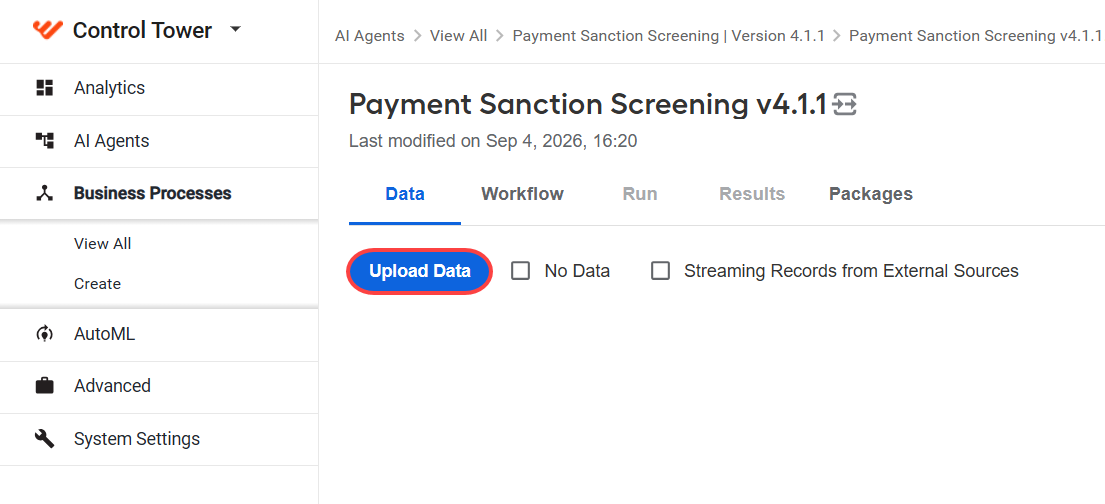
In your BP, go to the Data tab and click Upload Data.
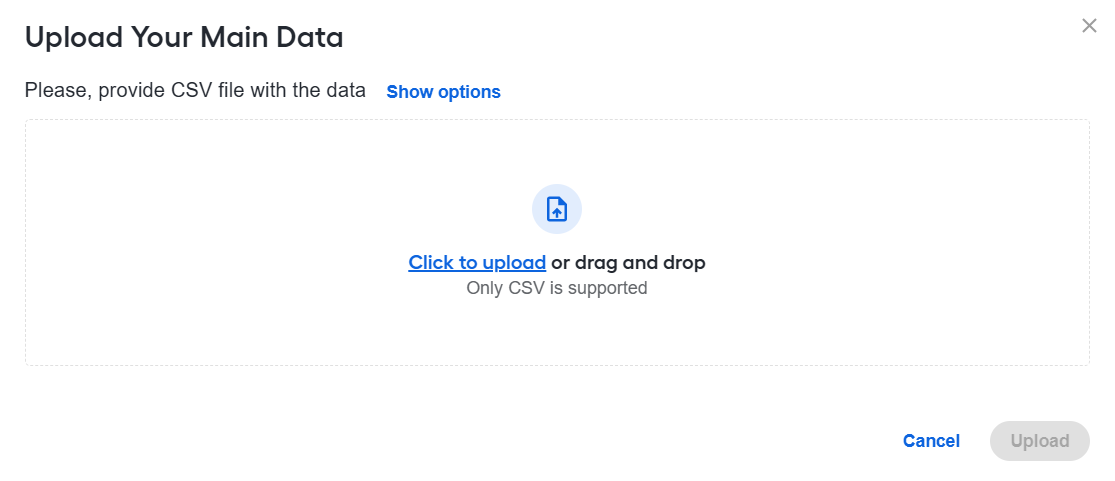
Click Click to upload, find your CSV data file, and click Open. Mind that the template supports up to 250K records. It takes longer to process more records.
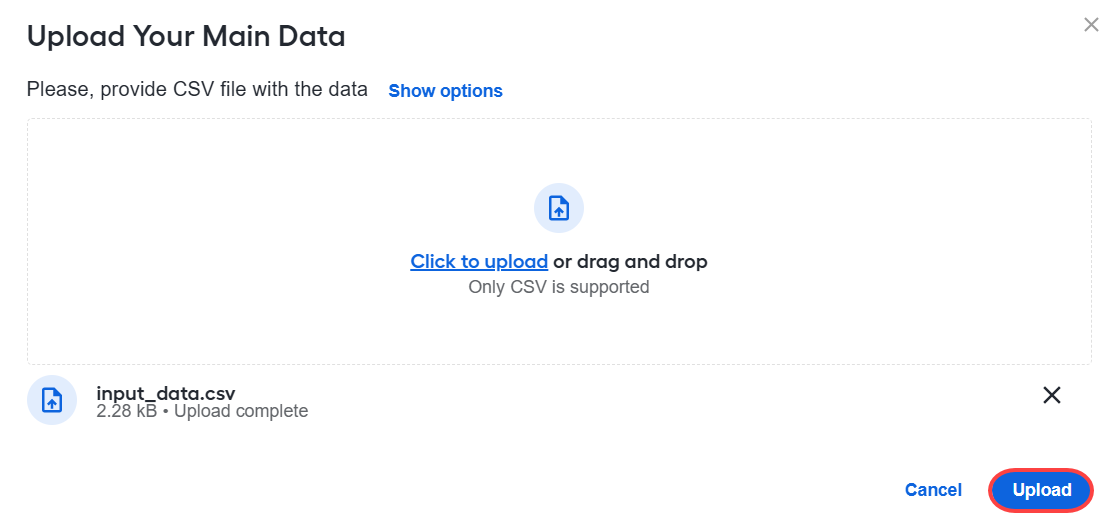
input_data.csvis a template you can use to quickly upload data for use with Tara.Click Upload.
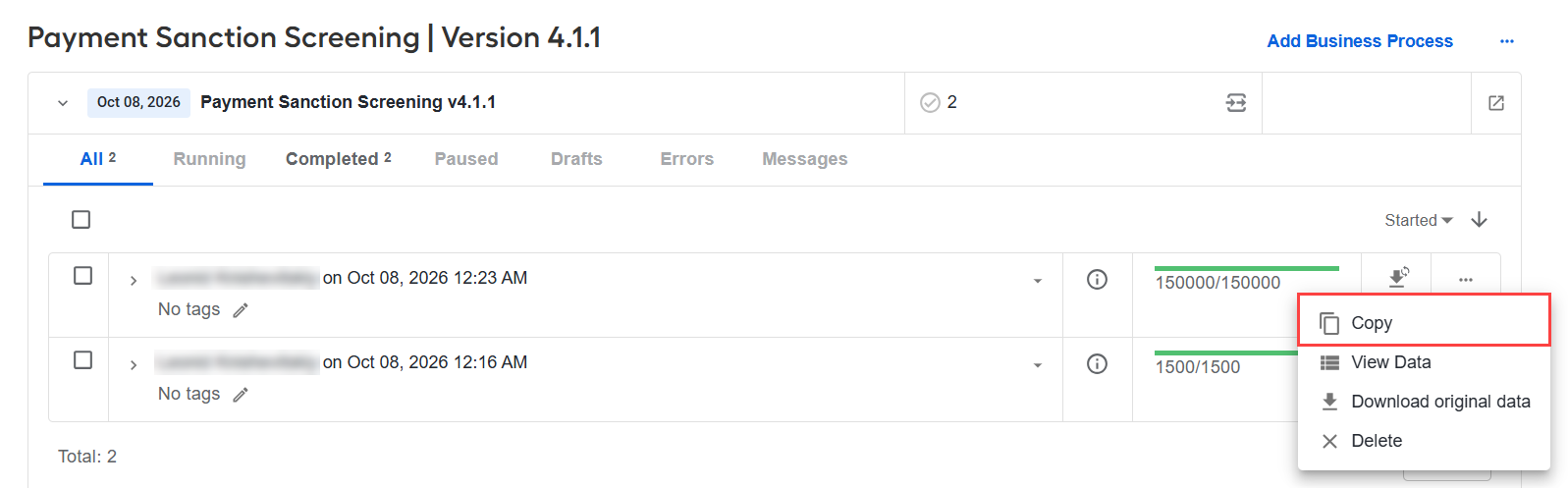
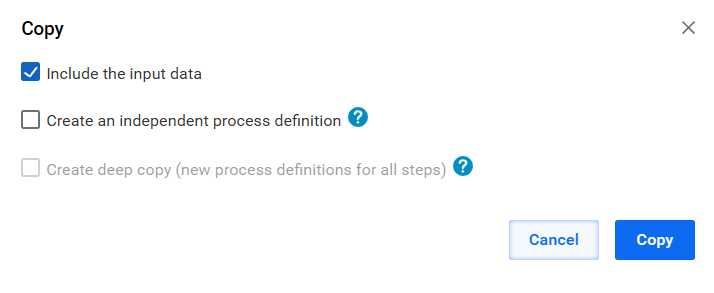
If you have already run the BP, you might need to copy it. To do that, select the Copy option.
In the Copy window, do not select the Include the input data option. Then, you can add a new CSV file to your copied BP.
Streaming API input
The system obtains input data from the built-in streaming service over the REST API. You can define and update API endpoints. A BP remains available even when all records are processed.
For details on the REST connector, refer to Process transactions with REST connector.
Configure Business Process
To use the built-in streaming service, do as follows:
In your BP, go to the Data tab and select the Streaming Records from External Sources option.
In the field next to the option, specify a custom name for the REST API endpoint. This name is used to reach the BP. For more details, refer to API | Tara.
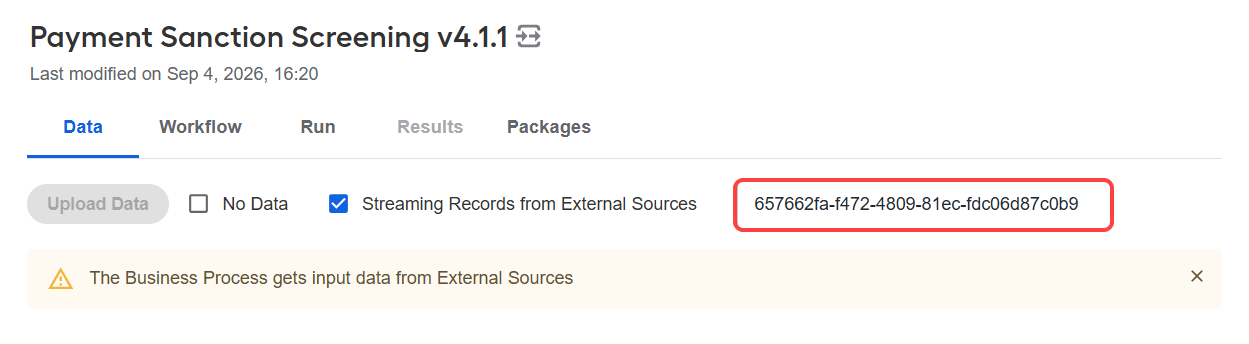
Go to the Run tab and click Run This Process to start the BP as usual. The Process Details panel confirms that all records are retrieved from external sources.
To see the endpoints generated for your BP, click Show API in the Process Details panel.
Available endpoints
The streaming service exposes the following endpoints, where <endpoint-name> is the custom name you specified on the Data tab and <request-id> is the request ID returned by an asynchronous call.
| Method | Path | Description |
|---|---|---|
POST | /input-connector-rest/execute-record-raw/<endpoint-name> | Sends a request in the raw format and waits for the decision (synchronous mode). |
POST | /input-connector-rest/execute-record-json/<endpoint-name> | Sends a request in the JSON format and waits for the decision (synchronous mode). |
POST | /input-connector-rest/start-record-raw/<endpoint-name> | Sends a request in the raw format and returns a request ID (asynchronous mode). |
POST | /input-connector-rest/start-record-json/<endpoint-name> | Sends a request in the JSON format and returns a request ID (asynchronous mode). |
GET | /input-connector-rest/check-record-status/<request-id> | Returns the processing status of a request. |
GET | /input-connector-rest/get-record-result/<request-id> | Returns the decision for a processed request. |
Processing modes and formats
There are two approaches to sending data over the streaming REST API:
Synchronous mode: a single step. You send a request and wait for the response.
Asynchronous mode: two or three steps. You send a request message and receive a request ID, which you then use to check the processing status, retrieve the response, or both.
In addition, you can send data in either of the following formats:
Raw format. The
Messageobject is sent as a JSON object in the request body.JSON format. The
Messageobject is sent as a JSON string wrapped in thesend_requestparameter. The BP expects thesend_requestparameter; otherwise, the request is ignored.
Authentication
Regardless of the mode and format you choose, first obtain an authorization Bearer token and then use it in the Authorization header of every subsequent request. The token is issued by the Keycloak endpoint of your environment:
POST https://<auth-host>/auth/realms/WorkfusionRealm/protocol/openid-connect/token
To find or create the clientId and the user for authentication, log in to Control Tower and go to User Management.
The examples below use an API client such as Postman to call the endpoints.
Execution examples
Asynchronous mode, raw format
Send the request message with endpoint 3 (
start-record-raw). Use the authorization token generated earlier in theAuthorizationheader. The response contains therequest_idand the processing status.{
"id": "123",
"type": "PAYMENT_TRANSFER",
"hits": [
{
"id": "123",
"tagContent": "Sending payment to John Doe",
"tagType": "FREETEXT",
"additionalData": {
"name": "John Doe",
"dob": "01/01/1970",
"address": "123 Place St.",
"country": "GBR",
"city": "london",
"state": "GBR",
"postal": "123"
},
"sanctionData": {
"name": "John",
"primaryName": "Doe, John",
"type": "INDIVIDUAL",
"country": "united kingdom",
"sourceEntryId": "123",
"source": "OFAC",
"listType": "WORLD_COMPLIANCE",
"alsoKnownAs": [
{
"name": "Johnathan",
"type": "STRONG"
}
]
}
}
]
}Check the status with endpoint 5 (
check-record-status), using the request ID from the previous step and the same authorization token. The response is a JSON object that contains the request status only—no decision is returned at this stage. When processing is complete, the status isCOMPLETED.Retrieve the response with endpoint 6 (
get-record-result), using the same request ID and authorization token. The response is a JSON object that contains the decision in the raw format.
Synchronous mode, raw format
Send the request with endpoint 1 (execute-record-raw) and wait for the response. No intermediate polling step is required. The response contains the raw decision JSON returned by the model.
Synchronous mode, JSON format
Send the request message with endpoint 2 (execute-record-json), using the authorization token generated earlier in the Authorization header. The body contains the same Message object as in the raw format, escaped and wrapped in the send_request parameter.
{
  "send_request": "{\"id\":\"123\",\"type\":\"PAYMENT_TRANSFER\",\"hits\":[{\"id\":\"123\",\"tagContent\":\"Sending payment to John Doe\",\"tagType\":\"FREETEXT\",\"additionalData\":{\"name\":\"John Doe\",\"dob\":\"01/01/1970\",\"address\":\"123 Place St.\",\"country\":\"GBR\",\"city\":\"london\",\"state\":\"GBR\",\"postal\":\"123\"},\"sanctionData\":{\"name\":\"John\",\"primaryName\":\"Doe, John\",\"type\":\"INDIVIDUAL\",\"country\":\"united kingdom\",\"sourceEntryId\":\"123\",\"source\":\"OFAC\",\"listType\":\"WORLD_COMPLIANCE\",\"alsoKnownAs\":[{\"name\":\"Johnathan\",\"type\":\"STRONG\"}]}}]}"
}
Asynchronous mode, JSON format
Send the request message with endpoint 4 (
start-record-json), using the authorization token generated earlier in theAuthorizationheader. TheMessageobject is wrapped in thesend_requestparameter. The response contains therequest_idand the processing status.Retrieve the response with endpoint 6 (
get-record-result), using the request ID from the previous step and the same authorization token. The response is a JSON object that contains the decision in the JSON format wrapped in a string, returned in therest_responseoutput parameter.
Streaming API response
The streaming API returns a JSON object with the request ID, the processing status, optional status details, and the decision.
| Field | Description | Example |
|---|---|---|
requestId | Identifier of the request generated by the streaming service. | 9852d79b-e480-4508-8549-eaeba7010015 |
status | Processing status of the request. | COMPLETED, IN_PROGRESS, FAILED, INVALID_REQUEST, NOT_FOUND, NOT_AUTHORIZED |
statusDetails | Details of the problem if the request was not processed successfully. Empty for a successful request. | Invalid request: Missing required hits information |
format | Format in which the request was sent. Returned when you check the request status. | RAW |
decision | Model decision represented as a MessageDecision object. For more details, see Decision output. | |
html_report_link | Generated HTML report link included in the response if configured. |
The FAILED and INVALID_REQUEST statuses are returned by Tara. The NOT_FOUND and NOT_AUTHORIZED statuses come from the API client and can have a different format.
See the example of a successful response
{
    "requestId": "9852d79b-e480-4508-8549-eaeba7010015",
    "status": "COMPLETED",
    "statusDetails": "",
    "decision": {
        "messageId": "1232",
        "suggestedAction": "NO_DECISION",
        "hitDecisions": [
            {
                "hitId": "1232",
                "suggestedAction": "NO_DECISION",
                "comment": "Name match. Screened entity name 'Romana' matches closely with Watch List Entity name 'Romana Fitzerald'",
                "reasons": [
                    {
                        "code": "name match",
                        "description": "Name match. Screened entity name 'Romana' matches closely with Watch List Entity name 'Romana Fitzerald'"
                    }
                ]
            }
        ]
    }
}
See the examples of invalid request responses
An invalid request response uses the same JSON format as a regular decision response. The status reflects the problem, and statusDetails contains the error description.
{
  "requestId": "5e3eb0b9-2c84-4758-9b6c-76fe806ca310",
  "status": "INVALID_REQUEST",
  "statusDetails": "Invalid request: Missing required hits information ",
  "decision": {
    "messageId": "1232",
    "suggestedAction": "NO_DECISION",
    "comment": "NO_DECISION: Invalid request: Missing required hits information "
  },
  "html_report_link": ""
}
{
  "requestId": "5e3eb0b9-2c84-4758-9b6c-76fe806ca310",
  "status": "INVALID_REQUEST",
  "statusDetails": "Invalid request: Missing required message 'id' field/value. ",
  "decision": {
    "messageId": "",
    "suggestedAction": "NO_DECISION",
    "comment": "NO_DECISION: Invalid request: Missing required message 'id' field/value. "
  },
  "html_report_link": ""
}
{
  "requestId": "5e3eb0b9-2c84-4758-9b6c-76fe806ca310",
  "status": "INVALID_REQUEST",
  "statusDetails": "Invalid request: 'hit id' field/value must be unique within a message. ",
  "decision": {
    "messageId": "1232",
    "suggestedAction": "NO_DECISION",
    "comment": "NO_DECISION: Invalid request: 'hit id' field/value must be unique within a message. "
  },
  "html_report_link": ""
}
{
  "requestId": "5e3eb0b9-2c84-4758-9b6c-76fe806ca310",
  "status": "INVALID_REQUEST",
  "statusDetails": "Malformed request: Broken object.\nUnexpected character ('\"' (code 34)): was expecting comma to separate Object entries\n at [Source: REDACTED; line: 15, column: 13]",
  "decision": {
    "messageId": "",
    "suggestedAction": "NO_DECISION",
    "comment": "NO_DECISION: Malformed request: Broken object.\nUnexpected character ('\"' (code 34)): was expecting comma to separate Object entries\n at [Source: REDACTED; line: 15, column: 13]"
  },
  "html_report_link": ""
}
{
  "requestId": "5e3eb0b9-2c84-4758-9b6c-76fe806ca310",
  "status": "INVALID_REQUEST",
  "statusDetails": "Skipped: Message has more than the configured maximum number of hits (1200 present, maximum is 1000)",
  "decision": {
    "messageId": "1232",
    "suggestedAction": "NO_DECISION",
    "comment": "NO_DECISION: Skipped: Message has more than the configured maximum number of hits (1200 present, maximum is 1000)"
  },
  "html_report_link": ""
}
See the example of a failed request response
{
    "requestId": "9852d79b-e480-4508-8549-eaeba7010015",
    "status": "FAILED",
    "statusDetails": "Error description goes there",
    "decision": {
        "messageId": "1232",
        "suggestedAction": "NO_DECISION"
    }
}
See the examples of authorization errors
No
Authorizationheader was sent.{
"error": "Authorization token not provided. com.workfusion.connector.rest.app.auth.exception.AuthenticationNotProvided: 'Authorization' header wasn't provided or has incorrect format"
}The token is invalid.
{
  "error": "Authorization token verification failed. org.springframework.security.oauth2.jwt.BadJwtException: An error occurred while attempting to decode the Jwt: Invalid unsecured/JWS/JWE header: Invalid JSON object"
}
{
"error": "Authorization token verification failed. org.springframework.security.oauth2.jwt.BadJwtException: Failed to validate the token"
}The user credentials are invalid.
{
  "error": "invalid_grant",
  "error_description": "Invalid user credentials"
}
The token has expired.
{
  "error": "Authorization token verification failed. org.keycloak.exceptions.TokenNotActiveException: Token is not active"
}
Request status responses can be as follows:
COMPLETED: processing is finished, and the decision can be retrieved:{
"requestId": "bc6ea25f-35365",
"status": "COMPLETED",
"format": "RAW"
}IN_PROGRESS: the request is still being processed:{
"requestId": "bc6ea25f-35365",
"status": "IN_PROGRESS",
"format": "RAW"
}NOT_FOUND: the request ID does not exist. The response containsstatusDetailswith the error description and noformat:{
"requestId": "bc6ea25f-3",
"status": "NOT_FOUND",
"statusDetails": "Record for request ID bc6ea25f-3 was not found"
}
Data from connector
Tara uses the following in-house connectors to communicate with alerting systems:
Depending on a screening system, there are two options for working with the connectors:
Install a stand-alone external connector that communicates with Tara using a signal ID.
Add a connector as a separate step within Tara's core BP.
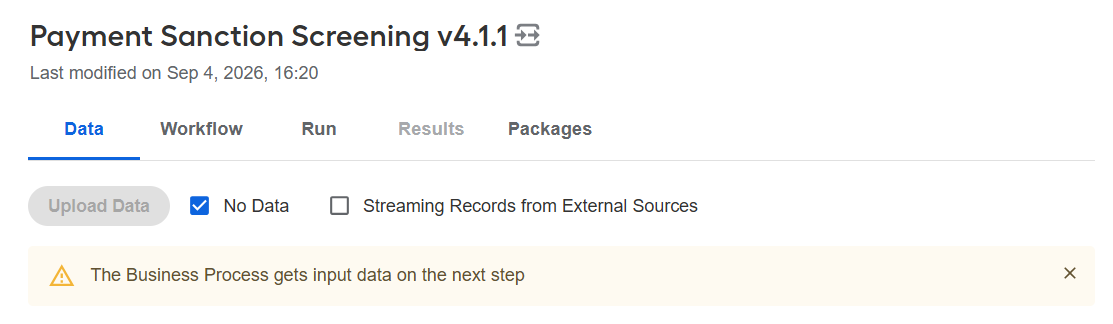
To select the connector as the source of your input data, go to the Data tab in your BP and click No Data.
Request Data Store
Tara accepts standardized input in JSON-formatted strings and saves requests into the pss_request_processing_v4 Data Store. For more details, see Run screening | Analyze results.
See a sample pss_request_processing_v4 Data Store in the table below.
| Column | Description | Example |
|---|---|---|
| system_id | Database generated ID. | 1 |
| request_id | UUID generated before adding a record to a Data Store. | 73116728-493e-4355-875d-78d6d2456f32 |
| request_json_object | Original customer data for adjudication in the JSON format representing a Message object. | See an example below. |
| decision_json_object | Model Decision in the JSON format representing a MessageDecision object. | See an example below. |
| decision_gold_json_object | Gold Model Decision in the JSON format representing a MessageDecision object; used for model training and calculating statistics. | See an example below. |
| message_json_object | Processed or enhanced copy of customer data for adjudication in the JSON format representing a Message object; data from this column is sent to the model for processing. | See the original Message object. |
| request_insert_time | Insert data timestamp. | Type: LocalDateTimeType—"yyyy-MM-dd HH:mm:ss.SSSX" |
| last_updated_time | Timestamp of the latest update. | Type: LocalDateTimeType—"yyyy-MM-dd HH:mm:ss.SSSX" |
| decision | Final message decision. | RESOLVE or NO_DECISION |
| status | Processing status; updated during record processing. | NEW, IN_PROGRESS, COMPLETED, or FAILED |
| client_id | User who sent the request for processing. | |
| run_uuid | BP run UUID used for data search and analysis. | |
| tara_version | AI Agent version used for data analysis. | |
| ner_model_version | Version of the NER model. | |
| decision_model_version | Version of the Decision model. | |
| number_of_hits | Number of hits in an alert request. | |
| is_auto_qc | Defines if an alert is marked for auto quality control. |
See the example of request_json_object
{
  "id": "test-message-id-6",
  "type": "PAYMENT_TRANSFER",
  "hits": [
    {
      "id": "2001",
      "tagContent": "DOE, J",
      "tagType": "FREETEXT",
      "screenedData": {
        "name": "Doer Jerry",
        "dob": "10/10/1975",
        "address": "10 Bressenden Place, 8th floor",
        "country": "GBR",
        "city": "london",
        "state": "GBR",
        "postal": "SW1E 5DH"
      },
      "sanctionData": {
        "name": "doe, john",
        "type": "INDIVIDUAL",
        "country": "syrian arab republic",
        "sourceEntryId": "1111",
        "source": "OFAC",
        "listType": "WORLD_COMPLIANCE"
      }
    },
    {
      "id": "2002",
      "tagContent": "DOE, J",
      "tagType": "FREETEXT",
      "screenedData": {
        "name": "Doer Jerry",
        "dob": "10/10/1975",
        "address": "10 Bressenden Place, 8th floor",
        "country": "GBR",
        "city": "london",
        "state": "GBR",
        "postal": "SW1E 5DH"
      },
      "sanctionData": {
        "name": "doe",
        "type": "INDIVIDUAL",
        "country": "US",
        "sourceEntryId": "2222",
        "source": "OFAC",
        "listType": "WORLD_COMPLIANCE",
    "primaryName": "Jerry Samuel Doe"
    "alsoKnownAs": [
      {"name": "doe", "type": "STRONG"},
      {"name": "JD", "type": "WEAK"},
      {"name": "Sam", "type": "NOT_AVAILABLE"}
    ]
      }
    }
  ]
}
See the example of decision_json_object
{
  "messageId": "test-message-id-6",
  "suggestedAction": "RESOLVE",
  "hitDecisions": [
    {
      "hitId": "2001",
      "suggestedAction": "RESOLVE",
      "comment": "Name mismatch. Screened entity name \"Doer Jerry\" does not match Watch List Entity name \"doe, john\";,Country mismatch. Screened entity location \"GBR\" does not match Watch List Entity location \"syrian arab republic\";",
      "reasons": [
        {
          "code": "2",
          "description": "Name mismatch. Screened entity name \"Doer Jerry\" does not match Watch List Entity name \"doe, john\";",
          "score": 1.0
        },
        {
          "code": "3",
          "description": "Country mismatch. Screened entity location \"GBR\" does not match Watch List Entity location \"syrian arab republic\";",
          "score": 1.0
        }
      ]
    },
    {
      "hitId": "2002",
      "suggestedAction": "RESOLVE",
      "comment": "Name mismatch. Screened entity name \"Doer Jerry\" does not match Watch List Entity name \"doe, johanna\";,Country mismatch. Screened entity location \"GBR\" does not match Watch List Entity location \"US\";",
      "reasons": [
        {
          "code": "2",
          "description": "Name mismatch. Screened entity name \"Doer Jerry\" does not match Watch List Entity name \"doe, johanna\";",
          "score": 1.0
        },
        {
          "code": "3",
          "description": "Country mismatch. Screened entity location \"GBR\" does not match Watch List Entity location \"US\";",
          "score": 1.0
        }
      ]
    }
  ],
  "status": "RESOLVE"
}
See the example of decision_gold_json_object
{
  "messageId": "test-message-id-6",
  "suggestedAction": "RESOLVE",
  "hitDecisions": [
    {
      "hitId": "2001",
      "suggestedAction": "RESOLVE",
      "comment": "Name mismatch. Screened entity name \"Doer Jerry\" does not match Watch List Entity name \"doe, john\",
      "reasons": []
    },
    {
      "hitId": "2002",
      "suggestedAction": "RESOLVE",
      "comment": "Screened entity location \"GBR\" does not match Watch List Entity location \"US\",
      "reasons": []
    }
  ]
}
Input data
See request input parameters in the tables below. For more details, refer to the API documentation.
Request input (flat file)
The table below is a flat representation of the official sanctions API client JSON.
| Field | Description | Required | Example |
|---|---|---|---|
id | Alert ID generated by the screening system. | Yes | 110981894 |
type | Payment type associated with the alert, provided as free text. The value is kept as declared and passed to the rules. The default value "PAYMENT_TRANSFER" is applied only when no type is declared and can be used for compatibility with Tara previous versions where this field was required. | No | PAYMENT_TRANSFER |
subtype | Payment message subtype. | No | 103 |
content | Full payment message content. If the content format is missing or incorrect, Tara detects it automatically. See Detect content format. | No |
|
content_format | Format in which the payment message is sent. To parse the message content, the field can be used instead of the type field:
| No (if the value is missing or incorrect, Tara detects the format automatically) | FUF, TCM, NATIVE, SWIFT_MT, SWIFT_MX, SWIFT_NPP, SWIFT_ADK |
customAttributes | Map of alert-level custom attributes. The attributes are not used in processing but can be used in rules. | No |
Hit details
| Field | Description | Required | Example |
|---|---|---|---|
hit_id | Hit ID generated by the screening engine. Used to identify a hit. Must be unique per alert. | Yes | 12345 |
hit_tagcontent | Text containing the hit value from hit_tagname. Typically, includes hit_hittext. | No (Yes if there is no message content) | /IT26S0306933090100000003191 CASTIGLIONI SRL VIA ACHILLE GRANDI,2 20020 ARCONATE (MI) |
hit_tagname | Name of the tag containing matched text. Messages can contain multiple tags. | No (Yes if content is used and parsing is needed) | 50K |
hit_tagtype | Indicates the type of data contained in the tag. Supported values: NAME, NAMEADDRESS, ADDRESS, FREETEXT (used if unknown). For dictionary-derived labels, see Assign attribute types. | Yes | NAMEADDRESS |
hit_hitstartindex | Start position of hit_hittext (related to the tag content). | No | 30 |
hit_hitendindex | End position of hit_hittext (related to the tag content). | No | 40 |
hit_hittext | Provides the exact part of the text that triggered the hit. If not provided, a sanction name is used to identify where the hit is within hit_tagcontent. Improves adjudication quality if provided. | No | CASTIGLIONI |
hit_hittype | Hit type from the screening system. | No | NAME |
Hit screened data
Information about screened entities is used to compare against sanction data. If it exists, it is treated as true values—not parsed and not preprocessed. The object can be populated during alert content parsing. See Group tags into parties for how related tag values contribute to screened data.
| Field | Description | Required | Example |
|---|---|---|---|
hit_screeneddata_type | Type of entity if known. | No | ORGANIZATION |
hit_screeneddata_name | Contains the value if the hit was on the name. | No | CASTIGLIONI SRL |
hit_screeneddata_dob | Date of birth for an individual. Preferred format: MM/dd/yyyy. | No | 10/24/1997 |
hit_screeneddata_address | Address information if relevant to the screened entity. | No | VIA ACHILLE GRANDI,2 20020 ARCONATE (MI) |
hit_screeneddata_country | Country information if relevant to the screened entity. Can contain multiple pipe-separated values. | No | |
hit_screeneddata_city | City information if relevant to the screened entity. Can contain multiple pipe-separated values. | No | ARCONATE |
hit_screeneddata_state | State information if relevant to the screened entity. | No | MI |
hit_screeneddata_postal | Postal code if relevant to the screened entity. | No | |
hit_screeneddata_id | Identification number if the hit was on an ID. | No | |
hit_screeneddata_code_type | Identification name relevant to the screened entity. | No | SSN |
hit_screeneddata_code_number | Identification value relevant to the screened entity. | No | 111-22-3333 |
hit_screeneddata_locations | Additional list of location objects. Not represented in a flat file. | No |
Hit sanction data
Hit sanction data (required) contains details of the Watch List Entity associated with the hit.
| Field | Description | Required | Example |
|---|---|---|---|
hit_sanctiondata_name | Sanctioned name that matches the content. | Yes | |
hit_sanctiondata_primaryName | Primary name of the sanctioned entity. | No | |
hit_sanctiondata_type | Entity type of the WLE. | Yes (Only defined or null values allowed) | ORGANIZATION |
hit_sanctiondata_dob | Date of birth for the WLE. Can contain multiple values separated by the pipe character. | No | |
hit_sanctiondata_address | Address of the sanctioned entity, if available. | ||
hit_sanctiondata_city | City relevant to the WLE. Can contain multiple values separated by the pipe character. | No | |
hit_sanctiondata_country | Country associated with the WLE. Can contain multiple values separated by the pipe character. | No | |
hit_sanctiondata_state | State relevant to the WLE. | No | |
hit_sanctiondata_sourceEntryID | Value relevant to the WLE source details. Used in the CLDS flow. | No | |
hit_sanctiondata_source | Value relevant to the WLE source details. Not used in the Decision model. | No | |
hit_sanctiondata_sourcekeywords | Pipe-separated values relevant to the WLE source details. Used in CLDS reporting but not in the Decision model. | ||
hit_sanctiondata_listType | Value relevant to the WLE source details. Not used in the Decision model. | No | |
hit_sanctiondata_additionalInfo | Additional information relevant to the WLE source details. Available in the rule object. If it contains a city, Tara checks the screened address and city for it and sets the sanctioned city when found. | No | |
hit_sanctiondata_alsoknownas_name | Alias name for the entity. Can contain multiple values separated by the pipe character. | No | |
hit_sanctiondata_alsoknownas_type | Entity type for the alias. | No | |
hit_sanctiondata_code_type | Identification name relevant to the screened entity. | No | SSN |
hit_sanctiondata_code_number | Identification value relevant to the screened entity. | No | 111-22-3333 |
hit_sanctiondata_locations | Additional list of location objects. Not represented in a flat file. | No | |
customAttributes | Map of alert-level custom attributes. The attributes are not used in processing but can be used in rules. | No |
Decision information
Decision information is the key data containing adjudication results. It is used for statistical calculations of the automation rate (AR) and error rate (ER). The recommended parameters are as follows:
| Field | Description | Required | Example |
|---|---|---|---|
gold_decision | Decision for a hit. Must be NO_DECISION or RESOLVE. | No | RESOLVE |
gold_decision_comment | Narrative created by the analyst explaining the reasons for the decision. No specific format is expected. | No | Name mismatch: john Doe versus John Silverman. Location mismatch: USA versus SYR. |
Payment information
| Field | Description | Required | Example |
|---|---|---|---|
payment_direction | Direction of the transfer. Supported values: INCOMING, OUTGOING. | No | INCOMING |
payment_receiver_bic | BIC code of the transfer's receiver. | No | BOFIIE2D |
payment_receiver_name | Name of the transfer's receiver. | No | John Doe |
payment_receiver_country | Country of the transfer's receiver. | No | USA |
payment_sender_bic | BIC code of the transfer's sender. | No | BOFIIE2D |
payment_sender_name | Name of the transfer's sender. | No | Jane Doe |
payment_sender_country | Country of the transfer's sender. | No | USA |
payment_amount | Monetary value of the transfer. | No | 123456.77 |
payment_currency | Currency of the transfer. | No | USD |
Request input (JSON file)
The input format is designed for easy reprocessing data from the pss_request_processing_v4 Data Store. The format is used to build synthetic data for testing.
| Column | Description |
|---|---|
request_json_object | Original request data for adjudication in the JSON format representing a Message object. |
decision_gold_json_object | Gold Model Decision in the JSON format representing a MessageDecision object. Optional; used for model training and calculating statistics. |
Output data
Output data format
You can retrieve a decision by:
A generated HTML report as text located at
doc-upload/payment_sanctions_screening/reports/html. For more details, see HTML reportsA generated detailed quality control (QC) report in the CSV format located at
doc-upload/payment_sanctions_screening/reports/qc. For more details, see QC reports.From the API output response JSON object.
The final model decision is adjudicated by running the default list of rules pre-installed with the package. You can also choose to create custom rules.
Decision output
A decision returns as a JSON representation of a MessageProcessingResponse object.
| Field | Description | Expectation | Example |
|---|---|---|---|
messageId | Message identification number. | Mandatory when the request processing status is COMPLETED. Optional if a message is invalid or cannot be processed. | |
suggestedAction | Message-level suggested action. Set to RESOLVE only if each hit has the RESOLVE action. Otherwise, NO_DECISION. | Mandatory | RESOLVE |
status | Custom decision status. You can define custom statuses, such as PASS, HALF_PASS, L1, or L2. | CLDS_ALL, CLDS_PARTIAL, RESOLVE, NO_DECISION |
Hit decisions
Hit decisions refer to a collection of all decisions per hit. Mandatory when the request processing status is COMPLETED. Optional if the message is invalid or cannot be processed.
| Field | Description | Expectation | Example |
|---|---|---|---|
hit_decision_hitId | Hit identification number. | Mandatory | |
hit_decision_suggestedAction | Hit-level suggested action. Set to RESOLVE or NO_DECISION. | Mandatory | NO_DECISION |
hit_decision_comment | Explanation of the decision, combining all reasons. | Mandatory | "Name mismatch. Screened entity name (Romana J) does not match Watch List Entity (Roman Silverman). Country mismatch. Screened entity location(s) <GBR> does not match Watch List Entity location <Palestinian territory, occupied>" |
html_report_link | Generated HTML report link included in the response if configured. |
Reasons
Reasons refer to the list of reasons that support the decision. At least one reason is expected.
| Field | Description | Expectation | Example |
|---|---|---|---|
hit_decision_reason_code | Reason codes. Matches the name of the rule that fired during adjudication. Varies based on decision factors. | Mandatory | "Name mismatch" |
hit_decision_reason_description | Detailed, human-readable explanation. | Mandatory | "Name mismatch. Screened entity name (Romana J) does not match Watch List Entity (Roman Silverman)" |
hit_decision_reason_score | Name matcher score that supports the reasoning. | Mandatory | 0.88 |