Parse message content
Overview
Tara can parse various types of message content. Currently, the supported formats are as follows:
FUF(Fircosoft Unified Format)SWIFTorSWIFT_MT(Society for Worldwide Interbank Financial Telecommunication; MT stands for Message Type; original SWIFT format)ISO20022(International Organization for Standardization 20022, a global standard for electronic data interchange between financial institutions),SWIFT_MX(SWIFT's ISO 20022-based XML message format),SWIFT_NPP(SWIFT New Payments Platform, used for Australia's real-time payments infrastructure) (XML)SWIFT_ADK(SWIFT Alliance Developer Kit)
Using the provided message format, message type, and hit tag name, Tara invokes an appropriate parser to extract the tag content value that triggered a hit during screening. For example, if an alert is identified as ISO20022, Tara applies the ISO20022 parser to better identify the screened entity for decision-making.
For certain defined tags, such as 50F or 59F, Tara parses the tag content into fields like ID, name, address, and country. This data populates a screened data object to facilitate adjudication during processing.
Detect content format
If the message content is provided but the content format is missing or incorrect, Tara detects the format from the content. Supported formats are FUF, ISO 20022 (SWIFT_MX), SWIFT MT, and SWIFT ADK.
- The declared content format is always tried first. If it is incorrect and leaves a hit without tag content, Tara uses the detected format instead.
- During intake, Tara also validates the content in the detected format. If the content cannot be parsed, for example, because of broken XML, the request is rejected with the
INVALID_REQUESTstatus and theMalformed request: Broken message contentdetails. - MT, ADK, and FUF content is parsed leniently, so only broken XML content is rejected.
A missing tag dictionary or an unavailable S3 service does not cause parsing to fail. For details, see Troubleshoot dictionary changes.
Dictionaries
Tag dictionaries group related tags into parties and assign attribute types used to populate screened data. See Configure tag dictionaries for the files, CSV structure, type mappings, grouping rules, examples, and maintenance instructions.
SWIFT MT parser
If an alert is identified as SWIFT_MT, Tara applies a parser to identify the screened entity used for decision-making. SWIFT MT messages are defined by the ISO 15022 standard.
To parse a SWIFT MT message, provide the complete message text in the alert's content field and the field tag associated with each hit in hit.tagName.
Each SWIFT MT message type contains a set of fields. Each field has a field tag, such as 20 or 50K, a defined format, such as 4*35x for four lines of up to 35 characters, and can be mandatory or optional.
Message categories
SWIFT MT messages are organized into the following categories:
| Category | Description | Example |
|---|---|---|
| 1 - Customer Payments and Cheques | Customer payment instructions and notifications. | MT101, MT103, MT103STP, MT103REMIT, MT104, MT107 |
| 2 - Financial Institution Transfers | Bank-to-bank transfers and cover payments. | MT200, MT202, MT202COV, MT203, MT204, MT205, MT205COV |
| 3 - Treasury Markets - Foreign Exchange, Money Markets and Derivatives | Foreign exchange, money markets, and derivatives. | MT300, MT304, MT305, MT306, MT320, MT330, MT340, MT350 |
| 4 - Collections and Cash Letters | Documentary collections. | MT400, MT405, MT410, MT412, MT416, MT420, MT422, MT450, MT455, MT456 |
| 5 - Securities Markets | Securities settlement, corporate actions, collateral management, and reporting, including complex sequence-based messages. | MT502-MT599 |
| 6 - Treasury Markets - Metals | ||
| 7 - Documentary Credits and Guarantees | ||
| 8 - Travelers Cheques | ||
| 9 - Cash Management and Customer Status | ||
| n - Common Group Messages |
Tara uses Prowide Core, an open-source library available under the Apache License 2.0, to extract fields and identify the hit entity. For implementation details, see the Prowide Core GitHub repository.
Field parsing
A single SWIFT field can contain multiple subfields with different value types. For example, field 59 in an MT103 Single Customer Credit Transfer message identifies the Beneficiary Customer. This is the receiver or creditor: a person or organization receiving funds from the Ordering Customer, which is the sender or debtor:
:59:/00123456789012345678
MERCADOS Y GESTION DE VALORES SA
FOOSTREET 65
MADRID SPAIN 28010701.18
Tara interprets the field as follows:
- The first line contains the receiver's account number and has the
IDtype. - The second line contains the receiver's name and has the
NAMEtype. The receiver can be anINDIVIDUALorORGANIZATION. - The remaining lines contain the receiver's street address and have the
LOCATIONtype. In this context,LOCATIONrepresents a street address, not an ISO country code or country name.
If a parsed SWIFT MT message contains the same field tag more than once, such as two 52D fields, Tara uses the field that matches the hit. The match is determined from hit.hitText, hit.sanctionData.codeMap, or hit.sanctionData.name.
SWIFT messages converted to FUF
The LexisNexis Risk Solutions Firco Continuity screening system might convert the original SWIFT MT message to FUF. Tara is able to parse the converted message, though it may contain less information than the original payment message.
A converted message starts with a FUF header similar to the following:
[FIRCOSOFT ] FMT V1.0 GEN CoreEngine 5.5.2.0_300
The FUF tag refers to the original SWIFT field tag. For example, SWIFT field 35B can be represented as follows:
[SWF_4_35B ] ...
Message example
The following example shows how Tara parses field 59 in an MT103 message. It is adapted from the Prowide Core MT103 sample. All identifying values have been replaced with placeholders or synthetic data.
See sample JSON input message
{
  "id": "Tara-Example-Alert",
  "type": "SWF",
  "content": "{1:F01BICFOOYYAXXX8667486276}{2:O1031610191014BBBBUS3NBXXX63382244921910142210N}{3:{108:FDF1910141142100}{121:8579f4a4-a547-463e-ae63-e7c6620d59b4}}{4:\n:20:22342343\n:23B:CRED\n:32A:191014USD1814,28\n:50K:FOO CAPITAL MARKETS LP\n99 WALL ST STE 9999\nNEW YORK, NY 10005-3122\n:52D:NORTH FOO BANK\n999 BROAD FOO RD\nMELVILLE, NY 11747\n:59:/00123456789012345678\nMERCADOS Y GESTION DE VALORES SA\nFOOSTREET 65\nMADRID SPAIN 28010701.18\n:70:FINDERS FEES-JULY,2007-  10.00, AUG\nUST,2007-  0.00   SEPTEMBER,2007   \n 1,999.99\nBNY CUST RRN - O/B NORTH FORK B\n:71A:SHA\n:72:/ACC/ 00940060752415000231\n-}",
  "contentFormat": "NATIVE",
  "hits": [
    {
      "id": "Tara-Example-Hit",
      "tagContent": null,
      "tagName": "59",
      "tagType": "FREETEXT",
      "hitText": "MERCADOS",
      "screenedData": null,
      "sanctionData": {
        "name": "Mercado",
        "type": "ORGANIZATION"
      }
    }
  ]
}
See sample JSON output message
After parsing, Tara populates tagContent, changes tagType to NAMEADDRESS, and adds the extracted identifier to screenedData.
{
  "id": "Tara-Example-Alert",
  "type": "SWF",
  "content": "{1:F01BICFOOYYAXXX8667486276}{2:O1031610191014BBBBUS3NBXXX63382244921910142210N}{3:{108:FDF1910141142100}{121:8579f4a4-a547-463e-ae63-e7c6620d59b4}}{4:\n:20:22342343\n:23B:CRED\n:32A:191014USD1814,28\n:50K:FOO CAPITAL MARKETS LP\n99 WALL ST STE 9999\nNEW YORK, NY 10005-3122\n:52D:NORTH FOO BANK\n999 BROAD FOO RD\nMELVILLE, NY 11747\n:59:/00123456789012345678\nMERCADOS Y GESTION DE VALORES SA\nFOOSTREET 65\nMADRID SPAIN 28010701.18\n:70:FINDERS FEES-JULY,2007-  10.00, AUG\nUST,2007-  0.00   SEPTEMBER,2007   \n 1,999.99\nBNY CUST RRN - O/B NORTH FORK B\n:71A:SHA\n:72:/ACC/ 00940060752415000231\n-}",
  "contentFormat": "NATIVE",
  "hits": [
    {
      "id": "Tara-Example-Hit",
      "tagContent": "/00123456789012345678\nMERCADOS Y GESTION DE VALORES SA\nFOOSTREET 65\nMADRID SPAIN 28010701.18",
      "tagName": "59",
      "tagType": "NAMEADDRESS",
      "hitText": "MERCADOS",
      "screenedData": {
        "codeMap": {
          "LEI": "00123456789012345678"
        }
      },
      "sanctionData": {
        "name": "Mercado",
        "type": "ORGANIZATION"
      }
    }
  ]
}
ISO20022 parser
If an alert is identified as ISO20022 (SWIFT_MX or SWIFT_NPP), Tara applies a parser to better identify the screened entity for decision-making.
The ISO20022 tag list dictionary, pss_iso20022_tags_list.csv, uses the shared CSV structure and attribute types. Its entityname identifies the parent element that groups related child elements, such as Cdtr.
Parsing process
When a new alert request arrives, the following actions take place:
The parser is loaded if the original payment message is applied to the
contentfield and:MessageTypeis"ISO_20022", andContentFormatis"NATIVE".MessageTypeis"ISO_20022", andContentFormatis"SWIFT_MX".MessageTypeis"ISO_20022", andContentFormatis"SWIFT_NPP".
An XML document is extracted from the
contentfield, producing a map of tag-value pairs. A tag represents the hierarchical path to the element containing a value. When elements contain child elements, the tag also includes the combined values of all children, separated by new lines. Thus, a tag name can be long, depending on the XML structure depth.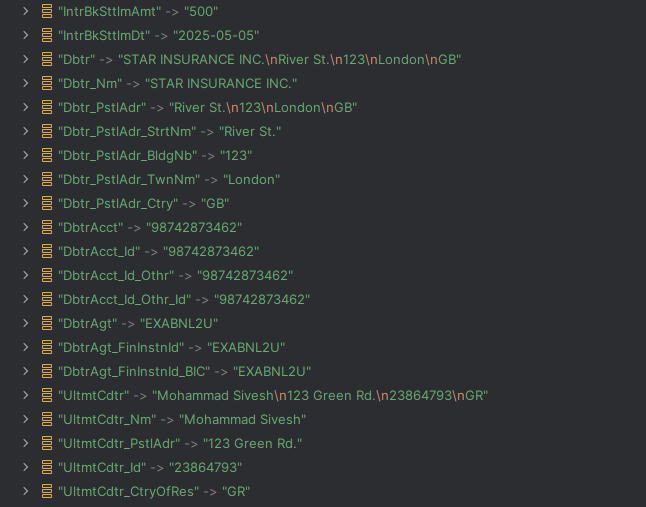
Using the content map and the target tag name from the
tagNamefield, Tara fetches the tag content and related entity data.If the entity name is found in the dictionary, related attribute names for the same entity are retrieved. Otherwise, only the tag content is used.
The parser creates an
EntityAttributemap object containing attributes, types, and values of related elements, such as debtor or creditor information.
The parser processor updates the hit's screened data with found elements using the entity attribute list. Once parsing is complete, the input message is sent to the next BP step.
Entity attribute types
The type of an entity attribute determines where the parser processor inserts the extracted XML information. For example, if the type is NAME, the entity attribute value is inserted into the Screened name field. If the type is FREETEXT, the value is inserted into the tagContent field. The tag content and tag type must always be populated. Screened data is populated only if the needed information can be identified in the XML.
The pss_iso20022_tags_list.csv dictionary allows mapping attributes and their types grouped by entity names. For example, Dbtr_Nm (NAME type) and Dbtr_PstlAddr (ADDRESS type) both belong to the same entity (Dbtr). See Group tags into parties for grouping conventions and branch separation. You can build a list of entity attributes using the dictionary if this dictionary contains the target tag name (tagName) from the alerted hit.
If the target tag name is not in the dictionary, a function checks for its parent XML element. If found, the parent's type is used. If there is no information in the dictionary, tagType is set to FREETEXT.
Message examples
See sample JSON input message
{
  "id": "5123456",
  "type": "ISO_20022",
  "contentFormat": "NATIVE",
  "content": "<CdtTrfTxInf>\r\n\t<IntrBkSttlmAmt Ccy=\"USD\">500<\/IntrBkSttlmAmt>\r\n\t<IntrBkSttlmDt>2025-05-05<\/IntrBkSttlmDt>\r\n\t<Dbtr>\r\n\t\t<Nm>STAR INSURANCE INC.<\/Nm>\r\n\t\t<PstlAdr>\r\n\t\t\t<StrtNm>River St.<\/StrtNm>\r\n\t\t\t<BldgNb>123<\/BldgNb>\r\n\t\t\t<TwnNm>London<\/TwnNm>\r\n\t\t\t<Ctry>GB<\/Ctry>\r\n\t\t<\/PstlAdr>\r\n\t<\/Dbtr>\r\n\t<DbtrAcct>\r\n\t\t<Id>\r\n\t\t\t<Othr>\r\n\t\t\t\t<Id>98742873462<\/Id>\r\n\t\t\t<\/Othr>\r\n\t\t<\/Id>\r\n\t<\/DbtrAcct>\r\n\t<DbtrAgt>\r\n\t\t<FinInstnId>\r\n\t\t\t<BIC>EXABNL2U<\/BIC>\r\n\t\t<\/FinInstnId>\r\n\t<\/DbtrAgt>\r\n\t<UltmtCdtr>\r\n\t\t<Nm>Mohammad Sivesh<\/Nm>\r\n\t\t<PstlAdr>123 Green Rd.<\/PstlAdr>\r\n\t\t<Id>23864793<\/Id>\r\n\t\t<CtryOfRes>GR<\/CtryOfRes>\r\n\t<\/UltmtCdtr>\r\n<\/CdtTrfTxInf>",
  "hits": [
    {
      "id": "52968422",
      "tagName": "UltmtCdtr",
      "tagContent": null,
      "hitText": "Mohammad",
      "screenedData": null,
      "sanctionData": {
        "name": "Mohammad",
        "type": "INDIVIDUAL",
        "dob": "1950",
        "city": null,
        "country": "myanmar",
        "state": null
      }
    }
  ]
}
See sample JSON output message
For the UltmtCdtr target tag name with the NAMEADDRESS tag type, the parser extracts values from UltmtCdtr in the XML and writes them to the tagContent field, adding screened data.
{
  "id": "5123456",
  "type": "ISO_20022",
  "contentFormat": "NATIVE",
  "content": "<CdtTrfTxInf>\r\n\t<IntrBkSttlmAmt Ccy=\"USD\">500<\/IntrBkSttlmAmt>\r\n\t<IntrBkSttlmDt>2025-05-05<\/IntrBkSttlmDt>\r\n\t<Dbtr>\r\n\t\t<Nm>STAR INSURANCE INC.<\/Nm>\r\n\t\t<PstlAdr>\r\n\t\t\t<StrtNm>River St.<\/StrtNm>\r\n\t\t\t<BldgNb>123<\/BldgNb>\r\n\t\t\t<TwnNm>London<\/TwnNm>\r\n\t\t\t<Ctry>GB<\/Ctry>\r\n\t\t<\/PstlAdr>\r\n\t<\/Dbtr>\r\n\t<DbtrAcct>\r\n\t\t<Id>\r\n\t\t\t<Othr>\r\n\t\t\t\t<Id>98742873462<\/Id>\r\n\t\t\t<\/Othr>\r\n\t\t<\/Id>\r\n\t<\/DbtrAcct>\r\n\t<DbtrAgt>\r\n\t\t<FinInstnId>\r\n\t\t\t<BIC>EXABNL2U<\/BIC>\r\n\t\t<\/FinInstnId>\r\n\t<\/DbtrAgt>\r\n\t<UltmtCdtr>\r\n\t\t<Nm>Mohammad Sivesh<\/Nm>\r\n\t\t<PstlAdr>123 Green Rd.<\/PstlAdr>\r\n\t\t<Id>23864793<\/Id>\r\n\t\t<CtryOfRes>GR<\/CtryOfRes>\r\n\t<\/UltmtCdtr>\r\n<\/CdtTrfTxInf>",
  "hits": [
    {
      "id": "52968422",
      "tagName": "UltmtCdtr",
      "tagContent": "Mohammad Sivesh\n123 Green Rd.\n23864793\nGR",
      "tagType": "NAMEADDRESS"
      "hitStartIndex": null,
      "hitEndIndex": null,
      "hitText": "Mohammad",
      "screenedData": {
        "name": "Mohammad Sivesh",
        "address": "123 Green Rd.\n23864793\nGR",
        "country": "GR",
        "state": null
      },
      "sanctionData": {
        "name": "Mohammad",
        "type": "INDIVIDUAL",
        "dob": "1950",
        "city": null,
        "country": "myanmar",
        "state": null
      }
    }
  ]
}
SWIFT ADK parser
If an alert is identified as SWIFT_ADK, Tara applies a parser to better identify the screened entity for decision-making.
The dictionary for SWIFT_ADK is the same as that for SWIFT_MT messages and has a structure similar to the tag dictionary CSV structure.
Parsing process
When a new alert request arrives, the parser loads, provided the original payment message applied to the
contentfield andMessageTypeisSWFandContentFormatisSWIFT_ADK.The
contentfield is processed to produce a map of tag-value pairs.Using the
tagNamefield, the parser retrieves the tag content and related entities. If an entity name is in the dictionary, related attributes are fetched; otherwise, only the tag content is used.The parser creates an
EntityAttributeMap object containing attributes, types, and values of related elements, such as debtor or creditor information.The parser processor updates the hit's screened data with found elements using a list of entity attributes. Once parsing is complete, the input message proceeds to the next BP step.
Entity attribute types
As in ISO20022, entity attribute types determine where data is inserted.
For example, if the type is NAME, the entity attribute value is inserted into the Screened name field. If the type is FREETEXT, the value is inserted into the tagContent field. The tag content and tag type must always be populated. Screened data is populated only if the needed information can be identified in the message content.
The pss_swift_tags_list.csv dictionary maps attributes and types grouped by entity names. You can build a list of entity attributes using this dictionary if the target tagName from the alerted hit is in this dictionary.
If no dictionary information is found, tagType is set to FREETEXT.
Message examples
See sample JSON input message
{
  "id": "32893_adk",
  "type": "SWF",
  "contentFormat": "SWIFT_ADK",
  "content": ":SND:WFBIUS6SBXXX\r\n:RCV:NBADAEAAAXXX\r\n:111:001\r\n:121:6ced294d-6bcd-4664-95be-fd6b5772487b\r\n:20:2023053100240000\r\n:23B:CRED\r\n:32A:230601AED8885,75\r\n:33B:USD2475,\r\n:36:0,278536\r\n:50K:/62765450000\r\nMUHAMMAD ALI\r\n1290 ALEXANDER DR NE\r\nBREMERTON WA 98311\r\nUNITED STATES\r\n:52D://FW325070980\r\nHASHINGTON FEDERAL BANK\r\nSEATTLE, WA\r\nUS\r\n:57A:B0MLAEAD\r\n:59:/AE840330000019010170000\r\nMUHAMMAD ALI\r\nABZ/SD297/X9478\r\nSUMAC HILLS 2 DUBAI\r\nUNITED ARAB EMIRATES\r\n:70:MORTGAGE PAYMENT LEL- LEASING IN\r\nTHE UAE\r\n:71A:OUR\r\n:72:/CCT/",
  "hits": [
    {
      "id": "32893_adk_hit",
      "tagName": "59",
      "hitText": "MUHAMMAD",
      "sanctionData": {
        "name": "MUHAMMAD",
        "type": "INDIVIDUAL"
      }
    }
  ]
}
See sample JSON output message
For the 59 target tag name with the NAMEADDRESS type, the parser reads values in the :59: field and writes them to the tagContent field, adding screened data.
{
   "id":"32893_adk",
   "type":"SWF",
   "content":":SND:WFBIUS6SBXXX\r\n:RCV:NBADAEAAAXXX\r\n:111:001\r\n:121:6ced294d-6bcd-4664-95be-fd6b5772487b\r\n:20:2023053100240000\r\n:23B:CRED\r\n:32A:230601AED8885,75\r\n:33B:USD2475,\r\n:36:0,278536\r\n:50K:/62765450000\r\nMUHAMMAD ALI\r\n1290 ALEXANDER DR NE\r\nBREMERTON WA 98311\r\nUNITED STATES\r\n:52D://FW325070980\r\nHASHINGTON FEDERAL BANK\r\nSEATTLE, WA\r\nUS\r\n:57A:B0MLAEAD\r\n:59:/AE840330000019010170000\r\nMUHAMMAD ALI\r\nABZ/SD297/X9478\r\nSUMAC HILLS 2 DUBAI\r\nUNITED ARAB EMIRATES\r\n:70:MORTGAGE PAYMENT LEL- LEASING IN\r\nTHE UAE\r\n:71A:OUR\r\n:72:/CCT/",
   "contentFormat":"SWIFT_ADK",
   "hits":[
      {
         "id":"32893_adk_hit",
         "tagContent":"/AE840330000019010170000\nMUHAMMAD ALI\nABZ/SD297/X9478\nSUMAC HILLS 2 DUBAI\nUNITED ARAB EMIRATES",
         "tagName":"59",
         "tagType":"NAMEADDRESS",
         "hitText":"MUHAMMAD",
         "screenedData":{
            "country":"",
            "codeMap":{
               "ID":"AE840330000019010170000"
            }
         },
         "sanctionData":{
            "name":"MUHAMMAD",
            "type":"INDIVIDUAL"
         }
      }
   ]
}
FUF suffix-based tag parsing
For FUF tags absent from the main dictionary, Tara can infer the attribute type from the tag suffix and group related tags by prefix. See Parse FUF tags by suffix for the suffix dictionary, precedence rules, numbered tags, examples, and limitations.
Parsing with NER model
If built-in parsers are inapplicable, Tara uses a custom NER model to extract relevant information from the tag content and hit text.
For example, consider the following tag content and associated hit text provided in a hit:
"tagContent": "Watson, John sends money to Ireland",
      "tagType": "FREETEXT",
      "hitText": "Watson",
      "sanctionData": {
        "name": "doe, john",
        "type": "INDIVIDUAL",
The truncated hit has the tag content: "Watson, John sends money to Ireland", with the hit text being "Watson". In most cases, it is expected that the hit text refers to a portion of the original tag content. Hence, the hit text most likely refers to the individual "Watson, John" (or John Watson), which, further down the pipeline, needs to be adjudicated against the sanctioned individual "Doe, John" in the example.
NER processing steps
Preconditions for the NER processing step are as follows:
Messageobjects and their constituent hits are parsed by the built-in parsers in the Tara workflow.- The
tagContentfield in each hit is populated, either by the parsers or externally. - The
hitTextfield is optionally provided in each hit, indicating where thetagContenthit is located. - The watchlist entity (WLE) data is provided as part of the hit (as the
sanctionDatasection in the hit object). - The NER model is invoked for each
tagContentfield, producing a list of NER-recognized objects associated with the field.
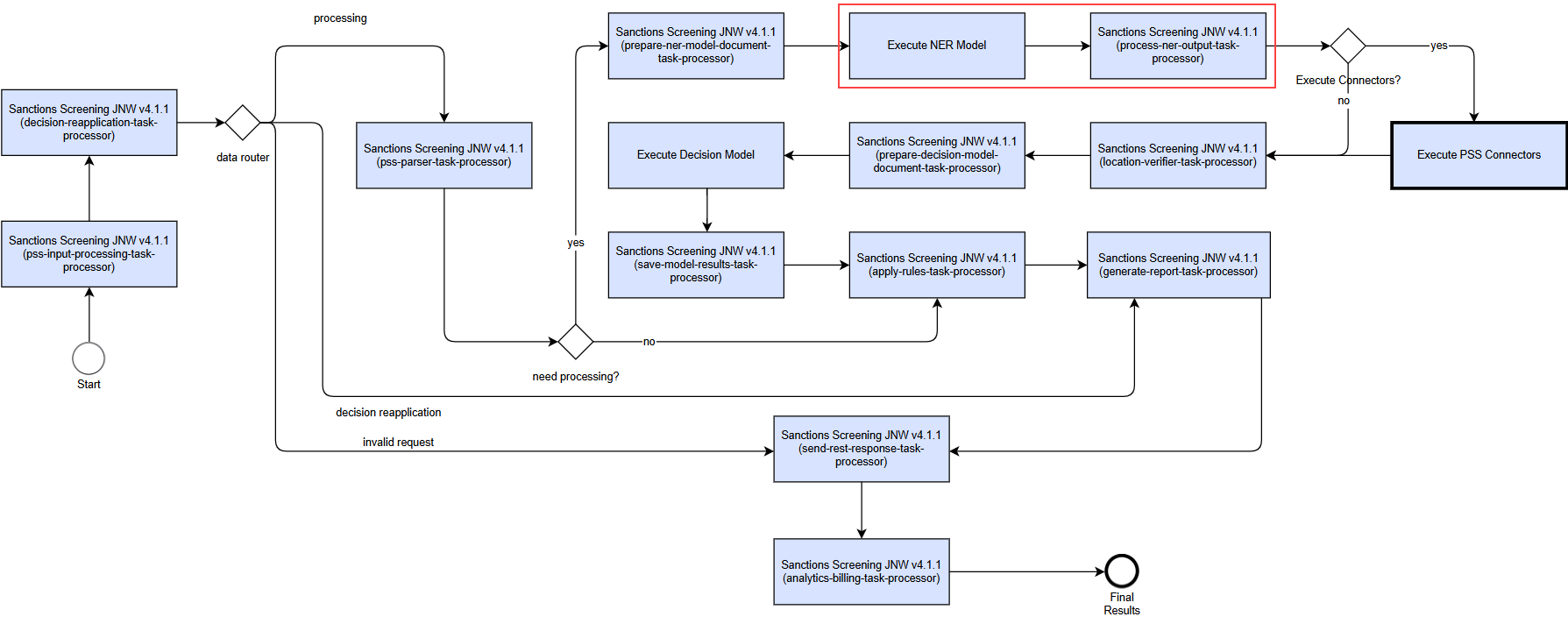
Hit text calculation
Calculation of hit entity greatly depends on the NER output.
For each NER entity from the list of entities provided by the NER model, Tara matches the associated text with the provided hit text. If the hit text is missing, blank, or ambiguous, Tara reverts to matching against the provided sanctioned data (watch list entity, WLE) name. If the WLE name is fully contained within the hit text, the WLE name is used.
Priority is given to full-token matches or partial-token matches. If none exist, a fuzzy match is performed, and the entity with the highest score is chosen. For example,
"Sherlock Holmes"to"sherlock"is a full token match, whereas"Sher"is a partial match."lock Holm"is considered a close fuzzy match.It is checked whether a legitimate hit was found in multiple locations in the tag content. Legitimate matches are considered full-token matches, partial-token matches, or high fuzzy matching scores. If direct matches are found, split hits are created for each of these multiple hits. Otherwise, the highest similarity score is used.
If split hits are generated, unnecessary ones are removed:
Check if split hits are created for the same NER entity. If found, these split hits are merged back together, ensuring any complementary information in the split hits is added to the final merged hit. For example, those IDs or countries that differ in different split hits are included in the final merged hit.
If one of the splits is an ID and there are no IDs on the sanctioned side, such a split is removed.
Non-ID entities are preferred over ID entities. However, if every NER entity captured by the hit is an ID, the ID entities are kept. For example, for the
ABCD1234tag content with theD 1hit text, the hit can be resolved as an entity type mismatch instead of being escalated. Identical IDs are merged into one hit, while distinct IDs remain separate split hits.
Multiple hits on tag content
Occasionally, the provided hit text directly or closely matches multiple places in the tag content:
{
      "id": "1-A",
      "tagName": "CDTXX",
      "tagType": "FREETEXT",
      "tagContent": "Jack London lives in 221B Baker Street London",
      "hitText": "London",
      ...
  }
Here, the hit text "London" can refer to either the writer "Jack London" or the address "221B Baker Street, London", creating ambiguity in selecting the correct entity.
See another example:
{
      "id": "Z06301047",
      "tagName": "CDTXX",
      "tagType": "FREETEXT",
      "tagContent": "BANQUE MONEYPENNY\nOVERSEAS BRANCH\n123 MOHAMED FARID STREET\nCAIRO, EGYPT\n",
      "hitText": "BANQUE MONEYPENNY, CAIRO, EGYPT, CAIRO",
    ...
  }
In this case, the hit text appears to combine multiple hits. The tokens "BANQUE MONEYPENNY" can refer to a bank name, while "CAIRO, EGYPT, CAIRO" is an address. This creates ambiguity in determining the correct entity.
In such scenarios, Tara internally splits the given hit into multiple hits for all potential entities referenced by the hit text. Each split hit is adjudicated separately, and the results are merged to produce the final decision.
See sample JSON
"hits":
  [
    {
      "id": "Z06301047-SPLIT-0",
      "tagName": "CDTXX",
      "tagType": "FREETEXT",
      "tagContent": "BANQUE MONEYPENNY\nOVERSEAS BRANCH\n123 MOHAMED FARID STREET\nCAIRO, EGYPT\n",
      "hitText": "BANQUE MONEYPENNY, CAIRO, EGYPT, CAIRO",
      "hitType": "NAME",
      "screenedData": {},
      "nerData": {
        "name": "BANQUE MONEYPENNY",
        "type": "ORGANIZATION",
        "address": "123 MOHAMED FARID STREET\nCAIRO, EGYPT"
        },
      "enrichmentData": {},
      "sanctionData":
      {...
      }
  },
  {
      "id": "Z06301047-SPLIT-1",
      "tagName": "CDTXX",
      "tagType": "FREETEXT",
      "tagContent": "BANQUE MONEYPENNY\nOVERSEAS BRANCH\n123 MOHAMED FARID STREET\nCAIRO, EGYPT\n",
      "hitText": "BANQUE MONEYPENNY, CAIRO, EGYPT, CAIRO",
      "hitType": "NAME",
      "screenedData": {},
      "nerData": {
      "name": "OVERSEAS BRANCH"
      "address": "123 MOHAMED FARID STREET\nCAIRO, EGYPT"
      "type": "LOCATION"
      },
      "enrichmentData": {},
      "sanctionData":
      {...
      }
A single hit is split into two separate hits, with its ID suffixed by "-SPLIT-<split#>". The NER data section in the first split reflects the hit on an organization, while the second split corresponds to an address.
NER output
For the above example, the tag content is processed by the NER model, and the output can look like this:
See sample JSON output message
The JSON is truncated to show the relevant details.
{
        "id": "2",
        "content": "Watson, John sends money to Ireland",
        "entities_found": [
          {
            "type": "PER",
            "text": "Watson, John",
            "confidence": "0.91",
            "offsets": {
              "begin": 0,
              "end": 11
            }
          },...
          {
            "type": "LOC",
            "text": "ireland",
            "confidence": "0.5",
            "offsets": {
              "begin": 20,
              "end": 27
            }
          }
        ]
      },
The NER model identified two relevant NER entities: "Watson, John", which is of the PERSON type, and "Ireland", which is of the LOCATION type. The next step is to compare the hit text with the NER entities to determine the best match. In this example, "Watson, John" is the best match. Consequently, the model extracts relevant information and supplements the hit object with it:
"tagContent": "Watson, John sends money to Ireland",
      "tagType": "FREETEXT",
      "hitText": "Watson",
      "nerData" : {
      "name": "Watson, John",
      "type": "INDIVIDUAL"
      }
      "sanctionData": {
        "name": "doe, john",
        "type": "INDIVIDUAL",
The added nerData section contains relevant information extracted from tagContent. This data can be used for adjudication against the provided sanction data.
Tara can extract more information based on the proximity of other recognized NER entities to the hit entity. Common cases include:
Name (an individual or an organization) followed by an address:
Example tag content:
"Sherlock Holmes, 221 B Baker Street, London".Result: name and address entities are associated in
nerData."tagContent": "Sherlock Holmes, 221 B Baker Street, London",
"tagType": "FREETEXT",
"hitText": "Holmes",
"nerData" : {
"name": "Sherlock Holmes",
"type": "INDIVIDUAL",
"address": "221 B Baker Street, London"
}
"sanctionData": {
"name": "doe, john",
"type": "INDIVIDUAL",ID followed by a name (usually an organization):
Example tag content:
"ISIN US6200763075 Motorola Inc".Result: the ID (
ISIN) is associated with the organization name."tagContent": "ISIN US6200763075 Motorola Inc",
"tagType": "FREETEXT",
"hitText": "Motorola",
"nerData" : {
"name": "Motorola Inc",
"type": "ORGANIZATION",
"codeMap": {
"ISIN":"US6200763075"
}
}
"sanctionData": {
"name": "Moto Evil",
"type": "ORGANIZATION",The corresponding NER output is as follows:
{
      "id": "2a",
      "content": "ISIN US6200763075 Motorola Inc",
      "entities_found": [
        {
          "type": "O",
          "text": "ISIN",
          "confidence": "0.91",
          "offsets": {
            "begin": 0,
            "end": 3,
          }
        },
        {
          "type": "ID_ISIN",
          "text": "US6200763075",
          "confidence": "1.0",
          "offsets": {
            "begin": 5,
            "end": 16
          }
        {
          "type": "ORG",
          "text": "Motorola Inc",
          "confidence": "0.9",
          "offsets": {
            "begin": 18,
            "end": 30
          }
        }
      ]
    },
Additional entity types
The NER output can include additional entity types introduced to support the static dictionary of VESSELS. Since the pre-trained model cannot reliably recognize VESSEL names (because they can resemble personal names or other entities), an additional indicator is provided. In certain cases, it is important to signal that an entity can also be a vessel to prevent decision-making errors.
{
  "id": "sample-document.json",
  "attrs": {
    "model-results": [
      {
        "content": "MIAMI PRIDE",
        "entities_found": [
          {
            "type": "LOC",
            "possible_types": [
              "VESSEL"
            ],
            "text": "MIAMI PRIDE",
            "offsets": {
              "begin": 0,
              "end": 11
            },
            "confidence": 0.9999940991401672
          }
        ],
        "id": "1A"
      },
      {
        "content": "ASIA BRIDGE 1",
        "entities_found": [
          {
            "type": "ORG",
            "possible_types": [
              "VESSEL",
              "LOC"
            ],
            "text": "ASIA BRIDGE",
            "offsets": {
              "begin": 0,
              "end": 11
            },
            "confidence": 0.9999911189079285
          },
          {
            "type": "O",
            "possible_types": [],
            "text": "1",
            "offsets": {
              "begin": 12,
              "end": 13
            },
            "confidence": 0.9999991655349731
          }
        ],
        "id": "1B"
      }
    ]
  }
}