
Local Nexus guide
Local Nexus installation is an optional step. Having local Nexus helps to avoid using shared public Nexus and to pull random Bot Config Bundles (BCBs) into your local Control Tower.
note
A good alternative would be to use your company's hosted Nexus server.
For a local development environment, it is possible to have all WorkFusion environment components within a workstation. IA Cloud Developer Edition allows to achieve that, except for a local Nexus repository. This guide explains how to install and configure for WorkFusion local Nexus.
Steps to install and configure
Download Nexus 2 Repository Manager
- Go to https://help.sonatype.com/repomanager2/download#Download-NexusRepositoryManager2OSS.
- Download Nexus 2 Repository Manager OSS (Open Source Edition) for Windows or macOS.
Install Nexus Repository Manager
Extract all the files from the zip folder.
Copy the
nexus-(version)andsonatype-workdirectories toC:\Program Files.Open the terminal (Run as Administrator).
Go to
C:\Program Files\ nexus-(version)\binand execute thenexus.bat consolecommand.C:\>cd Program Files C:\Program Files>cd nexus-2.14.14-01 C:\Program Files\nexus-2.14.14-01>cd bin C:\Program Files\nexus-2.14.14-01\bin> C:\Program Files\nexus-2.14.14-01\bin>nexus.bat consoleWait until Nexus starts. In the terminal, wait for the
Started Sonatype Nexus OSSmessage.
Open Nexus Repository Manager
- Open your browser and type in the URL: http://localhost:8081/nexus/.
- Sign in with the default credentials:
- username: admin
- password: admin123
Create and configure Repositories
Go to Repositories, click the Add icon > Hosted Repository, and create your local repository.
Enter a name for your repository and select defaults or custom settings. Typically, a repository for deployment to Control Tower is named
wf-machine-config-bundle. You can also use the name.Select Release for Repository Policy and Allow Redeploy for Deployment Policy.
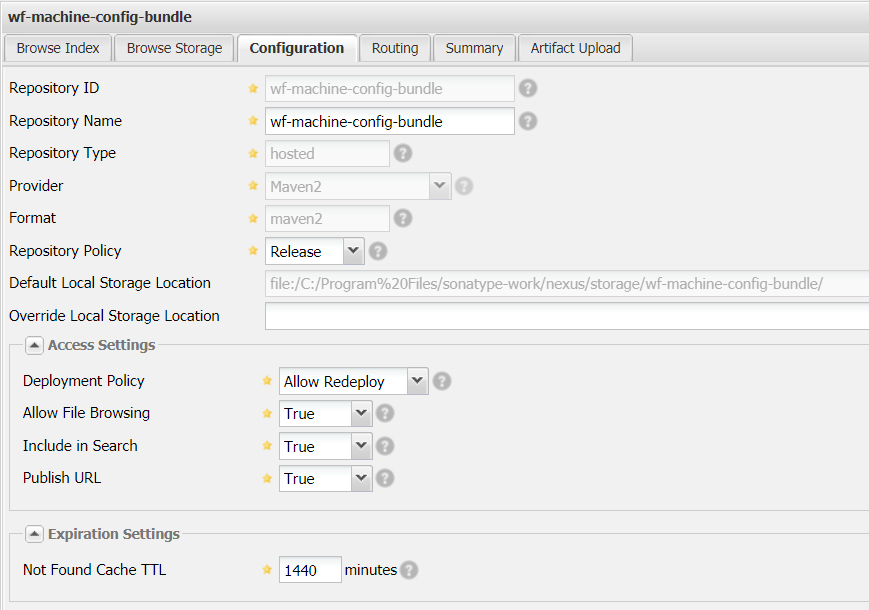
Your repository appears in the list of available repositories.
Repeat the same process to create the
webharvest-pluginsrepository.Enter the URL for the
wf-machine-config-bundlerepository in your<bcb.repository.url></bcb.repository.url>tag of the project's rootpom.xml.<bcb.repository.url>http://localhost:8081/nexus/service/local/repositories/wf-machine-config-bundle/content/</bcb.repository.url>Configure your local Maven's
settings.xmlfile to provide credentials for deploying to local Nexus:<server> <id>bcb-repository</id> <username>admin</username> <password>********</password> </server>