
RPA FAQ
General
How to determine if RPA components require restart
In case your Business Processes with RPA steps have issues (slow performance, processing issues), you might need to restart the RPA Hub and Node.
The following conditions can indicate the need for the RPA Hub or Node restart:
Hub or Node configuration changes (
hub.json,nodeX.json).High memory consumption on the RPA server (particularly the RPA Node). As a result, RPA scripts are performing at a slow speed.
The downtime of the RPA components can impact active Business Processes with RPA steps running.
The active records processed on the affected Hubs or Nodes will fail with an error. As a rule, the execution of the failed records will be automatically retried.
Execution will not be retried in case retrying is disabled for the given Business Process or the configured amount of retries was exhausted for a particular record. In such a case, the red error icon appears on the UI.
The records in queue may fail if no free Hubs or Nodes are available for too long.
How to check for active Business Processes
Go to the Business Processes list page.
In the Filter by drop-down box, select the Active filter .
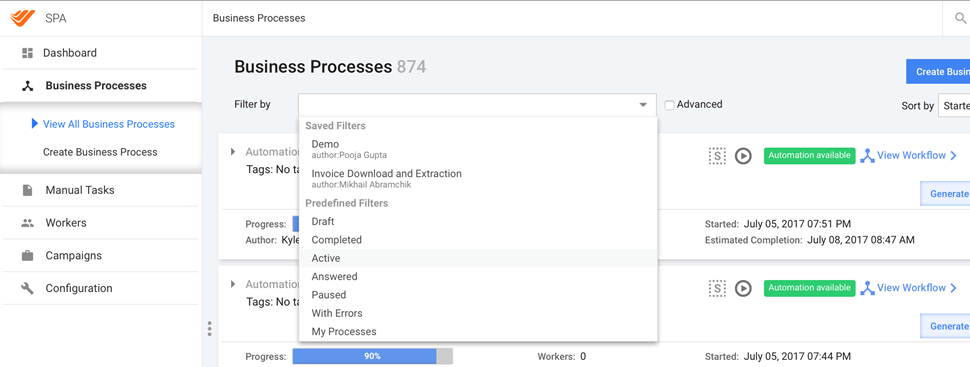
Make sure there are no active Business Processes with RPA running.
You may consider suspending active Business Processes to avoid impacting them, stop them, or pause them using the Actions menu.
note
Both the stop and pause operations let active records complete the execution of the steps already in progress. Thus, allow some time for them to finish.
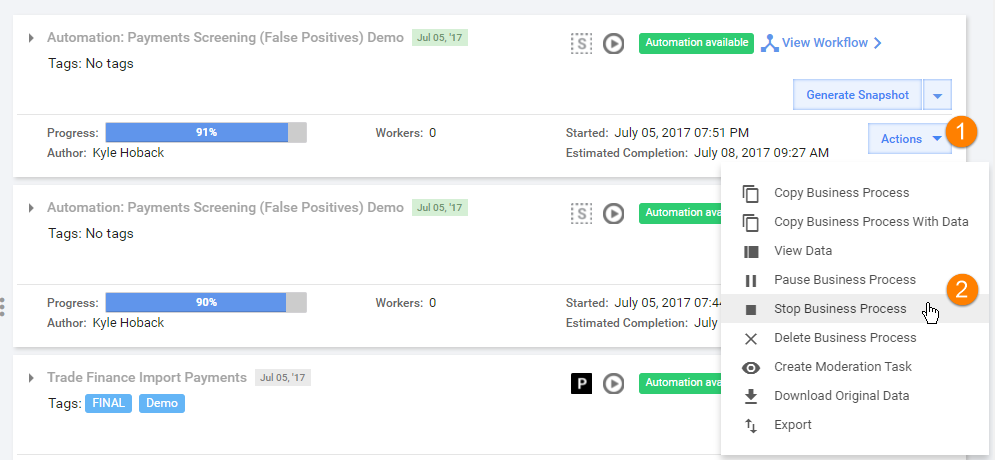
If you paused or stopped all Business Processes, your Business Process Active filter should be empty.
How to restart Hubs or Nodes via Platform Monitor
To restart Hubs or Nodes, do as follows:
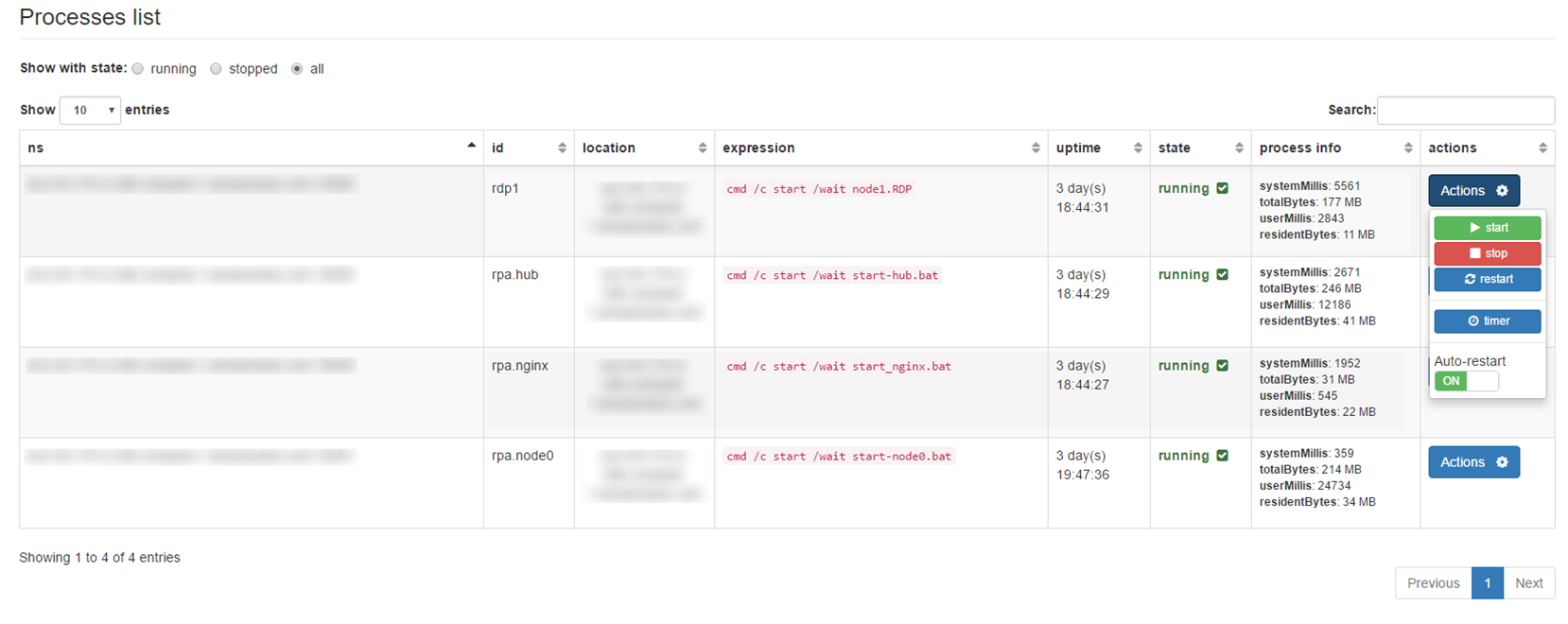
- Go to the Processes page.
- Click the Actions button and select the Stop action in the following sequence:
- Nginx (
rpa.nginx) - All Nodes (
rpa.node0,rpa.node1, and so on) - All Hubs (
rpa.hub)
- Nginx (
- Click the Actions button and select the Start action in the following sequence:
- All Hubs (
rpa.hub) - All Nodes (
rpa.node0,rpa.node1, and so on) - Nginx (
rpa.nginx)
- All Hubs (
How to check RPA server for non-closed drivers
Symptoms:
- No free Nodes are available in the RPA Grid console for a long time.
- RPA processes do not show progress.
Possible causes are as follows:
- Accidental Hub closing when a robotic script was executing on a Node.
- A robotic script contains the
close-on-completion="false"attribute inside the<selenium>tag.
To fix the situation, do as follows:
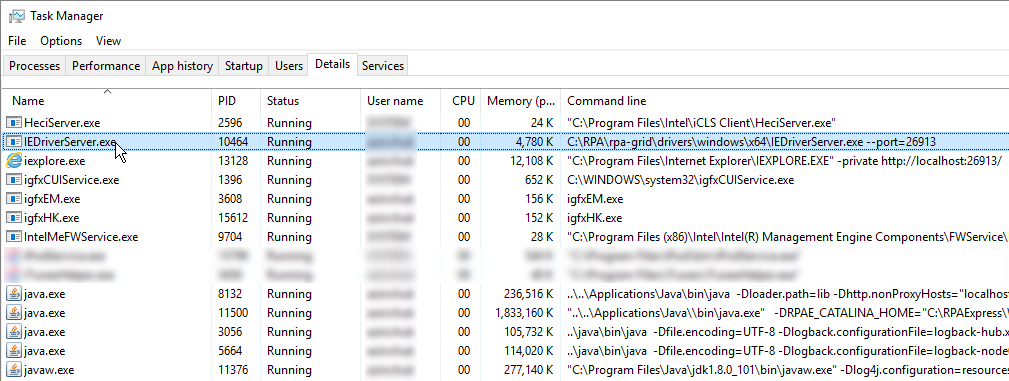
- Open Task Manager on the RPA server (Node).
- End all
IEDriverServer.exeprocess(es) running.
How RPA Hub and RPA Manager (also known as Selenograph, RPA Grid Router) are different?
RPA Manager (Grid Router) is designed to distribute requests across multiple Hubs.
Why does nginx.config on RPA Hub contain IP of RPA Manager?
That is an additional security measure. Nginx on an RPA Hub accepts requests from RPA Manager only.
Is there status agent for monitoring system health? Can it restart RPA Node if it is not responding?
It can be done in Platform Monitor > Control Panel > Bot Manager > Actions.
What do options in nodeX.json mean?
| Option | Description |
|---|---|
-host | <IP> <hostname>: usually, it is not needed and determined automatically. For an exotic configuration, a network with VPN specifying the host might be necessary. |
-port | <XXXX>: the port the remote Node or Hub listens to; defaults to 4444. |
-cleanupCycle | <XXXX> in ms; how often a proxy checks for timed out thread. |
-timeout | <XXXX>: the timeout in seconds before the Hub automatically ends a test that hasn't had any activity in the last X seconds. The browser will be released for another test to use; typically, this takes care of the client crashes. |
-browserTimeout | The timeout in seconds a browser can hang. |
-hub | <http://localhost:4444/grid/register>: the URL used to post a registration request; this option takes precedence over the -hubHost and -hubPort options. |
-hubHost | <IP> <hostname>: the host address of the Hub where the registration request should be sent; defaults to localhost. The -hub option takes precedence over this option. |
-hubPort | <XXXX>: the port listens to the Hub where the registration request should be sent; defaults to 4444. The -hub option takes precedence over this option. |
-proxy | The class used to represent the Node; defaults to org.openqa.grid.selenium.proxy.DefaultRemoteProxy. |
-maxSession | The maximum number of tests that can run at the same time on the Node, independently of the browser used. |
-registerCycle | In ms; how often the Node retries to register itself; allows to restart the Hub without having to restart the Nodes. |
-nodePolling | In ms; the interval between live checks of the Node; how often the Hub checks if the Node is still alive. |
-unregisterIfStillDownAfter | In ms; if the Node remains down for more than unregisterIfStillDownAfter millisec, it disappears from the Hub. Defaults to 1 min. |
-downPollingLimit | The Node is marked as down after downPollingLimit alive checks. |
-nodeStatusCheckTimeout | In ms; the connection and socket timeout used for the Node alive check. |
What do all options in hub.json mean exactly?
| Option | Description |
|---|---|
-host | <IP> <hostname>: usually not needed and determined automatically. For an exotic configuration, a network with VPN specifying the host might be necessary. |
-port | <XXXX>: the port the remote Node or Hub listens to; defaults to 4444. |
-throwOnCapabilityNotPresent | <true> or <false>: defaults to true. If true, the hub rejects test requests right away, provided no proxy is currently registered that can host that capability. Set it to false to have the request queued until a node supporting the capability is added to the grid. |
-newSessionWaitTimeout | <XXXX>: defaults to no timeout (-1); the time in ms after which a new test waiting for a Node to become available times out. When that happens, the test throws an exception before starting a browser. |
-capabilityMatcher | The class implementing the CapabilityMatcher interface; defaults to org.openqa.grid.internal.utils.DefaultCapabilityMatcher. Specify the logic the Hub will follow to define if a request can be assigned to a Node. Change this class if you want to have a matching process. Use a regular expression instead of an exact match for the version of the browser for the instance. All the Nodes of a grid instance will use the same matcher defined by the registry. |
-prioritizer | The class implementing the Prioritizer interface; defaults to null (no priority = FIFO). Specify a custom prioritizer if you need the grid to process the tests from the CI, or the IE tests first for the instance . |
-servlets | <com.mycompany.MyServlet,com.mycompany.MyServlet2> to register a new servlet on the Hub or Node. The servlet is accessible via the path: /grid/admin/MyServlet /grid/admin/MyServlet2. |
-grid1Yml | The YML file based on the grid1 format. |
-hubConfig | The JSON file based on the grid2 format that defines the Hub properties. |
-browserTimeout | In seconds; the timeout in seconds a browser can hang. |
How to prevent locking screen on Windows machine?
You need to set Local Security Policy.
- Go to Security Settings > Local Policies > Security Options > Interactive logon.
- Set Machine inactivity limit to 0 instead of the default 900 seconds.
How to find the RPA Manager version?
Log in to the Application server via SSH.
Navigate to
${INSTALL_DIR}/apps/rpa_manager/conf/.Open
wrapper.confand check the following parameter:wrapper.app.parameter.7=/opt/workfusion/apps/rpa_manager/rpa-manager-server-X.Y.Z.war
How to find RPA Node or Hub version?
- Log in to Windows Server with RPA Hub.
- Open
$RPA_DIR\\selenium(defaults toC:\\RPA\\selenium). - Check the version of
rpa-desktop-x.y.z.jar–x.y.zis the version of RPA Hub or Node.
How to avoid remote machine or bot from autolock?
With reference to an execution failure due to an autolock of a remote machine as confirmed with the IT security team, the autolock policy cannot be disabled permanently for the bot machines.
Disable screen lock via Windows registry.
Use a VB script simulating keyboard activity. There is a pretty simple script that works as is and can be used as a startup item in Windows.
Dim objResult

Set objShell = WScript.CreateObject("WScript.Shell")

Do While True
  objResult = objShell.sendkeys("{NUMLOCK}{NUMLOCK}")
  Wscript.Sleep (6000)
Loop
How to export MongoDB Node metrics for performance analysis?
Connect to MongoDB.
Execute the following command, replacing the
host/port/username/password/outattributes with actual values:mongoexport --host local-qa.ccs .com --port 27016 --username user --password "pass" --db selenograph --collection 'nodes-metrics' --type=csv --out /opt/workfusion/node-metrics.csv --fields nodeId,hubId,hubSgHash,waitTime,executeTime,totalTime,failed,date,name,sessionId,type,blockImages,closeOnCompletion,startInPrivate,hostName,contextPath,runName,runUuid,taskNameThe same query with the
date-fromfilter:mongoexport --host local2-qa15.crowdcomputingsystems.com --port 27016 --query '{"date" : {"$gte" : { "$date" : "2018-12-03T01:00:00.000Z"} }}' --db selenograph --collection nodes-metrics --type=csv --out D:\node-metrics.csv --fields nodeId,hubId,hubSgHash,waitTime,executeTime,totalTime,failed,date,name,sessionId,type,blockImages,closeOnCompletion,startInPrivate,hostName,contextPath,runName,runUuid,taskName
How to hide sensitive data from logs?
Node logs can store sensitive data (for instance, entered keys, such as passwords).
To hide sensitive data, do as follows:
Log in to the RPA Windows server.
Download the archive with two external JAR files.
Extract the JAR files from the archive and put them in
INSTALL_DIR/rpa-grid/dependency.Navigate to
INSTALL_DIR/rpa-grid.Modify the
logback-node.xmlfile.Modify all
logback-nodeXfiles, depending on the running nodes. For instance, if only node0 and node1 are running on this server, modifylogback-node0.xmlandlogback-node1.xml.Add the following code to both appenders (FILE, STDOUT):
      <filter class="ch.qos.logback.core.filter.EvaluatorFilter">
            <evaluator class="ch.qos.logback.classic.boolex.JaninoEventEvaluator">
                <expression>return message.contains("[send keys");</expression>
            </evaluator>
            <onMatch>DENY</onMatch>
        </filter>
The current example will eliminate all
SendKeysactions from the log files:<expression>return message.contains("[send keys");</expression>.The final result is as follows:
<configuration scan="true" scanPeriod="30 seconds" packagingData="true" debug="true">

    <property name="LOG_DIR" value="../logs"/>
    <property name="LOG_FILE_NAME" value="rpa-node1"/>

    <appender name="FILE" class="ch.qos.logback.core.rolling.RollingFileAppender">

        <rollingPolicy class="ch.qos.logback.core.rolling.TimeBasedRollingPolicy">
            <!-- rollover daily -->
            <fileNamePattern>${LOG_DIR}/${LOG_FILE_NAME}-%d{yyyy-MM-dd}.%i.log</fileNamePattern>
            <timeBasedFileNamingAndTriggeringPolicy class="ch.qos.logback.core.rolling.SizeAndTimeBasedFNATP">
                <!-- or whenever the file size reaches 100MB -->
                <maxFileSize>100MB</maxFileSize>
            </timeBasedFileNamingAndTriggeringPolicy>

            <!-- keep 30 days' worth of history -->
            <!--<maxHistory>30</maxHistory>-->
        </rollingPolicy>

        <filter class="ch.qos.logback.core.filter.EvaluatorFilter">
            <evaluator class="ch.qos.logback.classic.boolex.JaninoEventEvaluator">
                <expression>return message.contains("[send keys");</expression>
            </evaluator>
            <onMatch>DENY</onMatch>
        </filter>

        <encoder>
            <charset>UTF-8</charset>
            <pattern>%date{ISO8601} %-5level [%thread] %class.%M[:%L] - %msg%n</pattern>
        </encoder>
    </appender>

    <!--ch.qos.logback.core.ConsoleAppender.ConsoleAppender-->
    <appender name="STDOUT" class="com.workfusion.common.utils.AnsiConsoleAppender">
        <filter class="ch.qos.logback.classic.filter.ThresholdFilter">
            <level>INFO</level>
        </filter>

        <filter class="ch.qos.logback.core.filter.EvaluatorFilter">
            <evaluator class="ch.qos.logback.classic.boolex.JaninoEventEvaluator">
                <expression>return message.contains("[send keys");</expression>
            </evaluator>
            <onMatch>DENY</onMatch>
        </filter>

        <encoder class="ch.qos.logback.classic.encoder.PatternLayoutEncoder">
            <charset>utf-8</charset>
            <pattern>%boldGreen(%d{HH:mm:ss.SSS}) %highlight(%-5level) %boldMagenta([%thread]) %boldCyan(%class{40}.%M[:%L]) - %msg%n</pattern>
        </encoder>
    </appender>

    <logger name="org.openqa.jetty" level="INFO"/>
    <logger name="org.eclipse.jetty" level="INFO"/>
    <logger name="org.seleniumhq.jetty9" level="INFO"/>
    <logger name="org.apache.http" level="INFO"/>

    <!-- Enable the secure mod for a customer's data -->
    <logger name="ResultConfig" level="INFO"/>
    <!-- Disable the secure mod for a customer's data
    <logger name="ResultConfig" level="DEBUG"/> -->

    <!--<logger name="chapters.configuration.Foo" additivity="false">
        <appender-ref ref="FILE" />
    </logger>-->

    <root level="DEBUG">
        <appender-ref ref="STDOUT"/>
        <appender-ref ref="FILE"/>
    </root>

    <!--<contextListener class="ch.qos.logback.classic.jul.LevelChangePropagator">
            <resetJUL>true</resetJUL>
        </contextListener>-->


</configuration>
After you modified the
logback-nodefiles, restart Nodes.
Architecture and task distribution
How to check that all bots are alive?
Option 1:
Use Platform Monitor to check component statuses and incidents:
- http://instance.workfusion.com:10101/_agent/components
- http://instance.workfusion.com:10101/_agent/incidents
Option 2:
Health check REST API to get a JSON structure containing health of Hubs and Nodes.
How to check that all RPA Nodes are free?
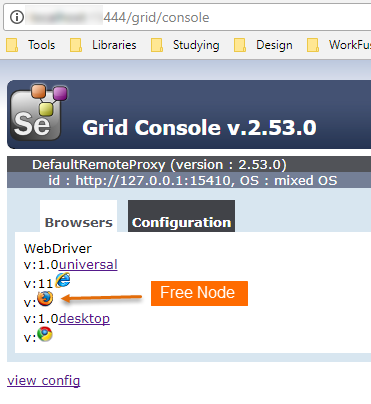
Open the RPA Grid console in your browser.
{hub_host}:{hub_port}/grid/consoleMake sure that all Nodes are free: there are no transparent icons
1 Busy Node All Nodes are free 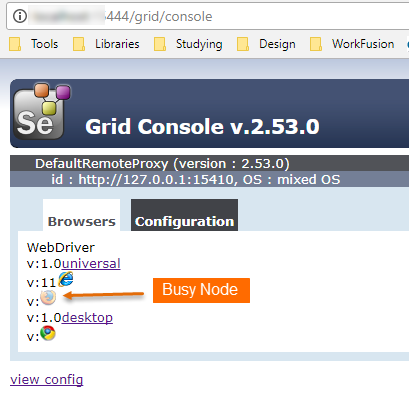
How to configure RPA Manager quota?
Question: Why do you need a login and a password for a quota on RPA Manager?
Answer: A login is needed to separate quotas for different users. For the username transfer, the basic authentication mechanism is used, so the password is also needed.
Question: Who uses these username and password? Where are they stored?
Answer: These usernames and passwords are used in Control Tower and stored in Control Tower properties files. For more information, see RPA Manager | Quota Configuration.
############################################################################################################################################
#RPA Grid Router
############################################################################################################################################
selenium.server.protocol=http
selenium.server.host=127.0.0.1
selenium.server.port=5555
selenium.server.file=/wd/hub
selenium.server.context=
selenium.server.quota.user=user
selenium.server.quota.hash=password
Question: What is the recommendation for storing and managing a custom quota and password?
Answer: A custom quota and password are stored in the properties file. For more information, see RPA Manager | User Configuration.
This username is not used for security, so its value can be stored in the properties file.
Question: Do you still need to change passwords from time to time?
Answer: This username is not used for security, so there is no need to change the password.
Question: Do Nodes check the server certificate? Or anyone with the access to Nginx? Can the port send requests to a bot?
Answer: Nodes connect to a Hub under Nginx only. Nodes are not available outside the server. Communication via RPA Manager and Nginx on a Hub should be configured to use two-way SSL authentication.
Can RPA Hub and Node be deployed on different machines? Is it possible to set up secure connection between them?
For the moment, it is not supported.
Can you develop functionality to enable secure communication between RPA Hub and Node?
It is possible to develop such functionality. However, the configuration will be more complicated. We recommend using RPA Grid Router that coordinates multiple RPA grids (RPA Hub and Node deployed on the same machine).
What deployment architecture do you recommend?
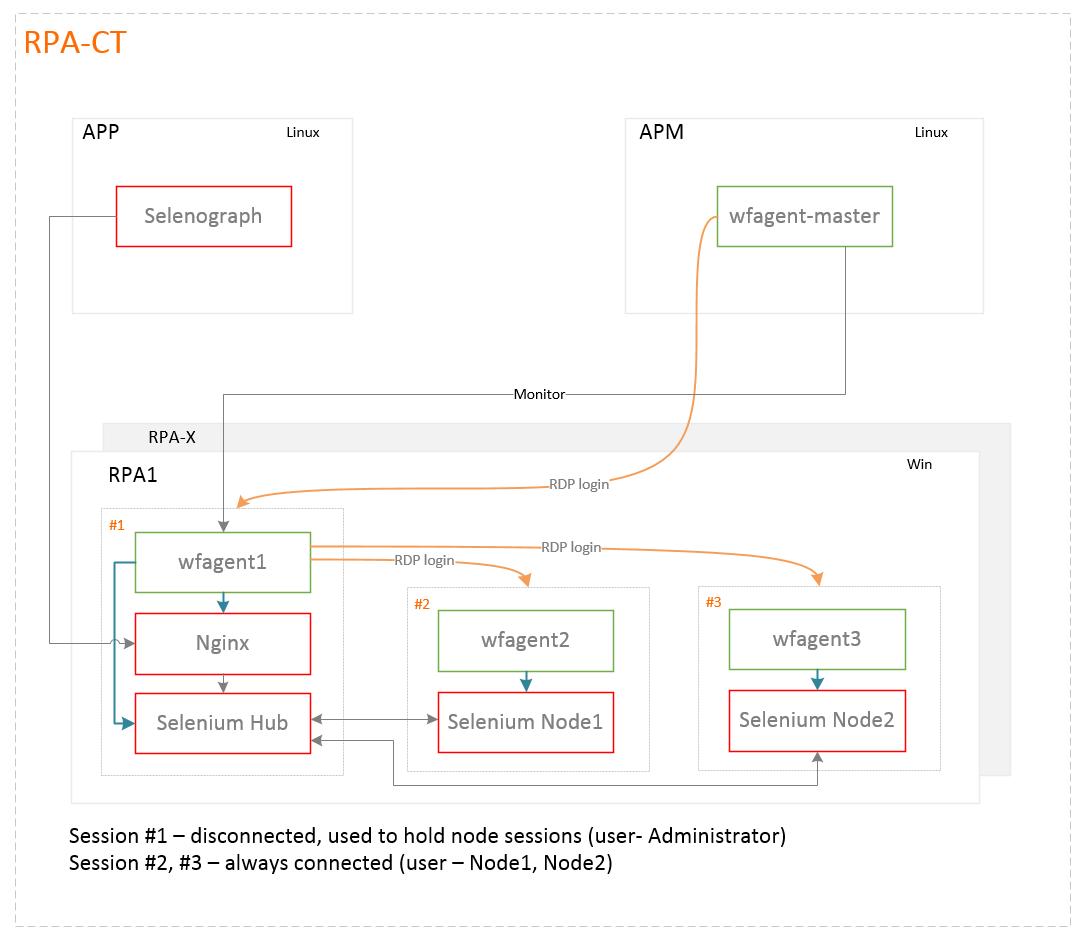
What is maximum number of Nodes per Hub?
It is recommended to use 5 Nodes per Hub maximum.
What is maximum number of Nodes that RPA Manager can handle?
RPA Manager can handle up to 20 Hubs (100 Nodes). You can have more than 100 Nodes in case your RPA servers have enough resources.
Can one deploy RPA Manager in Windows environment?
It is possible but not needed in most cases since RPA Manager can be deployed on the same Linux box as the Control Tower application.
What happens if you have nine nodes, and Bot Config is set to ten threads in pool?
Nine threads are distributed over nine nodes, while the tenth thread goes to the first free Node. On the Hub, it will be in the queue, waiting until the Node is free (by default, it waits for five minutes). Afterwards, if there are no free Nodes, an exception is thrown and the record goes for a retry.
How to check that request queue exists on Hub?
Go to the Hub machine and open the following link in your browser: http://127.0.0.1:4444/grid/console/.
At the bottom, below the list of Nodes, a list of queued requests is displayed.
How to check distribution of sessions for each Node?
Connect to the database.
mongo mongodb://local-qa.ccs.com:27017  -u username -p password
use selenograph
The query that shows the number of sessions handled by each Node after a certain date:
db['nodes-metrics'].aggregate(
    [
        {
            $match: {"date": {$gte: ISODate("2017-11-22T11:00:00.000Z")}}
        },
        {
            $group: {
                _id: {nodeId: '$nodeId', hubId: '$hubId'},
                count: {$sum: 1}
            }
        }
    ]
);
Implementation
How to run long-running tasks (needed time is more than five minutes)?
Set up a custom timeout for this task:
driver.manage().timeouts().setScriptTimeout(TIMEOUT, TimeUnit.SECONDS);
How to use proxy in bot tasks?
Try the following sample:
          <capability name="ie.usePerProcessProxy" value="true"/>

            <!--capability name="proxy" value="{proxyType=DIRECT}"/-->

            <!-- Choose the right proxy option for your needs. -->

            <capability name="proxy">
                <script return="proxyValue"><![CDATA[
                   proxyValue = new org.openqa.selenium.Proxy().setAutodetect(true);
                ]]></script>
            </capability>

            <capability name="proxy">
                <script return="proxyValue"><![CDATA[
                   proxyValue = new org.openqa.selenium.Proxy().setProxyType(org.openqa.selenium.Proxy.ProxyType.SYSTEM);
                ]]></script>
            </capability>

            <capability name="proxy">
                <script return="proxyValue"><![CDATA[
                    proxyValue = new org.openqa.selenium.Proxy().setProxyAutoconfigUrl("proxyAutoconfigUrl");
                ]]></script>
            </capability>

            <capability name="proxy">
                <script return="proxyValue"><![CDATA[
                    proxyValue = new org.openqa.selenium.Proxy().setHttpProxy("httpProxy");
                    proxyValue.setSocksUsername("userName").setSocksPassword("password");
                ]]></script>
            </capability>
For more information, see the article.
How to get currently logged-in username for node?
To get any system variables from a Node, use the executeScript command. Below, find a sample code how to get logged in as a user on a Node.
<robotics-flow>
    <robot name="driver" driver="desktop" close-on-completion="true">
        <script><![CDATA[
            def nodeUsername = executeGroovyScript('return System.getenv("USERNAME")');
            log.warn(nodeUsername);
        ]]></script>
    </robot>
</robotics-flow>
How to get value from AutoIt script in RPA?
Read the value from the AutoIt script.
Sample code
<config xmlns="http://web-harvest.sourceforge.net/schema/1.0/config" scriptlang="groovy">
<var-def name="autoit_script">
<![CDATA[
$a = 'test text';
ClipPut($a);
]]>
</var-def>
<var-def name="get_text_from_node">
<![CDATA[
import java.awt.Toolkit;
import java.awt.datatransfer.Clipboard;
import java.awt.datatransfer.DataFlavor;
return Toolkit.getDefaultToolkit().getSystemClipboard().getData(DataFlavor.stringFlavor);
]]>
</var-def>
<robotics-flow>
<robot driver="desktop" name="abc" maximize-on-startup="false" close-on-completion="true">
<script></script>
</robot>
</robotics-flow>
<export include-original-data="true"/>
</config>
How to disable Java Security Warning popup in Windows 8, 8.1, 10?
There has been released a Java update with security features included. While these security features protect your Windows 10, 8, or 8.1, you might find this update quite stressful and annoying as you might get various popup messages or alerts asking for permissions to run or block programs, processes, or web pages.
This protection is highly recommended, especially for the entry level or regular Windows 10, 8, and 8.1 users. In this way, you can safely install or run programs or navigate through various online platforms. In case you are an advanced user and you are tired of the same Security Warning popup alerts each time you want to perform a new action on your computer, consider disabling this built-in Java feature.
To disable the Java Security Warning popup in Windows 10, 8, or 8.1, do as follows:
- Open Java Settings within Control Panel.
- Select the Advanced tab.
- In the list of options, select and expand the Security one.
- Under Security, click Mixed Code and check the Disable verification box.
- Expand the Miscellaneous option and enable the Display mixed content box.
Restart your computer and check if the problem persists. If this is the case, temporarily disable your antivirus software. Sometimes, antivirus tools can block Java deployment, and disabling your security solution can help you fix it.
If the issue persists, try the following scenario:
- Run a SFC scan.
- Launch a new Command Prompt window.
- Type in
sfc /scannowand run the command. - Wait until the scanning process completes and restart your computer.
How to spy SAP application elements using AutoIT?
- Use this tool to locate the object metadata.
- Include the AutoIT lib script into your RPA project in the
RPA/autoit/Includefolder. For the script details, refer to the article. - For testing the AutoIT script, there is a tool coming as a part of the RPA package allowing you to run and debug the AutoIT script (
RPA/autoit/SciTe/SCiTE.exe).
How to pass argument object in executeScript?
In case you need to pass the value into one executeScript output object to another executeScript script, for instance:
Map res = desktopDriver.executeScript(getFileDetails.toString(), "GROOVY");
desktopDriver.executeScript(getFileCount.toString(), "GROOVY");
See the resolution below:
Map res = desktopDriver.executeScript(getFileDetails.toString(), "GROOVY");
String getFileCount = " YOUR SCRIPT, WHERE YOU CAN USE res";
desktopDriver.executeScript(getFileCount.toString(), "GROOVY");
How to work with Japanese characters?
It is recommended to use the UTF-16 encoding in all your Bot Configs and duplicate it in all places where you work with Japanese characters (and if you post information, too).
input = URLEncoder.encode(input,"UTF-16");
...
HttpPost post = new HttpPost(url);
post.setHeader("Accept-Charset", "UTF-16");
AND
<?xml version="1.0" encoding="UTF-16"?>
<config charset="UTF-16">
...
</config>
Is there any way to stop closing of window or browser when session gets deleted?
ie.usePerProcessProxy is a capability for IE only, and it means using proxy settings per process. For more information, refer to the link.
Proxy is a capability for all browsers, and it should be inside the selenium or robot tag.