
RPA troubleshooting
General
Browser is not able to perform navigation (error communicating with the remote browser)
Expand to learn more
Symptoms
The browser fails to perform click operations with the "Browser is unreachable" or "Browser died" error messages. When attempting to restart Nginx, Hub, and Node, the same problem occurs.
Resolution
The issue is resolved by modifying the java.policy file.
grant codeBase "file:/d:/RPA/selenium/dependency/rpa-jvmagent.jar" {
permission java.security.AllPermission;
};

grant codeBase "file:/d:/RPA/rpa-grid/dependency/rpa-jvmagent.jar" {
permission java.security.AllPermission;
};
sun.security.validator.ValidatorException: PKIX path building failed while accessing Nexus repository
Expand to learn more
Symptoms
The "sun.security.validator.ValidatorException: PKIX path building failed" error is shown in the Business Process event log on Control Tower.
Resolution
Go to the RPA server.
Open the Nexus URL in the browser.
Download the certificate from your browser.
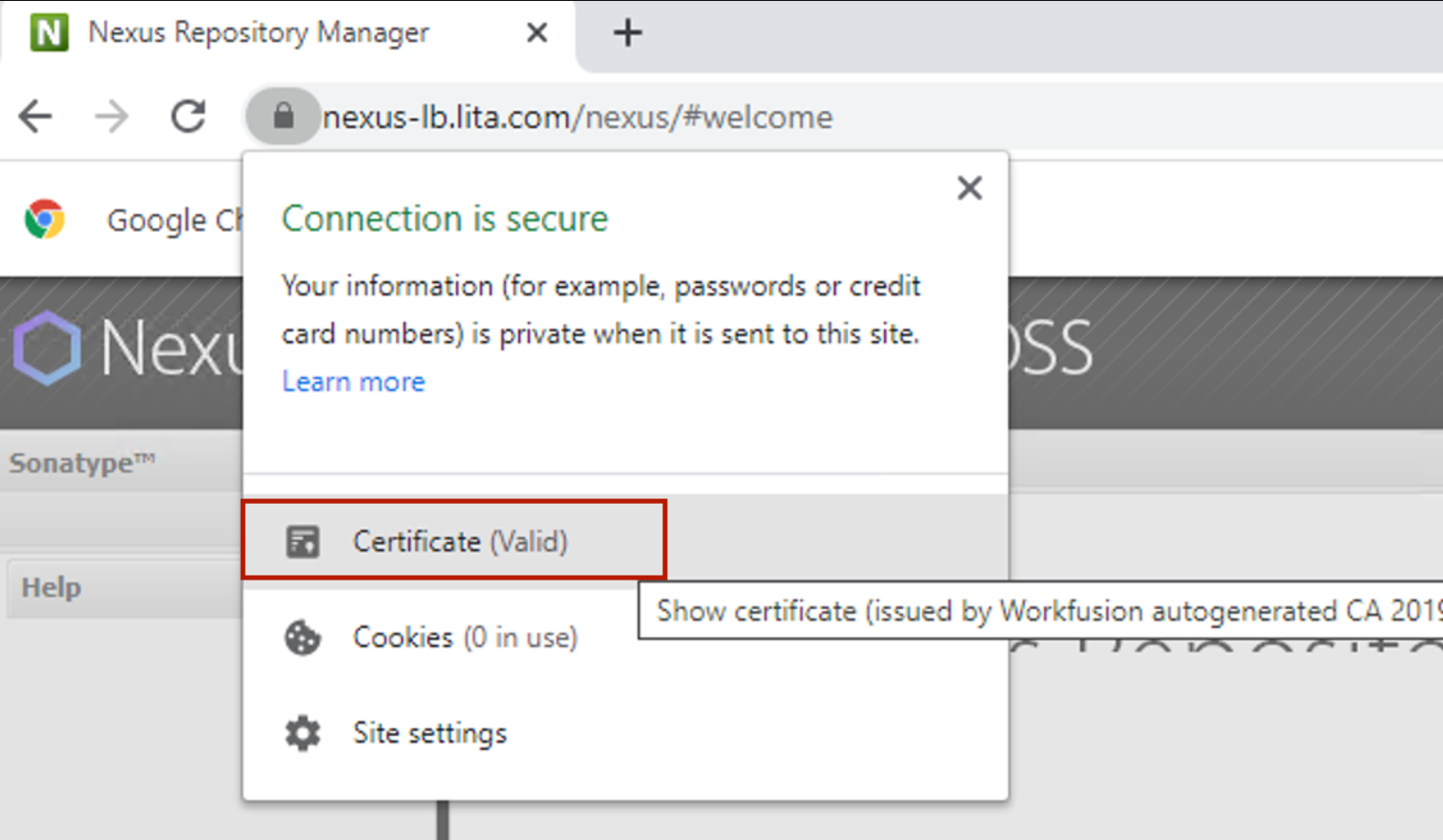
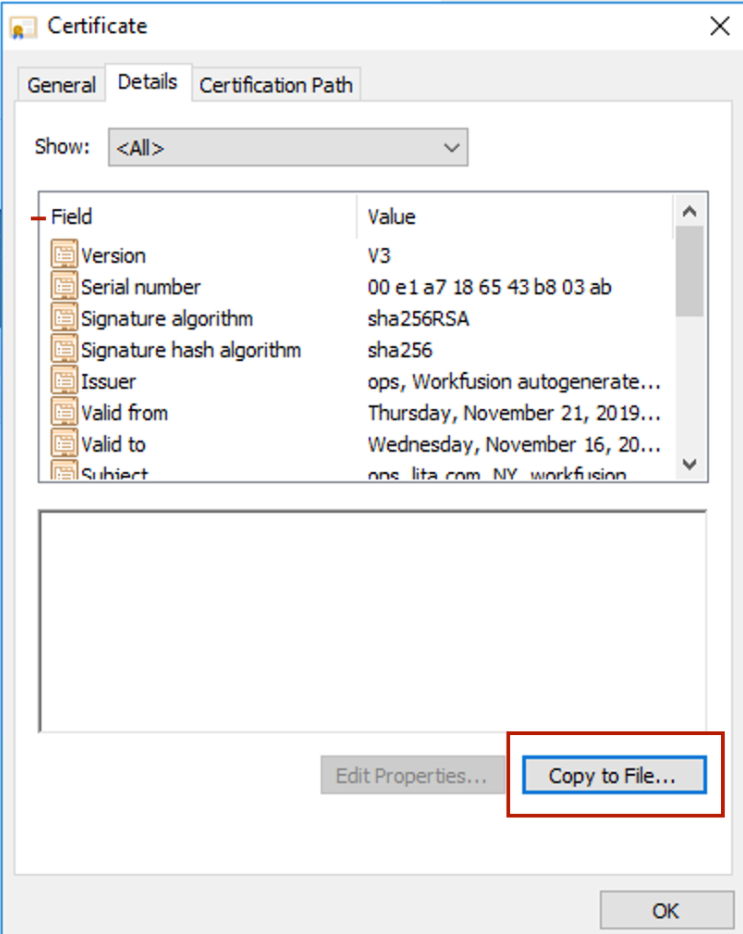
Follow the steps from the menu. Choose the CER file and save it to some location.
Open Command Prompt under Administrator and execute the following command:
keytool.exe -keystore C:\RPA\java\jre\lib\security\cacerts -importcert -alias nexus -file C:\RPA\java\bin\nexus.cer
Remember to specify the correct path to the downloaded certificate and the cacerts truststore. Use the "changeit" password when it prompts you to enter the keystore password.
Business Process started in Control Tower but nothing happens
Expand to learn more
Symptoms
A Business Process started in Control Tower, but nothing happened: no process execution, nothing in the Hub and Node logs, and so on.
Resolution
The console of Hub or Nodes can be in the edit mode. For example, some console text is selected. Hover over this console and press Enter for the console to go into the standard mode and Business Process execution to continue.
Business Process exception "org.openqa.selenium.WebDriverException: Connection refused"
Expand to learn more
Symptoms
The Business Process exception is as follows:
"org.openqa.selenium.WebDriverException: Connection refused: connect Command duration or timeout: 3.69 seconds Build info: version: '2.53.0', revision: '35ae25b1534ae328c771e0856c93e187490ca824', time: '2016-03-15 10:43:46' System info: host: 'VMINWORKFUSIONUATAPP', ip: '10.9.12.120', os.name: 'Linux', os.arch: 'amd64', os.version: '3.8.13-16.2.1.el6uek.x86_64', java.version: '1.8.0_101' Driver info: com.freedomoss.crowdcontrol.webharvest.selenium.wrapper.RemoteDriverWrapper Capabilities [{capabilityNodeId=http://127.0.0.1:5000, extra.block.images=false, extra.start.in.private=true, extra.executor.id=
{run.name=Lms flow v1.5 - Flow 2 Latest code, task.name=LMS_Checker/SubAndNewHLMaker, context.path=/workfusion, host.name=http://wfappuat.axisb.com, run.author.email=amit_kumar@infosys.com, run.uuid=5c38cad8-5f87-4838-bad5-d9c70ec2eb73, run.author.fullname=Amit Kumar}, webdriver.remote.sessionid=8d067c1a-274c-4cda-8543-121ef70ea633, browserName=autoit, takesScreen..."
Resolution
The issue is resolved by setting "cleanUpCycle":600000 the same as the timeout value in the node.json file.
java.lang.IllegalStateException: RPA Router/Nub should return Node ID, but returned message "Form too large"
Expand to learn more
Symptoms
Caused by java.lang.IllegalStateException: RPA Router/Nub should return Node ID, but returned: {"message":"Form too large: 223085 \u003e 200000"}.
Resolution
Change jetty.xml like in the example in ./grid-router in the rpa-manager folder:
<!DOCTYPE Configure PUBLIC "-//Jetty//Configure//EN" "http://www.eclipse.org/jetty/configure_9_0.dtd">

<Configure id="Server" class="org.eclipse.jetty.server.Server">
    <Call name="setAttribute">
        <Arg>org.eclipse.jetty.server.Request.maxFormContentSize</Arg>
        <Arg>-1</Arg>
    </Call>
    <Call name="addBean">
        <Arg>
            <New class="org.eclipse.jetty.security.HashLoginService">
                <Set name="name">Selenium Grid Router</Set>
                <Set name="config">./grid-router/users.properties</Set>
                <Set name="hotReload">true</Set>
            </New>
        </Arg>
    </Call>
</Configure>
In the example below, maxFormContentSize is unlimited. Also, you can change the size from -1 to 1,000,000. The default size is 200,000.
    <Call name="setAttribute">
        <Arg>org.eclipse.jetty.server.Request.maxFormContentSize</Arg>
        <Arg>-1</Arg>
    </Call>
RPA bot process fails
Expand to learn more
Symptoms
The RPA Bot process is unable to execute on bot units.
Resolution
The resolution is a logoff session of Bot Master and Bot Units. You can log off in two ways.
Via logout through GUI
- In the bottom left corner, click the Start button.
- In the top left corner of the start menu, click your username.
- Click Sign Out.
Via Task Manager
- On your keyboard, press
Ctrl + Shift + Escto launch Task Manager. - Once Task Manager is up, go to the Users tab.
- Select the account you want to log off among the available user accounts.
- Go to the bottom of the window and click the Sign Out button. You can also right-click the user and select Sign Off from the context menu.
- You see a warning that says that the user’s unsaved data will be lost. Click Sign Out User if you are sure that the other user will not lose any data.
Once you log off the session, re-log into the Bot Master user session and start the Task scheduler of Bot Master and Bot Units respectively.
Hypothesis
Multiple Bot Master BAT files are started without closing the already running Bot Master process.
Error when launching Studio: Bot Task Launch Server Initializer. No worker application found
Expand to learn more
Symptoms
An internal error occurred during the launch of WorkFusion Studio: "Bot Task Launch Server Initializer". No worker application found "C:\RPA_10.1.0.3\worker\worker-app.jar".
Solution
- Check if you installed RPA and if the
C:/RPAfolder exists. - Check that WorkFusion Studio is linked to an existing location of the RPA folder.
- Go to the WorkFusion Studio installation directory and open the configuration folder.
- Open
config.iniand add theworkfusion.rpa.package.pathproperty that defines the path to the RPA package, for example:workfusion.rpa.package.path=c:/RPA. Mind that the default path to the RPA package isC:/RPA. If you select another directory, make sure to specify it correctly.
RPA Server on Windows 10 Nginx not starting
Expand to learn more
Symptoms
Nginx does not start while trying to run the start_nginx.bat file.
Resolution
Possible causes are as follows:
- You do not have enough privileges.
- An unknown issue with the BAT file occurred.
- 80 and (or) 443 ports are allocated to another software.
To fix the issue, do as follows:
Run
nginx.exe.Check that 80 and 443 ports are not allocated to any other software.
netstat -an|moreStop the software and rerun
nginx.exe. If the program is unknown, apply the following commands:taskkill /IM "program_name" /F #to kill software by name taskkill /F /PID program_pid #to kill software by PIDUpdate the
nginx.conffile and change the allocated port to any other.server { listen 80; #change here 80 to any other suitable port ...
RPA Server on Windows 10 Bad Gateway error
Expand to learn more
Symptoms
RPA Server fails to load when trying to access https://<domain>/grid/console, resulting in the HTTP 400 error code.
Resolution
To disable IPv6 on the server, do as follows:
- Once Network and Sharing Center are open, select Change adapter settings.
- Right-click the network adapter you want to change and select Properties.
- Uncheck the box for Internet Protocol Version (TCP/IPv6) and click OK.
RPA bots cannot save data to a network mapped drive
Expand to learn more
Hypothesis
Possible causes are as follows:
- The mapped network drive is not accessible.
- The mapped network drive was mounted in the read-only mode.
- The mapped network drive's permissions for the specified user are set incorrectly.
Symptoms
The drive is not accessible.
Resolution
Investigate the issue with the network drive on a network level. If the drive cannot be used anymore, attach a new network-mapped drive.
Symptoms
The drive was mounted in the read-only mode.
Resolution
Remount the network drive.
Symptoms
Drive's permissions for the specified user are set incorrectly.
Resolution
Review access permissions for the user with the issue for the network drive and make necessary changes.
Data cannot be retrieved due to an unexpected error resolved with timeout configuration in RPA Manipulation Framework - v10.2.2
Expand to learn more
Symptoms
In the case of the native DLL execution stack due to internal dependencies problems, the worker freezes until it is manually restarted.
Resolution
As a resolution, the following features are implemented in IA Cloud Enterprise v10.2.2:
- A single thread execution method is provided with a timeout. If the timeout for a call is exceeded,
NativeTimeoutExceptionis thrown. - The Robotics plugin is modified. If the exception occurs, the worker is shut down and automatically restarted by the Bot Agent.
- Due to the nature of the exception, you can hardly reproduce it using any test application. Thus, the additional functionality is added on the native side of the RPA Manipulation Framework to simulate the issue and test the solution.
- The default timeout value is five minutes to avoid false alarms. You can change it using the
rpa.timeouts.mfwproperty in thebot-agent-unit.ymlfile. Set the value in milliseconds.
Troubleshooting when failing without Windows active session
Should be NPE if Node does not have active Windows session (getRect)
<?xml version="1.0" encoding="UTF-8"?>
<config xmlns="http://web-harvest.sourceforge.net/schema/1.0/config" scriptlang="groovy">

    <robotics-flow>
        <robot driver="desktop" name="desktopDriver">
            <script><![CDATA[
            import org.openqa.selenium.*;

            def jarPath = downloadFileOnAgent("http://rpa-grid.s3.amazonaws.com/integration-test/applets/demo/jfc/SwingSet2/SwingSet2.jar");
            open("..\\java\\bin\\java -jar ${jarPath}");
            WebDriver.Window window = window('[CLASS:SunAwtFrame;TITLE:SwingSet2]');
            Point point = window.getPosition();
            Dimension dimension = window.getSize();
            log.warn('#####--- : ' + point.x + ' : ' + point.y);
            log.warn('#####--- : ' + dimension.width + ' : ' + dimension.height);
            WebElement jtableDemo = driver().findElement(By.xpath("//component[@class='JToggleButton'][14]"));
            Rectangle butRect = jtableDemo.getRect();
            log.warn('#####--- : ' + butRect.x + ' : ' + butRect.y);
            log.warn('#####--- : ' + butRect.width + ' : ' + butRect.height);
            jtableDemo.click();
            sleep(1000);
            driver().findElement(By.cssSelector("[TOOLTIP:JTable demo]")).click();
            sleep(1000);
            driver().findElement(By.cssSelector("[TEXT:JTable Printing]")).sendKeys("^a");
            sleep(1000);
            driver().findElement(By.cssSelector("[TEXT:JTable Printing]")).sendKeys("^c");
            sleep(1000);
            String clipboard = clipboardText();
            log.warn('#####--- : ' + clipboard);
            Thread.sleep(5000);
        ]]></script>
        </robot>
    </robotics-flow>
    <export include-original-data="true"></export>

</config>
Should be NPE if Node does not have active Windows session (click)
<?xml version="1.0" encoding="UTF-8"?>
<config xmlns="http://web-harvest.sourceforge.net/schema/1.0/config" scriptlang="groovy">

    <robotics-flow>
        <robot driver="desktop" name="desktopDriver">
            <script><![CDATA[
            import org.openqa.selenium.*;

            def jarPath = downloadFileOnAgent("http://rpa-grid.s3.amazonaws.com/integration-test/applets/demo/jfc/SwingSet2/SwingSet2.jar");
            open("..\\java\\bin\\java -jar ${jarPath}");
            WebDriver.Window window = window('[CLASS:SunAwtFrame;TITLE:SwingSet2]');
            Point point = window.getPosition();
            Dimension dimension = window.getSize();
            log.warn('#####--- : ' + point.x + ' : ' + point.y);
            log.warn('#####--- : ' + dimension.width + ' : ' + dimension.height);
            WebElement jtableDemo = driver().findElement(By.xpath("//component[@class='JToggleButton'][14]"));
            jtableDemo.click();
            sleep(1000);
            driver().findElement(By.cssSelector("[TOOLTIP:JTable demo]")).click();
            sleep(1000);
            driver().findElement(By.cssSelector("[TEXT:JTable Printing]")).sendKeys("^a");
            sleep(1000);
            driver().findElement(By.cssSelector("[TEXT:JTable Printing]")).sendKeys("^c");
            sleep(1000);
            String clipboard = clipboardText();
            log.warn('#####--- : ' + clipboard);
            Thread.sleep(5000);
        ]]></script>
        </robot>
    </robotics-flow>
    <export include-original-data="true"></export>

</config>
Screenshot should be black screen if Node does not have active Windows session
<?xml version="1.0" encoding="UTF-8"?>
<config xmlns="http://web-harvest.sourceforge.net/schema/1.0/config" scriptlang="groovy">
<var-def name="javaScreenshot"><![CDATA[
import java.awt.Robot;
import java.awt.Rectangle;
import java.awt.image.BufferedImage;
import javax.imageio.ImageIO;
import java.io.File;
import org.openqa.selenium.Point;
import org.openqa.selenium.Dimension;
Point pos = driver.manage().window().getPosition();
Dimension dim = driver.manage().window().getSize();
BufferedImage screenFullImage = new Robot().createScreenCapture(new Rectangle(pos.x, pos.y, dim.width, dim.height));
File file = new File("screenshot_"+System.currentTimeMillis()+".png");
ImageIO.write(screenFullImage, "png", file);
return file.getAbsolutePath();
]]></var-def>
<robotics-flow>
<robot driver="desktop">
<script></script>
</robot>
</robotics-flow>
<export include-original-data="true"></export>
</config>
Screenshot should be black screen if Node does not have active Windows session
<?xml version="1.0" encoding="UTF-8"?>
<config xmlns="http://web-harvest.sourceforge.net/schema/1.0/config" scriptlang="groovy">
<var-def name="sikuliScreenshotAllScreen"><![CDATA[
import org.sikuli.script.*;
Screen screen = new Screen();
return screen.capture(screen.getBounds()).getFile();
]]></var-def>
<robotics-flow>
<robot driver="desktop">
<script></script>
</robot>
</robotics-flow>
<export include-original-data="true"></export>
</config>
Should be No Such Element Exception if Node does not have active Windows session
<?xml version="1.0" encoding="UTF-8"?>
<config xmlns="http://web-harvest.sourceforge.net/schema/1.0/config" scriptlang="groovy">

    <robotics-flow>
        <robot driver="internet explorer" close-on-completion="true" start-in-private="false" name="driver">
            <script><![CDATA[

            import org.openqa.selenium.NoSuchElementException;
            import org.openqa.selenium.ElementNotVisibleException;
        import java.util.concurrent.TimeUnit;
        import org.openqa.selenium.support.ui.*;
        import org.openqa.selenium.*;

            RemoteWebDriver ieDriver = driver.getWrappedObject();
            ieDriver.get("http://google.com");
            ieDriver.findElement(By.name("q")).click();
            ieDriver.findElement(By.name("q")).sendKeys("booom");
            ieDriver.findElement(By.name("btnK")).click();
            Wait wait = new FluentWait(ieDriver).withTimeout(30, TimeUnit.SECONDS).pollingEvery(5, TimeUnit.SECONDS).ignoring(NoSuchElementException.class);
            WebElement res = wait.until(ExpectedConditions.visibilityOfElementLocated(By.id("resultStats")));
            String text = res.getText();
            log.warn(text);
            sleep(4000);
         ]]></script>
        </robot>
    </robotics-flow>

    <export include-original-data="true"></export>

</config>
Installation
Xvfb process doesn't start if installation is performed in a non-standard directory—v10.1.2
Expand to learn more
Symptoms
When using a directory different from /opt/workfusion while installing on Linux servers, the xvfb process is not started. As a result, a Bot Master user cannot establish an RDP session to RPA server.
Resolution
In the
INSTALL_DIR/bot-managerdirectory, create theapplication-master.ymlfile with the following content:server.address: 127.0.0.1 server.contextPath: "/bot-manager" environment: pm_hostname: ${server.address} pm_port: ${server.port} agent.credentials: pmauthform agent.ns: bot_manager bot.manager.app.path: ${bot.manager.app.path:/opt/workfusion/bot-manager} xvfb.display.number: ${xvfb.display.number:13759} rpa_grid_router_host: ${server.address} rpa_grid_router_port: ${server.port} agent.master.port: 443 modules.auth: credentials: - { id: pmauthform, user: "${security.user.name}", password: "${security.user.password}", type: form, url: "http://${environment.pm_hostname}:${environment.pm_port}/login" } modules.bot_manager: groups: - { id: bot_manager, name: "Bot Manager" } alerts: - id: agent.rpa.%host% schedule: 20 triggers: - { metric: agent.check.rpa.%host%.size, eq: 0 } items: rpa.hubs checks: - id: agent.check.rpa.%host% type: custom schedule: 20 evaluate: - { id: agent.validate, parameters: { ns: "%host%:%environment.agent.master.port%" }, metric_name: "size" } items: rpa.hubs - id: agent.cleanup type: custom schedule: 20 evaluate: - id: agent.alive processes: - id: xvfb expression: "%bot.manager.app.path%/usr/bin/Xvfb :%xvfb.display.number% -ac -screen 0, 640x480x16 -nolisten tcp" commands: - id: agent.%host%.start type: command expression: "%bot.manager.app.path%/usr/bin/rdp.sh ${rpa.%host%.rdp.master.credentials/key} ${rpa.%host%.rdp.master.credentials/value} %host%" schedule: 60 alerts: [ agent.rpa.%host% ] items: rpa.hubsRestart the Bot Manager service.
wfmanager restart bot-manager
RPA Bot Master Agent application did not start automatically on VDI - v10.1.4
Expand to learn more
Symptoms
RPA Bot Master Agent does not start automatically (triggered by schedulers).
Resolution
- Add write credentials to Secrets Vault.

- Restart the RPA machine.
RPA Bot Master Agent application did not start automatically on Unit logon—v10.1.x
Expand to learn more
Symptoms
RPA Bot Master Agent application did not start automatically on Unit logon.
Resolution
Check if Windows Scheduler exists.
- Open Command Prompt as the Admin user and run control schedtasks.
- Check if the bot-agent-<Unit_User> scheduler exists.
Create a scheduler for each absent unit by running the following command:
SchTasks /Create /SC onlogon /TN "bot-agent-<UNIT_USER>" /TR "C:\RPA\bot-agent\bin\bot-agent-unit<UNIT_NUMBER>.bat" /RU <UNIT_USER> /IT /FRestart the RPA machine.
Domain name instead of machinename for a local user during RPA VDI installation—v10.1.1.5
Expand to learn more
Symptoms
In the case of VDI installation, local users are displayed as domain\username instead of machinename\username, and the installation crashes.
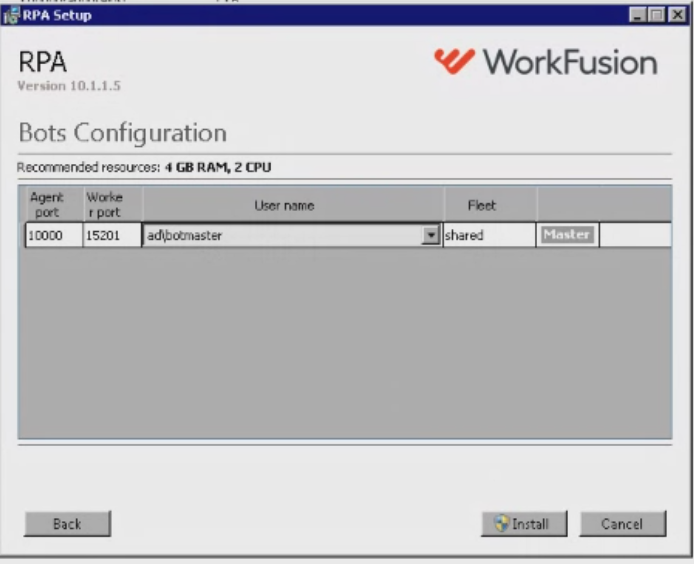
Resolution
- Go to the
RPAInstallerfolder and openrpa_config.ini. - Specify your RPA users in
rpa_config.ini:
- For local users:
machinename\username - For domain users:
domain\username
Run the installer in the silent mode:
rpainstaller.exe /s /norestart CONFIG=rpa_config.ini
Performance and task distribution
How to repair RPA processing issues
Expand to learn more
Symptoms
- Hub, Node, and (or) Nginx were disabled or restarted in a wrong sequence.
"SeleniumFlowPlugin executePlugin exception: [nodeId=d33df2ce1bac7bcd246f8cf6cdb5a3c6http://127.0.0.1:5000] org.webharvest.exception.ScriptException:
Config line 5: script block
org.openqa.selenium.WebDriverException: <html>
<head><title>502 Bad Gateway</title></head>
<body bgcolor=""white"">
<center><h1>502 Bad Gateway</h1></center>
<hr><center>nginx</center>
"SeleniumFlowPlugin executePlugin exception: [nodeId=d33df2ce1bac7bcd246f8cf6cdb5a3c6http://127.0.0.1:5000]
org.openqa.selenium.WebDriverException: Cannot create session on any available node (WARNING: The server did not provide any stacktrace information)
- No available Nodes were found by Hub during the Bot Task execution. For example, all available Nodes were busy during the timeout period.
SeleniumFlowPlugin executePlugin exception: [nodeId=d33df2ce1bac7bcd246f8cf6cdb5a3c6http://127.0.0.1:5000]
org.openqa.selenium.WebDriverException: Error forwarding the new session Request timed out waiting for a node to become available.
Command duration or timeout: 120.14 seconds
Resolution
Follow the steps described in View Business Process event logs.
RPA Hub and Node are running on different machines (no secure communication between them). Node cannot connect to Hub
Expand to learn more
Check that the Hub machine and the Node machine can see each other:
- You can open the http://{HUB_HOST}:{HUB_PORT}/grid/console page from the Node machine.
- You can open telnet {NODE_HOST} {NODE_PORT}.
If it does not work, check:
- Nginx is off on both Hub and Node.
- {HUB_PORT} and {NODE_PORT} are opened on the Hub machine and the Node machine accordingly.
On the Hub machine:
Check the
hostvalue inhub.json:"host": null,Check that the Hub port is opened in Firewall.
Check that Nginx is not running.
On the Node machine:
Check that, in
hub.json, the host points to the remote machine:"host": remote_host, "port": 4444,
Internet Explorer Driver does not work properly (hangs or crashes)
Expand to learn more
Symptoms
Internet Explorer Driver does not work properly (hangs or crashes).
Resolution
For more profound investigation of the problem with the IEDriver crash, you can switch on a log for IEDriver:
Modify the
startNodeX.batfile by adding two system properties to the start Java process.%_javaPath%\bin\java -Xms256m -Xmx256m -Dwebdriver.ie.driver.logfile="..\logs\iedriver.log" -Dwebdriver.ie.driver.loglevel=TRACE -Dfile.encoding=UTF-8 %_logConfig%......Restart the Node machine.
Mind that the log file contains logs of the latest Internet Explorer execution.
Bot entering data in IE browser is slow and delayed
Expand to learn more
Symptoms
Internet Explorer is slow during normal operations, mainly when you enter a value in a text box. The delay can be from 3 to 15 seconds, and the bot often fails.
The IELog.txt IE driver log file shows the following error message:
HookProcessor.cpp(185) [Windows Error 126]: Unable to set windows hook
Resolution
The problem occurs due to the 64-bit Internet Explorer Driver trying to access IE content tabs running in the 32-bit mode. Switch to the 32-bit driver to resolve the problem:
Add the following lines to the
start-node0.batfile.-Dwebdriver.ie.driver=C:\RPA\rpa-grid\drivers\windows\x32\IEDriverServer.exe -Dwebdriver.ie.bin="C:\Program Files (x86)\Internet Explorer\iexplore.exe"In Internet Explorer settings, go to Tools > Internet Options > Advanced and clear 64-bit Enhanced Protection Mode.
Start the Node.
Change the value from 0 to 1 for the
HKEY_CURRENT_USER\Software\Microsoft\Internet Explorer\Main\TabProcGrowthregistry. Refer to the Microsoft Support article for more information.Apply the changes for all other Nodes.
To verify the solution, start C:\Program Files (x86)\Internet Explorer\iexplore.exe. Task Manager should show two iexplorer.exe processes running, one of them being 32-bit.

If Internet Explorer is still slow, recheck the registry value. If it is reset back to 0, apply the following changes:
In the
RPA\registryfolder, open theuser-settings.regfile and look for the following entry:[HKEY_CURRENT_USER\Software\Microsoft\Internet Explorer\Main] ; Internet Option - Advanced "TabProcGrowth"="0" ; TabProcGrowth=0 : tabs and frames run within the same processChange the
TabProcGrowthvalue to 1.
IE crashes on Win7 VM
Expand to learn more
Symptoms
When running an RPA script that uses IE across several virtual machines, Internet Explorer crashes occasionally and locks up the Node running on the virtual machine. Ideally, the Node should close the window and try again, but this is not happening.
Resolution
Open the Node and close the window popup manually. You can also do as follows:
Add the following registry key entries. Error Dialog will not be displayed in this case, the process will crash silently, and crash reports will be written to the filesystem:
Windows Registry Editor Version 5.00
[HKEY_LOCAL_MACHINE\SOFTWARE\Microsoft\Windows\Windows Error Reporting]
"ForceQueue"=dword:00000001
[HKEY_LOCAL_MACHINE\SOFTWARE\Microsoft\Windows\Windows Error Reporting\Consent]
"DefaultConsent"=dword:00000001
[HKEY_LOCAL_MACHINE\SOFTWARE\Microsoft\Windows\Windows Error Reporting]
"DontShowUI"=dword:00000001
Restart all Nodes.
After that, if the Internet Explorer Driver crashes, it does not open a popup window, and your RPA script retries automatically without manual actions.
x64 Internet Explorer slowness
Expand to learn more
Symptoms
When Internet Explorer is slow, you can see a problem with Hooks in iedriver.log:
HookProcessor.cpp(185) [Windows Error 126]: Unable to set windows hook
Resolution
It is recommended to switch to x32 Internet Explorer running with x32 Internet Explorer Driver.
Create a backup of
start-node0.bat.Add this line to the new
start-node0.batfile:-Dwebdriver.ie.bin="C:\Program Files (x86)\Internet Explorer\iexplore.exe"Uncheck 64-bit Enhanced Protection Mode in Internet Explorer.
Restart the machine and start
wfagent-hub-node-nordp.bat.Make a registry backup.
Change the registry according to this article.
Run a Business Process test.
Error log contains org.springframework.web.client.HttpClientErrorException
Expand to learn more
Symptoms
The error log contains "org.springframework.web.client.HttpClientErrorException: 401 Unauthorizedorg.webharvest.exception.PluginException: SeleniumFlowPlugin".
Resolution
Check the load balancer configuration. It may be redirected to another Control Tower instance.
RoboticsFlowPlugin executePlugin nodeId "null" exception
Expand to learn more
Symptoms
The instance uses capabilities and quotas strategies at the same time, but for some reason, Business Processes with capabilities get the following exceptions:
- "RoboticsFlowPlugin executePlugin nodeId null".
- "Caused by: java.net. UnknownHostException: "some user name": unknown error".
Resolution
To solve the issue, check the following Control Tower files:
/opt/workfusion/apps/rpa_manager/grid-router/users.properties/opt/workfusion/apps/webapps/tomcat/conf/workfusion.properties
- Delete all special symbols like #,$,&,%\ from the password and hash values of an RPA capability user. It should contain only letters and numbers.
- Restart RPA Manager.
- Restart Tomcat.
Control Tower cannot find and acquire Node for working
Expand to learn more
Symptoms
The following exception is observed in Control Tower during a Business Process run:
RoboticsFlowPlugin executePlugin nodeId 'null' exception: org.webharvest.exception.PluginException: RoboticsFlowPlugin executePlugin nodeId 'null' exception:
    at com.freedomoss.crowdcontrol.webharvest.plugin.selenium.RoboticsFlowPlugin.executePlugin(RoboticsFlowPlugin.java:106)
    at com.freedomoss.crowdcontrol.webharvest.plugin.selenium.SeleniumFlowPlugin.executePlugin(SeleniumFlowPlugin.java:38)
    at org.webharvest.runtime.processors.WebHarvestPlugin.execute(WebHarvestPlugin.java:125)
    at org.webharvest.runtime.processors.BaseProcessor.run(BaseProcessor.java:127)
    at org.webharvest.runtime.Scraper.execute(Scraper.java:169)
    at org.webharvest.runtime.Scraper.execute(Scraper.java:182)
    at com.freedomoss.crowdcontrol.webharvest.executor.LocalWebharvestTaskExecutor.executeWebHarvestTask(LocalWebharvestTaskExecutor.java:180)
    at com.freedomoss.crowdcontrol.webharvest.executor.LocalWebharvestTaskExecutor.executeWebHarvestTask(LocalWebharvestTaskExecutor.java:93)
    at com.workfusion.service.machine.SubmissionsPortionExecutionThread.processSubmission(SubmissionsPortionExecutionThread.java:343)
    at com.workfusion.service.machine.SubmissionsPortionExecutionThread.wrapIntoAllocationLogger(SubmissionsPortionExecutionThread.java:324)
    at com.workfusion.service.machine.SubmissionsPortionExecutionThread.lambda$wrapIntoNamedThread$39(SubmissionsPortionExecutionThread.java:312)
    at com.workfusion.utils.thread.NamedThreadTemplate.executeWithNamedThread(NamedThreadTemplate.java:10)
    at com.workfusion.service.machine.SubmissionsPortionExecutionThread.wrapIntoNamedThread(SubmissionsPortionExecutionThread.java:312)
    at com.workfusion.service.machine.SubmissionsPortionExecutionThread.processSubmissions(SubmissionsPortionExecutionThread.java:276)
    at com.workfusion.service.machine.SubmissionsPortionExecutionThread.run(SubmissionsPortionExecutionThread.java:180)
    at java.util.concurrent.ThreadPoolExecutor.runWorker(ThreadPoolExecutor.java:1142)
    at java.util.concurrent.ThreadPoolExecutor$Worker.run(ThreadPoolExecutor.java:617)
    at java.lang.Thread.run(Thread.java:745)
Caused by: java.lang.IllegalStateException: RPA Router/Nub should return node id, but returned: {message:"Can't find and acquire Node for working."}
    at com.freedomoss.crowdcontrol.webharvest.plugin.selenium.SeleniumClient.findAndLockNode(SeleniumClient.java:116)
    at com.freedomoss.crowdcontrol.webharvest.plugin.selenium.RoboticsFlowPlugin.executePlugin(RoboticsFlowPlugin.java:94)
    ... 17 more
Resolution
Go to the Application server and check
grid-router log. You may see the following error:=============== Full stacktrace follows: =============== Caused by javax.net.ssl.SSLException: Unrecognized SSL message, plaintext connection?: Unrecognized SSL message, plaintext connection?The Hub console looks as follows:

In the case of the non-SSL configuration, go to
application.propertieson the Application server, changeuse.sslto false (trueby default), and restart RPA Manager.
RPA processes perform slowly
Expand to learn more
- Check the user configuration on RPA Manager. Mind that different users should not share Hubs. Thus, one Hub should belong to one user.
- Check the bot configuration source. It should have the number of threads equal to that of the Nodes used by this user.
- One bot source should be used by one RPA Manager user and in all bot configs where this user is included.
- If RPA processes are still slow, review logs based on the RPA performance analysis guidelines.
Error forwarding the new session Request timed out waiting for a Node to become available
Expand to learn more
Symptoms
The \nCommand duration or timeout: 300.02 seconds. The exception in the Hub log is as follows:
org.webharvest.exception.PluginException: SeleniumFlowPlugin executePlugin exception: org.openqa.selenium.WebDriverException: Error forwarding the new session Request timed out waiting for a node to become available.\nCommand duration or timeout: 300.02 seconds
Resolution
The exception occurs if the number of Bot Tasks exceeds the number of available RPA Nodes. Check running Bot Tasks. For that, create threads dump, calculate threads of Bot Tasks, and compare with available RPA Nodes.
Process silently crashes on Windows machine
Expand to learn more
Symptoms
Sometimes, a process (RPA Node, Platform Monitor, Nginx) may crash on a Windows machine, and it is hard to identify the reason.
Resolution
Enable a process monitor (requires Windows SDK or debugging tools). For more information, see this article.
Pay special attention to Enable Silent Exit Process Monitoring that activates the feature and tracks silent process exits in the application event log (Event ID: 3001).
BotUnit requests credentials in the RDP session—v10.x
Expand to learn more
Symptoms
When using Active Directory users for the RPA server, BotUnit users cannot establish an RDP session because of a login prompt. To trigger the problem, do as follows:
On the Application server, stop Bot Manager.
$ curl -kvL http://127.0.0.1:10509/api/v1/maintenance/enable
$ wfmanager stop bot-manager
Connect to the RPA server via RDP as a BotMaster user. The following login window appears:
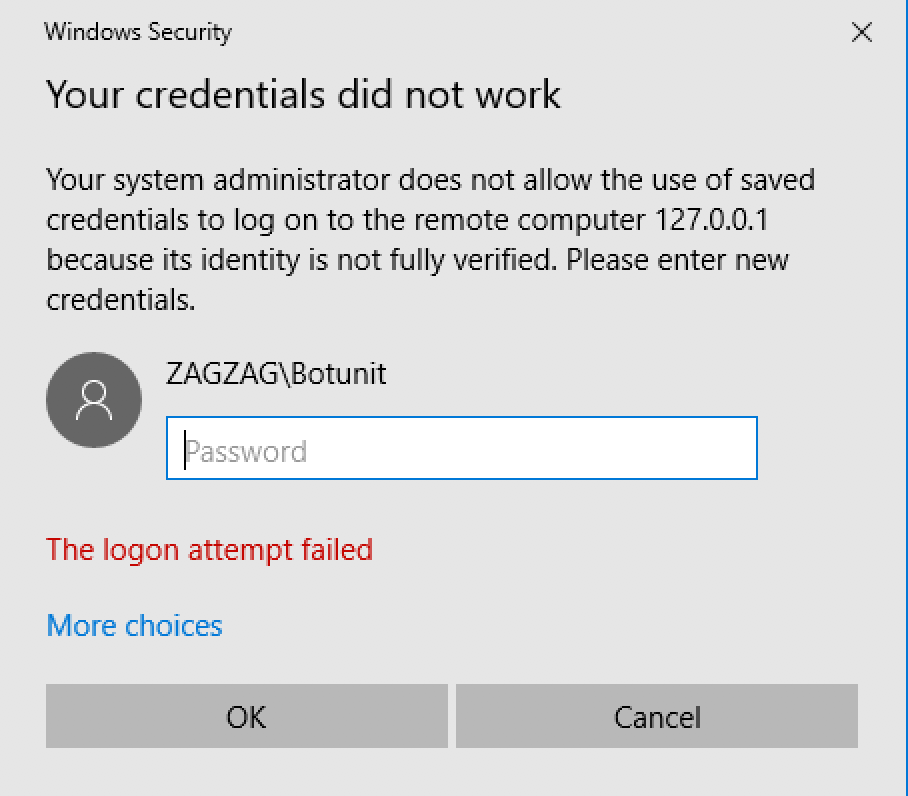
Resolution
On the RPA server, start the
gpedit.mscutility as Administrator.Go to Computer Configuration > Administrative Templates > System > Credentials Delegation.
In the list of policies, right-click Allow delegating saved credentials with NTLM-only server authentication. The window appears.
Select the Enabled checkbox.
Next to Add Servers to the list, click Show.
In the Show Contents window, add the following value:
TERMSRV/127.0.0.*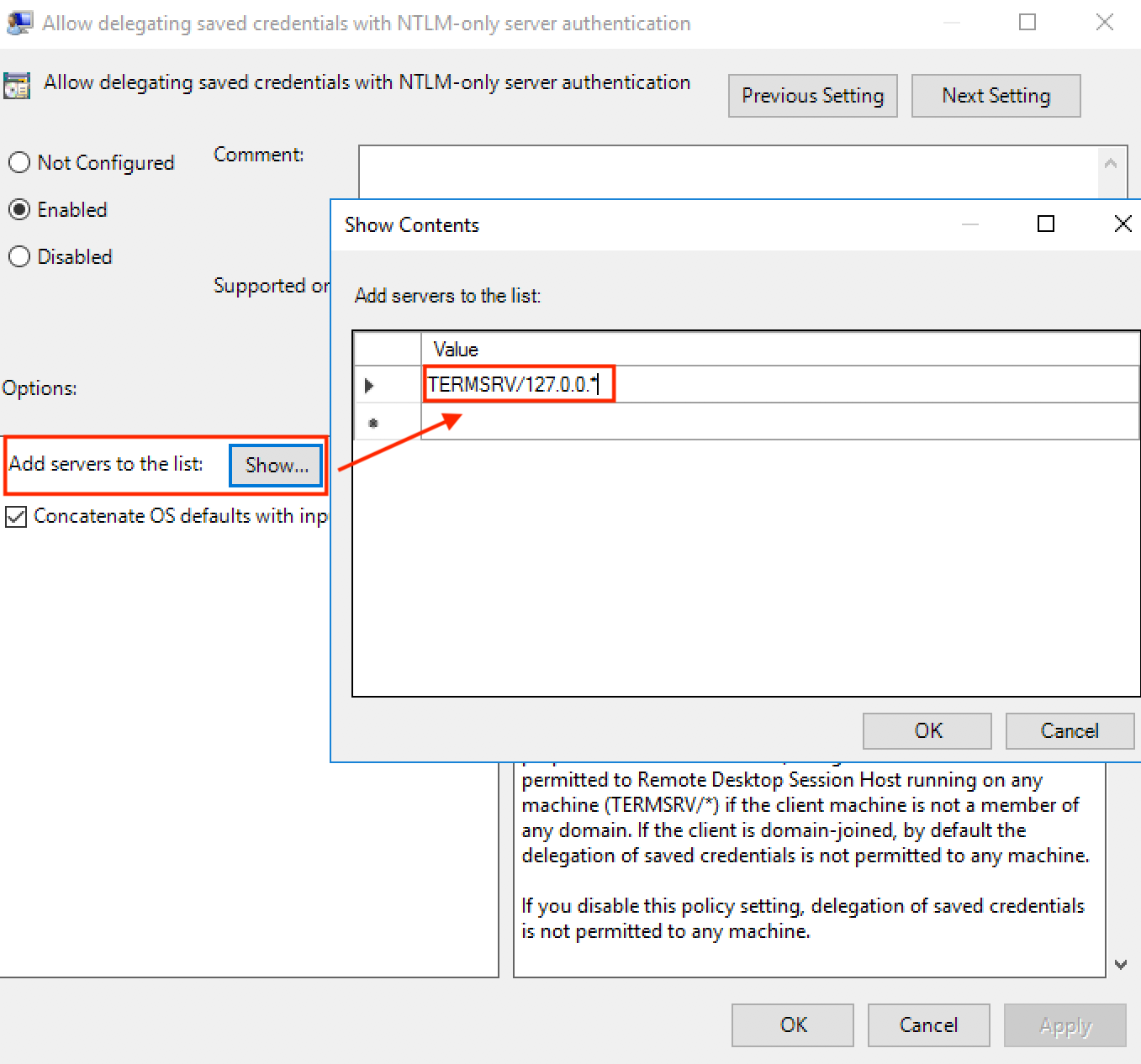
Click OK and then click Apply.
As Administrator, open a command-line tool, and run the following command:
gpupdate /forceOn the Application server, run the following command to start Bot Manager:
$ wfmanager start bot-manager
$ curl -kvL http://127.0.0.1:10509/api/v1/maintenance/disable
Command or Batch script do not run on Windows Server
Expand to learn more
Symptoms
You cannot get a CMD command file or a BAT batch file to work on the Windows Server 2012 RPA Node. The same code runs a file on the Windows 7 machine. The Win+R option does not help.
Resolution
Use:
ai = seleniumDriver.getWrappedObject();
ai.manage().set("typeOnScreen", "true");
ai.getKeyboard().sendKeys(org.openqa.selenium.Keys.chord(org.openqa.selenium.Keys.COMMAND, "r"));
or:
setOption("typeOnScreen", true);
sendKeys(Keys.chord(Keys.COMMAND, "r"));
Error with "Pop-up in Chrome - Error Loading Extension"
Expand to learn more
Symptoms
The error is usually the cause of a security policy applied to prevent Chrome from loading extensions when launched. A popup window contains the error message shown below.
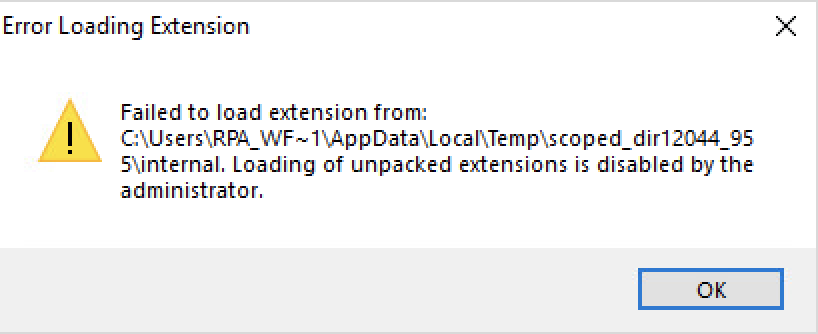
Resolution 1
The first approach is the quickest and easiest way—to delete the applied policy in the Windows registry.
You have custom policy settings for Chrome on the Node. To verify the police, browse to chrome://policy.
- To delete the policy, delete the following registry keys:
HKEY_LOCAL_MACHINE/SOFTWARE/Policies/GoogleHKEY_CURRENT_USER/Software/Policies/Google
- After deleting the registry keys, make sure that everything works correctly.
- Start Hub and Nodes as Administrator.
- Restart Hub and Nodes as a user without Administrator rights.
Resolution 2
There are times when the first approach is not an option due to the organization's security policy. You can apply a workaround at the BP level by adding the following code snippet to your BP steps. This prevents Chrome from loading the extension by default when the browser is launched:
<robot name="roboticsDriver" driver="${ROBOT_Driver}"
close-on-completion="true" start-in-private="false">
<capability name="chromeOptions">
<script return="options"></script>
</capability>
Start Internet Explorer Driver in private mode, but Internet Explorer is not opening
Expand to learn more
Symptoms
Internet Explorer does not start when you try using Internet Explorer Driver in the private mode.
Resolution
Check your Group Policy because it can be forbidden by the Group Policy on Windows.
Compatibility view setting gets removed
Expand to learn more
Symptoms
While executing the Business Process, the compatibility view setting from Internet Explorer gets removed automatically. Due to this, the URL does not work properly.
Resolution
Verify the Delete browser history on exit checkbox on IE. It should not be selected. Also, change your RPA script like this:
<selenium-flow>
<selenium browser="internet explorer" ...>
<capability name="ie.capabilityProcessorGridrouterSkip" value="true"/>
<script></script>
</selenium>
<selenium-flow>
Unable to interact with application using AutoIt
Expand to learn more
Symptoms
switchTo on AutoIt Driver cannot be used to navigate to the window. Usingwindow.getHandles() does not return any list of windows. Attempts to access the dialog like Alert``() are of no help, too.
                <!-- Java classes import -->
                <script><![CDATA[
                                import com.thoughtworks.selenium.*;
                                import com.thoughtworks.selenium.webdriven.WebDriverBackedSelenium;
                                import org.openqa.selenium.*;
                                import org.openqa.selenium.remote.RemoteWebDriver;
                                import org.openqa.selenium.interactions.Actions;
                                import org.openqa.selenium.Keys;
                                import org.openqa.selenium.WebElement;
                                import org.openqa.selenium.support.ui.*;
                                import java.util.concurrent.TimeUnit;
                ]]></script>

                <selenium-flow>
                                <capability name="SEARCH_ALL_WINDOWS">true</capability>
                                <capability name="percom" value="true" />
                                <selenium name="seleniumDriver" browser="autoit"
                                                close-on-completion="false">
                                                <script><![CDATA[
                                                                driver = seleniumDriver.getWrappedObject();
                                                                driver.manage().timeouts().implicitlyWait(10, TimeUnit.SECONDS);
                log.error("LOG 1");
                log.warn("LOG 2");
                                                                driver.get("C:\\Program Files\\BMO\\Customer Connect Drive Mapping\\CCDriveMap.bat");
                                                                Thread.sleep(60000);
                                                                log.error("LOG 3");
                                                                //driver.switchTo.window("Warning Dialog");
                                                                //driver.switchTo("[CLASS:WindowsForms10.Window.8.app.0.31b8b63_r28_ad1]");

                                                try{
                                                                Alert alert = driver.switchTo().alert();
                                                                driver.getKeyboard().sendKeys(new String[]{"{ENTER}"});
                                                } catch(Exception e){ log.error("LOG 4"); }
                                                                  for (String s : driver.getWindowHandles()) {
                                                                                try {
                                                                                                driver.switchTo().window(s);
                                                                                                Thread.sleep(1000);
                                                                                                log.error(driver.getTitle());
                                                                                                if ("title of Window ".equals(driver.getTitle())) {
                                                                                                                log.error("SUCCCESSS");break;
                                                                                                }} catch(Exception ex) {
                                                                                                log.error("failed to do the resize \n" + ex);
                                                                                }
                                                                }
                                                                driver.close();
                                                ]]></script>
                                </selenium>
                </selenium-flow>
                <!-- Export values -->
                <export include-original-data="false">
                </export>
 </config>
Resolution
Use the <capability name="SEARCH_ALL_WINDOWS" value="true"/> capability inside the selenium plugin to get handles of all the opened windows on the machine (not only opened by the robot). The code below returns the list of WindowHandles.
<?xml version="1.0" encoding="UTF-8"?>
<config xmlns="http://web-harvest.sourceforge.net/schema/1.0/config" scriptlang="groovy">
<selenium-flow>
<selenium name="seleniumDriver" browser="autoit" close-on-completion="true">
<capability name="SEARCH_ALL_WINDOWS" value="true"/>
<script></script>
</selenium>
</selenium-flow>
<export include-original-data="true"></export>
</config>
Unable to open Chrome using Selenium webdriver
Expand to learn more
Symptoms
A security patch is applied on the Windows PVCS server. Thus, Chrome cannot be opened. The message box contains the following text: "Loading of unpacking extension disabled by Administrator."
Resolution
A Selenium driver update is needed. The message indicates that the current user on the Windows machine has insufficient rights to deploy that extension. Chrome has an extension blacklist. Do as follows:
- Open Registry Editor.
- Search for the following keys:
HKEY_CURRENT_USER/Software/Policies/Google/Chrome/ExtensionInstallBlacklistHKEY_LOCAL_MACHINE/SOFTWARE/Policies/Google/Chrome/ExtensionInstallBlacklist
- If you find any of the keys, delete them.
Refer to the Chrome bug tracker for more information.
RoboticsFlowPlugin executePlugin exception
Expand to learn more
Symptoms
The robotics-flow plugin executePlugin exception: "Unsupported driver type: autoitorg.webharvest.exception.PluginException: RoboticsFlowPlugin executePlugin exception: Unsupported driver type: autoit".
Resolution
To resolve an issue, mind the following recommendations:
- If you use selenium-flow and selenium, apply
browser="autoit". - If you use robotics-flow and robot, apply
driver="desktop".
robotics-flow executePlugin exception: [nodeId=null] Broken pipe (Write failed) or Too large size in Selenium context for Node search
Expand to learn more
Symptoms
The excessive size in the Selenium context for the Node search means that if you use robotics-flow and robot in the loop, your bot context grows in the geometrical progression. As a result, you can get errors and exceptions.
Resolution
To avoid this situation, use an inner loop in the bot, or clean the bot context each time you finish work.
The sample code for clearing parent bot context is as follows:
sys.defiveVariable("selenium_parent_browser_capabilities", "");
The sample code scheme with the fix is as follows:
<config xmlns="http://web-harvest.sourceforge.net/schema/1.0/config" scriptlang="groovy">
<robotics-flow>
<capability name="SEARCH_ALL_WINDOWS" value="true"/>
<while condition="true" maxloops="3">
<robot driver="universal" start-in-private="true">
<script></script>
</robot>
<script></script>
</while>
</robotics-flow>
<export include-original-data="true"></export>
</config>
Cannot move screenshot (image file) from Application server to RPA Node
Expand to learn more
Symptoms
An RPA task requires to take a screenshot of browser and attach it in the same browser using the RPA Node. When you take a screenshot, it is automatically saved on the Application server. When trying to move the file to the RPA Node so it can be attached, the exception occurs on the server:
RoboticsFlowPlugin executePlugin exception: org.webharvest.exception.PluginException: org.webharvest.exception.ScriptException:
Config line 7: script block
org.openqa.selenium.WebDriverException: startup failed:
General error during class generation: Class file too large!

java.lang.RuntimeException: Class file too large!
at groovyjarjarasm.asm.ClassWriter.toByteArray(Unknown Source)
at org.codehaus.groovy.control.CompilationUnit$16.call(CompilationUnit.java:815)
at org.codehaus.groovy.control.CompilationUnit.applyToPrimaryClassNodes(CompilationUnit.java:1053)
at org.codehaus.groovy.control.CompilationUnit.doPhaseOperation(CompilationUnit.java:591)
at org.codehaus.groovy.control.CompilationUnit.processPhaseOperations(CompilationUnit.java:569)
at org.codehaus.groovy.control.CompilationUnit.compile(CompilationUnit.java:546)
at groovy.lang.GroovyClassLoader.doParseClass(GroovyClassLoader.java:298)
at groovy.lang.GroovyClassLoader.parseClass(GroovyClassLoader.java:26...org.webharvest.exception.PluginException: RoboticsFlowPlugin executePlugin exception: org.webharvest.exception.PluginException: org.webharvest.exception.ScriptException:
Config line 7: script block
org.openqa.selenium.WebDriverException: startup failed:
General error during class generation: Class file too large!
Resolution
Use the methods below from Simplified Robotics API:
sendToAgent(String)downloadTextFileFromAgent(String)
Mind that the file can be too big for transfer between the server and Nodes. Try using shared drives for the exchange of large files.
Getting exception while moving files through WorkFusion portal
Expand to learn more
Symptoms
An exception occurs while moving files of larger size (> 1-1.5 MB) through the WorkFusion portal.
Resolution
Try using NTLM authentication on the network drive. See the code below:
NtlmPasswordAuthentication destinationAuthentication = new NtlmPasswordAuthentication(domain, login, passw)
SmbFile smbFile = new SmbFile("smb:" + reportshare + filePath, destinationAuthentication);
BufferedReader reader = new BufferedReader(new InputStreamReader(new SmbFileInputStream(smbFile)));
ArrayList<String> inBuffer = new ArrayList<String>()
String lineReader = null;
while ((lineReader = reader.readLine()) != null) {
inBuffer.add(lineReader);
}
Send keys does not work with Oracle Forms Applet
Expand to learn more
Currently, Oracle Forms Applets are not fully supported. You can use the following workarounds to ensure stable executions of the send key manipulations:
- Do not use mouse clicks.
- Use keyboard actions for navigation, for example,
TAB,PAGEDOWN,ENTER, and more. - Use the
driver.getKeyboard().sendKeys()method instead ofelement.sendKeys().
jp2launcher.exe process remains after script execution
Expand to learn more
When the driver starts a Java web application, the javaws.exe initial process creates a jp2launcher.exe process detached from the parent. Close any spawned processes during script execution. The workaround is to run the kill command with the script execution functionality in the final clause in the machine config.
Use the following script:
executeGroovyScript('''
   String currentUser = System.getenv("USERNAME");
   Runtime.getRuntime().exec("taskkill /F /FI \\\"USERNAME eq ${currentUser}\\\" /IM jp2launcher.exe");
''');
javaws does not exist in RPA Java package in v10.1.6
Expand to learn more
OpenJDK Java Azul 8u262 does not contain Java Web Start (javaws.exe) by default as it exists in Oracle JDK used before v10.1.6. Azul provides open-source versions of Java Web Start. For more information, refer to Basic Facts about Zulu Enterprise.
To resolve the issue, download the IcedTea-Web archive and unzip it to the RPA Java folder.
RPA Manager
Unable to start RPA Manager
Expand to learn more
Check
grid-router.log:org.webharvest.exception.PluginException: SeleniumFlowPlugin executePlugin exception: Send SG/Hub response error (code): 503Check
selenograph.log:[pool-4-thread-1 ] WARN MongodbQuartzInitializer - Unable to start scheduler java.lang.IllegalStateException: state should be: open
If the following message is found, the problem is caused by special characters or hidden spaces in quota XML files or user.properties.
- Check all XML files for hidden characters and remove them. You can use the
listcommand in Vim editor. - If RPA Manager still cannot start, remove all tables from the selenograph collection in MongoDB.
Bot Manager cannot find available Nodes after force stop running BP with RPA steps
Expand to learn more
As a workaround, trigger RPA Manager API from the workfusion.properties file.
RPA-manager host + /grid/admin/WFServlet?action=unlockHostNodes&request_wfhost=YOUR_VALUE
request_wfhost = wf.application.host
RPA Manager major outage: MongoDB does not start after reboot
Expand to learn more
Symptoms
RPA Manager is in a major outage because MongoDB does not start after reboot.
Resolution
The total combined size of all data in operation, plus a small overhead, has to be less than 32 MB. Otherwise, MongoDB will not start after reboot.
RPA Manager writes a lot of information into the Mongo database in a binary format. The data is used for analytics only, so there is no need to keep it for more than one month.
To perform the MongoDB data purge, do as follows:
Download the
mongo_cleanup.jsscript.Update the file with a proper password and the optional
daysToDeletionparameter.Save it on the database host. The example uses the
toolsdirectory:/opt/workfusion/tools.Run it with the following syntax:
mongo --port 27016 /opt/workfusion/tools/mongo_cleanup.jsInclude the script to
crontabfor scheduled execution. Make sure to back up the data folder before the first run.
Drivers
AutoIt driver issue
Expand to learn more
Symptoms
The exception occurs after an incorrect RPA upgrade when the old version hasn't been deleted.
Config line 30: script block
org.webharvest.exception.PluginException: Failed to execute object-pool bodyorg.webharvest.exception.ScriptException:
Config line 30: script block
org.webharvest.exception.PluginException: Failed to execute object-pool body
at org.webharvest.runtime.scripting.GroovyScriptEngine.eval(GroovyScriptEngine.java:124)
at org.webharvest.runtime.processors.ScriptProcessor.execute(ScriptProcessor.java:74)
at org.webharvest.runtime.processors.BaseProcessor.run(BaseProcessor.java:127)
at org.webharvest.runtime.processors.BodyProcessor.execute(BodyProcessor.java:27)
at org.webharvest.runtime.processors.BaseProcessor.run(BaseProcessor.java:127)
at org.webharvest.runtime.processors.CaseProcessor.execute(CaseProcessor.java:77)
at org.webharvest.runtime.processors.BaseProcessor.run(BaseProcessor.java:127)
at org.webharvest.runtime.Scraper.execute(Scraper.java:169)
at com.freedomoss.crowdcontrol.webharvest.plugin.include.IncludeConfigPlugin.executePlugin(IncludeConfigPlugin.java:32)
at org.webharvest.runtime.processors.WebHarvestPlugin.execute(WebHarvestPlugin.java:125)
at org.webharvest.runtime.processors.BaseProcessor.run(BaseProcessor.java:127)
at org.webharvest.runtime.processors.BodyProcessor.execute(BodyProcessor.java:27)
at org.webharvest.runtime.processors.BaseProcessor.run(BaseProcessor.java:127)
at org.webharvest.runtime.processors.TryProcessor.execute(TryProcessor.java:86)
at org.webharvest.runtime.processors.BaseProcessor.run(BaseProcessor.java:127)
at org.webharvest.runtime.processors.BodyProcessor.execute(BodyProcessor.java:27)
at org.webharvest.runtime.processors.BaseProcessor.run(BaseProcessor.java:127)
at org.webharvest.runtime.processors.CaseProcessor.execute(CaseProcessor.java:77)
at org.webharvest.runtime.processors.BaseProcessor.run(BaseProcessor.java:127)
at org.webharvest.runtime.Scraper.execute(Scraper.java:169)
at org.webharvest.runtime.Scraper.execute(Scraper.java:182)
at com.freedomoss.crowdcontrol.webharvest.executor.LocalWebharvestTaskExecutor.executeWebHarvestTask(LocalWebharvestTaskExecutor.java:171)
at com.freedomoss.crowdcontrol.webharvest.executor.LocalWebharvestTaskExecutor.executeWebHarvestTask(LocalWebharvestTaskExecutor.java:94)
at com.freedomoss.crowdcontrol.webharvest.SubmissionsPortionExecutionThread.processSubmissions(SubmissionsPortionExecutionThread.java:186)
at com.freedomoss.crowdcontrol.webharvest.SubmissionsPortionExecutionThread.run(SubmissionsPortionExecutionThread.java:143)
at java.util.concurrent.ThreadPoolExecutor.runWorker(ThreadPoolExecutor.java:1142)
at java.util.concurrent.ThreadPoolExecutor$Worker.run(ThreadPoolExecutor.java:617)
at java.lang.Thread.run(Thread.java:745)
Caused by: org.webharvest.exception.PluginException: Failed to execute object-pool body
at com.freedomoss.crowdcontrol.webharvest.plugin.pool.ObjectPoolPlugin.executePlugin(ObjectPoolPlugin.java:111)
at org.webharvest.runtime.processors.WebHarvestPlugin.execute(WebHarvestPlugin.java:125)
at org.webharvest.runtime.processors.BaseProcessor.run(BaseProcessor.java:127)
at org.webharvest.runtime.processors.BodyProcessor.execute(BodyProcessor.java:27)
at org.webharvest.runtime.processors.BaseProcessor.run(BaseProcessor.java:127)
at org.webharvest.runtime.processors.TryProcessor.execute(TryProcessor.java:64)
... 14 more
Caused by: org.webharvest.exception.PluginException: SeleniumFlowPlugin executePlugin exception: [nodeId=9f27b73cd4e43178e1251b194f84cc9chttp://127.0.0.1:5016] org.openqa.selenium.WebDriverException: com/workfusion/autoit/driver/AutoItDriver
Command duration or timeout: 319 milliseconds
Build info: version: '2.53.0', revision: '35ae25b1534ae328c771e0856c93e187490ca824', time: '2016-03-15 10:43:46'
System info: host: 'sd-9eca-bdfc.nam.nsroot.net', ip: '153.40.212.141', os.name: 'Linux', os.arch: 'amd64', os.version: '2.6.32-642.13.1.el6.x86_64', java.version: '1.8.0_101'
Driver info: com.freedomoss.crowdcontrol.webharvest.selenium.wrapper.RemoteDriverWrapper
at com.freedomoss.crowdcontrol.webharvest.plugin.selenium.SeleniumFlowPlugin.executePlugin(SeleniumFlowPlugin.java:91)
at org.webharvest.runtime.processors.WebHarvestPlugin.execute(WebHarvestPlugin.java:125)
at org.webharvest.runtime.processors.BaseProcessor.run(BaseProcessor.java:127)
at org.webharvest.runtime.processors.BodyProcessor.execute(BodyProcessor.java:27)
at org.webharvest.runtime.processors.BaseProcessor.run(BaseProcessor.java:127)
at com.freedomoss.crowdcontrol.webharvest.plugin.pool.ObjectPoolPlugin.executePlugin(ObjectPoolPlugin.java:109)
... 19 more
Caused by: org.webharvest.exception.PluginException: org.openqa.selenium.WebDriverException: com/workfusion/autoit/driver/AutoItDriver
Command duration or timeout: 319 milliseconds
Build info: version: '2.53.0', revision: '35ae25b1534ae328c771e0856c93e187490ca824', time: '2016-03-15 10:43:46'
System info: host: 'sd-9eca-bdfc.nam.nsroot.net', ip: '153.40.212.141', os.name: 'Linux', os.arch: 'amd64', os.version: '2.6.32-642.13.1.el6.x86_64', java.version: '1.8.0_101'
Driver info: com.freedomoss.crowdcontrol.webharvest.selenium.wrapper.RemoteDriverWrapper
at com.freedomoss.crowdcontrol.webharvest.plugin.selenium.SeleniumPlugin.executePlugin(SeleniumPlugin.java:181)
at org.webharvest.runtime.processors.WebHarvestPlugin.execute(WebHarvestPlugin.java:125)
at org.webharvest.runtime.processors.BaseProcessor.run(BaseProcessor.java:127)
at org.webharvest.runtime.processors.BodyProcessor.execute(BodyProcessor.java:27)
at org.webharvest.runtime.processors.WebHarvestPlugin.executeBody(WebHarvestPlugin.java:246)
at com.freedomoss.crowdcontrol.webharvest.plugin.selenium.SeleniumFlowPlugin.executePlugin(SeleniumFlowPlugin.java:83)
... 24 more
Caused by: org.openqa.selenium.WebDriverException: com/workfusion/autoit/driver/AutoItDriver
Command duration or timeout: 319 milliseconds
Build info: version: '2.53.0', revision: '35ae25b1534ae328c771e0856c93e187490ca824', time: '2016-03-15 10:43:46'
System info: host: 'sd-9eca-bdfc.nam.nsroot.net', ip: '153.40.212.141', os.name: 'Linux', os.arch: 'amd64', os.version: '2.6.32-642.13.1.el6.x86_64', java.version: '1.8.0_101'
Driver info: com.freedomoss.crowdcontrol.webharvest.selenium.wrapper.RemoteDriverWrapper
at sun.reflect.NativeConstructorAccessorImpl.newInstance0(Native Method)
at sun.reflect.NativeConstructorAccessorImpl.newInstance(NativeConstructorAccessorImpl.java:62)
at sun.reflect.DelegatingConstructorAccessorImpl.newInstance(DelegatingConstructorAccessorImpl.java:45)
at java.lang.reflect.Constructor.newInstance(Constructor.java:423)
at org.openqa.selenium.remote.ErrorHandler.createThrowable(ErrorHandler.java:206)
at org.openqa.selenium.remote.ErrorHandler.throwIfResponseFailed(ErrorHandler.java:158)
at org.openqa.selenium.remote.RemoteWebDriver.execute(RemoteWebDriver.java:678)
at org.openqa.selenium.remote.RemoteWebDriver.startSession(RemoteWebDriver.java:249)
at org.openqa.selenium.remote.RemoteWebDriver.<init>(RemoteWebDriver.java:131)
at org.openqa.selenium.remote.RemoteWebDriver.<init>(RemoteWebDriver.java:158)
at com.freedomoss.crowdcontrol.webharvest.selenium.wrapper.RemoteDriverWrapper.<init>(RemoteDriverWrapper.java:44)
at com.freedomoss.crowdcontrol.webharvest.plugin.selenium.SeleniumPlugin.createSeleniumDriver(SeleniumPlugin.java:391)
at com.freedomoss.crowdcontrol.webharvest.plugin.selenium.SeleniumPlugin.createWebDriver(SeleniumPlugin.java:371)
at com.freedomoss.crowdcontrol.webharvest.plugin.selenium.SeleniumPlugin.initDriverWrapper(SeleniumPlugin.java:205)
at com.freedomoss.crowdcontrol.webharvest.plugin.selenium.SeleniumPlugin.executePlugin(SeleniumPlugin.java:169)
... 29 more
Caused by: java.lang.NoClassDefFoundError: com/workfusion/autoit/driver/AutoItDriver
at com.workfusion.autoit.driver.AutoItDriverProvider.newInstance(AutoItDriverProvider.java:29)
at org.openqa.selenium.remote.server.DefaultDriverFactory.newInstance(DefaultDriverFactory.java:60)
at org.openqa.selenium.remote.server.DefaultSession$BrowserCreator.call(DefaultSession.java:222)
at org.openqa.selenium.remote.server.DefaultSession$BrowserCreator.call(DefaultSession.java:209)
at java.util.concurrent.FutureTask.run(FutureTask.java:266)
at org.openqa.selenium.remote.server.DefaultSession$1.run(DefaultSession.java:176)
... 3 more
Resolution
Reinstall the RPA subsystem.
RouteServlet - unknown error: cannot find Chrome binary
Expand to learn more
Symptoms
The stack trace is as follows:
WARN  RouteServlet                   - [1] [SESSION_FAILED] [user] [127.0.0.1] [chrome] [] - unknown error: cannot find Chrome binary
  (Driver info: chromedriver=2.25.426923 (0390b88869384d6eb0d5d09729679f934aab9eed),platform=Windows NT 6.3.9600 x86_64) (WARNING: The server did not provide any stacktrace information)
Command duration or timeout: 547 milliseconds
Build info: version: '2.53.0', revision: '35ae25b1534ae328c771e0856c93e187490ca824', time: '2016-03-15 10:43:46'
Resolution
Most probably, the Chrome browser is incompatible with the Selenium Chrome driver. Make sure a correct browser version is installed according to the RPA compatibility matrix.
You can update the driver manually:
- Download the driver here.
- Unzip
chromedriver_win32.zip. - Replace
chromedriver.exefrom the zip archive in the folderC:/RPA/rpa-grid/drivers/windows/x32/.
How to upgrade Selenium drivers
Expand to learn more
Download the latest driver:
- Chrome
- Firefox:
geckodriver-vXXXX-win32.zip: 32-bit versiongeckodriver-vXXXX-win64.zip: 64-bit version
- Internet Explorer:
IEDriverServer_Win32_3.9.0.zip: 32-bit versionIEDriverServer_Win64_3.9.0.zip: 64-bit version
- Microsoft Edge (Chromium): for the latest stable version, see here.
edgedriver_win32.zip: 32-bit versionedgedriver_win64.zip: 64-bit version
Unpack the downloaded driver. In
$INSTALL_DIR\rpa-grid\drivers\windows, replace the current one with the downloaded driver depending on the driver architecture—32 or 64-bit.
How to fix Chrome driver error "DevToolsActivePort file doesn't exist"
Expand to learn more
Symptoms
The Chrome session fails to start. The event log reports an exception like this:
Exception message : org.openqa.selenium.WebDriverException: unknown error: DevToolsActivePort file doesn't exist
(Driver info: chromedriver=74.0.3729.6 (255758eccf3d244491b8a1317aa76e1ce10d57e9-refs/branch-heads/3729@{#29}),platform=Windows NT 6.1.7601 SP1 x86_64)
      (WARNING: The server did not provide any stacktrace information)
Command duration or timeout: 60.82 seconds
Build info: version: '2.53.0', revision: '35ae25b1534ae328c771e0856c93e187490ca824', time: '2016-03-15 10:43:46'
System info: host: 'xxxxxxxxx', ip: 'xx.xx.xx.xx', os.name: 'Windows 7', os.arch: 'amd64', os.version: '6.1', java.version: '1.8.0_92'
Driver info: org.openqa.selenium.chrome.ChromeDriver
Command duration or timeout: 63.03 seconds
Build info: version: '2.53.0', revision: '35ae25b1534ae328c771e0856c93e187490ca824', time: '2016-03-15 10:43:46'
System info: host: 'xxxxx.xxxxx.xxxxx.xxxt', ip: 'xxx.xxx.xxx.xxx', os.name: 'Linux', os.arch: 'amd64', os.version: '2.6.32-754.9.1.el6.x86_64', java.versi..."
Resolution
The error signals that ChromeDriver is unable to find a DevToolsActivePort file in the Chrome user directory. The file should contain information on how the driver can communicate to the browser and is supposed to be created by Chrome on start.
A detailed scenario looks as follows:
The web harvest plugin executes the
seleniumorrobotblock with optionalcapability. It composes a set of required Chrome options. If--user-data-diris not set explicitly in thechromeOptionscapability, it creates a temporary folder in the system temp and composes--user-data-dir optionto be passed to the Chrome browser.The internal Selenium Java WebDriver wrapper gets these options, runs the
chromedriver.exebinary, connects to the binary using the TCP/IP connection, then passes the options, and asks to create a new session.ChromeDriver creates clean and fresh Chrome user preferences in the given folder and runs the
chrome.exebinary with all required options—either set by the driver itself or specified in thechromeOptionscapability object.chrome.exestarts and, in theuser-data-dir, updates some files with the current session information. In particular, it creates a DevToolsActivePort text file named with the following information:- First line: TCP/IP port number to connect to REST API's current Chrome session development tools.
- Second line: URI to be used in the session to access Chrome REST API, for example:
    -------------------------------------------------------
    60831
    /devtools/browser/6575c8ad-7e4d-420c-a327-4f4196892d91
    -------------------------------------------------------
ChromeDriver reads the information from the DevToolsActivePort file and uses it to control the Chrome browser and execute further commands in the session.
Selenium WebDriver gets a response from ChromeDriver indicating the session is successfully started, the initial steps of the
selenium/robotcommand finish, the body of theselenium/robotblock starts execution.
The issue occurs on step 4 when ChromeDriver successfully starts chrome.exe. However, for some reason, the Chrome browser does not create DevToolsActivePort in the user-data-dir folder, so Chrome Driver doesn't have information on how to connect to Chrome.
The issue may have different causes. First, one should identify an affected Node and ensure the ChromeDriver version corresponds to the installed Chrome browser version. If everything is correct, investigate further and find if the issue occurs in each Chrome session run or has an intermittent nature.
Occurs each time: Follow the recommendations on removing Chrome policies related to the extension loading. For more details, see here. If it is of no help, one can try to set some additional Chrome options using the
chromeOptionscapability. Mind that all examples in the article use BeanShell that does not support the Java varargs methods. The Groovy code may use direct adding without composing a temporaryargumentsListobject.<robot name="..." driver="chrome" close-on-completion="..."> <capability name="chromeOptions"> <script return="options"><![CDATA[ import java.util.ArrayList; import org.openqa.selenium.chrome.ChromeOptions; ChromeOptions options = new ChromeOptions(); List argumentsList = new ArrayList(); argumentsList.add("--no-sandbox"); argumentsList.add("--disable-infobars"); argumentsList.add("--disable-extensions"); argumentsList.add("--disable-gpu"); options.addArguments(argumentsList); options.setExperimentalOption("useAutomationExtension", false); ]]></script> </capability> <script return="options"></script> </robot>
The passed options disable certain Chrome browser features known as a possible crash cause, or inability to connect to the browser as the DevTools client for control over it. In addition, setExperimentalOption("useAutomationExtension", false); forces to use a new method of Chrome control (using the REST DevTools interface) instead of using a legacy automated extension.
For more details, see here.
Occurs sporadically: In case the issue occurs intermittently or continues to occur now and then after the "each-time-occurrence" case was fixed as described above, most probably you're facing the Chrome browser unstable work. Possible reasons for the issue can include:
- A rarely manifested bug in the Chromium project.
- Interference with antivirus software. For instance, Semantic Endpoint Protection may conflict with the Chrome sandboxing feature.
- Chrome crash because of GPU usage and a bug in video drivers.
- Slow Chrome start, for instance, Chrome Driver timeout of more than 1 minute, due to performance issues.
- Unstable behavior due to intensive usage of specific extensions or policies.
- Unstable behavior due to specific JavaScript on used pages and so on.
The issue can be reproduced in a customer environment only. It can occur very rarely, so it may be hard or impossible to find the real cause and eliminate it. One may try to investigate deeper using Node-side scripts to gather additional information about running processes, Node resources, and other things like:
<script></script> <!-- ... --> <!-- Define a script running a tasklist command on a Windows node and writing stderr and stdout to a log file --> <var-def name="logProcessList"> <template> def logFile = new File("C:\\Path\\To\\Writable\\Folder\\tasklist-${strDate}.log") def sout = new StringBuilder(), serr = new StringBuilder() def proc = 'tasklist /V'.execute() proc.consumeProcessOutput(sout, serr) proc.waitForOrKill(100000) logFile.write("[${strDate}]\n"); logFile.append("========== stderr ==========\n") logFile.append(serr) logFile.append("========== stdout ==========\n") logFile.append(sout) return logFile.getAbsolutePath() </template> </var-def> <!-- ... --> <script return="options"></script>
The provided example should store a list of processes running on the Node in the given log file. You may examine the list to ensure there are no multiple ChromeDriver processes, enormous Chrome processes, CPU consumed by a specific process, and other environment issues. If everything is ok, see more information about the error in the ChromeDriver debug log.
Enabling Chrome Driver logging
To make Chrome Driver save the debug log on the disk, pass two system properties to JVM:
-Dwebdriver.chrome.logfile=C:\logs\chromedriver.log-Dwebdriver.chrome.verboseLogging=true(it implies the folderC:/logsexists and is writable by the Bot Task process)
There are several ways to pass the properties:
Add the command line parameters into a starting Java command in
start-nodeX.bat:%_javaPath%\bin\java -Xms256m .... -Dwebdriver.chrome.logfile=C:\logs\chromedriver.log -Dwebdriver.chrome.verboseLogging=true ....vAdd the
SET_JAVA_OPTIONS=-Dwebdriver.chrome.logfile=C:\logs\chromedriver.log -Dwebdriver.chrome.verboseLogging=truecommand to the beginning of thestart-nodeX.batfile.Add the
_JAVA_OPTIONSenvironment variable with the-Dwebdriver.chrome.logfile=C:\logs\chromedriver.log -Dwebdriver.chrome.verboseLogging=truevalue to the system environment variables list of the Node VDI.
Then, the Node has to be restarted. It makes ChromeDriver save a debug log to the C:\logs\chromedriver.log file. Unfortunately, it rewrites the file on each start, so you'll only be able to see the latest log.
Saving ChromeDriver log of each run
To save the ChromeDriver log of each run, add some more Node-side scripting, which will rename the file at the end of the Bot Task or on the start—to save a log from the previous run if it was not renamed:
<var-def name="saveChromedriverLogScript">
<!-- It uses the ${strDate} variable from the previous example.
It implies teh chrome driver log placed in C:\logs\chromedriver.log
Note, the "suffix" variable definition should be added to the script before call -->
<template>
def logFile = new File("C:\\logs\\chromedriver.log")
if(logFile.exists()) {
def newName = logFile.getParent()+"\\chromedriver"+suffix+"-${strDate}.log"
logFile.renameTo(newName)
return "Chromedriver log saved as "+newName
}
return "No Chromedriver log found"
</template>
</var-def>
<!-- ... execute before starting the chrome session -->
<script return="options"></script>
<!-- ... execute on the end of a bot task -->
<script return="options"></script>
Using this script, you should be able to collect a set of ChromeDriver logs from both successful and failed runs.
Checking ChromeDriver logs and applying workaround
First, examine the logs from failed runs to ensure no specific errors could be addressed separately. Then, compare successful and failed logs until the DevToolsActivePort file has no errors. Errors can look like this:
[1561027763.359][INFO]: Launching chrome: "C:\Program Files (x86)\Google\Chrome\Application\chrome.exe" -incognito --disable-background-networking
                        --disable-client-side-phishing-detection --disable-default-apps --disable-extensions --disable-gpu --disable-hang-monitor
                        --disable-infobars --disable-popup-blocking --disable-prompt-on-repost --disable-sync --disable-web-resources --enable-automation
                        --enable-blink-features=ShadowDOMV0 --enable-logging --force-fieldtrials=SiteIsolationExtensions/Control --ignore-certificate-errors
                        --log-level=0 --no-first-run --no-sandbox --password-store=basic --remote-debugging-port=0 --start-maximized --test-type=webdriver
                        --use-mock-keychain --user-data-dir="C:\Users\******\AppData\Local\Temp\scoped_dir5428_18303" data:,

[1561027823.388][INFO]: Failed to connect to Chrome. Attempting to kill it.

[1561027823.407][INFO]: [c4bce6f7434ea5020162239979761387] RESPONSE InitSession ERROR unknown error: DevToolsActivePort file doesn't exist
If the logs are identical until the error occurs, it means you are facing the Chrome browser's unexpected or unstable behavior that you can hardly fix directly. In this case, apply a workaround.
Possible workaround
The main idea is to have a Chrome session starting within a separate try-catch block and do some retries in while-loop if the issue occurs:
<!-- Start a session with retries, chromeSessionStarted=false -->
<while condition="${!chromeSessionStarted}" ...>
  <try>
     <body>
         <robot name='...' close-on-completion="false" driver="chrome"... >
              <!-- set chromeSessionStarted to true -->
         </robot>
     </body>
      <catch>
          <!-- any cleanup, check if max retries exceeded then throw
                  an exception, do needed cleanup -->
       </catch>
    </try>
<while>
<robot name='same name' driver="chrome" close-on-completion="true" ...>
    <!-- proceed with a normal flow -->
</robot>
The recommendation is to clean up in the catch block to kill all possible hung Chrome and ChromeDriver processes. Mind that this is environment-dependent and may affect the Node, for example, by killing unrelated processes in case the Node is used non-exclusively, and so on. Use it with caution after careful review.
Mind that ChromeDriver itself makes a 60-second pause waiting for the DevToolsActivePort file.
- If it is impossible to start a Chrome session after
maxRetries, it throws an exception, including the original ChromeDriver exception, as a cause to abort the Bot Task execution. - If a Chrome session starts successfully before
maxRetriesexceeds the usual flow proceeds.
IE driver crashes sometimes
Expand to learn more
Symptoms
If Internet Explorer Driver crashes, a popup window appears and crashes the RPA script. Open the Node and close the popup window manually.
Resolution
To avoid this situation, do as follows:
Add the following registry key entries. In this case, the error dialog is not displayed, the process crashes silently, and crash reports are written in the filesystem:
Windows Registry Editor Version 5.00
[HKEY_LOCAL_MACHINE\SOFTWARE\Microsoft\Windows\Windows Error Reporting]
"ForceQueue"=dword:00000001
[HKEY_LOCAL_MACHINE\SOFTWARE\Microsoft\Windows\Windows Error Reporting\Consent]
"DefaultConsent"=dword:00000001
[HKEY_LOCAL_MACHINE\SOFTWARE\Microsoft\Windows\Windows Error Reporting]
"DontShowUI"=dword:00000001
Restart all the Nodes.
After that, if IE Driver crashes, it does not open a popup window. The RPA script crashes, but it is automatically retried without manual actions.
Information about browser isn't saved
Expand to learn more
Symptoms
SessionLoadHostSelectionStrategy uses RPA Manager information about loaded Hubs, but if the browser version is an empty string, the information about this browser is not saved.
Resolution
- Set up the version to an RPA Manager quota file for the Chrome browser.
- Set up the version to RPA configuration files of Nodes.
See a step-by-step instruction below:
Stop RPA Manager.
Change all XML files in the
{RPA_MANAGER_FOLDER}/grid-router/quotafolder. Set up version 1.0 for the Chrome browser configuration. Instead of this code:<browser name="chrome" defaultVersion=""> <version number=""> ...should be:
<browser name="chrome" defaultVersion="1.0">
    <version number="1.0">
    ...
Start RPA Manager.
Stop all Hubs and Nodes.
Change all configuration files of Nodes. In all
{RPA_ROOT_FOLDER}/rpa-grid/nodeX.jsonfiles, replace this code:"browserName": "chrome", "version": "", ...with the following code:
"browserName": "chrome",
"version": "1.0",
...
Start all Hubs and Nodes.
Selenium log exceptions
Agent JAR loaded but Agent failed to initialize
Expand to learn more
Symptoms
Agent JAR is loaded, but the Agent fails to initialize.
Resolution
Check all JRE in the system. Mind that java.policy should contain grants for rpa-jvmagent.jar in all JRE in the system.
grant codeBase "file:/c:/RPA/rpa-grid/dependency/rpa-jvmagent.jar" {
permission java.security.AllPermission;
};
Error forwarding a new session request timed out waiting for Node to become available
Expand to learn more
Symptoms
Error forwarding a new session request timed out, waiting for the Node to become available.
Resolution
It means that the request on the Hub waits for the Node to be free until timeout. To avoid this, set the number of threads for the Bot Task equal to the number of Nodes.
RPA Router or Hub should return Node ID but returned exception
Expand to learn more
Symptoms
RPA Router or Hub should return a Node ID but returned "Node was not found" or "Can't find and acquire Node for working".
Resolution
It means that there are no Nodes with suitable capabilities. Check capabilities that you send and capabilities on Nodes.
Chrome-related exception in Node console
Expand to learn more
Symptoms
The Chrome-related exception in the Node console is "Exception: unknown error: cannot get automation extension".
Resolution
It means that the Chrome driver is outdated. Check that the driver is compatible with the Chrome version.
- Find
chromedriverVersion, for example,chromedriverVersion=2.25.426923, and the browser version, for example,version=58.0.3029.110, in the log. See here for more details. Mind that you can change the needed version in the URL. - Update the Chrome driver.
Unable to get connected to Hub or Node with Hub # & Node
Expand to learn more
Symptoms
The exception is "Selenium: Unable to get connected to Hub/Node with Hub # & Node #".
Resolution
Double-check Internet Explorer browser settings.
Error forwarding the new session request timed out waiting for a Node to become available
Expand to learn more
Symptoms
The exception is "executePlugin exception: org.openqa.selenium.WebDriverException: Error forwarding the new session Request timed out waiting for a node to become available".
RoboticsFlowPlugin executePlugin exception: org.openqa.selenium.WebDriverException: Error forwarding the new session Request timed out waiting for a node to become available.
Command duration or timeout: 300.03 seconds
Build info: version: '2.53.0', revision: '35ae25b1534ae328c771e0856c93e187490ca824', time: '2016-03-15 10:43:46'
System info: host: 'wfapp.db.com', ip: '127.0.0.1', os.name: 'Linux', os.arch: 'amd64', os.version: '3.10.0-693.1.1.el7.x86_64', java.version: '1.8.0_101'
Driver info: com.freedomoss.crowdcontrol.webharvest.selenium.wrapper.RemoteDriverWrapperorg.webharvest.exception.PluginException: RoboticsFlowPlugin executePlugin exception: org.openqa.selenium.WebDriverException: Error forwarding the new session Request timed out waiting for a node to become available.
Command duration or timeout: 300.03 seconds
Build info: version: '2.53.0', revision: '35ae25b1534ae328c771e0856c93e187490ca824', time: '2016-03-15 10:43:46'
System info: host: 'wfapp.db.com', ip: '127.0.0.1', os.name: 'Linux', os.arch: 'amd64', os.version: '3.10.0-693.1.1.el7.x86_64', java.version: '1.8.0_101'
Driver info: com.freedomoss.crowdcontrol.webharvest.selenium.wrapper.RemoteDriverWrapper
       at com.freedomoss.crowdcontrol.webharvest.plugin.selenium.RoboticsFlowPlugin.executePlugin(RoboticsFlowPlugin.java:105)
       at org.webharvest.runtime.processors.WebHarvestPlugin.execute(WebHarvestPlugin.java:125)
       at org.webharvest.runtime.processors.BaseProcessor.run(BaseProcessor.java:127)
       at org.webharvest.runtime.Scraper.execute(Scraper.java:169)
       at org.webharvest.runtime.Scraper.execute(Scraper.java:182)
       at com.freedomoss.crowdcontrol.webharvest.executor.LocalWebharvestTaskExecutor.executeWebHarvestTask(LocalWebharvestTaskExecutor.java:185)
       at com.freedomoss.crowdcontrol.webharvest.executor.LocalWebharvestTaskExecutor.executeWebHarvestTask(LocalWebharvestTaskExecutor.java:103)
       at com.freedomoss.crowdcontrol.webharvest.SubmissionsPortionExecutionThread.processSubmissions(SubmissionsPortionExecutionThread.java:187)
       at com.freedomoss.crowdcontrol.webharvest.SubmissionsPortionExecutionThread.run(SubmissionsPortionExecutionThread.java:144)
       at java.util.concurrent.ThreadPoolExecutor.runWorker(ThreadPoolExecutor.java:1142)
       at java.util.concurrent.ThreadPoolExecutor$Worker.run(ThreadPoolExecutor.java:617)
       at java.lang.Thread.run(Thread.java:745)
Resolution
To resolve the timeout errors, do as follows:
Check the Script Timeout settings and add the following setting:
driver.manage().timeouts().setScriptTimeout(TimeOut, TimeUnit.SECONDS);Analyze the executing time of the driver.
driver.executeScript(script,"GROOV");Specify the timeout accordingly.