
Version 10.1.7
Release date
January 31, 2022
Preparing the 10.1.7 release, WorkFusion has worked towards making Use Case developers' lives easier. The release introduces a major novelty for Open Development Framework (ODF)—support of isolated loading of third-party libraries. Now, you can smoothly and quickly incorporate any custom libraries of your choice into your automation projects without conflicts or time-consuming and costly workarounds.
Our team has done its best to remove irrelevant and excessive files from our public Nexus repository containing development artifacts. It has become easier to find artifacts compatible with specific release versions and integrate them properly into automation projects. Other significant upgrades under the release affect the Data Purge capability, Bot Execution Platform (BEP), RPA, and Control Tower, aiming to enhance the overall Intelligent Automation Cloud performance.
This release contains the components' fixes for the notorious Log4j vulnerability: a remote code execution flaw in the Java library for logging error messages in applications. You can also see the instruction on resolving the issue manually in any Product version. Besides that, the Product now supports the new Tableau v.2021.4.3 containing the Log4j fix out of the box. When installing or upgrading the Analytics component, you now have two options:
- Set up Tableau v.2021.4.3 with embedded fixes.
- Install standard Tableau v.2018.3.2 and mitigate the issue manually by following the instruction.
With our mind set on continuous quality improvement, WorkFusion has done its homework to reveal and eliminate bugs and vulnerabilities and address issues reported by customers so that you can enjoy your automation journey with the Product. Read on for more details.
Open Development Framework
Isolated loading of third-party libraries
ODF now supports the isolated loading of third-party libraries. The novelty feature facilitates Use Case delivery by enabling smoother integration of user-defined libraries into development projects and allows greater flexibility in using such libraries.
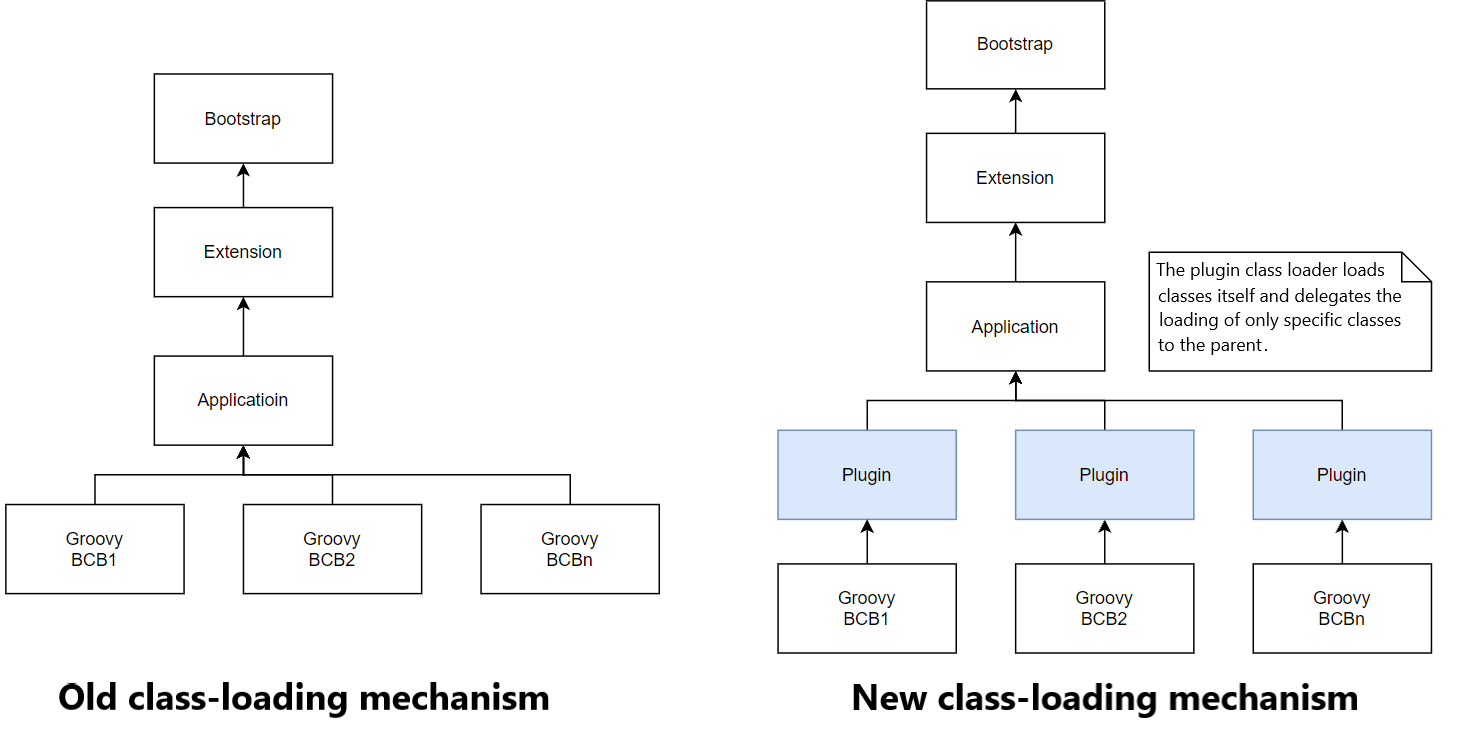
The new isolated class-loading mechanism makes it easy to load extra third-party dependencies, avoiding conflicts between those and the internal libraries in the runtime environment. It is available both at the development stage and when you launch a Use Case on the production environment. Significant related enhancements are as follows:
- ODF now features two Archetypes—one supporting the new class-loading isolation mechanism and the other utilizing the old class-loading approach.
- Bot Task JUnit supports local test execution for the new class loader. Developers don't have to change the Bot Task test code to leverage the new class-loading approach. There's also a possibility to enable the isolated class loading manually for corner cases.
For more details, refer to the Isolated loading of third-party libraries topic.
Public repository cleanup
ODF and ODF 2 artifacts not related to public releases were removed from the nexus.workfusion.com public repository to make it easier for users to match Archetype versions properly to those of the platform and avoid possible issues due to mistakes in matching. Now, public Nexus contains artifacts certified for specific platform release versions per the compatibility matrix.
You can now upload artifacts for ODF projects directly to the odf-releases and odf-snapshots repositories instead of the wf-archetypes and wf-dependencies public repositories.
Improved Data Purge
The out-of-the-box Data Purge feature was improved to enable the cleansing of persistent entities across the WorkFusion services—Analytics, WorkSpace, Control Tower, and so on. Other enhancements included the following:
- Data Purge was configured to run only within the preset purge duration.
- Issues related to scheduling via Cron expressions were eliminated.
With obsolete data removed correctly and regularly, customers can benefit from the faster performance of WorkFusion services and more efficient data management within the platform.
Other improvements
Bot Execution Platform
- Introduced new Worker Management Service (WMS) settings to adjust the Worker scaling strategy behavior. The improvement eliminates issues with slow Worker pools and BEP load spikes, thus enhancing the overall BEP performance.
- Improved distribution of stateless tasks based on the fair share rule, making it possible to speed up Worker task execution and fine-tune resource utilization.
Control Tower
- Enabled deletion of task queues that are no longer required.
- Changed the default
maxHttpHeaderSizesetting to 8192. - Added the ability to lock a user out after multiple failed logins into Control Tower.
RPA
- Added support of the Microsoft Edge browser based on the Chromium engine.
- Improved the startup performance of Remote Desktop Protocol (RDP) clients.
- Disabled the CTRL+C combination for the Worker console to prevent accidental process killing.
- Improved closing of drivers by an RPA bot to ensure all stages of the closing process are completed as appropriate.
- Removed plain-text passwords from the configuration file and moved them to Secrets Vault.
- Increased the default timeout for RPA web actions (such as
switchToFrame,clickElement,screenshot,getWindowHandles,isElementDisplayed) from 5 seconds to 10 minutes to improve the performance for slow browsers. Also, the default timeout for native RPA actions is increased from 5 to 15 minutes.
Updates
The following vulnerable libraries and components were updated to the latest versions:
- Tableau v.2021.4.3
- jQuery v.3.5.0 for all components, except for JSF that still uses v.1.8.3
- Re2J v.1.6
- Bootstrap v.3.4.1
Bug fixes
AutoML
- Fixed model selection when configuring an AutoML training task from a Business Process.
Bot Execution Platform
- Fixed the 500 error that appears when a user tries to expand the list of Business Process steps on a BP list or opens the BP itself.
- Enabled WMS to fix broken BEP Workers or activate the error mode when WMS finds such Workers.
Control Tower
- Fixed the cleanup mechanism not removing active Bot Task queues.
- Fixed the issue with the Data Store input imported incorrectly in Manual Tasks.
- Fixed the issue with Control Tower submitting tasks twice when Task Dispatcher Service (TDS) is not working, and a Business Process is stopped and subsequently resumed.
- Fixed the issue with the Workflow Designer menu for a newly created Business Process when the Copy action for Manual Tasks didn't work correctly.
- Fixed Business Process failing to resume if it is paused before any BEP queues are created.
- Fixed the Task Dispatcher Service failing to load a list of active Business Processes from ZooKeeper after the ZooKeeper server removes the root status node.
- Fixed the issue with the Worker continuing to process tasks added to RabbitMQ after a BP is stopped or paused.
- Hid Secrets Vault values behind asterisks to prevent users from seeing them when they input or view something in the Control Tower interface and added confirmation to display them.
Infrastructure
- Fixed the vulnerability issue with the hidden directories revealed regardless of access rights.
- Added MS SQL 2019 support to the Product.
- Fixed multiple vulnerability issues to prevent clickjacking or UI redress attacks.
- Fixed multiple vulnerability issues by removing various HTTP methods.
- Enabled Security Lifecycle Listener to improve security checks.
- Disabled auto-deploy of apps by Tomcat on startup to improve security.
- Increased Nginx client header size to prevent retry mechanism failure.
- Fixed the issues with the Nginx error log due to enabled Online Certificate Status Protocol (OSCP) stapling.
- Fixed the issue with the
cronschedule incorrectly saving the month and day expressions.
RPA
- Fixed the Bot Manager issue with screenshots not displayed for Bot Units in Windows 10 on VDI.
- Fixed the Bot Agent not starting after changing the RPA service credentials.
- Fixed the wrong logging pattern for JvmUiAgent, causing multiple exceptions and errors.
- Enabled automatic restart of BEP Workers when they are forcefully closed during execution upon the Ctrl+C signal, by pressing the [x] button, or due to a process killed from the console.
- Fixed the issue with Bot Units not starting automatically when the RPA service is running.
- Fixed Unit Agent crashes causing Bot Units to disappear from Bot Master.
- Fixed the issue of execution failing with
ClassCastExceptionwhenRPAUtils.callMethodWithoutParamsreturns Object. - Fixed the issue with Master Agent failing to keep a Master session active after the latter is disconnected.
- Fixed the BotMaster reconnection issue because the retries timer failed to reset.
- Fixed the failing Worker's automatic restart after a user stops and re-runs the Worker via Bot Manager.
- Fixed the fleet cell appearing to be empty for some time when changing the fleet in Bot Manager. (10.1.7?)
WorkSpace
- Fixed the vulnerability related to file formats and extensions not being validated.
OCR
- Resolved the issue with the OCR ABBYY query blocking processes by fixing the Hibernate logic.
- Eliminated the batch cleanup job issue to prevent out-of-memory errors.
Other
- Fixed sporadic BCB tasks failing and causing the "Artifact on nexus has a different checksum" error.
Known issues
RPA
- On Windows Server 2019, a Business Process fails due to a legal notice banner not showing. For remediation, refer to RPA troubleshooting.