
Study Analytics FAQs
Licences
How many Analytics server licenses will I need if I want 100 users to view dashboards in Control Tower?
Only 1 license key is required.
How many Analytics server users do I need?
It depends on how you intend to use the Analytics Server. One license for the Analytics Server provides access to 5 users.
If you interact with dashboards using only Control Tower, you need only one user. So, the initial license is enough.
To enable viewing dashboards on the Analytics Server, set up the required number of server users. The Analytics Server requires user-password authentication. So, you may need additional server licenses per user in case the number of available users is exceeded.
To customize dashboards or create them from scratch, you are required to add an Analytics Desktop license.
Can customers reuse licenses from a contract with WorkFusion for their own Tableau Server?
No, license keys for the WorkFusion Analytics server cannot be reused for a Tableau Server and vice versa.
Are there any concerns for the customers who use the core-based license?
It doesn't matter which license type you are using.
Installation and integration with Control Tower
How can I deploy out-of-the-box workbooks?
There are two ways to deploy workbooks:
- Manually, using Tableau Desktop
- Automated, using deployment scripts
The second way is preferable.
Can I use my own Tableau Server? And what should I do to make it work with WorkFusion application?
Yes, you can use your own Tableau Server. In case out-of-the-box (OOTB) dashboards are used, it is preferable to use a Tableau Server compatible with them. If the Tableau Server version differs from the preferable one, check the Dashboards section for possible solutions.
To configure the integration between the Tableau Server and the WorkFusion Master server you need the following:
- Have Tableau Sites and Projects set up correctly
- Add a WorkFusion Application server to Tableau Server trusted hosts
Analytics is enabled in Control Tower out of the box.
What kind of authentication is used to access Analytics in Control Tower?
Control Tower connects to the Analytics server using user-password authentication. Control Tower sends the credentials to the Tableau Server, regardless of the Tableau Server authentication type.
The credentials are stored in the Secrets Vault properties file.
Dashboards
What reporting functionality do you have?
You can choose different options:
- Use OOTB dashboards.
- Customize OOTB dashboards.
- Create dashboards from scratch.
- Share dashboards in Control Tower, the WorkFusion Analytics server, or Tableau Reader.
What are possible options if a customer uses a Tableau Server version that is newer than the one tested for compatibility with WorkFusion Product?
It is still possible to get OOTB dashboards. The most significant faults can occur on the user interface side.
Also, Tableau 10.5 supports dashboards created in previous versions, starting from 10.2.
Can I display Data Store data in Tableau as raw data without bar charts and so on? Can one visualize examples?
Yes, you can.
Just drag and drop required dimensions to rows or columns. You can use the text tables viz in the Show me hint.
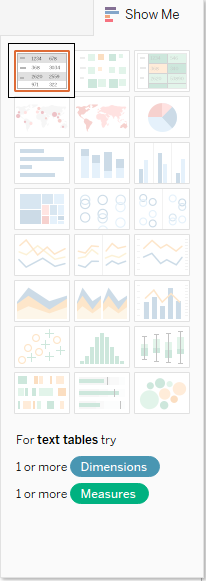
My data is in multiple Data Stores. Can Tableau handle joining it?
Yes, it can. Depending on the Tableau Desktop version, multiple data sources can be blended or joined. After blending, you have a separate data source in Tableau for each Data Store. After joining, all Data Stores are combined in a single Tableau data source.
As a Control Tower user, can I save my filters for each dashboard?
The ability to save filters is removed to provide better dashboard performance.
Can I separate dashboard views based on roles?
In Control Tower, there is no possibility to separate different dashboards according to user roles. For now, it's only possible to change Control Tower user role permissions associated with dashboards.
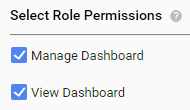
The Manage Dashboard permission enables choosing dashboards for displaying on the Dashboard page.
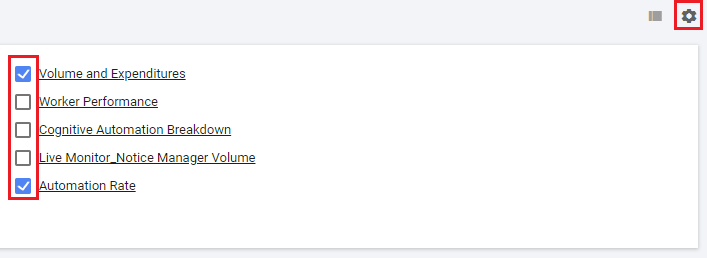
The View Dashboard permission determines the availability of the Dashboard page.