
Set up Disaster Recovery
Disaster recovery (DR) is the ability to continue services' operation in case of major outages, often with reduced capabilities or performance. Disaster recovery solutions typically involve manual activities. DR is aimed at minimal data loss, including up to 15 seconds for database loss, up to 15 minutes for file system data loss, and up to 4 hours of server downtime.
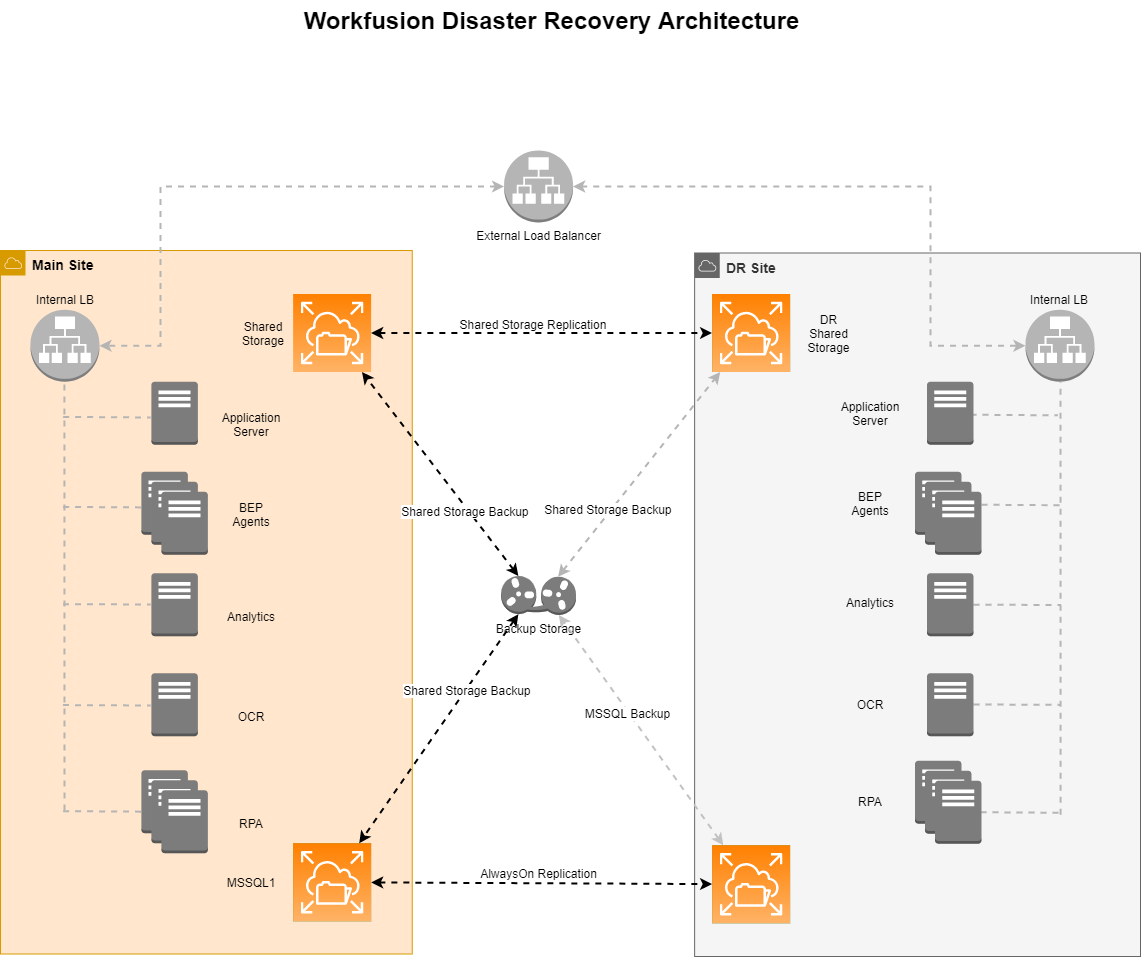
The DR architecture implies having two sites: primary and DR one. The primary set hosts the complete set of servers (either in the HA mode or without it) with running components. The DR site is the exact copy of the primary one, including the servers' DNS and topology. All the servers on the DR site are running while the components on them are stopped.
The replication of data between the sites is performed every 30 minutes. If the primary site fails, the system is switched to the DR site with minimum data loss.
Requirements
- The shared directory INSTALL_DIR/shared must be mounted to the Master servers both on the primary and the DR sites.
- The shared NFS directory must be replicated between the primary and the DR sites.
- MS SQL must support the Log Shipment and the Asynchronous Replication methods.
- The client must configure the Global DNS server or Route 53 to enable site failover.
- The DR site must mirror the following objects of the primary site:
- Servers' topology
- DNS records
- Credentials for services
- All the IA Cloud components must be stopped on the DR site.
Prepare primary environment for disaster recovery
To prepare the primary environment, do the following:
Deploy the primary environment as usual.
Run the following commands on each Master server to prepare the
etcdbackup and restore scripts:$ install_dir=/opt/workfusion # replace with correct install_dir value from config.yml $ etcd_port=2379 # replace with correct etcd_port value from ports.yml $ mkdir -p ${install_dir}/shared/etcd/backups $ cd $install_dirAfter that, run the command:
cat << EOF > ./tools/etcd-backup.sh
#!/bin/bash
set -e

function write_log() {
    local message=\$1
    echo -e "[\$(date '+%Y-%m-%dT%H:%M:%SZ')] [\$(hostname -i)] \${message}"
}

source ${install_dir}/environment.sh
if [ -f ${install_dir}/tools/check-nfs-ssl.sh ]; then
   check-nfs-ssl.sh
fi

dt_suffix="\$(date +%Y%m%d_%H_%M_%S)"
etcd_home="${install_dir}/etcd"
backup_dir="${install_dir}/shared/etcd/backups"
etcd_cmd="\${etcd_home}/etcdctl \
    --endpoints https://127.0.0.1:${etcd_port} \
    --cacert=${install_dir}/ssl/mtls-auth-ca.crt \
    --cert=${install_dir}/ssl/mtls-auth.crt \
    --key=${install_dir}/ssl/mtls-auth.key"

write_log "Checking if ETCD backup dir exists: \${backup_dir}"
if [[ -d "\${backup_dir}" ]]; then
    write_log "ETCD backup dir exists: \${backup_dir}. OK"
else
    write_log "ETCD backup dir does not exist: \${backup_dir}. Skipping ETCD backup"
    exit 1
fi

write_log "Checking if etcdctl file exists: \${etcd_home}/etcdctl"
if [[ -f \${etcd_home}/etcdctl ]]; then
    write_log "etcdctl file exists: \${etcd_home}/etcdctl. OK"
else
    write_log "etcdctl file does not exist: \${etcd_home}/etcdctl. Skipping ETCD backup"
    exit 1
fi

# it's not necessary to back up from a leader
# but since backup needs to be executed only from one node, select leader-follower as a criteria
write_log "Checking if current ETCD node is the leader."
self_id=\$(\$etcd_cmd --write-out=json endpoint status | jq .[0].Status.header.member_id)
leader_id=\$(\$etcd_cmd --write-out=json endpoint status | jq .[0].Status.leader)
if [[ "\$self_id" != "\$leader_id" ]]; then
    write_log "Current ETCD node is FOLLOWER. Skipping backup procedure."
else
    write_log "Current ETCD node is LEADER. OK"
    write_log "Making etcd snapshot and placing it to: \${backup_dir}"

    \$etcd_cmd snapshot save "\${backup_dir}/etcd_snapshot_\${dt_suffix}.db"
    write_log "Backup completed: \${backup_dir}/etcd_snapshot_\${dt_suffix}.db"

    write_log "Cleaning up ETCD backups older than 2 days from \${backup_dir}/"
    find \${backup_dir}/* -name '*.db' -mtime +2 -delete
    write_log "Cleanup completed"
fi
EOF
$ chmod +x ./tools/etcd-backup.sh

$ cat << EOF > ./tools/etcd-restore.sh
#!/bin/bash
set -e

# Usage: ./etcd-restore.sh [/path/to/backup.db]
# Restores etcd state from snapshot
# If the path to the snapshot is not provided, the newest etcd_snapshot* file from {{ common_nfs_share }}/etcd/backups will be used

source ${install_dir}/environment.sh
if [ -f ${install_dir}/tools/check-nfs-ssl.sh ]; then
   check-nfs-ssl.sh
fi

etcd_home="${install_dir}/etcd"
backup_dir="${install_dir}/shared/etcd/backups"

function write_log() {
    local message=\$1
    echo -e "[\$(date '+%Y-%m-%dT%H:%M:%SZ')] [\$(hostname -i)] \${message}"
}

function get_etcd_backup_file() {
    if [ -z "\$1" ]; then
        if (ls \$backup_dir | grep etcd_snapshot); then
            newest_snapshot=\$(ls -t \$backup_dir | grep etcd_snapshot | head -1)
            echo "\${backup_dir}/\${newest_snapshot}"
        else
            write_log "ERROR: No ETCD snapshots in backup directory: \${backup_dir}"
            exit 1
        fi
    else
        if [[ ! -f "\$1" ]]; then
            write_log "ERROR: provided snaphot doesn't exist: \$1"
            exit 1
        fi
        echo \$1
    fi
}

write_log "Making sure that ETCD is stopped: wfmanager stop etcd"
wfmanager stop etcd || true

snapshot=\$(get_etcd_backup_file \$1 | tail -1)

write_log "Cleaning up etcd data directory."
rm -rf \${etcd_home}/data.etcd/*

write_log "Restoring ETCD..."
\${etcd_home}/etcdutl snapshot restore \${snapshot} --data-dir=\${etcd_home}/data.etcd
write_log "Restoring has been completed"
write_log "You can now start etcd using 'wfmanager start etcd' command. If it's HA mode. Make sure you have restored etcd on each server, then start etcd on all servers."
EOF
$ chmod +x ./tools/etcd-restore.sh
Run the following commands on each Master server to prepare ZooKeeper backup and restore scripts:
$ install_dir=/opt/workfusion # replace with correct install_dir value from config.yml
$ cd $install_dir
After that, run the command:
cat << EOF > ./tools/zookeeper-backup.sh
#!/bin/bash
source ${install_dir}/environment.sh

function write_log() {
    local message=\$1
    echo -e "[\$(date '+%Y-%m-%dT%H:%M:%SZ')] [\$(hostname -i)] \${message}"
}

dt_suffix="\$(date +%Y%m%d_%H_%M_%S)"
zookeeper_home="${install_dir}/zookeeper"
backup_dir="${install_dir}/shared/zookeeper/backups"

write_log "Checking if ZK backup dir exists: \${backup_dir}"
if [[ -d "\${backup_dir}" ]]; then
    write_log "ZK backup dir exists: \${backup_dir}. OK"
else
    write_log "ZK backup dir does not exist: \${backup_dir}. Skipping ZK backup"
    exit 1
fi

write_log "Checking if zkServer.sh file exists: \${zookeeper_home}/bin/zkServer.sh"
if [[ -f \${zookeeper_home}/bin/zkServer.sh ]]; then
    write_log "zkServer.sh file exists: \${zookeeper_home}/bin/zkServer.sh. OK"
else
    write_log "zkServer.sh file does not exist: \${zookeeper_home}/bin/zkServer.sh. Skipping ZK backup"
    exit 1
fi

write_log "Checking if current ZK node is the leader."
if (\${zookeeper_home}/bin/zkServer.sh status 2>/dev/null | grep 'Mode: follower'); then
    write_log "Current ZK node is FOLLOWER. Skipping backup procedure."
else
    write_log "Current ZK node is LEADER. OK"
    write_log "Archiving ZK DATA and DATALOG to \${backup_dir}/zk-backup-\${dt_suffix}.zip"

    cd \${zookeeper_home}
    zip -1 -x "data/myid" -qr \${backup_dir}/zk-backup-\${dt_suffix}.zip data datalog
    write_log "Backup completed: \${backup_dir}/zk-backup-\${dt_suffix}.zip"

    write_log "Cleaning up ZK backups older than 2 days from \${backup_dir}/"
    find \${backup_dir}/* -name '*.zip' -mtime +2 -delete
    write_log "Cleanup completed"
fi
EOF
$ chmod +x ./tools/zookeeper-backup.sh

$ cat << EOF > ./tools/zookeeper-restore.sh
#!/bin/bash
set -e

# Usage: ./zookeeper-restore.sh [/path/to/backup.zip]
# Restores ZooKeeper state from backup
# If the path to the backup is not provided, the newest zk-backup* file from {{ common_nfs_share }}/zookeeper/backups will be used

zookeeper_home="${install_dir}/zookeeper"
backup_dir="${install_dir}/shared/zookeeper/backups"

function write_log() {
    local message=\$1
    echo -e "[\$(date '+%Y-%m-%dT%H:%M:%SZ')] [\$(hostname -i)] \${message}"
}

function get_zookeeper_backup_file() {
    if [ -z "\$1" ]; then
        if (ls \$backup_dir | grep "zk-backup"); then
            newest_backup=\$(ls -t \$backup_dir | grep "zk-backup" | head -1)
            echo "\${backup_dir}/\${newest_backup}"
        else
            write_log "ERROR: No ZooKeeper snapshots in backup directory: \${backup_dir}"
            exit 1
        fi
    else
        if [[ ! -f "\$1" ]]; then
            write_log "ERROR: provided backup file doesn't exist: \$1"
            exit 1
        fi
        echo \$1
    fi

}

write_log "Making sure that ZooKeeper is stopped: wfmanager stop zookeeper"
wfmanager stop zookeeper || true

backup=\$(get_zookeeper_backup_file \$1 | tail -1)

write_log "Cleaning up ZooKeeper data and datalog directories."
rm -rf \${zookeeper_home}/data
rm -rf \${zookeeper_home}/datalog

write_log "Restoring ZooKeeper..."
unzip \${backup} -d \${zookeeper_home}
write_log "Restoring has been completed."
write_log "You can now start ZooKeeper using the 'wfmanager start zookeeper' command. If it's HA mode. Make sure you have restored ZooKeeper on each server, then start ZooKeeper on all servers."
EOF
chmod +x ./tools/zookeeper-restore.sh
Run the following commands on each Master server to prepare the Elasticsearch backup and restore scripts:
$ install_dir=/opt/workfusion  # replace with correct install_dir value from config.yml
$ elasticsearch_host=$(cat ${install_dir}/elasticsearch/config/elasticsearch.yml | grep network.host | sed 's/network.host: //')
$ elasticsearch_port=$(cat ${install_dir}/elasticsearch/config/elasticsearch.yml | grep http.port | sed 's/http.port: //')
$ cd install_dir
After that, run the command:
cat << EOF > ./tools/elasticsearch-backup.sh
#!/bin/sh

xpack_args="--key ${install_dir}/ssl/elasticsearch.key --cert ${install_dir}/ssl/elasticsearch.crt --cacert ${install_dir}/ssl/elk-ca.crt"
elasticsearch_local_url=https://${elasticsearch_host}:${elasticsearch_port}
snapshot_request="\${elasticsearch_local_url}/_snapshot/fs_backup/dr_recovery"

read -r -d '' usage << EOM
Usage:
\$0 [-overwrite]
  -overwrite: If snapshot already exists -- delete it and create new snapshot
EOM


if [ "\$1" != "" ] && [ "\$1" != "-overwrite" ]; then
  echo -e "\${usage}"
  exit 1
fi

source ${install_dir}/environment.sh
if [ -f ${install_dir}/tools/check-nfs-ssl.sh ]; then
   check-nfs-ssl.sh
fi
if [ -f ${install_dir}/tools/check-elasticsearch.sh ]; then
   check-elasticsearch.sh
fi

if [ "\$1" == "-overwrite" ]; then
  curl -k \$xpack_args -X DELETE "\${snapshot_request}?pretty"
fi


# Create ELK .security* indices snapshot
curl -k \$xpack_args -X PUT -H 'Content-Type: application/json' "\${snapshot_request}?pretty&wait_for_completion=true" -d "
{
    \"indices\": \".security*\"
}
"
EOF
chmod +x ./tools/elasticsearch-backup.sh

cat << EOF > ./tools/elasticsearch-restore.sh
#!/bin/sh

# This script restores ONLY .security* indices
# It's designed to synchronize API keys from the primary environment to the DR environment
# Snapshod must be located inside ${install_dir}/shared/elasticsearch/backups directory
# The installer must generate a snapshot during the initial installation or update procedure

backup_dir=${install_dir}/shared/elasticsearch/backups
xpack_args='--key ${install_dir}/ssl/elasticsearch.key --cert ${install_dir}/ssl/elasticsearch.crt --cacert ${install_dir}/ssl/elk-ca.crt'
elasticsearch_local_url=https://${elasticsearch_host}:${elasticsearch_port}

function write_log() {
    local message=\$1
    echo -e "[\$(date '+%Y-%m-%dT%H:%M:%SZ')] [\$(hostname -i)] \${message}"
}

source ${install_dir}/environment.sh

write_log "Checking if elasticsearch backup dir exists: \${backup_dir}"
if [[ -d "\${backup_dir}" ]]; then
    write_log "elasticsearch backup dir exists: \${backup_dir}. OK"
else
    write_log "elasticsearch backup dir does not exist: \${backup_dir}. Exiting..."
    exit 1
fi

if [ -f ${install_dir}/tools/check-nfs-ssl.sh ]; then
   check-nfs-ssl.sh
fi
if [ -f ${install_dir}/tools/check-elasticsearch.sh ]; then
   check-elasticsearch.sh
fi

has_master=\$(curl -k -s -o /dev/null -I -w "%{http_code}" \$xpack_args -X GET "\${elasticsearch_local_url}/_nodes/master")

if [[ \$has_master == "200" ]]; then
    write_log "Deleting .security* indices to allow them to be restored from snapshot."
    curl -k \$xpack_args -X DELETE "\${elasticsearch_local_url}/.security*?pretty"

    write_log "Restoring .security* indices from snapshot"
    curl -k \$xpack_args -X POST "\${elasticsearch_local_url}/_snapshot/fs_backup/dr_recovery/_restore?pretty" -H 'Content-Type: application/json' -d'{"indices": ".security*"}'
else
    write_log "Currently Elasticsearch cluster hasn't elected the master node. Get back when the master node is elected."
    exit 1
fi
EOF
chmod +x ./tools/elasticsearch-restore.sh
On each Master server, run the following commands to enable Elasticsearch to produce snapshots and restore from them:
$ install_dir=/opt/workfusion  # replace with correct install_dir value from config.yml
$ elasticsearch_host=$(cat ${install_dir}/elasticsearch/config/elasticsearch.yml | grep network.host | sed 's/network.host: //')
$ elasticsearch_port=$(cat ${install_dir}/elasticsearch/config/elasticsearch.yml | grep http.port | sed 's/http.port: //')
$ elasticsearch_local_url=https://${elasticsearch_host}:${elasticsearch_port}
$ xpack_args="--key ${install_dir}/ssl/elasticsearch.key --cert ${install_dir}/ssl/elasticsearch.crt --cacert ${install_dir}/ssl/elk-ca.crt"

$ mkdir -p ${install_dir}/shared/elasticsearch/backups

$ echo "path.repo: ${install_dir}/shared/elasticsearch/backups" >> ${install_dir}/elasticsearch/config/elasticsearch.yml
$ wfmanager restart elasticsearch
$ curl -ks -o /dev/null -w "%{http_code}" ${elasticsearch_local_url}  # MUST return 401

# Create an ELK snapshot repository. It can be executed only once
$ curl -k $xpack_args -X PUT -H 'Content-Type: application/json' "${elasticsearch_local_url}/_snapshot/fs_backup" -d "
{
    \"type\": \"fs\",
    \"settings\": {
        \"location\": \"${install_dir}/shared/elasticsearch/backups\"
    }
}
"
Run the following commands on each Master server to enable KES to read secret variables from Vault and use them in the configuration:
note
wf-sec-storageis required for further steps. If you have deleted it earlier, to restore it, on each Master server, run./install.sh install wf-sec-storage.If
vault_kes_kms_provider: trueinconfig.yml, run the following commands:$ install_dir=/opt/workfusion # replace with correct install_dir value from config.yml # reading properties from KES config that will be uploaded to Vault $ approle_id=$(cat ${install_dir}/kes/server-config.yml | grep '# Your AppRole ID' | tr -d ' "' | sed 's/id://' | sed 's/#.*//') $ approle_secret_id=$(cat ${install_dir}/kes/server-config.yml | grep '# Your AppRole Secret ID' | tr -d ' "' | sed 's/secret://' | sed 's/#.*//') # uploading properties to Vault $ cat << EOF > ./wf-sec-storage/kes-secure.properties KES_VAULT_APPROLE_ROLE_ID=${approle_id} KES_VAULT_APPROLE_SECRET_ID=${approle_secret_id} EOF $ ./wf-sec-storage/loader.sh wfagent kes-secure.properties # modifying KES config to use properties retrieved from Vault $ sed -i "s/${approle_id}/\${KES_VAULT_APPROLE_ROLE_ID}"/ ${install_dir}/kes/server-config.yml $ sed -i "s/${approle_secret_id}/\${KES_VAULT_APPROLE_SECRET_ID}"/ ${install_dir}/kes/server-config.yml # modifying KES supervisord configuration to read secret variables from Vault $ replacement='check-vault.sh\n echo "\$(date) Trying to read variables from Vault..."\n echo "\$(date) Trying to get VAULT_TOKEN..."\n export VAULT_TOKEN=\$(get-vault-token.sh)\n echo "\$(date) Trying to read KES_VAULT_APPROLE_ROLE_ID from Vault..."\n export KES_VAULT_APPROLE_ROLE_ID=\$(get-vault-secret.sh workfusion_WFInternal\/KES_VAULT_APPROLE_ROLE_ID)\n echo "\$(date) Trying to read KES_VAULT_APPROLE_SECRET_ID from Vault..."\n export KES_VAULT_APPROLE_SECRET_ID=\$(get-vault-secret.sh workfusion_WFInternal\/KES_VAULT_APPROLE_SECRET_ID)' $ sed -i "s/check-vault.sh/${replacement}/g" ${install_dir}/supervisord/apps/kes.ini $ wfmanager updateif
aws_kes_kms_provider: trueinconfig.yml, run the following commands:$ install_dir=/opt/workfusion # replace with correct install_dir value from config.yml # reading properties from KES config that will be uploaded to Vault $ access_key=$(cat ${install_dir}/kes/server-config.yml | grep 'Your AWS Access Key' | tr -d ' "' | sed 's/accesskey://' | sed 's/#.*//') $ secret_key=$(cat ${install_dir}/kes/server-config.yml | grep 'Your AWS Secret Key' | tr -d ' "' | sed 's/secretkey://' | sed 's/#.*//') # uploading properties to Vault $ cat << EOF > ./wf-sec-storage/kes-secure.properties AWS_SECRETSMANAGER_ACCESS_KEY=${access_key} AWS_SECRETSMANAGER_SECRET_KEY=${secret_key} EOF $ ./wf-sec-storage/loader.sh wfagent kes-secure.properties # modifying KES config to use properties retrieved from ault $ sed -i "s/${access_key}/\${AWS_SECRETSMANAGER_ACCESS_KEY}"/ ${install_dir}/kes/server-config.yml $ sed -i "s/${secret_key}/\${AWS_SECRETSMANAGER_SECRET_KEY}"/ ${install_dir}/kes/server-config.yml # modifying KES supervisord configuration to read secret variables from Vault $ replacement='check-vault.sh\n echo "\$(date) Trying to read variables from Vault..."\n echo "\$(date) Trying to get VAULT_TOKEN..."\n export VAULT_TOKEN=\$(get-vault-token.sh)\n echo "\$(date) Trying to read AWS_SECRETSMANAGER_ACCESS_KEY from Vault..."\n export AWS_SECRETSMANAGER_ACCESS_KEY=\$(get-vault-secret.sh workfusion_WFInternal\/AWS_SECRETSMANAGER_ACCESS_KEY)\n echo "\$(date) Trying to read AWS_SECRETSMANAGER_SECRET_KEY from Vault..."\n export AWS_SECRETSMANAGER_SECRET_KEY=\$(get-vault-secret.sh workfusion_WFInternal\/AWS_SECRETSMANAGER_SECRET_KEY)' $ sed -i "s/check-vault.sh/${replacement}/g" ${install_dir}/supervisord/apps/kes.ini $ wfmanager updateif
azure_kes_kms_provider: trueinconfig.yml, run the following commands:$ install_dir=/opt/workfusion # replace with correct install_dir value from config.yml # reading properties from KES config that will be uploaded to Vault $ endpoint=$(cat ${install_dir}/kes/server-config.yml | grep "KeyVault instance endpoint" | tr -d ' "' | sed 's/endpoint://' | sed 's/#.*//') $ tenant_id=$(cat ${install_dir}/kes/server-config.yml | grep "The ID of the tenant" | tr -d ' "' | sed 's/tenant_id://' | sed 's/#.*//' $ client_id=$(cat ${install_dir}/kes/server-config.yml | grep "The ID of the client" | tr -d ' "' | sed 's/client_id://' | sed 's/#.*//' $ client_secret=$(cat ${install_dir}/kes/server-config.yml | grep "client secret" | tr -d ' "' | sed 's/client_secret://' | sed 's/#.*//' # uploading properties to Vault $ cat << EOF > ./wf-sec-storage/kes-secure.properties AZURE_KEY_VAULT_ENDPOINT=${endpoint} AZURE_KEY_VAULT_TENANT_ID=${tenant_id} AZURE_KEY_VAULT_CLIENT_ID=${client_id} AZURE_KEY_VAULT_CLIENT_SECRET=${client_secret} EOF $ ./wf-sec-storage/loader.sh wfagent kes-secure.properties # modifying KES config to use properties retrieved from Vault $ sed -i "s/${endpoint}/\${AZURE_KEY_VAULT_ENDPOINT}"/ ${install_dir}/kes/server-config.yml $ sed -i "s/${tenant_id}/\${AZURE_KEY_VAULT_TENANT_ID}"/ ${install_dir}/kes/server-config.yml $ sed -i "s/${client_id}/\${AZURE_KEY_VAULT_CLIENT_ID}"/ ${install_dir}/kes/server-config.yml $ sed -i "s/${client_secret}/\${AZURE_KEY_VAULT_CLIENT_SECRET}"/ ${install_dir}/kes/server-config.yml # modifying KES supervisord configuration to read secret variables from Vault $ replacement='check-vault.sh\n echo "\$(date) Trying to read variables from Vault..."\n echo "\$(date) Trying to get VAULT_TOKEN..."\n export VAULT_TOKEN=\$(get-vault-token.sh)\n echo "\$(date) Trying to read AZURE_KEY_VAULT_ENDPOINT from Vault..."\n export AZURE_KEY_VAULT_ENDPOINT=\$(get-vault-secret.sh workfusion_WFInternal\/AZURE_KEY_VAULT_ENDPOINT)\n echo "\$(date) Trying to read AZURE_KEY_VAULT_TENANT_ID from Vault..."\n export AZURE_KEY_VAULT_TENANT_ID=\$(get-vault-secret.sh workfusion_WFInternal\/AZURE_KEY_VAULT_TENANT_ID)\n echo "\$(date) Trying to read AZURE_KEY_VAULT_CLIENT_ID from Vault..."\n export AZURE_KEY_VAULT_CLIENT_ID=\$(get-vault-secret.sh workfusion_WFInternal\/AZURE_KEY_VAULT_CLIENT_ID)\n echo "\$(date) Trying to read AZURE_KEY_VAULT_CLIENT_SECRET from Vault..."\n export AZURE_KEY_VAULT_CLIENT_SECRET=\$(get-vault-secret.sh workfusion_WFInternal\/AZURE_KEY_VAULT_CLIENT_SECRET)' $ sed -i "s/check-vault.sh/${replacement}/g" ${install_dir}/supervisord/apps/kes.ini $ wfmanager update
Enable Marathon to read secret variables from Vault and use them in the configuration:
note
wf-sec-storageis required for further steps. If you have deleted it earlier, on each Master server, run./install.sh install wf-sec-storageto restore it.On each Master server, run the following commands:
$ install_dir=/opt/workfusion  # replace with correct install_dir value from config.yml

$ marathon_jks_pass=$(cat ${install_dir}/supervisord/apps/marathon.ini | grep ssl_keystore_password | tr -d ' ' | sed 's/--ssl_keystore_password//' | sed 's/.$//')

# uploading property to Vault
$ cat << EOF > ./wf-sec-storage/marathon-secure.properties
MARATHON_JKS_PASS=${marathon_jks_pass}
EOF
$ ./wf-sec-storage/loader.sh wfagent marathon-secure.properties

# modifying Marathon supervisord configuration to read secret variables from Vault
$ replacement='check-keycloak.sh\n    echo "\$(date) Trying to read variables from Vault..."\n    echo "\$(date) Trying to get VAULT_TOKEN..."\n    export VAULT_TOKEN=\$(get-vault-token.sh)\n    echo "\$(date) Trying to read MARATHON_JKS_PASS from Vault..."\n    export JKS_PASS=\$(get-vault-secret.sh workfusion_WFInternal\/MARATHON_JKS_PASS)'
$ sed -i "s/check-keycloak.sh/${replacement}/g" ${install_dir}/supervisord/apps/marathon.ini
$ sed -i "s/${marathon_jks_pass}/\${JKS_PASS}/g" ${install_dir}/supervisord/apps/marathon.ini
$ wfmanager update
You can now remove
wf-sec-storageif you want by runningrm -rf ${install_dir}/wf-sec-storageon each Master server.Prepare
etcd, ZooKeeper, and Elasticsearch backups:On each Master server, execute the following commands:
etcd-backup.sh

zookeeper-backup.sh
On any Master server, execute the following command once:
elasticsearch-backup.sh -overwrite
Deploy DR environment
Prerequisites
- The primary environment is deployed as usual and stopped.
- NFS directories from the primary site are replicated to the DR site's NFS.
- MSSQL is replicated from the primary site to the DR one.
- DNS records point to the DR environment.
Deployment
To deploy the Disaster Recovery environment, do the following:
Copy
INSTALLER_DIR(for example,/opt/workfusion/wf_installer) from the primary site (the Master1 server) to the DR one.note
If you transfer the installer directory with
rsync, make sure to add the-l, --links copy symlinks as symlinksoption.Remove ZooKeeper files from the
INSTALLER_DIR/certificates/_auth_internaldirectory:$ rm ${INSTALLER_DIR}/certificates/_auth_internal/zookeeper*Prepare internal certificates:
$ cd $INSTALLER_DIR
$ ./install.sh certs generate
Install the Product to the DR environment as usual while skipping the RPA and BI setup:
$ cd $INSTALLER_DIR
$ ./install.sh install full -e skip_rpa=true -e skip_bi=true
Run the following commands on each Master server to prepare the
etcdbackup and restore scripts:$ install_dir=/opt/workfusion # replace with correct install_dir value from config.yml $ etcd_port=2379 # replace with correct etcd_port value from ports.yml $ cd $install_dir $ cat << EOF > ./tools/etcd-backup.sh #!/bin/bash set -e function write_log() { local message=\$1 echo -e "[\$(date '+%Y-%m-%dT%H:%M:%SZ')] [\$(hostname -i)] \${message}" } source ${install_dir}/environment.sh if [ -f ${install_dir}/tools/check-nfs-ssl.sh ]; then check-nfs-ssl.sh fi dt_suffix="\$(date +%Y%m%d_%H_%M_%S)" etcd_home="${install_dir}/etcd" backup_dir="${install_dir}/shared/etcd/backups" etcd_cmd="\${etcd_home}/etcdctl \ --endpoints https://127.0.0.1:${etcd_port} \ --cacert=${install_dir}/ssl/mtls-auth-ca.crt \ --cert=${install_dir}/ssl/mtls-auth.crt \ --key=${install_dir}/ssl/mtls-auth.key" write_log "Checking if ETCD backup dir exists: \${backup_dir}" if [[ -d "\${backup_dir}" ]]; then write_log "ETCD backup dir exists: \${backup_dir}. OK" else write_log "ETCD backup dir does not exist: \${backup_dir}. Skipping ETCD backup" exit 1 fi write_log "Checking if etcdctl file exists: \${etcd_home}/etcdctl" if [[ -f \${etcd_home}/etcdctl ]]; then write_log "etcdctl file exists: \${etcd_home}/etcdctl. OK" else write_log "etcdctl file does not exist: \${etcd_home}/etcdctl. Skipping ETCD backup" exit 1 fi # it's not necessary to backup from the leader # but since backup needs to be executed only from one node, select leader-follower as a criteria write_log "Checking if current ETCD node is the leader." self_id=\$(\$etcd_cmd --write-out=json endpoint status | jq .[0].Status.header.member_id) leader_id=\$(\$etcd_cmd --write-out=json endpoint status | jq .[0].Status.leader) if [[ "\$self_id" != "\$leader_id" ]]; then write_log "Current ETCD node is FOLLOWER. Skipping backup procedure." else write_log "Current ETCD node is LEADER. OK" write_log "Making etcd snapshot and placing it to: \${backup_dir}" \$etcd_cmd snapshot save "\${backup_dir}/etcd_snapshot_\${dt_suffix}.db" write_log "Backup completed: \${backup_dir}/etcd_snapshot_\${dt_suffix}.db" write_log "Cleaning up ETCD backups older than 2 days from \${backup_dir}/" find \${backup_dir}/* -name '*.db' -mtime +2 -delete write_log "Cleanup completed" fi EOF $ chmod +x ./tools/etcd-backup.sh $ cat << EOF > ./tools/etcd-restore.sh #!/bin/bash set -e # Usage: ./etcd-restore.sh [/path/to/backup.db] # Restores etcd state from snapshot # If the path to the snapshot is not provided, the newest etcd_snapshot* file from {{ common_nfs_share }}/etcd/backups will be used source ${install_dir}/environment.sh if [ -f ${install_dir}/tools/check-nfs-ssl.sh ]; then check-nfs-ssl.sh fi etcd_home="${install_dir}/etcd" backup_dir="${install_dir}/shared/etcd/backups" function write_log() { local message=\$1 echo -e "[\$(date '+%Y-%m-%dT%H:%M:%SZ')] [\$(hostname -i)] \${message}" } function get_etcd_backup_file() { if [ -z "\$1" ]; then if (ls \$backup_dir | grep etcd_snapshot); then newest_snapshot=\$(ls -t \$backup_dir | grep etcd_snapshot | head -1) echo "\${backup_dir}/\${newest_snapshot}" else write_log "ERROR: No ETCD snapshots in backup directory: \${backup_dir}" exit 1 fi else if [[ ! -f "\$1" ]]; then write_log "ERROR: provided snaphot doesn't exist: \$1" exit 1 fi echo \$1 fi } write_log "Making sure that ETCD is stopped: wfmanager stop etcd" wfmanager stop etcd || true snapshot=\$(get_etcd_backup_file \$1 | tail -1) write_log "Cleaning up etcd data directory." rm -rf \${etcd_home}/data.etcd/* write_log "Restoring ETCD..." \${etcd_home}/etcdutl snapshot restore \${snapshot} --data-dir=\${etcd_home}/data.etcd write_log "Restoring has been completed" write_log "You can now start etcd using 'wfmanager start etcd' command. If it's HA mode. Make sure you have restored etcd on each server, then start etcd on all servers." EOF $ chmod +x ./tools/etcd-restore.shRun the following commands on each Master server to prepare ZooKeeper backup and restore scripts:
$ install_dir=/opt/workfusion # replace with correct install_dir value from config.yml
$ cd $install_dir

$ cat << EOF > ./tools/zookeeper-backup.sh
#!/bin/bash
source ${install_dir}/environment.sh

function write_log() {
    local message=\$1
    echo -e "[\$(date '+%Y-%m-%dT%H:%M:%SZ')] [\$(hostname -i)] \${message}"
}

dt_suffix="\$(date +%Y%m%d_%H_%M_%S)"
zookeeper_home="${install_dir}/zookeeper"
backup_dir="${install_dir}/shared/zookeeper/backups"

write_log "Checking if ZK backup dir exists: \${backup_dir}"
if [[ -d "\${backup_dir}" ]]; then
    write_log "ZK backup dir exists: \${backup_dir}. OK"
else
    write_log "ZK backup dir does not exist: \${backup_dir}. Skipping ZK backup"
    exit 1
fi

write_log "Checking if zkServer.sh file exists: \${zookeeper_home}/bin/zkServer.sh"
if [[ -f \${zookeeper_home}/bin/zkServer.sh ]]; then
    write_log "zkServer.sh file exists: \${zookeeper_home}/bin/zkServer.sh. OK"
else
    write_log "zkServer.sh file does not exist: \${zookeeper_home}/bin/zkServer.sh. Skipping ZK backup"
    exit 1
fi

write_log "Checking if current ZK node is the leader."
if (\${zookeeper_home}/bin/zkServer.sh status 2>/dev/null | grep 'Mode: follower'); then
    write_log "Current ZK node is FOLLOWER. Skipping backup procedure."
else
    write_log "Current ZK node is LEADER. OK"
    write_log "Archiving ZK DATA and DATALOG to \${backup_dir}/zk-backup-\${dt_suffix}.zip"

    cd \${zookeeper_home}
    zip -1 -x "data/myid" -qr \${backup_dir}/zk-backup-\${dt_suffix}.zip data datalog
    write_log "Backup completed: \${backup_dir}/zk-backup-\${dt_suffix}.zip"

    write_log "Cleaning up ZK backups older than 2 days from \${backup_dir}/"
    find \${backup_dir}/* -name '*.zip' -mtime +2 -delete
    write_log "Cleanup completed"
fi
EOF
$ chmod +x ./tools/zookeeper-backup.sh

$ cat << EOF > ./tools/zookeeper-restore.sh
#!/bin/bash
set -e

# Usage: ./zookeeper-restore.sh [/path/to/backup.zip]
# Restores ZooKeeper state from backup
# If the path to the backup is not provided, the newest zk-backup* file from {{ common_nfs_share }}/zookeeper/backups will be used

zookeeper_home="${install_dir}/zookeeper"
backup_dir="${install_dir}/shared/zookeeper/backups"

function write_log() {
    local message=\$1
    echo -e "[\$(date '+%Y-%m-%dT%H:%M:%SZ')] [\$(hostname -i)] \${message}"
}

function get_zookeeper_backup_file() {
    if [ -z "\$1" ]; then
        if (ls \$backup_dir | grep "zk-backup"); then
            newest_backup=\$(ls -t \$backup_dir | grep "zk-backup" | head -1)
            echo "\${backup_dir}/\${newest_backup}"
        else
            write_log "ERROR: No ZooKeeper snapshots in backup directory: \${backup_dir}"
            exit 1
        fi
    else
        if [[ ! -f "\$1" ]]; then
            write_log "ERROR: provided backup file doesn't exist: \$1"
            exit 1
        fi
        echo \$1
    fi

}

write_log "Making sure that ZooKeeper is stopped: wfmanager stop zookeeper"
wfmanager stop zookeeper || true

backup=\$(get_zookeeper_backup_file \$1 | tail -1)

write_log "Cleaning up ZooKeeper data and datalog directories."
rm -rf \${zookeeper_home}/data
rm -rf \${zookeeper_home}/datalog

write_log "Restoring ZooKeeper..."
unzip \${backup} -d \${zookeeper_home}
write_log "Restoring has been completed."
write_log "You can now start ZooKeeper using the 'wfmanager start zookeeper' command. If it's HA mode. Make sure you have restored ZooKeeper on each server, then start ZooKeeper on all servers."
EOF
chmod +x ./tools/zookeeper-restore.sh
Run the following commands on each Master server to prepare the Elasticsearch backup and restore scripts:
$ install_dir=/opt/workfusion  # replace with correct install_dir value from config.yml
$ elasticsearch_host=$(cat ${install_dir}/elasticsearch/config/elasticsearch.yml | grep network.host | sed 's/network.host: //')
$ elasticsearch_port=$(cat ${install_dir}/elasticsearch/config/elasticsearch.yml | grep http.port | sed 's/http.port: //')

$ cd $install_dir

$ cat << EOF > ./tools/elasticsearch-backup.sh
#!/bin/sh

xpack_args="--key ${install_dir}/ssl/elasticsearch.key --cert ${install_dir}/ssl/elasticsearch.crt --cacert ${install_dir}/ssl/elk-ca.crt"
elasticsearch_local_url=https://${elasticsearch_host}:${elasticsearch_port}
snapshot_request="\${elasticsearch_local_url}/_snapshot/fs_backup/dr_recovery"

read -r -d '' usage << EOM
Usage:
\$0 [-overwrite]
  -overwrite: If snapshot already exists -- delete it and create new snapshot
EOM


if [ "\$1" != "" ] && [ "\$1" != "-overwrite" ]; then
  echo -e "\${usage}"
  exit 1
fi

source ${install_dir}/environment.sh
if [ -f ${install_dir}/tools/check-nfs-ssl.sh ]; then
   check-nfs-ssl.sh
fi
if [ -f ${install_dir}/tools/check-elasticsearch.sh ]; then
   check-elasticsearch.sh
fi

if [ "\$1" == "-overwrite" ]; then
  curl -k \$xpack_args -X DELETE "\${snapshot_request}?pretty"
fi


# Create ELK .security* indices snapshot
curl -k \$xpack_args -X PUT -H 'Content-Type: application/json' "\${snapshot_request}?pretty&wait_for_completion=true" -d "
{
    \"indices\": \".security*\"
}
"
EOF
chmod +x ./tools/elasticsearch-backup.sh

$ cat << EOF > ./tools/elasticsearch-restore.sh
#!/bin/sh

# This script restores ONLY .security* indices
# It's designed to synchronize API keys from the primary environment to the DR environment
# Snapshod must be located inside ${install_dir}/shared/elasticsearch/backups directory
# The installer must generate a snapshot during the initial installation or update procedure

backup_dir=${install_dir}/shared/elasticsearch/backups
xpack_args='--key ${install_dir}/ssl/elasticsearch.key --cert ${install_dir}/ssl/elasticsearch.crt --cacert ${install_dir}/ssl/elk-ca.crt'
elasticsearch_local_url=https://${elasticsearch_host}:${elasticsearch_port}

function write_log() {
    local message=\$1
    echo -e "[\$(date '+%Y-%m-%dT%H:%M:%SZ')] [\$(hostname -i)] \${message}"
}

source ${install_dir}/environment.sh

write_log "Checking if elasticsearch backup dir exists: \${backup_dir}"
if [[ -d "\${backup_dir}" ]]; then
    write_log "elasticsearch backup dir exists: \${backup_dir}. OK"
else
    write_log "elasticsearch backup dir does not exist: \${backup_dir}. Exiting..."
    exit 1
fi

if [ -f ${install_dir}/tools/check-nfs-ssl.sh ]; then
   check-nfs-ssl.sh
fi
if [ -f ${install_dir}/tools/check-elasticsearch.sh ]; then
   check-elasticsearch.sh
fi

has_master=\$(curl -k -s -o /dev/null -I -w "%{http_code}" \$xpack_args -X GET "\${elasticsearch_local_url}/_nodes/master")

if [[ \$has_master == "200" ]]; then
    write_log "Deleting .security* indices to allow them to be restored from snapshot."
    curl -k \$xpack_args -X DELETE "\${elasticsearch_local_url}/.security*?pretty"

    write_log "Restoring .security* indices from snapshot"
    curl -k \$xpack_args -X POST "\${elasticsearch_local_url}/_snapshot/fs_backup/dr_recovery/_restore?pretty" -H 'Content-Type: application/json' -d'{"indices": ".security*"}'
else
    write_log "Currently Elasticsearch cluster hasn't elected the master node. Get back when the master node is elected."
    exit 1
fi
EOF
chmod +x ./tools/elasticsearch-restore.sh
On each Master server, run the following commands to enable Elasticsearch to produce snapshots and restore from them:
$ install_dir=/opt/workfusion  # replace with correct install_dir value from config.yml
$ elasticsearch_host=$(cat ${install_dir}/elasticsearch/config/elasticsearch.yml | grep network.host | sed 's/network.host: //')
$ elasticsearch_port=$(cat ${install_dir}/elasticsearch/config/elasticsearch.yml | grep http.port | sed 's/http.port: //')
$ elasticsearch_local_url=https://${elasticsearch_host}:${elasticsearch_port}
$ xpack_args="--key ${install_dir}/ssl/elasticsearch.key --cert ${install_dir}/ssl/elasticsearch.crt --cacert ${install_dir}/ssl/elk-ca.crt"

$ echo "path.repo: ${install_dir}/shared/elasticsearch/backups" >> ${install_dir}/elasticsearch/config/elasticsearch.yml
$ source ${install_dir}/environment.sh
$ wfmanager restart elasticsearch
$ curl -ks -o /dev/null -w "%{http_code}" ${elasticsearch_local_url}  # MUST return 401

# Create an ELK snapshot repository. It can be executed only once
$ curl -k $xpack_args -X PUT -H 'Content-Type: application/json' "${elasticsearch_local_url}/_snapshot/fs_backup" -d "
{
    \"type\": \"fs\",
    \"settings\": {
        \"location\": \"${install_dir}/shared/elasticsearch/backups\"
    }
}
"
Stop all services.
For the single-point installation, run the commands:
$ cd ${INSTALLER_DIR}
$ ./install.sh stop_services full -e skip_rpa=true -e skip_bi=true
For the multi-point installation:
On each Master server, run the commands:
$ wfmanager stop marathon-apps # this line could be executed only once
$ wfmanager stop all
On each Agent server, run the command:
$ wfmanager stop all
Run the following commands on each Master server to enable KES to read secret variables from Vault and use them in the configuration:
If
vault_kes_kms_provider: trueinconfig.yml, run the following commands:$ install_dir=/opt/workfusion # replace with correct install_dir value from config.yml # reading properties from KES config that will be uploaded to Vault $ approle_id=$(cat ${install_dir}/kes/server-config.yml | grep '# Your AppRole ID' | tr -d ' "' | sed 's/id://' | sed 's/#.*//') $ approle_secret_id=$(cat ${install_dir}/kes/server-config.yml | grep '# Your AppRole Secret ID' | tr -d ' "' | sed 's/secret://' | sed 's/#.*//') # modifying KES config to use properties retrieved from Vault $ sed -i "s/${approle_id}/\${KES_VAULT_APPROLE_ROLE_ID}"/ ${install_dir}/kes/server-config.yml $ sed -i "s/${approle_secret_id}/\${KES_VAULT_APPROLE_SECRET_ID}"/ ${install_dir}/kes/server-config.yml # modifying KES supervisord configuration to read secret variables from Vault $ replacement='check-vault.sh\n echo "\$(date) Trying to read variables from Vault..."\n echo "\$(date) Trying to get VAULT_TOKEN..."\n export VAULT_TOKEN=\$(get-vault-token.sh)\n echo "\$(date) Trying to read KES_VAULT_APPROLE_ROLE_ID from Vault..."\n export KES_VAULT_APPROLE_ROLE_ID=\$(get-vault-secret.sh workfusion_WFInternal\/KES_VAULT_APPROLE_ROLE_ID)\n echo "\$(date) Trying to read KES_VAULT_APPROLE_SECRET_ID from Vault..."\n export KES_VAULT_APPROLE_SECRET_ID=\$(get-vault-secret.sh workfusion_WFInternal\/KES_VAULT_APPROLE_SECRET_ID)' $ sed -i "s/check-vault.sh/${replacement}/g" ${install_dir}/supervisord/apps/kes.ini $ wfmanager update $ wfmanager stop kesIf
aws_kes_kms_provider: trueinconfig.yml, run the following commands:$ install_dir=/opt/workfusion # replace with correct install_dir value from config.yml # reading properties from KES config that will be uploaded to Vault $ access_key=$(cat ${install_dir}/kes/server-config.yml | grep 'Your AWS Access Key' | tr -d ' "' | sed 's/accesskey://' | sed 's/#.*//') $ secret_key=$(cat ${install_dir}/kes/server-config.yml | grep 'Your AWS Secret Key' | tr -d ' "' | sed 's/secretkey://' | sed 's/#.*//') # modifying KES config to use properties retrieved from ault $ sed -i "s/${access_key}/\${AWS_SECRETSMANAGER_ACCESS_KEY}"/ ${install_dir}/kes/server-config.yml $ sed -i "s/${secret_key}/\${AWS_SECRETSMANAGER_SECRET_KEY}"/ ${install_dir}/kes/server-config.yml # modifying KES supervisord configuration to read secret variables from Vault $ replacement='check-vault.sh\n echo "\$(date) Trying to read variables from Vault..."\n echo "\$(date) Trying to get VAULT_TOKEN..."\n export VAULT_TOKEN=\$(get-vault-token.sh)\n echo "\$(date) Trying to read AWS_SECRETSMANAGER_ACCESS_KEY from Vault..."\n export AWS_SECRETSMANAGER_ACCESS_KEY=\$(get-vault-secret.sh workfusion_WFInternal\/AWS_SECRETSMANAGER_ACCESS_KEY)\n echo "\$(date) Trying to read AWS_SECRETSMANAGER_SECRET_KEY from Vault..."\n export AWS_SECRETSMANAGER_SECRET_KEY=\$(get-vault-secret.sh workfusion_WFInternal\/AWS_SECRETSMANAGER_SECRET_KEY)' $ sed -i "s/check-vault.sh/${replacement}/g" ${install_dir}/supervisord/apps/kes.ini $ wfmanager update $ wfmanager stop kesIf
azure_kes_kms_provider: trueinconfig.yml, run the following commands:$ install_dir=/opt/workfusion # replace with correct install_dir value from config.yml # reading properties from KES config that will be uploaded to Vault $ endpoint=$(cat ${install_dir}/kes/server-config.yml | grep "KeyVault instance endpoint" | tr -d ' "' | sed 's/endpoint://' | sed 's/#.*//') $ tenant_id=$(cat ${install_dir}/kes/server-config.yml | grep "The ID of the tenant" | tr -d ' "' | sed 's/tenant_id://' | sed 's/#.*//' $ client_id=$(cat ${install_dir}/kes/server-config.yml | grep "The ID of the client" | tr -d ' "' | sed 's/client_id://' | sed 's/#.*//' $ client_secret=$(cat ${install_dir}/kes/server-config.yml | grep "client secret" | tr -d ' "' | sed 's/client_secret://' | sed 's/#.*//' # modifying KES config to use properties retrieved from Vault $ sed -i "s/${endpoint}/\${AZURE_KEY_VAULT_ENDPOINT}"/ ${install_dir}/kes/server-config.yml $ sed -i "s/${tenant_id}/\${AZURE_KEY_VAULT_TENANT_ID}"/ ${install_dir}/kes/server-config.yml $ sed -i "s/${client_id}/\${AZURE_KEY_VAULT_CLIENT_ID}"/ ${install_dir}/kes/server-config.yml $ sed -i "s/${client_secret}/\${AZURE_KEY_VAULT_CLIENT_SECRET}"/ ${install_dir}/kes/server-config.yml # modifying KES supervisord configuration to read secret variables from Vault $ replacement='check-vault.sh\n echo "\$(date) Trying to read variables from Vault..."\n echo "\$(date) Trying to get VAULT_TOKEN..."\n export VAULT_TOKEN=\$(get-vault-token.sh)\n echo "\$(date) Trying to read AZURE_KEY_VAULT_ENDPOINT from Vault..."\n export AZURE_KEY_VAULT_ENDPOINT=\$(get-vault-secret.sh workfusion_WFInternal\/AZURE_KEY_VAULT_ENDPOINT)\n echo "\$(date) Trying to read AZURE_KEY_VAULT_TENANT_ID from Vault..."\n export AZURE_KEY_VAULT_TENANT_ID=\$(get-vault-secret.sh workfusion_WFInternal\/AZURE_KEY_VAULT_TENANT_ID)\n echo "\$(date) Trying to read AZURE_KEY_VAULT_CLIENT_ID from Vault..."\n export AZURE_KEY_VAULT_CLIENT_ID=\$(get-vault-secret.sh workfusion_WFInternal\/AZURE_KEY_VAULT_CLIENT_ID)\n echo "\$(date) Trying to read AZURE_KEY_VAULT_CLIENT_SECRET from Vault..."\n export AZURE_KEY_VAULT_CLIENT_SECRET=\$(get-vault-secret.sh workfusion_WFInternal\/AZURE_KEY_VAULT_CLIENT_SECRET)' $ sed -i "s/check-vault.sh/${replacement}/g" ${install_dir}/supervisord/apps/kes.ini $ wfmanager update $ wfmanager stop kes
Enable Marathon to read secret variables from Vault and use them in the configuration:
For that, on each Master server, run the following commands:
$ install_dir=/opt/workfusion  # replace with correct install_dir value from config.yml

$ marathon_jks_pass=$(cat ${install_dir}/supervisord/apps/marathon.ini | grep ssl_keystore_password | tr -d ' ' | sed 's/--ssl_keystore_password//' | sed 's/.$//')

# modifying Marathon supervisord configuration to read secret variables from Vault
$ replacement='check-keycloak.sh\n    echo "\$(date) Trying to read variables from Vault..."\n    echo "\$(date) Trying to get VAULT_TOKEN..."\n    export VAULT_TOKEN=\$(get-vault-token.sh)\n    echo "\$(date) Trying to read MARATHON_JKS_PASS from Vault..."\n    export JKS_PASS=\$(get-vault-secret.sh workfusion_WFInternal\/MARATHON_JKS_PASS)'
$ sed -i "s/check-keycloak.sh/${replacement}/g" ${install_dir}/supervisord/apps/marathon.ini
$ sed -i "s/${marathon_jks_pass}/\${JKS_PASS}/g" ${install_dir}/supervisord/apps/marathon.ini
$ wfmanager update
$ wfmanager stop marathon
Copy
${INSTALL_DIR}/ssl/marathon.jksfrom the primary environment to the DR one, replacing the existing one.Restore
etcd, ZooKeeper, and Elasticsearch data:To restore
etcd, on each Master server, run the command:$ etcd-restore.shTo restore ZooKeeper, on each Master server, run the command:
$ zookeeper-restore.sh ${install_dir}/shared/zookeeper/backups/zk-backup-<...>.zip # Path to correct backup file, produced by primary environmentnote
Remember to specify the path to a backup file.
Otherwise, the restoration script automatically uses the latest backup in the
/backupsdirectory. Thus, it can accidentally use the file produced by the cron backup script in an incorrect environment.To restore Elasticsearch, do the following:
On each Master server, execute the following commands to start the Elasticsearch cluster:
$ install_dir=/opt/workfusion  # replace with correct install_dir value from config.yml

$ source ${install_dir}/environment.sh
$ wfmanager start elasticsearch
Restore Elasticsearch security indices by running the following command once on any Master server:
$ elasticsearch-restore.sh
Start all services.
For the single-point installation, run the commands:
$ cd ${INSTALLER_DIR}
$ ./install.sh start_services full -e skip_rpa=true -e skip_bi=true
For the multi-point installation:
On each Master server, run the commands:
$ wfmanager start all
$ wfmanager start marathon-apps # this line could be executed only once
On each Agent server, run the commands:
$ wfmanager start all
Install RPA and BI components:
$ ./install.sh install rpa
$ ./install.sh install bi
Verify that the deployed environment is working:
$ ./install.sh check full -e test_ml=true -e test_ocr=true -e test_rpa=true -e test_desktop=true -e test_ie=trueAfter setting the DR site, remember to disable the autostart of its processes. For that, on the DR site, perform the following operations:
On all Linux servers, run the following command to stop the processes. The processes on other servers must be stopped manually.
$ wfmanager stop marathon-apps
$ wfmanager stop all
On each server, run the following command to rename the directory with the startup scripts:
$ mv ${install_dir}/supervisord/apps ${install_dir}/supervisord/apps_disabled
$ wfmanager update
Switch the DNS records to point back to the primary site.
Configure DR failover
Switch from Primary site to DR
Failover is switching from a primary site to the DR one.
To switch to the DR site, do the following:
Stop all processes (for example, CT, workfusion, and so on) on the primary site.
It is recommended to shut down all servers with running processes. Alternatively, you can use the command
wfmanager stop marathon-apps && wfmanager stop allto halt the processes on the Linux servers. The processes on other servers, including MS SQL, must be stopped manually. For example, to stop the Analytics service on the BI server, run the following commands:$ tsm login $ tsm stopSwitch the DNS records and IP addresses from the primary site to the DR one.
Perform the failover procedure for MS SQL according to your standard process.
On each Linux server, restore supervisord configuration:
$ mv ${INSTALL_DIR}/supervisord/apps_disabled ${INSTALL_DIR}/supervisord/apps $ wfmanager update $ wfmanager stop allRestore
etcdand ZooKeeper data. See step 13 in the Deployment section.Start all services:
On the DR site, on each Linux server, start all processes:
$ wfmanager start allOn the DR site, on any Master server, run the command:
$ wfmanager start marathon-appsStart the processes on the Windows servers, including MS SQL, via the user interface or with specific initiation commands. For example, to run the Analytics service on the BI server, run the following commands:
$ tsm login $ tsm start
After the replication, Minio and Nexus are immediately updated to the latest state, as they both are installed in a shared directory.
Switch from DR to primary site
Once an incident is resolved, you may want to switch from the DR site back to the primary one or to a new environment.
On the DR site
To switch from the DR site to the primary one on the Disaster Recovery site, perform the following operations:
On each Master server, run the
etcdbackup procedure:$ etcd-backup.shOn each Master server, run the ZooKeeper backup procedure:
$ zookeeper-backup.shStop the processes:
On any Master server, run the command to stop
marathon-apps:$ wfmanager stop marathon-appsOn each Linux server, run the command:
$ wfmanager stop all
The processes on other servers, including MS SQL, must be stopped manually. For example, to stop the Analytics service on the BI server, run the following commands:
$ tsm login $ tsm stopOn Linux servers, disable services autostart by renaming the directory with startup scripts:
$ mv ${INSTALL_DIR}/supervisord/apps ${INSTALL_DIR}/supervisord/apps_disabled $ wfmanager updateOptional. Stop all DR servers.
Switch the DNS records and IP addresses from the DR site to the primary one.
Perform the failover procedure for MS SQL.
On the primary site
To continue switching, on the primary site, perform the following operations:
Replicate common_nfs_share from the DR site.
Start all Master servers.
On the Master servers, stop all services:
$ wfmanager stop marathon-apps $ wfmanager stop allRestore
etcdand ZooKeeper data:To restore
etcd, on each Master server, run the command:$ etcd-restore.shTo restore ZooKeeper, on each Master server, run the command:
$ zookeeper-restore.sh ${install_dir}/shared/zookeeper/backups/zk-backup-<...>.zip # Path to correct backup file, produced by dr environmentnote
Remember to specify the path to a backup file.
Otherwise, the restoration script automatically uses the latest backup in the
/backupsdirectory. Thus, it can accidentally use the file produced by the cron backup script in an incorrect environment.
Start all processes on Master servers.
$ wfmanager start all $ wfmanager start marathon-apps # execute this line only onceStart other Linux and Windows servers.
The processes on the Windows servers, including MS SQL, are to be started via UI or with specific initiation commands. For example, to run the Analytics service on the BI server, run the following commands:
$ tsm login $ tsm startRun a health check Business Process to verify that the system is restored correctly.
Recover OCR tasks
You can recover OCR tasks that may not be processed in case of disaster on the entire platform.
You can start the recovery process on one OCR server (node) at a time.
Start recovery
The REST endpoint /api/v2/recovery allows starting recovery immediately and gives a chance to restore tasks stuck in the IN_PROGRESS or QUEUED status.
There are two ways to initiate recovery:
- Restart the OCR REST process manually. Recovery is started automatically once the app is up.
- Send the POST request to the
/api/v2/recoveryOCR API endpoint. Recovery is started on one of the OCR servers in a cluster.
API messages
| Message | Recovery state |
|---|---|
| Recovery is in progress | Recovery has started successfully |
| No tasks for recovery | Recovery process hasn't found any task for recovery |
| Recovery start was skipped because it had started by another service | User tries to start recovery when recovery is already in progress. Recovery request is skipped. |
| Recovery start is failed | Recovery cannot be started for some reason (for example, problems with connection to ZooKeeper) |
Recovery process
recovery_status was introduced for a task as a database column to implement the recovery procedure. It is returned with general task info in the /getTaskStatus API.
Once the recovery process is started, OCR looks in the database to gather information about tasks with the InProgress, Queued, Submitted status.
| Task state before recovery | Task state after recovery |
|---|---|
| Submitted | Submitted tasks cannot be recovered. OCR recovery marks their status as ProcessingFailed and sets RecoveryStatus to Skipped. |
| Queued and InProgress | For Queued and InProgress tasks, the recovery process checks task data for consistency to ensure that recovery is meaningful for this particular task. Data consistency is checked between MSSQL and S3. If inconsistent task data (image files or pattern) is missing in S3 or MSSQL, a task is marked with the ProcessingFailed status, and the recovery status is set to Skipped.If data is consistent between S3 and MSSQL, the recovery process sends the task to processing, so the task is pushed to RabbitMQ and waits its turn for processing. The recovery status is set to Success. |