Data Analyst workflow
A Data Analyst (DA) acts based on several factors originating from the customer's data analysis. The article shares a typical workflow for new DAs.
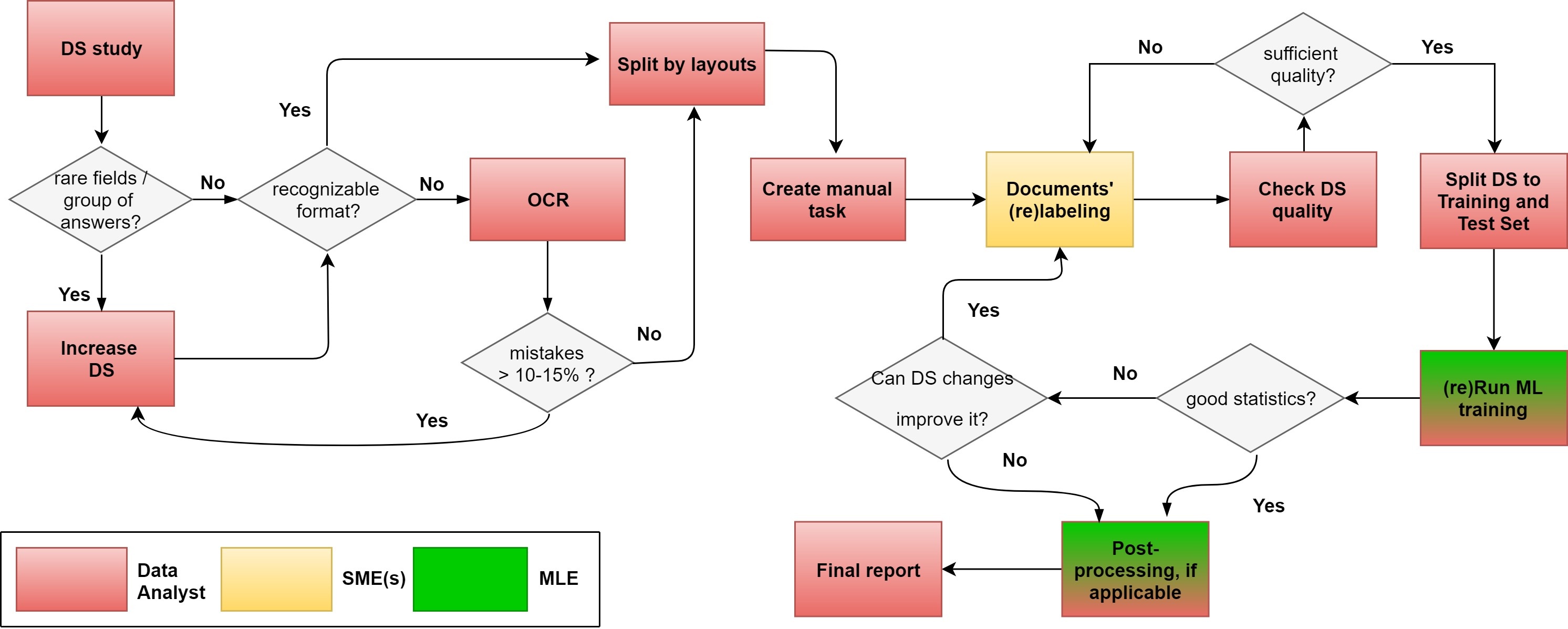
Preparatory work
DA initial data: information to work with—number of fields, document type, and format
DA goal: plan possible Answer types and their format and design a Manual Task (MT).
DA output: MT draft
The DA workflow starts once a work description is signed. That's the moment when the preparation period for automation development begins. RPA and ML engineers clarify technical details, while the DA works on human task designs.
The DA receives the initial information to handle: the number of fields and requirements, document types and formats, possible Answer Types and their format. The DA can also obtain such details as the number of SMEs, their workload, and plans on how to organize the dataset collection.
This is the initial step to work on an AI Agent, and information available for DAs can be limited. At this stage, the DA is to draw up a list of checkpoints to ask the customer as soon as possible and to think through potential work scenarios to minimize the time required for planning and consulting on the customer’s site.
Main development stage
DA initial data: Manual Task draft, a batch of documents
DA goal: dataset (DS) collection, model training
DA output: labeled dataset, trained model, report on statistics
At this stage, the DA's primary goal is to collect a dataset. The higher the quality of the dataset is, the better the ML result is.
DAs are to meet several requirements. They should know as much as possible about the logic and the flow of documents, document layouts, and production distribution. When production distribution details are known, it is essential to integrate them into the dataset. Unknown distribution is a more typical case and requires more effort because DAs must define the distribution manually.
The DA studies layout distribution to split documents into batches. The aim is to increase the labeling efficiency, decrease errors, and contribute to consistency. Each batch of layouts is to be labeled by Subject Matter Experts (SMEs). A possible solution to split documents into layouts can be to sort them by keywords.
A reasonable balance is essential when splitting. Limit the number of layouts and ensure the quantity of documents per layout is substantial—50 or more. The DA should check whether there is sufficient information about all fields or it is necessary to increase the number of documents. The document format (PDF or picture) can require OCR transformation into HTML or XML format so that the documents are suitable for labeling.
Note that the main output after labeling is a batch of labeled documents. However, to improve the statistics and demonstrate the results to the customer, it is essential to compare original documents with the labeled ones. The original document batch is usually added to the S3 storage before the OCR step and, at subsequent steps, is referred to via a link. After the OCR step, documents have names different from the original ones—that’s why it’s practical to establish a connection between the original document and the electronic one. You can set the link by the key, which is the original document hash and accompanies the document at all steps. You can introduce that by adding extra code before the OCR step.
When dataset is collected and checked, the DA splits it into two parts: a training set and a test set. The MLE starts model training. Together with the Data Analyst, they monitor model performance and results. If the statistics is below the required criteria, it’s necessary to investigate the causes and make improvements. Possible causes include incorrect labeling, insufficient dataset, or OCR mistakes. As a solution, you can retag documents and retrain the model or use a post-processing application. You can prolong and repeat the step until the statistics match the required goal.
The DA prepares a final statistical report to provide the customer with the model training results and final figures showing the model's performance. This step closes the development period, and the ML part is ready for production.