Manage isolated third-party dependencies
Work.AI offers the approach allowing smooth and flexible incorporation of user-defined Java libraries into BEP Workers. The approach enables the isolation of BCB classes from the application ones. If BCB classes use a library packaged together with the BCB, the BCB class loader loads the library classes from the BCB even if the Worker app contains the library as well.
Under the old class-loading approach, each bot script has its Groovy class loader, a child to the application class loader. In this case, the Groovy class loader has an additional classpath containing a BCB JAR. Both the Groovy and application class loaders work in the standard way:
When they are asked to load a class, they first try to delegate this to the parent.
If the parent can’t find the class, they load it themselves.
In the figure below, the old approach illustration is on the left.
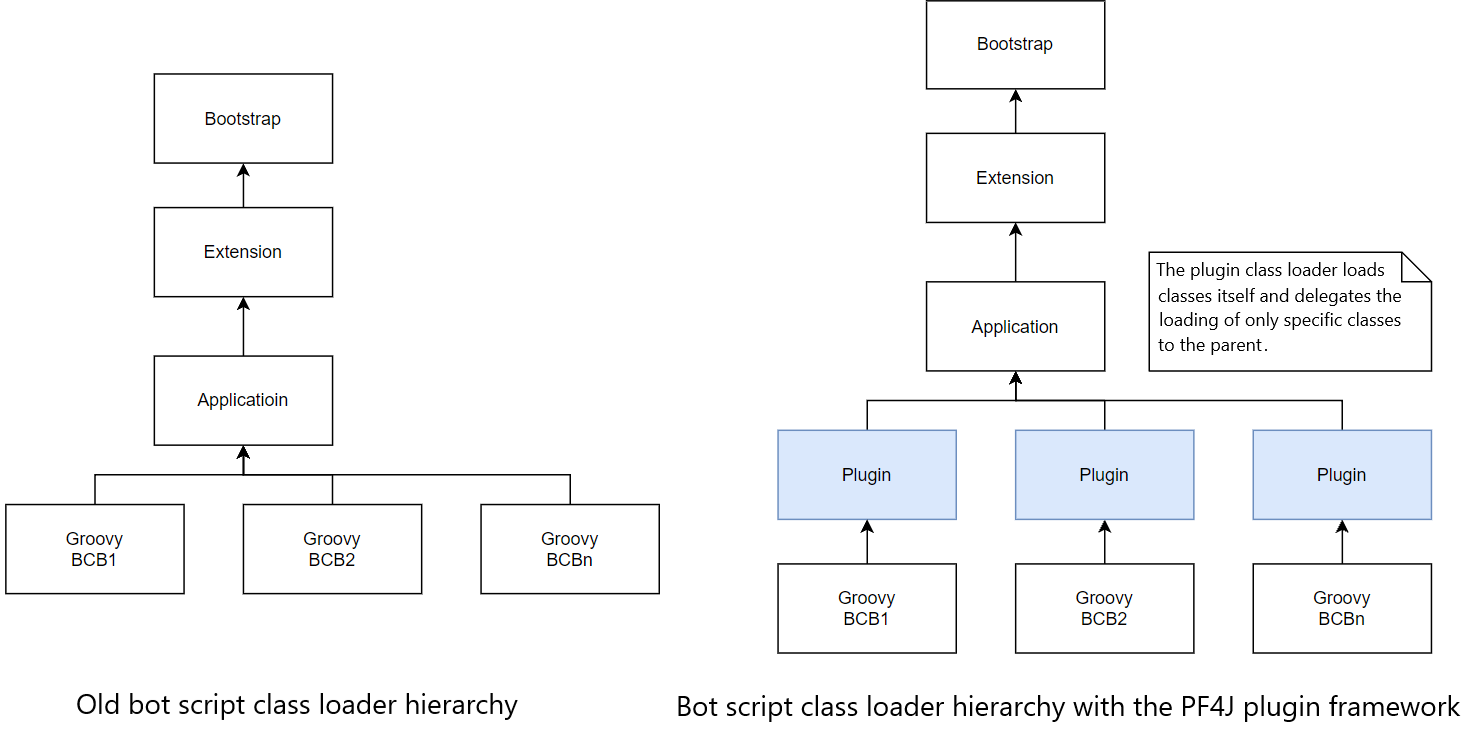
In the new approach, each BCB is loaded as a Java plugin. So, each bot still has a Groovy class loader, but the Groovy class loader is a child of the custom plugin class loader. In the figure above, the approach illustration is on the right.
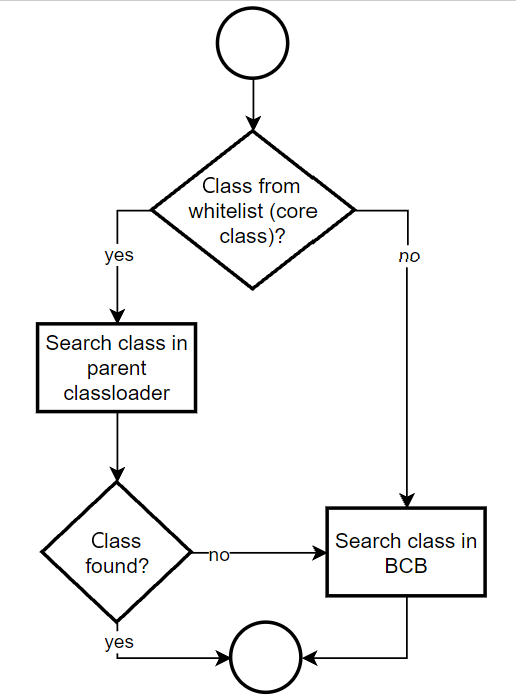
The plugin class loader knows about the BCB JAR and looks up for classes from the BCB. This class loader is configured so that it first tries to load a class from the BCB itself and delegates only classes specific to JVM and the Work.AI platform, such as Java Bot Execution API, to be loaded by the parent class loader first.
For resource resolving, new class loader searches them only in BCBs, except for the following Service Loader resources loaded from the parent class loader only:
META-INF/services/java.sql.DriverMETA-INF/services/rg.openqa.selenium.remote.server.DriverProviderMETA-INF/services/org.apache.groovy.json.FastStringServiceFactory
The following figure illustrates the class-loading algorithm for the plugin:
The following limitations apply to the feature:
Groovy class loader memory leaks are not addressed within the feature scope.
There are libraries you cannot override in the Bot Config Bundle. For reference information, see Worker API for BCB.
You can apply the algorithm to ODF- and ODF 2-based Maven projects:
- For ODF, a separate Archetype is introduced with the -PF4J postfix in its name. Now, ODF provides two Archetypes: for the old class-loading approach and the new one.
- For ODF 2, the new class-loading approach is enabled by default. There is a single Archetype to start an ODF 2 project, and it works based on the new class-loading approach.
Bot Task JUnit enables support of local test execution for the new class loader. Developers don't have to make any changes in the Bot Task test code to leverage the new class-loading approach. The only change is the bot-task-junit.properties configuration file available in new Archetypes, where it is possible to switch on or off the new class loader support for Bot Task JUnit tests.
Add third-party dependencies
Adding extra libraries is simple. Assume your Maven project has been started from an Archetype supporting the new class loader. Your task is to add required libraries into the <dependencies> section of the pom.xml file in the BCB module where you plan to work with those libraries. Packaging of these libraries is completed automatically during a build. See the example below:
<dependencies>

    ................

    <dependency>
        <groupId>com.microsoft.graph</groupId>
        <artifactId>microsoft-graph</artifactId>
        <version>2.5.0</version>
    </dependency>
    <dependency>
        <groupId>com.microsoft.graph</groupId>
        <artifactId>microsoft-graph-auth</artifactId>
        <version>0.2.0</version>
    </dependency>
</dependencies>
Align to working principle
Everything what ODF uses has to be bundled together. This is essential because when a BCB is inside a new PF4J-based Worker, it has access only to the classes packed in its bundle. This means that during a BCB build, you must pack everything you need inside the BCB itself. The task is accomplished by the Assembly plugin, and a proper configuration for this is already set up in ODF and ODF 2 Archetypes.
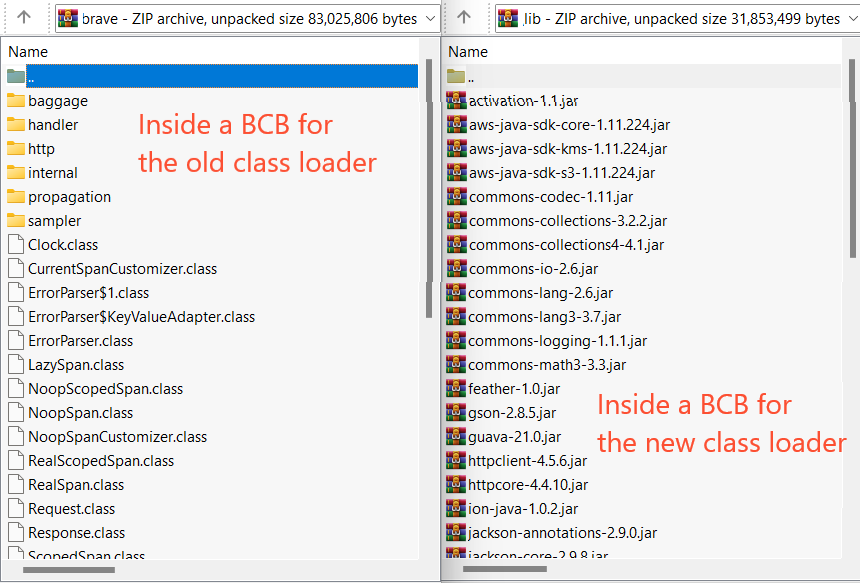
As a result, if you look at a BCB inside a built bundle zip file, you can notice significant changes. Previously, the Assembly plugin copied compiled Java classes from third-party libraries directly into the BCB. However, now the lib/ folder is added with all JARs required for the BCB, including both those required by the Work.AI platform and the third-party dependencies a developer can add into the BCB's pom.xml file.
Another major change is the MANIFEST.MF file created automatically in the META-INF folder of a compiled BCB JAR. Workers use the file to identify if the new class loader is to be applied since the old class loader is also available for backward compatibility.
Resolve dependencies issues in ODF-based Maven project
An ODF-based project is a multi-module Maven project by its nature, with the project BCB module having a parent POM. The basic structure of a project usually looks as follows:
odf
└── user-project
    └── user-project-bcb
    └── user-project-package
The root POM—com.workfusion.odf:odf:${version}—is a special kind. It is called BOM and stands for Bill Of Materials.
BOM controls versions of the project’s dependencies and provides a central place to define and update those versions. Simply speaking, the ODF-based project comes with a set of predefined dependencies, which versions are usually aligned to corresponding platform versions.
On the one hand, BOM makes working with dependencies easier since you don't have to worry about which version to choose as BOM does this for you. But, on the other hand, it can lead to an extra effort when you are obliged to use a specific version that differs from the one BOM provides.
In a typical case, such issues arise when multiple libraries have dependencies on the same shared library, but they depend on different and incompatible versions of the shared library.
The following example presents how to detect, analyze, and fix such issues.
Dependency resolution example
The main steps to deal with exceptions are as follows:
- Analyze your project by using
mvn dependency:treeand study other helpful tools. - Get acquainted with typical errors that occur in a multi-module Maven project.
- Override
<properties>when BOM provides such an opportunity, for example, a version is not hard-coded but rather specified inside the<properties>section. - Import BOMs of required libraries if such BOMs are available.
- Specify explicit dependency versions inside your POM file.
Download the example project here.
Perform the following steps:
Create an ODF-based project from the Archetype.
Add the
com.workfusion.component:mail:1.1library to your BCB. Mind that the library is built on the top ofmicrosoft-graphandazure-identityand brings about 90 transitive dependencies, which is quite enough to introduce some level of incompatibility between these dependencies and libraries defined in ODF BOM.<dependency>
<groupId>com.workfusion.component</groupId>
<artifactId>mail</artifactId>
<version>1.1</version>
</dependency>Add mail-component and create an email client inside your Bot Task.
Send a test message to the server:
OdfEmailMessage message = OdfEmailMessage.builder()
.from(OdfEmailAddress.of("username"))
.to(OdfEmailAddress.of("username"))
.subject("subject")
.text("Hello World")
.build();
Odf2EmailClient emailClient = new GraphEmailClient(new GraphEmailClientConfiguration("https://graph.microsoft.com/.default",
"CLIENT_ID", "CLIENT_SECRET", "TENANT_ID", "USERNAME",
new RetryStrategy(1), false));
emailClient.sendMessage(message);
Override properties
When you run the Bot Task, it fails with the following exception:
java.lang.NoClassDefFoundError: com/fasterxml/jackson/databind/cfg/MapperBuilder
at com.azure.identity.implementation.IdentityClient.<clinit>(IdentityClient.java:96)
at com.azure.identity.implementation.IdentityClientBuilder.build(IdentityClientBuilder.java:113)
at com.azure.identity.ClientSecretCredential.<init>(ClientSecretCredential.java:50)
at com.azure.identity.ClientSecretCredentialBuilder.build(ClientSecretCredentialBuilder.java:76)
at com.workfusion.component.mail.graph.GraphEmailClient.<init>(GraphEmailClient.java:40)
... frames omitted
Caused by: java.lang.ClassNotFoundException: com.fasterxml.jackson.databind.cfg.MapperBuilder
at org.pf4j.PluginClassLoader.loadClass(PluginClassLoader.java:144)
at com.workfusion.bcb.classloader.FilteringPluginClassLoader.loadPluginClass(FilteringPluginClassLoader.java:205)
at com.workfusion.bcb.classloader.FilteringPluginClassLoader.loadClass(FilteringPluginClassLoader.java:84)
... 43 common frames omitted
The stacktrace is self-explanatory: when GraphEmailClient is created, it is called for IdentityClient from the azure-identity library, which in its turn gets MapperBuilder to be loaded. Though, the classloader cannot find any MapperBuilder at the runtime classpath, and therefore ClassNotFoundException is thrown.
The package name denotes the com.fasterxml.jackson.databind.cfg.MapperBuilder class is from the jackson-databind library. To be on the safe side, you can also google that.
In the majority of cases, when the library you are searching for is open-sourced, you can find the Javadoc of the class. It helps you understand which version class is available in the library. In this case, it is 2.10.
Now, let's figure out which jackson-databind version (if any) is used in your BCB. To do that, execute the mvn dependency:tree command that displays the dependency tree for the project.
[INFO] +- com.workfusion.odf:odf-core:jar:10.1.7.5-PF4J:compile
[INFO] | +- com.fasterxml.jackson.core:jackson-databind:jar:2.9.8:compile
[INFO] | | +- com.fasterxml.jackson.core:jackson-annotations:jar:2.9.0:compile
[INFO] | | \- com.fasterxml.jackson.core:jackson-core:jar:2.9.8:compile
The output shows that the jackson-databind library is used, it is at the compile scope (included inside the BCB), but the version is 2.9.8.
This version cannot contain the MapperBuilder class since it was added only in 2.10. Moreover, if you take a look at the azure-core dependencies (the azure-core version is available from the dependency tree output as well), you can see that it was built using the jackson libraries of version 2.12.3.
So, why does Maven choose version 2.9.8 instead? This exact version is specified in ODF BOM, and Maven tries to align all transitive dependencies according to the BOM file.
Let's open the BOM file to take a look at its content.
If you work in IDEA, press Ctrl and click on the ODF artifact inside the root pom.xml of your project.
Otherwise, use this link to open it in a browser.
Here is a shortened version of the BOM presenting the part related to the jackson library. The version is specified using the ${jackson.version} property:
<properties>
...
<jackson.version>2.9.8</jackson.version>
...
</properties>
...
<dependency>
<groupId>com.fasterxml.jackson.dataformat</groupId>
<artifactId>jackson-dataformat-xml</artifactId>
<version>${jackson.version}</version>
</dependency>
<dependency>
<groupId>com.fasterxml.jackson.dataformat</groupId>
<artifactId>jackson-dataformat-cbor</artifactId>
<version>${jackson.version}</version>
</dependency>
<dependency>
<groupId>com.fasterxml.jackson.core</groupId>
<artifactId>jackson-databind</artifactId>
<version>${jackson.version}</version>
</dependency>
<dependency>
<groupId>com.fasterxml.jackson.core</groupId>
<artifactId>jackson-core</artifactId>
<version>${jackson.version}</version>
</dependency>
...
Now, let's override the version to 2.12.3 as required by azure-core.
To do that, in your BCB, add <jackson.version> to the the properties section. By doing so, you override jackson-databind and all other jackson libraries in one line:
<properties>
<jackson.version>2.12.3</jackson.version>
</properties>
Be attentive when working with properties, especially when you are going to override something. Keep track of which version is used by Maven after you have specified the property to be overridden.
To better understand whether your library was overridden or not, use the mvn help:effective-pom command. It shows the effective POM of your project.
If properties do not work, specify the explicit version using the dependency or dependencyManagement section.
Import BOMs
Rerun the Bot Task. The previous errors are gone, but a new one occurs:
Caused by: java.lang.ClassNotFoundException: io.netty.handler.logging.ByteBufFormat
at org.pf4j.PluginClassLoader.loadClass(PluginClassLoader.java:144)
at com.workfusion.bcb.classloader.FilteringPluginClassLoader.loadPluginClass(FilteringPluginClassLoader.java:205)
at com.workfusion.bcb.classloader.FilteringPluginClassLoader.loadClass(FilteringPluginClassLoader.java:84)
... 82 more
ClassNotFoundException means that the required class is not at the runtime classpath. It can be due to a missing library or a wrong version of the library. Refer to the dependency tree output:
[INFO] | | +- com.azure:azure-core-http-netty:jar:1.10.1:compile
[INFO] | | | +- io.netty:netty-codec-http2:jar:4.1.27.Final:compile
[INFO] | | | +- io.netty:netty-transport-native-unix-common:jar:4.1.27.Final:compile
[INFO] | | | +- io.netty:netty-transport-native-epoll:jar:linux-x86_64:4.1.27.Final:compile
[INFO] | | | +- io.netty:netty-transport-native-kqueue:jar:osx-x86_64:4.1.27.Final:compile
[INFO] | | | \- io.projectreactor.netty:reactor-netty:jar:1.0.7:compile
In this particular case, netty is used by azure-core-http-netty and the version is supposed to be at least 4.1.65.Final, but instead 4.1.27.Final is picked by Maven from the ODF BOM.
Since the netty project has a BOM of its own, take advantage of it. Instead of specifying dependencies explicitly, import the netty BOM file to your pom.xml. This results in overriding of all netty libraries.
To do so, put netty-bom into the dependencyManagement section inside the BCB's pom.xml.
<dependencyManagement>
<dependencies>
<dependency>
<groupId>io.netty</groupId>
<artifactId>netty-bom</artifactId>
<version>4.1.63.Final</version>
<type>pom</type>
<scope>import</scope>
</dependency>
</dependencies>
</dependencyManagement>
Specify explicit versions
When you rerun the Bot Task, you get another error:
java.lang.NoSuchMethodError: com.google.gson.JsonParser.parseString(Ljava/lang/String;)Lcom/google/gson/JsonElement;
at com.microsoft.graph.serializer.CollectionPageSerializer.serialize(CollectionPageSerializer.java:79)
at com.microsoft.graph.serializer.GsonFactory$11.serialize(GsonFactory.java:225)
at com.microsoft.graph.serializer.GsonFactory$11.serialize(GsonFactory.java:220)
NoSuchMethodError means that one version of a library was used during the compile time, while another version of the same library was applied at runtime. Therefore, some method is missing. Most likely, the root cause is the same as the one with the jackson library.
By analyzing the dependency tree output, you can see that microsoft-graph requires at least version 2.8.7 of guava, but at runtime you get 2.8.5 instead.
The simplest possible way to fix it (without even looking into the BOM file) is to add a required dependency right away into the dependency section inside the BCB's pom.xml.
When resolving dependencies, Maven picks the nearest definition. It uses the version of the closest dependency to your project in the tree of dependencies. You can always guarantee a version by declaring it explicitly in your project's POM file.
<dependencies>
...
<dependency>
<groupId>com.google.code.gson</groupId>
<artifactId>gson</artifactId>
<version>2.8.7</version>
</dependency>
...
</dependencies>
There are two more problems on the way regarding the reactor-core and jackson-annotations dependencies. We omit the details here as the algorithm remains the same: take a look at the dependencies tree, find the right version, and override it by putting it into your POM file.
<dependency>
<groupId>io.projectreactor</groupId>
<artifactId>reactor-core</artifactId>
<version>3.4.6</version>
</dependency>
<dependency>
<groupId>com.fasterxml.jackson.core</groupId>
<artifactId>jackson-annotations</artifactId>
<version>2.12.3</version>
</dependency>
As a result, the Bot Task is run without any issues. The final pom.xml file is as follows:
Expand to see pom.xml
<?xml version="1.0" encoding="UTF-8"?>
<project xmlns:xsi="http://www.w3.org/2001/XMLSchema-instance" xmlns="http://maven.apache.org/POM/4.0.0" xsi:schemaLocation="http://maven.apache.org/POM/4.0.0 http://maven.apache.org/maven-v4_0_0.xsd">
<modelVersion>4.0.0</modelVersion>
<parent>
<groupId>com.example</groupId>
<artifactId>example-project</artifactId>
<version>7.2.1</version>
</parent>
<artifactId>example-project-bcb</artifactId>
<version>7.2.1</version>
<packaging>jar</packaging>
<name>example-project-bcb</name>
<properties>
<jackson.version>2.12.3</jackson.version>
</properties>
<dependencyManagement>
<dependencies>
<dependency>
<groupId>io.netty</groupId>
<artifactId>netty-bom</artifactId>
<version>4.1.63.Final</version>
<type>pom</type>
<scope>import</scope>
</dependency>
</dependencies>
</dependencyManagement>
<dependencies>
<dependency>
<groupId>com.workfusion.spa.bot</groupId>
<artifactId>bot-execution-core</artifactId>
<scope>provided</scope>
</dependency>
<dependency>
<groupId>com.workfusion.secretmanagement</groupId>
<artifactId>workfusion-secret-management</artifactId>
<scope>provided</scope>
</dependency>
<dependency>
<groupId>com.workfusion.odf</groupId>
<artifactId>odf-core</artifactId>
</dependency>
<dependency>
    <groupId>com.workfusion.component</groupId>
    <artifactId>mail</artifactId>
    <version>1.1</version>
</dependency>
<dependency>
<groupId>com.fasterxml.jackson.core</groupId>
<artifactId>jackson-annotations</artifactId>
<version>2.12.3</version>
</dependency>
<dependency>
<groupId>com.google.code.gson</groupId>
<artifactId>gson</artifactId>
<version>2.8.7</version>
</dependency>
<dependency>
<groupId>io.projectreactor</groupId>
<artifactId>reactor-core</artifactId>
<version>3.4.6</version>
</dependency>
</dependencies>
<build>
<!-- build section is omitted -->
</build>
</project>
Eventually, you haven't added new dependencies to the BCB. Instead, you have overridden some versions of the already existing dependencies to enable the Bot Task to work with microsoft-graph and azure-identity.
New class loader implementation details
Below, you can find details on how the new PF4J-based class loader is implemented.
Worker APIs available in BCB
These are Work.AI platform classes used in both the Worker core and BCBs. To avoid cast and linkage errors, the plugin class loader delegates the loading of specific classes to the parent class loader. Packages containing them are listed below:
com.workfusion.autoit.driver.*
com.workfusion.bot.*
com.workfusion.common.browser.*
com.workfusion.common.utils.*
com.workfusion.rpa.*
com.workfusion.studio.rpa.recorder.api.*
com.workfusion.task.execution.configuration.*
com.workfusion.universal.*
com.workfusion.util.jwt.*
com.workfusion.utils.*
com.workfusion.webharvest.plugin.automl.*
com.workfusion.machine.properties.LocalWebHarvestTaskExecutorProperty.*
com.workfusion.task.webharvest.WebharvestTaskMetadataConstants.*
com.workfusion.utils.net.UriUtils.*
com.freedomoss.crowdcontrol.webharvest.*
groovy.*
org.apache.groovy.*
org.codehaus.groovy.*
org.webharvest.*
org.slf4j.*
org.openqa.selenium.*
org.openqa.grid.*
com.thoughtworks.selenium.*
com.microsoft.sqlserver.jdbc.*
net.sf.saxon.*
marker.NativeLibMarker
These classes are contained in the com.workfusion.spa.bot:bot-execution-api dependency to be included in BCB's pom.xml with the provided scope instead of com.workfusion.spa.bot:bot-execution-core. The bot-execution-api module was extracted from bot-execution-core and intended for more fine-grained dependency management.
The Bot execution API dependency provides classes from the following Maven artifacts without transitive dependencies:
com.workfusion.spa.bot:bot-execution-api-provided
com.workfusion.spa.bot:bot-execution-api-dto
com.workfusion.util:jwt
com.workfusion:bot-task-api
com.workfusion:recorder-custom-script-action
com.workfusion:rpa-api
com.workfusion:rpa-selenium-api
com.workfusion:rpa-selenium-chrome-driver
com.workfusion:rpa-selenium-edge-driver
com.workfusion:rpa-selenium-firefox-driver
com.workfusion:rpa-selenium-ie-driver
com.workfusion:rpa-selenium-safari-driver
com.workfusion:rpa-selenium-opera-driver
com.workfusion:rpa-selenium-remote-driver
com.workfusion:rpa-selenium-java
com.workfusion:rpa-selenium-leg-rc
com.workfusion:rpa-selenium-server
com.workfusion:rpa-selenium-support
com.workfusion.webharvest:workfusion-webharvest-core
org.codehaus.groovy:groovy-all
org.slf4j:slf4j-api
Classes from the following packages are considered to be system ones and loaded first from the parent class loader. If they cannot be found in the parent class loader, they are loaded from the BCB.
A new class loader tries to load classes from packages described above from the Worker first. If the required class is not found, try loading it from the BCB.
java.*
javax.*
com.sun.*
com.oracle.*
jdk.*
oracle.*
sun.*
org.ietf.jgss.*
org.jcp.xml.dsig.internal.*
org.w3c.dom.*
org.omg.*
org.xml.sax.*
javafx.*
netscape.*
You can use only public Bot Execution API in your BCB code. Avoid utilizing private, package-private, and protected methods and fields from the API classes because there is no guarantee that they won’t be changed or removed in the future.
Dependency management design
The figure below illustrates the design of modules in the new and old implementations.
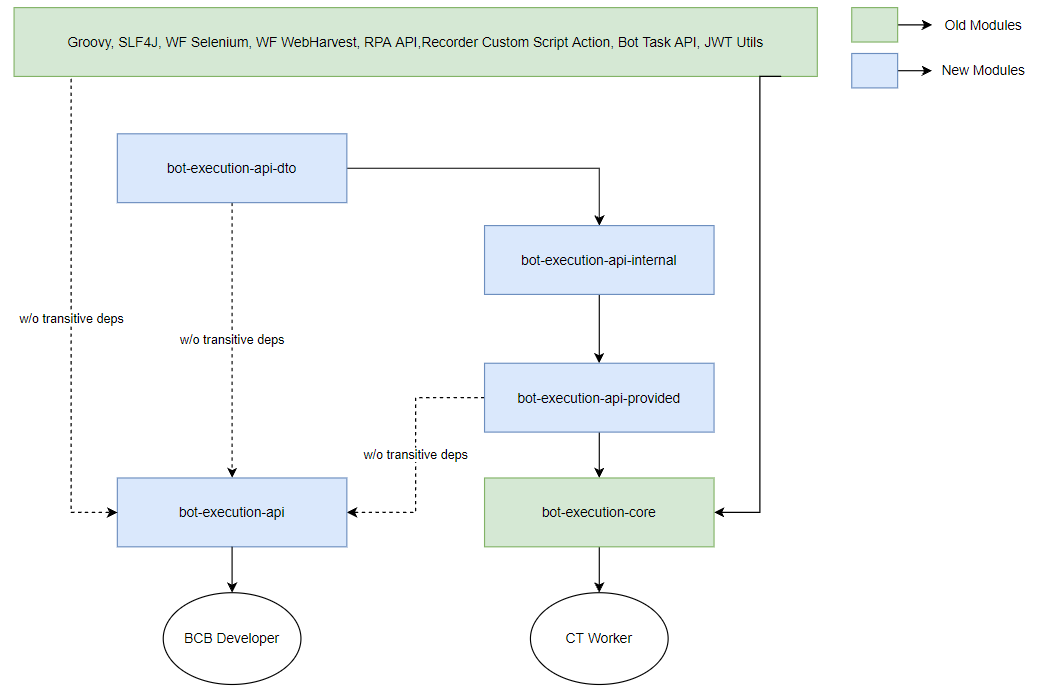
Bot Execution API DTO contains data transfer objects (DTOs) that should be present in Bot Execution Java API and are also required for internal needs.
Bot Execution API Internal describes the logic required for implementation and the logic to become part of Bot Execution Java API but to be left for backward compatibility.
Bot Execution API Provided is part of Bot Execution Java API provided by a Bot Execution project.
Bot Execution API is Bot Execution Java API for a BCB developer. It contains only classes required for the BCB developer without transitive dependencies essential to implement API itself.
Bot Execution Core contains all logic with dependencies to support the old flow and the Isolated Class Loading flow.
New BCB JAR packaging
As there can be resource conflicts when packaging multiple libraries with the Maven Shade plugin, it was decided to re-design the BCB uber-jar packaging. Instead of adding the unpacked content of all dependencies to a BCB JAR, dependency JARs are now included in the BCB uber-jar, which is similar to how it’s done in the WAR or Spring boot. The dependency JARs are saved to the lib folder under the BCB JAR. The JAR structure is as shown below:
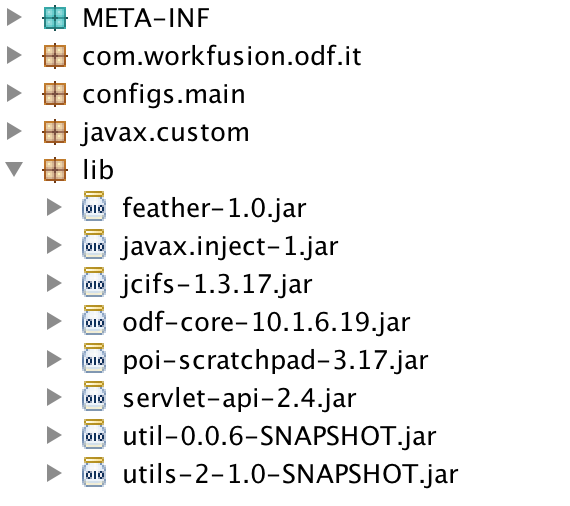
Dependency JARs are added to a BCB JAR in the order in which they appear in pom.xml. When a BCB is executed on a Worker, nested JARs are read from the lib folder in the same order they are written.
To use the new approach, update the Maven configuration in pom.xml for your BCB project as instructed in the Usage section below.
Changes made in BCB to use new class loading
The changes described below are already implemented in the latest ODF and ODF 2 project Archetypes you can leverage to start a project. However, specific scenarios can require manual migration of existing BCBs or ODF and ODF 2 projects. To manually enable new BCB class loading, follow the instruction below:
- Substitute the
com.workfusion.spa.bot:bot-execution-coredependency withcom.workfusion.spa.bot:bot-execution-apias illustrated in the examples below. The bot-execution-api module contains Work.AI platform classes you can use in the BCB code.
You can still continue using bot-execution-core in the following cases:
- You cannot find
bot-execution-apiof the required version at https://repository.workfusion.com. This occurs if you are an early adopter of the new class loading feature, and your project is built with ODF 1. - You are moving a project written before the new class loading feature and already build on the top of
bot-execution-core. In this case, the effort of moving tobot-execution-apican be huge, and you may decide to stay withbot-execution-core.
To enable the plugin class-loading isolation, include the following properties into
manifest.mfof the BCB JAR:Plugin-Id: the BCB unique identifier consisting of MavengroupId,artifactId, and a version joined with:. For example,bot.task.tests:odf-10.3:1.0.9. This is a required field. It must include the same values as stored in Nexus.Note that you can use a more generic form:
${project.groupId}:${project.artifactId}:${project.version}.Plugin-Cache-Supported: include this to enable or disable the class-loading cache. Possible values aretrueorfalse. The default setting isfalse.
Generally, it's recommended to enable the plugin cache to decrease the input-output pressure and BCB loading time. If your BCB contains libraries using static fields, you might need to disable the cache so that these libraries work correctly.
Plugin-Additional-Whitelist-Packages: a comma-separated list of additional packages to expose from isolation. For example,Plugin-Additional-Whitelist-Packages: org.apache.commons.lang3lets you get access toStringUtilsfrom the Apache Commons library of a Worker.
Note that the field is required for internal purposes only and specific corner cases. It is strongly recommended not to use it.
You can use either the Shade or Assembly plugin for the fat JAR packaging. To apply the new BCB dependency packaging strategy with nested JARs, opt for the Assembly plugin. With this approach, utilizing libraries, such as Apache POI 5, is much easier.
Shade plugin
You can add manifest entries to an existing BCB configuration of the Shade plugin.
Expand to see the example
<?xml version="1.0" encoding="UTF-8"?>
<project xmlns:xsi="http://www.w3.org/2001/XMLSchema-instance" xmlns="http://maven.apache.org/POM/4.0.0"
         xsi:schemaLocation="http://maven.apache.org/POM/4.0.0 http://maven.apache.org/xsd/maven-4.0.0.xsd">
    <modelVersion>4.0.0</modelVersion>
...
    <dependencies>

        <dependency>
            <groupId>com.workfusion.spa.bot</groupId>
            <artifactId>bot-execution-api</artifactId>
            <scope>provided</scope>
        </dependency>
...
    </dependencies>
...
    <build>
        <plugins>
            <plugin>
                <groupId>org.apache.maven.plugins</groupId>
                <artifactId>maven-shade-plugin</artifactId>
                <version>3.2.1</version>
                <executions>
                    <execution>
                        <phase>package</phase>
                        <goals>
                            <goal>shade</goal>
                        </goals>
                        <configuration>
                            <createDependencyReducedPom>false</createDependencyReducedPom>
                            <transformers>
                                <transformer implementation="org.apache.maven.plugins.shade.resource.ManifestResourceTransformer">
                                <manifestEntries>
                                    <Plugin-Id>${project.groupId}:${project.artifactId}:${project.version}</Plugin-Id>
                                    <Plugin-Cache-Supported>true</Plugin-Cache-Supported>
                                </manifestEntries>
                                </transformer>
                            </transformers>
                           ...
                        </configuration>
                    </execution>
                </executions>
            </plugin>
            ...
        </plugins>
    </build>
</project>
If the BCB's manifest file does not contain the properties described above, the old class-loading approach is used for BCB execution. In this case, the BCB class loader first looks up classes in the parent (application) class loader.
Assembly plugin
The Assembly plugin adds all BCB dependencies, excluding those provided for the /lib folder in the BCB JAR. Dependency JARs are written to the BCB JAR in the same order as they appear in pom.xml, so there should be no differences in the class-loading order. The Maven Assembly plugin configuration is illustrated below.
Expand to see more
<?xml version="1.0" encoding="UTF-8"?>
<project xmlns:xsi="http://www.w3.org/2001/XMLSchema-instance" xmlns="http://maven.apache.org/POM/4.0.0"
         xsi:schemaLocation="http://maven.apache.org/POM/4.0.0 http://maven.apache.org/xsd/maven-4.0.0.xsd">
    <modelVersion>4.0.0</modelVersion>
    ...
    <dependencies>
        <dependency>
            <groupId>com.workfusion.spa.bot</groupId>
            <artifactId>bot-execution-api</artifactId>
            <scope>provided</scope>
        </dependency>
    </dependencies>
    ...
    <build>
       ...
        <plugins>
            ...
            <plugin>
                <artifactId>maven-assembly-plugin</artifactId>
                <version>3.2.0</version>
                <configuration>
                    <descriptors>
                        <descriptor>assembly.xml</descriptor>
                    </descriptors>
                    <archiverConfig>
                        <compress>false</compress>
                    </archiverConfig>
                    <archive>
                        <index>true</index>
                        <manifest>
                            <addClasspath>true</addClasspath>
                            <classpathPrefix>lib/</classpathPrefix>
                        </manifest>
                        <manifestEntries>
                            <Plugin-Id>${project.groupId}:${project.artifactId}:${project.version}</Plugin-Id>
                            <Plugin-Cache-Supported>true</Plugin-Cache-Supported>
                        </manifestEntries>
                    </archive>
                    <appendAssemblyId>false</appendAssemblyId>
                </configuration>
                <executions>
                    <execution>
                        <id>create-archive</id>
                        <phase>package</phase>
                        <goals>
                            <goal>single</goal>
                        </goals>
                    </execution>
                </executions>
            </plugin>
            ...
        </plugins>
    </build>
</project>
Also, add the assembly.xml file to your project with the detailed config for the Assembly plugin:
<assembly
        xmlns="http://maven.apache.org/plugins/maven-assembly-plugin/assembly/1.1.2"
        xmlns:xsi="http://www.w3.org/2001/XMLSchema-instance"
        xsi:schemaLocation="http://maven.apache.org/plugins/maven-assembly-plugin/assembly/1.1.2 http://maven.apache.org/xsd/assembly-1.1.2.xsd">
    <id>bcb</id>
    <formats>
        <format>jar</format>
    </formats>
    <includeBaseDirectory>false</includeBaseDirectory>
    <dependencySets>
        <dependencySet>
            <outputDirectory>/</outputDirectory>
            <unpack>true</unpack>
            <includes>
                <include>${artifact}</include>
            </includes>
        </dependencySet>
        <dependencySet>
            <outputDirectory>/lib</outputDirectory>
            <unpack>false</unpack>
            <excludes>
                <exclude>${artifact}</exclude>
            </excludes>
        </dependencySet>
    </dependencySets>
</assembly>
Troubleshooting
Below, you can find a list of the most common issues and troubleshooting tips:
java.lang.LinkageError: loader constraint violation: when resolving method X...can happen when you have two dependencies, one depending on another (for example,slf4j-apiandslf4j-log4j), and only one of them is packaged in your BCB.To solve this problem, try the following resolution:
If the library is listed in Restricted Dependencies in the JAR, set the provided scope for the dependency in your
pom.xml.Otherwise, add both dependencies to your
pom.xmlas compile dependencies.
java.lang.ClassCastException: X cannot be cast to Xcan be due to several reasons:You get an object from binding and explicitly cast to a class. In this case, the class in the BCB context is loaded by the plugin class loader, but the actual object you get from the binding is loaded by the application class loader and considered a different class. In this case, set the provided scope to the dependency containing class from
pom.xml.The class relates to a transitive dependency. In this case, add the transitive dependency to
pom.xmlwith a compile scope.
Corner cases
Custom JDBC driver
In some cases, the step logic requires access to a non-Work.AI database (DB), such as Oracle, MySQL, and so on. Unfortunately, the Java implementation of the JDBC driver makes it difficult to use custom DB drivers in a BCB.
To get a custom JDBC driver to behave stably, follow the rules below:
Explicitly create a Data Source or driver for use instead of relying on Java's automatic driver resolving. This way, you avoid situations when drivers are not found, or
ClassCastExceptionoccurs for the same class name.After a task is complete, make sure no custom
java.sql.Driveris left injava.sql.DriverManager. If you ignore the rule, this can lead to Metaspace memory leaks and out-of-memory issues.