Generate code with JNW Toolkit
To reduce the amount of boilerplate code required to write Task Processors for the Java Native Worker (JNW), JNW Toolkit (or jnw-toolkit) offers several annotation processors. The article provides basic instructions on using them in a project.
Use JNW Toolkit in existing project
To use jnw-toolkit in an existing project, complete the following steps:
Add a version of jnw-toolkit to the
<properties>section of your Maven project:<properties>
<wf.jnw-toolkit.version>1.0.0.17</wf.jnw-toolkit.version>
<!--
1.0.0.17 is the earliest version that supports features described in the article.
1.0.0.17.1 is the earliest version that supports all features described in the article for Platform version 10.2.8.
You might need to look for the recent version.
-->
</properties>If the project is a part of the workfusion-meta pipeline, add a dependency to jnw-toolkit to the
components.yamlfile of theworkfusion-metaproject:your-project:
dependencies:
- jnw-toolkitImport
jnw-toolkit-parentin the<dependencyManagement>section of the Maven project. It transitively importsjava-native-worker-parent-bomand the worker-task-test library, so you do not need to import them explicitly. Add any required module of jnw-toolkit to the<dependencies>section of the Maven project:<dependencyManagement>
<dependencies>
<dependency>
<groupId>com.workfusion.jnw.toolkit</groupId>
<artifactId>jnw-toolkit-bom</artifactId>
<version>${wf.jnw-toolkit.version}</version>
<type>pom</type>
<scope>import</scope>
</dependency>
</dependencies>
</dependencyManagement>
<dependencies>
<dependency>
<groupId>com.workfusion.jnw.toolkit</groupId>
<artifactId>jnw-toolkit-auto-task-processor</artifactId>
</dependency>
</dependencies>
The worker-task-test library is a testing library explicitly designed for Task Processors written for the JNW, which has evolved from the bot-task-test library.
Use auto-generated Task Processors
A use case for an auto-generated Task Processor is a task that works with object input and output, de-serializes input data from JSON, and then serializes output data to JSON. The code for such a task has no inherent value and can be easily generated.
Perform the following steps:
Add the
jnw-toolkit-auto-task-processordependency to a Maven project:<dependencies>
<dependency>
<groupId>com.workfusion.jnw.toolkit</groupId>
<artifactId>jnw-toolkit-auto-task-processor</artifactId>
</dependency>
<dependency>
<groupId>com.workfusion.jnw.toolkit</groupId>
<artifactId>jnw-toolkit-auto-task-processor-xml</artifactId>
</dependency>
</dependencies>Configure
maven-compiler-pluginto pass Maven project coordinates to the annotation processor. For more details, see Use auto-generated Task Processor XML files.<build>
<plugins>
<plugin>
<groupId>org.apache.maven.plugins</groupId>
<artifactId>maven-compiler-plugin</artifactId>
<configuration>
<showWarnings>true</showWarnings>
<compilerArgs>
<arg>-AgroupId=${project.groupId}</arg>
<arg>-AartifactId=${project.artifactId}</arg>
<arg>-Aversion=${project.version}</arg>
</compilerArgs>
</configuration>
</plugin>
</plugins>
<build>Create a Spring component with a method that contains your Task Processor's logic. The method signature is used to understand the required input for a task and the resultant output it generates. Annotate the method with
@AutoTaskProcessor:import com.workfusion.jnw.toolkit.annotation.AutoTaskProcessor;
@Component
public class TaskProcessorComponent {
@AutoTaskProcessor
public MyResultObject taskProcessorMethod(String someInput, int otherInput, MyInputObject objectInput) {
// put task logic here
}
}Rebuild the Maven project. Go to the
target/generated-sources/annotationsdirectory of the module that contains the annotated method and see the auto-generated code. The auto-generated class is created in the same package as the initial component.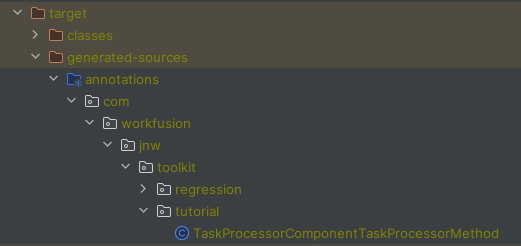
Auto-generated Task Processor naming
By default, the name of the auto-generated Task Processor class is derived from the name of the method annotated with @AutoTaskProcessor and the name of the class to which it belongs. For the TaskProcessorComponent class and the taskProcessorMethod method, the auto-generated class name is TaskProcessorComponentTaskProcessorMethod. The auto-generated Task Processor ID is also derived from the same names. In the same case, it is defined as "task-processor-component-task-processor-method".
@TaskProcessor(id = "task-processor-component-task-processor-method")
public class TaskProcessorComponentTaskProcessorMethod extends JsonTaskProcessor {
You can override the defaults with attributes of the @AutoTaskProcessor annotation:
@AutoTaskProcessor(className = "OtherClassName", id = "other-id")
With the above example settings, the auto-generated class definition is as follows:
@TaskProcessor(id = "other-id")
public class OtherClassName extends JsonTaskProcessor {
Attributes of the @AutoTaskProcessor annotation are used as written, without any checks for validity or duplication. If the className attribute contains a wrong Java identifier, it causes a compilation error. If the id attribute is incorrect or duplicates the ID of another Task Processor, an error occurs on the side of Control Tower of the JNW and is much harder to identify.
There is one more attribute of the @AutoTaskProcessor annotation called "fileName". You can use it to control the name of the auto-generated Task Processor XML file. For more details, see Auto-generate Task Processor XML files for auto-generated Task Processors.
Auto-generated Task Processor code
To learn more about the auto-generated code, let's create a simple task:
@Component
public class SimplestTaskComponent {

    @AutoTaskProcessor
    public String concatenateArguments(String someInput, int otherInput) {
        return someInput + otherInput;
    }
}
The auto-generated Task Processor class for the concatenateArguments method looks like this:
@TaskProcessor(id = "simplest-task-component-concatenate-arguments")
public class SimplestTaskComponentConcatenateArguments extends JsonTaskProcessor {

    @Autowired
    private SimplestTaskComponent actualProcessor;

    @Override
    public JsonTaskOutputData process(JsonTaskInputData taskInputData) throws TaskProcessorException {
        final String result = actualProcessor.concatenateArguments(
            taskInputData.getValueAsType("someInput", new TypeReference<String>() {}),
            taskInputData.getValueAsType("otherInput", int.class)
        );

        final JsonTaskOutputData taskOutputData = new JsonTaskOutputData();
        final JsonTaskOutputRow row = new JsonTaskOutputRow();
        row.putValue("output", result);
        taskOutputData.addRow(row);
        return taskOutputData;
    }
}
The class containing the task method is auto-wired in the auto-generated class. Therefore, it must be @Component, like in the example above, or it must be provided by the @Bean-annotated method somewhere in the Spring application. The annotation processor cannot reliably check this during the compile time, so it is the developer's responsibility to make the class known to the Spring context.
The body of the process() method consists of two distinctive parts:
- The
concatenateArguments()method with its arguments taken from the task input and converted to correct types - The result of
concatenateArguments()placed into the task output
Supported types
The following Java types are supported as argument types and return the type of the task method:
All Java primitive types (
int,boolean,double, and so on).All Java wrapper types for primitive values (
Integer,Boolean,Double, and so on).java.lang.String.An array of any supported type, including multi-dimensional arrays.
java.util.Mapor any of its descendant types, with keys of theStringtype and values of any other supported type, without wildcards in the type argument (for example,Map<String, ? extends SomeObject>is not supported, whileMap<String, SomeObject>is).java.util.Optionalof any other supported type, without wildcards in the type argument (for example,Optional<? extends SomeObject>is not supported, whileOptional<SomeObject>is).java.lang.Iterableor any of its descendant types (Collection,List,Set, and so on) of any other supported type, without wildcards in the type argument (for example,List<? extends SomeObject>is not supported, whileList<SomeObject>is).Any non-generic Java object that can be serialized and deserialized by Jackson (accessible default constructor; getter and setter for each field). Fields of such objects can be of any supported type except for
java.util.Optional. Optional is not supported as a field type of an input or output object.
There are some additional types allowed in input and output, and there is a case when Iterables are treated differently. Such exceptions are described in the corresponding parts of the article. However, mind that any supported type can be used anywhere in the task method signature.
Generics are not allowed anywhere except for collections due to the limitations of OpenAPI used as a language for contracts. For the Task Processor generation and contract generation, it is important to have the same rules so that even when contract generation for a task method is not used, the limitation still applies.
An unsupported argument type in the task method signature causes a compilation error during annotation processing. Arguments of variable length of any type are not supported.
Task method input
For each argument of the task method, the generated code tries to retrieve a value from the task input and convert it to the expected type. For example, the value for the int otherInput argument is retrieved as taskInputData.getValueAsType("otherInput", int.class). To perform the required conversion, use the com.workfusion.spa.jnative.worker.core.api.JsonTaskInputData class belonging to the JNW itself. The class treats task input values as JSON and deserializes them into a desired type. If the value is absent, null is passed to the task method instead. If the value cannot be parsed as JSON representing the desired type, an exception occurs in the runtime.
In addition to standard supported types, the task method can have arguments of the com.workfusion.spa.jnative.worker.core.api.TaskInputData and com.workfusion.spa.jnative.worker.core.api.JsonTaskInputData types. You can use such arguments to access raw Task Processor input.
Unlike other supported types, you cannot use TaskInputData and JsonTaskInputData as component types of an array or Iterable.
If an input column has a weird name, rename the task method arguments. Control Tower does not support spaces in column names, while other symbols, like underscores, are not supported by Java. The IDE highlights some names for breaking the code style, but it is not an issue otherwise.
Task method output
The output is converted to JSON using the com.workfusion.spa.jnative.worker.core.api.JsonTaskOutputData and com.workfusion.spa.jnative.worker.core.api.JsonTaskOutputRow classes belonging to the JNW itself. However, there are several ways to interprete task output during code generation.
Raw task output
A task method can return com.workfusion.spa.jnative.worker.core.api.TaskOutputData or com.workfusion.spa.jnative.worker.core.api.JsonTaskOutputData. The returned value is used as Task Processor output as is.
Single-row versus multi-row task output
The task method return type is the only place where java.lang.Iterable and its descendant types are treated differently from other supported types. If the task method result type is Iterable, the intention is to return multiple outputs. Then, each value inside returned Iterable is treated as a separate output row. All other supported types are treated as a single row of output. If you need to return a collection of elements in a single row, use an array (the JSON representation of arrays and Iterables are the same).
Compare examples below:
Iterable task method output
@AutoTaskProcessor
public List<String> multiRowOutput() {
    return Arrays.asList("a", "b", "c");
}
The method produces the following generated code:
final List<java.lang.String> result = actualProcessor.multiRowOutput();

final JsonTaskOutputData taskOutputData = new JsonTaskOutputData();
result.forEach( resultItem -> {
    final JsonTaskOutputRow row = new JsonTaskOutputRow();
    row.putValue("output", resultItem);
    taskOutputData.addRow(row);
});
return taskOutputData;
The code produces the following output:
| output | |
|---|---|
| 1 | "a" |
| 2 | "b" |
| 3 | "c" |
Array task method output
@AutoTaskProcessor
public String[] singleRowOutput() {
    return new String[]{"a", "b", "c"};
}
The method produces the following generated code:
final String[] result = actualProcessor.multiRowOutput();

final JsonTaskOutputData taskOutputData = new JsonTaskOutputData();
final JsonTaskOutputRow row = new JsonTaskOutputRow();
row.putValue("output", result);
taskOutputData.addRow(row);
return taskOutputData;
The code produces the following output:
| output | |
|---|---|
| 1 | [“a”,”b”,”c”] |
String task method output
@AutoTaskProcessor
public String singleRowOutput() {
    return "some output";
}
The method produces the following generated code:
final String result = actualProcessor.multiRowOutput();

final JsonTaskOutputData taskOutputData = new JsonTaskOutputData();
final JsonTaskOutputRow row = new JsonTaskOutputRow();
row.putValue("output", result);
taskOutputData.addRow(row);
return taskOutputData;
The code produces the following output:
| output | |
|---|---|
| 1 | “some output“ |
Single-column versus multi-column task output
As you can see in previous examples, a task method returning a String, array, or a primitive produces a single output column. By default, the column's name is output. You can control the name with the help of the com.workfusion.jnw.toolkit.annotation.TaskProcessorOutput annotation. The annotation is equally applicable to single-row and multi-row outputs.
Changing name of output column
@AutoTaskProcessor
@TaskProcessorOutput(propertyName = "other-name")
public String singleRowOutput(String someInput) {
    return "some output";
}
The method produces the following generated code:
final String result = actualProcessor.multiRowOutput();

final JsonTaskOutputData taskOutputData = new JsonTaskOutputData();
final JsonTaskOutputRow row = new JsonTaskOutputRow();
row.putValue("other-name", result);
taskOutputData.addRow(row);
return taskOutputData;
The code produces the following output:
| other-name | |
|---|---|
| 1 | “some output“ |
To produce multiple columns of output, the task method needs to return a Java object with multiple fields. By default, this object is deconstructed, meaning each field is used as a separate column of the Task Processor output.
Producing multi-column output
If you have a result object defined like this:
public class MyResultObject {

    private String columnA;
    private int columnB;

    public MyResultObject() {}

    public MyResultObject(String columnA, int columnB) {
        this.columnA = columnA;
        this.columnB = columnB;
    }

    public String getColumnA() {return columnA;}
    public void setColumnA(String columnA) {this.columnA = columnA;}
    public int getColumnB() {return columnB;}
    public void setColumnB(int columnB) {this.columnB = columnB;}
}
Then, the following task method is applied:
@AutoTaskProcessor
public MyResultObject multiColumnOutput() {
    return new MyResultObject("qwerty", 123);
}
The method produces the following generated code:
final MyResultObject result = actualProcessor.multiColumnOutput();

final JsonTaskOutputData taskOutputData = new JsonTaskOutputData();
final JsonTaskOutputRow row = new JsonTaskOutputRow();
row.putValue("columnA", result.getColumnA());
row.putValue("columnB", result.getColumnB());
taskOutputData.addRow(row);
return taskOutputData;
The code produces the following output:
| columnA | columnB | |
|---|---|---|
| 1 | “qwerty“ | 123 |
Returning Iterable of such objects produces multi-row multi-column task output.
Producing multi-row multi-column output
If you have a result object defined like this:
public class MyResultObject {

    private String columnA;
    private int columnB;

    public MyResultObject() {}

    public MyResultObject(String columnA, int columnB) {
        this.columnA = columnA;
        this.columnB = columnB;
    }

    public String getColumnA() {return columnA;}
    public void setColumnA(String columnA) {this.columnA = columnA;}
    public int getColumnB() {return columnB;}
    public void setColumnB(int columnB) {this.columnB = columnB;}
}
Then, the following task method is applied:
@AutoTaskProcessor
public List<MyResultObject> multiColumnOutput() {
    return Arrays.asList(new MyResultObject("qwerty", 123), new MyResultObject("asdfg", 456));
}
The method produces the following generated code:
final List<com.workfusion.jnw.toolkit.tutorial.MyResultObject> result = actualProcessor.multiColumnOutput();

final JsonTaskOutputData taskOutputData = new JsonTaskOutputData();
result.forEach( resultItem -> {
    final JsonTaskOutputRow row = new JsonTaskOutputRow();
    row.putValue("columnA", resultItem.getColumnA());
    row.putValue("columnB", resultItem.getColumnB());
    taskOutputData.addRow(row);
});
return taskOutputData;
The code produces the following output:
| columnA | columnB | |
|---|---|---|
| 1 | “qwerty“ | 123 |
| 2 | “asdfg“ | 456 |
There can be a case when deconstructing an object to its fields is undesirable. If it is required to return an object as a single column containing its JSON representation, you can do it with the help of the same @TaskProcessorOutput annotation.
Producing single-column output with JSON object inside
If you have a result object defined like this:
public class MyResultObject {

    private String columnA;
    private int columnB;

    public MyResultObject() {}

    public MyResultObject(String columnA, int columnB) {
        this.columnA = columnA;
        this.columnB = columnB;
    }

    public String getColumnA() {return columnA;}
    public void setColumnA(String columnA) {this.columnA = columnA;}
    public int getColumnB() {return columnB;}
    public void setColumnB(int columnB) {this.columnB = columnB;}
}
Then, the following task method is applied:
@AutoTaskProcessor
@TaskProcessorOutput(deconstruct = false)
public MyResultObject singleColumnOutput() {
    return new MyResultObject("qwerty", 123);
}
The method produces the following generated code:
final MyResultObject result = actualProcessor.singleColumnOutput();

final JsonTaskOutputData taskOutputData = new JsonTaskOutputData();
final JsonTaskOutputRow row = new JsonTaskOutputRow();
row.putValue("output", result);
taskOutputData.addRow(row);
return taskOutputData;
The code produces the following output:
| output | |
|---|---|
| 1 | {"columnA":"qwerty","columnB":123} |
Returning Iterable predictably produces multi-row output with a single column of JSON objects. You can also rename the column using @TaskProcessorOutput(deconstruct = false, propertyName = "whatever").
Java objects deconstruction in output
Only the top-level object returned by the task method is subject to deconstruction. Fields of the object are serialized to JSON regardless of their type.
Nested objects in output
public class Inner {
  private String innerValue;
  // constructors and accessors omitted for clarity
}

public class Outer {
  private Inner inner;
  private String otherValue;
  // constructors and accessors omitted for clarity
}

@AutoTaskProcessor
public Outer nestedOutput() {
    return new Outer(new Inner("qwerty"), "asdf");
}
The method produces the following output:
| inner | otherValue | |
|---|---|---|
| 1 | {"innerValue":"qwerty"} | “asdf” |
An object to be deconstructed is also the only type in the task method signature (aside from Iterables) that can be generic. It is allowed because a deconstructed type is never mentioned in the output contract.
Generic type in task method output
If you have result objects defined like this:
public class TypicalOutput<T> {
    private T content;
    private String commonData;
    // constructors and accessors omitted for clarity
}

public class BusinessData {
  private String businessValue;
  // constructors and accessors omitted for clarity
}
Then, the following task method is applied:
@AutoTaskProcessor
public TypicalOutput<BusinessData> genericOutput() {
    return new TypicalOutput<>(new BusinessData("qwerty"), "asdf");
}
The method produces the following generated code:
final TypicalOutput<BusinessData> result = actualProcessor.singleColumnOutput();

final JsonTaskOutputData taskOutputData = new JsonTaskOutputData();
final JsonTaskOutputRow row = new JsonTaskOutputRow();
row.putValue("content", result.getBusinessData());
row.putValue("commonData", result.getCommonData());
taskOutputData.addRow(row);
return taskOutputData;
The code produces the following output:
| content | commonData | |
|---|---|---|
| 1 | {"businessValue":"qwerty"} | “asdf” |
If output object deconstruction is disabled by the @TaskProcessorOutput(deconstruct = false) annotation in the task method, the generic output type causes a compilation error.
Multiple task methods in same class
Any given Spring component can have multiple task methods, for example:
@Component
public class SomeTaskComponent {

    @AutoTaskProcessor
    public String taskA() { /* some logic */ }

    @AutoTaskProcessor
    public String taskB() { /* some logic */ }

    @AutoTaskProcessor
    public String taskC() { /* some logic */ }
}
The code in three auto-generated Task Processors: SomeTaskComponentTaskA, SomeTaskComponentTaskB, and SomeTaskComponentTaskC.
While Java allows having multiple methods with the same name and different parameters in one class, such code leads to auto-generating several Task Processors with the same name, causing a compilation error. Therefore, it is recommended to avoid using the same names for task methods or to change the default Task Processor class name and ID, if such method naming is required.
Use auto-generated Task Processor XML files
The JNW requires each Task Processor class to be accompanied by a Bot Task configuration XML file. The file must contain Maven coordinates of the artifact in which the Task Processor class is stored, along with the Task Processor ID. Maintaining the file manually is inconvenient. For this reason, jnw-toolkit offers an annotation processor that makes the generation of Task Processor XML files fully automated.
Add the
jnw-toolkit-auto-task-processor-xmldependency to the Maven module that serves as a JNW application:<dependencies>
<dependency>
<groupId>com.workfusion.jnw.toolkit</groupId>
<artifactId>jnw-toolkit-auto-task-processor-xml</artifactId>
</dependency>
</dependencies>Configure
maven-compiler-pluginto pass Maven project coordinates to the annotation processor:<build>
<plugins>
<plugin>
<groupId>org.apache.maven.plugins</groupId>
<artifactId>maven-compiler-plugin</artifactId>
<configuration>
<showWarnings>true</showWarnings>
<compilerArgs>
<arg>-AgroupId=${project.groupId}</arg>
<arg>-AartifactId=${project.artifactId}</arg>
<arg>-Aversion=${project.version}</arg>
</compilerArgs>
</configuration>
</plugin>
</plugins>
<build>Annotation processors run as a part of the Java compilation process. The Java compiler is not aware of Maven.
maven-compiler-plugincalls the Java compiler to compile the project code. Thus, the annotation processor has no information about the Maven project, its coordinates, or even its existence. At the same time, the annotation processor needs this information in the generated XML file. That's why you must configuremaven-compiler-pluginto pass required information to the compiler so that the annotation processor can use it.If
jnw-toolkit-auto-task-processor-xmlis present in the project, butmaven-compiler-pluginis not configured correctly, it causes a compilation error.Rebuild the Maven project. Go to the
target/classes/configs/maindirectory of the module to see the auto-generated code. A Task Processor XML file is generated for each class annotated with the JNW'scom.workfusion.spa.jnative.worker.core.task.TaskProcessorannotation.
For example, you have the following Task Processor class located in the com.example:example-module:1.0.0 Maven module:
@TaskProcessor(id = "some-task-processor-id")
public class SomeTaskProcessor implements ITaskProcessor {
  // actual code is not important
}
Then, the Task Processor some-task-processor.xml file is generated:
<?xml version="1.0" encoding="UTF-8"?>
<config type="java">
  <worker>com.example:example-module:1.0.0</worker>
  <processor>some-task-processor-id</processor>
</config>
Auto-generated Task Processor XML file naming
By default, the name of the Task Processor XML file is derived from the name of the Task Processor class annotated with @TaskProcessor. For example, for the "SomeTaskProcessor" class, the name of the XML file is some-task-processor.xml.
It is technically possible to have identically named Task Processor classes in different packages. However, this leads to a conflict between identically named Task Processor XML files in the target/classes/configs/main directory. You can avoid the conflict by customizing the name of the auto-generated XML file by the com.workfusion.jnw.toolkit.annotation.FileName annotation.
For example, if you add the @FileName("custom file name") annotation to the previous example, the Task Processor's custom file name.xml file is generated.
@FileName("custom file name")
@TaskProcessor(id = "some-task-processor-id")
public class SomeTaskProcessor implements ITaskProcessor {
  // actual code is not important
}
A separate annotation is required for a filename. Thus, @TaskProcessor is the annotation belonging to the JNW itself. It has no semantics related to auto-generation of XML files, and the auto-generation is not provided by the JNW. Therefore, it is incorrect to add a filename attribute to it.
On the other hand, the @FileName annotation belongs to jnw-toolkit, and its semantics implies that some file with a specified name is associated with the annotated class.
Values of the @FileName and @TaskProcessor annotations are used as written, without any checks for validity or duplication. If the @FileName value conflicts with another filename, it causes a compilation error. If the id attribute of @TaskProcessor is incorrect or duplicates the ID of another Task Processor, an error occurs on the side of Control Tower of the JNW and is much harder to identify.
Auto-generating Task Processor XML files for auto-generated Task Processors
The jnw-toolkit-auto-task-processor and jnw-toolkit-auto-task-processor-xml annotation processors are designed to work together. It is expected that any project taking advantage of the Task Processor generation auto-generates XML files for them. Auto-generated Task Processors are annotated with @TaskProcessor. You can control its id attribute with the id attribute of the @AutoTaskProcessor annotation. For more details, see Auto-generated Task Processor naming.
As for the @FileName annotation, you can control it with the help of @AutoTaskProcessor(fileName = "custom file name").
Changing name of Task Processor XML file with @AutoTaskProcessor
@Component
public class SomeComponent {

  @AutoTaskProcessor(fileName="other-name")
  public String someTask(String someInput) {
    // actual code is not important
  }

}
The method produces the following generated Task Processor class:
@TaskProcessor(id = "some-component-some-task")
@FileName("other-name")
public class SomeComponentSomeTask extends JsonTaskProcessor {
}
Therefore, the auto-generated XML file is named other-name.xml.
Configuring content of generated XML file
JNW Toolkit offers several annotations to modify a generated Task Processor XML file. The annotations are located in the com.workfusion.jnw.toolkit.annotation.taskxml package:
@Configuration(template="some-template", value="some-value")adds the<configuration template="some-template">some-value</configuration>section to the generated XML file.@SendResultToCaller(true)adds the<sendResultToCaller>true</sendResultToCaller>section to the generated XML file.@SplitData(SplitDataValue.FORCE)adds the<splitData>force</splitData>section to the generated XML file.
To create custom annotations that add arbitrary sections to the generated XML file, annotate them with @RepresentsXML.
Annotations marked with @RepresentsXml are converted to XML in the following way:
A tag name equals the value of the
RepresentsXml.tagName()attribute. If the value is an empty string or null, the tag name equals the class name of the annotation marked with@RepresentsXml, with the first letter converted to lowercase.Tag content equals the
"value()"attribute of the annotation marked with@RepresentsXml, if such attribute exists.Other attributes of the annotation marked with
@RepresentsXmlare converted to XML tag attributes by callingString.valueOf().
All the above annotations are created with the help of @RepresentsXml and can be used as an example.
Currently, you cannot add elements like <sendResultToCaller> or <configuration> to the auto-generated XML file, but the feature is planned.
Resolving issues with IntelliJ IDEA
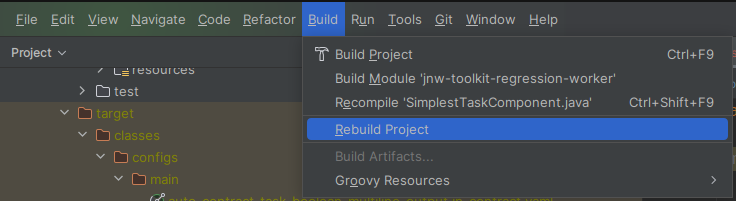
Usually, IntelliJ IDEA supports annotation processors and custom compiler arguments. However, there can be issues with custom compiler arguments. In this case, when trying to compile a Java class or run a test, you see an error message about a missing -AgroupId compiler argument from the annotation processor.
The solution is to rebuild a project in IDEA (go to the main menu > Build > Rebuild project) or re-import the Maven project and then rebuild the project in IDEA. In any case, this is an IDEA issue, as the Maven build will still work.
Use auto-generated contracts
Along with auto-generated Task Processors, jnw-toolkit can automatically generate input and contracts for task methods. The generation of contracts is designed to work with the Task Processor generation. It works along the same logic, supports the same subset of Java types, is subject to the same limitations, and is provided by the same jnw-toolkit-auto-task-processor module. It is enabled by annotating the Task Processor method with the com.workfusion.jnw.toolkit.annotation.AutoContract annotation.
You can use @AutoTaskProcessor without contracts or create contracts manually. You can also use @AutoContract without @AutoTaskProcessor, but you still need some method with a signature that can be used as a source for contracts.
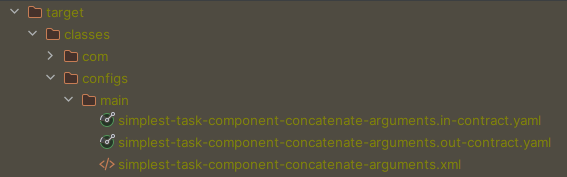
Auto-generated contracts are placed into the target/classes/configs/main directory. Their naming is consistent with the naming of auto-generated task XML files, which means that it is controlled by @AutoTaskProcessor if it is used, or by @FileName if you decide to write the Task Processor yourself.
For instance, the task from the first example in the article:
@Component
public class SimplestTaskComponent {

    @AutoContract
    @AutoTaskProcessor
    public String concatenateArguments(String someInput, int otherInput) {
        return someInput + otherInput;
    }
}
The following XML files are auto-generated:
Auto-generated input contract
openapi: 3.0.0
info:
  title: IN schema for simplest-task-component-concatenate-arguments
  version: 1.0.0
components:
  schemas:
    in:
      type: object
      properties:
        someInput:
          type: string
        otherInput:
          type: integer
          format: int32
Auto-generated output contract
openapi: 3.0.0
info:
  title: OUT schema for simplest-task-component-concatenate-arguments
  version: 1.0.0
components:
  schemas:
    out:
      type: object
      properties:
        output:
          type: string
Object references in auto-generated contracts
When a Java class appears in the input or output data of a task method, this object is reflected in a contract as a reference to its definition in the object schema.
For any Java class except for primitives, their wrappers, strings, arrays, and Iterables, you must provide the information about an object schema to the annotation processor. The information is needed to avoid a compilation error.
There are two ways to provide the information:
Recommended. When writing a Java class and defining it inside an object schema, you can annotate it with
com.workfusion.jnw.toolkit.annotation.ObjectSchema. The annotation value must contain a path to a schema file inside an Asset Bundle where the annotated class is described. For example, a class:@ObjectSchema("schema/com/workfusion/something/schema.yaml")
public class MyInputObject {
}is represented in a contract as follows:
$ref: 'schema/com/workfusion/something/schema.yaml#/components/schemas/MyInputObject'When using a Java class that for some reason lacks an
@ObjectSchemaannotation and there is no possibility to add it (for example, a class belongs to the Java standard library or a third-party one), annotate the task method that requires that class withcom.workfusion.jnw.toolkit.annotation.AssignedObjectSchema, for example:@Component
public class SomeTaskComponent {
@AutoContract
@AutoTaskProcessor
@AssignedObjectSchema(type = ExternalDataType.class, schema = "schema/com/workfusion/something/schema.yaml")
public String someTask(ExternalDataType t) {
// not important
}
}Here, the code assigns a schema to
ExternalDataType.
Apply @CodeGenerationOptions annotation for code generation
To provide additional instructions to annotation processors that generate code, use the @CodeGenerationOptions annotation introduced in JNW Toolkit 1.0.0.25 for Work.AI v10.2.9. Apply the annotation to the parameter of the task method, the field of the class used as a return type of the task method, or the task method itself. In the latter case, it is interpreted as an annotation for the primitive or non-deconstructed return type of the task method.
@CodeGenerationOptions can contain a set of elements of the CodeGenerationOption enum. CodeGenerationOption.REQUIRED affects the behavior of jnw-toolkit-auto-task-processor.
When a contract is generated, the contract field produced from the element marked with this option is added to the required: section of the contract.
Example of usage on parameter of task method
@Component
public class SimplestTaskComponent {
    @AutoContract
    @AutoTaskProcessor
    public String concatenateArguments(@CodeGenerationOptions(CodeGenerationOption.REQUIRED) String someInput, int otherInput) {
        return someInput + otherInput;
    }
}
The following input contract is generated:
openapi: 3.0.0
info:
  title: IN schema for simplest-task-component-concatenate-arguments
  version: 1.0.0
components:
  schemas:
    in:
      type: object
      required:
        - someInput
      properties:
          someInput:
            type: string
          otherInput:
            type: string
Example of usage on field of output type
public class MyResultObject {
    @CodeGenerationOptions(CodeGenerationOption.REQUIRED)
    private String columnA;
    private int columnB;
}
@Component
public class SimplestTaskComponent {
    @AutoContract
    @AutoTaskProcessor
    public MyResultObject myTask() {
       //...
    }
}
The following input contract is generated:
openapi: 3.0.0
info:
  title: IN schema for simplest-task-component-my-task
  version: 1.0.0
components:
  schemas:
schemas:
    out:
      type: object
      required:
        - columnA
      properties:
        columnA:
          type: string
        columnB:
          type: integer
          format: int32
Example of usage on task method itself
@Component
public class SimplestTaskComponent {
    @AutoContract
    @AutoTaskProcessor
    @CodeGenerationOptions(CodeGenerationOption.REQUIRED)
    public String concatenateArguments(String someInput, int otherInput) {
        return someInput + otherInput;
    }
}
The following input contract is generated:
openapi: 3.0.0
info:
  title: OUT schema for simplest-task-component-concatenate-arguments
  version: 1.0.0
components:
  schemas:
    out:
      type: object
      required:
        - output
      properties:
        output:
          type: string