Certificate-based authentication
Certificate generation (Client and Server)
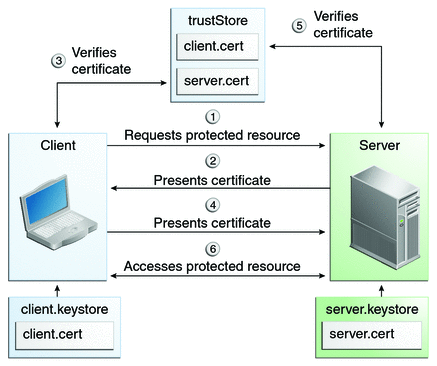
- Download the generate-certificates.bat file and execute it with the
<username>parameter. - Put the generated
server.jksfile to<TOMCAT_HOME>/conf. - Use the generated
<username>.p12file on the client side. Import it to the browser or use it with Client API.
Example for Windows:
@echo off
if "%1" == "" goto usage
keytool -genkeypair -alias servercert -keyalg RSA -dname "CN=Web Server,OU=Unit,O=Organization,L=City,S=State,C=US" -keypass password -keystore server.jks -storepass password
keytool -genkeypair -alias %1 -keystore %1.p12 -storetype pkcs12 -keyalg RSA -dname "CN=%1,OU=Unit,O=Organization,L=City,S=State,C=US" -keypass password -storepass password
keytool -exportcert -alias %1 -file %1.cer -keystore %1.p12 -storetype pkcs12 -storepass password
keytool -importcert -keystore server.jks -alias %1 -file %1.cer -v -trustcacerts -noprompt -storepass password
keytool -list -v -keystore server.jks -storepass password
del %1.cer
goto end
:usage
echo Need user id as first argument: generate_keystore [username]
goto end
:end
pause
Tomcat configuration
Add a new SSL connector to
<TOMCAT_HOME>/conf/server.xml.<Connector protocol="org.apache.coyote.http11.Http11Protocol" clientAuth="true" port="8443" maxThreads="200" scheme="https" secure="true" SSLEnabled="true" sslProtocol="TLS" keystoreFile="${catalina.home}\conf\server.jks" keystoreType="JKS" keystorePass="password" keyAlias="servercert" truststoreFile="${catalina.home}\conf\server.jks" truststoreType="JKS" truststorePass="password"
/>Add a new JNDI variable to
<TOMCAT_HOME>/conf/context.xml.<Environment name="rest/cert-auth/enable" value="true" type="java.lang.Boolean"/>
Nginx configuration
Add a new location to <NGINX_HOME>/conf/nginx.conf.
location <REPLACE_WITH_PATH> {
     proxy_pass        https://localhost:8443/mturk-web;
     proxy_set_header    Host            $host;
     proxy_set_header    X-Real-IP       $remote_addr;
     proxy_set_header    X-Forwarded-For $proxy_add_x_forwarded_for;
     client_max_body_size       4G;
     client_body_buffer_size    128k;
     proxy_read_timeout 3000;
     proxy_send_timeout 30;
}
Spring Security configuration
Add certificate authentication for the needed path:
<http pattern="<REPLACE_WITH_PATTERN>">
    .....
    <intercept-url pattern="..." access="isAuthenticated()" requires-channel="https"/>
    <x509 subject-principal-regex="CN=(.*?)," user-service-ref="userDetailsService"/>
    ....
</http>
How to use:
- Download the linked user certificate from CCS-5600.
- Double-click the certificate and then add it as user cert authority.
- Try opening the links.
Known issues
- Open url:8443. A cert request appears. After it, the Nginx URL works fine.
- Open the WorkFusion dashboard using any existing credentials. After it, the Nginx URL works fine.
- Without prior authentication, the Nginx->Tomcat case fails with a
401error. Full authentication is required. - Authentication fails if an additional certificate is configured in Nginx.