
WorkFusion REST API
important
For WorkFusion public REST API, refer to Swagger.
The WorkFusion API lets you post data to, launch, and receive results from the WorkFusion application automatically.
Using the RESTful API, you can manage simple tasks and more complex Business Processes representing a workflow of various manual and automated tasks.
Groups of contributors working on submitting manual tasks are referred to as Workforces. A workforce can represent one or more different groups, both from Cloud worker pools, such as UpWork, Mechanical Turk, and internal collaborators, business partners, and outsourcers.
Business Processes and tasks have a certain lifecycle within WorkFusion. There are a number of states, such as draft, processing, paused, completed, and so on. The API lets you manage the operations by providing unique actions applicable to various states—create, start, pause, stop, and so on.
API security
All API postings are made over a Secure Sockets Layer (SSL) connection encrypting communications between the user and the web server to ensure data remains private.
note
All requests must be preceded by https://.
Form-based authentication
WorkFusion REST API employs form-based (login and password) authentication to ensure that APIs are only accessible to users with proper credentials.
Note that CSRF protection is added to REST endpoints. To make a REST call, add a CSRF token to the request header.
Before executing REST API requests, log in using the form URL:
POST method
POST /workfusion/api/dologin
Content-Type: application/x-www-form-urlencoded
j_username=usernamej_password=password
where:
j_usernameis your username in Control Tower.j_passwordis your password in Control Tower.
A successful request body from the server looks like this:
{
    "success": true,
    "csrfToken": <csrftoken>,
    "csrfHeaderName": <csrftokenname>
}
Get the
JSESSIONIDfrom the Set-Cookie response header.When creating REST API requests:
- Set this
JSESSIONIDto the Cookie header. - Set
application/x-www-form-urlencodedas the Content-Type header. - Set the received
<csrftoken>as the<csrftokenname>header.
- Set this
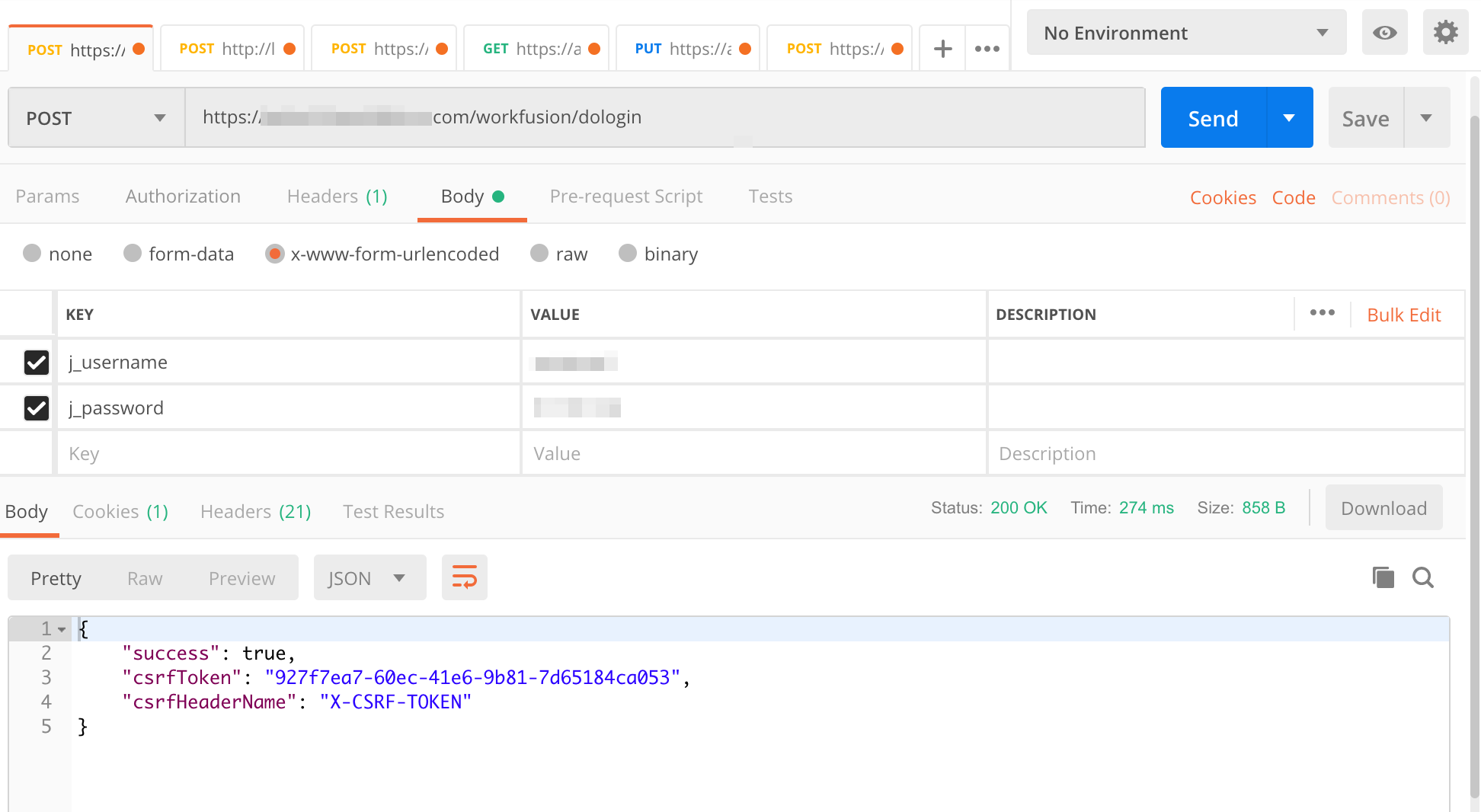
Here is a Postman login request example:
Sample login with HttpClient
package org.example;

import com.google.gson.Gson;
import org.apache.commons.lang.StringUtils;
import org.apache.http.HttpResponse;
import org.apache.http.NameValuePair;
import org.apache.http.client.HttpClient;
import org.apache.http.client.entity.UrlEncodedFormEntity;
import org.apache.http.client.methods.HttpPost;
import org.apache.http.entity.AbstractHttpEntity;
import org.apache.http.impl.client.HttpClients;
import org.apache.http.message.BasicNameValuePair;

import java.io.IOException;
import java.io.InputStream;
import java.util.ArrayList;
import java.util.List;
import java.util.Map;

//Not a production-grade implementation; use as an example only
public class ApiLogin {

    public static final String USERNAME = "ct_user_name";
    public static final String PASSWORD = "ct_user_password";
    public static final String LOGIN_URL = "https://instance.workfusion.com/workfusion/api/dologin";

    public static void main(String... args) throws IOException {
        String token = new ApiLogin().login();
        System.out.println("Auth token: " + token);
    }

    public String post(String addressURL, AbstractHttpEntity body, String csrfToken) throws IOException {

        HttpPost httpPost = new HttpPost(addressURL);
        System.out.println("POST -> " + addressURL);
        httpPost.setEntity(body);
        // add a token if necessary
        if (!StringUtils.isEmpty(csrfToken)) {
            httpPost.addHeader("X-CSRF-TOKEN",csrfToken);
            httpPost.getParams().setParameter("_csrf",csrfToken);
        }
        HttpClient httpClient = HttpClients.createDefault();
        HttpResponse response = httpClient.execute(httpPost);

        //Read the Set-Cookie header from the response
        String cookies = response.getHeaders("Set-Cookie")[0].getValue();
        System.out.println("Set-Cookie header: " + cookies);

        String stringResponse = convertStreamToString(response.getEntity().getContent());
        System.out.println(stringResponse);

        return stringResponse;
    }


    public String login() throws IOException {

        List<NameValuePair> nvp = new ArrayList<>();
        nvp.add(new BasicNameValuePair("j_username", USERNAME));
        nvp.add(new BasicNameValuePair("j_password", PASSWORD));

        //simply post the username and password to the server to login
        //re-use the httpClient instance to make sure the same JSESSIONID cookie is used

        //UrlEncodedFormEntity sets Content-Type=application/x-www-form-urlencoded
        // no token is required for login
        String loginResponse = post(LOGIN_URL, new UrlEncodedFormEntity(nvp),"");

        Map jsonResponse = new Gson().fromJson(loginResponse, Map.class);

        String csrfToken = (String) jsonResponse.get("csrfToken");

        String csrfHeader = (String) jsonResponse.get("csrfHeaderName");
        return csrfToken;
        // then use csrfHeader and csrfToken for REST API calls, return it.

    }

    private String convertStreamToString(InputStream is) {
        java.util.Scanner s = new java.util.Scanner(is).useDelimiter("\\A");
        return s.hasNext() ? s.next() : "";
    }
}
Use REST API with SSO
When using REST API with SSO, you cannot use your SSO ID and password. The recommended approach is as follows:
- In the
INSTALL_DIR/workfusion/conf/workfusion.propertiesfile, disable SSO by changing thewf.sso.saml.enable=falseproperty. - Restart Control Tower by running the
wfmanager restart workfusioncommand. - Log in to Workfusion with the pre-SSO ID and password.
- Create special REST API users and grant necessary permissions by assigning proper roles.
- In the
INSTALL_DIR/workfusion/conf/workfusion.propertiesfile, enable SSO by updating thewf.sso.saml.enable=trueproperty. - Restart Control Tower by running the
wfmanager restart workfusioncommand.
Now, SSO is enabled, but you can also use the REST API user ID and password for REST API authentication.
Use REST API with LDAP
To enable using REST API with LDAP authentication, follow the steps below:
- In the
INSTALL_DIR/workfusion/conf/workfusion.propertiesfile, disable LDAP by changing theldap.enabled=falseproperty. - Restart Control Tower by running the command:
wfmanager restart workfusion. - Log in to Workfusion with pre-LDAP ID and password.
- Create a special REST API user and grant them the necessary permissions by assigning proper roles.
- In the
INSTALL_DIR/workfusion/conf/workfusion.propertiesfile, enable SSO by updating theldap.enabled=trueproperty. - Restart Control Tower by running the command:
wfmanager restart workfusion.
Now, LDAP is enabled, and you can use it for REST API authentication the same way you use SSO.
URLs
All URLs begin with the following pattern:
https://%HOSTNAME%/workfusion/api/
UUIDs
Each operation, such as a task, Business Process, or workforce, have a unique identifier called UUID. It is used as a unique reference to invoke the WorkFusion API and identify those entities. The UUID looks similar to this: db1cf0a8-1be4-4842-aec9-4ab0196bc9f1.
Once you receive the required UUID, you can use it to manage BPs or workforces via API. For example:
- To get JSON with detailed information on a BP, such as status, executor, and so on, send the
POSTrequest to the endpointhttps://HOSTNAME/workfusion/api/v1/bp-instances/BP_UUID?scope=STRUCTURE&scope=BP_DETAILS&scope=CHILDREN_DETAILS. - To receive snapshots for a BP, send the
POSTrequest to the endpointhttps://HOSTNAME/workfusion/api/v1/bp-instances/BP_UUID/snapshots/final?lastSnapshotCount=50. - To receive CSV with BP results, send the
POSTrequest to the endpointhttps://HOSTNAME/workfusion/api/v1/snapshots/BP_UUID.
For more information on each endpoint and its parameters, see the Swagger UI.
Obtain Business Process UUID
To obtain Business Process UUID:
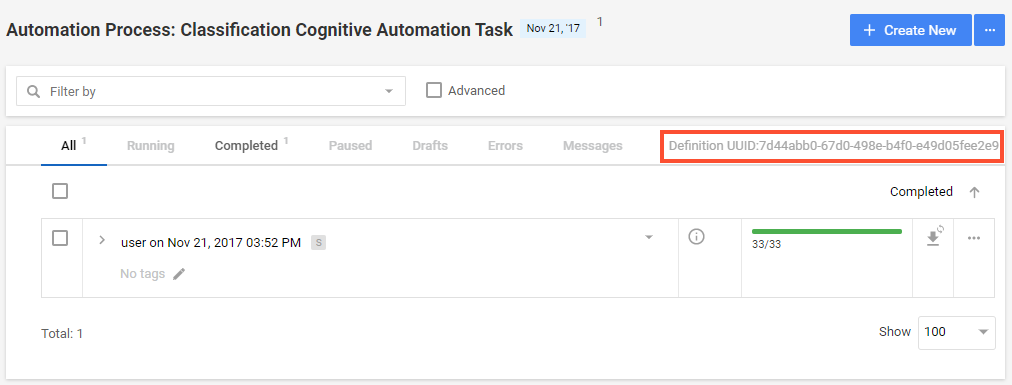
In Control Tower, go to the Business Process list.
Click on Open Process Definition In New Tab.

The Business Process Definition opens in a new tab. The UUID is displayed as shown on the screenshot below.
Obtain Workforce UUID
To get a Workforce UUID:
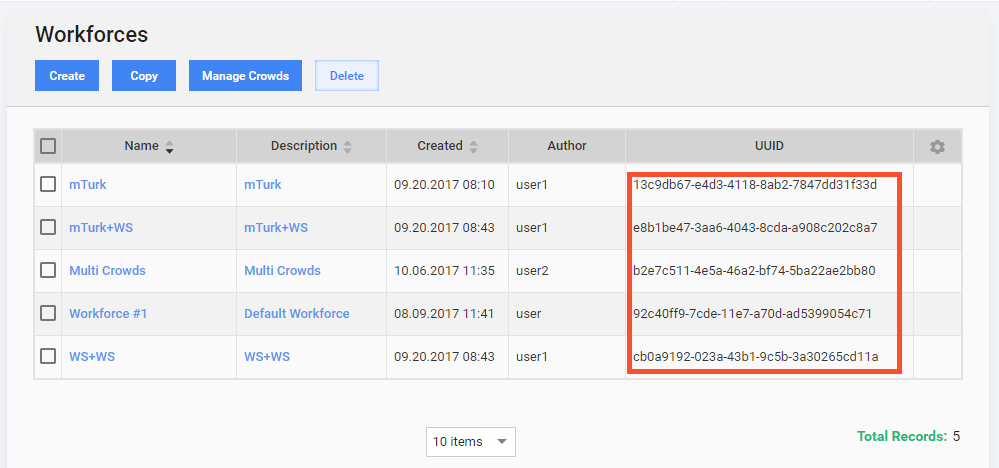
In Control Tower, go to Workers > Workforces.
Copy the UUID of the required Workforce from the table.
Sample implementation
Refer to the API sample below to see how login, launching, and getting a BP status can be implemented using Apache HttpClient.
API sample
import com.google.gson.Gson;
import com.google.gson.annotations.SerializedName;
import org.apache.http.Header;
import org.apache.http.HttpResponse;
import org.apache.http.NameValuePair;
import org.apache.http.client.HttpClient;
import org.apache.http.client.entity.UrlEncodedFormEntity;
import org.apache.http.client.methods.HttpGet;
import org.apache.http.client.methods.HttpPost;
import org.apache.http.entity.AbstractHttpEntity;
import org.apache.http.entity.StringEntity;
import org.apache.http.impl.client.*;
import org.apache.http.message.BasicHeader;
import org.apache.http.message.BasicNameValuePair;

import java.io.IOException;
import java.io.Serializable;
import java.util.ArrayList;
import java.util.HashMap;
import java.util.List;
import java.util.Map;

//Not a production grade implementation; use as an example only
public class APISample {

    public static String BASE_URL = "https://instance.workfusion.com/workfusion";
    public static String START_BP_URL = BASE_URL + "/api/v2/workfusion/task/file";
    public static String STATUS_BP_URL = BASE_URL + "/api/v2/workfusion/task/";
    public static String LOGIN_URL = BASE_URL + "/api/dologin";


    public static String UUID = "4632e14b-86af-4fa8-8bc3-21ed709a0cb1";
    public static String USERNAME = "ct_user_name";
    public static String PASSWORD = "ct_user_password";

    private HttpClient httpClient;
    private List<Header> defaultHeaders;

    public APISample() {
        this.httpClient = HttpClients.createDefault();
        this.defaultHeaders = new ArrayList<>(2);
    }

    public static void main(String... args) throws IOException {
        APISample apiSample = new APISample();
        apiSample.login();

        //get version details and alike
        //apiSample.get(BASE_URL + "/api/v2/workfusion/service/info");

        //launch a new Business Process
        String uuid = apiSample.startBusinessProcess(UUID);

        System.out.println(apiSample.getBusinessProcessStatus(uuid));
    }

    public void login() throws IOException {

        List<NameValuePair> nvp = new ArrayList<>();
        nvp.add(new BasicNameValuePair("j_username", USERNAME));
        nvp.add(new BasicNameValuePair("j_password", PASSWORD));

        //UrlEncodedFormEntity sets Content-Type=application/x-www-form-urlencoded
        loginPost(LOGIN_URL, new UrlEncodedFormEntity(nvp));
    }


    public String get(String addressURL) throws IOException {

        HttpGet httpGet = new HttpGet(addressURL);
        System.out.println("GET -> " + addressURL);

        HttpResponse response = httpClient.execute(httpGet);
        return convertStreamToString(response.getEntity().getContent());
    }

    public List<Header> loginPost(String addressURL, AbstractHttpEntity body) throws IOException {

        HttpPost httpPost = new HttpPost(addressURL);
        System.out.println("POST -> " + addressURL);
        httpPost.setEntity(body);

        HttpResponse response = httpClient.execute(httpPost);
        //
        String cookieHeader = response.getHeaders("Set-Cookie")[0].getValue();
        this.defaultHeaders.add(new BasicHeader("Cookie", cookieHeader));
        //
        String stringResponse = convertStreamToString(response.getEntity().getContent());
        //
        Map jsonResponse = new Gson().fromJson(stringResponse, Map.class);
        String csrfToken = (String) jsonResponse.get("csrfToken");
        String csrfHeader = (String) jsonResponse.get("csrfHeaderName");
        this.defaultHeaders.add(new BasicHeader(csrfHeader, csrfToken));
        return this.defaultHeaders;
    }

    public String post(String addressURL, AbstractHttpEntity body) throws IOException {

        HttpPost httpPost = new HttpPost(addressURL);
        System.out.println("POST -> " + addressURL);
        httpPost.setEntity(body);
        this.defaultHeaders.stream().forEach(httpPost::addHeader);

        HttpResponse response = httpClient.execute(httpPost);
        String stringResponse = convertStreamToString(response.getEntity().getContent());
        System.out.println(stringResponse);

        return stringResponse;
    }


    public String startBusinessProcess(String uuid) throws IOException {
        TaskStart taskStart = new TaskStart();
        taskStart.setCampaignUuid(uuid);

        //pass the CSV file content here to provide input for the Business Process
        taskStart.setMainData("loan_amt\n100000");

        StringEntity body = new StringEntity(new Gson().toJson(taskStart));

        //the server may return an error if it is not Content-Type=application/json
        body.setContentType("application/json");

        return post(START_BP_URL, body);
    }

    public String getBusinessProcessStatus(String uuid) throws IOException {
        return get(STATUS_BP_URL + uuid);
    }

    static String convertStreamToString(java.io.InputStream is) {
        java.util.Scanner s = new java.util.Scanner(is).useDelimiter("\\A");
        return s.hasNext() ? s.next() : "";
    }

    private static class TaskStart implements Serializable {

        @SerializedName("campaignUuid")
        private String campaignUuid;

        @SerializedName("mainData")
        private String mainData;

        @SerializedName("sandbox")
        private Boolean isSandbox;

        @SerializedName("tags")
        private String tags;

        @SerializedName("goldData")
        private String goldData;

        @SerializedName("qualificationRun")
        private Boolean qualificationRun;

        @SerializedName("qualificationTraining")
        private Boolean qualificationTraining;

        public TaskStart() {

        }

        public String getCampaignUuid() {
            return campaignUuid;
        }

        public void setCampaignUuid(String campaignUuid) {
            this.campaignUuid = campaignUuid;
        }

        public String getMainData() {
            return mainData;
        }

        public void setMainData(String mainData) {
            this.mainData = mainData;
        }

        public Boolean isSandbox() {
            return isSandbox;
        }

        public void setSandbox(Boolean sandbox) {
            isSandbox = sandbox;
        }

        public String getTags() {
            return tags;
        }

        public Boolean getSandbox() {
            return isSandbox;
        }

        public void setTags(String tags) {
            this.tags = tags;
        }

        public String getGoldData() {
            return goldData;
        }

        public void setGoldData(String goldData) {
            this.goldData = goldData;
        }

        public Boolean getQualificationRun() {
            return qualificationRun;
        }

        public void setQualificationRun(Boolean qualificationRun) {
            this.qualificationRun = qualificationRun;
        }

        public Boolean getQualificationTraining() {
            return qualificationTraining;
        }

        public void setQualificationTraining(Boolean qualificationTraining) {
            this.qualificationTraining = qualificationTraining;
        }
    }

}