
Version 10.1.6
Release date
August 25, 2020
The new version includes the following updates:
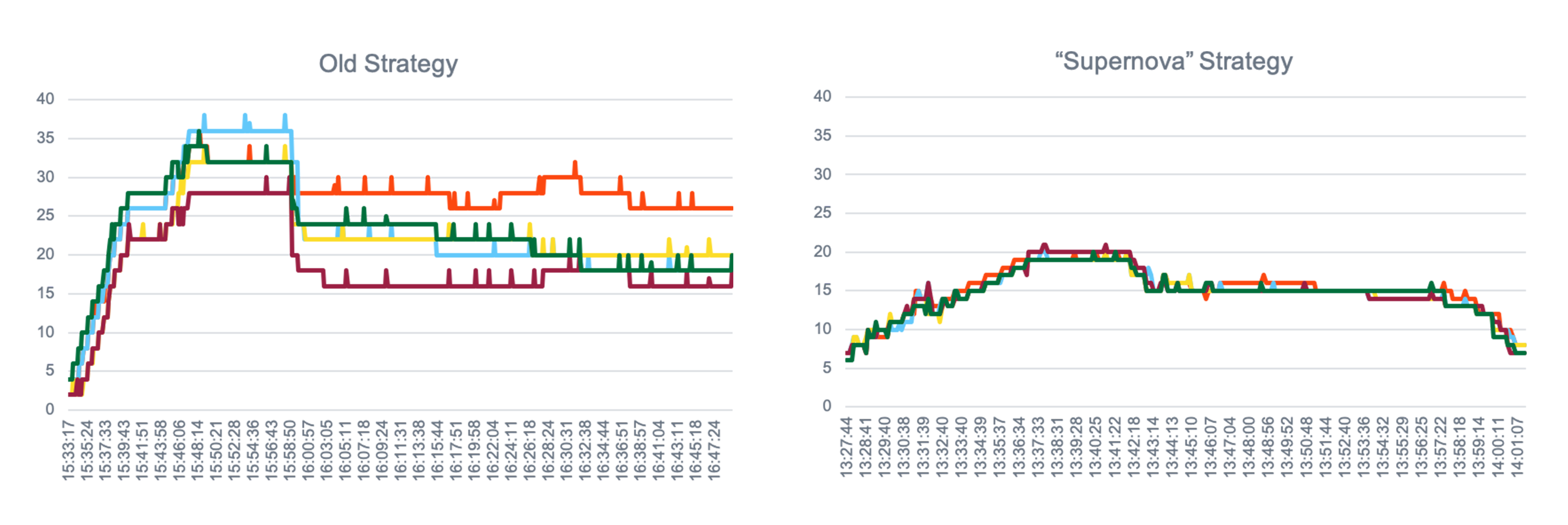
- Introduces a new allocation strategy for BEP resources and increases BEP Agents' performance.
- Enhances RPA and facilitates the installation of the component.
- Enriches ODF and AutoML.
- Features another set of logging improvements.
- Adds new monitoring dashboards.
- Fixes bugs caught after previous installations.
BEP
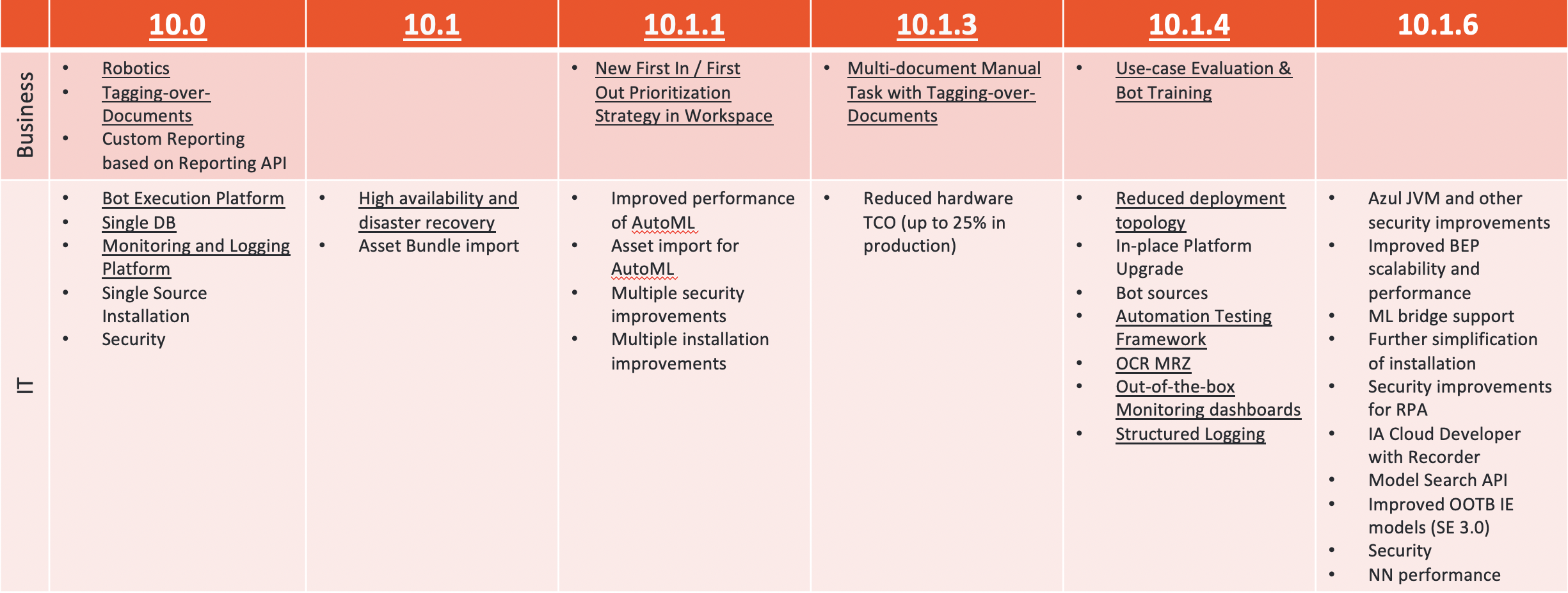
With the new BEP cluster resources allocation strategy, the utilization of BEP Agents is optimized for each agent's available resources. The strategy calculates which Agents have more resources and are more suitable for adding new workers. As unused workers get killed, and resources get released, the approach reevaluates available resources, adjusts target BEP agent where new workers are to be launched, and guarantees equal CPU/Memory utilization across all BEP agents.
RPA
RPA as Windows service
Running RPA as a Windows service solves the following issues while preserving the current implementation:
The xfreerdp tool is no longer used for communication between Bot Manager and Bot Master users. This tool was used to set the RDP connection between Bot Manager and the Bot Master session and was not always compliant with the security policies.
To resolve security concerns, Bot Units' credentials are now saved to Secrets Vault instead of Windows Credential Manager.
After the RPA server is rebooted, the wfsrv.exe process is initialized for the RPA workers to accept tasks from the queue automatically.
Note: before you shut down the RPA server for maintenance, you now have to stop the RPA process with the Task Manager.
The services running in the Bot Master session (nginx, filebeat, metricbeat) will automatically restart when finished. This approach also increases the system's robustness and allows you to change the services' properties on the run.
Search capability
A new mechanism of finding elements is introduced for Win32 desktop applications. You can search for those components that have a handle attribute only that allows you to accelerate the findElement() action by 21 times. For more information, refer to Element selectors | Win32 desktop applications.
Installation
VDI installation support
As many of our customers adopt the "one bot - one server" principle and prefer to scale the RPA capacity horizontally, IA Cloud supports these components' VDI installation. Running RPA in the Virtual Desktop Infrastructure does not require Server OS and supports one RDP connection. At the same time the Enterprise server solution allows using multiple bots but can be installed on a Windows Server edition only.
For RPA Windows server installation, refer to Multi-point installation | Install RPA Windows Server.
Active Directory support
Many of our customers are used to the benefits of the Active Directory service and its centralized storage of user accounts, settings, and credentials. But until now, this feature could not be integrated with RPA, and you had to create users locally on each server.
Starting from version 10.1.6, you can use Active Directory users and local ones on the RPA servers. This feature allows you to simplify the installation of the component. Once you specify all your servers and users on them, no matter AD or local ones, in a single file, you don't have to log in to the server any more before the setup. For more details, refer to rpa.yml options | File structure.
AutoML
IE models: Search Engine 3.0
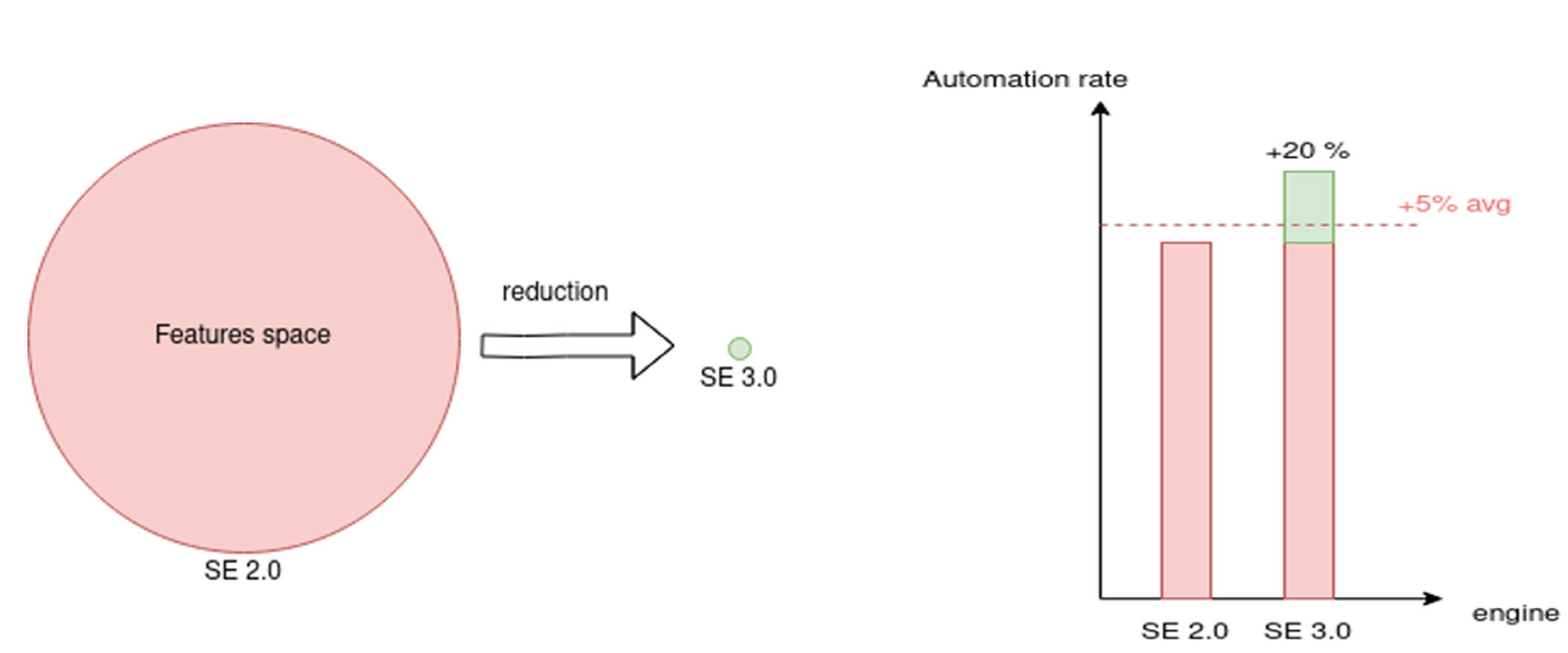
The new archetype for the Information Extraction models features Search Engine 3.0, which:
- Allows preparing a better model on the same data.
- Improves automation rate and accuracy (5% avg., up to 20% per field).
- Reduces output features space (10-500 times).
- Allows using resource-intensive ML algorithms without a significant impact on training/execution performance.
To apply Search Engine 3.0 to an existing model, configuration changes and re-training are required.
AutoML: Model management service
The Model Management service contains additional information on models: training procedures, datasets, statistics, model's goals, and so on. This useful information is now available via RestAPI, which allows you to search models and artifacts by various criteria. Thus, an automation engineer can quickly gather the required information on any model from the single point instead of collecting it by tiny bits from multiple sources.
The updated model management service also features reworked domain models, which helped improve installation in high-availability environments.
Additional extensions
Starting with Intelligent Automation Cloud 10.1.6, AutoML SDK provides grid search extensions for the following classifiers:
LiblinearClassifierAdaBoostClassifierLinearSupportVectorClassifierLogisticRegressionRandomForestClassifier
Extensions allow setting value ranges for some algorithm parameters to select the best algorithm parameters for model training. Refer to AutoML SDK configuration for more details.
Control Tower
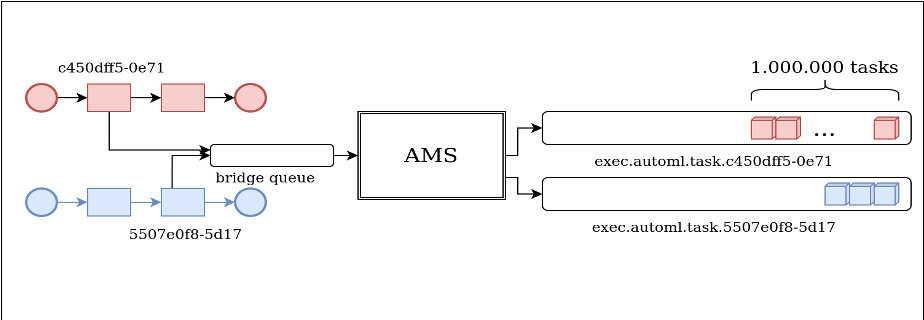
The new IA Cloud version adds a new AutoML step to process the AutoML Model Execute task by using the Bridge framework. The step is implemented over ETL Bot Config, processes one document with one model, and allows to send requests without the use of Local Bot Execution.
As a result, this allows to remove limitations on communication between Control Tower and AutoML and thus use the servers' resources more effectively, increase BP performance, and improve the requests' throughput.
Installation
Users
The designated installation user that you had to create on each Linux server only to install the Product is no longer required. You can now use the unified system user with the required permissions to prepare servers for IA Cloud setup, install, update, and work with the Product.
Windows OCR
For new installations, we only support the Linux-based OCR component. The Windows-based OCR component may only be used for upgrades from previous versions if you already have it in your environment.
System components
IA Cloud 10.1.6 now supports both Oracle JDK and Azul OpenJDK. Azul OpenJDK comes out-of-the-box as a part of base installation package.
ODF
The Open Development Framework components are now installed automatically along with the Product. Such a setup will save you up to 20 minutes.
Additional checks
The following additional pre-installation checks are implemented and guarantee a more stable setup process:
- Verification of changed ulimits
- Validation of
uidandgidof the system user - Validation of the certificate's PKCS#8 format
Open Development Framework
The latest version of Open Development Framework (ODF) is fully compatible with the IA Cloud Enterprise v.10.1.6.
The release also features Bridge integration between Control Tower and BEP and introduces the new ETL task to operate AutoML efficiently. ODF includes two templates of Bot Configs that allow you to integrate the ETL task to a Business Process developed with ODF.
Recorder
The Recorder capability allows automating web, desktop, and mainframe applications in a natural macro-like way without any coding or scripting work for both server Control Tower and Control Tower provided by IA Cloud Developer v.10.1 that is fully compatible with IA Cloud Enterprise v.10.1.6.
Improved logging
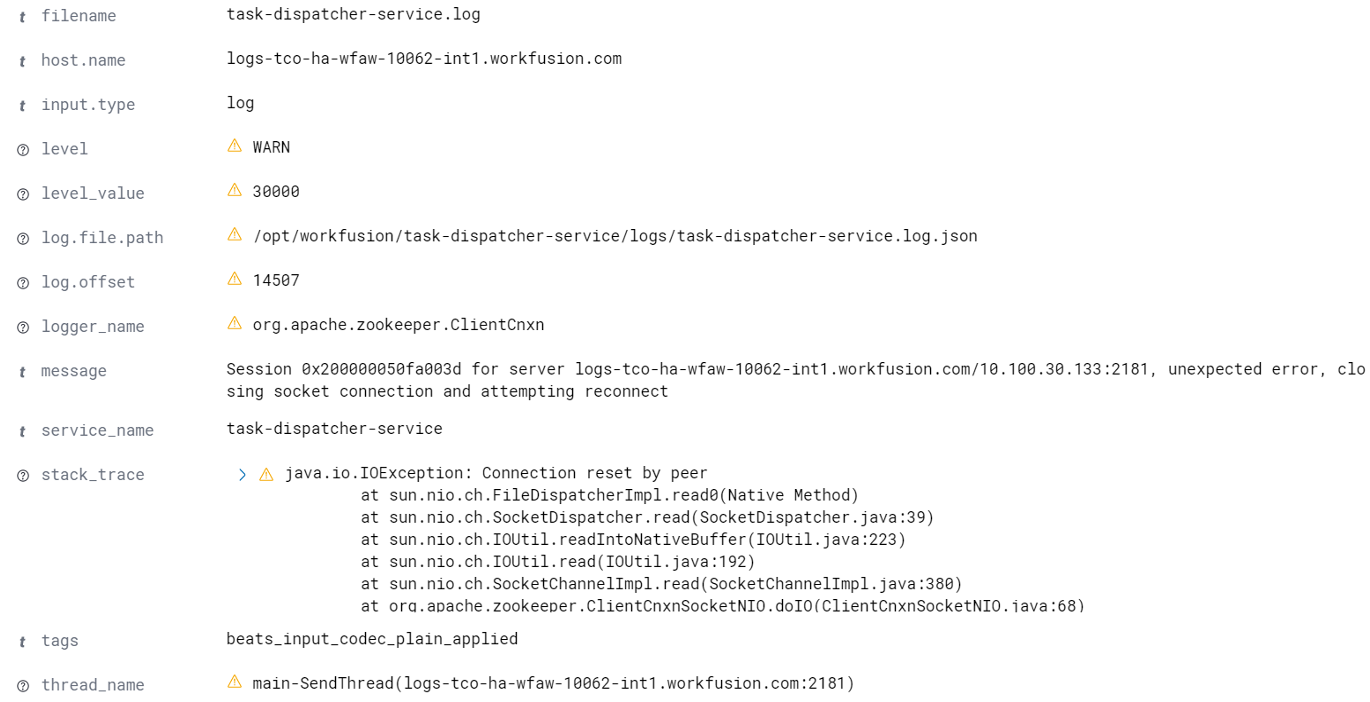
Application logging has been improved mainly with the introduction of the JSON-based log structure. Instead of aggregating plain line-based records, we offer well structured and highly searchable application logs.
This improvement increases the troubleshooting speed by providing the following features:
- Filtering by log level
- Context variables
- Tracing
Component logs underwent a significant clean-up and downsizing (up to 20x reduction in volume) to eliminate a large amount of non-informative and repetitive records. This reduces the time needed for troubleshooting and finding root causes.
New monitoring dashboards
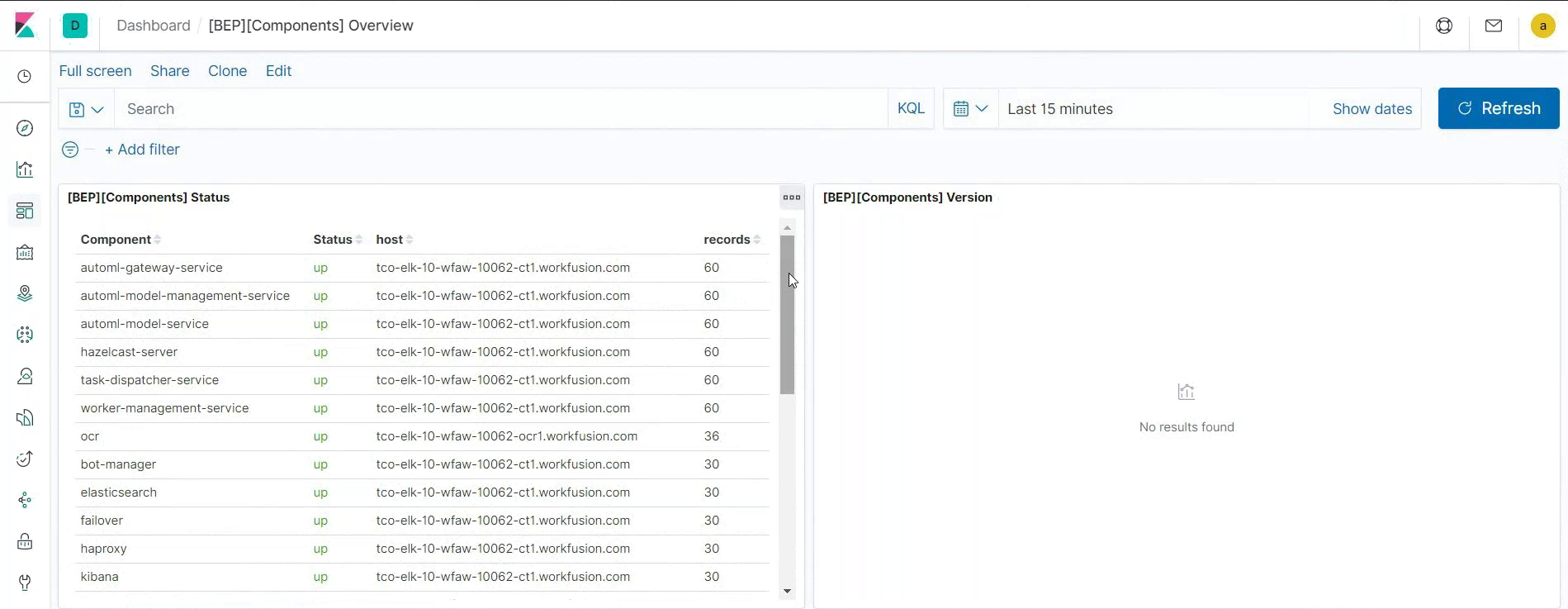
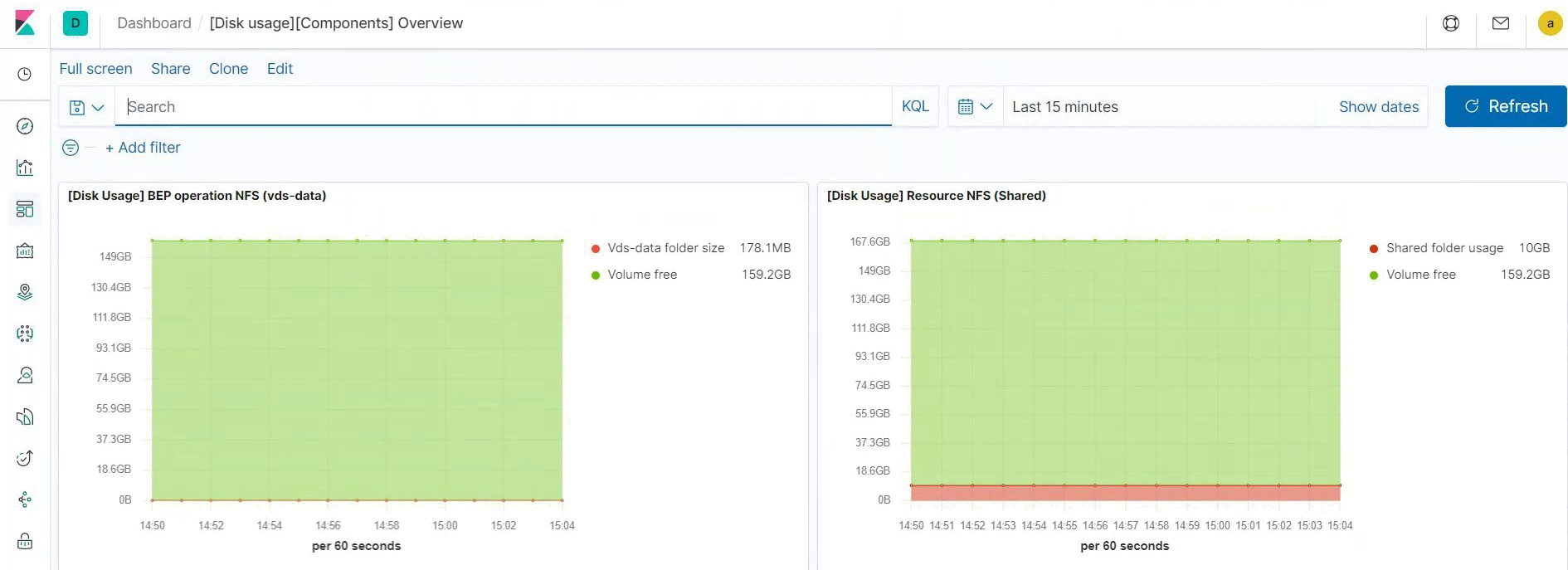
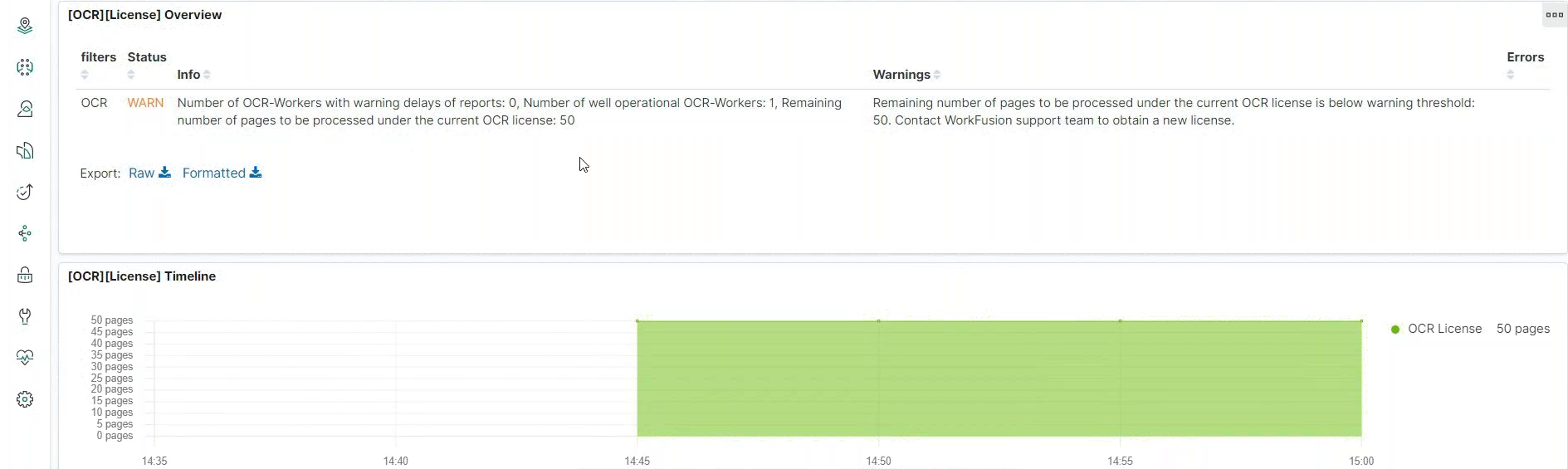
The update also features new Dashboards in Kibana that will help you monitor your system even more effectively:
Health and info compound dashboard provides information on the status of components and components' versions.
Disk and folder usage visualization presents the detailed disk usage data for each component.
OCR license health check includes information on the status of the OCR component, warnings about expiring licenses, and so on.
The improved navigation and the new Welcome Dashboard also reduce time on finding the required visualizations.
Bug fixes & improvements
Expand to see the list of improvements
Control Tower
- Added a feature flag to enable or disable the archives functionality for data stores.
- Reduced the DB server load during Manual Task rendering due to migrating Information Extraction auto-install templates to a separate frontend application.
- Fixed a bug when re-publishing a BP bundle with changes to Control Tower using the Maven plugin ended in changes not being displayed in BP.
- Fixed a deadlock preventing Control Tower startup.
- Fixed a problem where each consecutive bundle import took more time than the previous one.
- Fixed an issue with a multi-doc Manual Task where validation messages remained even after removing the manually added invalid value.
- Fixed an issue with Bot Manager, while selecting Edit Fleet > Create new > Save, the previous fleet name was saved instead of a new one.
- Updated libraries for CT-workers. See WorkFusion libraries and tools.
BEP
- Improved monitoring in Kibana shows the actual state of a BEP worker using the configured health check for Control Tower and AutoML.
- Improved logging and search in Kibana.
- Fixed a bug where an RPA worker could continue utilizing resources even without running an RPA task.
- Updated dependencies for workers:
- logstash-logback upgraded from 5.3 to 6.1.
- spring-rabbit upgraded from 2.0.5.RELEASE to 2.0.14.RELEASE.
OCR
- Integrated ABBYY FRE12 R3 with fixes for Linux OCR.
- Fixed an issue with OCR producing duplicated text in the ToD BP.
- Fixed an issue with ToD where you couldn't select the already tagged value.
AutoML
- Added support for ensemble models for both training and execution.
- Added the ability to configure number of feature extractors per field both for Search Engine 2.0 and 3.0.
- Added limitation on the retry attempts to the task retry policy (default: 5).
- Fixed an issue with the HTML-formatted documents in classification.
- Fixed an issue with zombie workers appearing after out-of-memory errors.
- Fixed an issue where deleting the model directory while Spring boot is still running caused engine lock.
- Fixed an issue when training a model on several fields ended in storing results for all fields into a single file.
- Fixed an issue where several feature extractors generated features with the same name. This resulted in ~12% of features not being added into the feature matrix and, therefore, not used for model training.
- The cost parameter type changed to
DoubleforLiblinearClassifier. - Price Annotator now labels candidates even without the currency sign.
- Auto-tagging for Organization/Location fields to improve the model quality.
- Liquibase updated from v3.6 to v3.8 to avoid an issue with AMMS (AutoML Model Management Service) migrations.
- Updated libraries for AutoML-workers. See WorkFusion libraries and tools.
Known issues
- After you uninstall the RPA component and start the RPA Windows Server installation procedure, the "All RPA processes will be stopped automatically. Continue?" popup appears though does not affect installation.
- In Control Tower, no warning message about missing machine steps appears after deleting the answer in the Global Variables scheme and then trying to save the business process.
- In Control Tower, no error message on preview appears when the bucket with the IE task is not accessible.
- The BP title from API response differs from the BP title on UI when trying to get the instance list by definition UUID.
- The BP execution raises the exception, when
appender.addDestination(null)is sent. See the workaround in the Troubleshooting section.