
Troubleshoot installation issues
BI services drop connection to APP
Expand to learn more
Symptoms
When BI services are running, they drop the connection to the Master server.
Resolution
To resolve the issue, execute the following script:
sysctl -w net.ipv4.tcp_tw_recycle=0
As stated by the tcp(7) manual, the net.ipv4.tcp_tw_recycle option is problematic for public-facing servers as it won’t handle connections from two different computers behind the same NAT device.
SSL check cannot verify CA certificate
Expand to learn more
Symptoms
An SSL check cannot verify the CA certificate.
SSL check is unable to verify CA certificate
[wfsadmt@wfapp workfusion]$ openssl s_client -showcerts -connect wfbi.example.com:443
...
SSL handshake has read 1698 bytes and written 415 bytes
---
New, TLSv1/SSLv3, Cipher is ECDHE-RSA-AES256-GCM-SHA384
Server public key is 2048 bit
Secure Renegotiation IS supported
Compression: NONE
Expansion: NONE
No ALPN negotiated
SSL-Session:
Protocol : TLSv1.2
Cipher : ECDHE-RSA-AES256-GCM-SHA384
Session-ID: 7DB33295ED365F489D1D953076A04C95D1A9A76E14648526666AD3A0B90FFE5F
Session-ID-ctx:
Master-Key: ECB17FE663720814E973AC3A576A32E217757174CDBC9F39C4E2A423AF6D0E22D45A2809A5AC972D44AE4B627A2627C8
Key-Arg : None

Timeout : 300 (sec)
Verify return code: 21 (unable to verify the first certificate)
Resolution
Add CA.cert to the OpenSSL system main file:
# openssl version -d
OPENSSLDIR: "/etc/pki/tls"

cat CA.cert >> /etc/pki/ca-trust/extracted/pem/tls-ca-bundle.pem

ls -lah /etc/pki/ca-trust/extracted/pem/
lrwxrwxrwx. 1 root root 49 Apr 18 2017 cert.pem -> /etc/pki/ca-trust/extracted/pem/tls-ca-bundle.pem
vds-standalone/vds-master installation fails with kernel.exec-shield
Expand to learn more
Symptoms
During the vds-standalone or vds-master installation, Ansible fails on the Connected with NFS step.
Resolution
Follow the steps below:
Open the
/etc/sysctl.conffile or files in the/etc/sysctl.d/folder.Find the
kernel.exec-shieldoption and change its value to0:kernel.exec-shield=0Upload the options from the
/etc/sysctl.conffile to the Linux kernel once again:sysctl -p /etc/sysctl.confRestart
nfs-server.service:systemctl restart nfs-server.serviceRerun the Ansible installation step:
./install.sh install vds-standalone
No access to RHEL repositories
Expand to learn more
Symptoms
Servers have no access to public RHEL repositories.
yumfails with the following traceback:See traceback
Traceback (most recent call last):
File "/usr/bin/yum", line 29, in <module>
    yummain.user_main(sys.argv[1:], exit_code=True)
File "/usr/share/yum-cli/yummain.py", line 375, in user_main
    errcode = main(args)
File "/usr/share/yum-cli/yummain.py", line 170, in main
    base.getOptionsConfig(args)
File "/usr/share/yum-cli/cli.py", line 262, in getOptionsConfig
    self.conf
File "/usr/lib/python2.7/site-packages/yum/__init__.py", line 1078, in <lambda>
    conf = property(fget=lambda self: self._getConfig(),
File "/usr/lib/python2.7/site-packages/yum/__init__.py", line 420, in _getConfig
    self.plugins.run('init')
File "/usr/lib/python2.7/site-packages/yum/plugins.py", line 188, in run
    func(conduitcls(self, self.base, conf, **kwargs))
File "/usr/share/yum-plugins/rhnplugin.py", line 121, in init_hook
    login_info = up2dateAuth.getLoginInfo(timeout=timeout)
File "/usr/share/rhn/up2date_client/up2dateAuth.py", line 228, in getLoginInfo
    login(timeout=timeout)
File "/usr/share/rhn/up2date_client/up2dateAuth.py", line 195, in login
    li = server.up2date.login(systemId)
File "/usr/share/rhn/up2date_client/rhnserver.py", line 63, in __call__
    return rpcServer.doCall(method, *args, **kwargs)
File "/usr/share/rhn/up2date_client/rpcServer.py", line 204, in doCall
    ret = method(*args, **kwargs)
File "/usr/lib64/python2.7/xmlrpclib.py", line 1233, in __call__
    return self.__send(self.__name, args)
File "/usr/share/rhn/up2date_client/rpcServer.py", line 38, in _request1
    ret = self._request(methodname, params)
File "/usr/lib/python2.7/site-packages/rhn/rpclib.py", line 384, in _request
    self._handler, request, verbose=self._verbose)
File "/usr/lib/python2.7/site-packages/rhn/transports.py", line 188, in request
    return self._process_response(fd, connection)
File "/usr/lib/python2.7/site-packages/rhn/transports.py", line 195, in _process_response
    fd = resp.decode(fd)
File "/usr/lib/python2.7/site-packages/rhn/transports.py", line 442, in decode
    self.read(fd)
File "/usr/lib/python2.7/site-packages/rhn/transports.py", line 420, in read
    max_mem_size=self.max_mem_size)
File "/usr/lib/python2.7/site-packages/rhn/transports.py", line 528, in _smart_read
    chunk = fd.read(l)
File "/usr/lib64/python2.7/httplib.py", line 610, in read
    self.close()
File "/usr/lib64/python2.7/httplib.py", line 555, in close
    self.fp.close()
File "/usr/lib/python2.7/site-packages/rhn/SSL.py", line 133, in close
    self._really_close()
File "/usr/lib/python2.7/site-packages/rhn/SSL.py", line 148, in _really_close
    if self._connection.state_string() == 'SSL negotiation finished successfully':
File "/usr/lib/python2.7/site-packages/OpenSSL/SSL.py", line 1135, in __getattr__
    return getattr(self._socket, name)
AttributeError: '_socketobject' object has no attribute 'state_string'
Resolution
To resolve the issue, follow the steps below:
As a root user, open
/usr/lib/python2.7/site-packages/rhn/SSL.py.Change line #144.
Original line #144:
if self._connection.get_state_string() == b'SSL negotiation finished successfully':Line #144 after the required change:
if self._connection.state.string() == b'SSL negotiation finished successfully':
Analytics setup fails
Expand to learn more
In some cases, the installation of Analytics components can fail on the Ensure Analytics Server installed task with the following error message:
- Trial activation for Tableau server was not applied correctly. Refer to the documentation for further steps.
- There is not enough license to promote user 3 to the system admin. (errorCode=10009)
This issue relates to the Tableau software and appears when the Tableau trial activation fails with errors.
VDI installation on RPA Server
Expand to learn more
For VDI installations, you need to maintain RDP sessions active.
Mind that Bot Manager can open an RDP session but for some seconds only, and then the session is disconnected. In this case, you have a unit without an active session—hence, no active UI to make RPA work incorrectly. To avoid opening an RDP connection, start Bot Manager with the noRdpCheck profile:
Go to the Master server where Bot Manager is installed.
In the
/opt/workfusion/bot-manager/run-bot-manager.shfile, change the--spring.profiles.activevalue frommastertonoRdpCheck. After editing, you should have:--spring.profiles.active=production,noRdpCheckSave the changes and restart Bot Manager.
wfmanager restart bot-manager
Single-point installation fails with error "sudo: no tty present"
Expand to learn more
To fix the problem, follow the steps below:
Go to
INSTALL_DIR/wf_installer/.In the
install.shscript, changeexport ANSIBLE_SSH_PIPELINING=truetofalsewith any available text editor.vi install.sh # the vi editor opens export ANSIBLE_SSH_PIPELINING=falseSave the changes to the
install.shfile.Continue the installation.
Installation fails on TASK [init-common : Ensure environment file <...> is sourced on login of <...> user]
Expand to learn more
Symptoms
A runtime user is not allowed to write to the home directory.
Resolution
Go to
INSTALL_DIR/wf_installer/.Edit the listed files using the code sample below:
playbooks/common.ymlplaybooks/lb.ymlplaybooks/app.ymlplaybooks/int.ymlplaybooks/bep-master.ymlplaybooks/bep-agent.ymlplaybooks/bi.ymlplaybooks/ocr.ymlplaybooks/ocrwin.yml
    - name: <...>
    hosts: <...>
    <...>
    environment:
        PATH: '{{ rpms_dir }}/usr/bin:{{ rpms_dir }}/usr/sbin:{{ ansible_env.PATH | default("") }}'
        LD_LIBRARY_PATH: '{{ rpms_dir }}/usr/lib:{{ rpms_dir }}/usr/lib64:{{ package_dir }}/ansible/lib:{{ ansible_env.LD_LIBRARY_PATH | default("") }}'
        XDG_CONFIG_HOME: '{{ install_dir }}'
        PYTHONPATH: '{{ pythonpath }}:{{ ansible_env.PYTHONPATH | default("") }}'
    roles:
        - role: <...>
    ```
Edit
roles/init-common/tasks/install.yml.- name: Ensure environment file {{ wf_environment_file }} is sourced on login of {{ wf_user }} user <...> ignore_errors: true <...>
Installation fails on TASK [Gathering Facts]
msg: 'Unable to create local directories(/home/<...>/.ansible/cp): [Errno 13] Permission denied: ''/home/<...>/.ansible'''
Expand to learn more
Symptoms
An installation user is not allowed to write to the home directory.
Resolution
Go to
INSTALL_DIR/wf_installer/.Open the
install.shscript for editing and addexport ANSIBLE_SSH_CONTROL_PATH_DIR=/tmp/.ansible/cptofunction prepare_ansible().vi install.sh # the vi editor opens function prepare_ansible() { export ANSIBLE_SSH_CONTROL_PATH_DIR=/tmp/.ansible/cp <...> }Save the changes to the
install.shfile.Continue the installation.
No events in Kibana GUI after environment has been off for several days
Expand to learn more
Elasticsearch has an index policy configured to freeze all indexes after a predefined period (currently, three days). If the environment has been off for more than three days, no new events could be written to frozen indexes, which breaks the message search in the Kibana GUI:
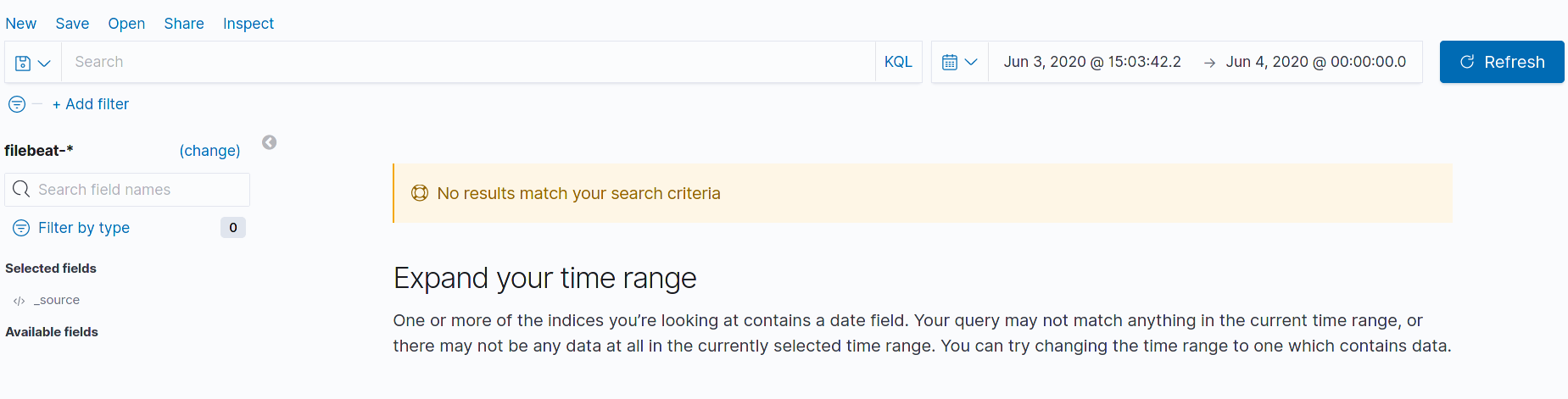
If you see no data in search, verify whether indexes are indeed frozen:
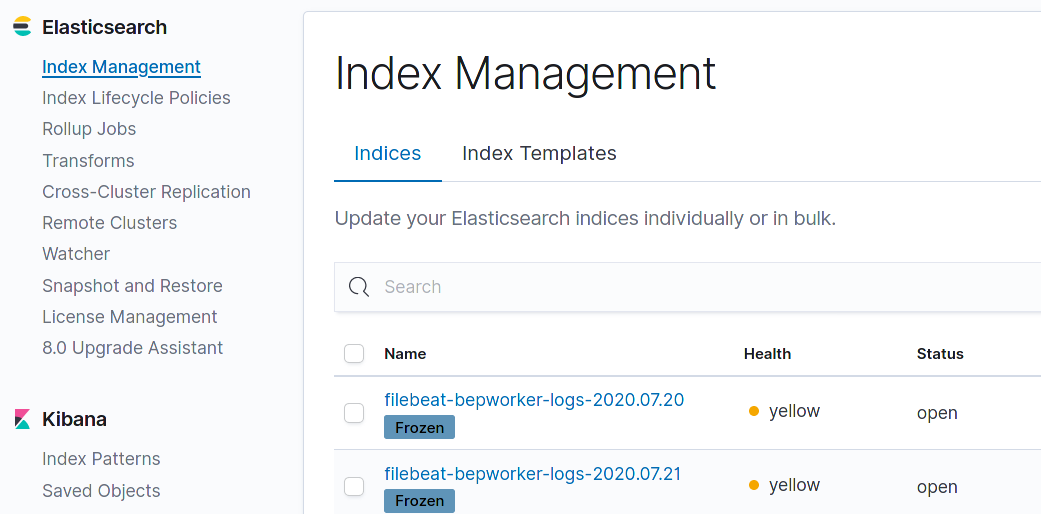
Go to Management > Index Management and find the Filebeat index tagged with the date when your environment was shut down. If it is frozen (see the picture below), unfreeze it.
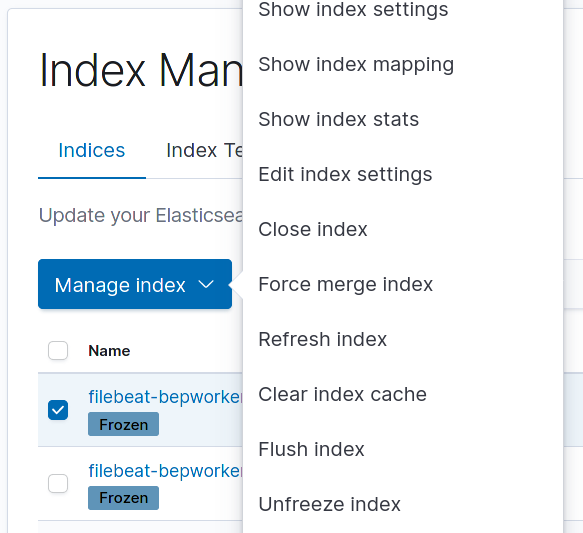
To unfreeze a particular index, select its checkbox, click the appearing Manage Index button, and choose Unfreeze index.
High spikes in Load Average and disk IO calls at specific time
Expand to learn more
Symptoms
In the environment with a large volume of logs, you observe spikes in disk IO calls when cleanup.sh runs.
The Host Overview and System Overview dashboards of Platform Monitor show spikes in disk IO calls and Load Average.
The vault fails to connect to ZooKeeper. See the logs in
INSTALL_DIR/supervisord/log/vault.log:2020-05-14T21:00:41.575Z [ERROR] core: error checking health: error="failed to check for initialization: zk: connection closed" 2020-05-14T21:00:41.575Z [ERROR] core: error checking health: error="zk: connection closed"fsync-ing the write aheadis reported inINSTALL_DIR/supervisord/log/zookeeper.log:2020-05-14 21:00:46,205 [myid:2] - WARN [SyncThread:2:FileTxnLog@338] - fsync-ing the write ahead log in SyncThread:2 took 1859ms which will adversely effect operation lat ency. See the ZooKeeper troubleshooting guide
Resolution
As the script includes three log cleaning tasks that start simultaneously, it is recommended to schedule each task for different time.
To do that, follow the steps below:
- On the server where Logstash and ZooKeeper are installed (depending on the installation, it is the INT or APP server), go to
INSTALL_DIR/supervisord/conf/cron.d/. - Open the
cleanup.shscript for editing and change it as shown further:
When editing the script, remember to replace INSTALL_DIR/logrotate/status with your actual directory.
#!/bin/bash
# Ansible managed

if [[ "$(date +%H:%M)" == "00:00" ]]; then
    # Perform log rotation - common for all servers
    /usr/sbin/logrotate -s INSTALL_DIR/logrotate/status INSTALL_DIR/logrotate/logrotate.conf > /dev/null 2>&1
    # Cleaning temp data from INSTALL_DIR/tmp directory - common for all servers
    find /opt/workfusion/tmp/*  -mtime +3  -delete
fi

if [[ "$(date +%H:%M)" == "01:00" ]]; then
    # Archiving consolidated logstash logs older than 1 day
    find INSTALL_DIR/shared/logs ! -name '*.gz' -type f -daystart -mtime +0 -exec gzip --suffix $(date +".%m-%d-%Y-%H:%M:%S.gz") {} +
    # Cleanup logstash logs older than 7 days
    find INSTALL_DIR/shared/logs -mindepth 4 -maxdepth 4 -type d -mtime +7 -exec rm -rf {} + > /dev/null 2>&1
fi

if [[ "$(date +%H:%M)" == "02:00" ]]; then
    # Zookeper snapshots cleanup
    bash -l INSTALL_DIR/zookeeper/bin/cleanupSnapshots.sh >> INSTALL_DIR/zookeeper/log/zkclean.log
fi
When editing the script, remember to replace INSTALL_DIR/logrotate/status with your actual directory.
The script on INT0 must be the same as shown further:
#!/bin/bash
# Ansible managed

if [[ "$(date +%H:%M)" == "00:00" ]]; then
    # Perform log rotation - common for all servers
    /usr/sbin/logrotate -s INSTALL_DIR/logrotate/status INSTALL_DIR/logrotate/logrotate.conf > /dev/null 2>&1
    # Cleaning temp data from the INSTALL_DIR/tmp directory - common for all servers
    find /opt/workfusion/tmp/*  -mtime +3  -delete
fi

if [[ "$(date +%H:%M)" == "01:00" ]]; then
    # Archiving consolidated logstash logs older than 1 day
    find INSTALL_DIR/shared/logs ! -name '*.gz' -type f -daystart -mtime +0 -exec gzip --suffix $(date +".%m-%d-%Y-%H:%M:%S.gz") {} +
    # Clean up logstash logs older than 7 days
    find INSTALL_DIR/shared/logs -mindepth 4 -maxdepth 4 -type d -mtime +7 -exec rm -rf {} + > /dev/null 2>&1
fi

if [[ "$(date +%H:%M)" == "02:00" ]]; then
    # ZooKeper snapshot cleanup
    bash -l INSTALL_DIR/zookeeper/bin/cleanupSnapshots.sh >> INSTALL_DIR/zookeeper/log/zkclean.log
fi
The script on INT2, INT3 must look as shown further:
#!/bin/bash
# Ansible managed

if [[ "$(date +%H:%M)" == "00:00" ]]; then
    # Perform log rotation - common for all servers
    /usr/sbin/logrotate -s INSTALL_DIR/logrotate/status INSTALL_DIR/logrotate/logrotate.conf > /dev/null 2>&1
    # Cleaning temp data from the INSTALL_DIR/tmp directory - common for all servers
    find /opt/workfusion/tmp/*  -mtime +3  -delete
fi

if [[ "$(date +%H:%M)" == "02:00" ]]; then
    # ZooKeper snapshot cleanup
    bash -l INSTALL_DIR/zookeeper/bin/cleanupSnapshots.sh >> INSTALL_DIR/zookeeper/log/zkclean.log
fi