Release notes
important
Release date: 16 September 2019
With 10.1, Smart Process Automation is finally reborn as The Intelligent Automation Cloud Enterprise edition — an entire automation ecosystem for large organizations digitizing their operations.
This release crystallizes the groundbreaking capabilities of the 10 series into a solid and definitive Intelligent Automation experience. We worked hard to meet the demands of our clients and bring the best enterprise-scale solution possible.
Speaking of large scale, we think rock-solid stability and maximum performance are absolutely essential. With that in mind, version 10.1 brings high availability and disaster recovery, per the strictest industry standards, to keep your business up and running amidst even catastrophic events. We fine-tuned our Bot Execution Platform (BEP) cluster architecture for improved performance and document throughput on the same hardware.
Asset Bundle import allows to you transfer any part of your project in development to a new environment with minimal effort and errors.
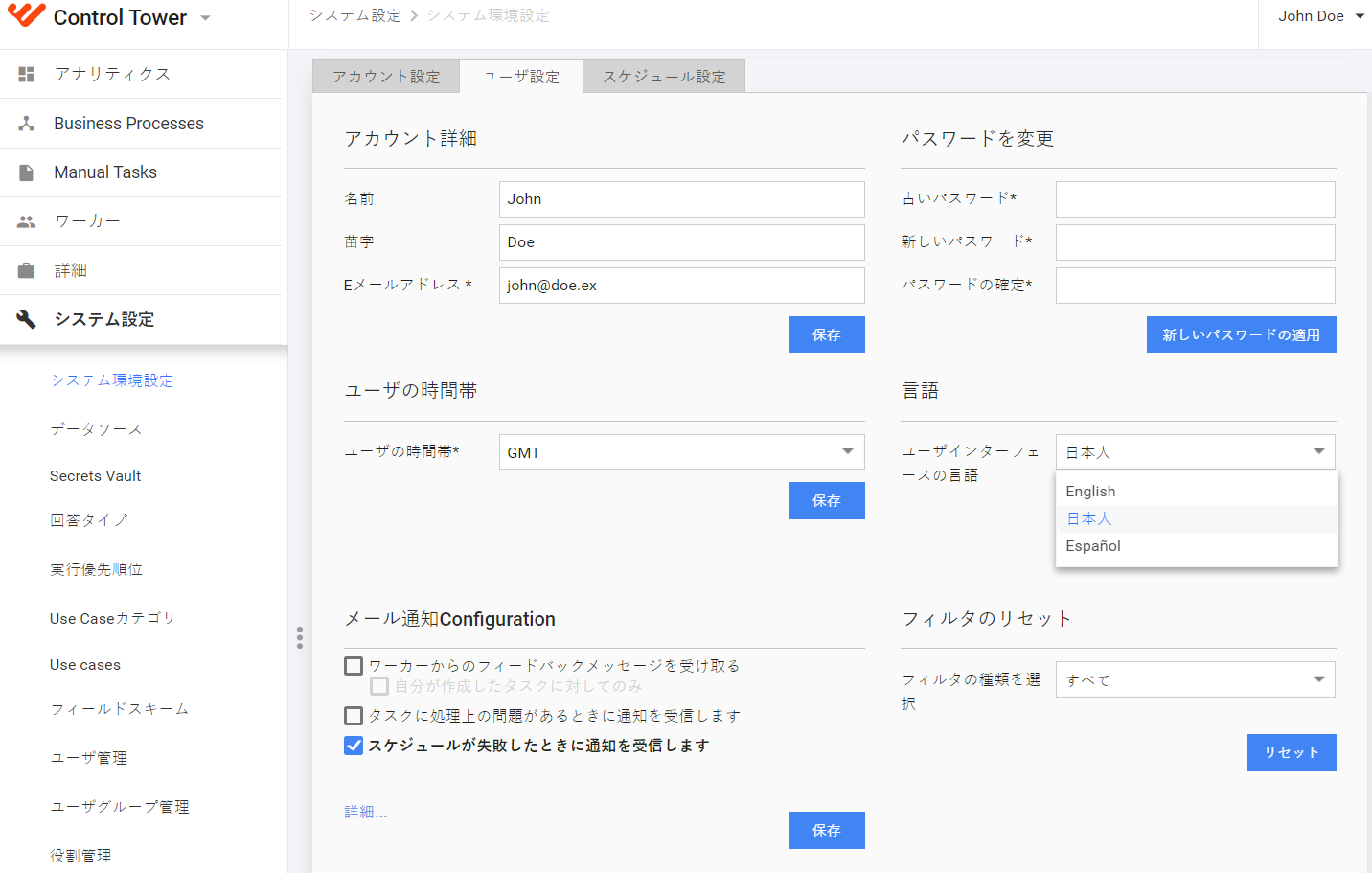
Full product localization finally delivers The Intelligent Automation Cloud Enterprise edition to Japanese and Spanish speakers.
High availability and disaster recovery
Here at WorkFusion, we believe that losing even the slightest piece of work is frustrating. Losing time and data in a real-world enterprise environment where thousands of people rely on your system is simply unacceptable. With that in mind, we introduce a new type of system architecture which ensures Intelligent Automation Cloud Enterprise edition is available all the time, whatever happens.
High availability (HA) is the ability of a system to be continuously operational for a long period of time. Its aim is zero data loss and a maximum of 10 minutes of service downtime, after which it must be fully restored. The Enterprise edition supports HA through all components.
To take advantage of the high availability feature, you need to provide several emergency servers for each system component of the Intelligent Automation Cloud. In case of a component's failure, this allows the system to automatically switch to a “healthy” machine and continue its operation with minimum or zero downtime and data loss. All your data is stored on a shared file system or a mounted NAS, thus it is always available.
To provide the availability of services and distribute traffic among them, the load balancer (LB) component must be installed on the customer's side. It accepts all the traffic and forwards the application requests to the APP server. After that, the traffic is routed among other servers. Here’s a simplified diagram to make things clearer.
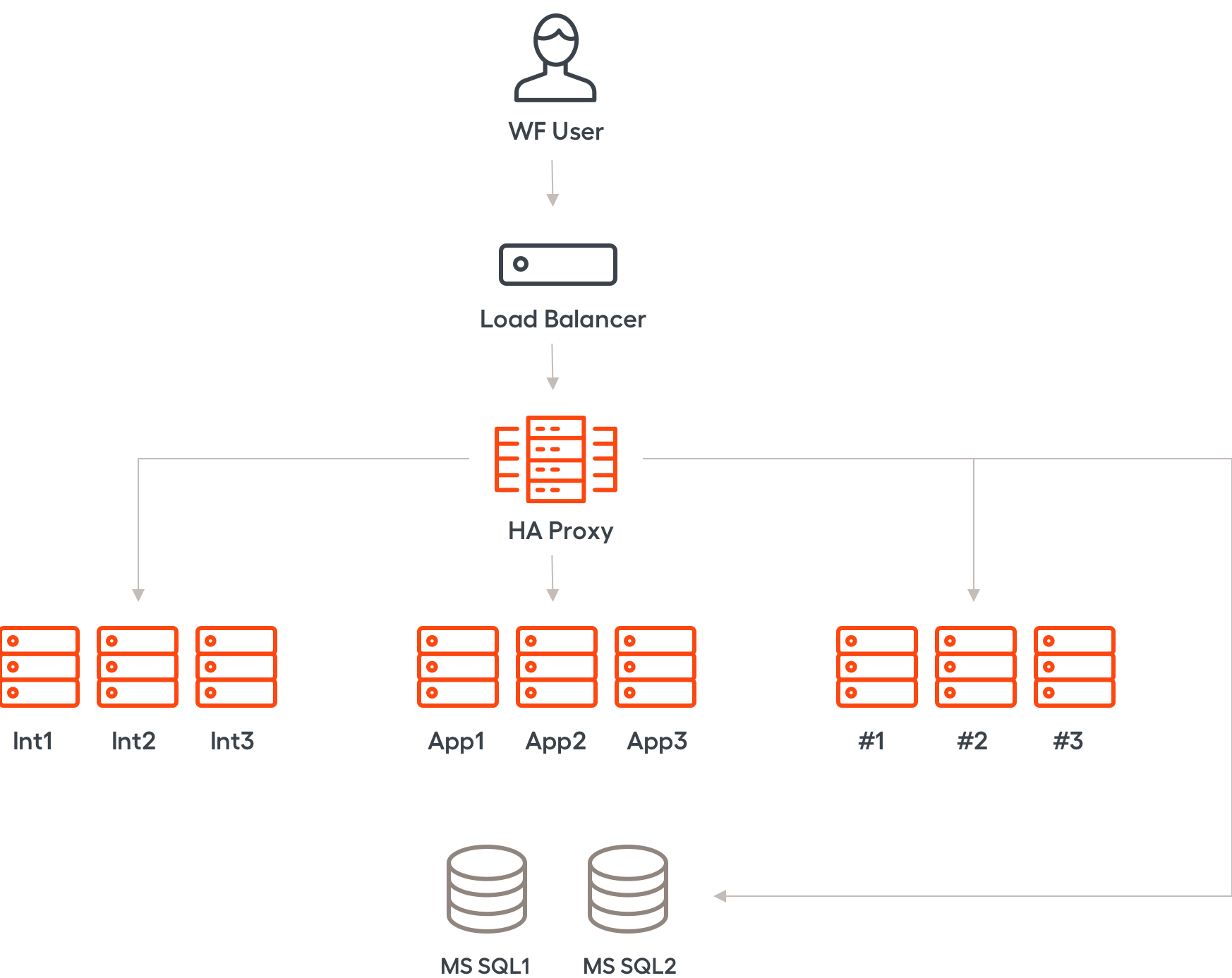
Bot Manager on the Application server is also highly available, with distributed architecture making Workers available by default. The RPA hosts list is now saved in a secured database and highly available too.
The Disaster Recovery (DR) architecture includes two sites: primary and emergency. The primary site hosts the full set of servers (either in the HA mode or without it) with running components. The DR site is a full and exact copy of the primary one. All the servers on the DR site keep running, while the components on them are stopped. Replication of data between the sites is performed every 30 minutes. If the primary site fails, the system is switched to the emergency one, with minimal loss of data.
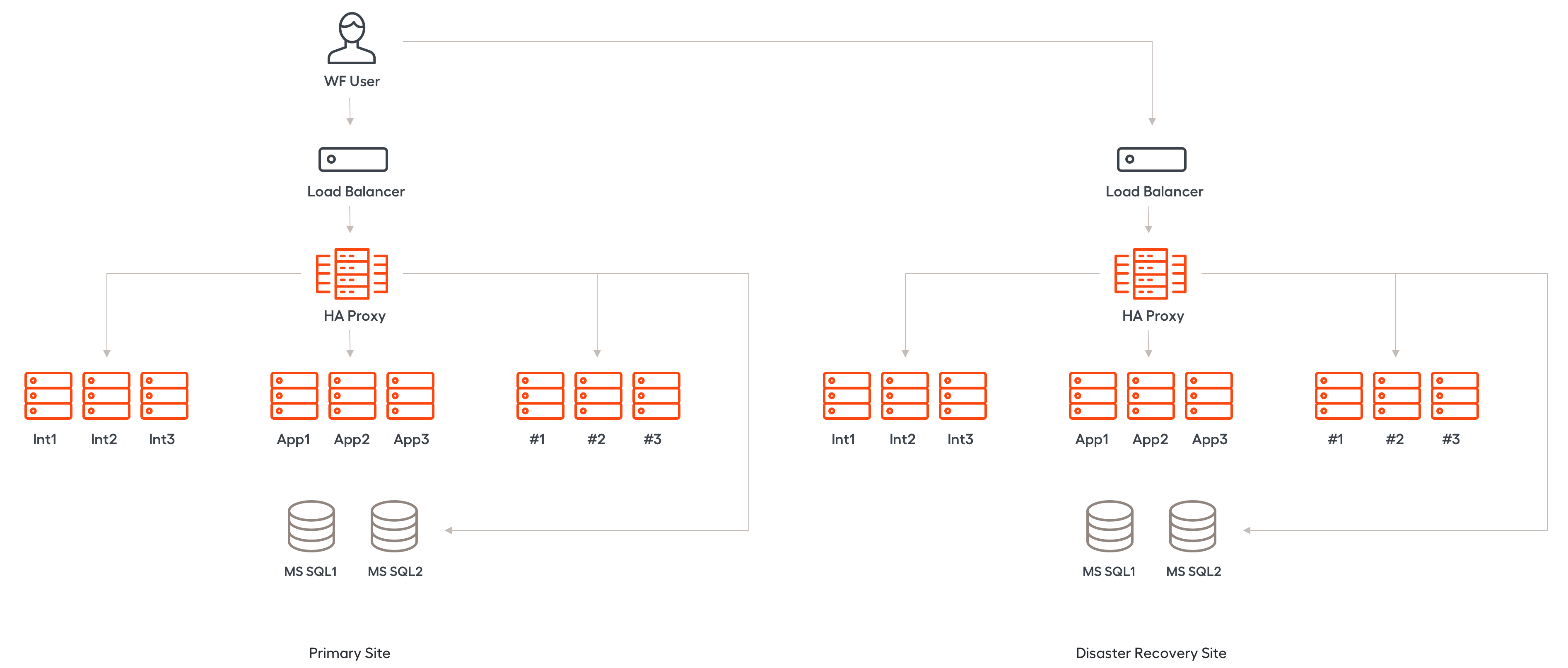
The high availability and disaster recovery features can be installed and configured with our common installer. The combination of the emergency modes is limited only by your needs and available servers: You can install HA and DR separately or combine them in one completely fault-resilient system. For detailed information, refer to the high availability and disaster recovery documentation.
Asset Bundle import
Asset Bundle is a structure composed of a Business Process and its supporting resources: AutoML models, bot configs, data, templates and more. Asset Bundle can represent either a complete BP with all its dependencies or any dependency required to run a BP: models, data, config etc. It is intended for easy asset transfer between environments.

Previously, BP import required an in-depth model knowledge, direct access to resources, multiple permissions, and credentials. You had to follow a multiple-page instruction for a long sequence of steps, including nuanced pre- and post-import steps. There was no way to check the import status or correct the failure cause.
With the introduction of the Asset Bundle, everything required for a Business Process delivery is conveniently wrapped in a self-sufficient bundle. The bundle is ported to a target environment via script execution or a REST request to the Control Tower API with minimal precautions. You only need correct permissions in Control Tower. This import mechanism supports large files and is less error-prone than the traditional methods. Successful import is asynchronous – meaning fast – and verified by a checksum.
This accelerates BP delivery, decreases total cost of development, and eventually contributes to continuous integration. To learn more about Asset Bundle, refer to the Import Asset Bundle documentation.
Performance
Remember that we introduced a brand new Bot Execution Platform (BEP) in version 10.0? The team did a tremendous job rethinking the whole product architecture from the ground up.
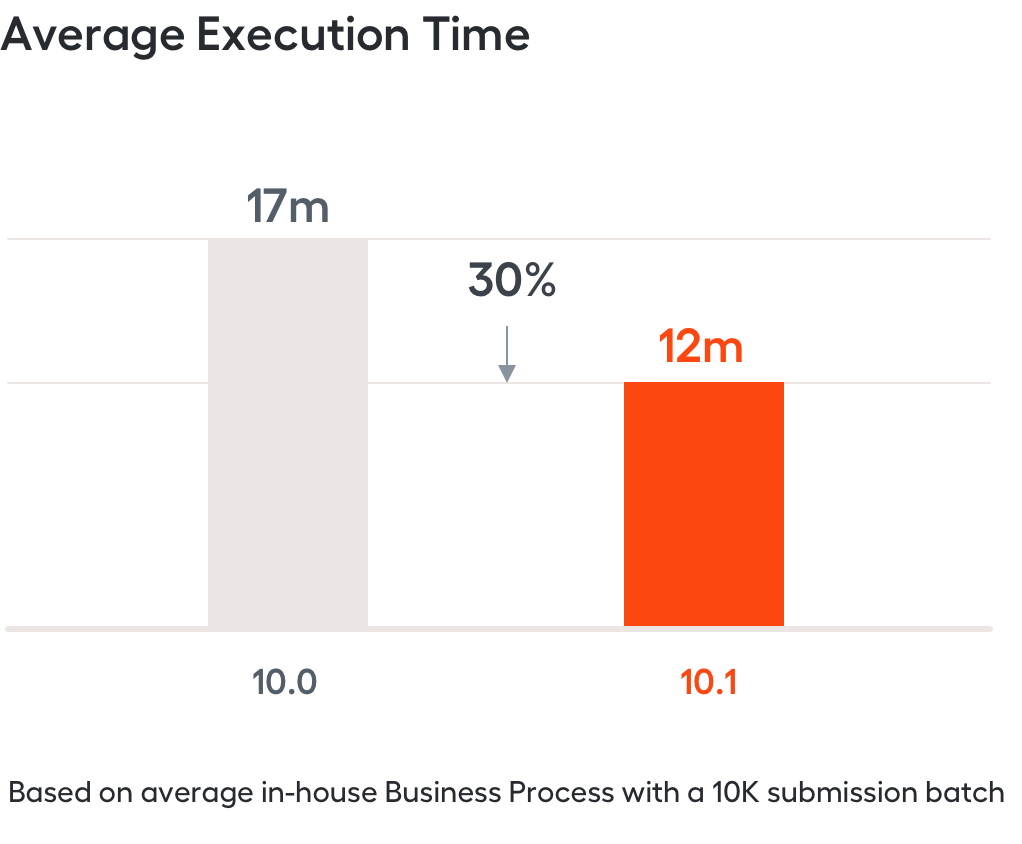
In 10.1, we focused on optimizing BEP communication with other system components, Control Tower in particular. Why is this important to you? Based on several in-house test Business Processes, the maximum documents throughput per hour for Intelligent Automation Cloud is now, on average, 30% higher than in 10.0 — depending on the scale of your Business Process. This became possible due to a 3x shorter execution overhead, allowing for leaner resource utilization on the same hardware.
The above-mentioned improvements allow some Business Processes to utilize more BEP nodes for a visibly better result than in 10.0. It’s also worth mentioning that the maximum efficient number of BEP nodes heavily depends on the complexity of your Business Process.
We also enhanced the performance of Control Tower, decreasing the processing time of transition steps, as well as optimized some MS SQL queries to ensure our database contributes to the overall performance improvement. Last but not least, we updated some Kibana dashboards, like [BEP] Tasks, [BEP] Tasks trace by BP steps, [BEP] Throughput to help you track BEP cluster performance and make data-driven decisions. For more information, refer to Monitoring documentation.
OCR
ABBYY FineReader Engine SDK upgrade to version 12 resulted in a number of improvements, enabling our users to select between FRE SDK 11 and FRE SDK 12. Thus, we added a second (alternative) OCR engine, with advanced recognition of tables and texts in images, as well as significantly improved recognition of Japanese characters.
- With the help of enhanced layout reconstruction, you can easily detect complex tables and reconstruct them to match the layout in the original document.
- Based on Artificial Intelligence algorithms, we provide higher accuracy and increased speed in recognition of the Japanese language, as well as dictionary enhancements and alphabet corrections
- Text classifier easily extracts textual data from any image and ensures high precision and classification accuracy. For more information, refer to Aggressive table recognition and detect text on image.
Robotics
Security
Mutual TLS authentication is now in place in communication between the RPA server and the Application server. Certificates exchange means all traffic between RPA components (Control Tower, Bot Manager, Bot Agent, Worker) is secured. RPA server gets commands from Application server only — so that no one can access RPA data or connect to any of the components without authentication, even from the customer intranet and having gained Control Tower credentials. For more details, refer to RPA Deployment.
Credentials rotation
All RPA-related credentials are now saved in Secrets Vault, so an RPA bot does not request the RPA server for credentials. As soon as credentials rotation is configured in Control Tower, new credentials automatically apply for all bots.
The credentials rotation mechanism makes RDP timeout no longer affect task execution due to automatic reconnection. If a bot is inactive for some time, for example, 15 minutes, an RDP session becomes locked. A new logic requires the Worker to automatically refer to Secrets Vault for credentials before executing each bot task. Thus, the Worker closes the current RDP window, gets new credentials from Secrets Vault, and connects again.
Performance
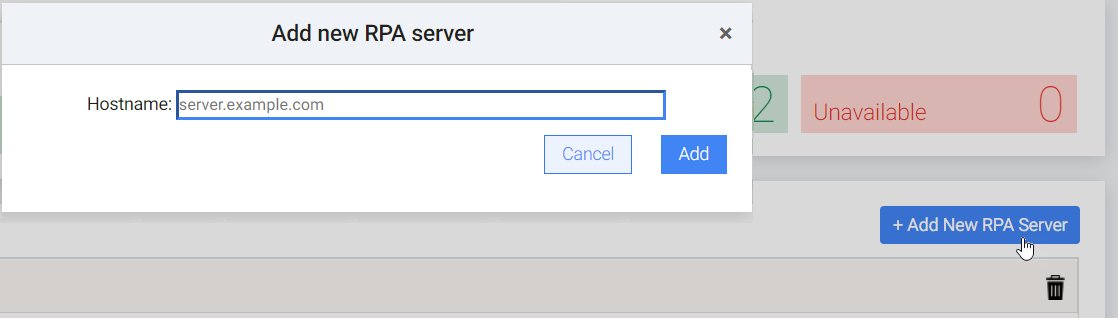
To add an RPA machine to an RPA cluster or remove it, you no longer need SSH access to the Application server; a Control Tower user with sufficient permissions to access Bot Manager is enough. Previously, getting SSH was tricky and time-consuming in a corporate environment, thus RPA cluster resizing happening on the UI-only contributes to deployment acceleration. For more details, refer to Bot Manager.
SAP
Let's not forget that WorkFusion Intelligent Automation Cloud is the only SAP-certified automation solution. In the 10.1 release, SAP automation for huge tables/trees as well as ALV trees is now two times faster (as measured by SAP Order Management: transaction codes MIRO, VA02). For more details, refer to the SAP GUI Desktop Automation documentation.
WorkFusion Studio
All Studio improvements are aimed at simplifying developer flow, saving time, and avoiding unnecessary actions. The result is faster deployment and happier developers.
- WorkFusion Studio now provides full Worker support. You can launch and debug bot tasks on a local BEP-compatible RPA Worker, as well as start, restart, and stop Worker in the Studio console.
- With the new Bot Execution architecture, where Bot Relay and Bot (or Hub and Node) are redundant now, all interactions occur directly with Worker, ensuring each "Run a Bot" action to happen instantly without delays and freezes. To learn more about RPA deployment, see here.
- WorkFusion Studio and RPA package are tightly coupled. You only need to point WorkFusion Studio to the RPA package location once to reuse it in all development activities. For more details, refer to RPA Environment Setup.
Installation
Intelligent Automation Cloud Enterprise
The updated Intelligent Automation Cloud Enterprise installer offers you two installation modes:
- Common installation
- Installation with the high availability support
When deciding to make your system highly available, the installation process is almost the same. Make sure you have the required amount of instances of each server, a load balancer to route the traffic, and then enable the HA mode during the installation in one step. When completed, you will have the fault-resilient system.
RPA
Due to the removal of Bot Relay and Bot, we managed to decrease TCO by 1GB RAM together with dependencies for each bot, enabling big scripts with multiple loops to work lightning-fast.
RPA server installation on a Windows machine now takes place in the RPA setup wizard with next-next navigation and requires no additional pre- or post-installation manual steps. There is no more need to make numerous network and RPA bot configuration changes in various places, with the installation procedure saving up to 1 hour of installation time per each RPA machine. From now on, the easy-to-follow wizard with tool tips and user-friendly UI makes everything work like magic.
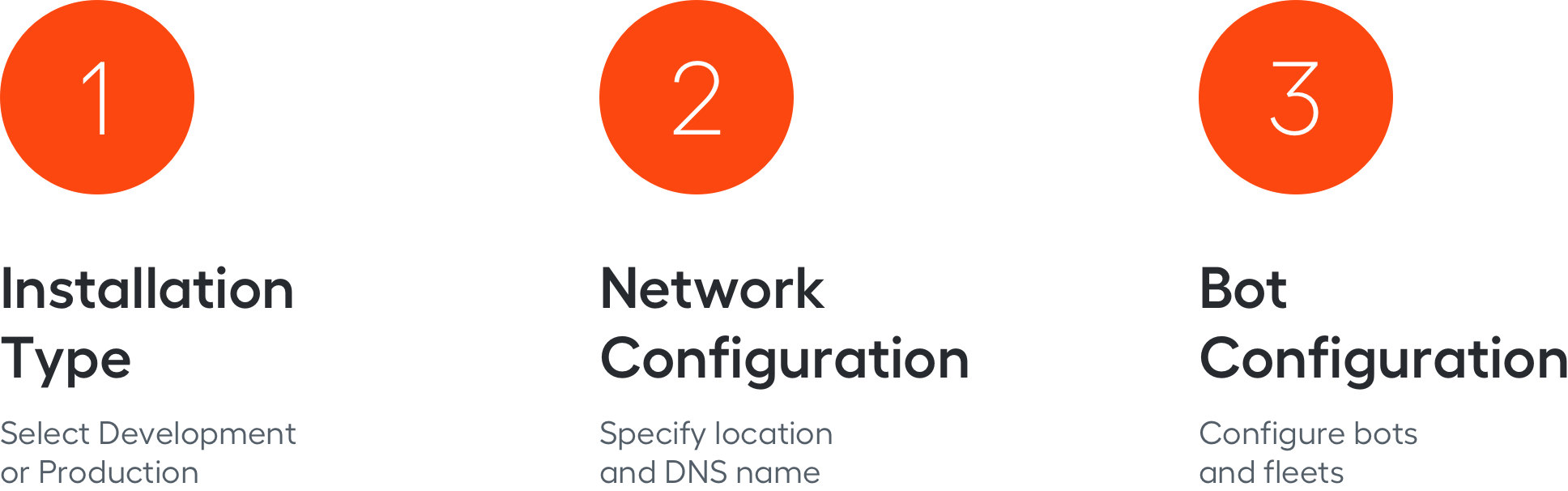
A new RPA installer offers two installation modes to select from according to your needs:
- Development – used for developing and debugging tasks from WorkFusion Studio, configured for one bot and a local task queue, has lightweight (without network) configuration
- Production – used for executing bot tasks from an external task queue, configured for multiple bots and needs installation of other components
Creation of centralized configuration during installation allows you to seamlessly upgrade by running the RPA installer in the repair mode. It retains variables from the previous installation and prompts you to use them.
To learn more, refer to the installation documentation.
Analytics
As business users immersed themselves in the productive insights of the 10.0 release analytics, they became more knowledgeable and demanded more in-depth information. Based on their feedback, the 10.1 release adds a new dimension to analytics with a sharper visualization.
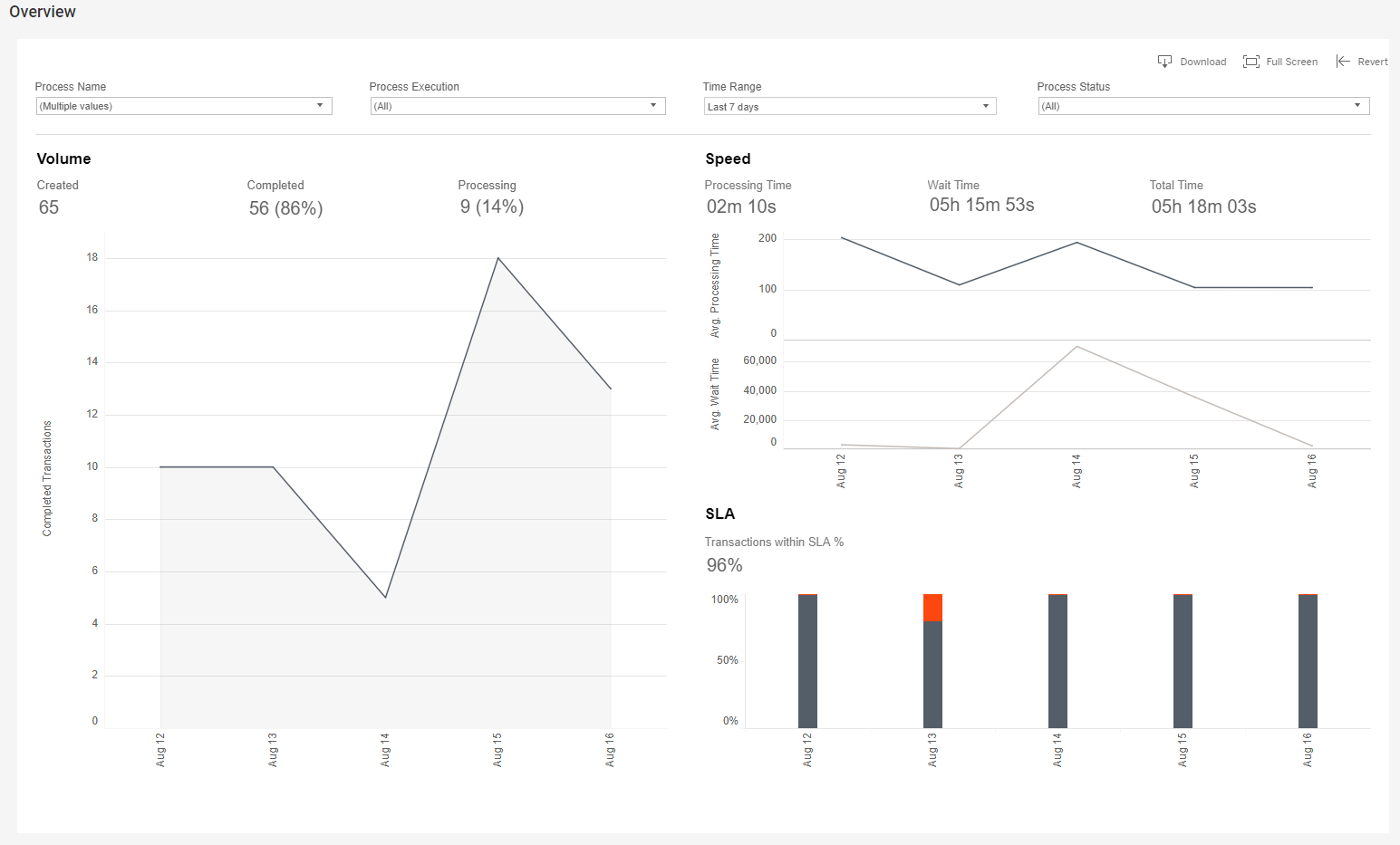
The Overview dashboard presents a cross-section of the task volume, showing a proportion of the completed and processing tasks of any kind among all the tasks created. Speed is a double chart, presenting average wait and processing time for tasks, as well as total processing time.
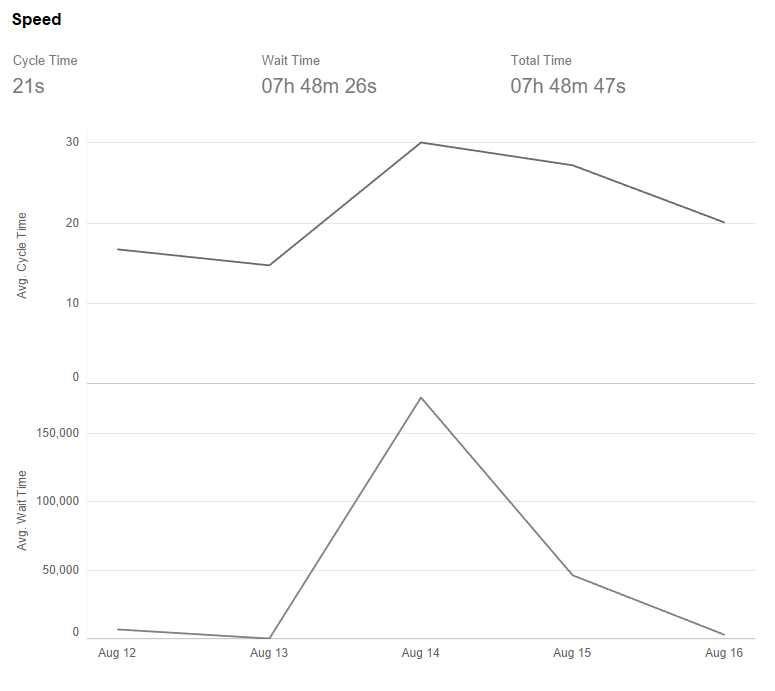
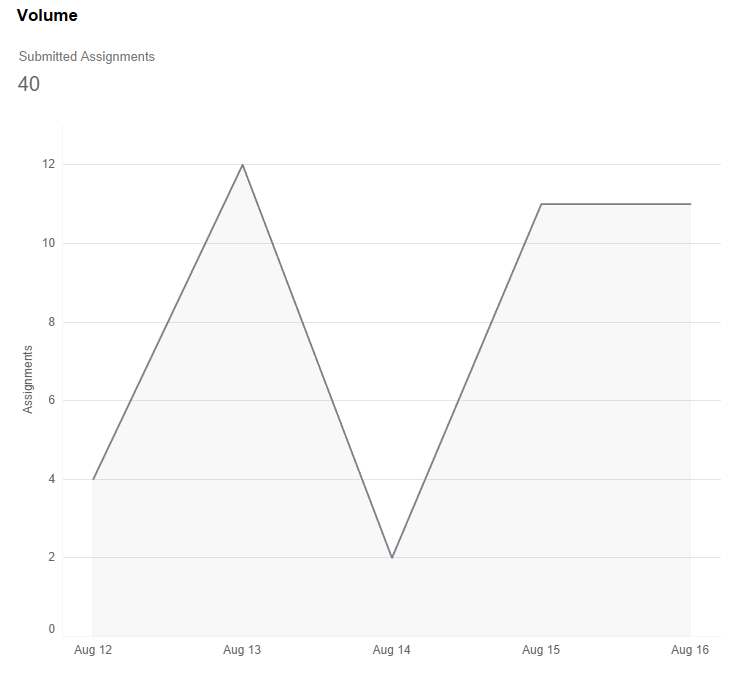
On the Manual dashboard, we've added another Volume chart to visualize the number of completed manual tasks on a particular day. Manual processing speed has also become a double chart, presenting the time spent working on a task, wait time, and total processing time.
On the Tasks, Workers and Worker Details charts, you can filter data by a single click on the element.
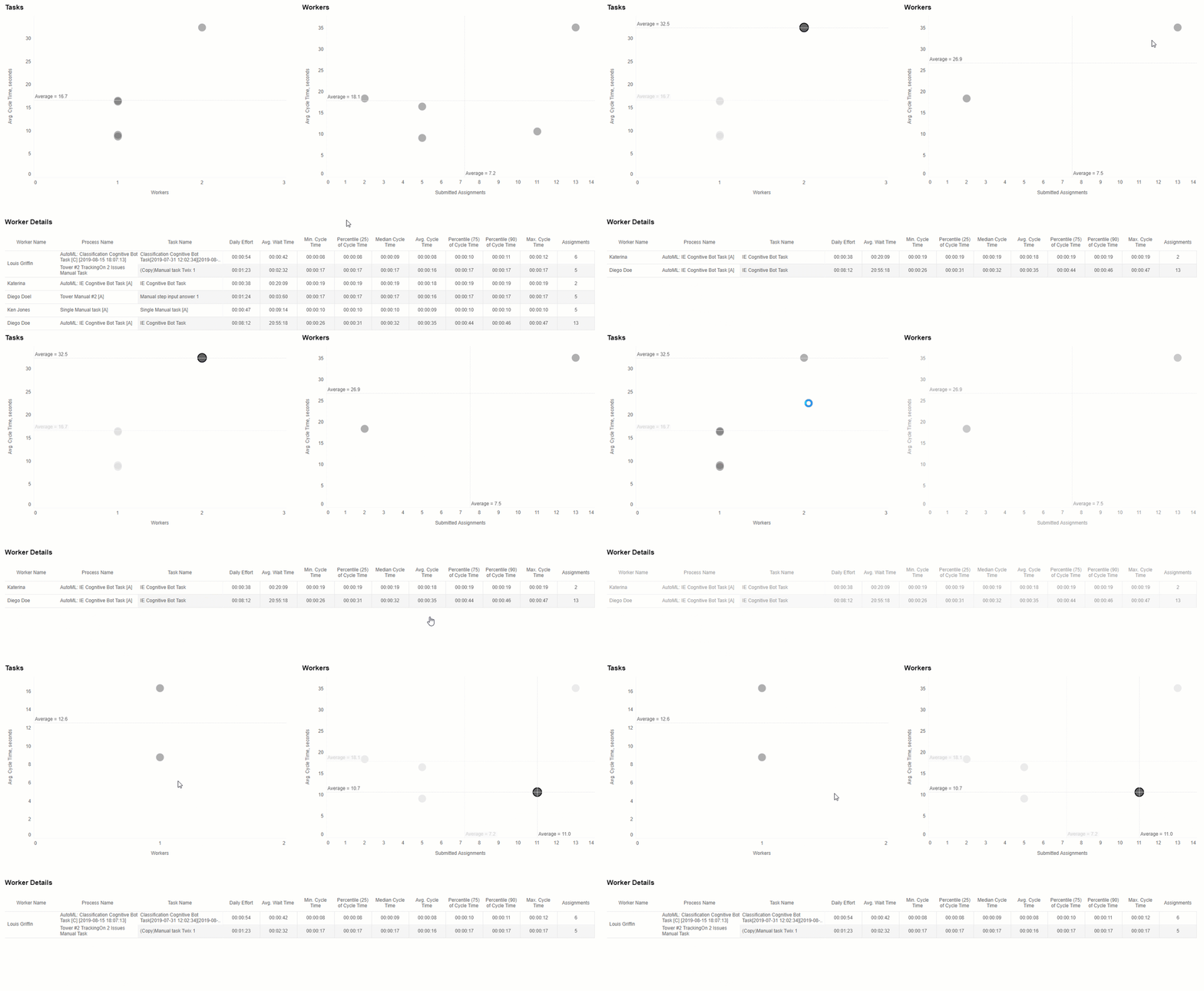
Improved analytics focuses on process ownership, allowing us to distinguish between a fluctuation and a bottleneck. With this knowledge, a process owner can prompt an IT operations engineer to monitor components performance. See the full list of 10.1 dashboards for more information on each of them.
Monitoring
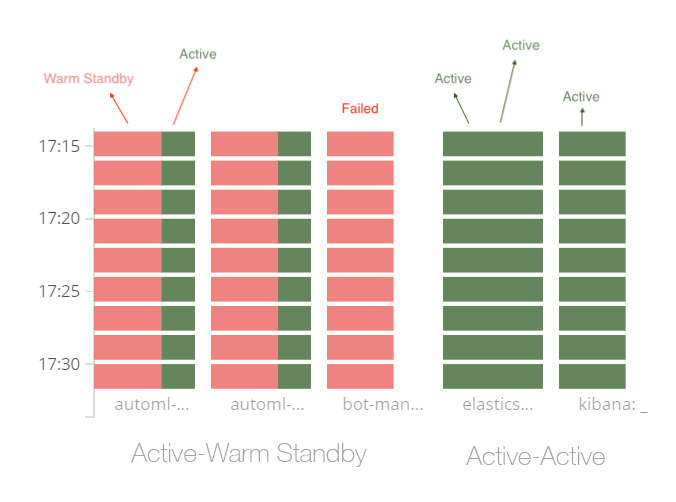
Intelligent Automation Cloud Enterprise features new dashboards in Kibana that help check the health of your system deployed in the high availability mode. The dashboard demonstrates the status of each server in the group and events that have caused switching operations from the faulty to the healthy ones in case of minor outages.
Localization
With the 10.1 release, WorkFusion is expanding the Intelligent Automation global reach. Business users and subject matter experts (SMEs) can now use the Intelligent Automation Cloud in Japanese and Spanish. The user interfaces for several major components are provided in those languages, to increase accessibility, particularly for native speakers. The following components have the new multi-lingual options:
- Control Tower: build and schedule business processes
- WorkFusion Studio: develop bot tasks
- WorkSpace: perform and submit manual tasks
- Analytics: view business intelligence