
Version 10.2
Release date
October 30, 2020
The new Intelligent Automation Cloud v.10.2 provides you with a set of innovations to increase productivity and simplify your routine work. The release includes but is not limited to the following features:
- WorkSpace 2.0 is a human-in-the-loop tool designed to tackle various issues with the exception-handling process, allowing faster completion and improving compliance. Compared to the previous version, WorkSpace 2.0 is strengthened with a feature that enables you to manipulate and adjust the workflow.
- With the new A/B testing feature, you can validate automation variations, review Analytics dashboards for test results, and choose the most confident automation version, thus improving performance of the pre-trained bots.
- Automated retraining allows you to start retraining on a collected training set, know the estimated duration, and see Analytics for validating models. The bot retraining workflow becomes even more friendly to business users, now available in the Control Tower UI.
- Centralized user management and role-based access control are introduced to rule all the ecosystem components, including Analytics dashboards and WorkSpace.
- Analytics introduces 20 new data points, drill-down capability, improved navigation, and simplified, user-friendly analysis.
- Intelligent Automation Cloud Developer updates include the new Launcher application for components management and other improvements to your local development environment.
- ML SDK extensions address complex problems, including but not limited to hybrid models, grouping, and classification cascade training.
- Optimized orchestration of services allows you to reduce hardware requirements to 11 servers for a high-availability environment.
- Additional bug fixes, improvements, and deprecations address user requests and solve earlier flaws.
For more information on each improvement, see detailed descriptions below.
Orchestration
Workspace 2.0
We improved and strengthened WorkSpace 2.0 in terms of user efficiency and productivity, security, performance, and process compliance compared to the previous version.
In terms of employee experience and retention, several changes have been made to present a new modern and human-engineered user interface, including:
Intuitive user experience based on the most common Operations Specialist workflows — allowing a decrease in onboarding time, increased employee satisfaction, and lower employee turnover.
Assignment priority queues enable execution of time-sensitive or critical assignments and faster completion.
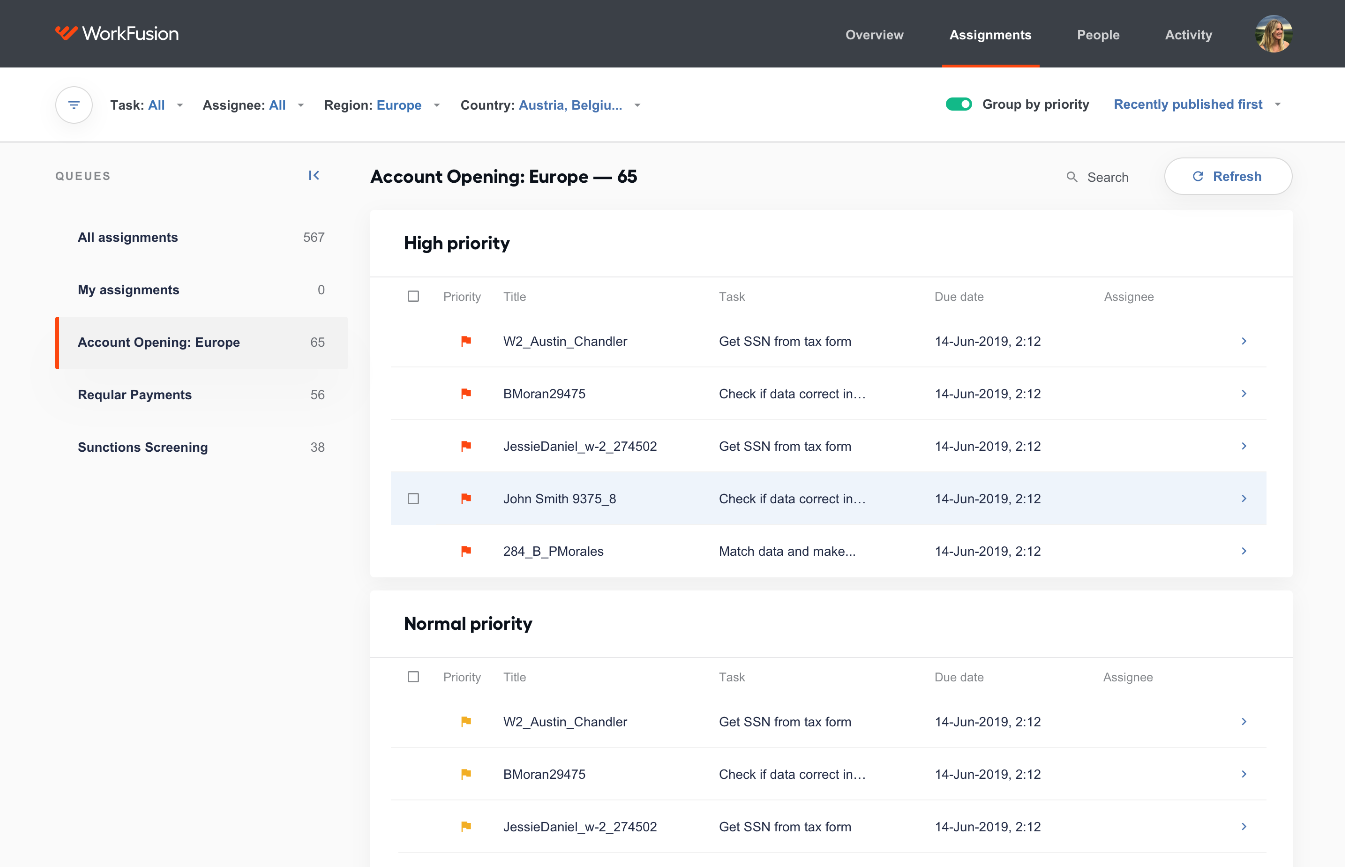
- Extended sorting options, including custom ordering strategy (FIFO) that is configurable for predictability and transparency.
Adjustable custom filters used to identify tasks quickly based on the selected business attributes.
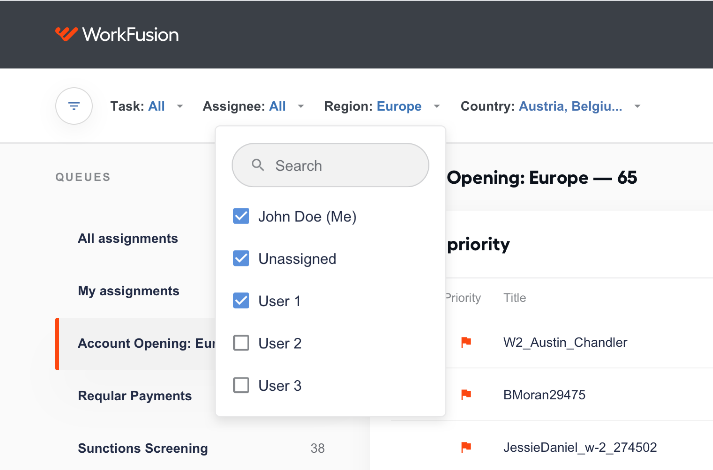
- Assignee management options used to set responsible users or groups for an assignment, thus decreasing the number of SLA violations.
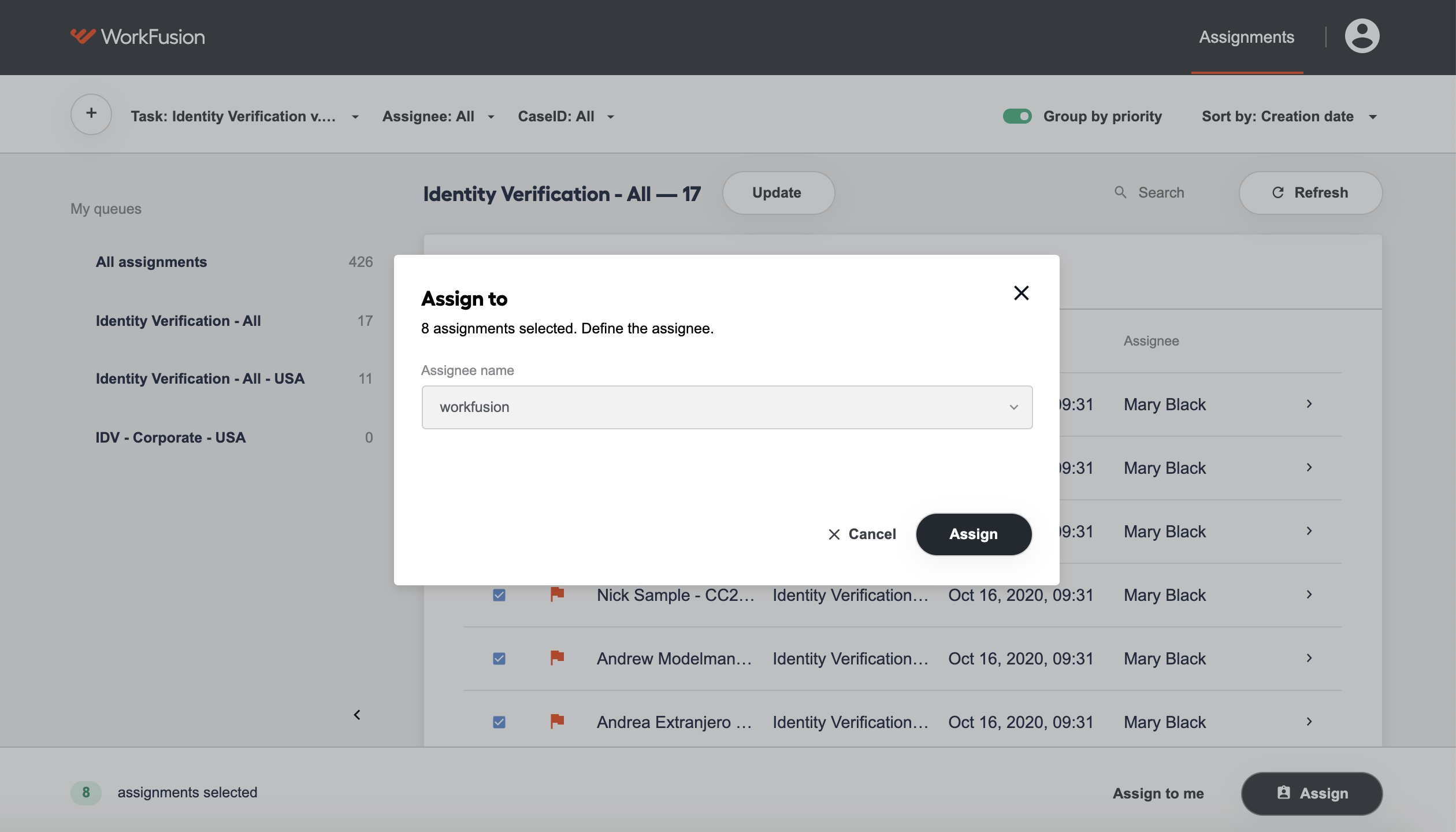
For more details on the user business workflow, refer to the Work with Manual Tasks section.
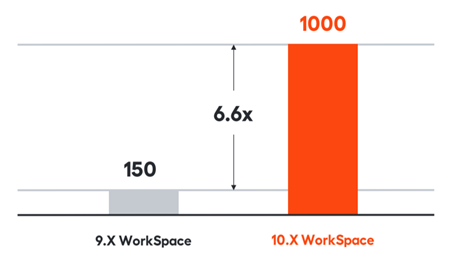
WorkSpace 2.0 supports up to 1,000 concurrent users per instance of WorkSpace without affecting productivity.
The Access Control mechanism based on the standard Access Control Lists (ACL) approach grants users access to the assignments and data based on the input business attributes - user groups. For more details, refer to User Management in WorkSpace below.
A/B-testing of Use Cases
The A/B testing functionality enables you to easily test adjustments or new versions of automation and gather key metrics to determine whether to implement these changes in the production environment.
The intuitive workflow makes the whole procedure easy to run, with data available for comparison after actual testing.
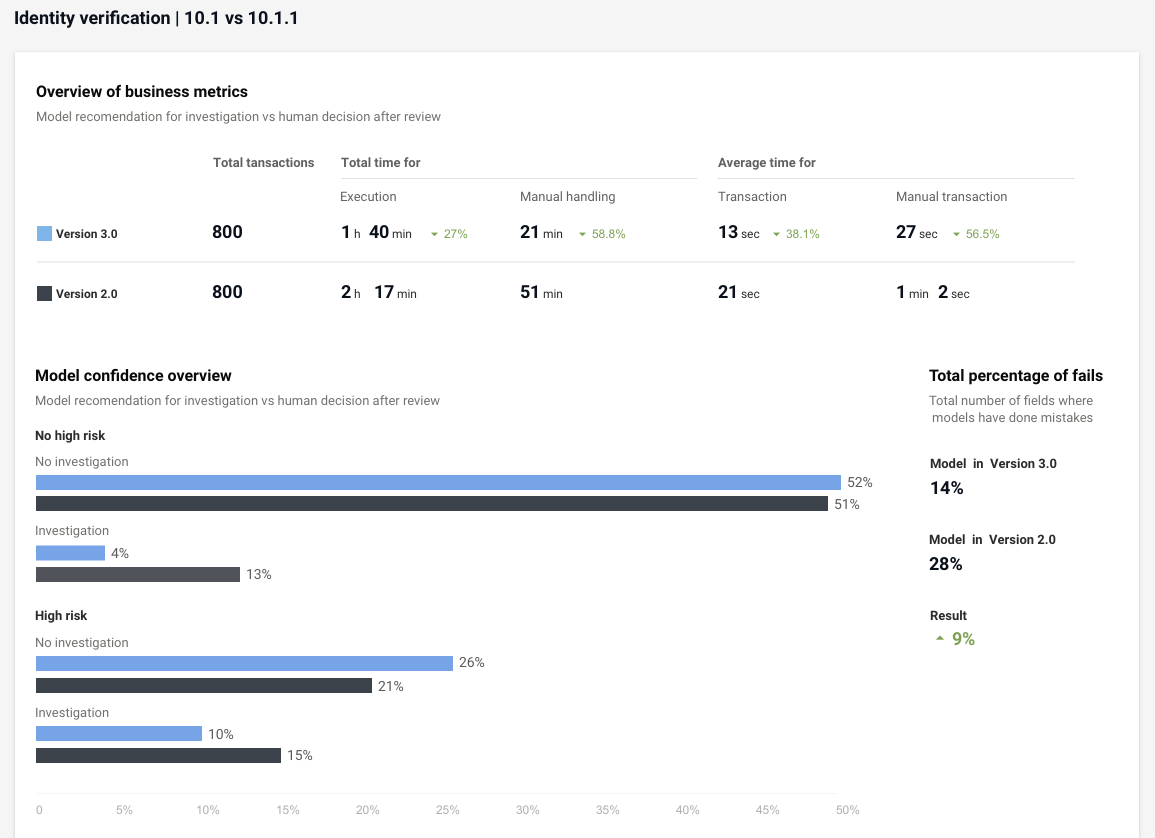
Using A/B tests, you can accomplish the following:
- Safely run data, historical or live, through a new version without impacting the original version.
- Manage variations of Business Processes to be tested.
- Test the efficiency and routing of updated Manual Tasks.
- Automatically gather data to measure and compare two different versions.
- Analyze business metrics and compare versions.
For business user workflow, refer to the A/B testing instructions.
Automated retraining out-of-the-box (Negative News support)
Starting from Intelligent Automation Cloud Enterprise v10.2, we introduce the model retraining feature for the Negative News Use Case. You can now find incorrectly labeled documents quickly and easily without manually reviewing the full data set and then improve model quality based on the retrained data.
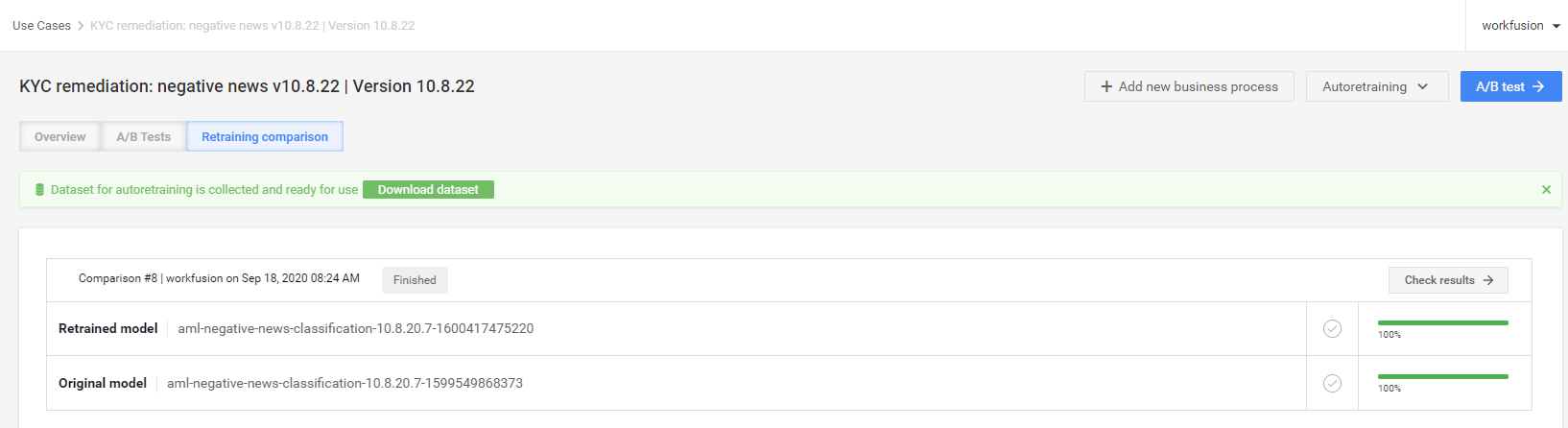
Control Tower provides functionality to perform basic model-retraining operations, including downloading and uploading a training dataset or model, actual retraining, statistics comparison, and the ability to switch between use case models. The workflow makes it easy for you to trigger retraining without the assistance of an MLE or data analyst.
The model comparison screen allows you to analyze the retraining results and decide whether to apply the retrained model.
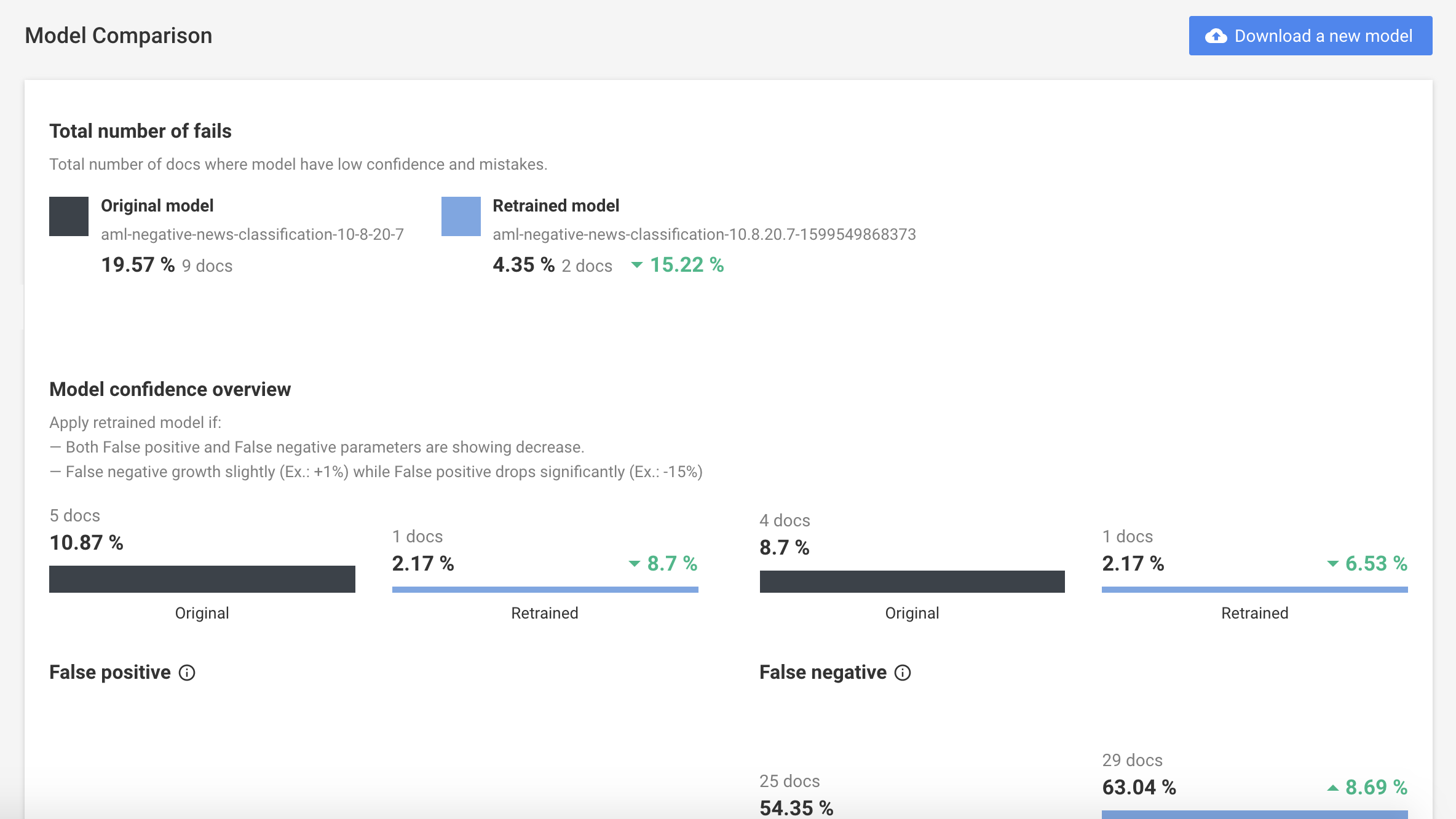
For more details on the workflow, refer to Model retraining.
Improved import of Use Case bundles
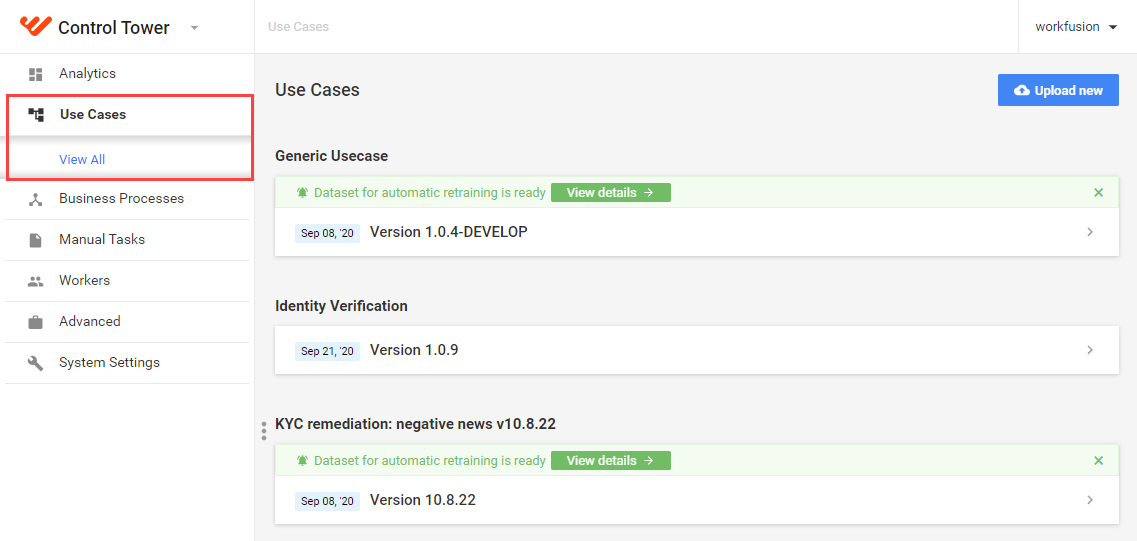
In the previous implementation, to import a pre-packaged Use Case, you had to download additional scripts and work from the command line, which was difficult and time-consuming. With the new Product version, we provide you with a simple interface in Control Tower to deploy the package quickly. Thus, you can start using a pre-packaged use case without addressing your IT Ops. For details, see the AML Use Case installation guide.
Document Intelligence
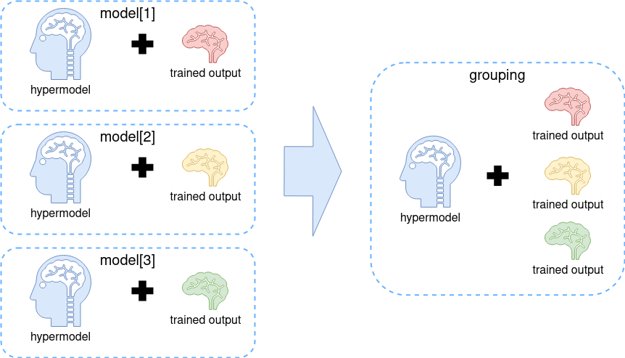
Grouping models
The feature reduces the ML worker numbers on the cluster by combining existing or new models into a single artifact. This approach allows us to minimize the worker's start time on the cluster.
Hybrid models
A new ML SDK mechanism helps solve complex ML issues, like specific extraction based on classification or classification cascade results, to handle many classes using a single model. Hybrid models are based on the ensembles framework, and combine different models in the execution graph using YAML-based DSL.
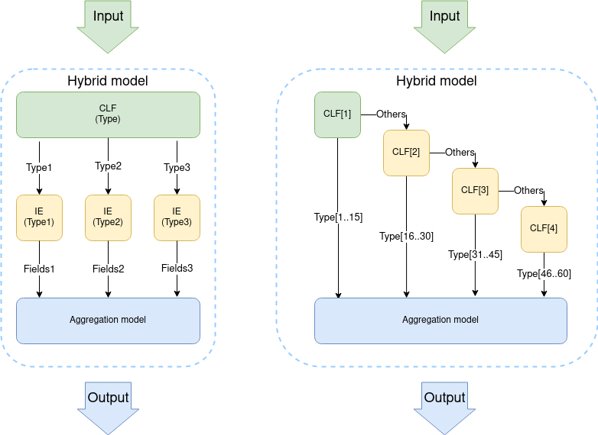
Classification cascade training
Another ML SDK mechanism builds a classification cascade automatically, based on the class frequency in documents. This training allows you to create a classification model with over 20 classes, using only a new model type.
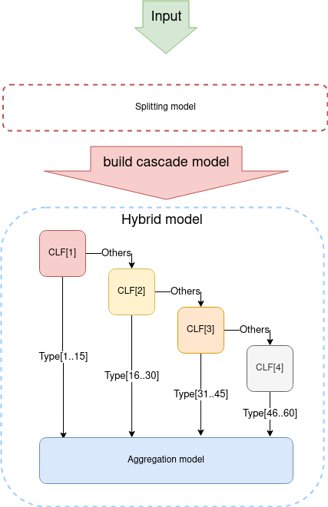
Architecture
New User Management and Access Control
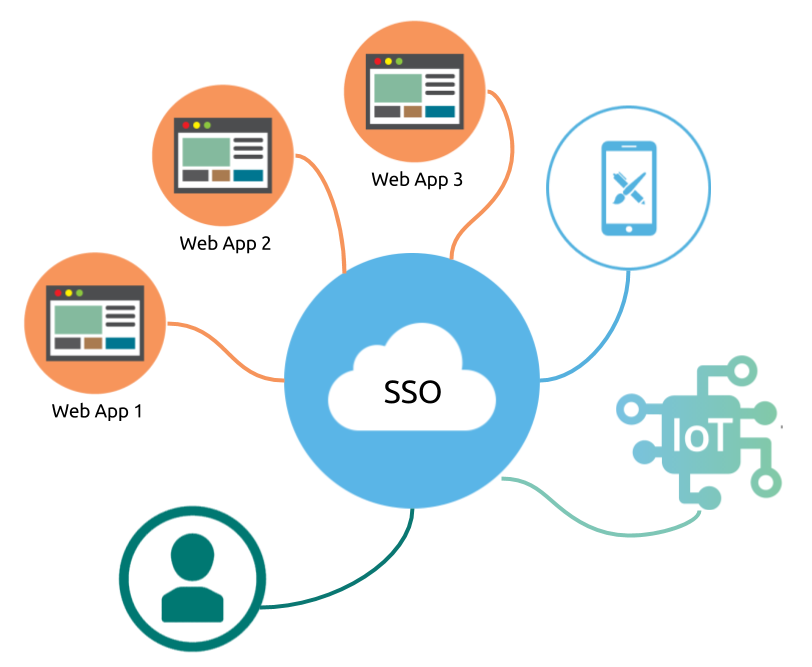
In the latest version, we added Keycloak-based single sign-on to all applications on the Intelligent Automation Cloud platform. This allows you to perform all User management activities in one place.
Why you will like it:
- You need only one account to access any application in Intelligent Automation Cloud.
- You can restrict access to any application based on user group or role.
- You have a centralized location for user management as well as a shared user database across all applications.
- You set up role-based access, built on the user groups approach compatible with industry standards.
- You are provided with built-in support to connect to existing LDAP or Active Directory servers.
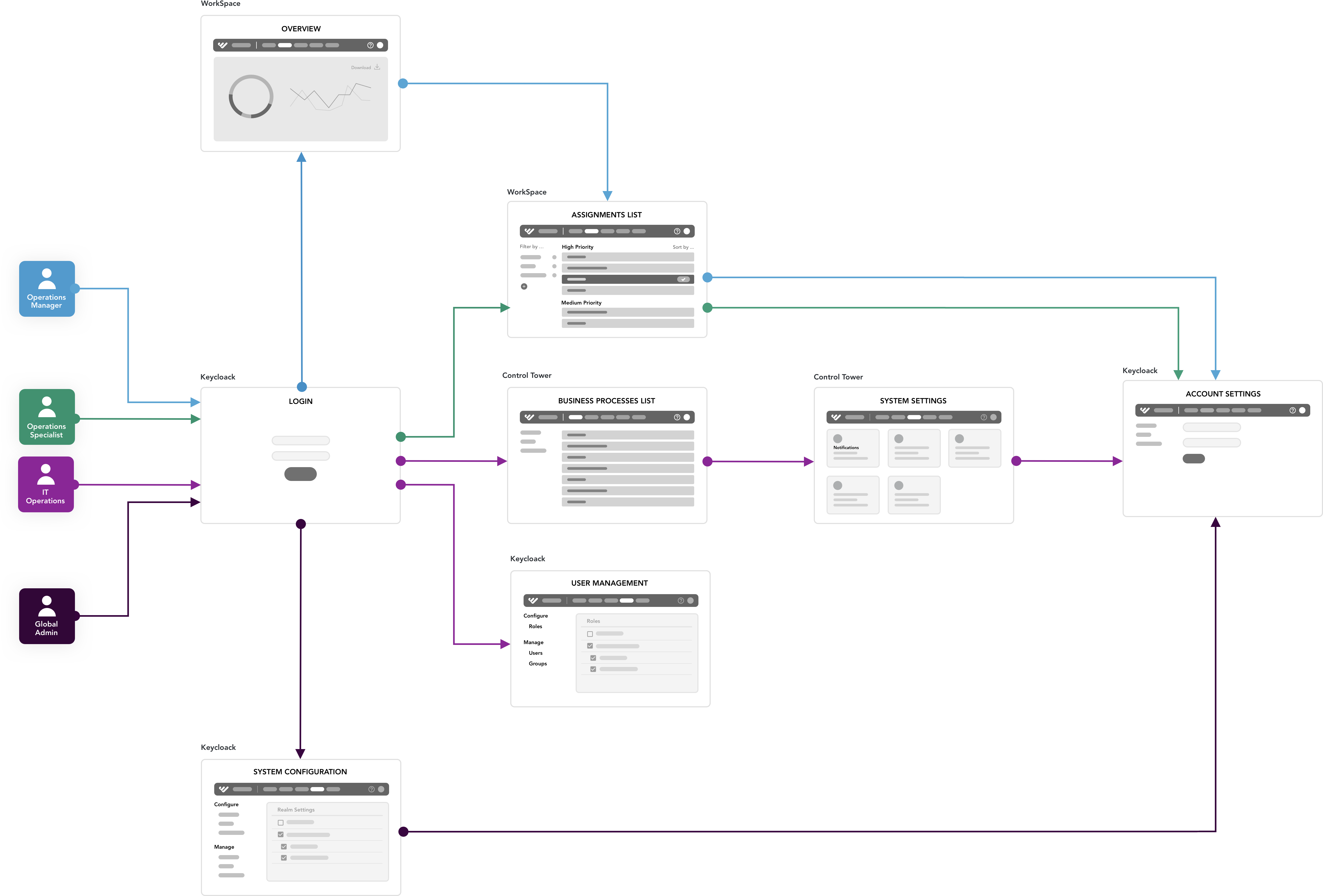
For more details, refer to User Management | Keycloak administrator guide.
SSO across IA Cloud Components
We have also introduced a built-in SSO provider, so you can benefit from the same login across Intelligent Automation Cloud applications. In combination with Centralized User Managements, this makes access control more flexible.
Currently, the SSO covers the following applications:
- Control Tower
- WorkSpace
- Kibana
User Management in WorkSpace 2.0
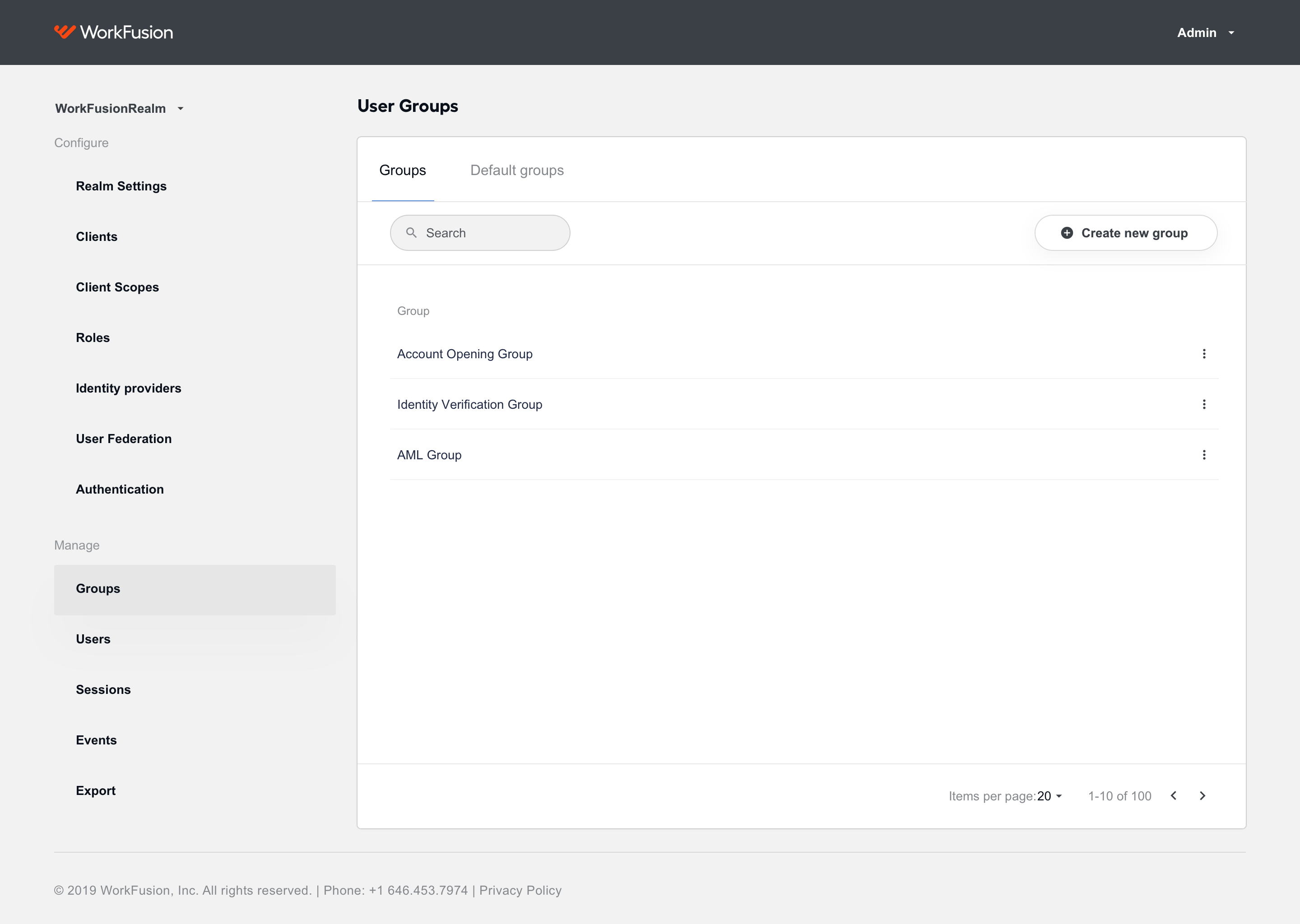
The new approach to user management in WorkSpace 2.0 enables you to limit access to assignments based on the ACL (Access Control List) principle that allows business processes and assignment data to be securely restricted only to defined users/user groups. Now, you can dynamically add restrictions to assignments from a business process step, and manage their visibility. This guarantees that users who should not see sensitive data associated with the specific manual task will never be routed or assigned to the task.
The solution boosts application security and reduces user maintenance time, resulting in fast onboarding, painless integration, and transparent audits. To learn more, see How to configure ACL.
Access Control for Analytics
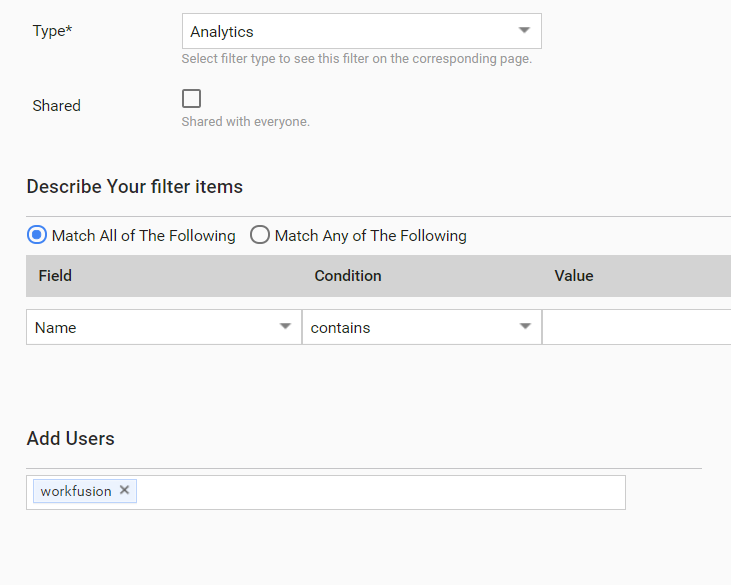
In Enterprise v.10.2, you can limit access to the Analytics dashboards on user, group, business process, and role levels. Such access control prevents data exposure risks and impedes visibility to authorized consumers only. For details, see the Access Control guide.
Orchestration by Mesos/Marathon
As a first step to the containerization of the whole Product, we enhanced the use of Mesos/Marathon for orchestration. With this version, all Linux components that previously used custom failover scripts for service management are now managed by this solution.
What are Mesos and Marathon
Apache Mesos is open-source software designed to manage and simplify applications running on a scalable cluster of servers.
Marathon is a framework for Mesos and a container orchestration system. For more information, see The Marathon overview).
Why you will like it:
- This innovation increases the Product's stability and performance primarily when operated in the High Availability mode.
- Installation and maintenance processes require fewer operations.
- A user-friendly GUI for components improves maintenance.
New orchestration architecture
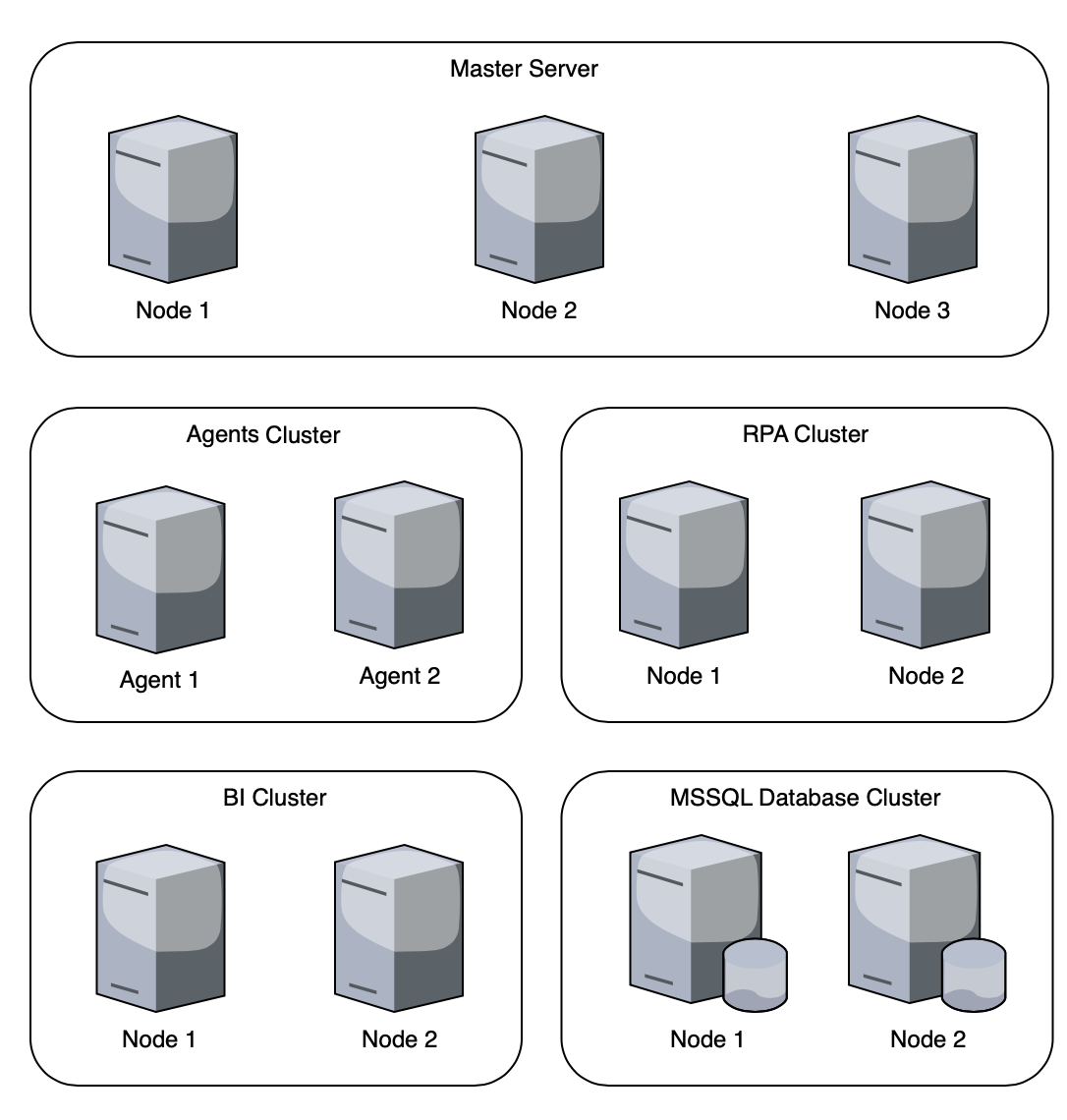
The optimized architecture of Enterprise v.10.2 will require even fewer servers to deploy due to combining the OCR and BEP components on the same machine. Now for the high-availability setup, you will need 11 servers instead of 18. Such a solution grants you reduced expenses, a reliable failover mechanism, and fewer points of failure. Note that you can either deploy the reduced environment with a clean slate or switch to it during the upgrade from the previous 10.1.x versions.
Analytics
Datamart 2.0
With v.10.2, we introduce a new unified approach to Business Process data to build custom Analytics for any use case through a pre-defined set of extensible components. Data mart 2.0 includes:
- A standard schema for Data Stores
- Out-of-the-box ETL for loading data into the centralized data warehouse
- Set of pre-defined data views for Dashboards
New Data Stores and data marts are fully extensible, which means you can add any custom measures and dimensions to the standard schema and Dashboards.
For users, the new approach will bring:
- New data points available for Analytics and insights
- End-to-end Analytics across multiple business processes
- Capturing business and technical exceptions
From a technical point of view, the main benefit is a 50% reduction in time for Analytics enablement with custom use cases using standardized data schema.
Dashboard design
WorkFusion Analytics in v.10.2 introduces a new design for Dashboards, improving the user experience in data analysis activities and leading to better data-driven decisions when evaluating use case performance.
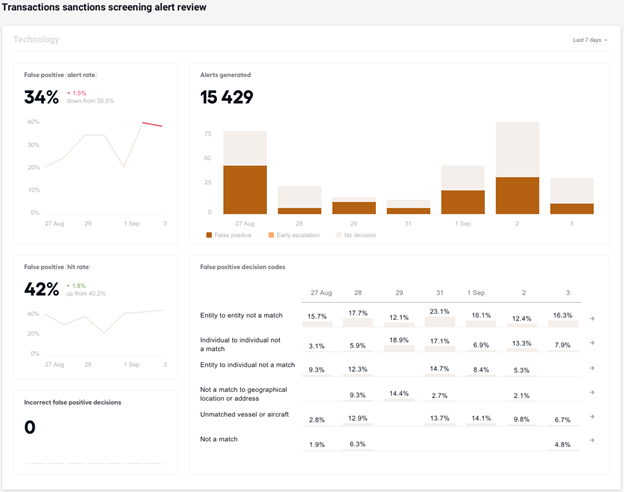
Infused Analytics
The new version of Intelligent Automation Cloud features even closer integration between the pre-packaged use cases and Analytics, to create a more unified and immersive experience for users. The earlier implementation hid the use case-specific Dashboards in the Custom section. But now, Analytics is infused in the workflow and lets you focus on critical activities. You can quickly analyze the process from the use case itself, once you spot a data anomaly that requires intervention and investigation.
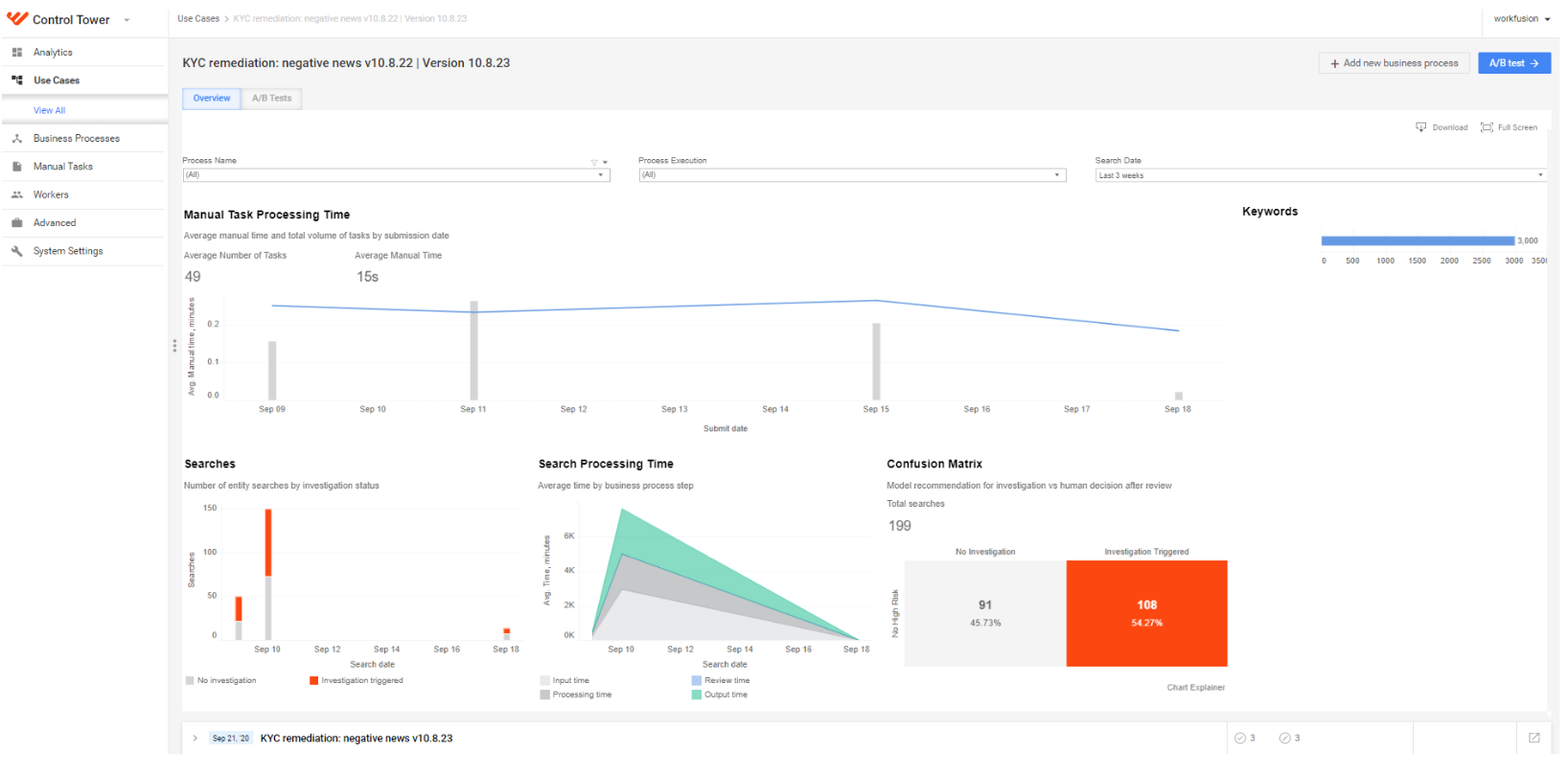
Improved navigation
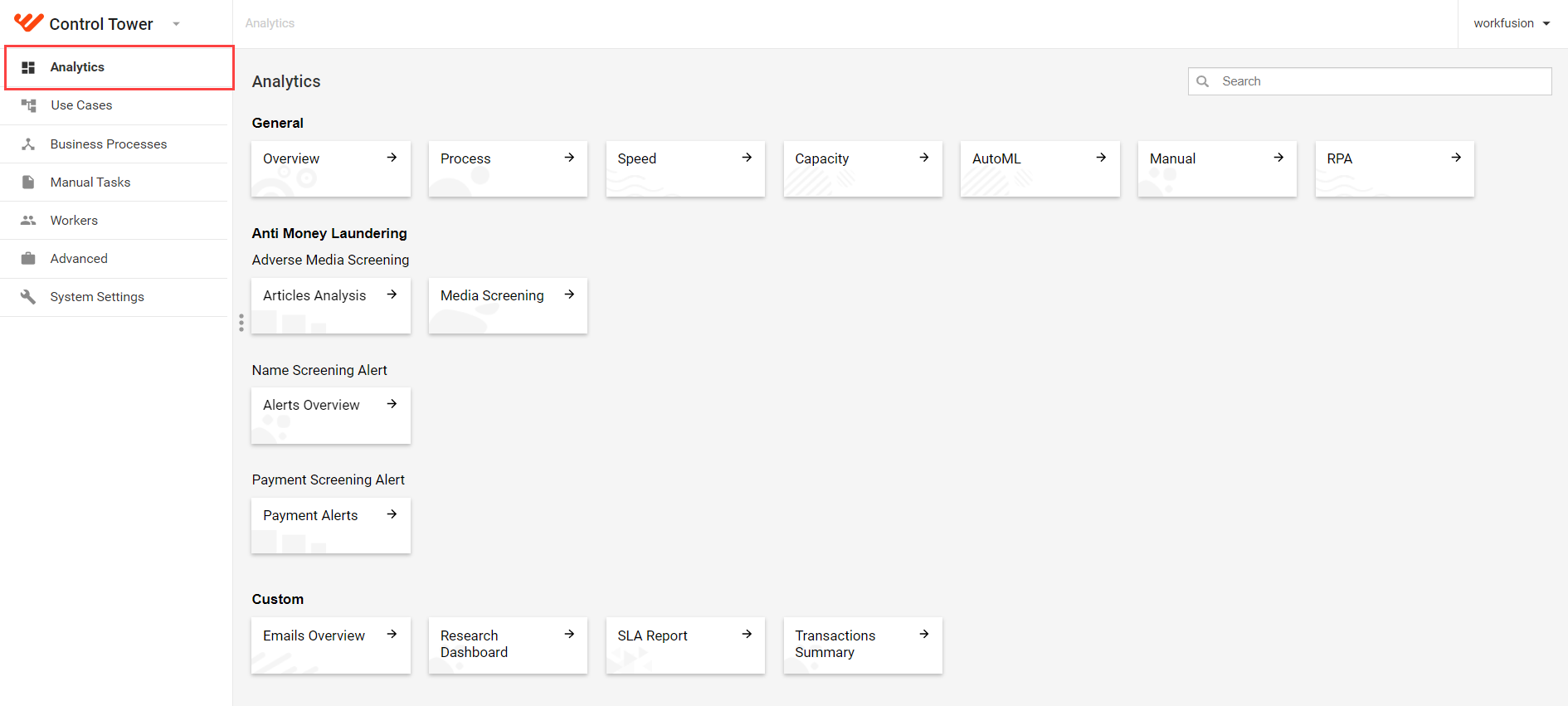
We have also simplified navigation across Analytics dashboards and grouped them in the following clusters:
- The General group contains all standard dashboards.
- The Use case group includes all use case-related visualizations.
- The Custom group comprises all custom-made dashboards.
Tableau Workbook naming conventions define the new menu structure and layout, meaning you can change any element to better suit business needs and fully control labels and grouping.
For more details, see Analytics.
IA Cloud Developer
As a component of Enterprise v10.2, Intelligent Automation Cloud Developer v10.2 enables faster development on a local environment with granular server components management via the Launcher application.
Server components management application
The desktop Launcher application is the component management tool that replaces the Components panel previously used in WorkFusion Studio. The main features are as follows:
Components are grouped to flexibly launch only currently required servers depending on development needs: RPA Worker, OCR, or Control Tower&WorkSpace, and related dependencies.
- Groups are manageable in the configuration.
- Grouping reduces RAM and CPU loads on local development workstations and makes the startup of components much faster.
Options to enable and disable components are available both from Launcher and the tray menu.
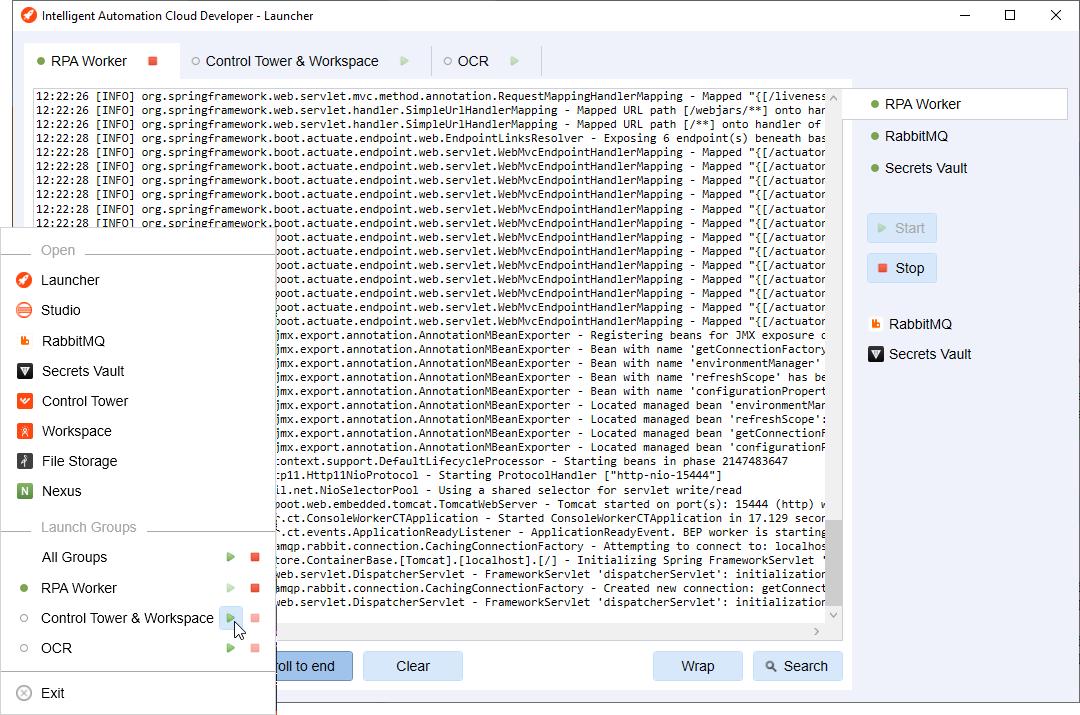
Searchable components console output is available right in the application.
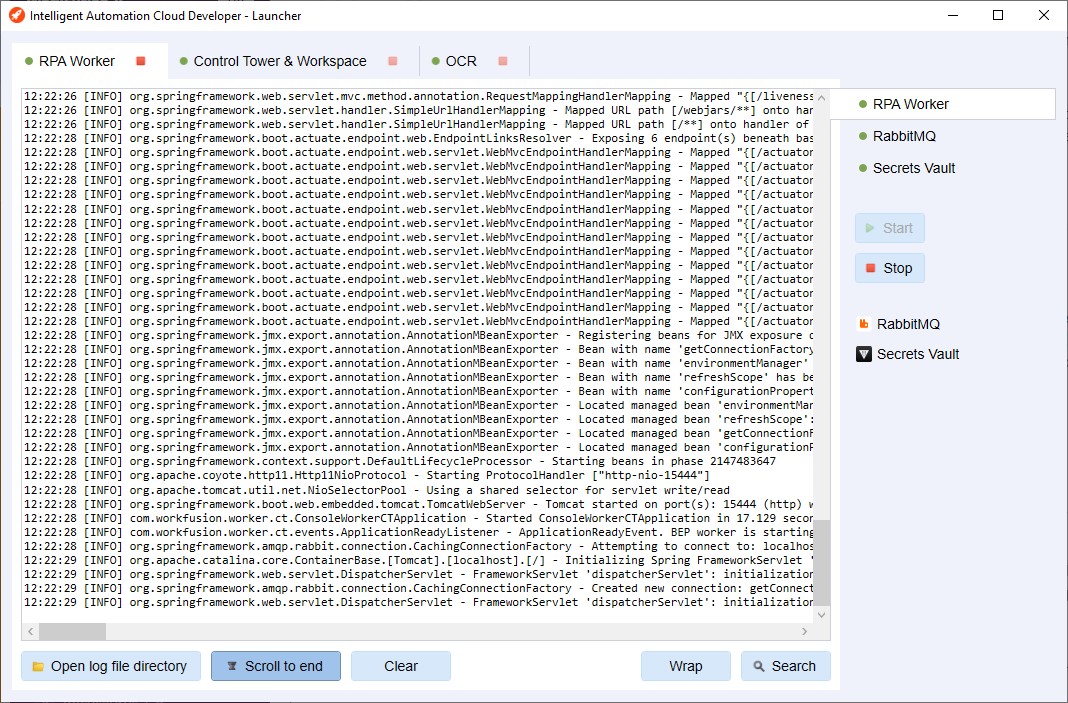
For more details, refer to the Launcher section.
Other improvements
- A local Nexus repository is added as part of the Developer installation, making local development and deployment 100% autonomous.
- The OCR group in Launcher shows the actual number of remaining pages on the active OCR license, which allows you to proactively and transparently manage your OCR licenses.
Adverse Media Monitoring
The new release also brings various improvements for the Adverse Media Monitoring (Adverse Media Monitoring) Use Case. With the latest version, you can:
- Save articles for further retraining and mark them according to relevancy.
- Perform a search of the articles in Spanish.
- Add additional filters to the search and narrow down the results.
- Try the beta version of the LexisNexis connector. The feature is temporarily intended for use only in a non-Production environment.
Also, the Article Scoring ML model now produces less noise and reduces the risk of missing a real hit by 10%.
For more information, see Adverse Media Monitoring.
Bug fixes
Infrastructure
- Fixed the issue with the Logstash startup failing and secrets not taken from Secrets Vault.
- Fixed the bug with jobs not working when cloning from the current directory.
- Fixed the certificate error with Logstash unable to start.
- Fixed the issue on the Run postmigrate SQL script step.
- Fixed the issue with the port pre-checker not working when the FirewallD service blocks ports.
- Fixed the issue with the update_artifacts task failing when running on the HA environment.
- Fixed a Liquibase error when upgrading.
- Resolved the issue with proper permissions for using mssql-cli in the installation process.
- Fixed the issue with a confusing pre-check message when system packages are not up to date.
- Resolved the issue with the upgrade procedure failing on checking the mount point directory.
- Resolved the issue with deployment failing on the filebeat startup on the MSSQL server.
- Fixed the exception when Ansible does not check
license.propertiesduring single-point installation. - Fixed the issue with reinstallation failing on the Mesos task on the HA environment.
- Resolved the issue with installation failing on uploading AutoML models when calling automl-model-management-service.
- Resolved issues with insecure TLS ciphers on the Mesos and Marathon, Secrets Vault, Elasticsearch, and Logstash endpoints.
- Fixed the issue with the pre-install failing on
nfs-utils-1.3.0-0.61.el7.x86_64.rpmfor the Azure Cloud installation without Internet access. - Resolved the issue with default
cleanup.shfrom cron scripts resulting in colossal disk I/O. - Fixed the issue with Kibana not having logs from Control Tower after the environment is stopped for several days.
- Fixed the issue with the Mesos web UI using ports 5050 and 5051 instead of 443 for end-user web requests.
BEP
- Resolved the issue with a BEP Worker creating 160 to 180 parallel threads.
- Resolved the issue with each BEP Worker creating 75 to 95 threads.
- Fixed the problem with the wrong field set on the Worker CPU/Memory dashboard.
- Resolved the issue with a WMS memory leak on manual deletion of a Worker's job.
RPA
- Resolved the issue with Bot Agent failing to start or restart when Secrets Vault is unavailable.
AutoML
- Resolved the issue with the validation for automl-model-service REST API.
- Fixed the problem with the L2 regularization disabled in the Python config.
- Resolved the issue with BenchmarkRunner(s) not working locally.
Control Tower
- Fixed a 500 HTTP error with Business Processes not displayed.
- Resolved the issue with imported Business Process preventing a schedule from being copied.
- Fixed the Quartz configuration to improve the Control Tower behavior.
- Fixed the issue with the failure to trigger the Data Purge default configuration.
- Fixed the out-of-memory error with the out-of-date
htmlcleanerlibrary. - Resolved the issue with
stopWorkerAsyncofCmdWorkerExecuteServiceexceptions generated non-stop in the idle system. - Fixed the issue with a copy of the AutoML Business Process running with an old user when it should run with the current one.
- Fixed the "Not all template attributes were mapped to main file columns" error while running the Manual Task.
- Fixed the issue with the Asset Bundle import status not updating to Completed after import.
- Fixed the issue with Data Store import failing if the Data Store has UTF-8 with BOM encoding.
- Fixed the issue with the package Asset Bundle import API deleting Data Store records in case of a corrupted Data Store file.
- Resolved the issue with invalid message processing in the exception case for
CompositeTaskRunBPService. - Fixed the issue with empty fields in WorkSpace Preview Schema due to missing
workspacePreviewDataafter re-importing. - Fixed the following XML External Entity (XXE) vulnerabilities:
XsltXmlModificationService,PdfExporter,XmlExporterUtil,XmlConverterUtil, and some other minor ones. - Resolved the issue with the activity log type displayed in an invalid format.
WorkSpace
- Resolved the issue with the first sub-answer of the Select one type in the Line Item answer always being empty after submitting.
Improvements
Infrastructure
- Improved the logic of the Business Process health check in the Ansible installer.
- Reworked the Vowpal Wabbit installation to be installed on BEP Agents only.
- Improved the mechanism of checking external balancer ports after internal HAPROXY is started.
- Removed unauthenticated access for listing Minio buckets content resulting in better security of customers' data.
- Enabled the installer to update bi_workbooks with the
./install.sh update\artifacts bi-workbookscommand. - Changed the BI AA\ETL\Scheduler workbook priority from 50 to 10.
- Stabilized the installation process if the application user does not have the home directory or the directory is in the read-only mode.
- Updated Nexus to version 2.14.18.
- Upgraded Kibana, Elasticsearch, and Logstash to version 7.9.1.
- Stabilized the installation process by adding the logrotate RPM to the installation package.
BEP
- Cleaned AutoML related data (< 10) in Control Tower.
- Upgraded vds-models to get rid of Log4j1x.
- Introduced four new customizable parameters for the BEP Workers to prevent memory leaks. The parameters detect possible memory leaks and stop the worker's execution if the threshold is exceeded.
- Improved the task brokering mechanism in the Task Dispatcher Service. The feature provides a more equal utilization of Worker resources for slower tasks and minimizes the Worker idle state by loading them constantly for faster tasks.
AutoML
- Synchronization for the train flow between Control Tower and Bot Config is now fully processed by using the WFML_Job_Data Data Store.
- Added support of Python version 3.6+ for the generic Python server.
- Accelerated the AutoML Worker startup by up to 10%.
Control Tower
- Moved system scheduler jobs from Quartz execution to Spring. Re-implemented the ct-schedulers mechanism to stop using Quartz with background Control Tower activities with fixed delay to be switched to the Spring @Scheduled annotation.
- Improved the REST API login to keep a user session if the authentication token is expired or the administrator revokes it.
- Implemented
new.automl.flow.deprecation.notificationto notify users that they should move their old Business Processes with AutoML in a new format. - Implemented the ability to set up
_sys_mt_hit_titleused as an assignment title for WorkSpace 2.0 assignments. For details, refer to How to configure assignment title. - Updated SLF4J Extensions Module to version 1.7.27.
OCR
- Added structured logging to OCR components:
- For the ocr-rest service, logs are changed to the JSON format with Filebeat configured to send logs to Elasticsearch.
- For ocr-workers, logs are sent by using a lockback appender. The ABBYY engine logs are saved in the
wf_base_dir]/vds-data/workers/log/ocr-enginefolder with log rotation.
Deprecations
Infrastructure
- Removed
cups-libsfrom the installer.
RPA
- Removed
com.workfusion.studio.mcb.mcbProjectNatureandcom.workfusion.studio.rpa.rpaProjectNaturefrom the WorkFusion Studio mechanisms.
AutoML
The old AutoML plugin deprecated in favor of a new Bot Config plugin, which implies asynchronous execution. The previous Control Tower versions executed all bot configs in tomcat JVM (CT JVM), which made processing tasks slower. Now, the changes of the CT flow are aimed at increased performance and stability and support facilitation for the Business Processes that contain AutoML steps as well as improved throughput of AutoML tasks.
Control Tower
- Deprecated the
ControlTowerDistributedLockServiceimplementation along with the feature flag. - Qualifications, Qualification Manual Tasks, and Adjudication rules, except for 1+0, are obsolete and should not be used. These are planned to be removed from Control Tower UI in further releases.
- Removed the Time allotted per task option in the Manual Task Properties menu.
- Removed the FAQ (Frequently Asked Questions)functionality from the Task Designer.
- Deprecated Suggestions in IE answers and IE split view.
- Removed the Accept and View Comments functionality as not essential.
- Removed the Advanced Mail Notification configuration from the System Settings on UI. The removed checkboxes are as follows:
- Email Daily Reports
- Email Monthly Reports
- Send notification on Run completion
- Removed the Contact Us message.
- Deprecated the Crowd Agreement functionality.
- Removed unused beans related to
internalHazelcastInstance:com.freedomoss.jobber.listener.RestartableJobListenercom.freedomoss.jobber.listener.hazelcast.ClusterMembershipListener
WorkSpace
- Deprecated the Dynamic Task Rendering (DTR) mechanism in favor of a new approach based on custom queues. Though the feature still remains on the UI, any DTR configurations from Control Tower are ignored.
For details on the new approach, refer to Working with custom queues.
- Removed the
hit_auditandassignment_audittables.
OCR
- Removed the redundant parameter of
ocr.engine.logs.activelicense.log. Use existingocr.engine.logs.locationinstead.