
Simplified Robotics API
Overview
RPA developers can create lighter weight, clearly readable robotics scripts using WorkFusion Simplified API, and temporary files are automatically cleaned up after bot execution.
The Robotics Simplified API provides a wrapper library with a lightweight and succinct jQuery-like syntax, encapsulating best practices into the most frequent functions and hiding the complexity from the end user. As a result, the amount of code is significantly reduced, and the code itself becomes clearly readable.
| Simplified API reference Javadocs | Packages list |
|---|---|
| Latest release |
Compare API samples
Simplified API sample
import com.workfusion.bot.service.SecureEntryDTO;
import com.workfusion.odf2.compiler.BotTask;
import com.workfusion.odf2.core.cdi.Requires;
import com.workfusion.odf2.core.task.AdHocTask;
import com.workfusion.odf2.core.task.TaskInput;
import com.workfusion.odf2.core.task.output.TaskRunnerOutput;
import com.workfusion.odf2.core.webharvest.rpa.RpaDriver;
import com.workfusion.odf2.core.webharvest.rpa.RpaFactory;
import com.workfusion.odf2.core.webharvest.rpa.RpaRunner;
import com.workfusion.odf2.service.ControlTowerServicesModule;
import com.workfusion.odf2.service.vault.SecretsVaultService;
import com.workfusion.rpa.driver.Driver;
import com.workfusion.rpa.helpers.*;
import com.workfusion.rpa.helpers.resources.Filter;
import org.openqa.selenium.By;
import org.openqa.selenium.Keys;
import org.openqa.selenium.WebElement;
import org.slf4j.Logger;
import javax.inject.Inject;
import java.time.temporal.ChronoUnit;
import java.util.*;
import static com.workfusion.rpa.helpers.Excel.*;
import static com.workfusion.rpa.helpers.RPA.$;
import static com.workfusion.rpa.helpers.RPA.downloadFileOnAgent;
import static com.workfusion.rpa.helpers.Script.*;
import static com.workfusion.rpa.helpers.UiConditions.text;

@BotTask(requireRpa = true)
@Requires({ControlTowerServicesModule.class})
public class SimplifiedRoboticsAPI implements AdHocTask {

    private final RpaRunner rpaRunner;
    private final Logger logger;
    private final SecretsVaultService secretsVault;

    @Inject
    public SimplifiedRoboticsAPI(RpaFactory rpaFactory, Logger logger, SecretsVaultService secretsVault){
        this.rpaRunner = rpaFactory
                .builder(RpaDriver.UNIVERSAL)
                .closeOnCompletion(true)
                .build();
        this.logger = logger;
        this.secretsVault =secretsVault;
    }


    @Override
    public TaskRunnerOutput run(TaskInput taskInput) {

        rpaRunner.execute(driver->{
            this.simplifiedAPISample(driver);
        });

        return taskInput.asResult()
                .withColumn("example_bot_task_output", "completed_successfully");

    }

    private void simplifiedAPISample(Driver driver) {

        String loginPage = "https://mail.rediff.com/cgi-bin/login.cgi";

        //User needs to create entry of their email credential in secretvault
        SecureEntryDTO secureEntry = secretsVault.getEntry("EmailCredentials");

        String mailSubject = "Robotics API demo";
        String mailBody = "We are not afraid of ajax anymore.This is Simplified API example !!!";

        RPA.openChrome(loginPage);

        RPA.sleep(5 * 1000);
        $(By.xpath("//input[@id = 'login1']")).sendKeys(secureEntry.getKey());

        $(By.xpath("//input[@id = 'password']")).sendKeys(secureEntry.getValue());

        $(By.xpath("/html/body/div/div[1]/div[1]/div[2]/form/div[1]/div[2]/div[2]/div[2]/div/input[2]")).click();

        WebElement compose = $(By.xpath("//*[@id=\"boxscroll\"]/li[1]/a/b"));
        compose.click();

        try {
            Thread.sleep(2000);
        } catch (InterruptedException e) {
            throw new RuntimeException(e);
        }

        WebElement toAddress = $(By.xpath("//*[@class=\"rd_inp_to as-input\"]"));
        toAddress.click();
        toAddress.sendKeys("tuk.tuk.rpa@gmail.com");
        RPA.sleep(1000);

        WebElement subject = $(By.xpath("//*[@id=\"rd_compose_cmp2\"]/ul/li[4]/input"));
        subject.sendKeys(mailSubject, Keys.TAB);
        RPA.sleep(1000);

        WebElement emailBodyIframe = $(By.xpath("//*[@id=\"cke_1_contents\"]/iframe"));
        driver.switchTo().frame(emailBodyIframe);

        driver.switchDriver("chrome");

        WebElement emailBody = $(By.xpath("/html/body"));
        emailBody.click();
        driver.executeScript("arguments[0].innerHTML = arguments[1]" ,emailBody , mailBody );
        RPA.sleep(1000);

        driver.switchTo().defaultContent();

        WebElement send = $(By.xpath("//*[@id=\"rd_compose_cmp2\"]/div[1]/a[1]"));
        RPA.sleep(1000);
        send.click();

        logger.debug("Email Sent");
    }

}
Original Selenium API sample
import com.workfusion.bot.service.SecureEntryDTO;
import com.workfusion.odf2.compiler.BotTask;
import com.workfusion.odf2.core.cdi.Requires;
import com.workfusion.odf2.core.task.AdHocTask;
import com.workfusion.odf2.core.task.TaskInput;
import com.workfusion.odf2.core.task.output.TaskRunnerOutput;
import com.workfusion.odf2.core.webharvest.rpa.RpaDriver;
import com.workfusion.odf2.core.webharvest.rpa.RpaFactory;
import com.workfusion.odf2.core.webharvest.rpa.RpaRunner;
import com.workfusion.odf2.service.ControlTowerServicesModule;
import com.workfusion.odf2.service.vault.SecretsVaultService;
import com.workfusion.rpa.driver.Driver;
import com.workfusion.rpa.helpers.*;
import com.workfusion.rpa.helpers.resources.Filter;
import org.openqa.selenium.By;
import org.openqa.selenium.Keys;
import org.openqa.selenium.WebElement;
import org.slf4j.Logger;
import javax.inject.Inject;
import java.time.temporal.ChronoUnit;
import java.util.*;
import static com.workfusion.rpa.helpers.Excel.*;
import static com.workfusion.rpa.helpers.RPA.$;
import static com.workfusion.rpa.helpers.RPA.downloadFileOnAgent;
import static com.workfusion.rpa.helpers.Script.*;
import static com.workfusion.rpa.helpers.UiConditions.text;

@BotTask(requireRpa = true)
@Requires({ControlTowerServicesModule.class})
public class SimplifiedRoboticsAPI implements AdHocTask {

    private final RpaRunner rpaRunner;
    private final Logger logger;
    private final SecretsVaultService secretsVault;

    @Inject
    public SimplifiedRoboticsAPI(RpaFactory rpaFactory, Logger logger, SecretsVaultService secretsVault){
        this.rpaRunner = rpaFactory
                .builder(RpaDriver.UNIVERSAL)
                .closeOnCompletion(true)
                .build();
        this.logger = logger;
        this.secretsVault =secretsVault;
    }


    @Override
    public TaskRunnerOutput run(TaskInput taskInput) {

        rpaRunner.execute(driver->{
            this.originalSeleniumAPISample(driver);
        });

        return taskInput.asResult()
                .withColumn("example_bot_task_output", "completed_successfully");

    }

    private void originalSeleniumAPISample(Driver driver) {
        String loginPage = "https://mail.rediff.com/cgi-bin/login.cgi";
        //User needs to create entry of their email credential in secretvault
        SecureEntryDTO secureEntry = secretsVault.getEntry("EmailCredentials");
        String mailSubject = "Robotics API demo";
        String mailBody = "We are not afraid of ajax anymore.This is Original Selenium API example !!!";

        RPA.openChrome(loginPage);

        RPA.sleep(5 * 1000);
        driver.findElement(By.xpath("//input[@id = 'login1']")).sendKeys(secureEntry.getKey());

        driver.findElement(By.xpath("//input[@id = 'password']")).sendKeys(secureEntry.getValue());

        driver.findElement(By.xpath("/html/body/div/div[1]/div[1]/div[2]/form/div[1]/div[2]/div[2]/div[2]/div/input[2]")).click();

        WebElement compose = driver.findElement(By.xpath("//*[@id=\"boxscroll\"]/li[1]/a/b"));
        compose.click();

        try {
            Thread.sleep(2000);
        } catch (InterruptedException e) {
            throw new RuntimeException(e);
        }

        WebElement toAddress = driver.findElement(By.xpath("//*[@class=\"rd_inp_to as-input\"]"));
        toAddress.click();
        toAddress.sendKeys("tuk.tuk.rpa@gmail.com");
        RPA.sleep(1000);

        WebElement subject = driver.findElement(By.xpath("//*[@id=\"rd_compose_cmp2\"]/ul/li[4]/input"));
        subject.sendKeys(mailSubject, Keys.TAB);
        RPA.sleep(1000);

        WebElement emailBodyIframe = driver.findElement(By.xpath("//*[@id=\"cke_1_contents\"]/iframe"));
        driver.switchTo().frame(emailBodyIframe);

        driver.switchDriver("chrome");

        WebElement emailBody = driver.findElement(By.xpath("/html/body"));
        emailBody.click();
        driver.executeScript("arguments[0].innerHTML = arguments[1]" ,emailBody , mailBody );
        RPA.sleep(1000);

        driver.switchTo().defaultContent();

        WebElement send = driver.findElement(By.xpath("//*[@id=\"rd_compose_cmp2\"]/div[1]/a[1]"));
        RPA.sleep(1000);
        send.click();

        logger.debug("Email Sent");
    }

}
The simplified API code is clear and can be understood without deep knowledge of Robotics API:
RPA.open("https://workfusion.com");              // Open website in driver's browser
$(byName("username")).val("johny");          // Enter text into field
$("#submit").click();                        // Click submit button
$(".loading_progress").should(DISAPPEAR);    // Wait until element disappears
$("#username").shouldHave(text("Welcome!")); // Wait until element gets text
Examples
Here you can find some examples of using Robotics Simplified API:
Automating webpage with AJAX and iframe
import com.workfusion.odf2.compiler.BotTask;
import com.workfusion.odf2.core.task.AdHocTask;
import com.workfusion.odf2.core.task.TaskInput;
import com.workfusion.odf2.core.task.output.TaskRunnerOutput;
import com.workfusion.odf2.core.webharvest.rpa.RpaDriver;
import com.workfusion.odf2.core.webharvest.rpa.RpaFactory;
import com.workfusion.odf2.core.webharvest.rpa.RpaRunner;
import com.workfusion.rpa.driver.Driver;
import com.workfusion.rpa.helpers.*;
import com.workfusion.rpa.helpers.resources.Filter;
import com.workfusion.studio.rpa.recorder.api.StringTransformations;
import org.openqa.selenium.By;
import org.openqa.selenium.Keys;
import org.openqa.selenium.WebElement;
import org.slf4j.Logger;
import javax.inject.Inject;
import java.time.temporal.ChronoUnit;
import java.util.*;
import static com.workfusion.rpa.helpers.Excel.*;
import static com.workfusion.rpa.helpers.RPA.$;
import static com.workfusion.rpa.helpers.RPA.downloadFileOnAgent;
import static com.workfusion.rpa.helpers.Script.*;
import static com.workfusion.rpa.helpers.UiConditions.text;

@BotTask(requireRpa = true)
@Requires({ControlTowerServicesModule.class})
public class SimplifiedRoboticsAPI implements AdHocTask {

    private final RpaRunner rpaRunner;
    private final Logger logger;
    private final SecretsVaultService secretsVault;

    @Inject
    public SimplifiedRoboticsAPI(RpaFactory rpaFactory, Logger logger, SecretsVaultService secretsVault){
        this.rpaRunner = rpaFactory
                .builder(RpaDriver.UNIVERSAL)
                .closeOnCompletion(true)
                .build();
        this.logger = logger;
        this.secretsVault =secretsVault;
    }

    @Override
    public TaskRunnerOutput run(TaskInput taskInput) {

        rpaRunner.execute(driver->{
            this.automatingWebpageWithAjaxAndIframe(driver);
        });

        return taskInput.asResult()
                .withColumn("example_bot_task_output", "completed_successfully");

    }

    private void automatingWebpageWithAjaxAndIframe(Driver driver){
        RPA.openChrome("https://www.w3schools.com/xml/tryit.asp?filename=tryajax_first");
        RPA.switchTo().frame("iframeResult");
        $("#demo > h1").shouldHave(text("The XMLHttpRequest Object"));
        RPA.sleep(2000);
        $("#demo > button").shouldHave(text("Change Content")).click();
        WebElement p1 =  $(By.xpath("//div[@id='demo']/p[1]")).shouldHave(text("AJAX is not a programming language."));
        WebElement p2 = $("#demo p:nth-child(3)").shouldHave(text("AJAX is a technique for accessing web servers from a web page."));
        logger.debug(" p[1] value - " + p1.getText());
        logger.debug(" p[2] value - " + p2.getText());
    }

}
Automating Invoiceplane - web CRM
import com.workfusion.odf2.compiler.BotTask;
import com.workfusion.odf2.core.task.AdHocTask;
import com.workfusion.odf2.core.task.TaskInput;
import com.workfusion.odf2.core.task.output.TaskRunnerOutput;
import com.workfusion.odf2.core.webharvest.rpa.RpaDriver;
import com.workfusion.odf2.core.webharvest.rpa.RpaFactory;
import com.workfusion.odf2.core.webharvest.rpa.RpaRunner;
import com.workfusion.rpa.driver.Driver;
import com.workfusion.rpa.helpers.*;
import com.workfusion.rpa.helpers.resources.Filter;
import com.workfusion.studio.rpa.recorder.api.StringTransformations;
import org.openqa.selenium.By;
import org.openqa.selenium.Keys;
import org.openqa.selenium.WebElement;
import org.slf4j.Logger;
import javax.inject.Inject;
import java.time.temporal.ChronoUnit;
import java.util.*;
import static com.workfusion.rpa.helpers.Excel.*;
import static com.workfusion.rpa.helpers.RPA.$;
import static com.workfusion.rpa.helpers.RPA.downloadFileOnAgent;
import static com.workfusion.rpa.helpers.Script.*;
import static com.workfusion.rpa.helpers.UiConditions.text;

@BotTask(requireRpa = true)
@Requires({ControlTowerServicesModule.class})
public class SimplifiedRoboticsAPI implements AdHocTask {

    private final RpaRunner rpaRunner;
    private final Logger logger;
    private final SecretsVaultService secretsVault;

    @Inject
    public SimplifiedRoboticsAPI(RpaFactory rpaFactory, Logger logger, SecretsVaultService secretsVault){
        this.rpaRunner = rpaFactory
                .builder(RpaDriver.UNIVERSAL)
                .closeOnCompletion(true)
                .build();
        this.logger = logger;
        this.secretsVault =secretsVault;
    }


    @Override
    public TaskRunnerOutput run(TaskInput taskInput) {

        rpaRunner.execute(driver->{
            this.automatingInvoiceplaneWebCRM(driver);
        });

        return taskInput.asResult()
                .withColumn("example_bot_task_output", "completed_successfully");

    }

    private void automatingInvoiceplaneWebCRM(Driver driver){
        RPA.timeouts(40 * 1000);
        RPA.openChrome("https://train-invoiceplane.workfusion.com");
        final String CLIENT_NAME = "Abbble Inc.";
        final String INVOICE_DATE = "10/02/2016";
        ArrayList< HashMap<String,String> > PRODUCT_AND_PRICES = new ArrayList<HashMap<String,String>> ();

        HashMap<String,String> product1 = new HashMap<>();
        product1.put("product","Wooden Table");
        product1.put("quantity","2");
        product1.put("price","140");

        HashMap<String,String> product2 = new HashMap<>();
        product2.put("product","Printer Ink");
        product2.put("quantity","1");
        product2.put("price","30");

        HashMap<String,String> product3 = new HashMap<>();
        product3.put("product","Paper Rim");
        product3.put("quantity","3");
        product3.put("price","60");

        PRODUCT_AND_PRICES.add(product1);
        PRODUCT_AND_PRICES.add(product2);
        PRODUCT_AND_PRICES.add(product3);

        $("#login").click();
        SecureEntryDTO secureEntry = secretsVault.getEntry("robotCredentials");
        $("#email").val(secureEntry.getKey());
        $("#password").val(secureEntry.getValue());
        $(By.name("btn_login")).click();

        $(By.xpath("//*[@id='ip-navbar-collapse']/ul[1]/li[4]/a")).click();
        $(By.linkText("Create Invoice")).click();
        $(By.className("select2-selection--single")).click();

        try {
            $(By.xpath("//*[contains(text(), '" + CLIENT_NAME  + "')]")).click();
        } catch(Exception ex) {
            $(By.xpath("//*[@id='select2-client_name-results']/li[2]")).click();
        }
        $(By.xpath("//*[@id=\"invoice_date_created\"]")).val(INVOICE_DATE);
        $(By.xpath("//*[@id=\"invoice_group_id\"]")).sendKeys(Keys.DOWN, Keys.ENTER);
        $(By.xpath("//*[@id=\"invoice_create_confirm\"]")).click();

        String invoice_number = $("#invoice_number").getAttribute("value");
        logger.debug("Invoce number - " + invoice_number);

        for (int i = 0; i < PRODUCT_AND_PRICES.size(); i++) {
            HashMap<String,String> item = PRODUCT_AND_PRICES.get(i);
            $(By.xpath("//*[@id='item_table']/tbody[last()]/tr//input[@name='item_name']")).sendKeys(item.get("product"));
            $(By.xpath("//*[@id='item_table']/tbody[last()]/tr//input[@name='item_quantity']")).sendKeys(item.get("quantity"));
            $(By.xpath("//*[@id='item_table']/tbody[last()]/tr//input[@name='item_price']")).sendKeys(item.get("price"));
            $(By.xpath("//*[@id='item_table']/tbody[last()]/tr//input[@name='item_discount_amount']")).sendKeys("0");

            if (i < PRODUCT_AND_PRICES.size() - 1) {
                $(".btn_add_row").click();
            }
            RPA.sleep(2000);
        }
        $("#btn_save_invoice").click();

    }

}
Desktop automation: Notepad, Clipboard, Download file
import com.workfusion.odf2.compiler.BotTask;
import com.workfusion.odf2.core.task.AdHocTask;
import com.workfusion.odf2.core.task.TaskInput;
import com.workfusion.odf2.core.task.output.TaskRunnerOutput;
import com.workfusion.odf2.core.webharvest.rpa.RpaDriver;
import com.workfusion.odf2.core.webharvest.rpa.RpaFactory;
import com.workfusion.odf2.core.webharvest.rpa.RpaRunner;
import com.workfusion.rpa.driver.Driver;
import com.workfusion.rpa.helpers.*;
import com.workfusion.rpa.helpers.resources.Filter;
import com.workfusion.studio.rpa.recorder.api.StringTransformations;
import org.openqa.selenium.By;
import org.openqa.selenium.Keys;
import org.openqa.selenium.WebElement;
import org.slf4j.Logger;
import javax.inject.Inject;
import java.time.temporal.ChronoUnit;
import java.util.*;
import static com.workfusion.rpa.helpers.Excel.*;
import static com.workfusion.rpa.helpers.RPA.$;
import static com.workfusion.rpa.helpers.RPA.downloadFileOnAgent;
import static com.workfusion.rpa.helpers.Script.*;
import static com.workfusion.rpa.helpers.UiConditions.text;

@BotTask(requireRpa = true)
@Requires({ControlTowerServicesModule.class})
public class SimplifiedRoboticsAPI implements AdHocTask {

    private final RpaRunner rpaRunner;
    private final Logger logger;
    private final SecretsVaultService secretsVault;

    @Inject
    public SimplifiedRoboticsAPI(RpaFactory rpaFactory, Logger logger, SecretsVaultService secretsVault){
        this.rpaRunner = rpaFactory
                .builder(RpaDriver.UNIVERSAL)
                .closeOnCompletion(true)
                .build();
        this.logger = logger;
        this.secretsVault =secretsVault;
    }

    @Override
    public TaskRunnerOutput run(TaskInput taskInput) {

        rpaRunner.execute(driver->{
            this.automatingInvoiceplaneWebCRM(driver);
        });

        return taskInput.asResult()
                .withColumn("example_bot_task_output", "completed_successfully");

    }

    private void desktopAutomation(Driver driver){
        String downloadLink = "http://pub_demo.s3.amazonaws.com/trainings/new.txt";
        String filePath = "C:\\temp\\test.txt";
        String filePathOnAgent = downloadFileOnAgent(downloadLink, filePath);

        RPA.open("notepad.exe");
        RPA.switchTo().window("[CLASS:Notepad]");
        RPA.sendKeys("foo");
        RPA.pressEnter();

        // select all and copy
        RPA.pressCtrlA();
        RPA.pressCtrlC();
        String clipboard = RPA.clipboardText();

        // paste
        RPA.sendKeys(Keys.HOME);
        RPA.pressCtrlV();

        // select all and copy
        String entire_text = RPA.selectAllTextAndCopy();

        // undo - redo
        RPA.pressCtrlZ();
        RPA.pressCtrlShiftZ();

        // open file downloaded from s3
        RPA.sleep(2000);
        RPA.sendKeys(Keys.chord(Keys.CONTROL, "o"));

        // select "Do not save" option
        RPA.switchTo().window("[TITLE:Notepad]");
        $("[CLASS:Button; INSTANCE:2]").click();
        RPA.sleep(2000);

        RPA.switchTo().window("[TITLE:Open]");
        RPA.sendKeys(filePathOnAgent);
        RPA.pressEnter();

        RPA.switchTo().window("[CLASS:Notepad]");
        String downloaded_text = RPA.selectAllTextAndCopy();
        RPA.pressEnter();
        RPA.sendKeys(downloaded_text);
        RPA.sleep(3000);

    }

}
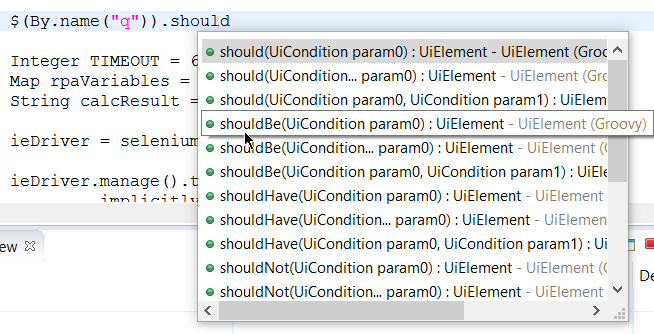
Simplified Robotics API has a lot of classes and methods. Just stop reading, open your WorkFusion Studio, and start typing.
Just type in $ or $(selector)., and the IDE suggests you available options.
More examples
Download the zip archive with more examples. For details on each example, see the following topics:
- Simplified Robotics API cheatsheet
- Add links to S3 buckets
- Automate command-line applications
- Automate Java desktop applications
- Automate web elements
- Automate Windows desktop applications
- Automate browser navigation commands
- Apply element selectors
- Handle iFrames
- Apply surface-based Robotics driver
- Apply universal RPA driver
- Switch to window
- Take screenshots
Automatically imported classes
com.workfusion.rpa.helpers refers to the RPA class that represents simplified API for RPA. Static methods and variables from this class and the following classes are automatically included in Bot Configs:
The following classes are also automatically imported into Bot Configs. They are accessible by their short-class-name, for example, RemoteWebDriver:
RemoteWebDriverActionActionsMouseKeyboardWaitFluentWaitWebDriverWaitExpectedConditionExpectedConditionsCoordinatesApiUtilsPointedCoordinatesRobotsMouseUiElementUiElementCollectionUiConditionUiCollectionCondition
Classes from the following packages also are automatically imported into Bot Configs:
org.openqa.selenium
Important API methods
tip
See the Simplified API cheatsheet to learn robotics API on examples.
WorkFusion Studio supports autocomplete for all simplified API methods.
Main simplified methods:
driver()accesses the current driver instance.keyboard()is the current driver keyboard.mouse()is the current driver mouse.$(By)finds the first element matching given descriptor. With a UIElement instance, you can either complete an action with it (click,copySelectedText) or check a condition:shouldHave(text("abc")). Both will trigger the search of the elements in DOM or desktop.$$(String)finds all elements matching a given descriptor.
Other important simplified methods:
sendKeys(CharSequence...)sends a string to the current window using a keyboard.open(String)opens a specified URL or application.window(String)switches to a window with a specified title or descriptor.timeouts(long)sets the maximum amount of time to wait for condition, page load, script to execute, element search.
The following additional methods are implemented for desktopDriver:
executeGroovyScript(String)clipboardText()copySelectedText()selectAllTextAndCopy()sendToAgent(String)downloadFileOnAgent(String downloadLink, String filePath)downloadTextFileFromAgent(String)deleteFileOnAgent(String)
Methods to manipulate files, folders, and Excel:
- Finding window handles by criteria
- Identifying process ID when starting program
- Clicking on element with offset
- Excel class
- Files and folders - Resource class
- Script class
- Working with S3 inside robot plugin
Method chaining examples
Note that practically all Simplified API methods support chaining because they return a driver, keyboard, mouse, window, UiElement, or UiElementCollection. Therefore you can use the following examples with chaining:
Selecting elements, checking conditions
$$(".errorMessage").first().shouldBe(visible, enabled)
$$("td").shouldHaveSize(5)
$$(".edit").getTexts()
$("#myInput").waitUntil(hasPartialValue("John"), 5000)
Mouse driver, browser actions
mouse().doubleClick(20, 40).contextClick(100, 78)
openLinkInNewWindow(byCssSelector(".container a.create-new")).switchTo()
Windows handling, keyboard driver, typing
switchTo().window("[CLASS:Notepad]").maximize()
keyboard().sendKeys(Keys.TAB)
window().close()
Console automation, typing and copying text
window("[CLASS:PuTTY]")
sendKeys("vim 123.txt", Keys.ENTER)
copyPuttyWindowText()
Finding window handles by criteria
To improve automation performance and stability, window handles can be found by criteria, for example, a class, a title, and so on. To narrow down the window search, the getWindowHandles method is used.
API
Set<String> windowHandles = Window.windowHandles("[CLASS:Notepad]");
The following window attributes are used for search:
parentPIDprocessNamecommandLineclassTitle/Regexp title
Examples
Class
import com.workfusion.odf2.compiler.BotTask;
import com.workfusion.odf2.core.task.AdHocTask;
import com.workfusion.odf2.core.task.TaskInput;
import com.workfusion.odf2.core.task.output.TaskRunnerOutput;
import com.workfusion.odf2.core.webharvest.rpa.RpaDriver;
import com.workfusion.odf2.core.webharvest.rpa.RpaFactory;
import com.workfusion.odf2.core.webharvest.rpa.RpaRunner;
import com.workfusion.rpa.driver.Driver;
import com.workfusion.rpa.helpers.*;
import org.openqa.selenium.By;
import org.openqa.selenium.Keys;
import org.openqa.selenium.WebElement;
import org.slf4j.Logger;
import javax.inject.Inject;
import java.util.*;
import static com.workfusion.rpa.helpers.RPA.$;
import static com.workfusion.rpa.helpers.UiConditions.text;

@BotTask(requireRpa = true)
@Requires({ControlTowerServicesModule.class})
public class SimplifiedRoboticsAPI implements AdHocTask {

    private final RpaRunner rpaRunner;
    private final Logger logger;
    private final SecretsVaultService secretsVault;

    @Inject
    public SimplifiedRoboticsAPI(RpaFactory rpaFactory, Logger logger, SecretsVaultService secretsVault){
        this.rpaRunner = rpaFactory
                .builder(RpaDriver.UNIVERSAL)
                .closeOnCompletion(true)
                .build();
        this.logger = logger;
        this.secretsVault =secretsVault;
    }

    @Override
    public TaskRunnerOutput run(TaskInput taskInput) {

        rpaRunner.execute(driver->{
            this.findWindowByClass(driver);
        });

        return taskInput.asResult()
                .withColumn("example_bot_task_output", "completed_successfully");

    }

    private void findWindowByClass(Driver driver){
        RPA.openAndFocus("notepad.exe", 1000, 100);
        RPA.openAndFocus("notepad.exe", 1000, 100);
        RPA.openAndFocus("notepad.exe", 1000, 100);
        RPA.openAndFocus("mspaint.exe", 1000, 100);
        RPA.openAndFocus("mspaint.exe", 1000, 100);

        Set<String> notepadHandles = driver.getWindowHandles("[CLASS:Notepad]");
        logger.debug(" notepadHandles size " + notepadHandles.size());
        for(String notepadHadnle:notepadHandles){
            logger.debug(" notepad handle - " + notepadHadnle);
        }
        Set<String> paintHandles = driver.getWindowHandles("[CLASS:MSPaintApp]");
        logger.debug(" paintHandles size " + paintHandles.size());
        for(String paintHandle:paintHandles){
            logger.debug(" paint handle - " + paintHandle);
        }

        assert notepadHandles.size() == 3;
        assert paintHandles.size() == 2;
    }

}
Parent PID
<?xml version="1.0" encoding="UTF-8"?>
<config xmlns="http://web-harvest.sourceforge.net/schema/1.0/config" scriptlang="groovy">
<robotics-flow>
<robot driver="universal">
<script></script>
</robot>
</robotics-flow>
<export include-original-data="false"/>
</config>
Performance metrics
Previous implementation
<?xml version="1.0" encoding="UTF-8"?>
<config xmlns="http://web-harvest.sourceforge.net/schema/1.0/config" scriptlang="groovy">
    <robotics-flow>
        <robot driver="universal">
            <script><![CDATA[
                timeouts(10 * 1000)
                inDesktop(){
                    Set<String> handles = driver().getWindowHandles()
                    List<String> handlesFiltered = new ArrayList<String>()
                    for(String handle : handles){
                        try {
                            window(handle)
                                if (driver().getTitle() == "Untitled - Notepad") {
                                    handlesFiltered.add(handle)
                                }
                        } catch (Exception e) {}
                    }
                }
        ]]></script>
        </robot>
    </robotics-flow>

    <export include-original-data="true"></export>

</config>
Current implementation
<?xml version="1.0" encoding="UTF-8"?>
<config xmlns="http://web-harvest.sourceforge.net/schema/1.0/config" scriptlang="groovy">
<robotics-flow>
<robot driver="universal">
<script></script>
</robot>
</robotics-flow>
<export include-original-data="true"></export>
</config>
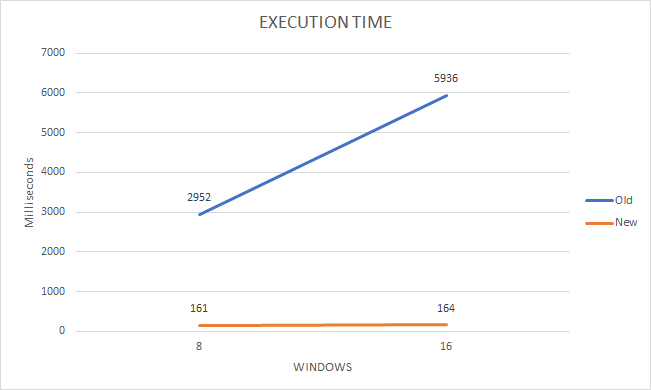
Execution results
| Total windows | Filtered windows | Execution time previously (ms) | Execution time now (ms) | Speed growth |
|---|---|---|---|---|
| 8 | 3 | 2,952 | 161 | 18 |
| 16 | 3 | 5,936 | 164 | 36 |
Typing text with focus on input field
The Internet Explorer Selenium driver can have some issues with typing text into web UI input fields when you use the UiElement.sendKeys method. Sometimes, only a part of the text can be set in the input field or even no text at all. This behavior is often caused by the lost focus on a web element, a known issue of the IE Selenium driver.
The UiElement.sendKeysWithFocus method helps to reduce problems with the lost focus in Internet Explorer and Edge in IE mode browsers and improves typing experience.
API
public UiElement sendKeysWithFocus(Object text) {
        scrollTo();
        mouse().mouseMove(getCoordinates());
        element.sendKeys(toStringArray(text));
        return this;
    }
Description
The method first scrolls to an element to ensure it is in the viewport. Next, the pointer is moved over the element. Adding scrollTo(); ensures that getCoordinates() executes without issues. In newer versions of IEDriverServer (more than 4.0), getCoordinates() throws an exception if the element is not in the viewport. Finally, the UiElement.sendKeys action is invoked.
caution
Use the UiElement.sendKeysWithFocus method for web drivers only. Executing it for a desktop driver causes an exception.
Identifying process ID when starting program
The process identifier, normally referred to as the process ID or PID, is a unique decimal number used to uniquely identify an active process. This number may be treated as a parameter in various function calls to manipulate processes while automating desktop applications. That makes it much easier in complex use cases, when you need to know and save the ID of the process created by the open (app.exe) command, for example, in order to detect all children of the opened application and perform some actions with them.
API
Integer pid = open("notepad.exe");
Integer pid = openAndFocus("notepad.exe", 1000, 100);
Description
- Works for desktop automation only.
- Returns null value for web drivers.
- Open method returns only parent process, child processes might exist in your case.
Examples
The feature can be used in combination with window filtering by process ID.
Expand to see the example
import com.workfusion.odf2.compiler.BotTask;
import com.workfusion.odf2.core.task.AdHocTask;
import com.workfusion.odf2.core.task.TaskInput;
import com.workfusion.odf2.core.task.output.TaskRunnerOutput;
import com.workfusion.odf2.core.webharvest.rpa.RpaDriver;
import com.workfusion.odf2.core.webharvest.rpa.RpaFactory;
import com.workfusion.odf2.core.webharvest.rpa.RpaRunner;
import com.workfusion.rpa.driver.Driver;
import com.workfusion.rpa.helpers.*;
import org.openqa.selenium.By;
import org.slf4j.Logger;
import javax.inject.Inject;
import java.util.*;


@BotTask(requireRpa = true)
@Requires({ControlTowerServicesModule.class})
public class SimplifiedRoboticsAPI implements AdHocTask {

    private final RpaRunner rpaRunner;
    private final Logger logger;
    private final SecretsVaultService secretsVault;

    @Inject
    public SimplifiedRoboticsAPI(RpaFactory rpaFactory, Logger logger, SecretsVaultService secretsVault){
        this.rpaRunner = rpaFactory
                .builder(RpaDriver.UNIVERSAL)
                .closeOnCompletion(true)
                .build();
        this.logger = logger;
        this.secretsVault =secretsVault;
    }


    @Override
    public TaskRunnerOutput run(TaskInput taskInput) {

        rpaRunner.execute(driver->{
            this.findWindowByPidExample(driver);
        });

        return taskInput.asResult()
                .withColumn("example_bot_task_output", "completed_successfully");

    }

    private void findWindowByPidExample(Driver driver){
        Integer pid = RPA.openAndFocus("notepad.exe", 1000, 100);
        Set<String> handlesByPid = Window.windowHandles("[pid="+pid+"]");
        logger.debug( " Is there any window with Current PID " + pid + " " + !handlesByPid.isEmpty());
    }

}
Clicking on element with offset
When automating desktop applications, clicks are often done not only in the center of the selected element but somewhere else (the corner, or the corner with offset). Click offset is a click on the given element with the relative position (x, y) from the top left corner of that element. Clicking on elements with offset facilitates automating complex controls like trees (Outlook) or tables with checkboxes (SAP).
API
UiElement elem = $(By.cssSelector("[TOOLTIP:ToolTip demo]"));
elem.click(elem.right() + 30, elem.bottom() - 15);
elem.click(elem.left() + 10, elem.top() - 15);
elem.click(-10, 15);
Description
- Works for desktop automation only.
- It throws exception.
- Valid for any mouse click (double, triple, wheel).
- Point 0,0 is in the top left corner of the element.
Examples
The feature can be used in combination with window filtering by process ID.
Expand to see the example
import com.workfusion.odf2.compiler.BotTask;
import com.workfusion.odf2.core.task.AdHocTask;
import com.workfusion.odf2.core.task.TaskInput;
import com.workfusion.odf2.core.task.output.TaskRunnerOutput;
import com.workfusion.odf2.core.webharvest.rpa.RpaDriver;
import com.workfusion.odf2.core.webharvest.rpa.RpaFactory;
import com.workfusion.odf2.core.webharvest.rpa.RpaRunner;
import com.workfusion.rpa.driver.Driver;
import com.workfusion.rpa.helpers.*;
import com.workfusion.rpa.helpers.resources.Filter;
import com.workfusion.studio.rpa.recorder.api.StringTransformations;
import org.openqa.selenium.By;
import org.openqa.selenium.Keys;
import org.openqa.selenium.WebElement;
import org.slf4j.Logger;
import javax.inject.Inject;
import java.util.*;
import static com.workfusion.rpa.helpers.RPA.$;
import static com.workfusion.rpa.helpers.RPA.downloadFileOnAgent;
import static com.workfusion.rpa.helpers.Script.*;
import static com.workfusion.rpa.helpers.UiConditions.text;


@BotTask(requireRpa = true)
@Requires({ControlTowerServicesModule.class})
public class SimplifiedRoboticsAPI implements AdHocTask {

    private final RpaRunner rpaRunner;
    private final Logger logger;
    private final SecretsVaultService secretsVault;

    @Inject
    public SimplifiedRoboticsAPI(RpaFactory rpaFactory, Logger logger, SecretsVaultService secretsVault){
        this.rpaRunner = rpaFactory
                .builder(RpaDriver.UNIVERSAL)
                .closeOnCompletion(true)
                .build();
        this.logger = logger;
        this.secretsVault =secretsVault;
    }


    @Override
    public TaskRunnerOutput run(TaskInput taskInput) {

        rpaRunner.execute(driver->{
            this.clickingOnElementWithOffSet(driver);
        });

        return taskInput.asResult()
                .withColumn("example_bot_task_output", "completed_successfully");

    }

    private void clickingOnElementWithOffSet(Driver driver){
        String javaPath = "C:\\Java\\bin\\java";
        String jarPath = downloadFileOnAgent("http://rpa-grid.s3.amazonaws.com/integration-test/applets/demo/jfc/SwingSet2/SwingSet2.jar");
        RPA.open(javaPath+" -jar " + jarPath );

        //Changing focus to Swingset2 application
        RPA.switchTo().window("[CLASS:SunAwtFrame; TITLE:SwingSet2]");
        $(By.cssSelector("[TOOLTIP:ToolTip demo]")).click();
        RPA.sleep(2000);

        UiElement elem= $(By.cssSelector("[TOOLTIP:ToolTip demo]"));
        elem.click(elem.right() + 30, elem.bottom() - 15);
        RPA.close();
        RPA.close();
    }

}
Excel class
The Excel class is intended for automating Excel spreadsheet manipulations, such as getting or setting cell values, switching between sheets, saving, and so on. All the Excel Actions are executed in the background, so the application window does not appear on the screen.
See the Excel action group in RPA Recorder for better understanding the Excel API. For a quick start, do as follows.
- Create a script with file or folder manipulations in RPA Recorder.
- Export this script as a Bot task or export to Groovy code and analyze the auto-generated code that uses the Resource API.
To start using Excel methods, it is needed to understand cell, row, and column position concept:
- Scheme with description: Excel.
- Javadocs: Cell Position, Row/Column Position.
- When you get or set a cell, row, column, the currently active cell is changed.
Examples
Excel class usage
This example performs the following actions:
- Downloads an excel file from S3 file storage.
- Switches to the sheet by its name and sets an active cell.
- Gets row and column values.
- Searches for a cell with a particular value.
- Copies a range between sheets.
- Saves as a new file and closes the file.
Expand to see the example
import com.workfusion.odf2.compiler.BotTask;
import com.workfusion.odf2.core.task.AdHocTask;
import com.workfusion.odf2.core.task.TaskInput;
import com.workfusion.odf2.core.task.output.TaskRunnerOutput;
import com.workfusion.odf2.core.webharvest.rpa.RpaDriver;
import com.workfusion.odf2.core.webharvest.rpa.RpaFactory;
import com.workfusion.odf2.core.webharvest.rpa.RpaRunner;
import com.workfusion.rpa.driver.Driver;
import com.workfusion.rpa.helpers.*;
import com.workfusion.rpa.helpers.resources.Filter;
import com.workfusion.studio.rpa.recorder.api.StringTransformations;
import org.openqa.selenium.By;
import org.openqa.selenium.Keys;
import org.openqa.selenium.WebElement;
import org.slf4j.Logger;
import javax.inject.Inject;
import java.time.temporal.ChronoUnit;
import java.util.*;
import static com.workfusion.rpa.helpers.Excel.*;
import static com.workfusion.rpa.helpers.RPA.$;
import static com.workfusion.rpa.helpers.RPA.downloadFileOnAgent;
import static com.workfusion.rpa.helpers.Script.*;
import static com.workfusion.rpa.helpers.UiConditions.text;


@BotTask(requireRpa = true)
@Requires({ControlTowerServicesModule.class})
public class SimplifiedRoboticsAPI implements AdHocTask {

    private final RpaRunner rpaRunner;
    private final Logger logger;
    private final SecretsVaultService secretsVault;

    @Inject
    public SimplifiedRoboticsAPI(RpaFactory rpaFactory, Logger logger, SecretsVaultService secretsVault){
        this.rpaRunner = rpaFactory
                .builder(RpaDriver.UNIVERSAL)
                .closeOnCompletion(true)
                .build();
        this.logger = logger;
        this.secretsVault =secretsVault;
    }

    @Override
    public TaskRunnerOutput run(TaskInput taskInput) {

        rpaRunner.execute(driver->{
            this.excelClassUsage(driver);
        });

        return taskInput.asResult()
                .withColumn("example_bot_task_output", "completed_successfully");

    }

    private void excelClassUsage(Driver driver){
        String s3Path = "http://pub_demo.s3.amazonaws.com/trainings/Tickers.xlsx";
        String filePath = downloadFileOnAgent(s3Path);
        String newFilePath = "D:/temp/new-excel.xlsx";

        openExcel(filePath);
        switchSheet(filePath, "Fact");

        if (!getActiveCell(filePath).equals("A1")) {
            setActiveCell(filePath, ExcelCellPosition.START_OF_DOCUMENT);
        }

        // Getting Row and Column values

        List<String> firstColumn = getColumn(filePath, "A", 2, 5);
        List<String> secondRow = getRow(filePath, ExcelColumnRowPosition.CURRENT);

        // Searching for a cell with a particular value
        String temp = getCell(filePath, "B1");
        int counter = 0;
        int maxRowsCount = 100;
        while (!temp.equals("Schlumberger Limited") && counter < maxRowsCount) {
            temp = getCell(filePath, ExcelCellPosition.CELL_BELOW);
            counter++;
        }
        String price = getCell(filePath, ExcelCellPosition.CELL_TO_THE_RIGHT);
        deleteCell(filePath, ExcelCellPosition.CURRENT);

        // Copying a range between sheets

        List<List<String>> tempRange = getRange(filePath, "A4");
        switchSheet(filePath, 1);
        setRange(filePath, "A4", tempRange);

        // Saving as new file and closing file

        saveExcel(filePath, newFilePath);
        closeExcel(filePath);
    }

}
Copying range between 2 files
This example performs the following actions:
- Downloads two excel files from S3 file storage.
- Opens the first file and copies a range to a temp variable.
- Opens the second file and sets a range using the temp variable value.
- Saves the second excel as a new file and closes all files.
Expand to see the example
import com.workfusion.odf2.compiler.BotTask;
import com.workfusion.odf2.core.task.AdHocTask;
import com.workfusion.odf2.core.task.TaskInput;
import com.workfusion.odf2.core.task.output.TaskRunnerOutput;
import com.workfusion.odf2.core.webharvest.rpa.RpaDriver;
import com.workfusion.odf2.core.webharvest.rpa.RpaFactory;
import com.workfusion.odf2.core.webharvest.rpa.RpaRunner;
import com.workfusion.rpa.driver.Driver;
import com.workfusion.rpa.helpers.*;
import com.workfusion.rpa.helpers.resources.Filter;
import com.workfusion.studio.rpa.recorder.api.StringTransformations;
import org.openqa.selenium.By;
import org.openqa.selenium.Keys;
import org.openqa.selenium.WebElement;
import org.slf4j.Logger;
import javax.inject.Inject;
import java.time.temporal.ChronoUnit;
import java.util.*;
import static com.workfusion.rpa.helpers.Excel.*;
import static com.workfusion.rpa.helpers.RPA.$;
import static com.workfusion.rpa.helpers.RPA.downloadFileOnAgent;
import static com.workfusion.rpa.helpers.Script.*;
import static com.workfusion.rpa.helpers.UiConditions.text;


@BotTask(requireRpa = true)
@Requires({ControlTowerServicesModule.class})
public class SimplifiedRoboticsAPI implements AdHocTask {

    private final RpaRunner rpaRunner;
    private final Logger logger;
    private final SecretsVaultService secretsVault;

    @Inject
    public SimplifiedRoboticsAPI(RpaFactory rpaFactory, Logger logger, SecretsVaultService secretsVault){
        this.rpaRunner = rpaFactory
                .builder(RpaDriver.UNIVERSAL)
                .closeOnCompletion(true)
                .build();
        this.logger = logger;
        this.secretsVault =secretsVault;
    }

    @Override
    public TaskRunnerOutput run(TaskInput taskInput) {

        rpaRunner.execute(driver->{
            this.excelCopyRangeBetweenTwoFiles(driver);
        });

        return taskInput.asResult()
                .withColumn("example_bot_task_output", "completed_successfully");

    }

    private void excelCopyRangeBetweenTwoFiles(Driver driver){
        String s3Path = "http://pub_demo.s3.amazonaws.com/trainings/Tickers.xlsx";
        String s3Path2 = "http://pub_demo.s3.amazonaws.com/trainings/other-excel.xlsx";
        String sourceFile = downloadFileOnAgent(s3Path);
        String destinationFile = downloadFileOnAgent(s3Path2);
        String newFilePath = "D:/temp/copied-excel.xlsx";

        // opening the 1st excel file

        openExcel(sourceFile);
        switchSheet(sourceFile, "Fact");

        // Copying a range

        List<List<String>> tempRange = getRange(sourceFile, "A1");

        // opening another excel file and pasting the range from the 1st one

        openExcel(destinationFile);
        setRange(destinationFile, "A2", tempRange);

        // Saving the 2nd excel as new file and closing all files

        saveExcel(destinationFile, newFilePath);
        closeExcel(destinationFile);
        closeExcel(sourceFile);
    }

}
Excel class methods
The Excel class has the following methods.
| Type | Method | Description |
|---|---|---|
| void | closeExcel(String filePath) | Closes excel file and removes it from script context |
| void | deleteCell(String filePath, ExcelCellPosition position) | Clears cell value |
| void | deleteCell(String filePath, String coordinate) | Clears cell value |
| String | getActiveCell(String filePath) | Gets active cell |
| String | getCell(String filePath, ExcelCellPosition position) | Gets cell value and returns it as string |
| String | getCell(String filePath, String coordinate) | Gets cell value and returns it as string |
| List<String> | getColumn(String filePath, ExcelColumnRowPosition position) | Gets column values as List |
| List<String> | getColumn(String filePath, ExcelColumnRowPosition position, Integer rowFrom, Integer rowTo) | Gets column values as List |
| List<String> | getColumn(String filePath, String columnLettes) | Gets column values as List |
| List<String> | getColumn(String filePath, String columnLettes, Integer rowFrom, Integer rowTo) | Gets column values as List |
| List<List<String>> | getRange(String filePath, String coordinateFrom) | Gets range values |
| List<List<String>> | getRange(String filePath, String coordinateFrom, String coordinateTo) | Gets range values |
| List<String> | getRow(String filePath, ExcelColumnRowPosition position) | Gets row values as List |
| List<String> | getRow(String filePath, ExcelColumnRowPosition position, String columnFrom, String columnTo) | Gets row values as List |
| List<String> | getRow(String filePath, int rowNum) | Gets row values as List |
| List<String> | getRow(String filePath, int rowNum, String columnFrom, String columnTo) | Gets row values as List |
| void | openExcel(String filePath) | Reads excel file by path, stores this in script context |
| void | saveExcel(String filePath) | Saves excel file |
| void | saveExcel(String filePath, String newFilePath) | Saves excel as new file |
| void | setActiveCell(String filePath, ExcelCellPosition position) | Sets active cell |
| void | setActiveCell(String filePath, String coordinate) | Sets active cell |
| void | setCell(String filePath, ExcelCellPosition position, String value) | Sets cell value |
| void | setCell(String filePath, String coordinate, String value) | Sets cell value |
| void | setCells(String filePath, String coordinate, List<String> values, boolean isVertical) | Sets cell value |
| void | setRange(String filePath, String coordinateFrom, List<List<String>> values) | Gets range values |
| void | setRange(String filePath, String coordinateFrom, String coordinateTo, List<List<String>> values) | Gets range values |
| void | switchSheet(String filePath, int index) | Selects as active sheet by index |
| void | switchSheet(String filePath, String name) | Selects as active sheet by index |
Files and folders - Resource class
The Resource class is intended for general manipulations with files and folders, for example, creating a folder under the specified path or a file with specific content in a defined location or copying and moving a folder or a file to a specified location.
See the Files and Folders action group in RPA Recorder for better understanding the Resource API. For a quick start, do as follows:
- Create a script with file and folder manipulations in RPA Recorder.
- Export the script as a Bot Task or export to Groovy code and analyze the auto-generated code that uses the Resource API.
Examples
Resource class usage
This example performs the following actions:
- Downloads a text file from S3 file storage.
- Checks that the new file was downloaded to a temp folder. The check result is saved in the
is_existingvariable. - Appends the downloaded text file content with new content.
- Reads the result into the
content_utf8variable. - Creates a new directory with a new file (randomly generated name).
- Overwrites this file content with a new string containing the current timestamp.
Expand to see the example
import com.workfusion.odf2.compiler.BotTask;
import com.workfusion.odf2.core.task.AdHocTask;
import com.workfusion.odf2.core.task.TaskInput;
import com.workfusion.odf2.core.task.output.TaskRunnerOutput;
import com.workfusion.odf2.core.webharvest.rpa.RpaDriver;
import com.workfusion.odf2.core.webharvest.rpa.RpaFactory;
import com.workfusion.odf2.core.webharvest.rpa.RpaRunner;
import com.workfusion.rpa.driver.Driver;
import com.workfusion.rpa.helpers.*;
import com.workfusion.rpa.helpers.resources.Filter;
import com.workfusion.studio.rpa.recorder.api.StringTransformations;
import org.openqa.selenium.By;
import org.openqa.selenium.Keys;
import org.openqa.selenium.WebElement;
import org.slf4j.Logger;
import javax.inject.Inject;
import java.time.temporal.ChronoUnit;
import java.util.*;
import static com.workfusion.rpa.helpers.Excel.*;
import static com.workfusion.rpa.helpers.RPA.$;
import static com.workfusion.rpa.helpers.RPA.downloadFileOnAgent;
import static com.workfusion.rpa.helpers.Script.*;
import static com.workfusion.rpa.helpers.UiConditions.text;


@BotTask(requireRpa = true)
@Requires({ControlTowerServicesModule.class})
public class SimplifiedRoboticsAPI implements AdHocTask {

    private final RpaRunner rpaRunner;
    private final Logger logger;
    private final SecretsVaultService secretsVault;

    @Inject
    public SimplifiedRoboticsAPI(RpaFactory rpaFactory, Logger logger, SecretsVaultService secretsVault){
        this.rpaRunner = rpaFactory
                .builder(RpaDriver.UNIVERSAL)
                .closeOnCompletion(true)
                .build();
        this.logger = logger;
        this.secretsVault =secretsVault;
    }

    @Override
    public TaskRunnerOutput run(TaskInput taskInput) {

        rpaRunner.execute(driver->{
            this.resourceClassUsage(driver);
        });

        return taskInput.asResult()
                .withColumn("example_bot_task_output", "completed_successfully");

    }

    private void resourceClassUsage(Driver driver){
        String s3Path = "http://pub_demo.s3.amazonaws.com/trainings/new.txt";
        String newDir = "D:\\temp\\new\\";
        String filePath = downloadFileOnAgent(s3Path);
        String newFileName = newDir + UUID.randomUUID() + ".txt";
        String now = new Date().toString();

        boolean is_existing = Resource.exist(filePath);

        if (is_existing) {
            Resource.append(filePath, "___ New Content ___", "utf-8");
            String content_utf8 = Resource.read(filePath, "utf-8");
            logger.debug(" file content - " + content_utf8);
            Resource.delete(filePath);
        }

        Resource.createDirectoryOverwrite(newDir);
        Resource.createFileSkip(newFileName);
        Resource.overwrite(newFileName, "File overwritten at " + now, "utf-8");
    }

}
Actions with files and folders
This example performs the following actions:
- Getting all files and folders recursively and exporting as a list
- Getting all TXT files recursively and copying them to the destination folder
- Getting all folders changed in the last five days and moving them to the destination folder
Expand to see the example
import com.workfusion.odf2.compiler.BotTask;
import com.workfusion.odf2.core.task.AdHocTask;
import com.workfusion.odf2.core.task.TaskInput;
import com.workfusion.odf2.core.task.output.TaskRunnerOutput;
import com.workfusion.odf2.core.webharvest.rpa.RpaDriver;
import com.workfusion.odf2.core.webharvest.rpa.RpaFactory;
import com.workfusion.odf2.core.webharvest.rpa.RpaRunner;
import com.workfusion.rpa.driver.Driver;
import com.workfusion.rpa.helpers.*;
import com.workfusion.rpa.helpers.resources.Filter;
import com.workfusion.studio.rpa.recorder.api.StringTransformations;
import org.openqa.selenium.By;
import org.openqa.selenium.Keys;
import org.openqa.selenium.WebElement;
import org.slf4j.Logger;
import javax.inject.Inject;
import java.time.temporal.ChronoUnit;
import java.util.*;
import static com.workfusion.rpa.helpers.Excel.*;
import static com.workfusion.rpa.helpers.RPA.$;
import static com.workfusion.rpa.helpers.RPA.downloadFileOnAgent;
import static com.workfusion.rpa.helpers.Script.*;
import static com.workfusion.rpa.helpers.UiConditions.text;


@BotTask(requireRpa = true)
@Requires({ControlTowerServicesModule.class})
public class SimplifiedRoboticsAPI implements AdHocTask {

    private final RpaRunner rpaRunner;
    private final Logger logger;
    private final SecretsVaultService secretsVault;

    @Inject
    public SimplifiedRoboticsAPI(RpaFactory rpaFactory, Logger logger, SecretsVaultService secretsVault){
        this.rpaRunner = rpaFactory
                .builder(RpaDriver.UNIVERSAL)
                .closeOnCompletion(true)
                .build();
        this.logger = logger;
        this.secretsVault =secretsVault;
    }

    @Override
    public TaskRunnerOutput run(TaskInput taskInput) {

        rpaRunner.execute(driver->{
            this.actionsWithFilesAndFolders(driver);
        });

        return taskInput.asResult()
                .withColumn("example_bot_task_output", "completed_successfully");

    }

    private void actionsWithFilesAndFolders(Driver driver) {
        String sourceFolder = "D:\\_temp\\configs\\";
        String destinationFolder = "D:\\_temp\\txt\\";


        // Getting all files and folders recursively and exporting as a list

        Filter filterAll = Filter.filesAndFolders().includeSubFolders().get();
        List<String> allFolderFiles = Resource.listFolder(sourceFolder, filterAll);


        // Getting all TXT files recursively and copying them to destination folder

        Filter filterByExtension = Filter.files().includeSubFolders().pattern(".*.txt").get();
        List<String> onlyTxtFiles = Resource.listFolder(sourceFolder, filterByExtension);

        for (String fileName : onlyTxtFiles) {
            Resource.copyOverwrite(fileName, destinationFolder);
        }


        // Getting all folders changed in the last 5 days and moving them to destination folder

        Filter filterByDate = Filter.folders()
                .includeSubFolders()
                .modifiedInLast(Integer.valueOf("5"), ChronoUnit.DAYS)
                .get();
        List<String> onlyNewFolders = Resource.listFolder(sourceFolder, filterByDate);

        for (String foldername : onlyNewFolders) {
            Resource.moveSkip(foldername, destinationFolder);
        }
    }

}
Resource class methods
The Resource class has the following options:
- You can choose what to do in case conflicts occur while the actions are executed, for example, overwrite or skip (keep an existing) file or folder or fail the process execution.
- You can create text files with the encoding that enables writing, saving, and displaying all characters properly.
- When using the
listFolder()method, you might need to import the following classes:com.workfusion.rpa.helpers.resources.Filterjava.time.temporal.ChronoUnit
| Type | Method | Description |
|---|---|---|
| void | append(String path, String value, String encoding) | Opens a file using the path specified, adds a given string value to the end of the file |
| boolean | createDirectoryFail(String path) | Creates a folder under a path specified in the input field. If such folder already exists, exception is thrown |
| boolean | createDirectoryOverwrite(String path) | Creates a folder under a path specified in the input field. If such folder already exists, it will be overwritten |
| boolean | createDirectorySkip(String path) | Creates a folder under a path specified in the input field. If such folder already exists, no action is taken |
| boolean | createFileFail(String path) | Creates a file under a path specified in the input field. If such file already exists, exception is thrown |
| boolean | createFileOverwrite(String path) | Creates a file under a path specified in the input field. If such file already exists, it will be overwritten |
| boolean | createFileSkip(String path) | Creates a file under a path specified in the input field. If such file already exists, no action is taken |
| boolean | delete(String path) | Deletes a file or a folder under a path specified with entire content |
| boolean | exist(String path) | Checks if a file or a folder already exists and returns a Boolean result |
| void | overwrite(String path, String value, String encoding) | Opens a file using the path specified, deletes file content, adds a given string value to the file |
| String | read(String path, String encoding) | Reads content from a specified file and returns a string value. |
| List<String> | listFolder(String path) | Reads content of a defined folder including files and sub-folders, and returns the result (full paths to the items) as a List |
| List<String> | listFolder(String path, Filter filter) | Reads content of a defined folder, filters the content (Filter object), and returns the result (full paths to the items) as a List |
| void | moveFail(String resourceFrom, String pathTo) | Moves a file or a folder from one location to another. If such file or folder already exists, exception is thrown |
| void | moveOverwrite(String resourceFrom, String pathTo) | Moves a file or a folder from one location to another. If such file or folder already exists, it will be overwritten |
| void | moveSkip(String resourceFrom, String pathTo) | Moves a file or a folder from one location to another. If such file or folder already exists, no action is taken |
| void | copyFail(String resourceFrom, String pathTo) | Copies file or folder from one location to another. If such file or folder already exists, exception is thrown. |
| void | copyOverwrite(String resourceFrom, String pathTo) | Copies file or folder from one location to another. If such file or folder already exists, no action is taken. |
| void | copySkip(String resourceFrom, String pathTo) | Copies file or folder from one location to another. If such file or folder already exists, no action is taken. |
Script class
Executes Script on the RPA agent side, not in Сontrol Tower. The same as:
driver.executeScript(...)
Examples
GroovyScript
This example performs the following actions:
- Executes GroovyScript (sum operation) and stores result in the
result1variable. - Executes GroovyScript with timeout. Action fails if execution time exceeds 31 seconds.
Expand to see the example
import com.workfusion.odf2.compiler.BotTask;
import com.workfusion.odf2.core.task.AdHocTask;
import com.workfusion.odf2.core.task.TaskInput;
import com.workfusion.odf2.core.task.output.TaskRunnerOutput;
import com.workfusion.odf2.core.webharvest.rpa.RpaDriver;
import com.workfusion.odf2.core.webharvest.rpa.RpaFactory;
import com.workfusion.odf2.core.webharvest.rpa.RpaRunner;
import com.workfusion.rpa.driver.Driver;
import com.workfusion.rpa.helpers.*;
import com.workfusion.rpa.helpers.resources.Filter;
import com.workfusion.studio.rpa.recorder.api.StringTransformations;
import org.openqa.selenium.By;
import org.openqa.selenium.Keys;
import org.openqa.selenium.WebElement;
import org.slf4j.Logger;
import javax.inject.Inject;
import java.time.temporal.ChronoUnit;
import java.util.*;
import static com.workfusion.rpa.helpers.Excel.*;
import static com.workfusion.rpa.helpers.RPA.$;
import static com.workfusion.rpa.helpers.RPA.downloadFileOnAgent;
import static com.workfusion.rpa.helpers.Script.*;
import static com.workfusion.rpa.helpers.UiConditions.text;


@BotTask(requireRpa = true)
@Requires({ControlTowerServicesModule.class})
public class SimplifiedRoboticsAPI implements AdHocTask {

    private final RpaRunner rpaRunner;
    private final Logger logger;
    private final SecretsVaultService secretsVault;

    @Inject
    public SimplifiedRoboticsAPI(RpaFactory rpaFactory, Logger logger, SecretsVaultService secretsVault){
        this.rpaRunner = rpaFactory
                .builder(RpaDriver.UNIVERSAL)
                .closeOnCompletion(true)
                .build();
        this.logger = logger;
        this.secretsVault =secretsVault;
    }

    @Override
    public TaskRunnerOutput run(TaskInput taskInput) {

        rpaRunner.execute(driver->{
            this.executeGroovyScriptExample(driver);
        });

        return taskInput.asResult()
                .withColumn("example_bot_task_output", "completed_successfully");

    }

    private void executeGroovyScriptExample(Driver driver){
        String script_01 = " def sum = 2 + 2 ;return sum.toString() ";

        String result1 = executeGroovyScript(script_01);

        String result2 = executeGroovyScript(script_01, 31000L);

        logger.debug(" Result1 - " + result1 );
        logger.debug(" Result2 - " + result2 );
    }

}
JavaScript
This example performs the following actions:
- Opens Selenium
localhostpage. - Executes JavaScript.
- Stores script output in the
resultvariable.
Expand to see the example
import com.workfusion.bot.service.SecureEntryDTO;
import com.workfusion.odf2.compiler.BotTask;
import com.workfusion.odf2.core.cdi.Requires;
import com.workfusion.odf2.core.task.AdHocTask;
import com.workfusion.odf2.core.task.TaskInput;
import com.workfusion.odf2.core.task.output.TaskRunnerOutput;
import com.workfusion.odf2.core.webharvest.rpa.RpaDriver;
import com.workfusion.odf2.core.webharvest.rpa.RpaFactory;
import com.workfusion.odf2.core.webharvest.rpa.RpaRunner;
import com.workfusion.odf2.service.ControlTowerServicesModule;
import com.workfusion.odf2.service.vault.SecretsVaultService;
import com.workfusion.rpa.driver.Driver;
import com.workfusion.rpa.helpers.*;
import com.workfusion.rpa.helpers.resources.Filter;
import org.openqa.selenium.By;
import org.openqa.selenium.Keys;
import org.openqa.selenium.WebElement;
import org.slf4j.Logger;
import javax.inject.Inject;
import java.time.temporal.ChronoUnit;
import java.util.*;
import static com.workfusion.rpa.helpers.Excel.*;
import static com.workfusion.rpa.helpers.RPA.$;
import static com.workfusion.rpa.helpers.RPA.downloadFileOnAgent;
import static com.workfusion.rpa.helpers.Script.*;
import static com.workfusion.rpa.helpers.UiConditions.text;

@BotTask(requireRpa = true)
@Requires({ControlTowerServicesModule.class})
public class SimplifiedRoboticsAPI implements AdHocTask {

    private final RpaRunner rpaRunner;
    private final Logger logger;
    private final SecretsVaultService secretsVault;

    @Inject
    public SimplifiedRoboticsAPI(RpaFactory rpaFactory, Logger logger, SecretsVaultService secretsVault){
        this.rpaRunner = rpaFactory
                .builder(RpaDriver.UNIVERSAL)
                .closeOnCompletion(true)
                .build();
        this.logger = logger;
        this.secretsVault =secretsVault;
    }


    @Override
    public TaskRunnerOutput run(TaskInput taskInput) {

        rpaRunner.execute(driver->{
            this.executeJavaScriptExample(driver);
        });

        return taskInput.asResult()
                .withColumn("example_bot_task_output", "completed_successfully");

    }

    private void executeJavaScriptExample(Driver driver){
        RPA.openChrome("https://google.com");
        driver.switchDriver("chrome");
        String scriptCode =     "var i;" +
                "for (i=0; i< 10; i++) {" +
                "    window.setTimeout(alert(\"Hello Bot! Again!! Smile!! \" + i +  \" ^_^ \"), 1000);" +
                "}" +
                "return \"Im Ok ^_^\";" ;

        String result = executeJavaScript(scriptCode);
        logger.debug(" Java Script result - " + result);
    }

}
AutoitScript
This example executes AutoitScript with timeout. The action fails if the execution time exceeds 10 seconds.
Expand to see the example
<?xml version="1.0" encoding="UTF-8"?>
<config xmlns="http://web-harvest.sourceforge.net/schema/1.0/config" scriptlang="groovy">
<robotics-flow>
<robot driver="universal">
<script></script>
</robot>
</robotics-flow>
<export include-original-data="true"></export>
</config>
GroovyScript with params
This example performs the following actions:
- Executes GroovyScript with timeout and additional parameters
- Returns script results to the
resultvariable
Expand to see the example
import com.workfusion.odf2.compiler.BotTask;
import com.workfusion.odf2.core.task.AdHocTask;
import com.workfusion.odf2.core.task.TaskInput;
import com.workfusion.odf2.core.task.output.TaskRunnerOutput;
import com.workfusion.odf2.core.webharvest.rpa.RpaDriver;
import com.workfusion.odf2.core.webharvest.rpa.RpaFactory;
import com.workfusion.odf2.core.webharvest.rpa.RpaRunner;
import com.workfusion.rpa.driver.Driver;
import com.workfusion.rpa.helpers.*;
import com.workfusion.rpa.helpers.resources.Filter;
import com.workfusion.studio.rpa.recorder.api.StringTransformations;
import org.openqa.selenium.By;
import org.openqa.selenium.Keys;
import org.openqa.selenium.WebElement;
import org.slf4j.Logger;
import javax.inject.Inject;
import java.time.temporal.ChronoUnit;
import java.util.*;
import static com.workfusion.rpa.helpers.Excel.*;
import static com.workfusion.rpa.helpers.RPA.$;
import static com.workfusion.rpa.helpers.RPA.downloadFileOnAgent;
import static com.workfusion.rpa.helpers.Script.*;
import static com.workfusion.rpa.helpers.UiConditions.text;


@BotTask(requireRpa = true)
@Requires({ControlTowerServicesModule.class})
public class SimplifiedRoboticsAPI implements AdHocTask {

    private final RpaRunner rpaRunner;
    private final Logger logger;
    private final SecretsVaultService secretsVault;

    @Inject
    public SimplifiedRoboticsAPI(RpaFactory rpaFactory, Logger logger, SecretsVaultService secretsVault){
        this.rpaRunner = rpaFactory
                .builder(RpaDriver.UNIVERSAL)
                .closeOnCompletion(true)
                .build();
        this.logger = logger;
        this.secretsVault =secretsVault;
    }


    @Override
    public TaskRunnerOutput run(TaskInput taskInput) {

        rpaRunner.execute(driver->{
            this.executeGroovyScriptWithParamExample(driver);
        });

        return taskInput.asResult()
                .withColumn("example_bot_task_output", "completed_successfully");

    }

    private void executeGroovyScriptWithParamExample(Driver driver){
        int param = 2 ;
        String script_01 = " def sum = 2 + param1 ;return sum.toString() ";

        String result = executeGroovyScript(script_01, 31000L,new ScriptParams("param1", param));

        logger.debug(" Result with param - " + result );
    }

}
Script class methods
The Script class has the following methods.
| Type | Method | Description |
|---|---|---|
| static <T> T | executeAutoitScript(String code) | Executes AutoIt Script |
| static <T> T | executeAutoitScript(String code, long timeout) | Executes AutoIt Script with execution timeout |
| static <T> T | executeAutoitScript(String code, long timeoutInMillis, Object... args) | Executes AutoIt Script with execution timeout and additional arguments |
| static <T> T | executeGroovyScript(String code) | Executes Groovy Script |
| static <T> T | executeGroovyScript(String code, long timeoutInMillis) | Executes Groovy Script with execution timeout |
| static <T> T | executeGroovyScript(String code, long timeoutInMillis, ScriptParams arguments) | Executes Groovy Script with execution timeout and additional arguments |
| static <T> T | executeGroovyScript(String code, ScriptParams arguments) | Executes Groovy Script with additional arguments |
| static <T> T | executeJavaScript(String code, Object... args) | Executes JavaScript with additional arguments |
S3 inside robot plugin
There is a special class for working with an S3 MinIO bucket on the RPA Bot side (Windows RPA Server).
Call example
<robotics-flow>
<robot driver="universal">
<script></script>
</robot>
</robotics-flow>
Downloading file
The method downloads a file from S3 to the RPA Bot side and returns an absolute path to a local file.
Expand to see the example
import com.amazonaws.services.s3.model.S3ObjectSummary;
import com.workfusion.odf2.compiler.BotTask;
import com.workfusion.odf2.core.cdi.Requires;
import com.workfusion.odf2.core.task.AdHocTask;
import com.workfusion.odf2.core.task.TaskInput;
import com.workfusion.odf2.core.task.output.TaskRunnerOutput;
import com.workfusion.odf2.core.webharvest.rpa.RpaDriver;
import com.workfusion.odf2.core.webharvest.rpa.RpaFactory;
import com.workfusion.odf2.core.webharvest.rpa.RpaRunner;
import com.workfusion.odf2.service.ControlTowerServicesModule;
import com.workfusion.odf2.service.s3.S3Bucket;
import com.workfusion.odf2.service.s3.S3Service;
import com.workfusion.rpa.helpers.RPA;
import org.slf4j.Logger;
import javax.inject.Inject;
import java.io.File;
import java.io.IOException;
import java.nio.file.Files;
import java.nio.file.Path;
import java.nio.file.Paths;
import java.util.List;
import java.util.UUID;

@BotTask(requireRpa = true)
@Requires({ControlTowerServicesModule.class})
public class SimplifiedRoboticsApiForS3Examples  implements AdHocTask {

    private final RpaRunner rpaRunner;
    private final Logger logger;
    private final S3Service s3Service;

    private final String BUCKET_NAME = "rpa-s3example";   //Create any user defined bucket

    private final String USER_DIRECTORY = System.getProperty("user.home");

    private final String SAVED_FILE_LOCATION = USER_DIRECTORY + "\\s3Examples";  // Creating New Folder in User Directory if not present

    @Inject
    public SimplifiedRoboticsApiForS3Examples(RpaFactory rpaFactory, Logger logger, S3Service s3Service){
        this.rpaRunner = rpaFactory
                .builder(RpaDriver.UNIVERSAL)
                .closeOnCompletion(true)
                .build();
        this.logger = logger;
        this.s3Service = s3Service;
    }

    @Override
    public TaskRunnerOutput run(TaskInput taskInput) {
        rpaRunner.execute(driver-> {
            this.downloadingFilesFromS3Minio();
        });

        return taskInput.asResult()
                .withColumn("example_bot_task_output", "completed_successfully");

    }

    private void downloadingFilesFromS3Minio(){
        S3Bucket s3Bucket = s3Service.getBucket(BUCKET_NAME);
        byte[] file = s3Bucket.get("FileDownloadExample.pdf");
        File directory = new File(SAVED_FILE_LOCATION);
        if (! directory.exists()){
            // If Folder is not found create the folder
            directory.mkdir();

        }
        String fileName = "FileDownloadExample.pdf";
        File SavedFile = new File(SAVED_FILE_LOCATION + "\\" + fileName);
        Path path = Paths.get(SAVED_FILE_LOCATION + "\\" + fileName);
        try {
            Files.write(path,file);
        } catch (IOException e) {
            throw new RuntimeException(e);
        }
        logger.debug(" File saved on " + path.toAbsolutePath());

    }
}
Uploading file
The method uploads a file to S3 on the RPA Bot side and returns a link to the uploaded file.
Expand to see the example
import com.amazonaws.services.s3.model.S3ObjectSummary;
import com.workfusion.odf2.compiler.BotTask;
import com.workfusion.odf2.core.cdi.Requires;
import com.workfusion.odf2.core.task.AdHocTask;
import com.workfusion.odf2.core.task.TaskInput;
import com.workfusion.odf2.core.task.output.TaskRunnerOutput;
import com.workfusion.odf2.core.webharvest.rpa.RpaDriver;
import com.workfusion.odf2.core.webharvest.rpa.RpaFactory;
import com.workfusion.odf2.core.webharvest.rpa.RpaRunner;
import com.workfusion.odf2.service.ControlTowerServicesModule;
import com.workfusion.odf2.service.s3.S3Bucket;
import com.workfusion.odf2.service.s3.S3Service;
import com.workfusion.rpa.helpers.RPA;
import org.slf4j.Logger;
import javax.inject.Inject;
import java.io.File;
import java.io.IOException;
import java.nio.file.Files;
import java.nio.file.Path;
import java.nio.file.Paths;
import java.util.List;
import java.util.UUID;

@BotTask(requireRpa = true)
@Requires({ControlTowerServicesModule.class})
public class SimplifiedRoboticsApiForS3Examples  implements AdHocTask {

    private final RpaRunner rpaRunner;
    private final Logger logger;
    private final S3Service s3Service;

    private final String BUCKET_NAME = "rpa-s3example";   //Create any user defined bucket

    private final String USER_DIRECTORY = System.getProperty("user.home");

    private final String SAVED_FILE_LOCATION = USER_DIRECTORY + "\\s3Examples";  // Creating New Folder in User Directory if not present

    @Inject
    public SimplifiedRoboticsApiForS3Examples(RpaFactory rpaFactory, Logger logger, S3Service s3Service){
        this.rpaRunner = rpaFactory
                .builder(RpaDriver.UNIVERSAL)
                .closeOnCompletion(true)
                .build();
        this.logger = logger;
        this.s3Service = s3Service;
    }

    @Override
    public TaskRunnerOutput run(TaskInput taskInput) {
        rpaRunner.execute(driver-> {
            try {
                this.uploadingFilesToS3Minio();
            } catch (IOException e) {
                throw new RuntimeException(e);
            }
        });

        return taskInput.asResult()
                .withColumn("example_bot_task_output", "completed_successfully");

    }

    private void uploadingFilesToS3Minio() throws IOException {
        S3Bucket s3Bucket = s3Service.getBucket(BUCKET_NAME);
        byte[] fileToUploadOnS3 =  Files.readAllBytes(Paths.get(SAVED_FILE_LOCATION + "\\FileDownloadExample.pdf"));  //Kindly Run downloadingFilesFromS3Minio example first.
        String FileName_= "upload/FileUpload-" + UUID.randomUUID() + ".pdf";        //Creating new folder in bucket and uploading the file
        String URL = s3Bucket.put(fileToUploadOnS3,FileName_).getDirectUrl();
    }
}
Creating folder
The method creates a folder in S3 on the RPA Bot side and returns a link to the created folder.
Expand to see the example
import com.amazonaws.services.s3.model.S3ObjectSummary;
import com.workfusion.odf2.compiler.BotTask;
import com.workfusion.odf2.core.cdi.Requires;
import com.workfusion.odf2.core.task.AdHocTask;
import com.workfusion.odf2.core.task.TaskInput;
import com.workfusion.odf2.core.task.output.TaskRunnerOutput;
import com.workfusion.odf2.core.webharvest.rpa.RpaDriver;
import com.workfusion.odf2.core.webharvest.rpa.RpaFactory;
import com.workfusion.odf2.core.webharvest.rpa.RpaRunner;
import com.workfusion.odf2.service.ControlTowerServicesModule;
import com.workfusion.odf2.service.s3.S3Bucket;
import com.workfusion.odf2.service.s3.S3Service;
import com.workfusion.rpa.helpers.RPA;
import org.slf4j.Logger;
import javax.inject.Inject;
import java.io.File;
import java.io.IOException;
import java.nio.file.Files;
import java.nio.file.Path;
import java.nio.file.Paths;
import java.util.List;
import java.util.UUID;

@BotTask(requireRpa = true)
@Requires({ControlTowerServicesModule.class})
public class SimplifiedRoboticsApiForS3Examples  implements AdHocTask {

    private final RpaRunner rpaRunner;
    private final Logger logger;
    private final S3Service s3Service;

    private final String BUCKET_NAME = "rpa-s3example";   //Create any user defined bucket

    private final String USER_DIRECTORY = System.getProperty("user.home");

    private final String SAVED_FILE_LOCATION = USER_DIRECTORY + "\\s3Examples";  // Creating New Folder in User Directory if not present

    @Inject
    public SimplifiedRoboticsApiForS3Examples(RpaFactory rpaFactory, Logger logger, S3Service s3Service){
        this.rpaRunner = rpaFactory
                .builder(RpaDriver.UNIVERSAL)
                .closeOnCompletion(true)
                .build();
        this.logger = logger;
        this.s3Service = s3Service;
    }

    @Override
    public TaskRunnerOutput run(TaskInput taskInput) {
        rpaRunner.execute(driver-> {
            this.creatingEmptyFolderInsideS3MinioBucket();
        });

        return taskInput.asResult()
                .withColumn("example_bot_task_output", "completed_successfully");

    }

    private void creatingEmptyFolderInsideS3MinioBucket(){
        S3Bucket s3Bucket = s3Service.getBucket(BUCKET_NAME);
        byte[] fileToUploadOnS3 =  new byte[0];  //Dummy Empty file to create empty folder
        String FileName_= "newDirectory-" + UUID.randomUUID() +"/";
        String URL = s3Bucket.put(fileToUploadOnS3,FileName_).getDirectUrl();
        logger.debug(" URL " + URL);
    }
}
Deleting folder or file
The method deletes a folder or a file in S3 on the RPA Bot side.
Expand to see the example
import com.amazonaws.services.s3.model.S3ObjectSummary;
import com.workfusion.odf2.compiler.BotTask;
import com.workfusion.odf2.core.cdi.Requires;
import com.workfusion.odf2.core.task.AdHocTask;
import com.workfusion.odf2.core.task.TaskInput;
import com.workfusion.odf2.core.task.output.TaskRunnerOutput;
import com.workfusion.odf2.core.webharvest.rpa.RpaDriver;
import com.workfusion.odf2.core.webharvest.rpa.RpaFactory;
import com.workfusion.odf2.core.webharvest.rpa.RpaRunner;
import com.workfusion.odf2.service.ControlTowerServicesModule;
import com.workfusion.odf2.service.s3.S3Bucket;
import com.workfusion.odf2.service.s3.S3Service;
import com.workfusion.rpa.helpers.RPA;
import org.slf4j.Logger;
import javax.inject.Inject;
import java.io.File;
import java.io.IOException;
import java.nio.file.Files;
import java.nio.file.Path;
import java.nio.file.Paths;
import java.util.List;
import java.util.UUID;

@BotTask(requireRpa = true)
@Requires({ControlTowerServicesModule.class})
public class SimplifiedRoboticsApiForS3Examples  implements AdHocTask {

    private final RpaRunner rpaRunner;
    private final Logger logger;
    private final S3Service s3Service;

    private final String BUCKET_NAME = "rpa-s3example";   //Create any user defined bucket

    private final String USER_DIRECTORY = System.getProperty("user.home");

    private final String SAVED_FILE_LOCATION = USER_DIRECTORY + "\\s3Examples";  // Creating New Folder in User Directory if not present

    @Inject
    public SimplifiedRoboticsApiForS3Examples(RpaFactory rpaFactory, Logger logger, S3Service s3Service){
        this.rpaRunner = rpaFactory
                .builder(RpaDriver.UNIVERSAL)
                .closeOnCompletion(true)
                .build();
        this.logger = logger;
        this.s3Service = s3Service;
    }

    @Override
    public TaskRunnerOutput run(TaskInput taskInput) {
        rpaRunner.execute(driver-> {
            this.deleteFolderOrFileInsideS3MinioBucket();
        });

        return taskInput.asResult()
                .withColumn("example_bot_task_output", "completed_successfully");

    }

    private void deleteFolderOrFileInsideS3MinioBucket(){
        S3Bucket s3Bucket = s3Service.getBucket(BUCKET_NAME);

        //If user has to delete a folder then first delete all the files inside that folder and after that delete the folder.
        //Here "upload" folder has "FileUpload-328fdd3e-3b85-4c2c-98f7-3593ead337fd.pdf" file inside it. So deleting it first and then user can delete "upload" folder.
        s3Bucket.delete("upload/FileUpload-328fdd3e-3b85-4c2c-98f7-3593ead337fd.pdf");      //Deleting File. Assuming it has a single file in upload folder. Kindly Replace the file name from your MINIO Bucket.
        s3Bucket.delete("upload/");   //Deleting Folder
    }
}
Getting directory list
The method gets a list of folders and files from S3 bucket and returns a list of JSON objects with information about an S3 object (a file or a folder).
Expand to see the example
import com.amazonaws.services.s3.model.S3ObjectSummary;
import com.workfusion.odf2.compiler.BotTask;
import com.workfusion.odf2.core.cdi.Requires;
import com.workfusion.odf2.core.task.AdHocTask;
import com.workfusion.odf2.core.task.TaskInput;
import com.workfusion.odf2.core.task.output.TaskRunnerOutput;
import com.workfusion.odf2.core.webharvest.rpa.RpaDriver;
import com.workfusion.odf2.core.webharvest.rpa.RpaFactory;
import com.workfusion.odf2.core.webharvest.rpa.RpaRunner;
import com.workfusion.odf2.service.ControlTowerServicesModule;
import com.workfusion.odf2.service.s3.S3Bucket;
import com.workfusion.odf2.service.s3.S3Service;
import com.workfusion.rpa.helpers.RPA;
import org.slf4j.Logger;
import javax.inject.Inject;
import java.io.File;
import java.io.IOException;
import java.nio.file.Files;
import java.nio.file.Path;
import java.nio.file.Paths;
import java.util.List;
import java.util.UUID;

@BotTask(requireRpa = true)
@Requires({ControlTowerServicesModule.class})
public class SimplifiedRoboticsApiForS3Examples  implements AdHocTask {

    private final RpaRunner rpaRunner;
    private final Logger logger;
    private final S3Service s3Service;

    private final String BUCKET_NAME = "rpa-s3example";   //Create any user defined bucket

    private final String USER_DIRECTORY = System.getProperty("user.home");

    private final String SAVED_FILE_LOCATION = USER_DIRECTORY + "\\s3Examples";  // Creating New Folder in User Directory if not present

    @Inject
    public SimplifiedRoboticsApiForS3Examples(RpaFactory rpaFactory, Logger logger, S3Service s3Service){
        this.rpaRunner = rpaFactory
                .builder(RpaDriver.UNIVERSAL)
                .closeOnCompletion(true)
                .build();
        this.logger = logger;
        this.s3Service = s3Service;
    }

    @Override
    public TaskRunnerOutput run(TaskInput taskInput) {
        rpaRunner.execute(driver-> {
            this.gettingDirectoryListFromMinioBucket();
        });

        return taskInput.asResult()
                .withColumn("example_bot_task_output", "completed_successfully");

    }

    private void gettingDirectoryListFromMinioBucket(){
        S3Bucket s3Bucket = s3Service.getBucket(BUCKET_NAME);
        List<S3ObjectSummary> totalObject =  s3Bucket.listObjects();
        logger.debug(" Total Objects " + totalObject.toString());
        File directory = new File(SAVED_FILE_LOCATION);

        if (!directory.exists()){
            // If Folder is not found create the folder
            directory.mkdir();
        }
        String fileName = "DirectoryList.json";
        File SavedFile = new File(SAVED_FILE_LOCATION + "\\" + fileName);
        Path path = Paths.get(SAVED_FILE_LOCATION + "\\" + fileName);
        byte[] file = totalObject.toString().getBytes();
        try {
            Files.write(path,file);
        } catch (IOException e) {
            throw new RuntimeException(e);
        }
        logger.debug(" File saved on " + path.toAbsolutePath());
    }
}