
OCR REST API
General information
Primary APIs:
- /api/v1/cloud/submitImage
- /api/v1/cloud/processDocument
- /api/v1/cloud/getTaskStatus
tip
See also:
- ABBYY FREngine11 user guide attached OCR API
- ABBYY user guide with short examples: OCR API Part I or OCR API Part II
Authentication
As some other parts of WorkFusion, OCR uses JWT for authentication. To access most of OCR resources, you need to retrieve the JWT token. For that, you can access any Workfusion instance, provide a user login/password and retrieve a short-living JWT token:
curl -X POST -H Content-Type:application/json -d '{"username":"'<USER>","password":"<PASSWORD>"}' http://<workfusion_hostname>/workfusion/api/v1/jwt/login
You can use that token to access any OCR resource, e.g.:
curl --form "file=@FILENAME" -H "Authorization:Bearer <JWT_TOKEN>" "http://<ocr-hostname>/api/v1/cloud/processImage"
Using command-line
- Process image - specify appropriate location of file (FILENAME) and OCR parameters to processImage API call
curl -s --form "file=@FILENAME" "http://ocr.hostname:8080/api/v1/cloud/processImage?correctSkew=true&xml:writeRecognitionVariants=false&profile=documentConversion&exportFormat=txt&language=English&correctOrientation=true"
Output. copy task ID for the next command.
<?xml version="1.0" encoding="UTF-8" standalone="yes"?><response><task id="5693d8f77b78005fcbbfbe84" message="OK" processEndTime="2016-01-11T16:32:00" processStartTime="2016-01-11T16:31:56" registrationTime="2016-01-11T16:32:28" resultUrl="http://ocr.hostname:8080/api/v1/cloud/download?taskId=5693d8f77b78005fcbbfbe84&result=1" resultUrl2="http://ocr.hostname:8080/api/v1/cloud/download?taskId=5693d8f77b78005fcbbfbe84&result=2" resultUrl3="http://ocr.hostname:8080/api/v1/cloud/download?taskId=5693d8f77b78005fcbbfbe84&result=3" statusChangeTime="2016-01-11T16:32:28" status="Completed"/></response>
- Get status by task ID:
curl -s "http://ocr.hostname:8080/api/v1/cloud/getTaskStatus?taskId=5693d8f77b78005fcbbfbe84"
Output. If message="OK", you can download results from links in resultUrl,resultUrl2,resultUrl3 (depends on the export format).
<?xml version="1.0" encoding="UTF-8" standalone="yes"?><response><task id="5693d8f77b78005fcbbfbe84" message="OK" processEndTime="2016-01-11T16:32:00" processStartTime="2016-01-11T16:31:56" registrationTime="2016-01-11T16:32:28" resultUrl="http://ocr.hostname:8080/api/v1/cloud/download?taskId=5693d8f77b78005fcbbfbe84&result=1" resultUrl2="http://ocr.hostname:8080/api/v1/cloud/download?taskId=5693d8f77b78005fcbbfbe84&result=2" resultUrl3="http://ocr.hostname:8080/api/v1/cloud/download?taskId=5693d8f77b78005fcbbfbe84&result=3" statusChangeTime="2016-01-11T16:32:28" status="Completed"/></response>
API Usage
API sequence call
- Upload file with submitImage
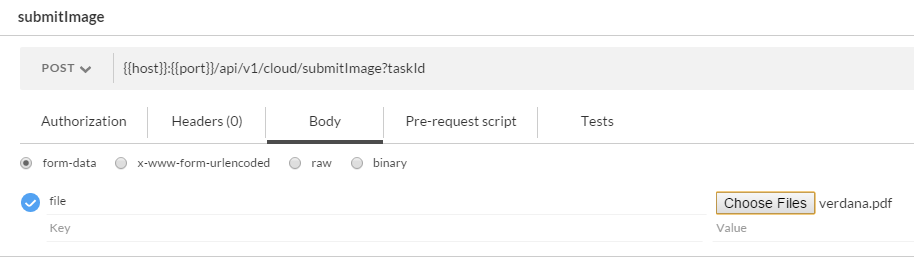
Copy taskId from the response:
<?xml version="1.0" encoding="UTF-8" standalone="yes"?>
<response>
<task id="5b06b1b295ac0b000144fb7e" processEndTime="" processStartTime="" registrationTime="2018-05-24T12:36:02"
resultUrl="http://ocr2-dev2.crowdcomputingsystems.com:8080/api/v1/cloud/download?taskId=5b06b1b295ac0b000144fb7e&
result=1" resultUrl2="http://ocr2-dev2.crowdcomputingsystems.com:8080/api/v1/cloud/download?taskId=5b06b1b295ac0b000144fb7e&
result=2" resultUrl3="http://ocr2-dev2.crowdcomputingsystems.com:8080/api/v1/cloud/download?taskId=5b06b1b295ac0b000144fb7e&
result=3" statusChangeTime="2018-05-24T12:36:02"
status="Submitted"/>
</response>
- Start image processing with processDocument.
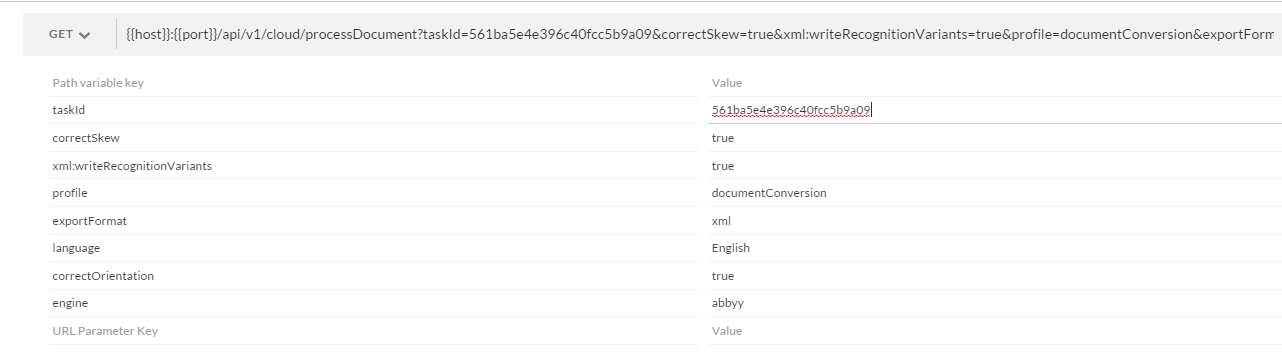
- Check task status with getTaskStatus (specify correct
taskId).

If task is complete (status="Completed") - open results from resultUrl, resultUrl2 or resultUrl3 fields (replace & with &).
Custom request parameters
We implement custom or additional request parameters. See the following sections.
GET /processDocument
OCR API export format (supports HTML):
html- html page.pdfSearchable- text can be searched in such file.xml- file contains characters/words along with their location in the original document (coordinates/frames).xmlForCorrectedImage- the same as xml, except location is taken from a processed/adjusted document.txt– plain text. The default format.
For multiple export formats you can use combinations delimited by a comma:
pdfSearchable,xmlForCorrectedImage,html.Attention: You can use maximum three types at once.
customRegions(JSON variable)[ { "type":"BT_Table", "page":1, "left":0, "top":0, "right":2000, "bottom":2000 }, { "type":"BT_Table", "page":1, "left":0, "top":2000, "right":4000, "bottom":4000 }, { "type":"BT_Table", "page":2, "left":0, "top":0, "right":4000, "bottom":4000 } ]The example to select one table region for all pages.
[ { "type":"BT_Table", "left":0, "top":0, "right":2000, "bottom":2000 } ]correctSkew(default true) - if true, the page skew will be detected and automatically corrected.correctOrientation(default true) - if true, the page orientation will be detected and if it differs from normal, will be automatically rotated.skipPreprocessing(default false) - skips preprocessing stage. It will increase performance up to 30%.useOnlyCustomRegions(default false) - skips original analyzing stage / extract information from custom regions only.alphabetExtension- string with specials symbols to extend already defined alphabet.useDefaultPattern(default false) - if true, it requires to apply the default pattern (from the OCR application bundle).removeNoiseModels- removes noise on the image (optional, valid value - comma separated values: CorrelatedNoise, WhiteNoise). Important: This method can be used for color and 8-bit gray images only.removeGarbageSize- removes garbage (excess dots that are smaller than a certain size) from the image (optional, valid value > 0 and -1 for automatically detect garbage size).allowedRegionTypes- allowed region types for identified blocks classification. If allowedRegionTypes=Empty, all types will be processed. For example, to suppress classifying any block as picture (BT_RasterPicture) specify the parameter value as BT_Table, BT_Text, BT_Barcode, BT_VectorPicture, BT_Separator, BT_SeparatorGroup, BT_Checkmark, BT_CheckmarkGroup. NOTE: Narrowing down type of regions can break page layout. Do not use it if you're not sure you need it.discardColorImage- If you work with black-and-white images or the color of images is not important, set the discardColorImage to true.enhanceLocalContrast- Specifies whether the local contrast of the image should be increased. Such preprocessing may increase the quality of recognition. It is effective for:- photos or scans of documents with texture or pictures in the background.
- photos or scans of documents with highly colorful background or text highlighting.
language- Specify predefined language - ex. English You can also define multiple languages and use comma as a separator: English,German,Polish.lowResolutionMode:true,false- improves recognition of images with low resolution, for example, faxes.
Pre-processing parameters:
invertImage(defaultfalse) - inverts Image.discardColorImage(defaultfalse) - leaves only black-and-white plane in the prepared image.removeColorObjects- removes color objects from the image, colors values: Blue, Green, Red, Yellow.removeColorObjectsType(defaultBackground) - removes color objects from the image, modes values: Background, Full, Stamp.convertTo(value=tiff) - auto detection of the file type and conversion to TIFF(convert before processing). Accept images: PDF, PNG, JPG, JPEG.pages- selection of pages from PDF files for recognition (example:pages=1,2,3,10-15).changeDPI- contains the new value of dpi, changeDPI available values from 50 to 3200 (example:changeDPI=300).useAutoDetectedDPIFromRange({"min": 50,"max": 3200}) - DPI detection from defined range to detect best resolution and apply it before further processing. Note: changeDPI is not applicable whenuseAutoDetectedDPIFromRangeis defined. When engine cannot define best DPI then original DPI is used.priority: 0-10 - defines priority in the image processing queue.
POST /processImage
fileFile in format PDF, PNG, JPG, JPEG.OCR API export format:
html- HTML page.pdfSearchable- text can be searched in such file.xml- file contains characters/words along with their location in the original document (coordinates/frames).xmlForCorrectedImage- the same as XML, except location is taken from a processed/adjusted document.txt– plain text. The default format.
For multiple export formats you can use combinations delimited by the comma:
pdfSearchable,xmlForCorrectedImage,html. You can use maximum three types at once.xml:writeRecognitionVariants- makes xml/xmlForCorrectedImage formats to contain all variants of character/word OCR considered as a possible recognition.customRegions(JSON variable).correctSkew(default true) - if true, the page skew will be detected and automatically corrected.correctOrientation(default true) - if true, the page orientation will be detected and if it differs from normal, will be automatically rotated.skipPreprocessing(default false).useOnlyCustomRegions(default false) - skips original analyzing stage / extract information from custom regions only.alphabetExtension- string with specials symbols to extend already defined alphabet.pattern- file upload for a pattern to be applied to recognize special symbols. Note:- 1. you should also add the symbol to
alphabetExtension. - 2. you can use either the explicit pattern uploaded with the field or
useDefaultPattern=true. Both can not be used at a time.
- 1. you should also add the symbol to
useDefaultPattern(default false) - if true, it requires to apply the default pattern (from the OCR application bundle).dictionary- file where each line contains a word or combination of characters which can be used to improve OCR recognition. The set of words extends, not limits, the default dictionary.removeNoiseModels- removes noise on the image (optional, valid value - comma separated values: CorrelatedNoise, WhiteNoise). Important: This method can be used for color and 8-bit gray images only.removeGarbageSize- removes garbage (excess dots that are smaller than a certain size) from the image (optional, valid value > 0).allowedRegionTypes- allowed region types for identified blocks classification. IfallowedRegionTypes=Empty, all types will be processed. For example, to suppress classifying any block as picture (BT_RasterPicture) specify the parameter value as BT_Table, BT_Text, BT_Barcode, BT_VectorPicture, BT_Separator, BT_SeparatorGroup, BT_Checkmark, BT_CheckmarkGroup. To narrow down type of regions even more you can use the following set: BT_Table, BT_Text, BT_Separator, BT_SeparatorGroup. NOTE: Narrowing down type of regions can break page layout. Do not use it if you're not sure you need it.enhanceLocalContrast- Specifies whether the local contrast of the image should be increased. Such preprocessing may increase the quality of recognition. It is effective for:- photos or scans of documents with texture or pictures in the background.
- photos or scans of documents with highly colorful background or text highlighting.
language- Specify predefined language - ex. English.lowResolutionMode:true,false- improves recognition of images with low resolution, for example, faxes.
Pre-processing parameters:
invertImage(default false) - inverts Image.discardColorImage(default false) - leaves only black-and-white plane in the prepared image.removeColorObjects- removes color objects from the image, colors values: Blue, Green, Red, Yellow.removeColorObjectsType(default Background) - removes color objects from the image, modes values: Background, Full, Stamp.convertTo(value=tiff) - auto detection of the file type and conversion to TIFF(convert before processing). Accept images: PDF, PNG, JPG, JPEG.pages- selection of pages from PDF files for recognition (example:pages=1,2,3,10-15).changeDPI- contains the new value of dpi, changeDPI available values from 50 to 3200 (example:changeDPI=300).useAutoDetectedDPIFromRange({"min": 50,"max": 3200}) - DPI detection from defined range to detect best resolution and apply it before further processing. Note:changeDPIis not applicable whenuseAutoDetectedDPIFromRangeis defined. When engine cannot define best DPI then original DPI is used.priority: 0-10 - defines priority in the image processing queue.
Custom APIs
GET /summary
Return the total number of tasks with status QUEUED. Can produce JSON and XML.
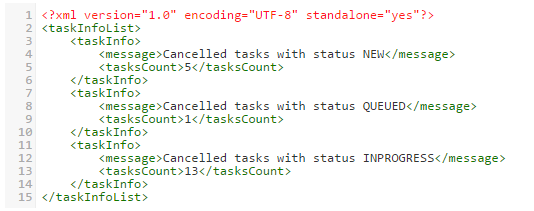
GET /cancelTasks
Change status for all NEW, QUEUED and INPROGRESS tasks to CANCELLED.
Response example:
tip
Add the new parameter that defines which tasks to cancel. For example, date of upload or task ID.
POST /trainPattern
Trains user pattern for the symbol.
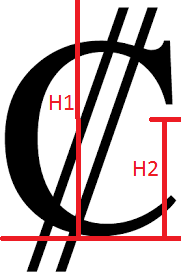
file- image file with the symbol.baseLinecontains the distance from the base line to the top edge of the cropped image of the character. The base line is the line on which the characters are located.- The top edge of the image is determined by the character orientation. H1 - on the picture.
smallSymbolHeight- specifies the height of small characters in pixels on the source image. H2 - on the picture.symbol- the symbol that is associated with picture(-s).mergePattern– a pattern is uploaded as a file. If provided, the training output pattern will be combined with the uploaded.
Request example:
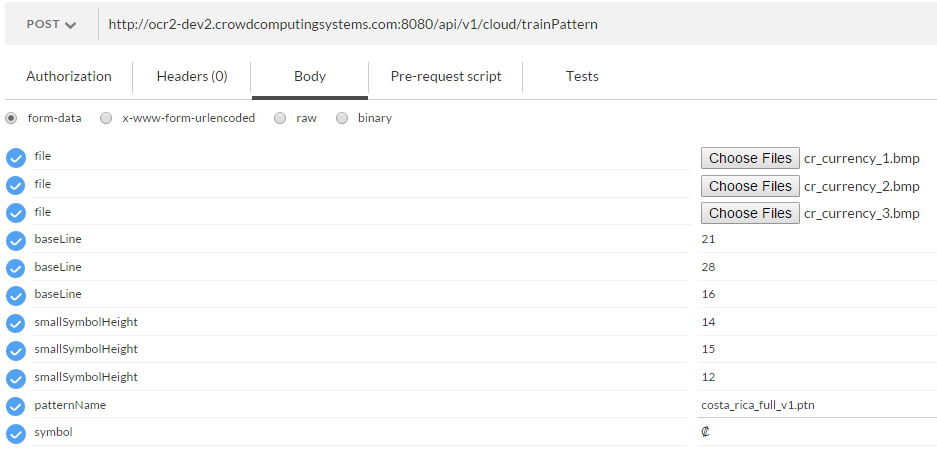
Response is a downloadable pattern file in a proprietary binary format.
note
When using a custom pattern, you need to specify alphabetExtension with the trained symbol in processImage or processDocument.
POST /submitPattern
This method attaches a pattern file for recognition of special symbols to an (existing) task created with submitImage. To be consequently processed with processDocument action.
Parameters:
pattern– the pattern file to upload.taskId– mandatory.
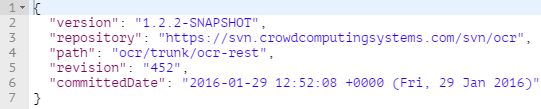
GET /api/project-info
GET /activeLicense

Method returns current active license and all available information about this license.
Result example
{
   "availableTextTypes":    [
      "ATT_Normal",
      "ATT_Typewriter",
      "ATT_Matrix",
      "ATT_Index",
      "ATT_OCR_A",
      "ATT_OCR_B",
      "ATT_MICR_E13B",
      "ATT_MICR_CMC7",
      "ATT_Advanced"
   ],
   "availableBarcodeModules":    [
      "ABM_1D",
      "ABM_PDF417",
      "ABM_Aztec",
      "ABM_QRCode",
      "ABM_MaxiCode",
      "ABM_DataMatrix",
      "ABM_Autolocation"
   ],
   "availableEngineModules":    [
      "AEM_ProcessAsPlainText",
      "AEM_Process",
      "AEM_Analyze",
      "AEM_Recognize",
      "AEM_Synthesize",
      "AEM_ExtendedCharacterInfo",
      "AEM_OpenPDF",
      "AEM_UserPatterns",
      "AEM_BalancedMode",
      "AEM_FastMode",
      "AEM_BCR",
      "AEM_Classification"
   ],
   "availableExportFormats":    [
      "AEF_RTF",
      "AEF_HTML",
      "AEF_XLS",
      "AEF_PDF",
      "AEF_Text",
      "AEF_PDFImageOnly",
      "AEF_XML",
      "AEF_PPT",
      "AEF_PDFA",
      "AEF_PDFMRC",
      "AEF_ALTO",
      "AEF_EPUB",
      "AEF_FB2",
      "AEF_ODT",
      "AEF_XPS"
   ],
   "availableVisualComponents": [],
   "availableLanguageSets":    [
      "ALS_Standard",
      "ALS_DataCapture",
      "ALS_Artificial",
      "ALS_Programming",
      "ALS_User",
      "ALS_Chinese",
      "ALS_Hebrew",
      "ALS_Thai",
      "ALS_Vietnamese",
      "ALS_Arabic",
      "ALS_Japanese",
      "ALS_Korean"
   ],
   "volumeRefreshingPeriod": "VRP_Infinite",
   "volume": 10000,
   "volumeRemaining": 10000,
   "serialNumber": "SWAT-1101-1004-1541-1060-5817",
   "allowedCoresCount": 2,
   "minimumCoresCountPerInstance": 0
}
The meaning of the fields in the response:
| Attribute | Explanation |
|---|---|
| availableTextTypes | The set of the text types available in the license. |
| availableBarcodeModules | The set of the ABBYY FineReader Engine barcode modules available in the license. |
| availableEngineModules | The set of the ABBYY FineReader Engine modules available in the license. |
| availableExportFormats | The set of the export formats available in the license. |
| availableVisualComponents | The set of visual components available in the license. |
| availableLanguageSets | The set of the language sets available in the license. |
| volumeRefreshingPeriod | Information about the limitation period if the license limits the number of processed pages/characters during this period. |
| volume | The total number of pages/characters which can be processed during a period if the license has such a limitation. |
| volumeRemaining | The remaining number of pages/characters which can be processed till the end of the current period if the license has such a limitation. When this property value reaches 0, analysis, recognition and export operations will not be possible. |
| serialNumber | The serial number of the license. |
| allowedCoresCount | The number of CPU cores that can be used simultaneously. If the value of this property is 0, the number of CPU cores is unlimited. |
| minimumCoresCountPerInstance | The minimum number of CPU cores which is allocated by ABBYY FineReader Engine at initialization. |
GET /listLicenses

Method returns a list of all licenses connected to the current ABBYY Engine.
List of licenses
[{
   "availableTextTypes":    [
      "ATT_Normal",
      "ATT_Typewriter",
      "ATT_Matrix",
      "ATT_Index",
      "ATT_OCR_A",
      "ATT_OCR_B",
      "ATT_MICR_E13B",
      "ATT_MICR_CMC7",
      "ATT_Advanced"
   ],
   "availableBarcodeModules":    [
      "ABM_1D",
      "ABM_PDF417",
      "ABM_Aztec",
      "ABM_QRCode",
      "ABM_MaxiCode",
      "ABM_DataMatrix",
      "ABM_Autolocation"
   ],
   "availableEngineModules":    [
      "AEM_ProcessAsPlainText",
      "AEM_Process",
      "AEM_Analyze",
      "AEM_Recognize",
      "AEM_Synthesize",
      "AEM_ExtendedCharacterInfo",
      "AEM_OpenPDF",
      "AEM_UserPatterns",
      "AEM_BalancedMode",
      "AEM_FastMode",
      "AEM_BCR",
      "AEM_Classification"
   ],
   "availableExportFormats":    [
      "AEF_RTF",
      "AEF_HTML",
      "AEF_XLS",
      "AEF_PDF",
      "AEF_Text",
      "AEF_PDFImageOnly",
      "AEF_XML",
      "AEF_PPT",
      "AEF_PDFA",
      "AEF_PDFMRC",
      "AEF_ALTO",
      "AEF_EPUB",
      "AEF_FB2",
      "AEF_ODT",
      "AEF_XPS"
   ],
   "availableVisualComponents": [],
   "availableLanguageSets":    [
      "ALS_Standard",
      "ALS_DataCapture",
      "ALS_Artificial",
      "ALS_Programming",
      "ALS_User",
      "ALS_Chinese",
      "ALS_Hebrew",
      "ALS_Thai",
      "ALS_Vietnamese",
      "ALS_Arabic",
      "ALS_Japanese",
      "ALS_Korean"
   ],
   "volumeRefreshingPeriod": "VRP_Infinite",
   "volume": 10000,
   "volumeRemaining": 10000,
   "serialNumber": "SWAT-1101-1004-1541-1060-5817",
   "allowedCoresCount": 2,
   "minimumCoresCountPerInstance": 0
}]
GET /api/v1/metrics/count
Request example:
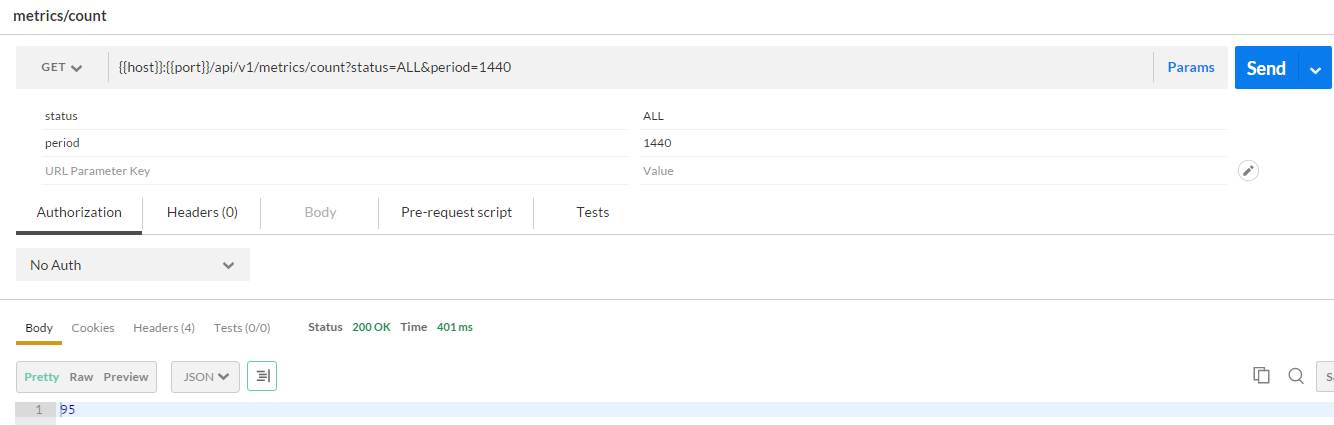
Parameters:
status. Either one of TaskStatus values or aggregate - DONE, PROCESSING, ALL.period. Number of minutes to subtract from current time. By default the range is NOW-MINUTES to NOW, when period is negative the range is BEGINNING to NOW-MINUTES. Default is 60 minutes
GET /api/v1/metrics/stats
Request example:
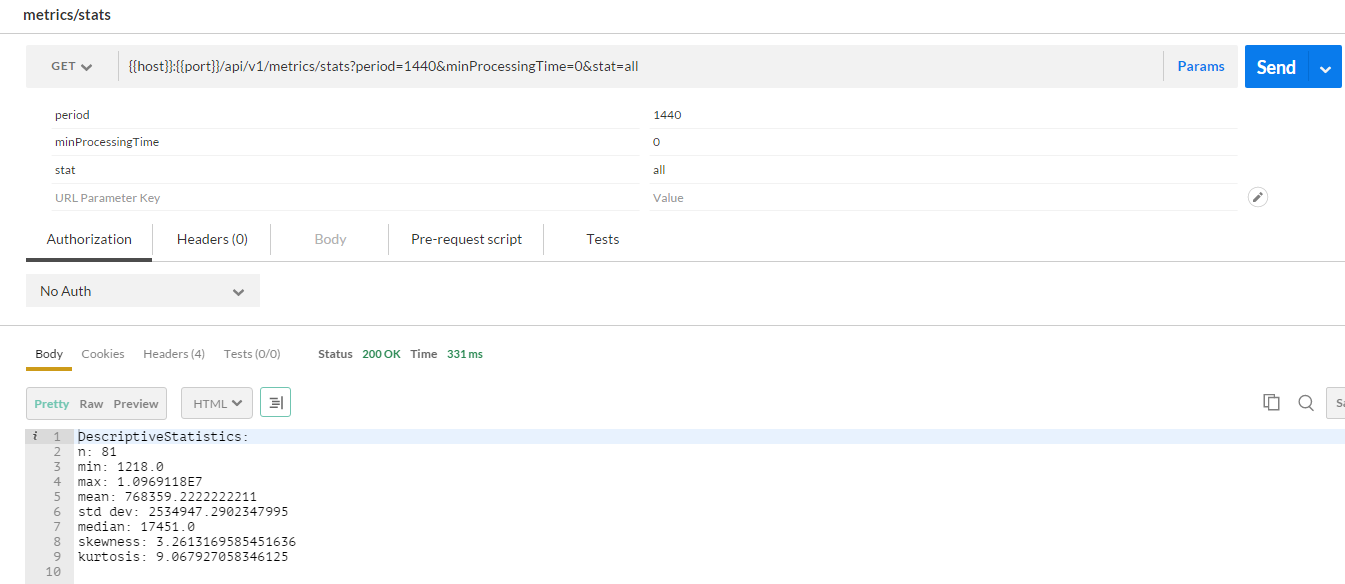
Parameters:
period. Number of minutes to subtract from current time. By default the range is NOW-MINUTES to NOW. Default is 60 minutesminProcessingTime. Tasks with processing time less than this value will be discurded. Default is 1000 (1 second).stat. Descriptive statistic -min,max,n(number of values),std,percentileN(where N is any number 0-100) or all.
Multi-worker processing
When process starting to work with specific task it changes task status, so other processes can't also start working with that task thus one task can be processed only by one process-worker.
When server during task processing is terminated we not able to send that task to the queue immediately, but we have service that runs on a schedule and puts such tasks to the queue.
Server specification and usage guidance
Currently, it's a low-parameters instance. Don't submit many documents. License allows only 10K pages to be recognized.
License
Refer to Activate OCR license.
Practical usage tips
This paragraph describes tips for OCR API usage.
Recognition quality
- Use custom dictionary.
- Fetch plain text from pdf and set it to originalText parameter.
- Don't use removeGarbageSize parameter for PDF searchable and carefully use it for scanned PDF or image. Sometime it can degrade results.
- Use allowedRegionTypes=BT_Table,BT_Text,BT_Barcode,BT_VectorPicture, BT_Separator,BT_SeparatorGroup,BT_Checkmark,BT_CheckmarkGroup,BT_AutoAnalysis for aggressive recognition image blocks in documents.
- Train and use pattern for some repeatable unrecognized cases. By default, costa_rica_currency pattern.
- PDF searchable document is preferable to recognition than high dpi image created from it.
- Recommended resolution for source image: 300 dpi for typical texts (10pt or larger) and 400-600 dpi for texts in smaller fonts (9pt or smaller).
Performance improvements
- Use
skipPreprocessing=trueat least for PDF searchable documents. It saves up to 30% processing time - Use
xml:writeRecognitionVariants=falseif you don't need char/word variants in the output xml file. It saves up to 30% processing time, memory and disk space.