
Secrets Vault API
Description
The password parameter requires the BCrypt Encoded value with the strength measure of 10.
tip
You can use Secrets Vault Plugins as part of Business Processes.
Configuration
The service is published under the following URL: /api/v1/secrets-vault.
URL examples
https://custom-name.workfusion.com/workfusion/api/v1/secrets-vault
API security
All API postings are made over a Secure Sockets Layer (SSL) connection encrypting communications between the user and web server to ensure data remains private.
note
All requests must be preceding with https://.
The API supports both basic (login and password hash) and form-based (login and password) authentication to ensure that it is only accessible to users with proper credentials. By default, the basic authentication is used.
caution
You can enable only one authentication type at a time. For example, if you enable the form-based authentication, the basic one is disabled, and vice versa.
Basic authentication
Basic authentication requires the following:
usernameis your username in Control Tower.passwordis your password hash in Control Tower.
Form-based authentication
To enable the form-based authentication, go to the INSTALL_DIR/conf/workfusion.properties file on the WorkFusion server and set the following property:
rest.form.auth.enable=true
CSRF protection is added to REST endpoints. To make a REST call, add a CSRF token to the header.
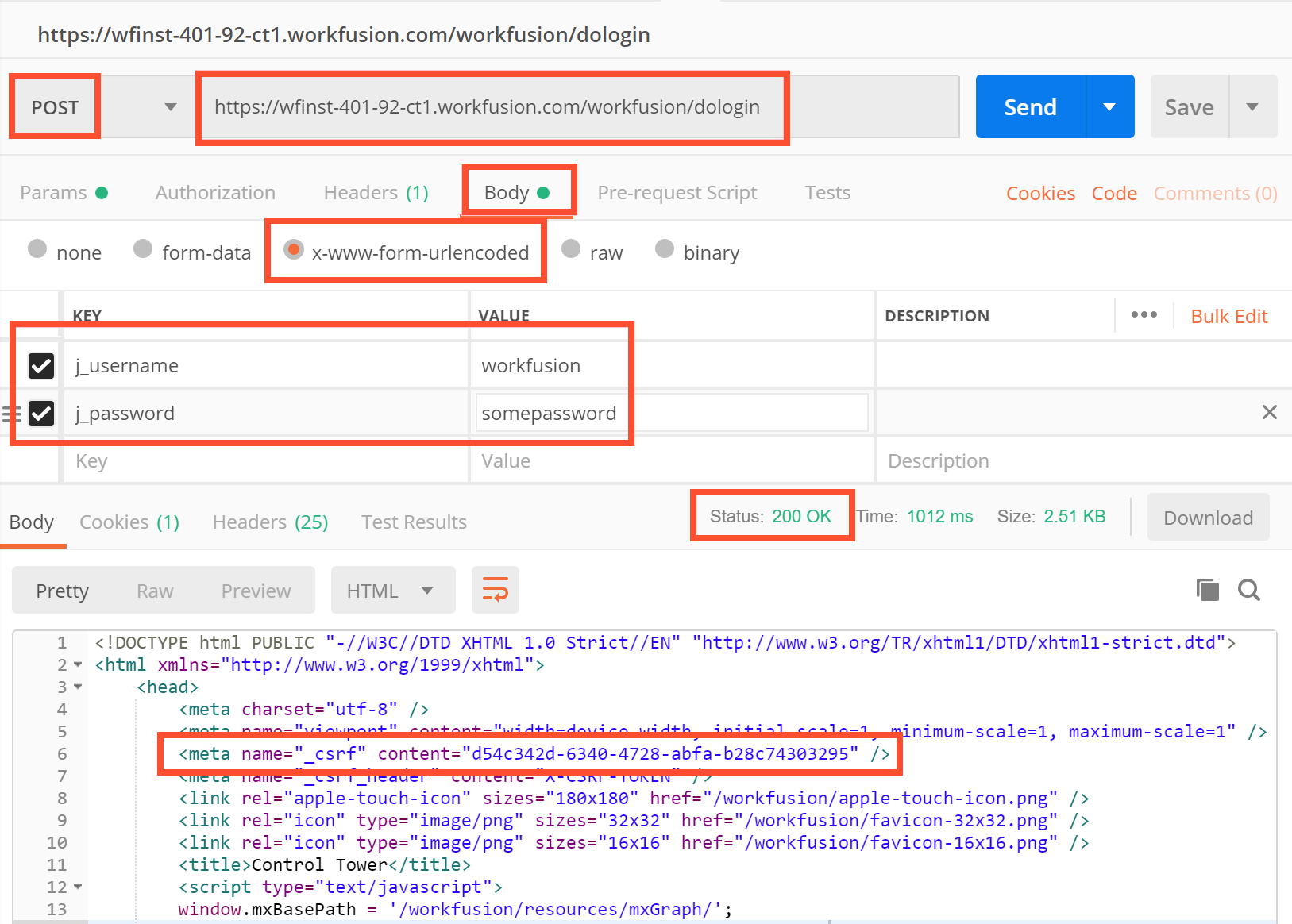
Before executing REST API requests, log in using the form URL:
POST method
POST /workfusion/api/dologin
Content-Type: application/x-www-form-urlencoded
j_username=username
j_password=password
where:
j_usernameis your username in Control Tower.j_passwordis your password in Control Tower.
A successful request body from the server should look like this:
<html>
<head>
    <meta name="_csrf" content="<csrftoken>" />
    <meta name="_csrf_header" content="<csrftokenname>" />
    ...
</head>
<body>
    ...
</body>
</html>
Get
JSESSIONIDfrom the Set-Cookie response header.When creating REST API requests:
- Set this
JSESSIONIDto the Cookie header. - Set
application/x-www-form-urlencodedas the Content-Type header. - Set the received
<csrftoken>as the<csrftokenname>header.
- Set this
Here is a Postman login request example:
Sample login with HttpClient
        public String post(String addressURL, AbstractHttpEntity body) throws IOException {

    HttpPost httpPost = new HttpPost(addressURL);
    System.out.println("POST -> " + addressURL);
    httpPost.setEntity(body);

    HttpResponse response = httpClient.execute(httpPost);
    String stringResponse = convertStreamToString(response.getEntity().getContent());
    System.out.println(stringResponse);

    return stringResponse;
}

public void login() throws IOException {

    List<NameValuePair> nvp = new ArrayList<>();
    nvp.add(new BasicNameValuePair("j_username", USERNAME));
    nvp.add(new BasicNameValuePair("j_password", PASSWORD));

    //simply post the username and password to the server to login
    //re-use the httpClient instance to make sure the same JSESSIONID cookie is used

    //UrlEncodedFormEntity sets Content-Type=application/x-www-form-urlencoded
    String loginResponse = post(LOGIN_URL, new UrlEncodedFormEntity(nvp));

    Document htmlDocument = getDocument(loginResponse);

    XPathExpression exprToken = getXPathExpression("//meta[@name='_csrf']/@content");
    String csrfToken = exprToken.evaluate(document);

    XPathExpression exprHeader = getXPathExpression("//meta[@name='_csrf_header']/@content");
    String csrfHeader = expr.evaluate(document);

    // then use csrfHeader and csrfToken for REST API calls
}

private Document getDocument(String content) throws ParserConfigurationException, SAXException, IOException {
    DocumentBuilderFactory dbf = DocumentBuilderFactory.newInstance();
    DocumentBuilder db = dbf.newDocumentBuilder();
    return db.parse(IOUtils.toInputStream(content, "UTF-8"));
}

private XPathExpression getXPathExpression(String xPath) throws XPathExpressionException {
    XPathFactory xpf = XPathFactory.newInstance();
    XPath xpath = xpf.newXPath();
    return xpath.compile(xPath);
}
Use REST API with SSO
Starting from IA Cloud v10.2, you can authenticate REST requests with your Keycloak credentials without making Control Tower changes. Note that you must have the password assigned for your user. This condition is mandatory because, when using SSO, a user appears in Keycloak only after their first login via the interface, while Keycloak won't have the user's password.
For more information, read the Configure Identity Providers and REST API authentication with enabled IDP topics.
Use REST API with LDAP
Starting from IA Cloud v.10.2, LDAP access is configured via Keycloak. So, you can authenticate REST requests with your Keycloak credentials. For more information, read the Configure LDAP topic.
Get secure entry
Resource path: v1/secrets-vault/entry
Method: POST
Description: Retrieves secure entry from Secrets Vault.
Parameter |
Description |
Required |
Param Type |
Data |
alias |
Alias of the secured entry |
Yes |
x-www-form-urlencoded | String |
Successful output:
{
    "responseStatus": "SUCCESS",
    "body": {
        "alias": "333",
        "key": "0000000",
        "value": "0000000000",
        "lastUpdateDate": 1449814392229
    },
    "errors": []
}
Error output: Invalid UUID
{
    "responseStatus": "FAILURE",
    "body": null,
    "errors": [
        {
            "code": 22,
            "message": "Invalid password"
        }
    ]
}
Save secure entry
Resource path: v1/secrets-vault/entry/put
Method: POST
Description: Saves the provided entry to Secrets Vault.
Parameter |
Description |
Required |
Param Type |
Data |
alias |
Alias of the secured entry |
Yes |
x-www-form-urlencoded | String |
key |
Entry key, which is usually a username |
Yes |
x-www-form-urlencoded | String |
value |
Entry value, which is usually the password |
Yes |
x-www-form-urlencoded | String |
Successful output:
{
    "responseStatus": "SUCCESS",
    "body": true,
    "errors": []
}
Error output: Invalid UUID
{
    "responseStatus": "FAILURE",
    "body": null,
    "errors": [
        {
            "code": 20,
            "message": "Secure Entry 1211 already exists"
        }
    ]
}
Delete secure entry
Resource path: v1/secrets-vault/entry/delete
Method: POST
Description: Deletes the specified entry from Secrets Vault.
Parameter |
Description |
Required |
Param Type |
Data |
alias |
Alias of the secured entry |
Yes |
x-www-form-urlencoded | String |
Successful output:
{
    "responseStatus": "SUCCESS",
    "body": true,
    "errors": []
}
Error output: Invalid UUID
{
    "responseStatus": "FAILURE",
    "body": null,
    "errors": [
        {
            "code": 22,
            "message": "Invalid password"
        }
    ]
}
Update secure entry
Resource path: v1/secrets-vault/entry/update
Method: POST
Description: Updates the specified entry (key, value) by alias to Secrets Vault.
Parameter |
Description |
Required |
Param Type |
Data |
alias |
Alias of the secured entry |
Yes |
x-www-form-urlencoded | String |
key |
Entry key, which is usually the username |
Yes |
x-www-form-urlencoded | String |
value |
Entry value, which is usually the password |
Yes |
x-www-form-urlencoded | String |
Successful output:
{
    "responseStatus": "SUCCESS",
    "body": true,
    "errors": []
}
Error output: Invalid UUID
{
  "message": "Validation Failed",
  "code": "com.workfusion.api.error.missing.request.parameter",
  "errors": [
    {
      "message": "Required String parameter 'key' is not present",
      "field": "key"
    }
  ]
}
Reset secure entry
Resource path: v1/secrets-vault/entry/reset
Method: POST
Description: Resets the value for the specified entry from Secrets Vault. The new value is generated randomly. The length is 20 symbols.
Parameter |
Description |
Required |
Param Type |
Data |
alias |
Alias of the secured entry |
Yes |
x-www-form-urlencoded | String |
Successful output:
{
    "responseStatus": "SUCCESS",
    "body": true,
    "errors": []
}
Error output: Invalid UUID
{
  "message": "Secure Entry with alias '12342222' does not exist",
  "code": "com.workfusion.api.error.http.not.found"
}