Feature engineering
Features are individual measurable properties or characteristics of the data being observed. Selecting relevant features and deciding how to encode them for a training can have a great impact on model results. The process of feature development is known as feature engineering or feature generation. Simply put, it is a process of manually constructing new attributes from raw data. It involves intelligent combining or splitting the existing raw attributes into new ones with a higher predictive power.
A particular target data element can have several features tagging it. It is important to select only the features that are relevant to the problem so that the accuracy of the model improves. It also reduces the complexity of the model as we avoid the least significant or unnecessary features.
Feature engineering steps
- Review the training set and define field patterns.
- Create a Feature.
- Run training and evaluate results.
Review training set and define field patterns
As input data you have a list of fields that should be extracted and a training set with already tagged fields. In the example below, you can see a tagged invoice and tagged fields that should be extracted: Client Name, Invoice Date, and a group of field Products with fields, such as Item, Description, Quantity, Discount, Tax Rate, and Price.
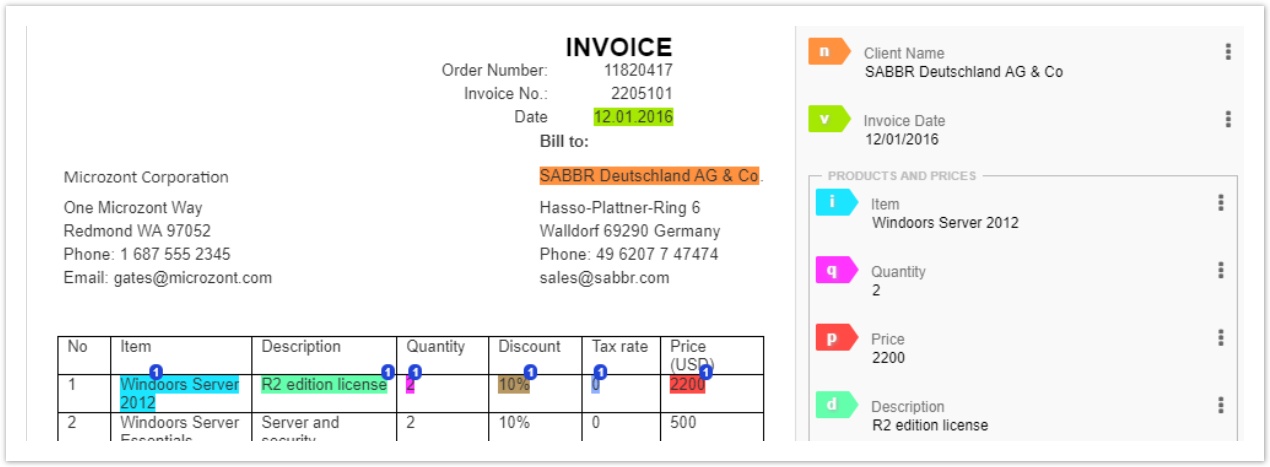
The step is aimed to find out the attributes that better differentiate the patterns for each field. Each field should be carefully analyzed to understand its nature (whether it is time, date, email, address, and so on) and possible position and context. The context is basically everything that surrounds the tagged piece of text, its position on the page, and in some cases its position relative to other important pieces of information. The context is the most important source of features and is used to determine where a gold value should be searched.
The field analysis usually contains the following steps:
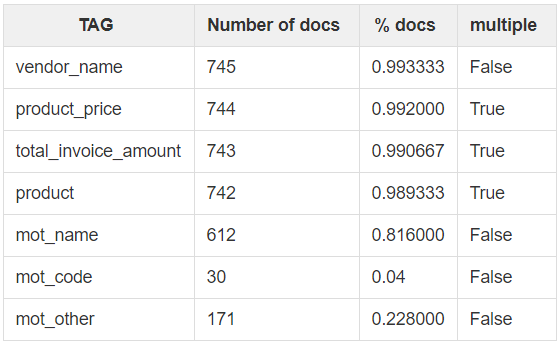
Tags distribution (how many objects for each field are in the data set):
- Check their consistency (for example, in case of the Address field): whether all values look similar.
- Check whether some values are missed (in case of not required fields). This information is useful in understanding which fields are badly represented. In the example below, the training set size is 750 documents, but there are only 30 objects of the
mot_codefield. This field is badly represented.
Required vs. not required fields.
Group values, for example, a table with a list of products, their name, quantity, and price.
Multiple values for one field in a document.
Other examples for analysis are the total number of tags, frequency of a given tag, tag with the greatest count, N most common tags and their frequencies, and so on.
Define whether word-shape patterns is applied to the field and how many occurrences of each pattern is found in the documents:
- Example 1: for the Invoice Number field, we should pay attention to the shape and numeric.
- Invoice:
xx-xxxxfound in 50 cases. - Invoice:
xx\_xxxxfound in 45 cases. - Invoice:
xx-Xxxxfound in 5 cases.
- Invoice:
- Example 1: for the Invoice Number field, we should pay attention to the shape and numeric.
You can analyse data using various utilities, for example, Analyse Context:
- Compare a tagged value and a data value and get the context where they are found.
tagged_value | data_value | Context |
|---|---|---|
| EUR | Euros or sign | A sentence where this character is found. |
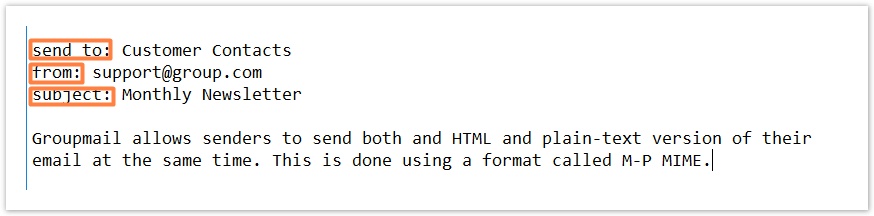
- Get the first element in the line from the left side:
Feature engineering tips
- Start with a minimum set of features:
- Include features suggested by domain knowledge.
- Test these out individually, build from the bottom up.
- Keep in mind the limits on Feature Engineering. Too many features can lead to overfitting when a model provides good extraction results and statistics on a training set, but has bad results on a production (new) set. This can be caused by selecting useless features or dependent and correlated features.
Create features
When you have the field patterns and context from the previous step, you can proceed with creation of features. Generally, all features can be split into several types:
Gold Data Specific Features. This defines the features related to the gold value itself.
Examples:
- The gold value type (price, percentage, address, year, time, date, phone, email, and so on) in case we do not have a specific letter pattern for the words. Examples:
- Identify if the token contains currency characters.
- Determine whether the last N characters of the token contain digits.
- Determine if the covered text contains a number, comma or dot for every 1-3 digits "(\s*[€£₤$]\s*)?[0-9])*(?:\D|$)";
- Presence of a hyphen.
- Define whether a token corresponds to a specific letter pattern (capitalization, numeric, length, special characters in between like hyper, dot, and so on). Word shape features are used to represent such patterns by mapping lower-case letters to ‘x’, upper-case to ‘X’, numbers to ’d’, and punctuation. Thus, for example, A.B.C would map to A.B.C., and AB/01-03 would map to XX/dd-dd. Examples:
- Determine if the token is a CUSIP code.
- Determine whether a token wordshape corresponds to a specific pattern:
Xxx_ddddd,xx/xx-ddd-xx,XXXXXX.
- N-gram is a sequence of words: a 2-gram (or bigram) is a two-word sequence of words like “please click” or ”click button”, and a 3-gram (or trigram) is a three-word sequence of words like “please click button”, and so on.
Example 1
In the example below, in case the focus element is a number, the feature is created with the value equal to 1.
Define if focus element contains number
import java.util.Collection;
import java.util.Collections;

import com.workfusion.vds.sdk.api.nlp.fe.Feature;
import com.workfusion.vds.sdk.api.nlp.fe.FeatureExtractor;
import com.workfusion.vds.sdk.api.nlp.fe.annotation.FeatureName;
import com.workfusion.vds.sdk.api.nlp.model.Document;
import com.workfusion.vds.sdk.api.nlp.model.Element;

@FeatureName(IsNumberIncludedFE.FEATURE_NAME)
public class IsNumberIncludedFE<T extends Element> implements FeatureExtractor<T> {

    public static final String FEATURE_NAME = "IsNumberIncluded";

    @Override
    public Collection<Feature> extract(Document document, T element) {
        String text = element.getText();
        if (text.matches(".*\\d.*")) {
            // if text contains a digit, return a feture
            return Collections.singletonList(new Feature(FEATURE_NAME, 1));
        }
        // otherwise return empty list
        return Collections.emptyList();
    }

}
Local Context Features: information around the gold value. Examples:
- The N tokens, lines, and cells before, after, above, or below the gold value. Examples:
- Check whether the wordshape of neighboring words corresponds to a specific pattern.
- Define whether the number of tokens covered by the cell is equal to a specific value.
- Define whether a token is situated in a specifc line of the focus cell.
- Check if there are keyword matches in the same line in the non-empty block preceding the block covering the focus line.
- Determine if the numeric value of the focus cell is equal to the cell above.
- Determine if the number of columns from the current cell to the end of the table is equal to N.
- Determine whether keywords occur in the same column as the focus cell.
Example 2
The below example shows that the feature is created with the value equal to 1 in case when the token next to the target token in the same cell contains a keyword.
Define whether next token in same cell contains keyword
import java.util.ArrayList;
import java.util.Collection;
import java.util.List;

import com.workfusion.vds.sdk.api.nlp.fe.Feature;
import com.workfusion.vds.sdk.api.nlp.fe.FeatureExtractor;
import com.workfusion.vds.sdk.api.nlp.fe.annotation.FeatureName;
import com.workfusion.vds.sdk.api.nlp.fe.annotation.Index;
import com.workfusion.vds.sdk.api.nlp.fe.annotation.IndexType;
import com.workfusion.vds.sdk.api.nlp.fe.annotation.Indexes;
import com.workfusion.vds.sdk.api.nlp.model.Cell;
import com.workfusion.vds.sdk.api.nlp.model.Document;
import com.workfusion.vds.sdk.api.nlp.model.Element;
import com.workfusion.vds.sdk.api.nlp.model.Token;

//feature extractor analyze cell->token covered/covering relations, so index will be added.
//BIDIRECTIONAL index type is required, because feature extractors search cells by token, and tokens by cells.
@Indexes()
@FeatureName(NextCellContainsKeyword.FEATURE_NAME)
public class NextCellContainsKeyword<T extends Element> implements FeatureExtractor<T> {

    public static final String FEATURE_NAME = "NextTokenInCellContainsKeyword";

    private String keyword;

    public NextCellContainsKeyword(String keyword) {
        super();
        // specify keyword
        this.keyword = keyword;
    }

    @Override
    public Collection<Feature> extract(Document document, T element) {
        List<Feature> result = new ArrayList<>();
        // find parent cells on current token
        List<Cell> cells = document.findCovering(Cell.class, element);
        if (!cells.isEmpty()) {
            // first cell will be a target cell
            Cell firstCell = cells.stream().findFirst().get();
            // find all tokens inside cell
            Collection<Token> nextTokens = document.findCovered(Token.class, element.getEnd(), firstCell.getEnd());
            nextTokens.forEach(token -> {
                // if one of the token in cell contains a keyword, add a feature
                if (token.getText().contains(keyword)) {
                    Feature feature = new Feature(FEATURE_NAME, 1.0);
                    result.add(feature);
                }
            });
        }
        return result;
    }

}
Global Context Features: global information, such as a location within a specific element (in a line, cell, table, block, or page).
Examples:
- Check whether a token is on the same page with some keywords or NERs.
- Determine whether any keyword(s) of a user-provided list are found in the blocks to the left of the focus.
- Check whether the number of tokens of the needed type in all tables is equal to N.
- Define if the token is in the longest row of all tables in a document.
- Check whether the number of cells in a focus table is equal to N.
Example 3
The following example defines how many times the text from the focus element is found in the Document. The OnDocumentStart** method is used to prepare data for extraction.
Define how many times target element is found in document
import java.util.ArrayList;
import java.util.Collection;
import java.util.HashMap;
import java.util.List;
import java.util.Map;

import com.workfusion.vds.sdk.api.nlp.annotation.OnDocumentComplete;
import com.workfusion.vds.sdk.api.nlp.annotation.OnDocumentStart;
import com.workfusion.vds.sdk.api.nlp.fe.Feature;
import com.workfusion.vds.sdk.api.nlp.fe.FeatureExtractor;
import com.workfusion.vds.sdk.api.nlp.fe.annotation.FeatureName;
import com.workfusion.vds.sdk.api.nlp.model.Document;
import com.workfusion.vds.sdk.api.nlp.model.Element;

@FeatureName(TextOccurrenceInDocument.FEATURE_NAME)
public class TextOccurrenceInDocument <T extends Element> implements FeatureExtractor<T> {
    public static final String FEATURE_NAME = "ToknenMetInDocument";

    private Map<String, Integer> textOccurrence = new HashMap<>();
    private int totalFocusElementNumber;

    @OnDocumentStart
    public void onStart(Document document, Class<T> focusClass) {
        // find all focus elements (by default focusElement is Token)
        Collection<T> elements = document.findAll(focusClass);
        // store a total number of elements in document. it will be used for feature normalization
        totalFocusElementNumber = elements.size();
        Map<String, Integer> textOccurrence = new HashMap<>();
        // calculate how many times text present into the document
        for (T element : elements) {
            Integer occurrence = textOccurrence.get(element.getText());
            if (occurrence == null) {
                occurrence = 0;
            } else {
                occurrence++;
            }
            textOccurrence.put(element.getText(), occurrence);
        }
    }

    @Override
    public Collection<Feature> extract(Document document, T element) {
        List<Feature> result = new ArrayList<>();
        // get precalculated number of how many times text of element is found in the document
        Integer number = textOccurrence.get(element.getText());
        // it is strongly recommended to use normalized features (values between 0 and 1), divide to the total number of elements in document to get feature value normalized
        double featureValue = (double)number/totalFocusElementNumber;
        // add feature
        result.add(new Feature(FEATURE_NAME, featureValue));
        return result;
    }

    @OnDocumentComplete
    public void complete() {
        // clear map after usage
        textOccurrence.clear();
    }

}
Named Entity Features: whether a word is a part of any relative Named Entities (NERs), the start, middle, or end of NER, the distance to a specific NER.
- Check if the text of the focus annotation is fully contained within the text of NERs.
- Check whether distance between the token and a specific NER equals to N characters.
- Determine if the focus table contains a full address (>=1 each of city, state, and postal code NERs).
Example 4
In the example below, the feature is created with the value equal to 1 in case the element is covered by a NER of a specific type.
Define if target element is covered by NER
import java.util.ArrayList;
import java.util.Collection;
import java.util.Collections;
import java.util.List;

import com.workfusion.vds.sdk.api.nlp.fe.Feature;
import com.workfusion.vds.sdk.api.nlp.fe.FeatureExtractor;
import com.workfusion.vds.sdk.api.nlp.fe.annotation.FeatureName;
import com.workfusion.vds.sdk.api.nlp.fe.annotation.Index;
import com.workfusion.vds.sdk.api.nlp.fe.annotation.IndexType;
import com.workfusion.vds.sdk.api.nlp.fe.annotation.Indexes;
import com.workfusion.vds.sdk.api.nlp.model.Document;
import com.workfusion.vds.sdk.api.nlp.model.Element;
import com.workfusion.vds.sdk.api.nlp.model.NamedEntity;

//feature extractor logic analyze Token->Named Entity relations, to increase performance index is recommended
@Indexes()
@FeatureName(IsNEPresent.FEATURE_NAME)
public class IsNEPresent<T extends Element> implements FeatureExtractor<T> {

    public static final String FEATURE_NAME = "is_named_entity";
    private final String mentionType;

    public IsNEPresent(String mentionType) {
        // specify required named entity type
        this.mentionType = mentionType;
    }

    @Override
    public Collection<Feature> extract(Document document, T element) {
        List<Feature> result = new ArrayList<>();

        // find all named entities inside token
        List<NamedEntity> namedEntity = document.findCovering(NamedEntity.class, element);
        if (namedEntity.stream()
                .filter(n -> mentionType.equalsIgnoreCase(n.getType()))
                .findAny()
                .isPresent()) {
            // if named entity with required type exist, then return a feature
            return Collections.singletonList(new Feature(FEATURE_NAME, 1));
        }
        return Collections.emptyList();
    }
}
All the Features listed above can be used in any combinations.
Run training and evaluate results
As soon as you added necessary features, you can start model training for the field. Once the training is finished, you should evaluate it.
Model evaluation should be implemented on an unseen dataset. Otherwise, the model evaluation results will be overstated.