Explore BEP components
Bot Execution Platform (BEP) is a platform allowing you to execute large volumes of tasks on a cluster in a scalable and fault-tolerant manner.
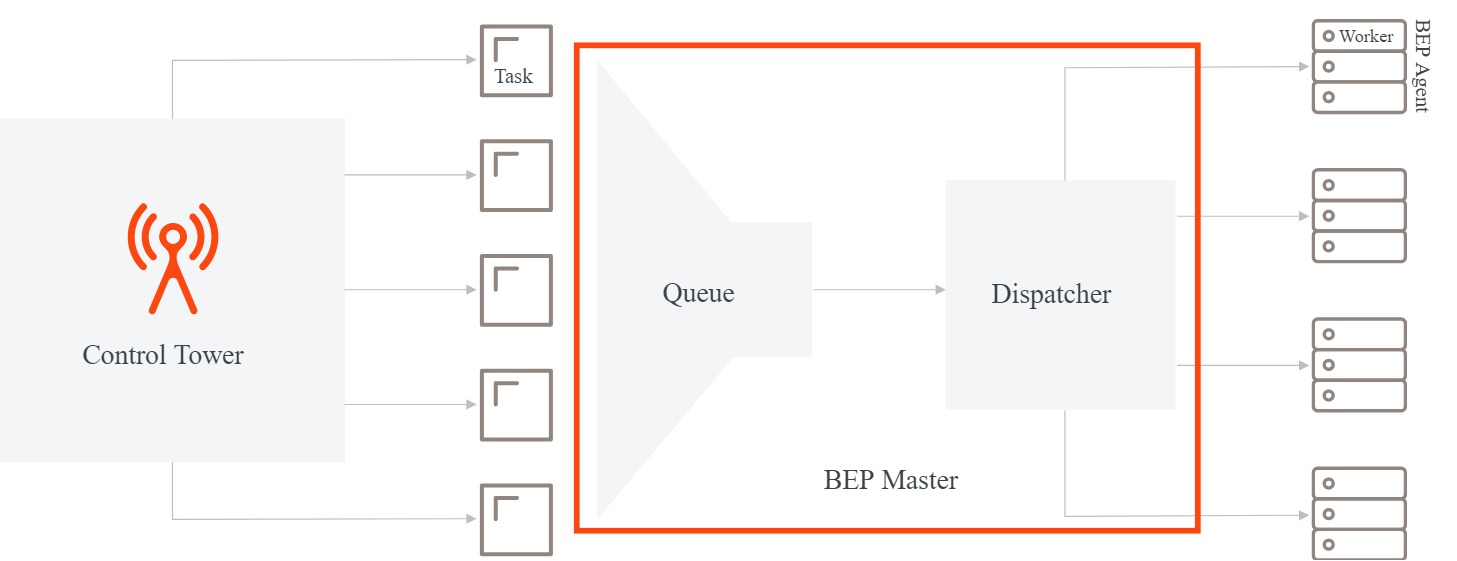
Applications, such as Control Tower (CT), AutoML Service, and OCR REST Service (since v10.2), submit tasks to a BEP cluster so that they are processed in a scalable way. BEP Master arranges tasks in a queue, and BEP Task Dispatcher dynamically allocates resources on Agent servers to invoke required Worker processes. For details, see BEP flow.
There are several Worker types, specific to the particular task types to be processed:
- CT Workers: regular Business Process (BP) tasks that do not require RPA connectivity or execution of ML services. For example, direct API connection, rule-based logic execution, data processing
- RPA Workers: RPA-specific tasks, which means tasks using RPA plugins
- AutoML Workers: AutoML training and execution tasks
- OCR Workers: OCR tasks
For Worker types and their default configurations, refer to the BEP Workers article.
BEP components
BEP Platform consists of two major components: BEP services and BEP framework API.
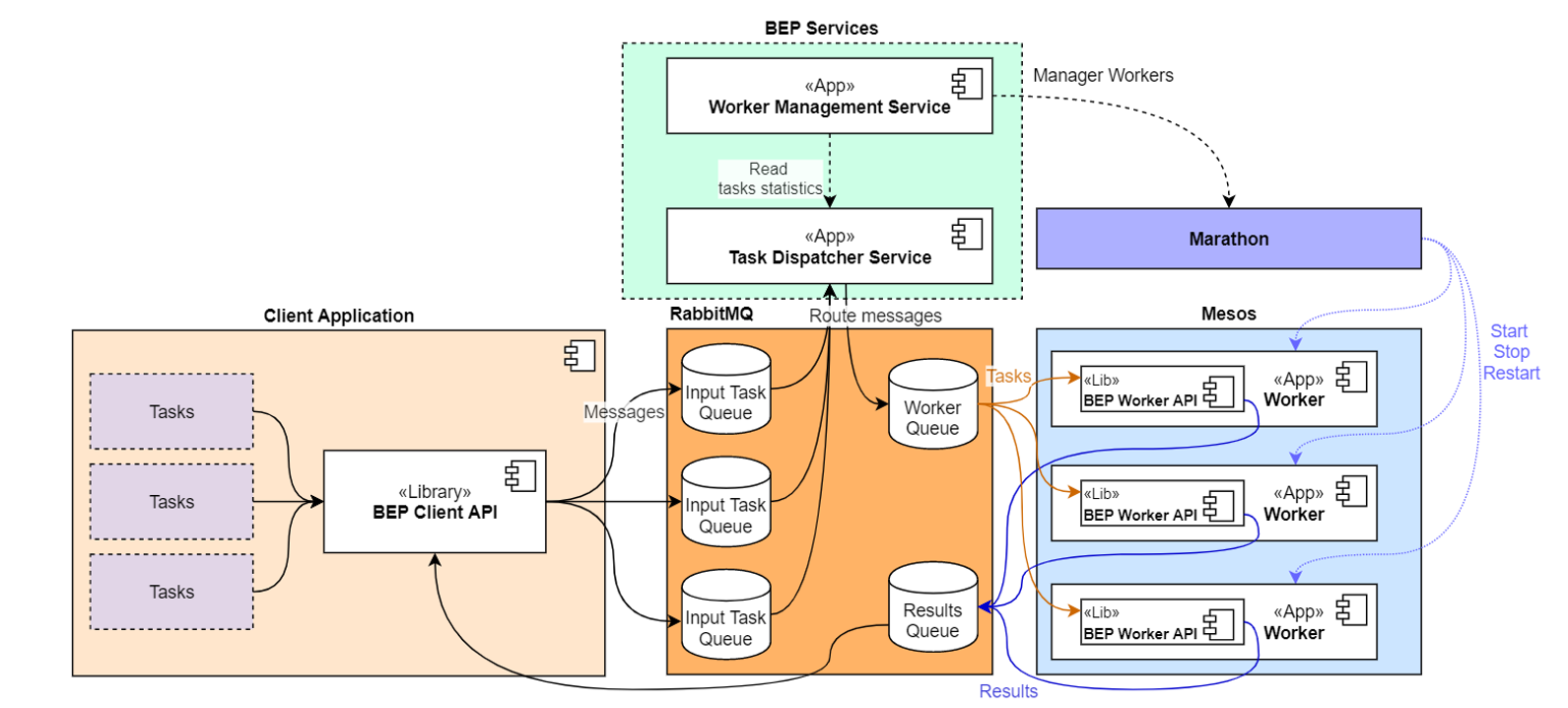
BEP services are as follows:
Task Dispatcher Service (TDS) routes tasks from input queues to Worker queues and enables fair-share task execution.
Worker Management Service (WMS) manages starts and stops of Worker processes using an orchestration platform, which is, currently, Marathon/ Mesos.
BEP framework API contains API to be implemented by the application interacting with BEP:
BEP client framework: API for client applications allowing to send tasks to BEP and receive task processing results.
BEP Worker framework: API for Worker applications allowing to get tasks from BEP and send their results back to it for further processing by client applications. For details, refer to BEP Workers | BEP Worker framework.
Additionally, the BEP platform comprises the following third-party services:
- RabbitMQ for message brokering
- Mesos + Marathon for cluster process orchestration
The diagram below displays the interaction of the components within BEP.
BEP flow
The diagram below illustrates the high-level overview of the BEP flow.
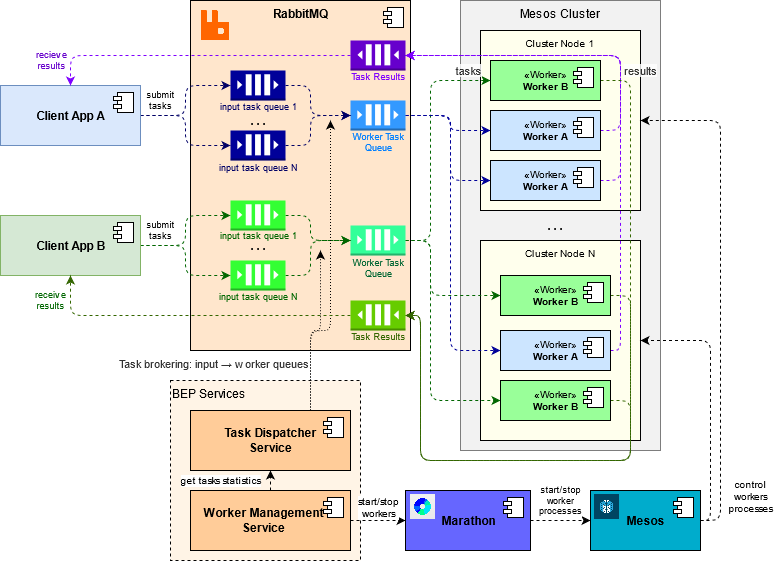
In the diagram, Client app A and B send tasks as messages to the messaging system (RabbitMQ) using BEP client API. These tasks are added to multiple input queues: for CT tasks—one queue per step in a BP instance, for AutoML step—one queue per model, and so on.
TDS monitors the queues, starting the Task Broker process for each group of input queues to be processed by a single Worker pool. Each Task Broker process creates a Worker queue and transfers messages from input queues to a Worker queue. Task Brokers select messages from the input queue using the round-robin approach and adjust the task brokering speed to the task processing speed, thus materializing the fair-share principle. For details, see the Task distribution article.
Within a specified interval, WMS acquires TDS statistics, such as input task count, task processing speed, and so on, and launches the scaling strategy algorithm. The latter calculates an optimal number of each Worker type to be used.
Based on the scaling strategy outcome, WMS prepares and sends commands to Marathon to start and stop Worker processes using REST API. In turn, Marathon calls Mesos internal API, and Mesos enables actual process management (starts or stops) on cluster nodes. For details, refer to the BEP Worker execution article.
BEP monitoring
The Work.AI platform enables monitoring of Worker health and performance, as well as the status of other BEP services. The monitoring is provided via the ELK stack and Kibana. For details, refer to the Monitoring overview article.
BEP management via UI
Control Tower features two interfaces that provide a transparent and flexible way to adjust the allocation of the Bot Execution Platform (BEP) resources and regulate processing priorities:
On the BEP Resource Management page, you can view current resource consumption metrics and adjust resource requirements and limits for each individual BEP worker pool. For details, see Manage bot execution resources from Control Tower.
On the BEP Workforces page, you can allocate BEP worker pools to specific Business Process definitions to optimize capacity utilization or address Service Level Agreement (SLA) violations. The allocation mechanism allows processing different loads without affecting the SLAs of executed Business Processes. For details, see Manage bot execution resources from Control Tower.