Apply versioning
Explore problem context
During the AI Agent lifecycle, there are cases when it is necessary to keep and execute multiple AI Agent versions on a single Control Tower. To support such a scenario, you need to clone and give a unique name and version to every single artifact of the AI Agent. You can perform this cloning process manually, but it takes a few hours and becomes a potential source of human mistakes. For sure, such work must be automated.
The Asset Bundle has a set of components, such as BCBs and third-party libraries, that contain version information by default. It has also resources to version, like Data Stores, S3 resources, Manual Task templates. To change a version, integrate these changes into a Business Process definition manually.
Data Stores that make your Data Model can be versioned like all other Assets of your project. However, increasing a Data Model version each time you release a new AI Agent version means that your Work.AI platform environment ends up having many Data Store instances. From a practical perspective, the Data Model changes rarely as compared to the Java code. Thus, your table_1_v1 and table_1_v2 are just copies of each other. Sometimes, you need to make changes to the Data Model, and often they are backward-compatible; for example, you introduce a new Data Store, add a column, or create an index.
Version inside ODF 2 Maven project
A project generated from the ODF 2 Simple Archetype is Maven-based by its nature, so it inherits a specific lifecycle and related artifacts. Additionally, WorkFusion-specific Bundle implementation introduces own versioning configuration points.
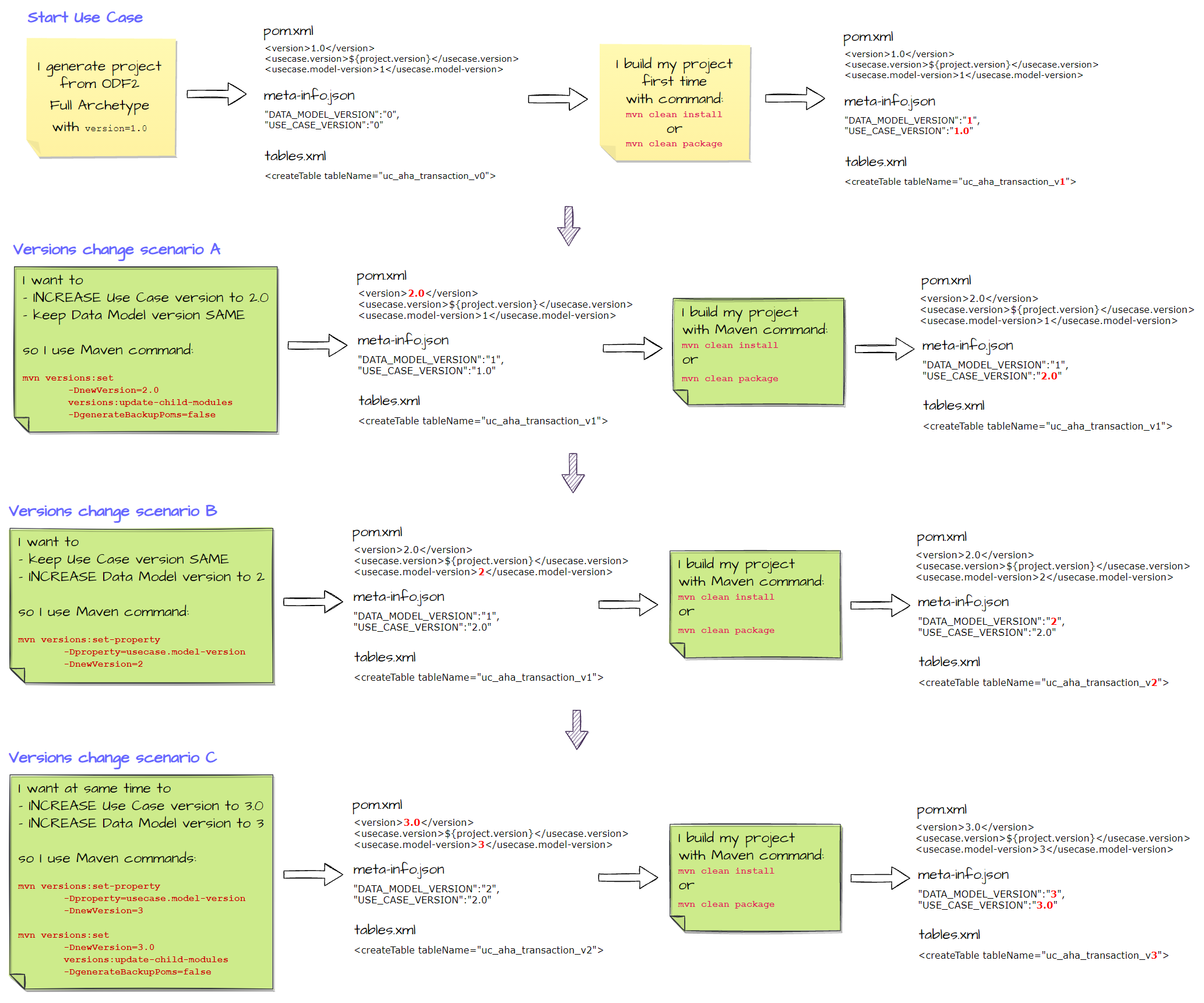
First, main configurations, such as AI Agent name and version, are created in the pom.xml files. Initially, the archetype generator puts values there. Later, it's recommended to use specific Maven command to change versions.
pom.xml works during the build time only. It is not included in the final artifact (Assets Bundle), so a separate [PROJECT]-package/src/main/resources/meta-info.json file is introduced where required versions are copied during the build. During the runtime on the server-side, when the Asset Bundle is processed by Import API, it takes necessary version data from meta-info.json. Remember to avoid manual modifications of the meta-info.json file as the content is dynamically changed.
Another important application of the versioning is the Data Store Liquibase migration definitions located in [PROJECT]-package/src/main/resources/datastore.migrations/. Data Store tables are created as described in the initial migration contained in tables.xml (changesets specified in YAML files are also supported). Each table name contains a Data Model version you can change, for example, <createTable tableName="uc_aha_transaction_v3">.
Use versioning cheatsheet
Here is a quick detailed view of how and when applied changes to versions modify mentioned configuration files. For changed files, refer to those marked with bold red: