Support Edge in IE mode
Why it is important
The Internet Explorer 11 desktop application is out of support as of June 15, 2022, for most Windows 10 versions.
Internet Explorer (IE) mode in Microsoft Edge is created for organizations that still need Internet Explorer 11 for backward compatibility with the existing websites but also require a modern browser.
The feature makes it easier for organizations to use one browser for both legacy or modern web applications. For more details, refer to the official documentation.
Prerequisites
To use Edge in IE mode, ensure that your environment meets the following pre-requirements:
- IE driver 4.3
- Microsoft Edge installed on the RPA server
Install the latest updates for Windows and Microsoft Edge. A failure to do so will likely cause IE mode to fail.
- Internet Explorer 11 enabled in Windows Features
- Microsoft Edge administrative template
- Supported Windows version and build with all required updates
For more information, see the IE mode documentation.
Usage in coded Bot Tasks
See the usage of Edge in IE mode for coded Bot Tasks below:
| Prerequisites | Usage in code | Implementation |
|---|---|---|
|
| Runs MS Edge with the IE driver. |
Usage in Recorder
The Open Website action from the Web section is modified to provide you with the Microsoft Edge and Microsoft Edge in IE mode browsers. There are two additional options in the Browser drop-down menu:
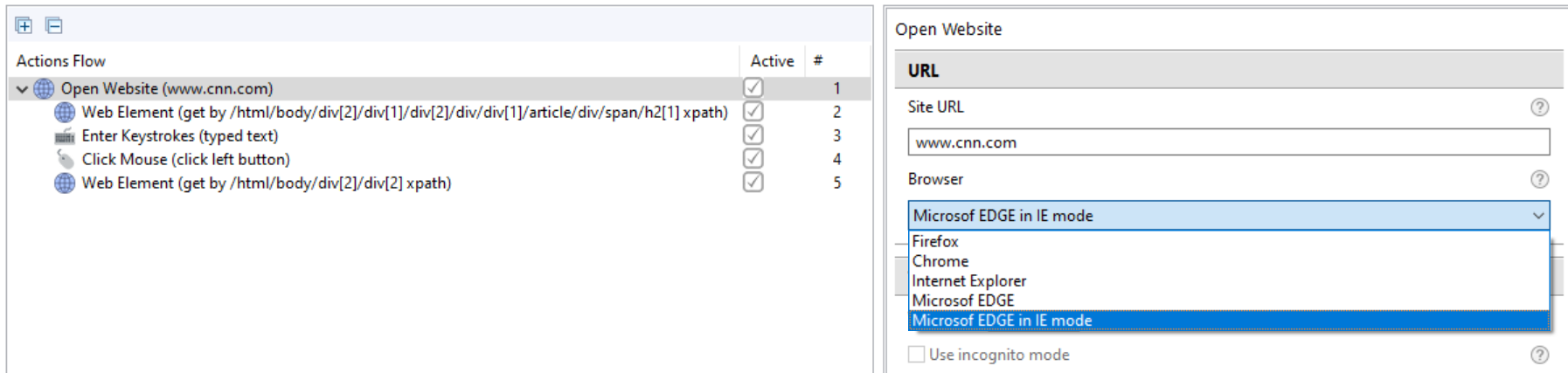
Timeout setup
You can specify a special timeout for the getWindowHandles() Selenium action. To set up, in worker.bat, define the Drpa.timeouts.http.getWindowHandles property. The default value is 15,000 milliseconds.
Known issues
For automations, a browser driver is used on top of a web browser. This driver is created and supported by the browser's team, so those teams are in charge of the driver features and backward compatibility.
The known issues and limitations of the latest IE driver are as follows:
- For
mouse().mouseMove(element.getCoordinates()), theelement.getCoordinates()method works differently than the previous versions of the IE driver. If you try to retrieve coordinates on an element not visible on the screen, it fails. - It is not recommended to run IE and Edge in IE mode simultaneously as it can lead to various issues and undefined behavior.
- Due to an unknown reason, the IE driver occasionally crashes during the session creation with
SocketTimeoutException. For more details, refer to Fix IE driver crash during session creation. - After
SocketTimeoutExceptionoccurs, a browser window can remain open. Flags are added for all browsers to enable cleaning opened windows before test execution. For more details, see Clean up drivers and open browsers before test execution. - Sometimes, the IE driver can hang on the
getWindowHandles()method. If the timeout breaks the operation, on calling thequitmethod, you can see the following exception in logs:
Expand to see the exception
2022-07-15 12:35:18,368 WARN  [pool-13-thread-1] com.workfusion.universal.state.UniversalDriverState.lambda$quit$1[:164] - Timeout occured while calling the web driver. Driver is probably frozen
Build info: version: 'unknown', revision: 'unknown', time: 'unknown'
System info: host: 'EC2AMAZ-9VMAUJS', ip: '10.100.37.217', os.name: 'Windows Server 2016', os.arch: 'amd64', os.version: '10.0', java.version: '1.8.0_322'
Driver info: driver.version: UniversalDriver
org.openqa.selenium.remote.DriverCallTimeoutException: Timeout occured while calling the web driver. Driver is probably frozen
Build info: version: 'unknown', revision: 'unknown', time: 'unknown'
System info: host: 'EC2AMAZ-9VMAUJS', ip: '10.100.37.217', os.name: 'Windows Server 2016', os.arch: 'amd64', os.version: '10.0', java.version: '1.8.0_322'
Driver info: driver.version: UniversalDriver
    at org.openqa.selenium.remote.RemoteWebDriver.execute(RemoteWebDriver.java:680) ~[rpa-selenium-remote-driver-CORE-38696-SNAPSHOT.jar!/:na]
    at org.openqa.selenium.remote.RemoteWebDriver.execute(RemoteWebDriver.java:725) ~[rpa-selenium-remote-driver-CORE-38696-SNAPSHOT.jar!/:na]
    at org.openqa.selenium.remote.RemoteWebDriver.close(RemoteWebDriver.java:487) ~[rpa-selenium-remote-driver-CORE-38696-SNAPSHOT.jar!/:na]
    at com.workfusion.universal.state.UniversalDriverState.closeAllWindowsForWeb(UniversalDriverState.java:185) ~[rpa-desktop-CORE-38696-CORE-38696-SNAPSHOT.jar!/:na]
    at com.workfusion.universal.state.UniversalDriverState.lambda$quit$1(UniversalDriverState.java:161) ~[rpa-desktop-CORE-38696-CORE-38696-SNAPSHOT.jar!/:na]
    at java.util.ArrayList.forEach(ArrayList.java:1259) ~[na:1.8.0_322]
    at com.workfusion.universal.state.UniversalDriverState.quit(UniversalDriverState.java:159) ~[rpa-desktop-CORE-38696-CORE-38696-SNAPSHOT.jar!/:na]
    at com.workfusion.universal.driver.UniversalDriver.quit(UniversalDriver.java:111) ~[rpa-desktop-CORE-38696-CORE-38696-SNAPSHOT.jar!/:na]
    at com.freedomoss.crowdcontrol.webharvest.selenium.wrapper.LocalDriverWrapper.quit(LocalDriverWrapper.java:222) ~[rpa-api-10.2.5.14-CORE-38696-CORE-38696-SNAPSHOT.jar!/:na]
    at com.freedomoss.crowdcontrol.webharvest.plugin.selenium.SeleniumUtils.closeDriverQuietly(SeleniumUtils.java:64) ~[bot-execution-api-provided-10.2.5.18-CORE-38696-SNAPSHOT.jar!/:na]
    at com.freedomoss.crowdcontrol.webharvest.plugin.selenium.RobotPlugin.closeDriver(RobotPlugin.java:364) ~[bot-execution-api-provided-10.2.5.18-CORE-38696-SNAPSHOT.jar!/:na]
    at com.freedomoss.crowdcontrol.webharvest.plugin.selenium.RobotPlugin.finishDriverExecution(RobotPlugin.java:235) ~[bot-execution-api-provided-10.2.5.18-CORE-38696-SNAPSHOT.jar!/:na]
    at com.freedomoss.crowdcontrol.webharvest.plugin.selenium.RobotPlugin.executePlugin(RobotPlugin.java:144) ~[bot-execution-api-provided-10.2.5.18-CORE-38696-SNAPSHOT.jar!/:na]
    at org.webharvest.runtime.processors.WebHarvestPlugin.execute(WebHarvestPlugin.java:125) ~[workfusion-webharvest-core-1.6.114.jar!/:na]
    at org.webharvest.runtime.processors.BaseProcessor.run(BaseProcessor.java:127) ~[workfusion-webharvest-core-1.6.114.jar!/:na]
    at org.webharvest.runtime.processors.BodyProcessor.execute(BodyProcessor.java:27) ~[workfusion-webharvest-core-1.6.114.jar!/:na]
    at org.webharvest.runtime.processors.WebHarvestPlugin.executeBody(WebHarvestPlugin.java:246) ~[workfusion-webharvest-core-1.6.114.jar!/:na]
    at com.freedomoss.crowdcontrol.webharvest.plugin.selenium.RoboticsFlowPlugin.executePlugin(RoboticsFlowPlugin.java:110) ~[bot-execution-api-provided-10.2.5.18-CORE-38696-SNAPSHOT.jar!/:na]
    at org.webharvest.runtime.processors.WebHarvestPlugin.execute(WebHarvestPlugin.java:125) ~[workfusion-webharvest-core-1.6.114.jar!/:na]
    at org.webharvest.runtime.processors.BaseProcessor.run(BaseProcessor.java:127) ~[workfusion-webharvest-core-1.6.114.jar!/:na]
    at org.webharvest.runtime.Scraper.execute(Scraper.java:169) ~[workfusion-webharvest-core-1.6.114.jar!/:na]
    at org.webharvest.runtime.CustomScraper.execute(CustomScraper.java:37) ~[bot-execution-core-10.2.5.18-CORE-38696-SNAPSHOT.jar!/:na]
    at org.webharvest.runtime.Scraper.execute(Scraper.java:182) ~[workfusion-webharvest-core-1.6.114.jar!/:na]
Edge in IE mode doesn't support the following Internet Explorer functionality:
- Internet Explorer toolbars
- Internet Explorer settings and group policies that control the navigation menu
- IE11 or Microsoft Edge F12 developer tools
Edge in IE mode uses the Internet Explorer Selenium driver. Thus, all the restrictions and limitations of Internet Explorer are also in effect while using Edge in IE mode. An example of such limitations is monitor scaling: using a scale other than 100% causes the driver to fail.
While using Edge in IE mode, you can experience problems while typing text to various controls on the websites known from Internet Explorer. If a desired text does not appear in the text field or appears only partially, it is recommended to use the following code:
elementName = $(byXpath("//input[contains(@type, 'name')]"));
elementName.scrollTo()
mouse().mouseMove(elementName.getCoordinates());
elementName.sendKeys("Ju~Lee");
Where
elementName.scrollTo()andmouse().mouseMove(elementName.getCoordinates());directly beforesendKeyshelp with focusing issues. Both of them are needed, becauseelementName.scrollTo()moves an element in view allowingelementName.getCoordinates()to work without issues.