
Availability
On the Availability tab, you can restrict access to a task, depending on the number of already completed tasks, current time, country, and geolocation of workers.
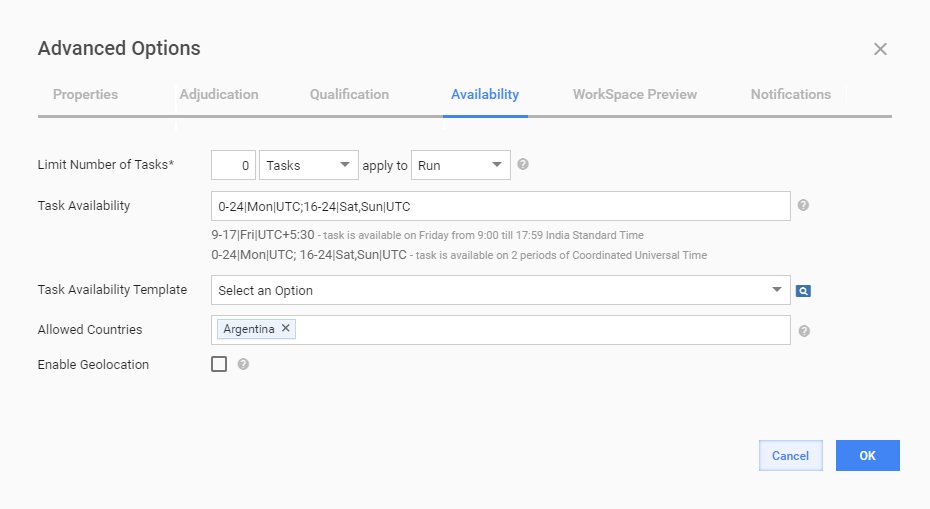
Set availability
| Field | Description |
|---|---|
| Limit Number of Tasks | The maximum number of tasks a worker can complete as an exact number or a percentage of the total endpoint task amount. Set to 0 for an unlimited number of tasks. The limit can be applied to the following:
|
| Task Availability | The time during which a task is available to workers on target endpoints. If you want to show the task during business hours: 8-17|Sun,Mon,Tue,Wed,Thu,Fri,Sat By default, the time is set to the UTC timezone. You can specify multiple time frames and your timezone: 8-17|Mon,Tue,Wed,Thu,Fri|UTC-4; 16-20|Sat,Sun|UTC-7 |
| Task Availability Template | Set a message to be displayed to workers when they try to view or accept an unavailable task. |
| Allowed Countries | This is a text input field with a country lookup. Start typing a country name and select a suitable item from autocomplete suggestions. You can add several countries or delete data if needed. |
| Enable Geolocation | Enabling this option causes workers to see only tasks that are geographically close to their current location. The location is requested by the browser. For details, see the Enable geolocation section below. |
Enable geolocation
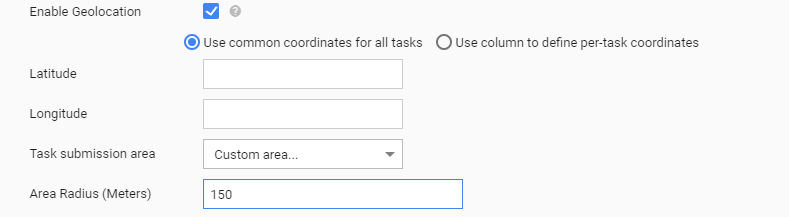
As a result of enabling the option, workers see only Manual Tasks that are geographically close to their current location. The location is requested by the browser.
| Field | Description |
|---|---|
| Use common coordinates for all tasks | When the option is selected, specify the Latitude and Longitude values to be used for all task records. |
| Use column to define per-task coordinates | When the option is selected, map the Latitude and Longitude fields to the corresponding columns of the input data file.In this case, each task record has unique coordinates. |
| Task Submission Area | Select one of the following options:
|