
Copy Task
In the Intelligent Automation Cloud, you can save time and effort by re-using previously created Tasks and Business Processes.
Tasks with the same name have a common template (Definition) – if you modify the design or parameters of one Task and save it, all other Tasks with the same name will be affected.
Tags are unique for each Task, hence you can use different Tags to distinguish Tasks among the Tasks with the same name (of the same Definition).
You can copy a Task by selecting Copy in the Actions dropdown.
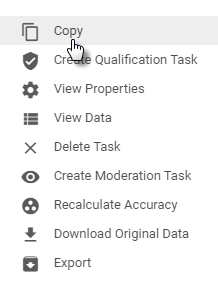
If you have copied a Task with the Create an independent task option selected – a new Task instance is created in the Intelligent Automation Cloud, and it will not be linked to its source Task.
Copy task
To run the same Task with new Data, select the Copy Task action.
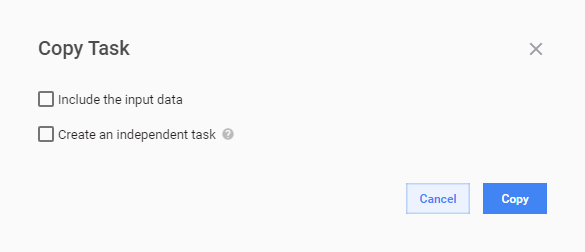
As a result, a new Task instance with the same name as original is created. The Data file is not copied – you will need to upload your Data.
All changes to this new Task will affect Tasks with the same name.
If you want to "unlink" this Task, change its name on the Task Design tab and save the Task.
Include input data
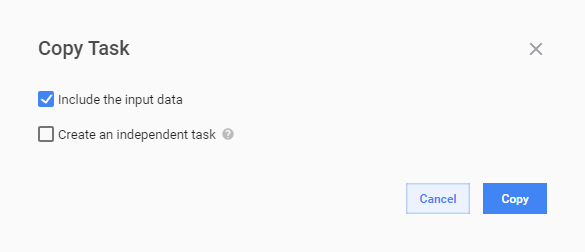
To re-run the same Task with the same Data, select the Include Task the input data option. This action is helpful if some issues occurred.
As a result, a new Task instance with the same name and Data as original is created.
All changes to this new Task will affect Tasks with the same name.
If you want to "unlink" this Task, change its name on the Task Design tab and save the Task.
Create independent task
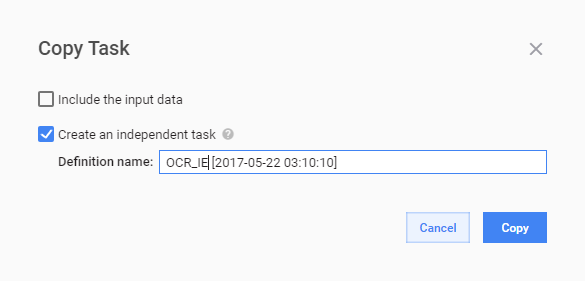
Select the Create an independent task option to:
- avoid affecting all Task instances with the same name
- create a new Task instance based on an existing one
You will be prompted to enter a new Task name in the Definition name field.
This Task will not be linked to its original.
Export/import task
Intelligent Automation Cloud Enterprise provides capability to copy (or deploy or migrate) manual tasks, business processes, and operations from one Control Tower instance to another. To migrate your work, export business process or task to a single .xml file or a .zip package on a source instance and import these files to the target instance. With this approach, you can organize solution promotion from development environment to production.
There are two migration options: