Analytics components and licensing
WorkFusion Analytics provides you with valuable insights into the performance and health of Business Processes.
High-level components
WorkFusion Analytics is based on a data visualization tool that builds dashboards and enables visual graphical analysis and filtering control for them.
In terms of high-level components, WorkFusion Analytics consists of the following:
Server: dashboards are published there, and Control Tower takes them from the server to display on its Analytics page.
Desktop: helps to create new dashboards within self-service BI and customize out-of-the-box dashboards.
Dashboards in Control Tower
The dashboard is a reporting mechanism to aggregate and display metrics and key performance indicators (KPIs). It consists of one or more charts, tables, and numeric metrics. Dashboards help to improve decision-making by revealing and communicating in-context insight into business performance.
To view Analytics dashboards, go to the Control Tower main menu and click Analytics. Out of the box, the following dashboards are available:
In addition to the out-of-the-box dashboards above, you can make use of the following visualizations:
If you have other questions regarding Analytics in WorkFusion Intelligent Automation Cloud, see also Study Analytics FAQs. To better understand WorkFusion Analytics and train related skills, take the Business Intelligence Analyst course with WorkFusion Automation Academy https://automationacademy.com.
note
You can restrict access to specific dashboards for certain users, groups, or roles. For more information, see Set up filters for collaborative work.
Licensing
To work with WorkFusion Analytics, you need the following:
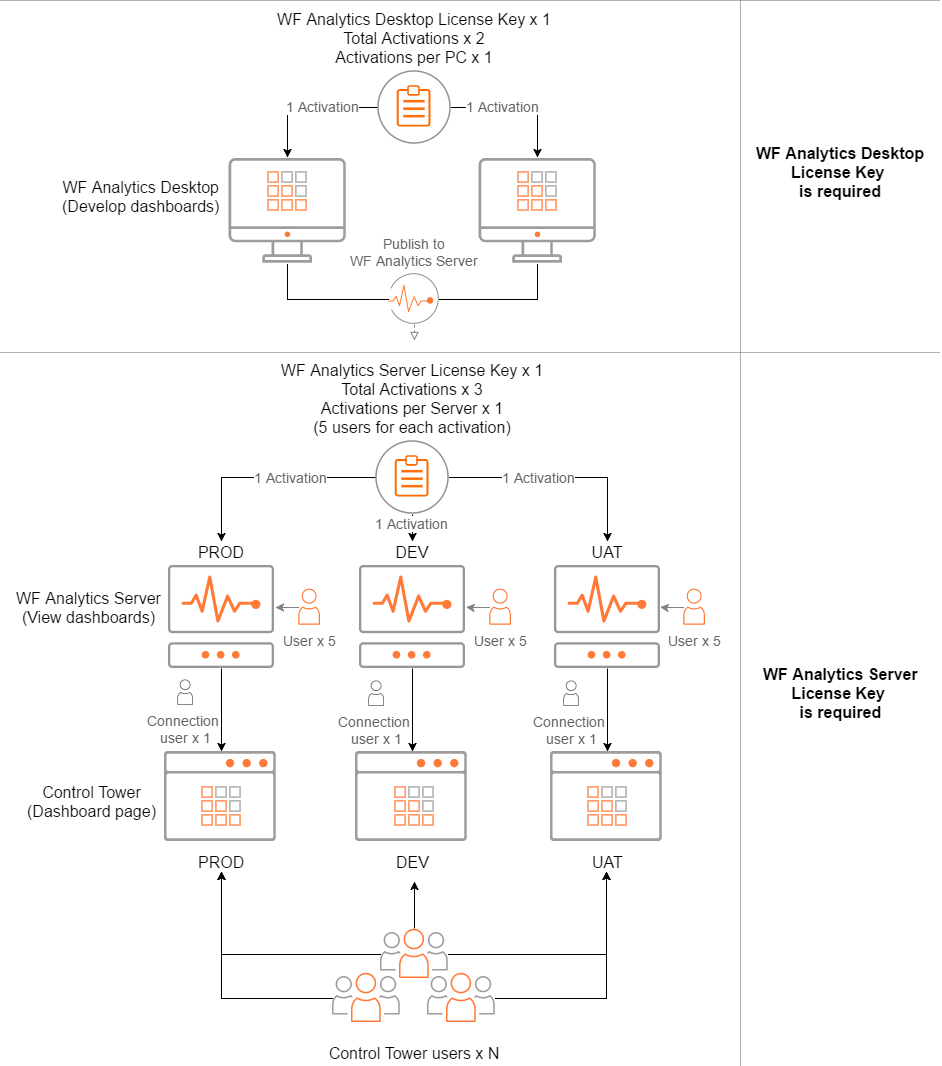
Desktop License Key is available for 2 activations—1 activation per PC. You can use it only for WorkFusion Analytics Desktop (not Tableau).
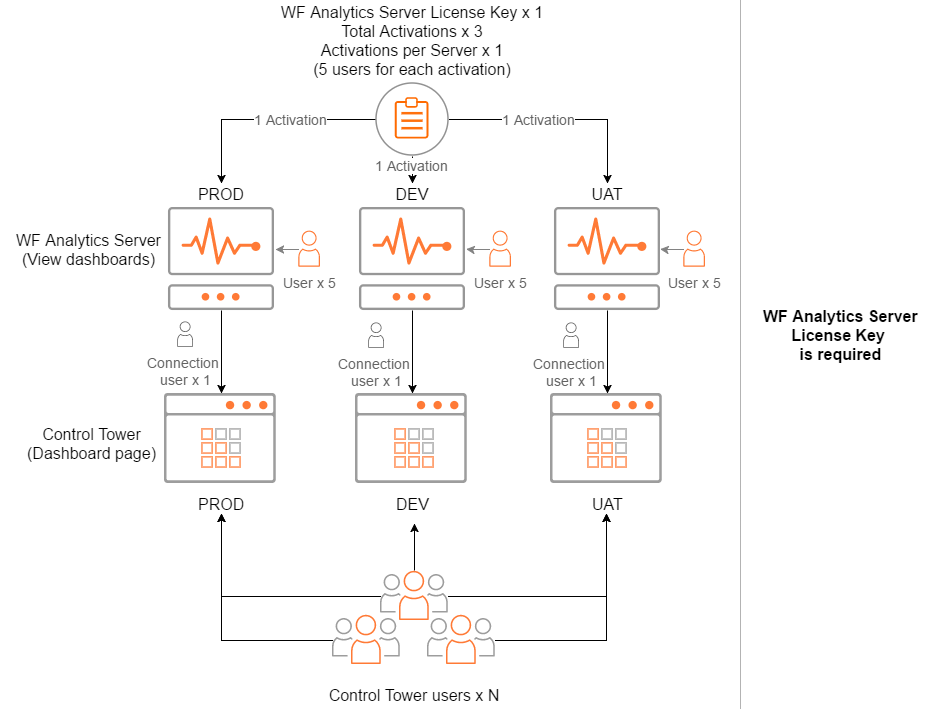
Server License Key is available for 3 activations—1 activation per server (supposing you are using the same key on Dev, UAT, Prod environments). You can use it only for WorkFusion Analytics Server (not Tableau).
Each activation provides access to the WF Analytics Server web application for 5 WF Analytics Server users. One of the five users is intended for the Analytics-Control Tower integration. Supposedly, you will not need more than five WF Analytics Server users to view and interact with dashboards in the application. Thus, one Server License Key is enough.
To view dashboards in Control Tower, only one Server License Key is required. If Analytics is enabled in Control Tower, any CT user can view dashboards, and the number of such viewers is unlimited.
Below, you can see license usage schemes for the following cases:
OOTB dashboards
OOTB dashboards with the development and customization option