
← Back to Investigate non-operational BP
The following symptoms can indicate your issue is related to a non-operational Business Process (BP):
The Event log includes errors.
Your BP is stuck at a specific step. The Event log includes no related indications.
Your BP is not triggered by the Scheduler, another BP, or REST API.
If you detect any of the preceding symptoms, follow the steps below.
Locate issue within Business Process
To locate the issue within a BP, act as follows:
Find the step where the issue occurred.
Check that the BP's or step's input data is valid, in particular:
The file format is correct (CSV, XML).
Data files contain no empty fields.
All links are valid and accessible.
In your BP, go to the Results tab, select the failed step from the dropdown list, and click the exclamation mark to view the event log.
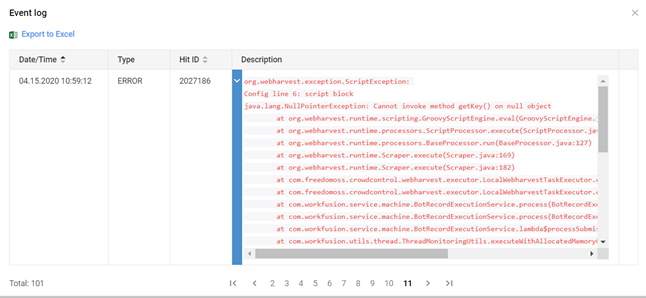
In the event log, find the first exception using pagination (pay attention to the type of the
ERRORlog level) and check its stack trace as shown below. Mind that when a user logs into a Control Tower instance using a time zone different from the Greenwich Mean Time (GMT), the Business Process event log and any exported event log sheets are in GMT, irrespective of the user time zone.
caution
If you don't see any stack trace information in the event logs, make sure your custom logging does not overwrite or hide the original exception.
note
Since the event log table has a content size limit, you can find the full stack trace of the exception in webharvest-config.log located on the following path: INSTALL_DIR/workfusion/logs/.
Find BP exception root cause
To find the root cause of the BP exception located in the section above, conduct all or any of the below investigations.
Investigate script block issues
If the issue stems from the <script> block, you might see the following exception in the event log:
org.webharvest.exception.ScriptException:
Config line 6: script block
java.lang.NullPointerException: Cannot invoke method getKey() on null object
       at org.webharvest.runtime.scripting.GroovyScriptEngine.eval(GroovyScriptEngine.java:138)
        …
Caused by: java.lang.NullPointerException: Cannot invoke method getKey() on null object
       at org.codehaus.groovy.runtime.NullObject.invokeMethod(NullObject.java:91)
       at org.codehaus.groovy.vmplugin.v7.IndyGuardsFiltersAndSignatures.invokeGroovyObjectInvoker(IndyGuardsFiltersAndSignatures.java:164)
       at org.codehaus.groovy.vmplugin.v7.IndyInterface.selectMethod(IndyInterface.java:237)
       at Script1_genScript_29.run(Script1_genScript_29.groovy:11)
       at groovy.lang.GroovyShell.evaluate(GroovyShell.java:444)
To investigate, follow the steps below:
Sometimes, you can easily locate the root cause of the issue right in the
<script>block of a Bot Config file.In the example below, the section
Caused by: java.lang.NullPointerException: Cannot invoke method getKey() on null objectincludes the line:at Script1_genScript_29.run(Script1_genScript_29.groovy:11). This points to the exact line in the Bot Config where the issue comes from.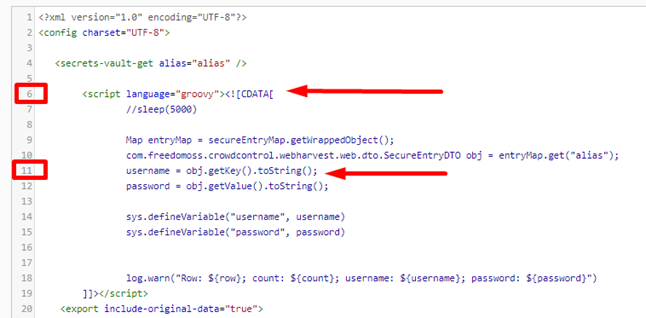
If you failed, go to Step 2.
In case you cannot locate the issue right in the
<script>block of the Bot Config file, do as follows:- Add additional logs to the code.
- Rerun the BP. To find out the exact place (method, class, config file, and so on) where the exception occurred, analyze the general issues logs.
- Ask your internal development team to verify and correct (if needed).
Find solution
Study the solutions appropriate for the step you identified: