
WorkSpace is not available
The article describes issues related to the WorkSpace application being unavailable to users.
WorkSpace endpoint is not available
Firstly, work with your teams to exclude all possible external causes, as well as browser, firewalls, and internal security barriers.
Check user permissions: the resolution can be a matter of granting an appropriate role to view assignments. For details, refer to Manage Control Tower roles and permissions and Manage and assign realm and client roles.
When you're confident it's not a trivial reason, proceed as described below:
Go to the Master server and execute the following command:
wfmanager statusRun another command:
wfmanager status marathon-apps
The output should be like this:
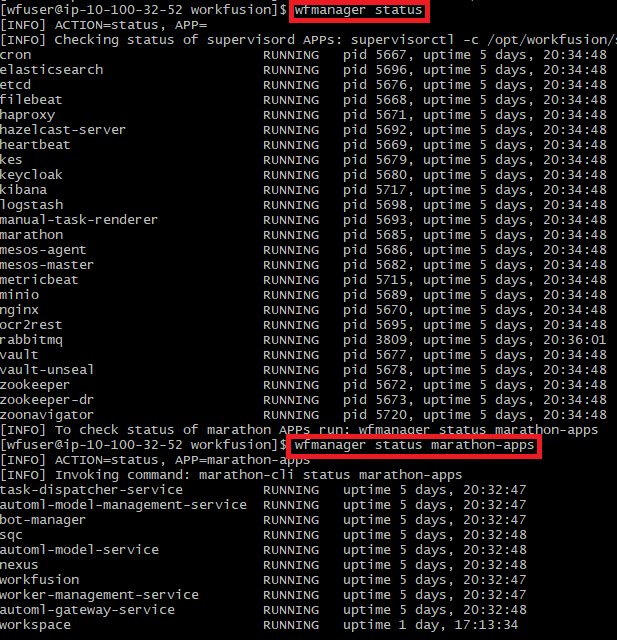
All services should be in the RUNNING state. When you see any anomalies, try to start the service by <SERVICE_NAME>:
wfmanager start <SERVICE_NAME>
Eventually, when you see WorkSpace running, try to restart the application by executing the following command:
wfmanager restart <SERVICE_NAME>
Pay attention to how long WorkSpace has been running. It might have been restarted when, for instance, someone modified the application properties or after the app failed for some reason. The piece of information can shed light on possible causes of the fallback.
When roles are correct and restarting fails to bring WorkSpace back
To investigate the issue, follow the steps below:
On the Master server, go to the following directory:
/opt/workfusion/workspace/logsExecute
cat workspace/log/jsonand copy the latest entries. Alternatively, for convenient access, you can save the log file in the/tmpshared folder.Get the logs and investigate the possible reason for the application being down.
The most common issues are property changes, database issues, or infrastructure failures. Therefore, it's good to look for bean creation issues or simply application run failures.
You may also want to increase the logging level to DEBUG. To learn how to do this, follow the instructions in the Change component's log level topic.
View also: