Set up MSSQL TDE
Transparent Data Encryption (TDE) is the MSSQL feature to encrypt database data and transaction log without changing an application. DB engine encrypts or decrypts data during the query execution.
important
TDE is supported only in the SQL Server Enterprise Edition.
Setup Process
Create master key
To configure the TDE on the database, first, create a master key in the master database. Only one master key can be made per each SQL Server instance.
To generate the master key, run the following query and remember to specify the password for it:
USE master
go
CREATE MASTER KEY ENCRYPTION
BY PASSWORD='<your master password>';   --Use strong password here
go
Create certificate
After generating the master key, create the Certificate to encrypt the Database Encryption Key. The previously created master key will protect the Certificate.
USE master
GO
CREATE CERTIFICATE TDE_CERT
WITH SUBJECT='TDE_certificate';
go
Copy certificate to replicas
If you don't use AlwaysON, skip this step.
If you use the AlwaysON feature of SQL Server, you need to have the same certificate installed on all servers.
For that, do the following:
On all other servers, create master keys described in Step 1. It's not necessary to have the same password on all servers.
Backup previously created certificate:
USE master
GO
BACKUP CERTIFICATE TDE_CERT
TO FILE = 'C:\Temp\TDE_CERT'                         --Use the directory with access from SQL Server
WITH PRIVATE KEY (file='C:\Temp\TDE_CERT_Pirvate',
ENCRYPTION BY PASSWORD='<backup file password>');    --Use your password here
Copy the certificate and the private key files to all your servers to a folder where SQL Server can access it.
Restore certificate on all the servers:
CREATE CERTIFICATE TDE_CERT
FROM FILE = 'C:\Temp\TDE_CERT'
WITH PRIVATE KEY
(
    FILE = 'C:\Temp\TDE_CERT_Pirvate',
    DECRYPTION BY PASSWORD = '<backup file password>' --The password used to create cert backup
);
Create database encryption key
The DB encryption key uses a certificate to encrypt DB data.
To create the key, run the following queries:
USE workfusion;
GO
CREATE DATABASE ENCRYPTION KEY
WITH ALGORITHM = AES_128
ENCRYPTION BY SERVER CERTIFICATE TDE_CERT;
GO
If you use AlwaysON, run the earlier command and the next step on the PRIMARY server. As these changes are related to DB, they will be replicated on all replicas.
To look for the encrytion key please use the following query:
SELECT DB_NAME(database_id) AS DatabaseName,
       encryption_state AS EncryptionState,
       key_algorithm AS Algorithm,
       key_length AS KeyLength
FROM sys.dm_database_encryption_keys
WHERE DB_NAME(database_id) = 'workfusion';
GO

Enable TDE in workfusion DB
To enable TDE in the database, run the query:
ALTER DATABASE workfusion SET ENCRYPTION ON;
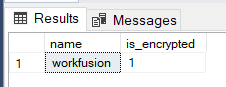
To check if the TDE is turned on for the DB, use the following query:
SELECT name,
       is_encrypted
FROM sys.databases
WHERE name = 'workfusion';