Full Archetype
The article dwells on the structure of a project created from the ODF 2 Full Archetype. For more details on creating a new project, see Start Maven project.
The new class-loading approach enables the isolation between BCB classes and application ones. If BCB classes use a library packaged together with the BCB, the BCB class loader loads the library classes from the BCB even if the Worker app contains the library as well. For ODF 2, the new class loader is enabled by default. To start an ODF 2 project, a single Archetype is used, which applies the new class-loading approach.
How Java sources match Business Processes
Some Bot Task Java classes in the BCB module do not match the corresponding Business Process one-to-one steps. In fact, ODF 2 Core provides standard tasks. You can find standard Bot Tasks generated from Core among other reusable Bot Tasks. In most cases, you don't need to change standard tasks. For example, in the Submission Business Process, a Monitor fetches transactions with the ready for submission status, and a Finalizer sets a new status reflecting that the submission is completed, meaning all those actions are pretty framework flow-standard.
If you realize the need to implement your own Monitor or Finalizer, add a class to the proper BCB module. For more details, refer to Multi-process Use Case design.
Bot Task names in a Business Process are generated automatically in two stages:
During the Maven build, a Bot Task XML is generated. The Bot Task Java class name is reworked into a lower case split by "-", with "Task" ignored. For example,
InvoiceSubmissionTaskturns intoinvoice-submission.xml. Alternatively, a Bot Task can be explicitly named by a developer. To create a Bot Task, refer to Create Bot Task | @BotTask annotation.During the BCB deployment, Bot Task names are generated using the
<name>property from the BCB modulepom.xmland the Use Case version from the rootpom.xml. For example,invoice-submission.xmlfrom<name>odf2-bcb</name>of v1.0.0 is named asodf2-bcb v1.0.0 (invoice-submission)in Control Tower.
Project structure
The ODF 2 project created from the Full Archetype is a normal Maven multi-module project with the following structure:
- example-project-bcb
- example-project-package
build.groovypom.xml
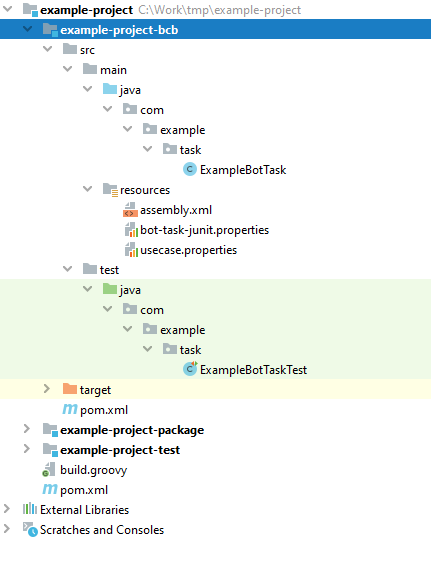
When opened in IntelliJ IDEA, the project looks as follows:

Besides a couple of Maven sub-modules, the project contains two files:
build.groovy: a Jenkins Pipeline script that helps to create a proper continuous integration and continuous delivery process. For more details, see Basic continuous integration.pom.xml: the root configuration of the Maven project. Basically, each Maven module and sub-module has its ownpom.xmlfile. The root file contains a primary configuration like repository settings, dependency management, profiles and modules specification. Also, the rootpom.xmlfile is the place where Use Case and ODF 2 versions are configured:<properties>
<usecase.name>uc-name</usecase.name>
<usecase.code>uc-code</usecase.code>
<usecase.version>${project.version}</usecase.version>
...
<odf2.version>X.X.X.X</odf2.version>
</properties>
The framework version depends on your platform version. For the appropriate version of ODF 2, refer to the compatibility matrix page.
BCB module
The BCB module is a common module of the project to store your Bot Tasks and related Java code. The module consists of different packages:
- The model package contains Data Store entities like
Attachment,Email,Invoice. - The repository package contains the corresponding
OrmLiterepositories. - The task package is the main location of all Bot Tasks within the BCB.
Intake Bot Tasks
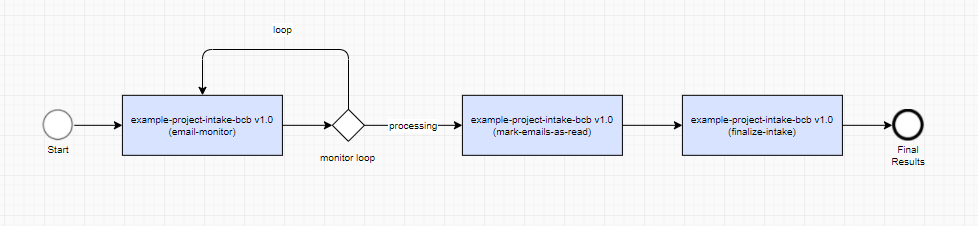
The task.intake package corresponds to the Intake Business Process.
The package comes with a couple of Intake task examples:
EmailMonitorTask: a Monitor Task to create newEmailentitiesMarkEmailsAsReadTask: a task to emulate the intake business logic, for example, to mark emails as read
The Intake Business Process definition starts with a Monitor Task. The task with the business logic is followed by a finalization task that is available directly from the ODF 2 framework.
Also, you might want to check corresponding EmailMonitorTaskTest from the test folder. That is a decent example of how to test a Monitor Task using the bot-task-junit library.
Processing Bot Tasks
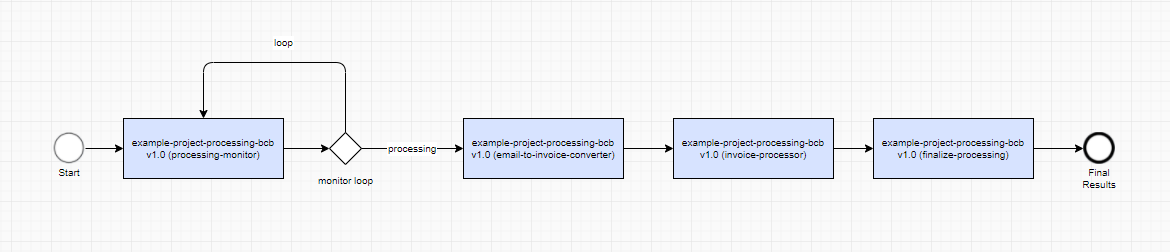
The task.processing package corresponds to the Processing Business Process.
The package comes with a couple of Processing task examples:
EmailToInvoiceConverterTask: an input converter task responsible for converting input entities (Emails) into business entities (Invoices)InvoiceProcessorTask: a task to emulate business entity processing logic
The Processing Business Process definition starts with the Processing Monitor Task responsible for getting transactions to be processed from the Data Store. This task comes directly from the ODF 2 framework. EmailToInvoiceConverterTask converts the Email entities into Invoices, which in their turn, are processed by InvoiceProcessorTask. At the end of the Business Process, there is a default finalization task.
In terms of tests, there are InvoiceProcessorTaskTest and EmailToInvoiceConverterTaskTest, examples of how to test Bot Tasks with extensive use of the OrmLite repositories.
Submission Bot Tasks
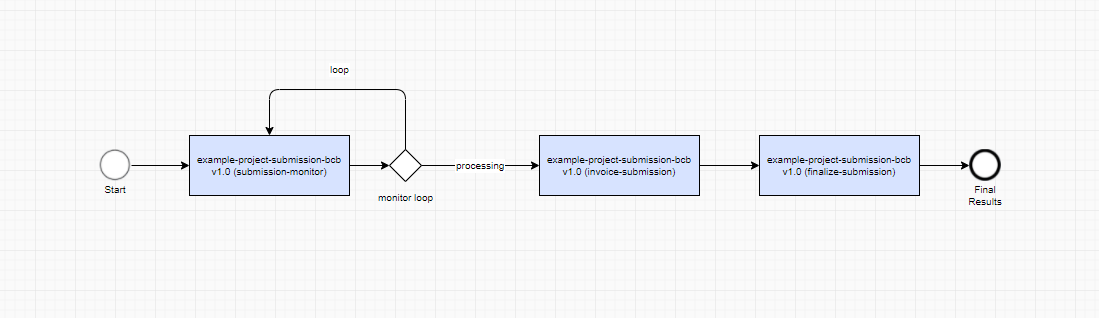
The task.submission package corresponds to the Submission Business Process.
The package comes with only one Submission task example:
InvoiceSubmissionTask: a task to emulate theInvoiceentity data to be submitted into the Data Mart
The Submission Business Process definition starts with the Monitor Task and ends with the finalization task. Both of these tasks are part of the ODF 2 framework. In the middle, there is InvoiceSubmissionTask that emulates the logic of the Invoice entity data submission.
Error Handling Bot Tasks
The task.errorhandling package corresponds to the Error Handling Business Process.
The module comes with only one error handling task example:
ExceptionProcessorTask: a task to define whether manual error handling is needed
The Error Handling Business Process is expected to analyze an error related to a transaction and try some form of error recovery. In the example, ExceptionProcessorTask sends certain transactions directly to the finalizer task, and the rest is processed with the help of the Manual Task.
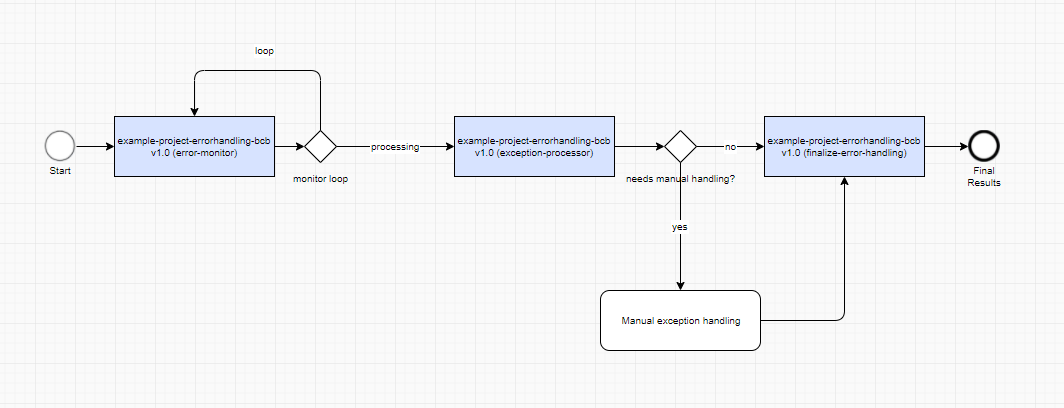
In terms of tests, there is ExceptionProcessorTaskTest, an example of how to test Bot Tasks with error handling logic.
Resources
The BCB module also contains several important files inside the resources folder, which you must be aware of:
- The
usecase.propertiesfile is populated with actual Use Case settings during a project build for the ODF 2 framework to read it at runtime and understand which Use Case is associated with the current project. This is especially crucial for Data Stores since a Data Store name consists of a Use Case code and version. - The
assembly.xmlfile is responsible for assembling your BCB into a final JAR file compatible with the Control Tower environment. Usually, you don't have to change this file. - The
bot-task-junit.propertiesfile contains settings for thebot-task-junitlibrary to be used during the test execution.
Package module
The package module or the Asset Bundle module comprises a Business Process and its supporting resources, such as AutoML models, bot configs, Data Stores, templates, and others.
In our case, the package module already contains four Business Processes that correspond to the modules mentioned above: Data_Intake.zip, Data_Processing.zip, Data_Submission.zip, and Error_Handling.zip. Also, there is package.xml inside the assembly folder. This file is a descriptor for copying dynamic resources.
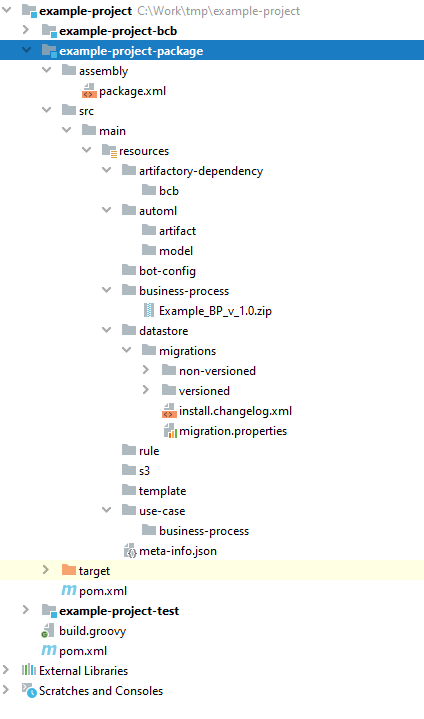
Let's describe each folder inside the package module.
/artifactory-dependency
The directory is required if a BCB (Bot Config Bundle) is used. Otherwise, it is optional. The content of the directory maps to zero, one, or multiple BCBs.
In most cases, there is no need to add assets to the artifactory-dependency directory. After you run mvn clean package, Bot Config Bundle files from the BCB modules of the same project are deployed automatically to the target/artifactory-dependency folder.
/automl
The directory maps to zero, one, or multiple AutoML models (trained or not). Each trained model is a sub-directory of the model directory. Each model artifact (not trained yet) is a sub-directory of the artifact directory. When there is no such directory in an Asset Bundle, it means all Manual Tasks have the No Automation AutoML setting.
For instructions to pack models customized with AutoML SDK, refer to Import model customized with AutoML SDK.
/bot-config
The directory contains bot steps (XML) that appear in Control Tower and are essential for designing Business Processes. It is intended to store all the bot steps the BCB module doesn't include.
Packing this directory is optional unless you have legacy bot configurations that are not in BCBs, for example, those created before the transition to the ODF framework.
Do not copy XML data from a BCB to the bot-config directory. Once the BCB import is over, all the necessary bot steps reappear in Control Tower automatically.
/business-process
Pack the directory with Business Process packages created as .zip files in a local or server Control Tower in the development environment.
To add a new Business Process, the recommended practice is following:
- Create a Business Process in a server or local Control Tower in your development environment.
- Export the Business Process from Control Tower.
- Put the exported Business Process into the
resources/business-processfolder.
Apply a similar workflow when you need to update a Business Process to incorporate BCB code changes.
Be aware that the system automatically creates a Business Process draft for every imported Business Process package in Control Tower.
/datastore
The datastore directory serves as a storage for any content essential for creating and maintaining Business Processes. It is also the most convenient way to share temporary data across bot steps.
Pack the directory with CSV files to be used for creating Data Stores. One CSV file corresponds to one Data Store. The names of CSV files map to the names of Data Stores.
The data format in the files must be the same as if you uploaded data to a Data Store via Control Tower. Each file must contain headers and, at least, one record.
Mind that Data Stores created based on the files contain a single data type, NVarchar(max).
The datastore folder created from the ODF 2 Full Archetype already contains a Standardized Data Store schema. For details, read Manage Data Model.
/s3
Pack the directory with static resources if you need those for your Use Case. Each top-level sub-directory in the s3 directory corresponds to an S3 bucket. Therefore, the names of these top-level sub-directories in the s3 directory must map to the names of S3 buckets.
/template
The directory contains zero, one, or multiple XML files, each representing a Template. An XML file name maps to a Template name.
A macro sub-directory can reside inside the template directory, representing Macro Templates used for advanced Manual Task customizations.
When simple Task Designer manipulations or Answer configurations are not enough to achieve the desired behavior or interface in a Manual Task, Macro Templates are created in Control Tower with custom HTML, CSS, or JavaScript code. Subsequently, the Macro Templates can be re-used in a base Manual Task template via the <include> tag.
/use-case
If you have a fully developed Business Process, packing the /use-case directory is optional.
You can include XML files representing Operations into the directory if you need them to develop a Business Process. In this case, you put the files into the directory for initial Asset Bundle deployment without a Business Process package. See the Package assets into an Asset Bundle for deployment | /business-process for packing the business-process directory.
meta-info.json
The file is required and must be a valid JSON file. The NAME and WF_VERSION parameter pairs are required.
The USE_CASE_CODE and USE_CASE_VERSION parameters are optional but recommended since they allow viewing Use Case versions on the Use Cases list. They define the Use Case version where the imported bundle is to be applied. All assets in the Use Case are to be tracked within the version. If the parameters are used, they must be used together.
The following restrictions apply to the parameters:
USE_CASE_CODEcan contain letters in uppercase, dashes ("-"), underlines ("_"), and digits.USE_CASE_VERSIONmust contain a semantic version of a Use Case (see Semantic Versioning), for example, 1.0.2, 2.3.5-SNAPSHOT.
If an Asset Bundle is structured correctly, it contains all components needed for Business Processes to run n a target (production) environment. However, any component from the structure above is optional, except for meta-info.json.