Switch ABBYY OCR API from FRE11 to FRE12
The upgrade of the ABBYY FineReader Engine SDK to version 12 resulted in a number of improvements, enabling you to select between FRE SDK 11 and FRE SDK 12. Thus, a second (alternative) OCR engine was added with advanced recognition of tables and texts in images, as well as significantly improved recognition of Japanese characters.
You can switch from FR Engine 11 to FR Engine 12 and vice versa as described below.
API changes
For using FRE12 via API, change the existing v1 prefix to v2.
v1: FRE11 functionality is still valid and available for use.v2: FRE12 functionality is valid and available for use.
FRE11 example of API URLs:
https://<ocr_hostname>/api/v1/cloud/processImage

https://<ocr_hostname>/api/v1/cloud/activateLicense
FRE12 example of API URLs:
https://<ocr_hostname>/api/v2/cloud/processImage

https://<ocr_hostname>/api/v2/cloud/activateLicense
Business Process changes
The ocr plugin uses FRE11 by default. Using FR Engine 12 (API v2) in a Business Process (BP) since Work.AI v10.1 requires specifying the OCR API v2 URL in the following way:
- As a new variable in Data Store > Global Variables
- Individually for each corresponding Bot Task by using a proper OCR API v2 URL defined in Global Variables
To configure a global variable to use with FR Engine 12 (API v2), do as follows:
Add a new
ocr_url_v2variable and define the URL for the OCR API server used with FR Engine 12.Keep original
ocr_urlin the Global Variables Data Store to use FRE11 (API v1) as the default OCR engine for existing Bot Tasks when upgrading or making a new installation in a "classic" way.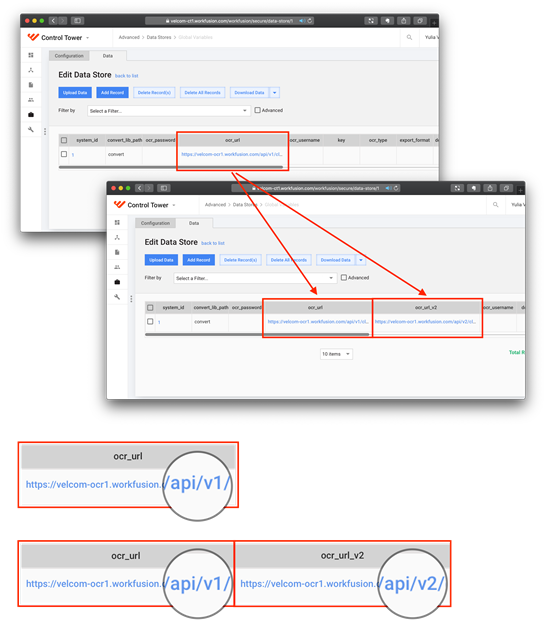
Make sure Bot Tasks designed to use with new FR Engine 12 have
ocr_url_v2instead ofocr_url. To defineocr_url_v2, go to your BP > Workflow tab (Edit mode) > select a Bot Task in the flow > go to the Design tab.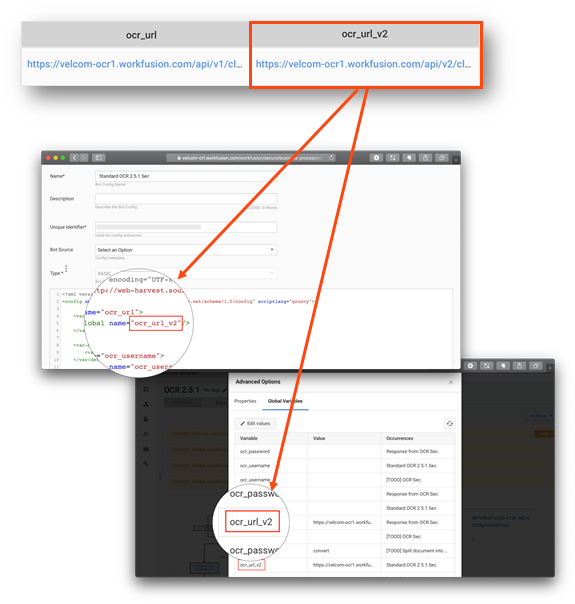
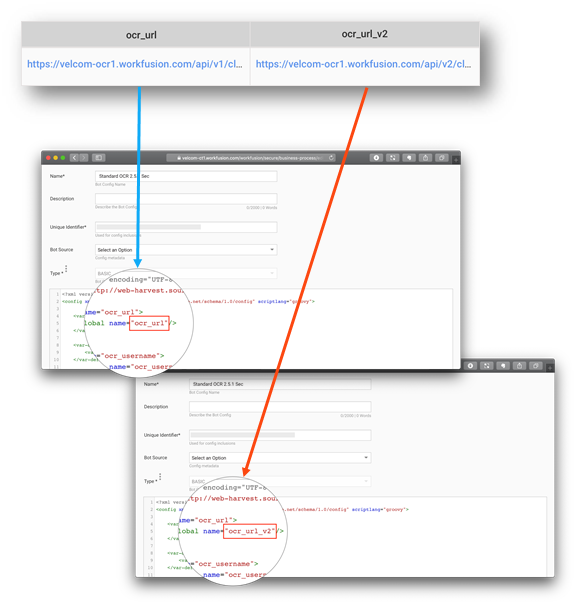
It is possible to combine FRE11 (API v1) and FRE12 (API v2) in a single BP for some use cases. To do this, a Bot Task requires to have default ocr_url OR ocr_url_v2 specified for the OCR engine to be used in the bot configuration code section.
Mind that each Bot Task needs to have only one OCR URL API specified, whether it should be v1 or v2.
OCR URL in step results
To display ocr_url in step results, you can use the export plugin at the end of the Bot Task.
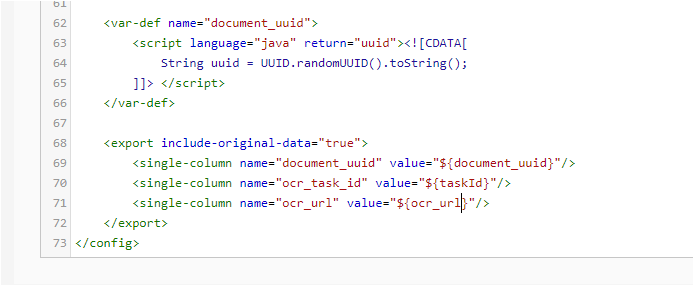
<export include-original-data="true">
<single-column name="ocr_url" value="${ocr_url}"/>
</export>
FAQ
What OCR engine and OCR API are used in Work.AI 10.1 by default?
FR Engine 11 (API v1)—the same stable and well-known OCR engine used since v8.x.
Why can't we just switch to FRE12 in Work.AI 10.1 if it's better than FRE11?
At the current moment, FRE11 and FRE12 are rather complementary than interchangeable.
FRE11 is a reliable OCR engine that works fine in many cases. Thus, FRE12 is not recommended as a replacement for the current OCR engine until enough feedback is collected from PS, COE, and our partners. Consider it a beta available since 10.1.
FRE12 produces results incompatible with previously trained models used with FRE11.
At the moment, it is not possible to provide an effortless way to retrain models to be used with FRE12. In general, FRE12 performs better (improvements vary 5-20% for different tests) and could be the only solution when it comes to CJK docs (especially modern Japanese), documents with complicated layouts, tables, texts over stamps, and so on. It is still highly recommended to perform tests and choose which of FREs works best for a specific BP.
How long FRE11 will be supported by Work.AI and other products?
FR Engine 11 is at the end of its product lifecycle according to its vendor (ABBYY). Only some of the critical issues are fixed. FRE11 is to be deprecated with the next major release, so it will be only available for backward compatibility for previously trained models. We expect other teams to advocate for FRE12 for each new client and each new trained ML model.