Post incoming invoice into SAP
The use case shows how to create and post an incoming invoice into the SAP system.
Business case
- Daimler purchased Brake Pads from Bosch.
- Materials have been delivered.
- Bosch sent an Invoice for those Brake Pads to Daimler.
- Daimler is saving the invoice in the system. This step is to be processed by the Bot.
Manual scenario
Open SAP GUI and log in.
Start the
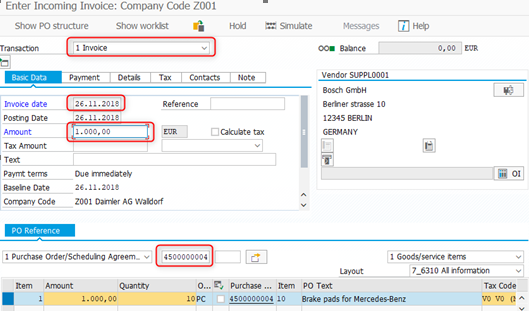
MIRO**transaction. Enter the transaction codeMIROinto the OK Code field and press Enter**.Select Invoice and specify the basic data.
Set the current date in the Invoice date field.
Set a purchase order number into the Purchase Order field (for example, 4500000005 - 4500000012).
Set the amount for Amount.
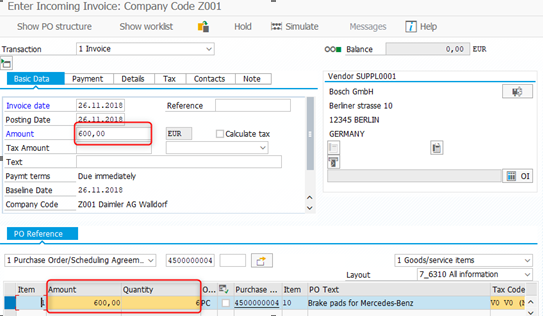
If not the full purchase order amount is invoiced (for example, not 600, but 300 for 2 pieces), change the amount in both header and items. The total items amount should be equal to the header amount.
Click on the Simulate button. When a financial document appears, click on Post.
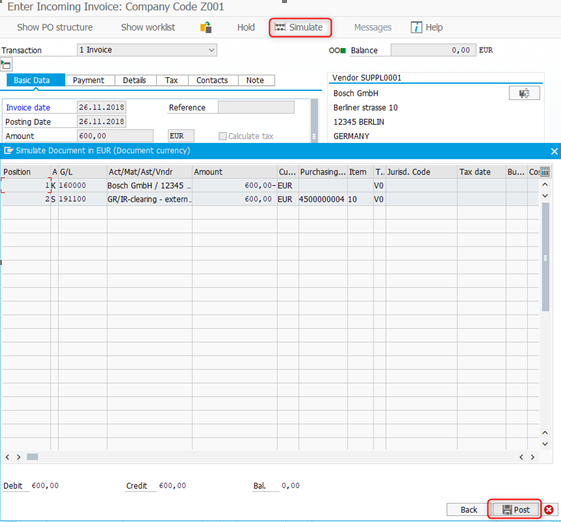
Alternatively, a Bot may press Save instead of clicking on Simulate and Post in a sequence.
Create purchase order
To create a purchase order as a copy of the existing one, do as follows.
Start the
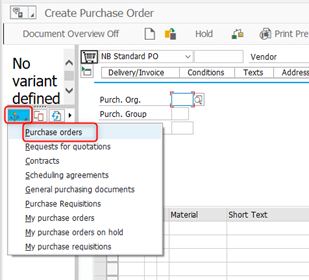
ME21Ntransaction.Select Document Overview On.
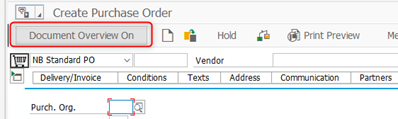
Select Purchase Orders within selection variants.
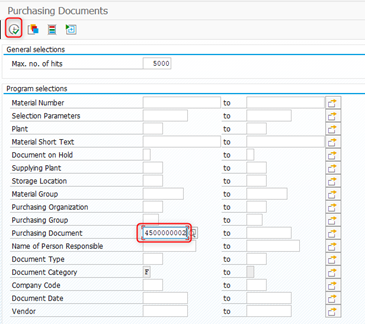
On the next selection screen, select the number of Purchasing document (=4500000002) and click Execute / F8.
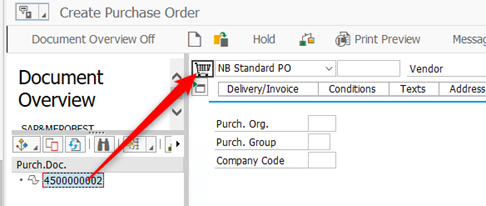
Drag the purchase order and drop into the basket.
Save the purchase order by pressing Ctrl+S and take the purchase order number from the status bar.

Create good receipt
On delivering the purchased goods to the storage, a good receipt for the purchase order is created.
Start the
MIGOtransaction.Select Goods Receipt and Purchase order as a reference document. Type the purchase order number (the one created above) and press Enter.

Specify the Storage location (= 0001) and check Item OK in the bottom left corner.
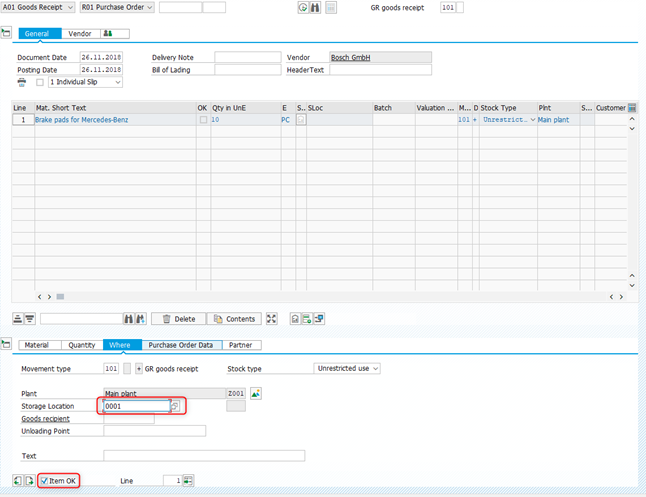
Click on the Check button and ensure that the message "Document is O.K." is displayed in the status bar.
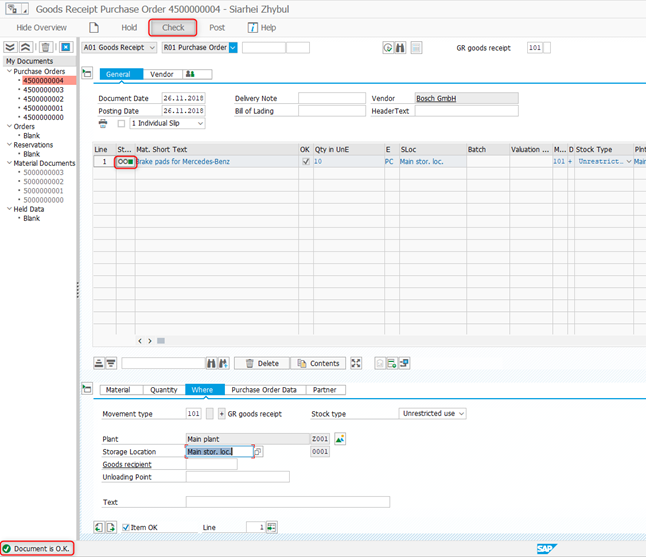
Click on the Post button. The created document is displayed in the status bar as a part of the message.

Alternatively, you may press Save instead of clicking on Check and Post in a sequence.
Automated scenario
To be able to run the script, provide your own credentials to enter SAP, defined as <SAP-USER> and <SAP-PASSWORD>.
Expand to see the code sample of how to post incoming invoice into SAP
<?xml version="1.0" encoding="UTF-8"?>
<config
    xmlns="http://web-harvest.sourceforge.net/schema/1.0/config"
    scriptlang="groovy">

    <robotics-flow>
        <robot name="sap_bot" driver="desktop"
            close-on-completion="true">
            <capability name="SEARCH_ALL_WINDOWS" value="true" />
            <script><![CDATA[
                import java.time.LocalDateTime;
                import java.time.format.DateTimeFormatter;

                companyCode = "Z001"
                currentDate = LocalDateTime.now().format(DateTimeFormatter.ofPattern("dd.MM.yyyy"));


                // ******* KILL ALL SAPLOGON PROCESESS *******
                open("TASKKILL /F /IM saplogon.exe /T")


                // ******* LOGIN AND OPEN TRANSACTION *******
                command = 'sapshcut -maxgui -user=<SAP-USER> -pw=<SAP-PASSWORD> -language=EN -system=ERD -client=100 -trace=0'
                open("C:/Program Files (x86)/SAP/FrontEnd/SAPgui/${command}")
                sleep(5000)


                // ******* CONTINUE WITHOUT ENDING ANY OTHER LOGONS *******
                if (Window.windowHandles("[CLASS:#32770; TITLE:License Information for Multiple Logons]").isEmpty()) {
                    log.info("Window [License Information for Multiple Logons] not found")
                } else {
                    window("[CLASS:#32770; TITLE:License Information for Multiple Logons]")
                    $("[CLASS:GuiRadioButton; NAME:MULTI_LOGON_OPT2]").click()
                    $('[CLASS:GuiButton; NAME:btn[0];]').click()
                    log.info("Window [License Information for Multiple Logons] closed")
                }


                // ******* CREATE PRODUCT ORDER *******
                window("[CLASS:SAP_FRONTEND_SESSION; TITLE:SAP Easy Access]")
                $("[CLASS:GuiOkCodeField]").setText("ME21N").pressEnter()


                // Document Overview enable
                window("[CLASS:SAP_FRONTEND_SESSION; TITLE:Create Purchase Order]")

                documentOverviewSelector = "[CLASS:GuiButton; INSTANCE: 18]"
                if ($(documentOverviewSelector).getText() == "Document Overview On") {
                    log.info("Overview panel is disable")
                    $(documentOverviewSelector).click()
                } else {
                    log.info("Overview panel is enable")
                }


                $("[CLASS:GuiShell; NAME:shell[0];]").click(10, 10)
                sleep(5000)
                sendKeys(Keys.DOWN)
                pressEnter()

                window("[CLASS:SAP_FRONTEND_SESSION; TITLE:Purchasing Documents]")
                $("[CLASS:GuiCTextField; NAME:SP\$00014-LOW]").setText("4500000002")
                sendKeys(Keys.F8)

                // Drag and drop purchase doc
                window("[CLASS:SAP_FRONTEND_SESSION; TITLE:Create Purchase Order]")
                $("[CLASS:TreeNode]").click(50, 10)
                $("[CLASS:GuiShell; NAME:shell[0];]").click(50, 5)

                $("[CLASS:GuiButton; NAME:btn[11]]").click()

                // Close system message
                window("[CLASS:#32770; TITLE:Save Document]")
                $("[CLASS:GuiButton; NAME:SPOP-VAROPTION1]").click()

                // Get PO number
                window("[CLASS:SAP_FRONTEND_SESSION; TITLE:Create Purchase Order]")
                status = $('[CLASS:GuiStatusPane; NAME:pane[0];]').getText()
                log.debug(status)
                poNumber = (status =~ /(\d+)/)[0][1]
                log.debug("PO number: ${poNumber}")


                // ******* GO BACK TO EASY ACCESS *******
                $("[CLASS:GuiButton; NAME:btn[15]]").click()


                // ******* CREATE Goods Receipt *******
                window("[CLASS:SAP_FRONTEND_SESSION; TITLE:SAP Easy Access]")
                $("[CLASS:GuiOkCodeField]").setText("MIGO").pressEnter()

                window("[CLASS:SAP_FRONTEND_SESSION; REGEXPTITLE:Goods Receipt Purchase Order(.*)]")

                $("[CLASS:GuiCTextField; NAME:GODYNPRO-PO_NUMBER]").setText(poNumber).pressEnter()

                $("[CLASS:GuiTab; NAME:OK_GOITEM_DESTINAT.]").click()
                $("[CLASS:GuiCTextField; NAME:GOITEM-LGOBE]").setText("0001")
                $("[CLASS:GuiCheckBox; NAME:GODYNPRO-DETAIL_TAKE]").setSelected(true)

                $("[CLASS:GuiButton; NAME:btn[7]]").click()
                assert $('[CLASS:GuiStatusPane; NAME:pane[0];]').getText() == "Document is O.K."

                $("[CLASS:GuiButton; NAME:btn[23]]").click()
                log.info($('[CLASS:GuiStatusPane; NAME:pane[0];]').getText())


                // ******* GO BACK TO EASY ACCESS *******
                $("[CLASS:GuiButton; NAME:btn[15]]").click()


                // ******** GO TO MIRO transaction ********
                window("[CLASS:SAP_FRONTEND_SESSION; TITLE:SAP Easy Access]")
                $("[CLASS:GuiOkCodeField]").setText("MIRO")
                $("[CLASS:GuiButton; NAME:btn[0]]").click()


                // ******** SET INVOICE DATE *******
                $("[CLASS:GuiCTextField; NAME:INVFO-BLDAT]").setText(currentDate)


                // ******** SET COMPANY CODE *******
                sendKeys(Keys.F7)
                window('[class="#32770"][title="Enter Company Code"]')
                $("[CLASS:GuiCTextField]").setText(companyCode)
                sendKeys(Keys.ENTER)


                // ******** SET PURCHASE ORDER *******
                window("[CLASS:SAP_FRONTEND_SESSION; TITLE:Enter Incoming Invoice: Company Code ${companyCode}]")
                $("[CLASS:GuiCTextField; NAME:RM08M-EBELN]").setText(poNumber)
                sendKeys(Keys.ENTER)


                // ******** SET AMOUNT ********
                $("[CLASS:GuiCheckBox]").setSelected(true)
                amount = $("[CLASS:GuiTextField; NAME:RM08M-DIFFERENZ]").getText().replace("-", "")
                log.info(amount)
                sys.defineVariable("amount", amount)
                $("[CLASS:GuiTextField; NAME:INVFO-WRBTR]").setText(amount)


                // ******** POST ORDER ********
                $("[CLASS:GuiButton; NAME:btn[11];]").click()

                status = $('[CLASS:GuiStatusPane; NAME:pane[0];]').getText()

                log.info(status)
                documentNumber = (status =~ /(\d+)/)[0][1]
                log.info("Document #${documentNumber} created.")

            ]]></script>
        </robot>
    </robotics-flow>

    <export include-original-data="false" />

</config>