Create Python project from Archetype
AutoML SDK offers the following types of Maven archetypes related to custom Python pipelines:
ml-python-classification-archetypegenerates projects for solving NLP classification problems.ml-python-classification-quickstart-archetypehas the same purpose asml-python-classification-archetype. The difference is that the quickstart archetype already contains essential paths and settings to train and extract a model. So, no configuration is required to run it.ml-python-ie-archetypegenerates projects for solving NLP information extraction problems.ml-python-image-archetypegenerates projects for solving image transforming problems (cleaning, resizing, and so on) and generic image-based problems (for example, detecting objects).ml-python-classification-archetype-v2serves as a template to generate pure Python projects.
The archetypes enable developers to speed up the integration of a Python model. To create a project from a template using the ml-python-classification-archetype, run the Maven command:
mvn archetype:generate -DarchetypeGroupId=com.workfusion.ml -DarchetypeArtifactId=ml-python-classification-archetype -DarchetypeVersion=%AutoML_SDK_version%*
For details, refer to the Start from Archetype guide.
Specify parameters
When you create a project, make sure to specify the parameters for the models as listed in the table below:
| Parameter | Description | Classification | IE | Image Transform | Generic image |
|---|---|---|---|---|---|
archetypeVersion | Version of the ML SDK archetypes (for example, 10.1.1.9) | + | + | + | + |
archetypeGroupId | Group ID of the Maven archetype | + | + | + | + |
archetypeArtifactId | Artifact ID of the Maven archetype | + | + | + | + |
modelVersion | Version of the generated model | + | + | + | + |
modelCode | Model code | + | + | + | + |
modelTitle | Model title | + | + | + | + |
modelDescription | Model description | + | + | + | + |
package | Java package name for the source code of the generated model | + | + | + | + |
groupId | Group ID of the generated project | + | + | + | + |
artifactId | Artefact ID of the generated project | + | + | + | + |
libName | Name of the Python package for the source code of the generated model (automl.ml.lib.<libName>) | + | + | + | + |
modelClassName | Name of the Java/Python model class | + | + | + | + |
imageTransform | Allowed input: y, n. Determines the image project type to be generated. If it is imageTransform == 'y', then:
imageTransform == 'n',then:
| - | - | + | + |
Explore resulting project structure
For the example below, the AutoML SDK version is v10.1.1.14.
As a result of the generation, you get the following directory structure:
custom-python-classification-pipeline               <-- generated project directory
├── deploy                                          <-- directory with the built worker artifact
│   └── python-custom-classification
│       └── 1.0-SNAPSHOT
│           ├── lib
│           │   └── vds-hypermodel-app.jar
│           ├── model.description
│           ├── worker-execution.yml
│           └── worker-training.yml
├── src                                             <-- project source directory
│   ├── main                                      <-- java part of the model
│   │   ├── java
│   │   │   └── com
│   │   │       └── wf
│   │   │           └── example
│   │   │               ├── config
│   │   │               │   └── Model1Configuration.java    <-- model ML SDK configuration
│   │   │               ├── model
│   │   │               │   └── Model1.java                 <-- hypermodel class
│   │   │               └── run
│   │   │                   ├──ModelExecutionRunner.java  <-- local execution runner
│   │   │                   └── ModelTrainingRunner.java  <-- local training runner
│   │   ├── python                                          <-- directory with python-related files
│   │   │   ├── build
│   │   │   │   └── do.py               <-- cross-platform build script (it's used in pom.xml during maven build)
│   │   │   ├── .meta
│   │   │   │   ├── packages            <-- pip requirements.txt files
│   │   │   │   ├── packages.dev
│   │   │   │   └── packages.ds
│   │   │   ├── deps                  <-- python resources packed to deps.tar
│   │   │   │   ├── data
│   │   │   │   └── wheels              <-- python dependencies generated using build/do.py
│   │   │   └── package                   <-- python part of the model
│   │   │       │   └── *
│   │   │       └── automl
│   │   │           ├── *
│   │   │           ├── ml
│   │   │           │   ├── *
│   │   │           │   └── lib
│   │   │           │       ├── custom_pipeline
│   │   │           │       │   ├── __init__.py
│   │   │           │       │   ├── pipeline.py             <-- extension point for models/pipelines
│   │   │           │       │   └── supported_models.py     <-- generated custom pipeline package
│   │   │           │       └── *
│   │   │           ├── sdk             <-- describe/instantiate available model/pipeline for dynamic import
│   │   │           │   ├── *           <-- generated custom pipeline module
│   │   │           │   └── api
│   │   │           │       ├── *       <-- package with stub files(*.pyi) describing available API
│   │   │           │       └── ml
│   │   │           │           ├── *
│   │   │           │           ├── base
│   │   │           │           │   └── *
│   │   │           │           ├── fe
│   │   │           │           │   └── *
│   │   │           │           └── pipeline
│   │   │           │               └── *
│   │   │           └── utils
│   │   │               └── *
│   │   └── resources
│   │       ├── META-INF
│   │       │   └── worker
│   │       │       ├── worker-execution.yml
│   │       │       └── worker-training.yml
│   │       └── python
│   │           ├── custom_pipeline-deps.tar    <-- packed python dependencies/resources artifact
│   │           └── custom_pipeline.pyz         <-- packed python compiled code (it will be dynamicly imported on execution)
│   └── test
│       ├── java
│       │   └── com
│       │       └── wf
│       │           └── example
│       ├── python
│       │   └── automl
│       │       ├── __init__.py
│       │       └── ml
│       │           ├── __init__.py
│       │           └── lib
│       │               ├── custom_pipeline
│       │               │   ├── __init__.py
│       │               │   └── test_pipeline.py
│       │               └── __init__.py
│       └── resources
└── pom.xml
Each new project contains several directories and classes generated by archetypes based on input parameters:
archetypeIdpackagelibNamemodelClassName
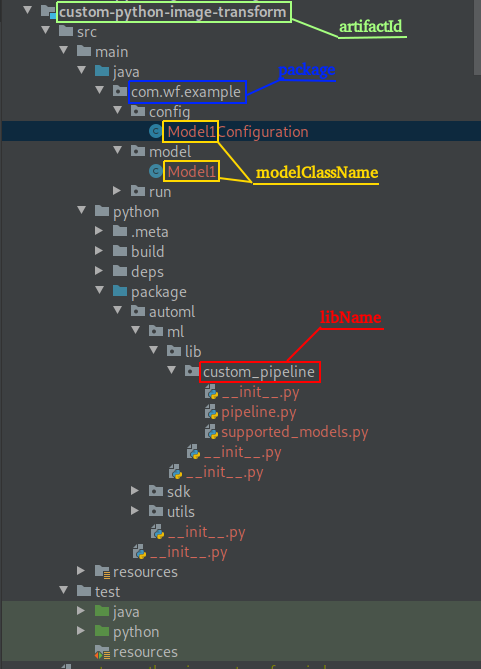
The resulting structure also comprises the following important files:
java/com/wf/example/config/Model1Configuration.java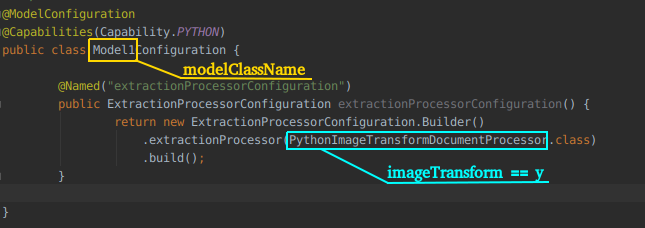
java/com/wf/example/model/Model1.java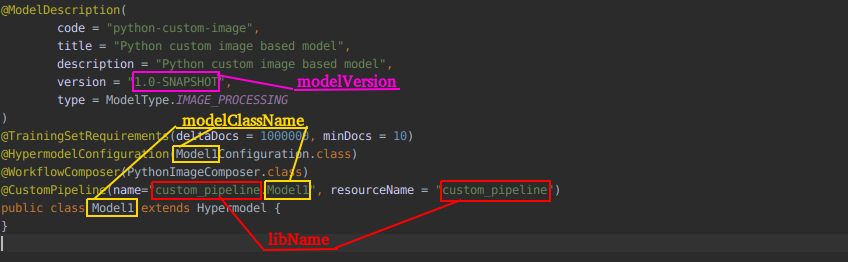
python/package/automl/ml/lib/custom_pipeline/pipeline.py, which is the Python side of the model implementation and an integration point for Python solutions.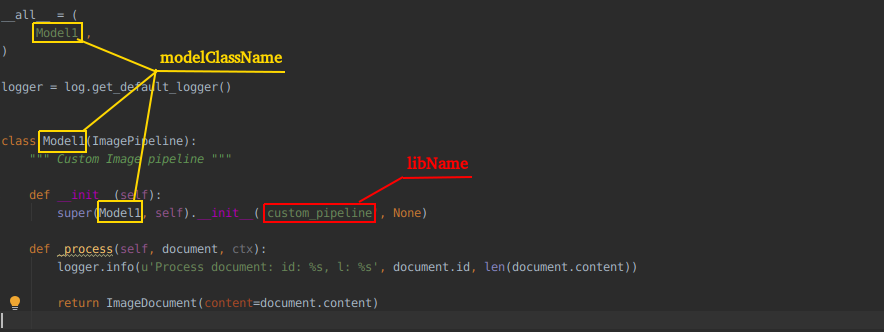
python/package/automl/ml/lib/{libname}/supported_models.py, which is a list of supported Python models (BaseModel) contained in the ({libname}) library.The list is used at the stage of initializing the Python code. All libraries are scanned for the
supported_modelsmodule andSUPPORTED_MODELSlist to load dynamically.
pom.xml, which contains a section to build Python code, fetch dependencies, and pack them into the resources of a target hyper model.
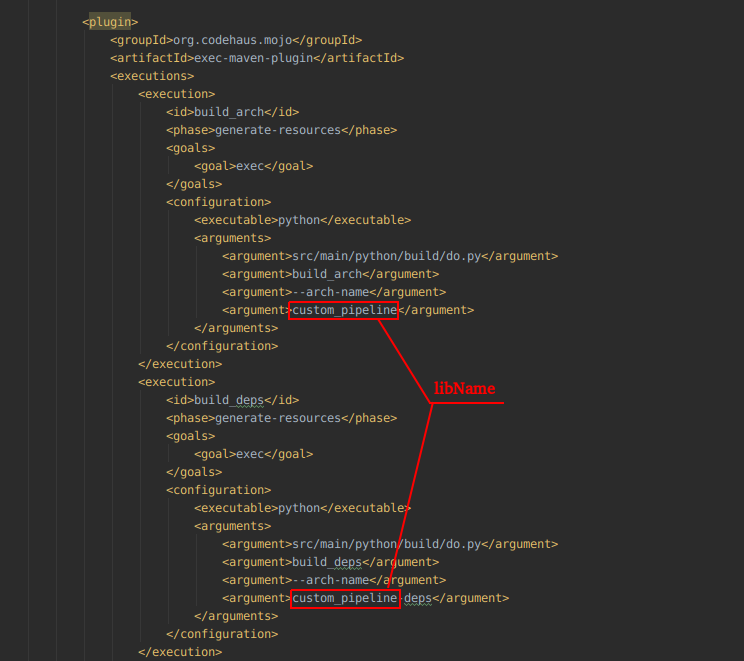
The figures above are generated based on ml-python-image-archetype.