Implement custom models
The tutorial walks you through the implementation of the following typical custom models—information extraction (IE) and classification with or without Python support.
Install the following three samples using your local Work.AI Developer and view the code to learn how to build AutoML SDK-based solutions.
Information extraction
The information extraction sample is an example of possible model customization for a particular case related to information extraction. It contains the following components:
- Annotators
- Feature Extractors
- Post-Processors
It also contains an example of model configuration with ready-to-use ModelTrainingRunner and ModelExecutionRunner.
Classification
The classification sample is an example of possible model customization related to classification. It contains almost the same components as the IE sample but has additional Feature Extractors.
Python classification
The Python classification sample is an example of possible model customization related to classification.
Sample project setup
Both model samples are packed into separate archetypes. To generate a sample project, follow the steps below:
Use AutoML SDK Wizard or any of the available ways mentioned in the Start from Archetype article.
Set the following parameters:
Archetype URL:
https://repository.workfusion.com/content/repositories/archetypes/Use the following credentials: bcbdeploy / Workfusion!5. You can change Maven's
settings.xmlto access the Archetype located in the above repository.Archetype ID:
quickstart-archetype(for IE) orquickstart-classification-archetype(for Classification)AutoML SDK Version
Alternatively, to generate a project, use one of the following commands in Terminal:
Information extraction
mvn archetype:generate -DarchetypeGroupId=com.workfusion.ml -DarchetypeArtifactId=ml-ie-quickstart -DarchetypeVersion=<%artifact-version%>Classification
mvn archetype:generate -DarchetypeGroupId=com.workfusion.ml -DarchetypeArtifactId=ml-classification-quickstart -DarchetypeVersion=<%artifact-version%>Python classification
mvn archetype:generate -DarchetypeGroupId=com.workfusion.ml -DarchetypeArtifactId=ml-python-classification-quickstart -DarchetypeVersion=<%artifact-version%>
Sample project results
The sub-sections below demonstrate sample project structures.
Information extraction sample
quickstart
│   build.groovy
│   pom.xml
│
│
├───test2-ml-ie-quickstart-project-ml-sdk
│   │   pom.xml
│   │
│   ├───deploy
│   │
│   ├───input
│   └───src
│      ├───main
│      │   ├───java
│      │   │   └───com
│      │   │       └───workfusion
│      │   │           └───myproject
│      │   │               ├───annotator
│      │   │               │       CeoNerAnnotator.java
│      │   │               │
│      │   │               ├───config
│      │   │               │       Fields.java
│      │   │               │       QuickstartModelConfiguration.java
│      │   │               │
│      │   │               ├───fe
│      │   │               │   ├───classification
│      │   │               │   │       IsInFirstOrLastNLinesInDocumentFeatureExtractor.java
│      │   │               │   │       LinePositionOfKeywordFeatureExtractor.java
│      │   │               │   │       PositionOfKeywordsFeatureExtractor.java
│      │   │               │   │
│      │   │               │   ├───general
│      │   │               │   │       IsCoveredWithParticularNerFeatureExtractor.java
│      │   │               │   │       IsFirstInSentenceFeatureExtractor.java
│      │   │               │   │       IsFirstWordInDocumentFeatureExtractor.java
│      │   │               │   │       IsFitCustomPatternFeatureExtractor.java
│      │   │               │   │       IsPrecededWithCurrencySignFeatureExtractor.java
│      │   │               │   │       IsPrecededWithKeywordsInLineFeatureExtractor.java
│      │   │               │   │       IsUniqueWordInLineFeatureExtractor.java
│      │   │               │   │       IsUpperCaseFeatureExtractor.java
│      │   │               │   │       IsUpperLowerCaseFeatureExtractor.java
│      │   │               │   │
│      │   │               │   └───table
│      │   │               │           IsCoveredWithCellFeatureExtractor.java
│      │   │               │           IsLastCellInTableFeatureExtractor.java
│      │   │               │           MatchFullColumnOrRowWithSpecifiedHeaderFeatureExtractor.java
│      │   │               │           TableColumnIndexFeatureExtractor.java
│      │   │               │           TableRowIndexFeatureExtractor.java
│      │   │               │
│      │   │               ├───model
│      │   │               │       QuickstartModel.java
│      │   │               │
│      │   │               ├───processing
│      │   │               │       AmountNormalizationPostProcessor.java
│      │   │               │       AppendCurrencyPostProcessor.java
│      │   │               │       DatePostProcessing.java
│      │   │               │       EmailPostProcessor.java
│      │   │               │       ProductPostProcessor.java
│      │   │               │       RemoveCommasFromPrice.java
│      │   │               │       RemoveSInTheBeginningFromPrice.java
│      │   │               │       SupplierNamePostProcessor.java
│      │   │               │       ToUpperOrLowerCasePostProcessor.java
│      │   │               │
│      │   │               └───run
│      │   │                       ModelExecutionRunner.java
│      │   │                       ModelTrainingRunner.java
│      │   │
│      │   └───resources
│      │       ├───dictionary
│      │       │       email_keywords.txt
│      │       │       invoice_date_keywords.txt
│      │       │       invoice_number_keywords.txt
│      │       │       price_keywords.txt
│      │       │       product_keywords.txt
│      │       │       quantity_keywords.txt
│      │       │       supplier_name.txt
│      │       │       supplier_name_keywords.txt
│      │       │       total_amount_keywords.txt
│      │       │
│      │       └───META-INF
│      │           └───worker
│      │                   worker-execution.yml
│      │                   worker-training.yml
│      │
│      └───test
│          └───java
│              └───com
│                  └───workfusion
│                      └───myproject
│
│
└───test2-ml-ie-quickstart-project-package
    │   pom.xml
    │
    ├───assembly
    │       package-remote.xml
    │
    └───src
        └───main
            └───resources
                │   meta-info.json
                │
                └───automl
                    ├───artifact
                    └───model
Classification sample without Python support
quickstart
├── in-test
├── in-ttrain
└──src
     └──main
         └──java
             └──quickstart
                 ├──config
                 │   └──QuickstartModelConfigurationjava
                 ├──fe
                 │   ├──IsPositiveNegativeKeywordPresentFeatureExtractor.java
                 │   └──IsSpecificPunctuationOrSmilesPresentFeatureExtractor.java
                 ├──model
                 │    └──QuickstartModel.java
                 └──run
                      ├── ModelExecutionRunner.java
                      └── ModelTrainingRunner.java
Classification sample with Python support
custom-python-classification-pipeline      <-- generated project directory
├── deploy                                 <-- directory with a built Worker artifact
│   └── python-custom-classification
│       └──1.0-SNAPSHOT
│           ├── lib
│           │   └── vds-hypermodel-app.jar
│           ├── model.description
│           ├── worker-execution.yml
│           └── worker-training.yml
├── src                   <-- project source directory
│   ├── main              <-- java part of the model
│   │   ├── java
│   │   │   └── com
│   │   │       └── wf
│   │   │           └── example
│   │   │               ├── config
│   │   │               │   └── Model1Configuration.java <-- model AutoML SDK configuration
│   │   │               ├── model
│   │   │               │   └── Model1.java  <-- hyper model class
│   │   │               └── run
│   │   │                   ├──ModelExecutionRunner.java  <-- local execution runner
│   │   │                   └── ModelTrainingRunner.java     <-- local training runner
│   │   ├── python        <-- directory with Python-related files
│   │   │   ├── build
│   │   │   │   └──do.py      <-- cross-platform build script, used in pom.xml during Maven build
│   │   │   ├── .meta
│   │   │   │   ├── packages <-- pip requirements.txt files
│   │   │   │   ├── packages.dev
│   │   │   │   └── packages.ds
│   │   │   ├── deps <-- Python resources packed to deps.tar
│   │   │   │   ├── data
│   │   │   │   └── wheels  <-- Python dependencies generated using build/do.py
│   │   │   └── package    <-- Python part of the model
│   │   │       │   └── *
│   │   │       └── automl
│   │   │           ├── *
│   │   │           ├── ml
│   │   │           │   ├── *
│   │   │           │   └── lib
│   │   │           │       ├── custom_pipeline
│   │   │           │       │   ├── __init__.py
│   │   │           │       │   ├── pipeline.py  <-- extension point for models and pipelines
│   │   │           │       │   └── supported_models.py <-- generated custom pipeline package
│   │   │           │       └── *
│   │   │           ├── sdk  <-- describe and instantiate available model or pipeline for dynamic import
│   │   │           │   ├── *  <-- generated custom pipeline module
│   │   │           │   └── api
│   │   │           │       ├── *  <-- package with stub files(*.pyi) describing available API
│   │   │           │       └── ml
│   │   │           │           ├── *
│   │   │           │           ├── base
│   │   │           │           │   └── *
│   │   │           │           ├── fe
│   │   │           │           │   └── *
│   │   │           │           └── pipeline
│   │   │           │               └── *
│   │   │           └── utils
│   │   │               └── *
│   │   └── resources
│   │       ├── META-INF
│   │       │   └── worker
│   │       │       ├── worker-execution.yml
│   │       │       └── worker-training.yml
│   │       └── python
│   │           ├── custom_pipeline-deps.tar <-- artifact with packed Python dependencies and resources
│   │           └── custom_pipeline.pyz  <-- packed Python code (it is dynamicly imported upon execution)
│   └── test
│       ├── java
│       │   └── com
│       │       └── wf
│       │           └── example
│       ├── python
│       │   └── automl
│       │       ├── __init__.py
│       │       └── ml
│       │           ├── __init__.py
│       │           └── lib
│       │               ├── custom_pipeline
│       │               │   ├── __init__.py
│       │               │   └── test_pipeline.py
│       │               └── __init__.py
│       └── resources
└── pom.xml
For details on Python model customization, refer to the Develop Python-based models section.
Solution review
Information extraction
The current information extraction model uses GenericIeHypermodelConfiguration with a number of pre-defined basic components and specifics related to a particular case.
The presented solution is configured for a typical case of information extraction—invoice processing. Invoice samples are located in the project's /input folder.
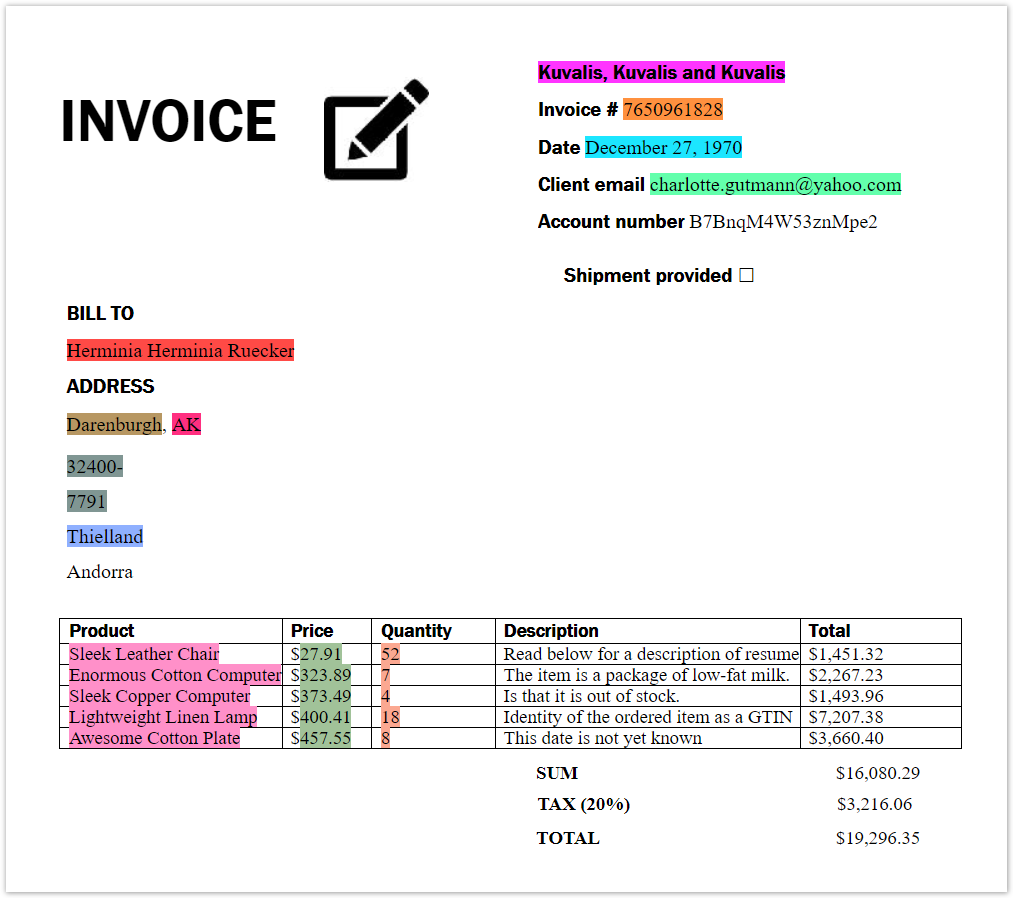
The solution is designed to extract data associated with the following single values:
- Supplier name
- Invoice date
- Invoice number
- Total amount
And the group values:
- Price
- Quantity
- Product
A Field configuration is added to the ModelTrainingRunner class. This class is configured for model training and points to the /input training directory.
The ModelExecutionRunner class is configured to use the already trained model and points to the /test and /trainedModel directories.
In addition, there is extra customization:
- The
Fieldsclass provides a sample of how to keep all model fields and model specifics in one place to avoid hard code. - Every class contains a brief description of its functionality.
- The
/inputand/testfolders contain sample documents for training and execution, respectively.
Classification
The Classification custom model is based on MultiClassClassificationGenericSe20Hypermodel with additional case-related Feature Extractors. The model is created for sentiment analysis based on the Twitter data related to the American airplane industry. There are two classes: positive and negative sentiments.
Input data is located in the /in-train/input.csv file and has the "text, class" format. The data is then processed to a separate /out-train folder in a number of text files, each of them containing one row from the initial file. The trained model is stored in /out-train-output.
The same structure is used for the test part. In the name, train is changed to test respectively.
Component configuration
Components related to the classification custom model are marked with an asterisk (*).
Annotators
See the /annotators folder of the project and QuickModelConfiguration.getAnnotators().
CeoNerAnnotatoris an example of a custom NER (Named Entity Recognition) annotator used for the specific goal of CEO lookup in documents.AhoCorasickDictionaryNerAnnotatorcreates Named Entity Elements based on word lists from dictionaries.BaseRegexNerAnnotatoranalyzes the text from Entity Boundary Elements according to a provided pattern and then creates Named Entity Elements.GenericIeAnnotatorConfigurationcontains the base annotator configuration used inGenericIeHypermodelConfiguration.
Feature Extractors
For Feature Extractors of the Information Extraction model, see the /fe folder of the project and QuickModelConfiguration.getFeatureExtractors().
For Feature Extractors of the Classification model, see the /fe folder of the project and ClassificationModelConfiguration.getFeatureExtractors().
Classification
IsInFirstOrLastNLinesInDocumentFeatureExtractorcreates a feature if specific data is found in the first and last N rows of a document.LinePositionOfKeywordFeatureExtractorcreates a feature if specific data is found in a line of a document. The feature value depends on the line number in the document.PositionOfKeywordsFeatureExtractorcreates a feature if specific data is found in a document. The feature value depends on the absolute position of the data in the document text.- *
IsSpecificPunctuationOrSmilesPresentFeatureExtractorfinds specific punctuations in the text of a document. - *
IsPositiveNegativeKeywordPresentFeatureExtractorfinds specific keywords in the text of a document.
General
IsCoveredWithParticularNerFeatureExtractorcreates a feature if data is covered with a particular Named Entity.IsFirstInSentenceFeatureExtractorcreates a feature if data is located at the beginning of a sentence.IsFirstWordInDocumentFeatureExtractorcreates a feature if data is located at the beginning of a document.IsFitCustomPatternFeatureExtractorcreates a feature if data fits a provided pattern.IsPrecededWithCurrencySignFeatureExtractorcreates a feature if data is preceded with a currency sign.IsPrecededWithKeywordsInLineFeatureExtractorcreates a feature if data is preceded with any keyword from a provided list.IsUniqueWordInLineFeatureExtractorcreates a feature if data is equal to the entire line.IsUpperLowerCaseFeatureExtractorcreates a feature if data is all upper and lowercase.
Table
IsCoveredWithCellFeatureExtractorcreates a feature if data is in a cell of a table.IsLastCellInTableFeatureExtractorcreates a feature if data is located in the lower right cell of a table.MatchFullColumnOrRowWithSpecifiedHeaderFeatureExtractorcreates a feature for every value in a column or row with headers containing any item from the provided keyword list.TableColumnIndexFeatureExtractorcreates a feature for every column value in a table. The value is a column number.TableRowIndexFeatureExtractorcreates a feature for every row value in a table. The value is a row number.CandidateFeatureExtractorsConfigurationcontains the base Feature Extractor configuration used inGenericIeHypermodelConfiguration.- *
GenericMultiClassificationFEConfigurationcontains the base Feature Extractor configuration used inGenericMultiClassificationHypermodelConfiguration.
Post-processors
See the /processing folder of the project and QuickModelConfiguration.getProcessors().
AmountNormalizationPostProcessornormalizes numbers to the #.00 pattern. Adds 0 in front of the dot sign, if missed. If the final value is not parsed as double, it is removed from the document.AppendCurrencyPostProcessorappends to the provided value, for example, USD.DatePostProcessingtries to normalize custom date formats to MM/dd/yyyy first. Then, clears all forbidden symbols and applies the OOTB date normalizer. Finally, removes all dates starting with 00 in the year.EmailPostProcessorvalidates emails with a specific pattern and removes them if data doesn't match.ProductPostProcessoris a custom post-processor to remove multiple spaces. Also, there are specific values to replace or remove. Keep in mind that data should be taken from table cells.RemoveCommasFromPriceremoves commas from numbers.RemoveSInTheBeginningFromPriceremoves OCR errors when a $ sign is recognized incorrectly as s or S.SupplierNamePostProcessoruses the Jaro-Winker similarity to repair corrupted data based on a provided dictionary. If the similarity value is below the threshold, data is removed.ToUpperOrLowerCasePostProcessorfixes the value case, if needed.
Local model training
Run ModelTrainingRunner as a Java application. For details, refer to Train model locally.
Local model run
Run ModelExecutionRunner as a Java application. For details, refer to Test model execution locally.
Model deployment
For instructions on deploying and using your model in Control Tower, refer to the Deploy model topic.
Python models
For more details, see the Develop Python-based model section.