Conditions
If-Else
The If-Else action provides an ability to route workflow execution to different step groups depending on some conditions (variable value, current date, image found or not). See more about conditional statements.
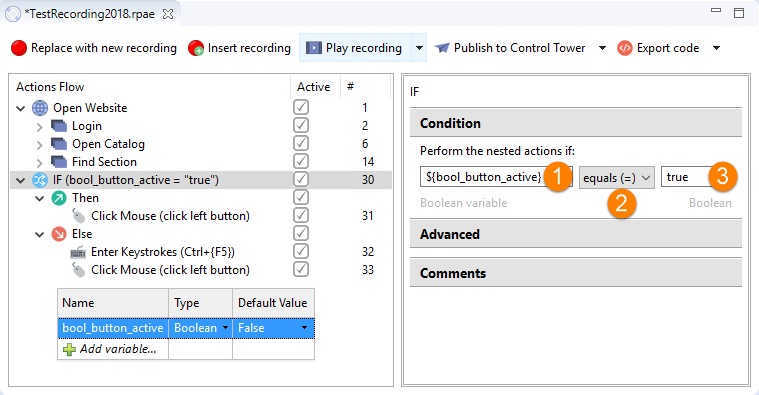
The If-Else action compares values of two variables, or of a variable and a specific value and returns a boolean result (true or false).
- If condition result is true, Then block is executed (Mouse Click #10 on the screen below).
- If condition result is false, Else block is executed (Enter Keystrokes #11, Mouse Click #12 on the screen below).
Parameters:
First operand: variable or string
Comparison operator:
- equals (=)
- not equals (!=)
- greater than (>)
- greater than or equals (>=)
- less than (\<)
- less than or equals (\<=)
- contains (substring)
- not contains (substring)
- is empty
- is not empty
- matches regular expression
- not matches regular expression
Second operand: variable or string (if available)
Do not compare variables with different types (for example, Number with Boolean, List with Date, and so on), except List, which can be compared to String using the contains or not contains operators.
Apply comparison operators
String type
| Left operand | Comparison operator | Right operand | True result |
|---|---|---|---|
| String 1 | equals (=) | String 2 | String 1 is equal to String 2. |
| String 1 | not equals (!=) | String 2 | String 1 is not equal to String 2. |
| String 1 | greater than (>) | String 2 | String 1 is greater than String 2. |
| String 1 | greater than or equals (>=) | String 2 | String 1 is greater than or equal to String 2. |
| String 1 | less than (\<) | String 2 | String 1 is less than String 2. |
| String 1 | less than or equals (\<=) | String 2 | String 1 is less than or equal to String 2. |
| String 1 | contains | String 2 | String 1 contains String 2. |
| String 1 | not contains | String 2 | String 1 does not contain String 2. |
| String 1 | is empty | N/A | String 1 is an empty string value. |
| String 1 | is not empty | N/A | String 1 is not an empty string value. |
| String 1 | matches regular expression | Regular expression, e.g `[A-Za-z]` | String 1 matches the regular expression. |
| String 1 | not matches regular expression | Regular expression, for example, `[A-Za-z0-9]` | String 1 does not match the regular expression. |
- =and!=are case sensitive
- >, >=, \<, \<= operators compare strings' length. In case lengths are equal, each character is compared by its Unicode number from left to right
Number type
| Left operand | Comparison operator | Right operand | True result |
|---|---|---|---|
| Number 1 | equals (=) | Number 2 | Number 1 is equal to Number 2. |
| Number 1 | not equals (!=) | Number 2 | Number 1 is not equal to Number 2. |
| Number 1 | greater than (>) | Number 2 | Number 1 is greater than Number 2. |
| Number 1 | greater than or equals (>=) | Number 2 | Number 1 is greater than or equals Number 2. |
| Number 1 | less than (\<) | Number 2 | Number 1 is less than Number 2. |
| Number 1 | less than or equals (\<=) | Number 2 | Number 1 is less than or equals Number 2. |
| Number 1 | matches regular expression | Regular expression, for example, [0-9]* | Number 1 matches the regular expression. |
| Number 1 | not matches regular expression | Regular expression, for example, [1-5]* | Number 1 does not match the regular expression. |
List type
| Left operand | Comparison operator | Right operand | True result |
|---|---|---|---|
| List 1 | equals (=) | List 2 | Size of List 1 equals size of List 2 and all elements of List 1 are the same as in List 2. |
| List 1 | not equals (!=) | List 2 | Size of List 1 is not equal to size of List 2 or all elements of List 1 are not the same as in List 2. |
| List 1 | greater than (>) | List 2 | Size of List 1 is greater than size of List 2. |
| List 1 | greater than or equals (>=) | List 2 | Size of List 1 is greater than or equals size of List 2. |
| List 1 | less than (\<) | List 2 | Size of List 1 is less than size of List 2. |
| List 1 | less than or equals (\<=) | List 2 | Size of List 1 is less than or equals size of List 2. |
| List 1 | contains | String | List 1 contains text from String . |
| List 1 | not contains | String | List 1 contains text from String . |
| List 1 | is empty | N/A | Size of List 1 is 0. |
| List 1 | is not empty | N/A | Size of List 1 is greater than 0. |
Table type
| Left operand | Comparison operator | Right operand | True result |
|---|---|---|---|
| Table 1 | equals (=) | Table 2 | Number of columns, number of rows and content in cells are the same in Table 1 and Table 2. |
| Table 1 | not equals (!=) | Table 2 | Number of columns, number of rows and content in cells are different in Table 1 and Table 2. |
| Table 1 | is empty | N/A | Size of Table 1 is 0. |
| Table 1 | is not empty | N/A | Size of Table 1 is greater than 0. |
Date type
| Left operand | Comparison operator | Right operand | True result |
|---|---|---|---|
| Date 1 | equals (=) | Date 2 | Date 1 is equal to Date 2. |
| Date 1 | not equals (!=) | Date 2 | Date 1 is not equal to Date 2. |
| Date 1 | greater than (>) | Date 2 | Date 1 is greater than Date 2. |
| Date 1 | greater than or equals (>=) | Date 2 | Date 1 is greater than or equals Date 2. |
| Date 1 | less than (\<) | Date 2 | Date 1 is less than Date 2. |
| Date 1 | less than or equals (\<=) | Date 2 | Date 1 is less than or equals Date 2. |
Boolean type
| Left operand | Comparison operator | Right operand | True result |
|---|---|---|---|
| Boolean 1 | equals (=) | Boolean 2 | Boolean 1 is equal to Boolean 2. |
| Boolean 1 | not equals (!=) | Boolean 2 | Boolean 1 is not equal to Boolean 2. |
- Date, Table, List in operands should be defined as variables:
${invoice_date},${customer_table},${contact_list} - String, Number, Boolean in operands can be defined:
- Explicitly: some text, 100500, false
- Or as a variable:
${string_1},${account_number},${is_enabled}
Nested IF-Else
The IF action can be moved inside another one, in the Then or Else block. The nested IF action works exactly the same way as described above.
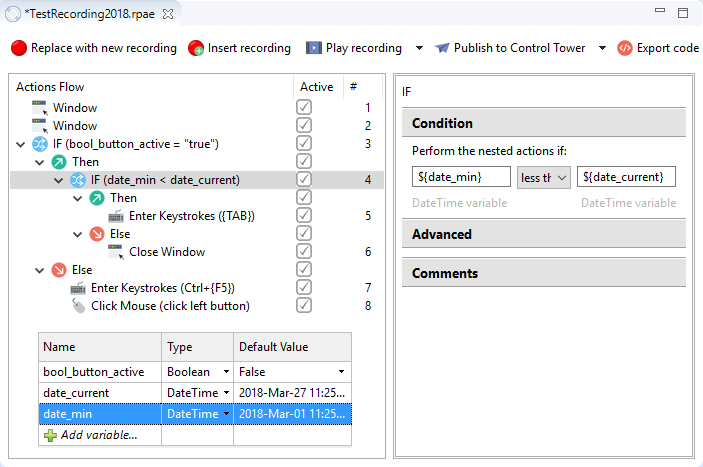
For example, in the screen below:
- Action 5 will be executed only if
${bool_button_active}=trueAND${date_min}\<${date_current}. - Action 6 will be executed only if
${bool_button_active}=trueAND${date_min}>=${date_current}. - Actions 7 and 8 will be executed only if
${bool_button_active}=false.