Get all stock movements for specified period
note
The use case shows how to get all the stock movements for a specified material and period, and send the data to a user, along with the stock on start and end dates of the selected period.
Manual scenario
Open SAP GUI and log in.
Start the
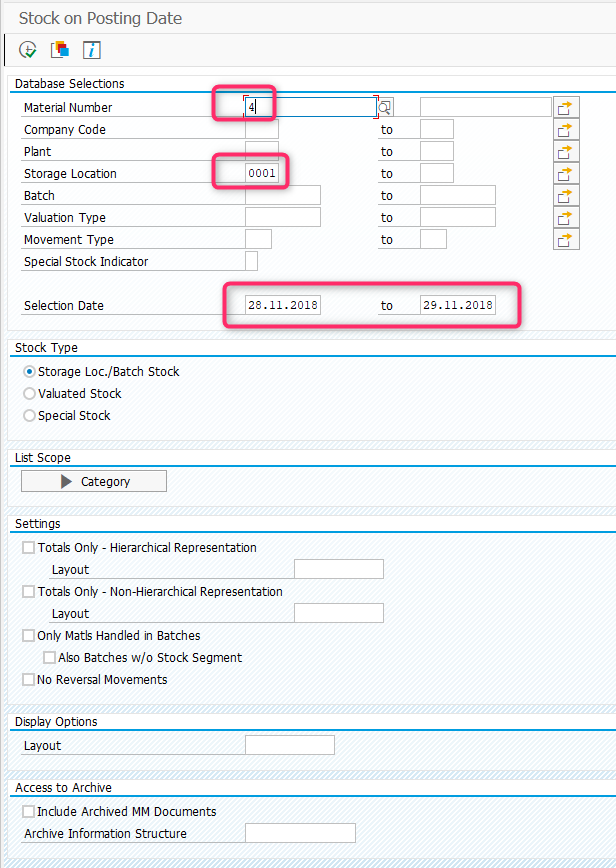
MB5Btransaction. Enter the transaction codeMB5Binto the OK Code field and press Enter.Specify the material number and storage location in the Material number and Storage Location fields respectively. Set dates within Selection Date.
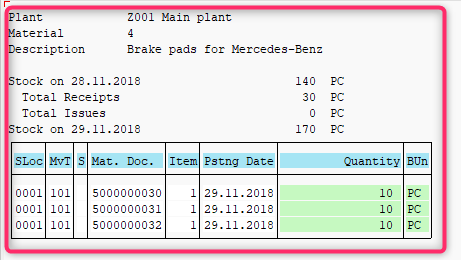
Get all the information from the screen and send to the user via email.
Automated scenario
tip
To be able to run the script, provide your own credentials to enter SAP, defined as <SAP-USER> and <SAP-PASSWORD>.
Also, use appropriate email addresses, passwords, etc. in the mail section of the script.
Expand to see the code sample of how to get all stock movements for specified period
<?xml version="1.0" encoding="UTF-8"?>
<config
    xmlns="http://web-harvest.sourceforge.net/schema/1.0/config"
    scriptlang="groovy">
    <robotics-flow>
        <robot name="sap_bot" driver="desktop" close-on-completion="true">
            <capability name="SEARCH_ALL_WINDOWS" value="true" />
            <script><![CDATA[


                // ******* KILL ALL SAPLOGON PROCESESS *******
                open("TASKKILL /F /IM saplogon.exe /T")

                // ******* LOGIN AND OPEN TRANSACTION *******
                command = 'sapshcut -user=<SAP-USER> -pw=<SAP-PASSWORD> -language=EN -system=ERD -client=100 -command=MB5B -trace=0'
                open("C:/Program Files (x86)/SAP/FrontEnd/SAPgui/${command}")
                sleep(5000)


                // ******* CONTINUE WITHOUT ENDING ANY OTHER LOGONS *******
                if (Window.windowHandles("[CLASS:#32770; TITLE:License Information for Multiple Logons]").isEmpty()) {
                    log.info("Window [License Information for Multiple Logons] not found")
                } else {
                    window("[CLASS:#32770; TITLE:License Information for Multiple Logons]")
                    $("[CLASS:GuiRadioButton; NAME:MULTI_LOGON_OPT2]").click()
                    $('[CLASS:GuiButton; NAME:btn[0];]').click()
                    log.info("Window [License Information for Multiple Logons] closed")
                }

                // ******* QUERY *******
                window("[CLASS:SAP_FRONTEND_SESSION; TITLE:Stock on Posting Date]")
                $("[CLASS:GuiCTextField; NAME:MATNR-LOW]").setText("4")
                $("[CLASS:GuiCTextField; NAME:LGORT-LOW]").setText("0001")
                $("[CLASS:GuiCTextField; NAME:DATUM-LOW]").setText("28.11.2018")
                $("[CLASS:GuiCTextField; NAME:DATUM-HIGH]").setText("29.11.2018")
                sendKeys(Keys.F8)


                // ******* PARSE SAP GUI REPORT *******
                window("[CLASS:SAP_FRONTEND_SESSION; REGEXPTITLE:Material Stocks Between .*]")

                sys.defineVariable("emailSubject", $("[CLASS:GuiTitlebar]").getText())

                guiLabels = $$("[CLASS:GuiLabel]")
                log.info("GuiLabels found: ${guiLabels.size()}")

                List<String> mainInfoLines = new ArrayList<>();
                rowsWithInfoCount = 8

                for (i = 0; i < rowsWithInfoCount; i++) {
                    lineText = guiLabels.get(i).getText()
                    mainInfoLines.add(lineText)
                }


                columnsInTableCount = 8

                if (((guiLabels.size() - rowsWithInfoCount) % columnsInTableCount) != 0) {
                    throw new RuntimeException("Table content more than ${columnsInTableCount} columns")
                }


                List<List<String>> table = new ArrayList<>()
                List<String> row = new ArrayList<>()

                for (i = 8; i < guiLabels.size(); i++) {

                    row.add(guiLabels.get(i).getText())

                    if (row.size() == columnsInTableCount) {
                        table.add(row)
                        row = new ArrayList<>()
                    }
                }


                log.info(table.toString())


                // ******* PREPARE HTML REPORT *******
                textRowTemplate = "<p style='text-autospace:none'\\><span style='font-size:10.0pt;font-family:monospace;color:black'>%s</span><span style='font-size:10.0pt;font-family:monospace'><o:p></o:p></span></p>"

                tableTemplate = "<table border=1 cellspacing=0 cellpadding=0 style='border-collapse:collapse;border:none'>%s</table>"
                tableRowTemplate = "<tr>%s</tr>"
                tableCellTemplate = "<td width=81 valign=top style='width:60.45pt;border:solid windowtext 1.0pt;padding:0cm 5.4pt 0cm 5.4pt'><p style='text-autospace:none'><span style='font-size:10.0pt;font-family:monospace;color:black'>%s<o:p></o:p></span></p></td>"

                StringBuilder reportBuilder = new StringBuilder();

                mainInfoLines.each {
                    reportBuilder.append(String.format(textRowTemplate, it))
                }

                StringBuilder tableBuilder = new StringBuilder();
                table.each {
                    StringBuilder rowBuilder = new StringBuilder();
                    it.each {
                        rowBuilder.append(String.format(tableCellTemplate, it))
                    }

                    tableBuilder.append(String.format(tableRowTemplate, rowBuilder.toString()))
                }


                reportBuilder.append(String.format(tableTemplate, tableBuilder.toString()))

                sys.defineVariable("emailContent", reportBuilder.toString())

            ]]></script>
        </robot>
    </robotics-flow>

    <mail from="<USERNAME_EMAIL>" smtp-host="<SMTP_HOST>"
        security="ssl" smtp-port="<SMTP_PORT>" to="<RECEIVER_EMAIL>"
        username="<USERNAME_EMAIL>" password="<USERNAME_EMAIL_PASSWORD>"
        type="html"
        subject='[SAP][AT] ${emailSubject}'>
        <var name="emailContent" />
    </mail>

    <export include-original-data="true"></export>

</config>