Get warehouse stock for specified material
note
The use case shows how to get the stock for specific material and send the data to a user.
Manual scenario
Open SAP GUI and log in.
Start the
MB52transaction. Enter the transaction codeMB52into the OK Code field and press Enter.Specify the material number and storage location in the Material and Storage Location fields respectively.
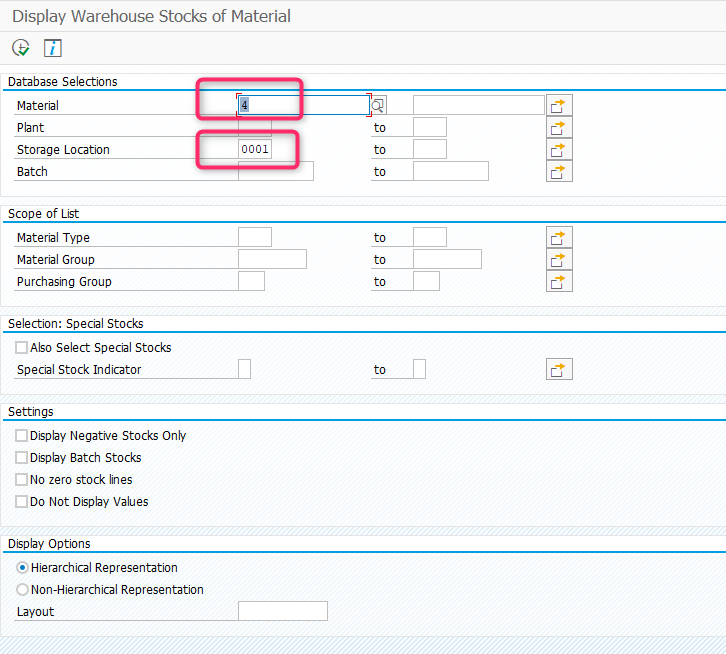
Click Execute or press F8.

In the ALV List, see the line corresponding to the specified storage location and get the quantity and total cost.
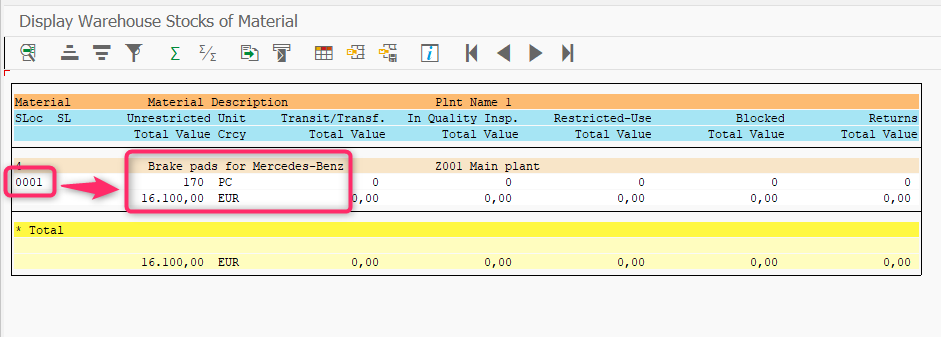
Send the data to the user via email.
Automated scenario
tip
To be able to run the script, provide your own credentials to enter SAP, defined as <SAP-USER> and <SAP-PASSWORD>.
Also, use appropriate email addresses, passwords, etc. in the mail section of the script.
Expand to see the code sample of how to get warehouse stock for specific material
<?xml version="1.0" encoding="UTF-8"?>
<config xmlns="http://web-harvest.sourceforge.net/schema/1.0/config" scriptlang="groovy">

    <robotics-flow>
        <robot name="sap_bot" driver="desktop" close-on-completion="true">
            <capability name="SEARCH_ALL_WINDOWS" value="true" />
            <script><![CDATA[


                // ******* KILL ALL SAPLOGON PROCESESS *******
                open("TASKKILL /F /IM saplogon.exe /T")

                // ******* LOGIN AND OPEN TRANSACTION *******
                command = 'sapshcut -user=<SAP-USER> -pw=<SAP-PASSWORD> -language=EN -system=ERD -client=100 -command=MB52 -trace=0'
                open("C:/Program Files (x86)/SAP/FrontEnd/SAPgui/${command}")
                sleep(5000)


                // ******* CONTINUE WITHOUT ENDING ANY OTHER LOGONS *******
                if (Window.windowHandles("[CLASS:#32770; TITLE:License Information for Multiple Logons]").isEmpty()) {
                    log.info("Window [License Information for Multiple Logons] not found")
                } else {
                    window("[CLASS:#32770; TITLE:License Information for Multiple Logons]")
                    $("[CLASS:GuiRadioButton; NAME:MULTI_LOGON_OPT2]").click()
                    $('[CLASS:GuiButton; NAME:btn[0];]').click()
                    log.info("Window [License Information for Multiple Logons] closed")
                }

                // ******* QUERY *******
                window("[CLASS:SAP_FRONTEND_SESSION; TITLE:Display Warehouse Stocks of Material]")
                $("[CLASS:GuiCTextField; NAME:MATNR-LOW]").setText("4")
                $("[CLASS:GuiCTextField; NAME:LGORT-LOW]").setText("0001")
                sendKeys(Keys.F8)

                window("[CLASS:SAP_FRONTEND_SESSION; TITLE:Display Warehouse Stocks of Material]")
                sys.defineVariable("emailSubject", $("[CLASS:GuiLabel; INSTANCE: 43]").getText().toString())

                tableTemplate = "<table border=1 cellspacing=0 cellpadding=0 style='border-collapse:collapse;border:none'>%s</table>"
                tableRowTemplate = "<tr>%s</tr>"
                tableCellTemplate = "<td width=81 valign=top style='width:60.45pt;border:solid windowtext 1.0pt;padding:0cm 5.4pt 0cm 5.4pt'><p style='text-autospace:none'><span style='font-size:10.0pt;font-family:monospace;color:black'>%s<o:p></o:p></span></p></td>"

                StringBuilder firstRowBuilder = new StringBuilder()
                StringBuilder secondRowBuilder = new StringBuilder()
                StringBuilder tableBuilder = new StringBuilder()

                firstRowBuilder.append(String.format(tableCellTemplate, $("[CLASS:GuiLabel; INSTANCE: 53]").getText()))
                firstRowBuilder.append(String.format(tableCellTemplate, $("[CLASS:GuiLabel; INSTANCE: 55]").getText()))

                secondRowBuilder.append(String.format(tableCellTemplate, $("[CLASS:GuiLabel; INSTANCE:68]").getText()))
                secondRowBuilder.append(String.format(tableCellTemplate, $("[CLASS:GuiLabel; INSTANCE:70]").getText()))

                tableBuilder.append(String.format(tableRowTemplate, firstRowBuilder.toString()))
                tableBuilder.append(String.format(tableRowTemplate, secondRowBuilder.toString()))

                sys.defineVariable("emailContent", String.format(tableTemplate, tableBuilder.toString()))

                ]]></script>
        </robot>
    </robotics-flow>

    <mail from="<USERNAME_EMAIL>" smtp-host="<SMTP_HOST>"
        security="ssl" smtp-port="<SMTP_PORT>" to="<RECEIVER_EMAIL>"
        username="<USERNAME_EMAIL>" password="<USERNAME_EMAIL_PASSWORD>"
        type="html"
        subject='[SAP][AT] Warehouse Stocks of Material: ${emailSubject}'>
        <var name="emailContent" />
    </mail>

    <export include-original-data="true"></export>

</config>