Learn about BEP and AutoML integration
The main goal of AutoML and BEP integration is to use the BEP platform for the AutoML execution.
In pre-BEP versions, all model execution requests were synchronous and used REST API from the corresponding bot steps. Though the approach works for BEP, it leads to performance issues:
- Limited number of simultaneous HTTP connections for a REST request.
- A lot of Workers waiting for AutoML execution leading to cluster resources under utilization. In the worst case, WMS kills Control Tower (CT) Workers waiting for a response to start an AutoML worker to process all these requests.
As CT should not be tightly coupled with the AutoML model input data format, the Bridge mechanism is introduced. For details about the mechanism, see Add and configure Model and Dataset steps in Business Process.
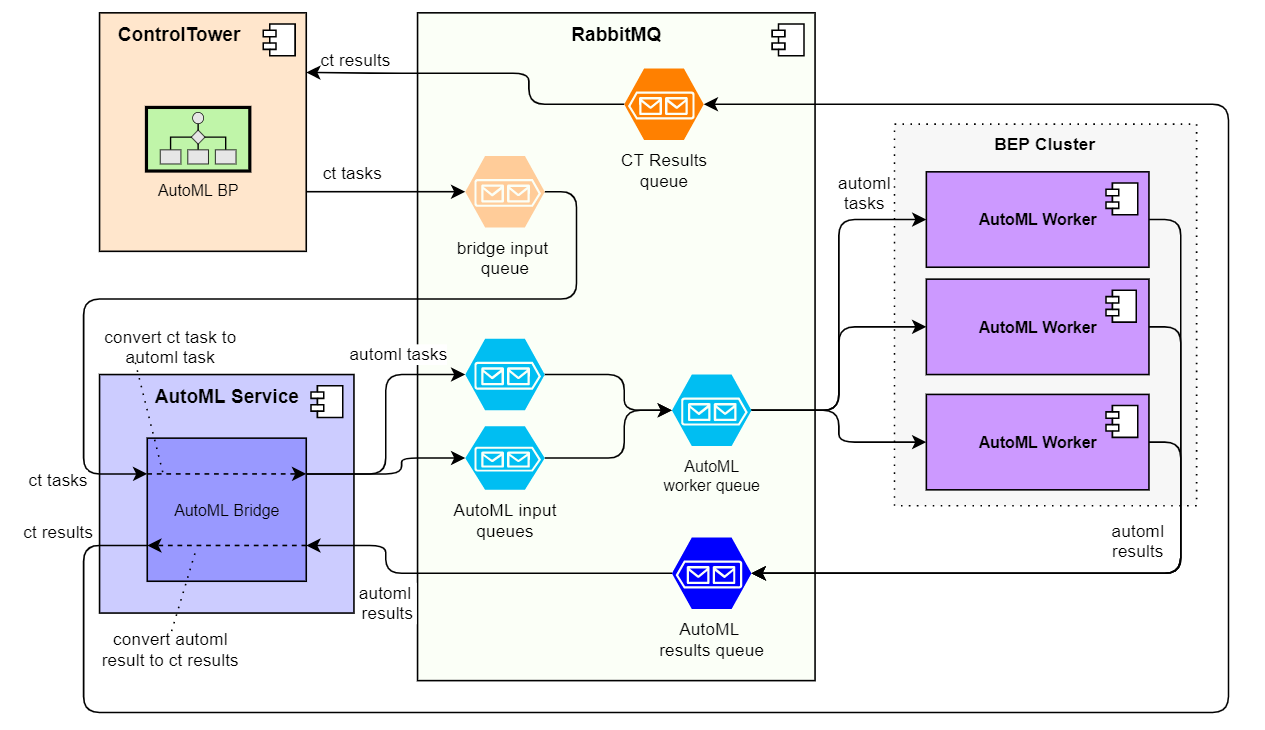
The overall flow using the mechanism is as follows:
A Model step is introduced. It is like a bot step that contains special XML with tags for model execution parameters instead of the web-harvest DSL XML.
When CT sees the step, it sends a special task to the AutoML Bridge channel, a special queue managed by the Bridge component.
The Bridge converts incoming CT tasks into AutoML tasks and sends them to AutoML Execution input queues.
The tasks are brokered to AutoML worker queues by the standard TDS mechanism. AutoML execution workers are also managed by standard WMS.
When an AutoML worker receives the task, it executes the model and sends the AutoML execution result to a special AutoML result channel.
The Bridge component consumes the result message and converts it to a CT result message sent to the standard CT result queue.
When CT gets the result, it processes the message similarly to a standard CT task result (a complete record on the AutoML execution step) and sends it further to the Business Process (BP) flow.