Manage BEP Worker execution
The Worker management system (WMS) starts and stops BEP Workers, as well as scales them up or down based on received streams of BEP Worker tasks queued from client apps.
Mind that WMS is not responsible for managing RPA Workers. Instead, RPA Workers are run on Windows nodes—one Worker per single Windows node. The figure below illustrates the approaches to managing RPA and CT Workers from the Control Tower cient app.
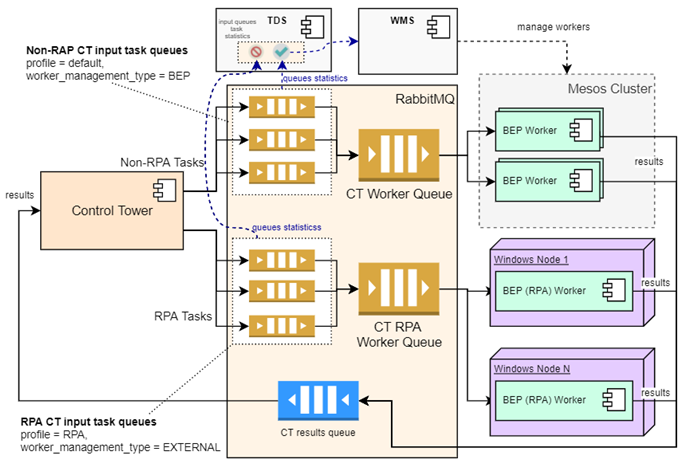
Worker management flow
WMS manages Workers as described below:
Starts one or more Workers as soon as a new message appears in an empty queue or a queue appears that didn't exist before.
Scales up or down Worker process instances based on the number of tasks in the queue and their processing speed.
Stops the Workers entirely when the corresponding queue is empty for a given period. This can happen before the period expires if more resources are required for another job. See Overall cluster capacity in the table below.
Input data for Worker management
BEP Worker management is based on the scaling strategy and the input information represented in the table below.
| Input data type | Details |
|---|---|
| Input task statistics | It is the total number of tasks in queues. WMS retrieves the task statistics from Task Dispatcher Service (TDS). In turn, TDS gets the task queue statistics via RabbitMQ management REST API. |
| Task processing (consuming) speed | To illustrate, let's assume you have two Worker types—Worker A and Worker B. Both have 1,000 tasks in corresponding queues. Worker A processes one task in 10 seconds on average, whereas Worker B—one task in 100 seconds. In this case, WMS needs to scale up Worker B by approximately 10X times as compared to Worker A. |
| Overall cluster capacity | WMS reads the total cluster capacity and free capacity to control the total number of Worker processes. This is essential to avoid exceeding resources leading to stuck Worker processes with the Waiting status. WMS is supposed to re-balance resources between Worker types: scale down specific Worker processes to free resources for other Worker types. Refer to the Scaling flow article. |
Graceful Worker shutdown
"Death pill" is a marker for a Worker to stop listening to a task queue and notify WMS that all tasks are finished, and it is ready to stop. After the notification, WMS commands Marathon to stop a specific Worker job.
The "death-pill" mechanism is not used for RPA workers because WMS is not responsible for managing them.
In terms of implementation, a "death pill" is a shared counter in ZooKeeper with the following path:
/kill/death-pill/<client-id>/<worker-gavp with '/' as delimiter: /<worker-group-id>/<cluster-node-host>/death-pill-count
The mechanism functions as described below:
If WMS needs to stop Workers, it increases the shared counter by the number of Workers to stop.
Workers get the counter state in one of the following ways:
- Directly listen to counter changes.
- Recheck themselves after processing a task.
WMS waits for a worker-event from Workers.
Under the current scaling strategy, WMS always kills Workers via "death pills", except for one case. If a pool has waiting tasks, none of its Workers is launched, and the same situation was in the previous iteration, WMS falls back on "force kill".
It tries to select a subset of cluster nodes to apply the "force kill". Typically, it is the intersection of nodes where Workers of waiting pools can be started. For example, if the strategy decides to run pool1 on [node1, node2] and pool2 on [node2, node3], it is enough to use "force kill" on node2 only.