Apply universal RPA driver
The universal driver provides the following benefits for rapid RPA scripts development:
- You do not need to switch between drivers and create multiple robot plugins.
- You can use the universal driver in 99% of use cases. Almost all RPA use cases don't need complex driver juggling with transaction handling and support.
To use the universal driver, complete the following conditions:
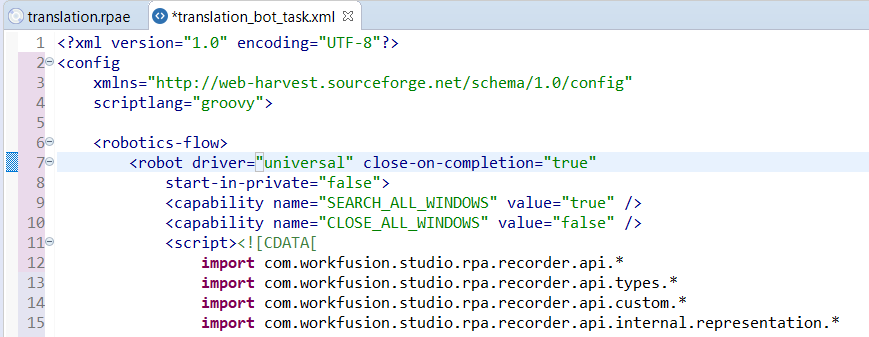
- In the robot plugin, set the
driver="universal"attribute. - Add a capability inside the robot plugin:
<capability name="SEARCH_ALL_WINDOWS" value="true" />.
See universal driver example
  import com.workfusion.odf2.compiler.BotTask;
  import com.workfusion.odf2.core.task.AdHocTask;
  import com.workfusion.odf2.core.task.TaskInput;
  import com.workfusion.odf2.core.task.output.TaskRunnerOutput;
  import com.workfusion.odf2.core.webharvest.rpa.RpaDriver;
  import com.workfusion.odf2.core.webharvest.rpa.RpaFactory;
  import com.workfusion.odf2.core.webharvest.rpa.RpaRunner;
  import com.workfusion.rpa.driver.Driver;
  import com.workfusion.rpa.helpers.RPA;
  import org.openqa.selenium.By;
  import org.openqa.selenium.JavascriptExecutor;
  import org.openqa.selenium.WebElement;
  import org.slf4j.Logger;
  import javax.inject.Inject;
  import static com.workfusion.rpa.helpers.RPA.$;
  import static com.workfusion.rpa.helpers.UiConditions.text;

  @BotTask(requireRpa = true)
  @Requires({ControlTowerServicesModule.class})
  public class ApplyUniversalRPADriver implements AdHocTask {

        private final RpaRunner rpaRunner;
        private final Logger logger;
        private final SecretsVaultService secretsVault;

    @Inject
    public ApplyUniversalRPADriver(RpaFactory rpaFactory, Logger logger , SecretsVaultService secretsVault){
        this.rpaRunner = rpaFactory
        .builder(RpaDriver.UNIVERSAL)
        .closeOnCompletion(true)
        .build();
        this.logger = logger;
        this.secretsVault = secretsVault;
    }

    @Override
    public TaskRunnerOutput run(TaskInput taskInput) {

        rpaRunner.execute(driver ->{
        this.universalDriverExample(driver);
        });

        return taskInput.asResult()
        .withColumn("example_bot_task_output", "completed_successfully");
    }

    private void universalDriverExample(Driver driver){
        this.openNotepadUniversal(driver);
        String wikiText = this.ChromeJobUniversal(driver);
        this.notepadJobUniversal(driver,wikiText);
    }

    private String ChromeJobUniversal(Driver driver){

        RPA.openChrome("https://www.wikipedia.org/");
        RPA.sleep(5000);

        RPA.window("[CLASS:Chrome_WidgetWin_1]");

        WebElement input = driver.findElement(By.xpath("//input[@id='searchInput']"));
        try{
            input.sendKeys("Robotic process automation");
        }
        catch (Exception ex){
            logger.debug("Exception Raised");
        }

        RPA.pressEnter();
        RPA.sleep(5000);
        String wikiText = driver.findElement(By.xpath("//div[@id='bodyContent']//p")).getText();
        return wikiText;
    }

    private void openNotepadUniversal(Driver driver){
        RPA.openAndFocus("notepad.exe",3000,250);
        RPA.sendKeys("What is RPA?");
        RPA.pressEnter();
    }
    private void notepadJobUniversal(Driver driver,String wikiData){
        RPA.window("[CLASS:Notepad]");
        RPA.sendKeys(wikiData);
        RPA.pressEnter();
        RPA.pressEnter();
        RPA.pressCtrlA();
        RPA.pressBackSpace();
    }
  }
For more universal driver examples, see:
Set driver type in universal driver explicitly
While using the universal driver in complex use cases, the driver auto-switching algorithm can fail to automatically detect which application (web or desktop) should accept the current action, for example:
$(byXpath("//input[@id='searchInput']")).click();                 // web

switchTo().window("[CLASS:SunAwtFrame; TITLE:SwingSet2]");
$(byXpath("//*[@text='Eyes']/following-sibling::*")).click();     // desktop
To handle such cases, use an explicit driver switching method that accept a closure with all actions for this driver:
inDesktop{}inChrome{}inFirefox{}inEdge{}inIE{}
For instructions that are outside the closure, the default auto-switching mechanism is applied.
The explicit driver closures improve the stability and readability of your code.
Using driver type closures
import com.workfusion.odf2.compiler.BotTask;
import com.workfusion.odf2.core.task.AdHocTask;
import com.workfusion.odf2.core.task.TaskInput;
import com.workfusion.odf2.core.task.output.TaskRunnerOutput;
import com.workfusion.odf2.core.webharvest.rpa.RpaDriver;
import com.workfusion.odf2.core.webharvest.rpa.RpaFactory;
import com.workfusion.odf2.core.webharvest.rpa.RpaRunner;
import com.workfusion.rpa.driver.Driver;
import com.workfusion.rpa.helpers.RPA;
import org.openqa.selenium.By;
import org.openqa.selenium.JavascriptExecutor;
import org.openqa.selenium.WebElement;
import org.slf4j.Logger;

import javax.inject.Inject;

import static com.workfusion.rpa.helpers.RPA.$;
import static com.workfusion.rpa.helpers.UiConditions.text;

@BotTask(requireRpa = true)
@Requires({ControlTowerServicesModule.class})
public class ApplyUniversalRPADriver implements AdHocTask {

    private final RpaRunner rpaRunner;
    private final Logger logger;
    private final SecretsVaultService secretsVault;
    @Inject
    public ApplyUniversalRPADriver(RpaFactory rpaFactory, Logger logger, SecretsVaultService secretsVault){
        this.rpaRunner = rpaFactory
                .builder(RpaDriver.UNIVERSAL)
                .closeOnCompletion(true)
                .build();
        this.logger = logger;
        this.secretsVault = secretsVault;
    }

    @Override
    public TaskRunnerOutput run(TaskInput taskInput) {

        rpaRunner.execute(driver ->{
            this.universalDriverClouser(driver);
        });

        return taskInput.asResult()
                .withColumn("example_bot_task_output", "completed_successfully");
    }

    private void firefoxJobClouser(Driver driver){
        RPA.openFirefox("https://train-invoiceplane.workfusion.com");
        $("#login").click();
        SecureEntryDTO secureEntry = secretsVault.getEntry("robotCredentials");
        $("#email").val(secureEntry.getKey());
        $("#password").val(secureEntry.getValue());
        $(By.name("btn_login")).click();
    }
    private void chromeJobClouser(Driver driver){
        RPA.openChrome("https://www.w3schools.com/xml/tryit.asp?filename=tryajax_first");
        RPA.switchTo().frame("iframeResult");
        $("#demo > h1").shouldHave(text("The XMLHttpRequest Object"));
        RPA.sleep(2000);
        $("#demo > button").shouldHave(text("Change Content")).click();
    }

    private void ieJobClouser(Driver driver){
        RPA.openIE("https://www.google.com/");
        driver.findElement(By.id("APjFqb")).sendKeys("RPA");
        RPA.pressEnter();
        RPA.sleep(2000);
    }
    private void notepadJobClouser(Driver driver){
        //driver.switchDriver("universal");
        RPA.sleep(2000);
        RPA.open("notepad");
        RPA.sleep(2000);
        RPA.switchTo().window("[CLASS:Notepad]");
        RPA.sendKeys("foo");
    }

    private void universalDriverClouser(Driver driver){

        // open a web-application in Firefox and log in
        this.firefoxJobClouser(driver);
        RPA.sleep(2000);

        // open a web-page in Chrome and click
        this.chromeJobClouser(driver);
        RPA.sleep(2000);

        // open a web-page in Internet Explorer, enter text, and click
        //this.ieJobClouser(driver);

        // open notepad and type text into it
        this.notepadJobClouser(driver);
    }

}
Generate universal driver code in Studio
To view an example of an RPA Bot Task with the universal driver, do as follows:
Create a new recording in Recorder.
Click Export code to Bot Task.

As a result, a valid Bot Task with the universal driver is generated: