Work.AI component overview
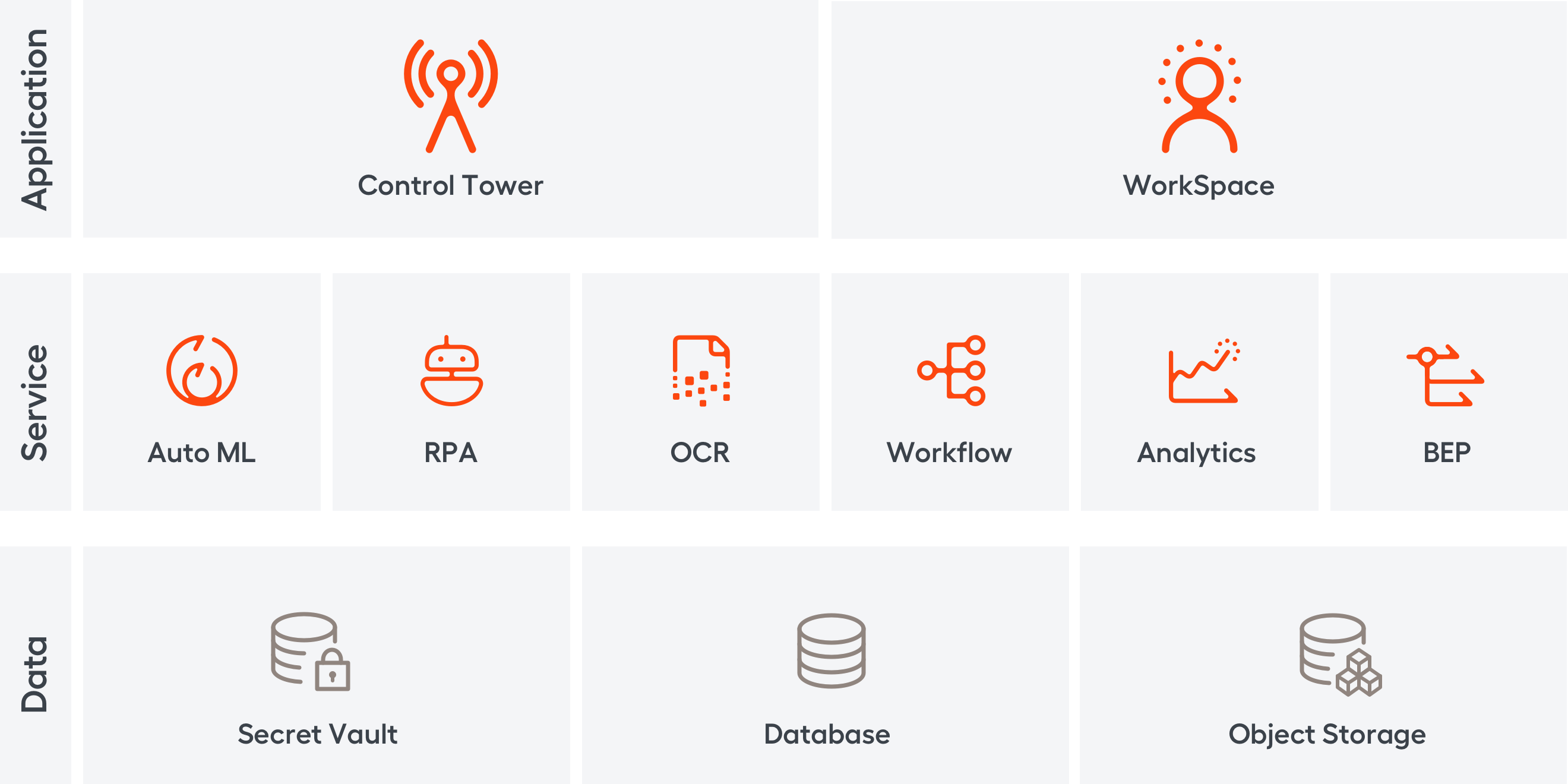
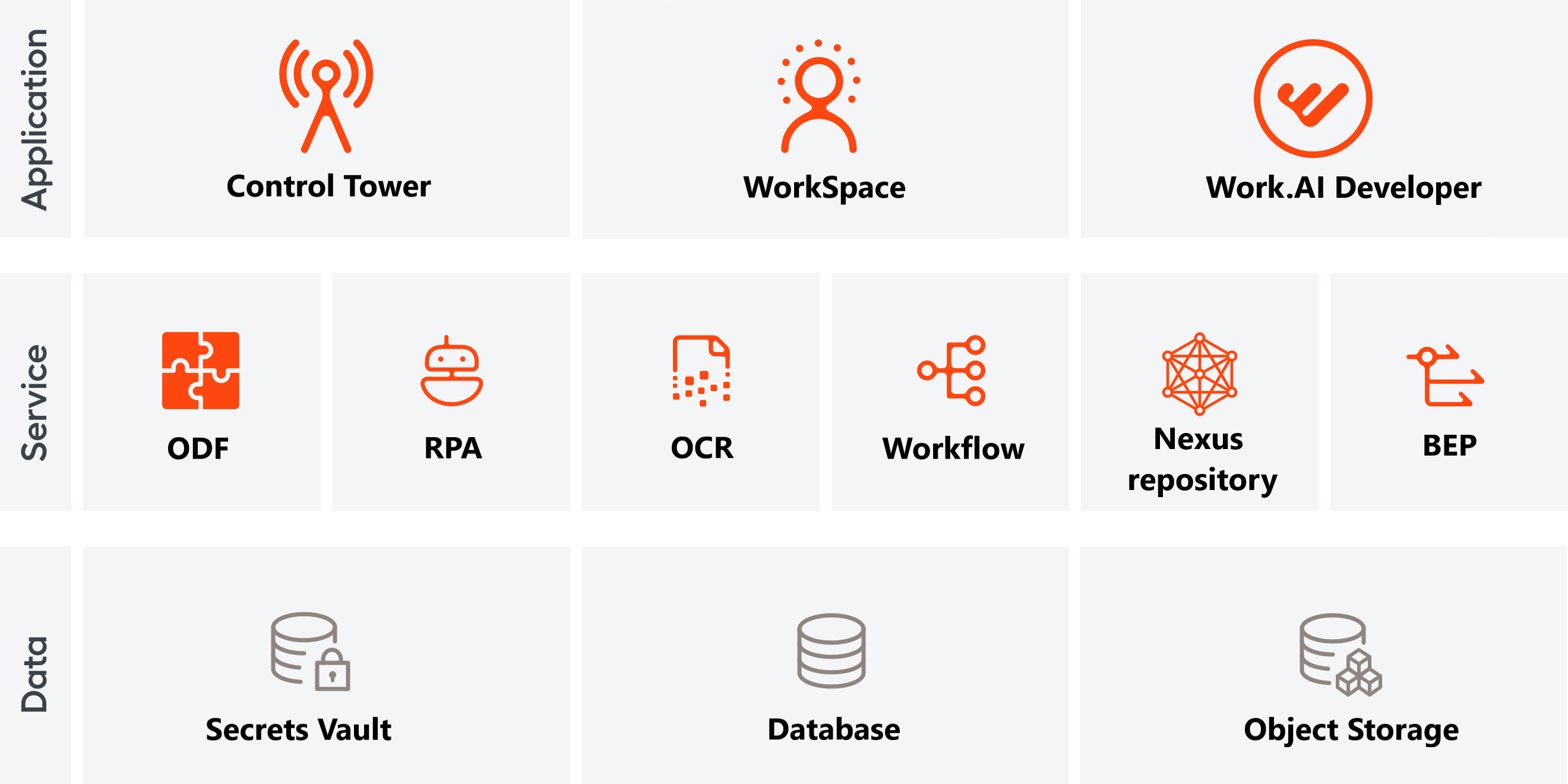
The article provides a comprehensive overview of Work.AI components, their server deployment, and data flows across them. The figure below illustrates how the components are joined together to form the Work.AI architecture.
Application level
On the level, the Work.AI platform comprises such major GUI applications as Control Tower and Workspace. In addition to them, the platform features development tools and third-party integrations for user management and data logging and monitoring.
Control Tower
It is a central management web application intended to orchestrate the automation of processes and tasks. It provides a graphical interface for power users, administrators, and developers to accomplish the following tasks:
- Design, run, schedule, and monitor automations and associated workflows
- Handle the input and output data related to automations
- Configure system settings
- Manage BEP resources
- View and manage WorkFusion Analytics
Related components: Workspace, Workflow, RPA, AutoML, OCR, BEP, File Storage, Secrets Vault
Bot Manager
Via Control Tower, you can also access Bot Manager—a web application that uses Bot Agents on RPA servers to manage RPA units and send commands. It allows the following:
- Manage server processes
- Maintain active RDP sessions
- Monitor hardware utilization and statistics for bots and instances
To learn more about the application, read Work with Bot Manager.
Related components: Control Tower, RPA, Analytics, Database, Secrets Vault
Workspace
It is a web application that offers a human-in-the-loop experience, allowing human workers to interact effectively with bots. You can access the application from the Control Tower user interface.
Workspace receives input from bots and creates assignments for users. The output is handled further by bots and displayed in Control Tower, including on Analytics dashboards.
To learn more about the component, read the Get started with Workspace topic.
Related components: Control Tower, Object Storage, Analytics
User management
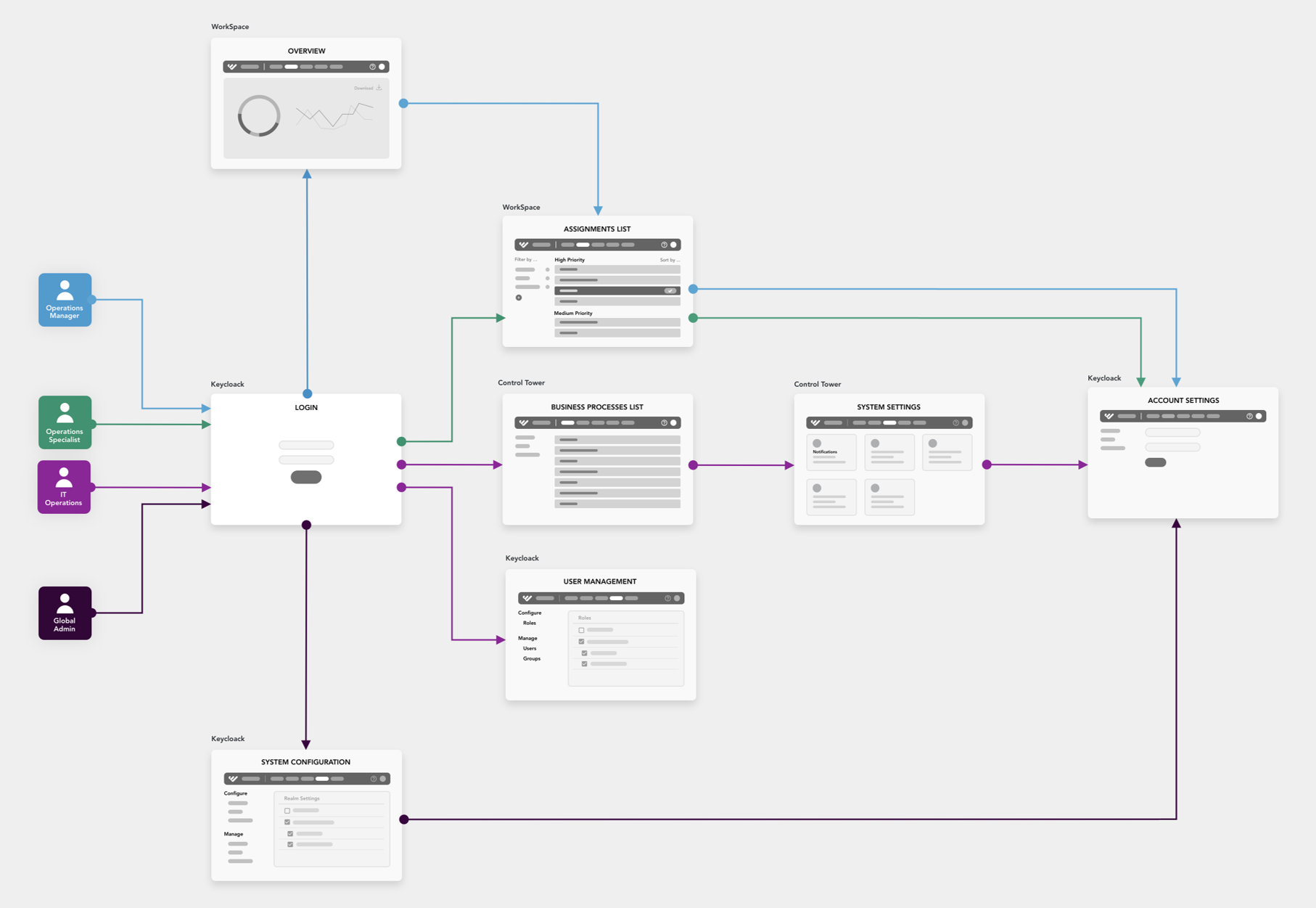
Work.AI features a unified user management interface based on Keycloak where you can do the following:
- Manage all users (admins, Ops specialists, and so on) from a single application
- Provide built-in single sign-on (SSO) across Work.AI components—Kibana, Bot Manager, Workspace, Control Tower, Marathon, and S3 Manager
- Integrate with external Identity Providers
- Limit access to specific Work.AI functionality based on user roles
To learn more about the component, read the Getting started with WorkFusion User Management topic.
The figure below illustrates how the user management system (Keycloak) interacts with some Work.AI components.
Platform Monitor
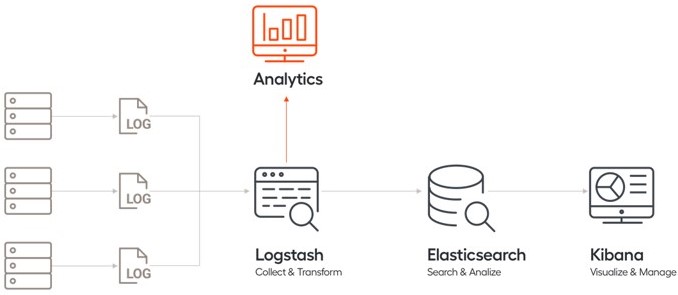
It is an interface where you can view and manage logs and a set of dashboards monitoring the performance of the platform components. You can access it from Control Tower.
In Work.AI, logging and monitoring are based on the ELK stack: Elasticsearch, Logstash, and Kibana. For details, read Monitoring.
Service level
The service level covers the Work.AI components that underlie WorkFusion applications. It enables the execution of automations and processes launched from these apps and supports interactions across the platform levels.
AutoML
The AutoML component finds the best machine learning model for a particular target function, trains and validates it, and finally predicts the target variables.
Related components: Control Tower, OCR, BEP, Object Storage
RPA
The RPA (Robotic Process Automation) Cluster is a scalable computing environment that automates user scenarios in desktop or web applications.
Related components: Control Tower
OCR
The OCR (Optical Character Recognition) engine processes scanned documents converting unstructured, image-based data into structured-character documents in several formats, such as HTML, XML.
Related components: Control Tower, Workspace, Object Storage
Workflow
Workflow Engine executes automation processes authored in Control Tower based on process definitions. This is a server application configured in Control Tower. The execution itself is handled in different computing environments—RPA, Workspace, OCR, and AutoML.
Related components: Control Tower, RPA, Workspace, AutoML
Analytics
Work.AI features Superset-based dashboards as an out-of-the-box (OOTB) analytics tool. For details, refer to Learn about analytics in WorkFusion.
Related components: Control Tower, Workspace
BEP
Bot Execution Platform (BEP) is a platform that creates tasks, submits them to queues, routes to isolated BEP Workers, and receives the task execution results.
You can manage the BEP platform resources from a dedicated user interface in Control Tower. For details, read Manage bot execution resources from Control Tower.
Related components: Control Tower, AutoML, Workflow, RPA
Data level
The data level comprises components for storing and managing data across the Work.AI platform, including sensitive information, such as passwords, access tokens, and so on.
Database
WorkFusion uses MS SQL as its database server. MS SQL Server stores Business Process definitions, as well as runtime and tracking information on their executions, including RPA and AutoML, and supplies the data as requested by other software applications.
Related components: Control Tower, Workspace, Analytics
Secrets Vault
It is secure storage for sensitive data.
Related components: Control Tower, RPA
Object Storage
It is a reliable storage for OCR results and trained AutoML models. It keeps binary file type content, such as OCR results, AutoML models, screenshots, and reports generated by automations.
Related components: Eclipse, Recorder, Workflow, OCR, AutoML
Data flow across Work.AI components
The figure below illustrates in a simplified way how users interact with Work.AI components and how data move across them.
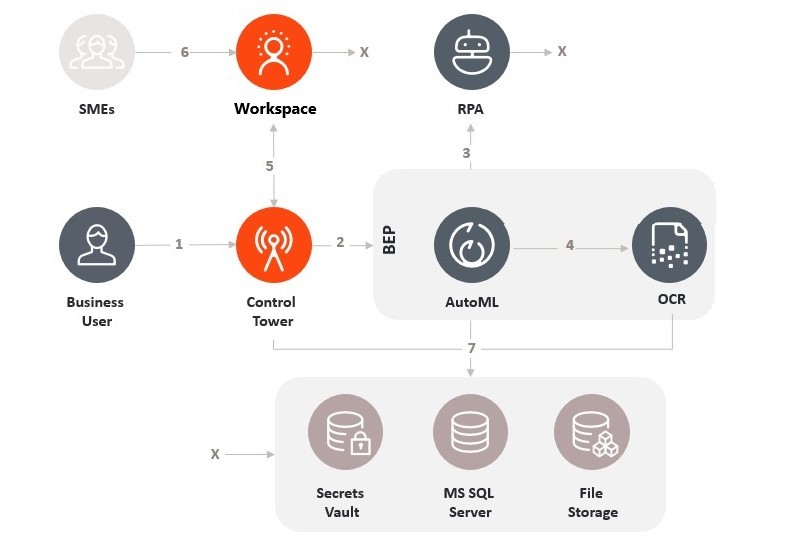
The digits in the diagram above correspond to the following descriptions:
A business user launches or schedules a Business Process in Control Tower (CT).
CT sends Bot Tasks to BEP for execution.
BEP sends tasks that require using the RPA functionality, such as accessing underlying applications (SAP, Outlook, so on), to RPA bots for execution.
The OCR server digitalizes documents retrieved by RPA bots—that means, converts them into the XML format for further processing. AutoML downloads the model required for the task and consumes the digitized documents to predict the output.
If any attribute in a document requires validation by a worker or a Subject Matter Expert (SME), the document is sent to Workspace.
In Workspace, SMEs validate or extract data from the documents. Workspace submits the validated or processed documents back to CT.
CT, BEP, AutoML, OCR, RPA, and Workspace components use the data layer—Secrets Vault, MS SQL Server, File Storage—for data and secret storage and retrieval.
Development tools
To facilitate the design of automations, WorkFusion offers a special development environment—Work.AI Developer. The figure below illustrates the components involved in operating the environment.
Server deployment
To learn how Work.AI components are distributed across servers and how the servers interact with each other, see the deployment diagram.
In case any of the platform components becomes non-operational, look for troubleshooting tips in the following support guides: