ML model improvements
Once the first results are received, there is low probability that they will meet all the success criteria without any changes and tuning. More often, some enhancements should be done.
Let’s review the most proven ways to achieve high ML model results. Model tuning is usually performed by an ML Engineer and (in some complicated cases) a Data Scientist. Below, find brief overviews of the most common practices in ML model improvements.
Clean your data
Perhaps there are missing or corrupt values (both in the training and test sets) that can be fixed or removed to increase the quality of the data. However, if the dataset was prepared properly, in compliance with all labeling rules and instructions, issues over mistakes in gold data should not arise.
Look for more data
If the model’s accuracy on the validation set is low, or fluctuates between low and high each time, the model is insufficiently trained and more data is needed.
Apply post-processing
Post-processing is the final stage of the AutoML SDK pipeline, performed after model training. Post-processing modifies the trained model output to fit the requirements of a customer by applying pre-defined rules. In rare cases, it's based on a separate ML model.
Generally, a rather high boost in precision can be achieved with the help of post-processors just by modifying fields’ values (adding, removing, changing (80% of cases), and grouping).
Post-processing and ML customization must be aimed at improving ML quality in production, not at achieving good results on this particular test set. It means only frequent mistakes in valid cases should be corrected. The impact of exceptions should be counted separately and communicated to the Delivery Manager.
Types of post-processing
Normalization
Normalization is the process of changing the extracted values to a certain format. The extracted values can include:
- Numbers (1k → 1000)
- Dates (11.07.2018 → 07/11/2018)
- Prices (100 → 100.00)
- Currencies (\$ → USD)
- Addresses (NY Brooklyn 02356 Ralph Ave. → 02356 Ralph Ave. Brooklyn NY)
- Organizations (WF or WorkFusion Systems → WorkFusion)
OCR errors correction
During document processing, OCR may introduce errors due to damaged documents and low-quality scans. In this situation, post-processing can be used either to correct damaged values or remove them.
Fixing value
OCR output may contain the same recognition error in all documents. Post-processing can fix incorrect values by introducing a rule (usually a regular expression replacing one character with another).
For example, if values are corrupted in one and the same way across all the dataset, the following rules can be applied: replace G with 6, B with 8, O with 0 in Zip Codes.
Removing value
Sometimes, OCR may introduce a recognition error in 50% of cases while the other 50% are correct.
For example, model training results may show that character B is replaced with 8 in 55% of cases and with 6 in 45% of cases. This is quite a low probability level and should not be used in a post-processor.
Depending on the AI Agent requirements, it is generally recommended that values with low- to medium-level of positive correction probability should be skipped or removed by the post-processor.
Validation
When extracting Bank Card Numbers, IBANs, Zip Codes, or CUSIPs, it’s crucial to check them to make sure the extracted value is valid. In cases where the extracted value is not valid, it’s usually removed.
Mapping to Reference Data
A post-processor can extract additional data not contained in the original document using the reference data. For example, Employer’s Name and Surname can help extract a unique company ID. Having extracted only zip code, you can map it to the city, and then extract this information even though it’s not initially present in the document. Reference data can be taken from a database, an API request, a local dictionary, and so on.
Transformation
Transformation represents simple procedures like trimming, lower or upper case, capitalization, removing punctuation, special characters, and so on.
For example, NOT CHEMICALLY TREATED can be transformed into Not chemically treated.
Grouping
A model can extract multiple field values of the same type (for example, Currency, Quantity, and Price) that should be joined into a group according to their logical connection. For example, you may need to group Product Name, Amount and Price. Field values can be grouped based on their position in a document or words in a sentence, based on a table line, or based on some underlying custom logic.
For example, table cells.
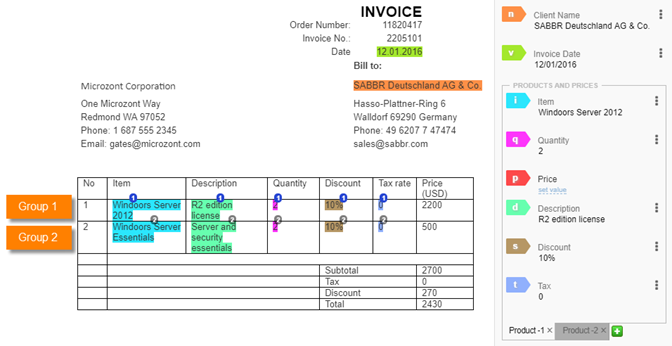
Field values grouped based on a line in a table.
For post-processing code examples, visit post-processing examples.
Create additional components: feature extractors and annotators
Features are unique signatures of the given value or unique properties that define a value. Creating new feature extractors depending on the particular dataset can help identify a field more unmistakably and as a result, improve model accuracy on unseen data.
For more details, see feature engineering.
Select accurate features
Not least important is feature selection. Feature selection is a process of finding out the best subset of attributes which better explains the relationship of independent variables with target variable.
Feature selection methods help to create an accurate predictive model and can be used to identify and remove unneeded, irrelevant and redundant attributes from data that do not contribute to the accuracy of a predictive model or may in fact decrease the accuracy of the model.
Fewer attributes is desirable because it reduces the complexity of the model, and a simpler model is simpler to understand and explain.