IT Operations guide
The organization’s IT Operations install the Work.AI development environment. A certain contribution to migration is required from the IT Operations side.
Step 1: calculate and build environment
"To Be" state of migration is when Low-Code Developers design their automations in Work.AI Developer and check them in the Work.AI test environment. Finally, tested Business Processes are exported from the test environment and imported into production. There is more work like installing required desktop applications on the test and production RPA servers, creating of required credentials in Secrets Vault in the test and production environments, and so on.
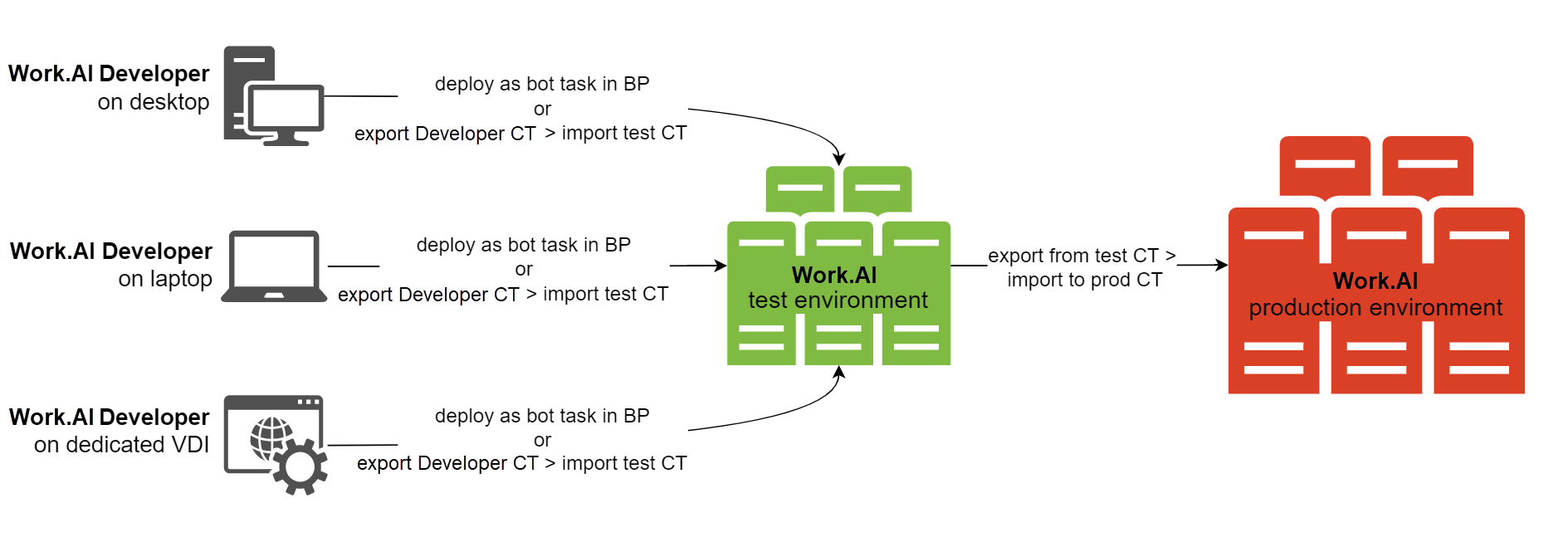
- Allow Low-Code Developers to access Control Tower and RPA unit Windows sessions in the test environment.
- Do not allow Low-Code Developers to access any production environment resources.
It is essential to understand the Low-Code Developer development lifecycle and know the number of current Low-Code Developers and plans to grow a program. Then, keeping the budget in mind, calculate how many RPA servers and RPA units are needed in the test and production environments. Note that the safest way is to provide each Low-Code Developer with an individual RPA unit. However, it is the most expensive and inefficient approach as RPA workers will be idle most of the time. Thus, negotiate a shared approach. There are no built-in tools for sharing RDP access between people, so agreements will be needed. In the worst scenario, one user will kick another from a Windows session while nothing will be lost.
Step 2: provide required access for Low-Code Developers
Migration to the Work.AI platform requires Low-Code Developers to learn how to test their RPA bots on the platform RPA server. To achieve that, they need a certain level of access:
Control Tower access. Provide credentials to access the server-based Control Tower with abilities to create, edit, and execute Business Processes, deploy from Work.AI Developer to Control Tower, schedule Business Processes, analyze logs on Control Tower.
All PU credentials need to be pre-created by IT Operations. Consider having multiple development environments if you have hundreds of Low-Code Developers. Control Tower performance depends on how many people are active simultaneously and what processes are executed at the moment. There is no good suggestion on how many users you may have on a single Control Tower or the Work.AI platform.
Access to RPA session on the server. Provide credentials with instructions on connecting via an RDP client on a dedicated RPA unit. It allows Low-Code Developers to connect to a real Windows session where their bots are executed. This access is crucial as only in this way it is possible to troubleshoot any issues, check access to target web and desktop applications, inspect applications, and so on.
All RDP accesses (RPA unit) must be pre-created by IT Operations in advance. To guarantee comfortable testing, create one RPA unit per one Low-Code Developer. Also, more RPA servers are needed to handle hundreds of Low-Code Developers.
If you decide to share RDP accesses, people may drop each other if they intersect in time. However, you can manage it manually, for example, via corporate messengers.
Personal RPA fleet. Name a personal RPA fleet. RPA units are split using the fleet capability between all Low-Code Developers. One fleet contains one RPA unit. Thus, Low-Code Developers do not interfere with each other while testing or executing. Low-Code Developers modify their Bot Tasks to include the
fleet="my_name"property of their<robotic-flow>. This guarantees the running of their dedicated RPA unit to which they have RDP access.IT Operations should split RPA units into fleets using the Bot Manager application UI.
Step 3: organize production support
Typically, only trained Support engineers can troubleshoot and maintain Business Processes run in production. The nature of WorkFusion Recorder brings some complexity here. Any bot created in Recorder is converted into a binary and exists in a Bot Task as a single <recorder> tag with the recorder-script-uuid attribute, for example, a script as a binary attached to the Bot Task. This makes it immutable in the production environment.
To make any changes, a Support person needs to access the source actions script created by a Low-Code Developer. But Work.AI Developer does not provide any Low-Code Developer-friendly way to share sources other than sending or copying the whole project folder from the Recorder's workspace. This requires an internal agreement on how to share sources between Low-Code Developers and Support. A typical Low-Code Developer is unfamiliar with version control systems (Git, SVN) and how to use them. So, the only viable option is to agree on some company-shared folder where Low-Code Developers upload sources. If changes are needed, the Support will have a starting-point project. A Support person will copy the project to their Recorder from the locally installed Work.AI Developer workspace and modify it. Once a fix is applied, the updated Business Process must be deployed and verified on the Work.AI test environment, then exported from the test environment, and imported to the production one.