Relaunch Unit Agent
The RPA component provides several mechanisms ensuring the system recovery after a crash, for example:
- Restarting a Master Agent by WFSvc
- Restarting a Worker by a Unit Agent
- Restarting a Unit Agent
The procedure of relaunching a Unit Agent is especially vital for the recovery of Workers. Thus, when a Unit Agent crashes, there is no way to restart a Worker. See the diagram for more details:
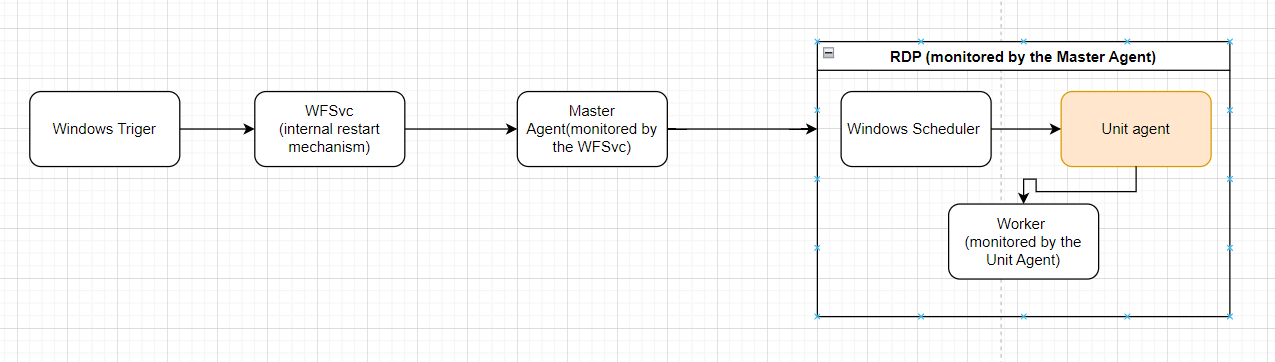
To restart a Unit Agent in case of a JVM crash, in the bot-agent.cmd file, apply the restart block and set up a counter with the number of restarts:
....
    for %%I in ("%~dp0..\..\ssl") do set "sslcertlocation=%%~fI"
    set /A "startCount = 1"
    set /A "maxRestartCount = 5"

    :restart
    set java_opts=-Djava.awt.headless=false -Dagent.desktopType=RPA -Dfile.encoding=UTF-8 -Xmx300m -Dzookeeper.clientCnxnSocket=org.apache.zookeeper.ClientCnxnSocketNetty -Dzookeeper.client.secure=true -Dzookeeper.ssl.keyStore.location=%sslcertlocation%/zookeeper-keystore.jks -Dzookeeper.ssl.trustStore.location=%sslcertlocation%/zookeeper-truststore.jks -Dzookeeper.ssl.keyStore.password=!zk_keystore_password! -Dzookeeper.ssl.trustStore.password=!zk_truststore_password! -Dmfw.lib.full.path=%mfw.lib.full.path%
....
bot-agent-unitX.bat parameters
In the bot-agent-unitX.bat file, the way of starting bot-agent.cmd is synchronous, allowing to catch the end of the execution of bot-agent.cmd.
cmd /c start /wait /min bot-agent.cmd run Unit%unitid% "%config%"
The logic is basically the same as in bot-agent.cmd, with a while-loop implementation when a process is launched. As soon as the process is completed, it is checked for errors during the execution.
To avoid an infinite loop, configure the counter value defining the number of restarts. If the counter exceeds the maxRestartCount value, the script is about to exit. If there are no errors (for example, if the console is closed manually), reset the counter to 1.
set /A "startCount = 1"
set /A "maxRestartCount = 2"

:while
if %startCount% leq %maxRestartCount% (
    cmd /c start /wait /min bot-agent.cmd run Unit%unitid% "%config%"

    if not %ERRORLEVEL% == 0 if %startCount% leq %maxRestartCount% (
        echo exited width error: %ERRORLEVEL%
        SET /A "startCount = startCount + 1"
        goto :while
    )
    SET /A "startCount = 1"
    goto :while
)
Task Scheduler settings
Task Scheduler contains settings that allow you to avoid launching one more console during the start /wait call.
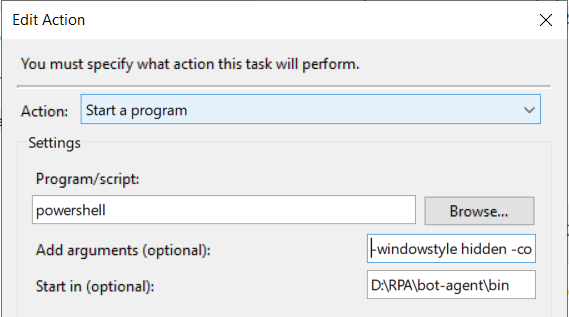
bot-agent-unitX.bat is about to be launched as a hidden PowerShell process allowing to minimize the possibility of being killed by a mistake.
The argument in the Add arguments (optional) field has the same value as in the example above:
windowstyle hidden -command ".\bot-agent-unitX.bat"