High availability
Another option that you have to decide on is the installation mode:
Standard basic
High availability
The high availability (HA) features make your installed system completely fault resilient and protected from the data loss in case of minor outages. Note that in this case, you need several servers for each installed component and load balancer. For more information, see the Hardware and the Load balancer article of the System requirements section.
HA architecture
The HA architecture implies having several instances of each server, where one is primary, and the others are emergency ones. To provide the availability of services and connectivity among servers, the load balancer is used. The data is replicated via a shared file system. If a server or a component is off for any reason, data can still be read from another server.
HA covers both servers' and components' failures. Depending on the type of redundancy in software to be provided for High Availability, the following strategies for servers and components are applied:
- Active-Active: the component is running on both primary and secondary servers in parallel with the data replicated among them. If a server fails, the other takes its place.
- Active-Warm Standby: the component runs on the primary server. The other servers are warm standby, which means all of them are working, while the component is installed on them but not running. In the case of a failure on the primary server, the software component is started with failover scripts on the secondary node. The data is regularly mirrored to a secondary system using replication or shared disk. This approach generally provides a recovery time of a few minutes.
See detailed HA configuration
| Component | HA mode |
|---|---|
| MS SQL (on the customer's side) | Active-Active (Always On). See requirements for the database. |
| Shared file system (on the customer's side) | Replication. See requirements. |
| Control Tower | Active-Warm Standby |
| Workspace | Active-Warm Standby |
| Kibana | Active-Active |
| Bot Manager | Active-Warm Standby |
| Superset | Active-Warm Standby |
| RPA/Bot Agents | Active-Active |
| OCR | Active-Active |
| BEP Worker | Active-Active |
| Marathon | Active-Active |
| Keycloak | Active-Active |
| AutoML (Gateway and Model) | Active-Warm Standby |
| Mesos Master | Active-Active |
| Master Service | Active-Warm Standby |
| RabbitMQ | Active-Active (Mirroring) |
| Nexus | Active-Warm Standby |
| S3 | Active-Active |
| Secrets Vault | Active-Active |
| ZooKeeper | Active-Active |
| Elasticsearch | Active-Active |
| Hazelcast | Active-Active |
| BEP Task Dispatcher | Active-Warm Standby |
A load balancer (LB) is aimed at providing the availability of services, distributing traffic communication across servers, and is used to increase the capacity and reliability of applications. The load balancer must be installed on the customer's side. It accepts all the traffic and forwards the application requests to HAProxy, which is installed on an Master server. After that, HAProxy routes the incoming traffic among Work.AI servers.
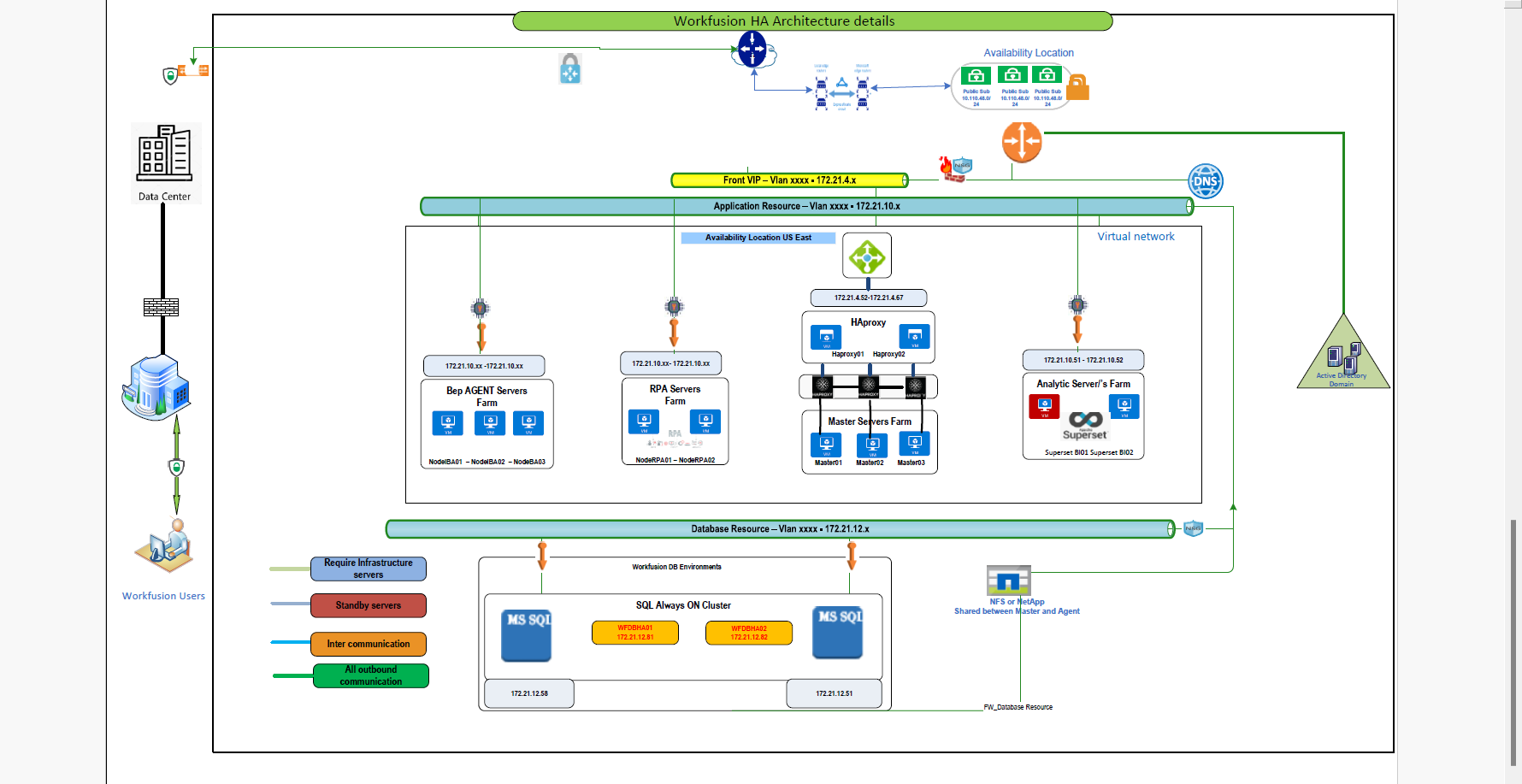
HAProxy is always installed on the Master server, even if you are not planning to run Work.AI in the HA mode.