
Version 10.1.4
Release date
January 30, 2020
Installation
Reduced deployment topology
Starting from v10.1.4, we introduce a new deployment topology that allows combining several services on the same machine and installing Intelligent Automation Cloud Enterprise on as few as six servers if you don’t plan OCR usage. This approach reduces hardware and maintenance costs. Within the 6+ servers topology, RPA, OCR, and BEP Agent servers can be scaled horizontally to any extent, depending on your expected load. For details, see Requirements for non-HA Installation. For details, see Requirements for hardware.
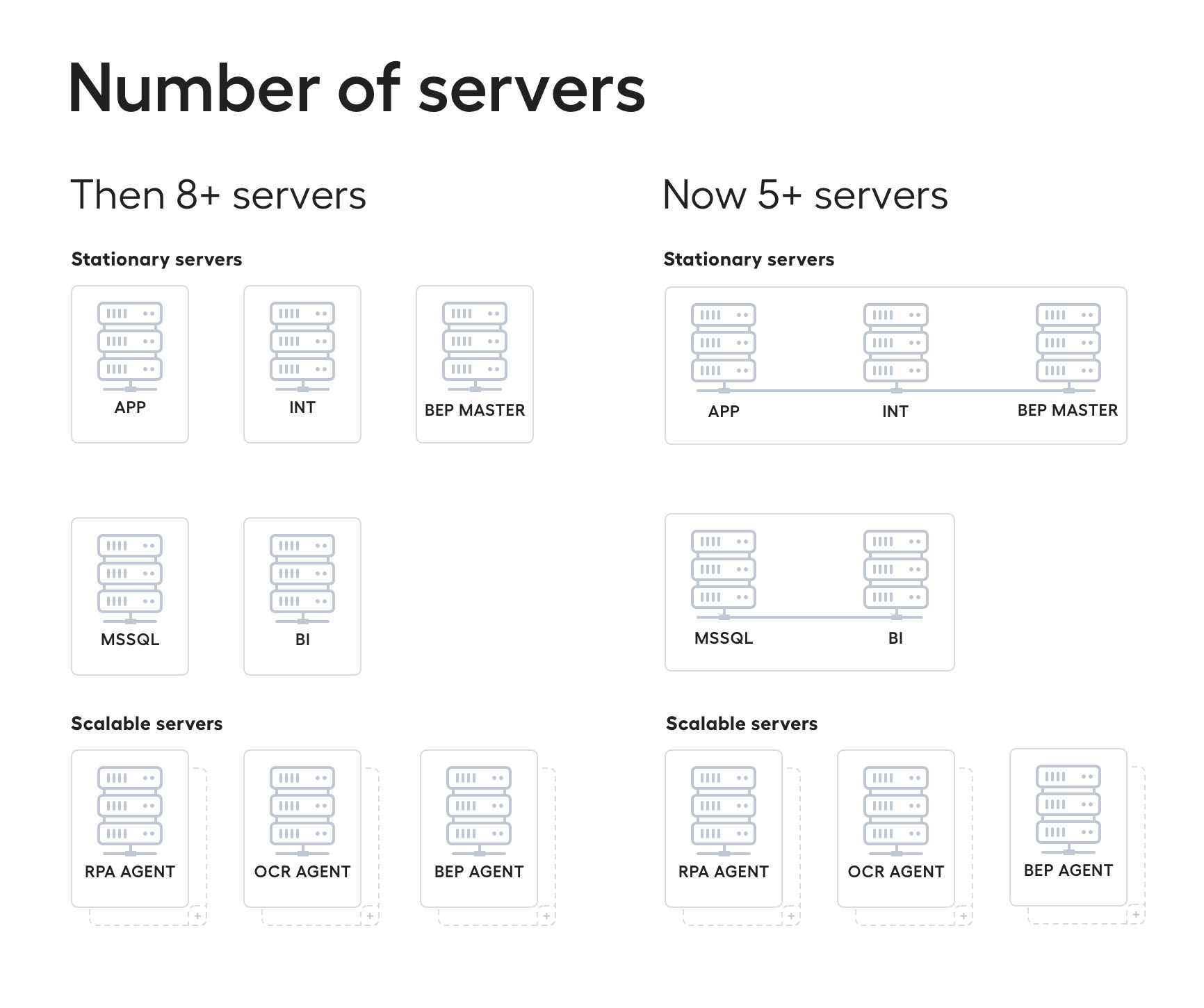
To support the new deployment topology and provide backward compatibility with v10.1.2, the APP Server has become a new installation server for the single-point installation mode instead of the INT Server used earlier. Mind that the entire installation process remains the same, while you only have to select another server as your starting point. For instructions, see the installation documentation.
In-place update
In v10.1.4, we enable the installer to support an in-place update on top of Intelligent Automation Cloud Enterprise v10.1.2, thus simplifying the update procedures.
caution
Note that you cannot change the number of servers during the update. Your current v10.1.2 installation environment can only be updated to a 10-server v10.1.4 topology. To take advantage of the six-server topology, you need to perform a clean install.
When updating, all your custom configurations are safely transferred to the new version, as the installer does not update environment-specific settings, preserves the existing key stores for SAML integration, and makes the needed backup of configuration files.
Bot sources
We renewed the bot source approach for bot management by implementing bot source support into BEP services and execution framework. As compared to the <pool> plugin used for bot task distribution in v10.x, the current solution has several advantages.
- Bot sources require fewer Workers count than the
<pool>plugin. - Bot sources limit the number of incoming tasks, which eliminates the problem of idle Workers. A Worker does not take more tasks than specified by the thread count limit, ensuring stable business process progress with no timeouts and exceptions.
- Control Tower provides options to create or update a bot source configuration either on saving or while importing the package within the user interface. To learn more, refer to Bot Sources.
Developer tools
We introduce SPOKE - a new business process testing framework - for you to test execution on a real Control Tower environment, so that test results become reliable.
- SPOKE provides fluent APIs to achieve typical testing goals.
- SPOKE works on top of Assets Bundle APIs and Maven plugins.
- SPOKE provides tools to modify the original business process bundle to remove manual steps and allow straight-through tests of Business Process execution.
To accelerate AutoML deployments, we provided the possibility to pull the AutoML model trained on a remote Control Tower to the local project structure using Maven.
note
Intelligent Automation Cloud Enterprise 10.1.4 is compatible with Open Development Framework (ODF) v10.1.0.9.
Multi-document Manual Task with Tagging-over-Document
Multi-document support for Manual Tasks enables automation in cases when multiple documents represent a single transaction and have to be processed together as one entity, both manually and by machine learning. The multi-document feature provides the ability to classify and extract information from multiple documents in the same task.
For example, an email may contain an invoice number, and the attached invoice may provide all the remaining information, such as the amount to pay. This email needs to be processed as a single transaction for consistency purposes, and multi-document Manual Task does just that.
To further improve the experience, we expanded the multi-document Manual Task with the Tagging-over-document feature, which provides a more natural human-like approach to labeling data in a Manual Task. With ToD, a user labels the original document, taking no time to recognize the familiar document, its structure, position, font, and font size of the required value.
Multi-document Manual Tasks can support both ToD and non-ToD tasks simultaneously in one transaction.
For details, refer to the Tagging-over-document article.
OCR
Now, you can perform recognition of the machine-readable zone (MRZ), which is a specific zone typically found on official travel or identity documents of many countries that contain 2 or 3 lines of machine-readable data. For more information, refer to Extract machine-readable zone.
Bug fixes & improvements
Expand to see the list of improvements
Control Tower
General
- Fixed a "Worker could not be started" error in UAT.
- Renaming and adding a new column in the Global Variables menu no longer causes an error.
- Fixed an issue with Control Tower not starting on the second APP server when a user stops the first APP server.
- Files extension, length, and content are checked on the backend side when uploading files to Control Tower.
- Fixed an issue with a task package not created by API.
- Fixed a problem with Control Tower reconnecting to Zookeeper if Zookeeper is unavailable.
- Improved Data Store plugin execution for huge documents with quotes and single quotes.
- Increased timeout with Hazelcast to avoid the "HazelcastClientNotActiveException: Partition does not have an owner" error when restarting the Hazelcast server.
- Fixed a template rename error.
- Fixed an issue with HealthChecker blocking Control Tower due to no timeout for the outgoing connection.
- Fixed an issue with the SSO logout action not working as expected.
- Fixed an issue with the Bot tab not opening within System Settings > Use Cases.
- Improved async behavior of tableau not valid by acceptance criteria using the tableau response timeout. If the response time is less than the timeout, synchronous sync with tableau is applied. Otherwise, asynchronous sync is used.
- Fixed an error produced by labeling multiple tags on the same tokens.
- Improved the existing failed step retry mechanism by setting the minimum guaranteed step retry interval.
- Fixed an issue with logging IP address of changes made during AB Import in Activity Log.
Security
- Fixed an issue with broken login to Control Tower by improving authorization procedure.
- Fixed a bug with the navigation bar breaking down on enabling the LDAP authorization.
- Fixed an issue with a user remaining a member of the LDAP group after they have been removed from it.
- Fixed an issue with a 500 error appearing instead of a login error in case of incorrect LDAP configuration.
Business Processes
- Fixed a bug where a Business Process got stuck after manually removing the task queue of some step. The queue never restarted causing the Business Process to stop.
- Fixed an issue with breaking the original JSON file at the "Download original data" step.
- Fixed an issue with a stuck business process if a task queue for some step is removed.
- Fixed an issue with a record processing in an infinite loop if some condition in a rule does not satisfy the input data.
- Fixed an issue with a new instance of the active business process showing the error message "Changes will be applied to 1 active instance".
- Fixed an issue with records stuck on a response from the OCR Response step.
- Fixed an issue with bot execution init in
@PostConstructmethods leading to a slow application start. - Fixed an out of memory error on the MSSQL side on opening a business process.
Manual Tasks
- Fixed an issue with the invalid format of an original downloaded file containing a semicolon.
- Fixed an issue with Manual Task snapshots not downloaded.
- Fixed an issue with the Manual Task design page not displayed on creating a Manual Task from the cognitive bot use case.
- Found articles are successfully displayed in a Manual Task within the Negative News Business Process.
- Fixed an issue with the Overall Recommendation radio button not saved after switching to the article and back on some documents.
- Fixed a bug where exporting and importing a Manual Task with a Select One parameter and a Data Store from v9.2.x to v10.x failed.
- Fixed an issue where a Manual Task wasn't available in WorkSpace with enabled FIFO and Unique Column Name parameters.
- "Manual Task" is no longer used as a fixed name instead of the original Manual Task name after the Cognitive Bot activation.
- OCR no longer outputs XML with encoded HTML entities, which could cause a ToD Manual Task and IE Manual Task to break.
Import
- Bundle import freezes no more if the asset bundle contains a use-case folder with empty folders.
- Fixed bundle import if the imported use cases depend on bot configuration bundles that are not imported yet.
- Fixed an issue with import bundle failing when importing some XMLs.
- Fixed an issue with asset bundle import log not filed up in case of errors during the import process.
- Fixed a bug with the failed use case import.
- Improved error messages when use case import fails.
- Fixed a problem with the package execution obtained from another instance.
- Fixed a migration bug with the exported business process that contains links to different versions of a .jar file.
- Reworked logic for AutoML validation and improved AutoML import on a project generated from the ODF archetype.
- Fixed an issue with the package import failing when the structure is changed in the included Data Store.
- Fixed an issue with
NonUniqueObjectExceptionwhen importing a business process with automation configuration. - Fixed an issue with
UncategorizedSQLExceptionupon repeated import of a Data Store with upper case columns. - Fixed an issue with package import failed with
ArrayIndexOutOfBoundsExceptionwhen the structure is changed in the included Data Store. - Fixed an issue with a Windows Import Script using the wrong login API.
BEP
- Fixed an issue with an incorrect variable name on the migrate step for all Intelligent Automation Cloud services.
- There are no more failures on the AutoML models import during installation due to modifying the installer code so that models import verification is not performed during normal BEP-Master installation.
- Improved Garbage Collector mechanism for task queues. Unused queues no longer exist after the Control Tower restart.
- Improved Worker Management Service (WMS) strategy prevents the startup of new workers in a situation where the whole capacity of a cluster is busy.
- Fixed an issue with BEP worker failing when task execution failed.
- Fixed an issue with BEP worker ignoring a task if there is no bot source.
- Fixed an issue with
stopWorkerAsync of CmdWorkerExecuteServiceexceptions generated non-stop on the idle system. As old BEP workers are killed, and resources are released, new workers can be launched without waiting. - Fixed an issue with a failure on sending TDS task queue metrics.
- Fixed an issue with Control Tower failed step retry mechanism when the BEP worker error mode is activated, and TDS starts to route incoming task messages as failed directly to Control Tower result queue.
- Fixed an issue with analytics not available for a specific user with the Administrator's permission.
- Fixed an issue with the import template modal not closing when importing the existing template.
- Fixed an issue where each BEP worker could create a large number of parallel threads causing the system and CPU overload.
- Fixed an issue where Marathon automatically scheduled more memory than allocated, which could crash the system.
- Fixed an issue with emerging redundant death pills.
- Fixed a bug with failing BEP workers due to failed task execution.
AutoML
- Improved the mechanism of running the existing python implemented models in Intelligent Automation Cloud.
- Improved processing images as input/output for AutoML models.
- Reduced hardware requirements in order to train models faster and use cluster resources more effectively.
- Fixed an issue with fixed configuration import failed on start when training a Generic model.
- The feature value is added to the feature name for the following feature extractors:
FirstLineRectangleFE,ElementValueRepeatedInDocumentFE. - Performed normalization of inconsistent scores while training and execution.
- Resolved an issue with STP Rate calculation to fix STP view and Manual Work Reduction view.
- Fixed an issue with no feature name hashes for each feature extractor in heuristic-results.csv.
- Fixed an issue where the generic Smart Process Discovery (SPD) model for information extraction could not always extract the full value.
- Fixed a bug where sometimes an AutoML worker could launch on a port that was already in use.
- Fixed an issue where the AutoML use case could not be changed in a Manual Task of a Business Process.
- Fixed an issue when sometimes an ensemble model could crash because the
EnsembleExecutionServiceshared a single instance ofExecutionRequestbetween multiple threads. - Fixed a bug where the
EnableAllParametersTaskparameter always saved the default document parser into parameters.json. - Fixed failing model training in the local mode if the training set contains documents with
tagorderwith an empty value. - Fixed the wrong order of directories in
sys.pathfor custom Python pipelines. - The feature value type is changed from String to Int for the following Feature Extractors:
isBeginOfNamedEntityFE,IsMiddleOfNamedEntityFE,IsEndOfNamedEntityFE,AreAllCellsSameInColumnFE,IsFirstNumericLineInCellFE,IsLargestNumericLineInCellFE,IsDigitGroupIntegerFE,IsNumberIncludedFE. This may cause slight fluctuations of statistics for the production models implementing these Feature Extractors. Model re-training is not required. MapDocumentTextToValueNormalizeris now case sensitive as values from the dictionary are used as-is.- Fixed the number of Feature Extractors for
FastSelectionFeatureExtractionProcessor. Previously it didn't account for duplicate Feature Extractors. - File streams implemented for Nexus upload to avoid import fail when the artifact size is larger than 200 MB.
- Fixed an issue with inconsistent naming of trained ensemble models by removing
postfix(id)from the rootmodel_id. - Fixed an issue with AMMS deleting trained models during artifact deletion.
- Fixed an out of memory error during export of large models.
- Fixed an issue with compression features not working for Classification models.
- Fixed an issue with AutoML models failing during execution if
model_idcontains dot. - Fixed an issue with incorrect Cross Validation results for the Information Extraction model.
- Fixed an issue with garbage on S3 for the AutoML component in case of failed S3 upload.
- Fixed an issue where the
CsvDictionaryKeywordProvider.csvColumnsToModifyfield was not serialized to parameters.json properly, which lead to errors in the dictionary union/intersection. - Fixed a problem when in some cases, gold values with the same
tagorderwere not combined with non-breaking space separators. - Fixed a problem when a Feature Extractor could stop working after the migration from v9.2.0.11 to AutoML v10.1.0.5.
- Business process training no longer fails after changing the
skipDocumentsWithoutTagparameter tofalse. - Fixed an issue where L2 normalization wasn't working correctly on Classification models.
- Fixed the default archetype for the IE model creating an incorrect example of the FE test.
- Improved tokenization of some fields, for example, dates.
- Fixed a bug when a configuration without Annotators could cause an NPE error in
RegisterComponentsTask.storeTokenizers. - Fixed a problem where a generic model had a different behavior when trained on the local dev against a model trained on Mesos.
- Fixed a problem when the force flag did not affect the artifact deployed to Nexus.
- Fixed runtime issues in WMS operations on WMS downloading AML worker due to the Nexus client searching for artifacts in all the repositories and downloading the first found artifacts by GAV if multiple artifacts exist with the same GAV in a different repository.
- Fixed an issue with duplicate resources created by synchronization started during long import.
- Fixed AutoML model training memory leaks.
WorkSpace
- Fixed an issue with
awshitassignmentandworkeractivityloghaving incorrect accept time if a worker reopens a manual task in WorkSpace. - Fixed an issue where selecting the View as: Table mode of a Manual Task resulted in an error.
RPA
- Added the option to update a fleet for the selected unit. For more details, refer to Bot Manager.
- Fixed a bug with an RDP session hanging on the credential input stage.
Tagging-over-Document
- Improved UX for partial value selection in ToD.
- Fixed a bug where search navigation buttons could be disabled for an unknown reason.
- Fixed incorrect behavior when editing the selection for line items.
- Fixed a bug when during labeling, the selection remained even after the labels were removed from the context menu.
- Fixed a bug when clicking N/A while labeling did not clear the label.
OCR
- Fixed an issue with .tiff files not processed through OCR with the
convertTo=tiffparameter. - Fixed an issue with tags not rendered correctly during the ToD document restore.
Analytics
- Applied math rules to the RPA workbook.
- Fixed a bug where several
ct.awshitassignmentrecords were created for eachct.awshit, but only one record was considered completed. - Fixed an ETL execution error with string or binary data truncated on the "ml_stat" loading step.
- Fixed a bug with
wh_auto_ml_document.[execution_type]not populated for 10.x versions.
Installation
- Resolved an issue with Filebeat not starting on BI Windows Server. For more information, see BI Windows Server Installation.
- Improved generation of BI configurations on INT Server in HA mode with two or more BI servers. For more information, see Prepare RPA, OCRWIN and BI configurations.
- Combined INT, APP, and BEP Master components into a single host, allowing INT Server and BEP Master Server install into APP Server and use the APP host in a single-point setup. To learn more, see Hardware Specifications and OS requirements.
- Fixed the installation in HA mode failing when items are copied to the shared storage several times.
- ELK activation no longer fails on the certificates validation step.
- Fixed the license request file for ELK by making it independent from OCR.
- Fixed the schedule of the log rotation that caused the "out-of-free-space" issues on servers.
- Fixed a bug that prevented the cleaning of the outdated log files.
- Fixed a bug that caused errors when using the WOFF2 content.
- Fixed a bug with failover scripts failing to restart services.
- Improved and stabilized installation in the high availability (HA) mode.
- Fixed various DB migration issues.
- Added symlinks to logs' directories, thus improving the search of logs.
- Simplified configuration of an external load balancer by making the PROXY protocol optional.
- Updated HAProxy configuration to apply the latest cryptography standards and increase security.
- Updated tomcat to 8.5.47 to fix the vulnerability issues.
Known issues
Configuring non-default LB ports in config.yml results in no redirection to
https://CT_LB_HOSTNAME:SSL_PORT/workfusion. For workaround, refer to Non-default ports workaround.Setup of IA Cloud Enterprise may fail if you don't have the PyYAML package installed in your CentOS system.
To avoid the issue, make sure that you use official CentOS AWS AMI images (https://aws.amazon.com/marketplace/pp/B00O7WM7QW?qid=1580725707965&sr=0-1&ref_=srh_res_product_title). If you encounter the problem, run the following command to install the component:
yum install PyYAMLIn case you use the same server for installing both MS SQL and Analytics (BI) component, the pre-installation step may fail because of the overlap of BI and MS SQL RDP credentials. To solve the issue, in file PACKAGE_DIR/group_vars/mssql/vars.yml, (for example, /opt/workfusion/wf_installer/group_vars/mssql/vars.yml) in the following section, replace the "ec2-user" credentials with the name of your RDP user in the system and the corresponding password. The section must look as follows:
workfusion_ia_cloud_component: mssql
server_role: mssql
ansible_user:                         "<your-RDP-user>"
ansible_password:                     "<password-of-RDP-user>"
ansible_become_user:                  "<your-RDP-user>"
ansible_become_password:              "<password-of-RDP-user>"
The single-point installation of the following components may fail:
- RPA, if using domain users for BotMaster and BotUnits.
- Analytics, if using the domain user bi-user.
To fix the issues, install these components locally.