Release notes
important
Release Date: July 8, 2019
WorkFusion's latest 10.0 release is the first in a series of groundbreaking releases with a number of fundamental technology and UX overhauls. As such, it serves as a bridge to WorkFusion's Intelligent Automation Cloud, the only platform powered by artificial intelligence (AI) and built for the enterprise for simpler automation at scale.
First off, we proudly present one of the biggest architectural changes in v10.0 — the new enterprise-grade bot execution platform designed to extend scalability as well as to reduce complexity and improve fault tolerance. Now you can deploy and manage thousands of bots instantly to cover your demand spikes.
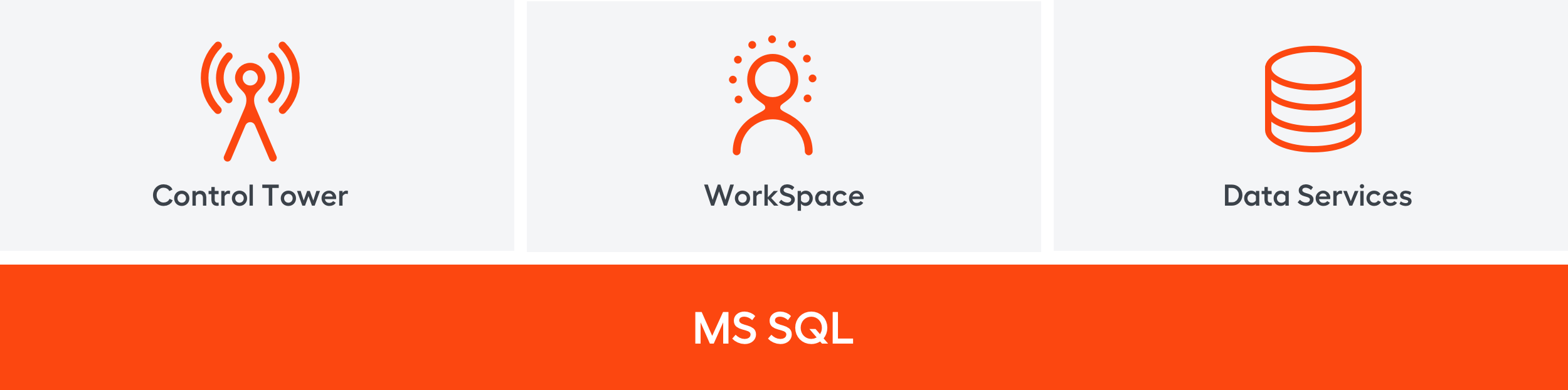
Another major improvement is replacing three databases (MySQL, PostgreSQL, MongoDB) with a single consolidated database — Microsoft SQL. This fundamental change allowed us to decrease maintenance complexity and enable consistent data backup in adherence to High Availability and Disaster Recovery standards.
We are also happy to announce a brand new monitoring tool based on the best in class solution for log aggregation and visualization — ELK Stack. Introducing a single centralized dashboard for enhanced monitoring of the digital workforce.
While these are only some major changes introduced in v10.0, there's plenty of other optimizations and improvements to make all pieces in a puzzle come together.
Bot Execution Platform
v9.x State
Imagine your business operations rapidly grow and at some point you need to process twice as many tasks as you currently have. How do you scale WorkFusion SPA? What if you need to scale but the task load is hardly predictable and depends on multiple factors? In SPA v9.x, the answer is add another Control Tower with its infrastructure, services, etc. And then maybe another one.
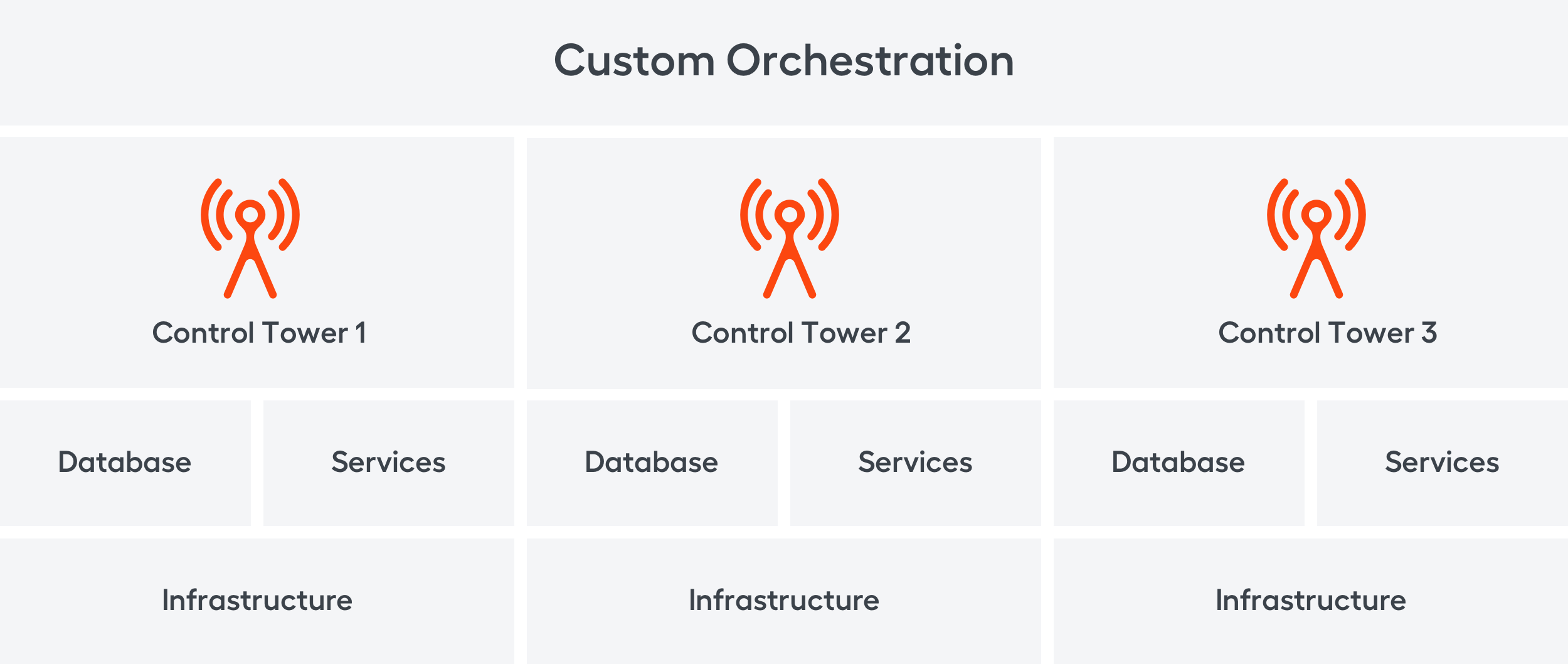
Now that you have three Control Towers, how do you manage, track and distribute the task load between them? The answer is custom setup and orchestration, which requires additional IT Ops involvement and adds weeks of work.
Needless to say, each Control Tower deployment is quite a time- and resource-consuming operation which requires custom actions for every specific use case. We knew this is not sustainable, as such monolithic architecture was obviously too complex for large enterprise clients.
v10.0 State
In v10.0, the very core concept of architecture has undergone major rethinking. The new state-of-the-art bot execution platform enables a horizontally scalable, predictable, and fault-tolerant system. It delivers on-demand automation with scalability and resilience designed specifically for enterprise level. Here are the three immediate benefits:
First, the platform dynamically allocates resources depending on the task load. This results in better utilization of hardware available for other tasks. In other words, no need to add more Control Towers to handle task load spikes.
Second, tasks are performed by completely isolated workers. This allows to avoid situations when one failed task could lead to unexpected behavior or Control Tower being stuck, thus improving the overall system fault tolerance. The failed task is now put back in a queue to be automatically processed later.
Finally, we drew an explicit line between the application, such as Control Tower, and the execution platform itself. Now, the platform exposes an API for cluster execution, orchestration, monitoring, and analytics.

Besides the fact that BEP scales horizontally, it also works 30% faster comparing with SPA 9.x versions on the same hardware and allows scaling up to 500 RPA bots running simultaneously.
Consolidated Database
Previous versions of SPA architecture were evolving quickly and utilized PostgreSQL, MySQL and MongoDB databases. Having multiple databases in one product makes it a challenge to the business continuity support which is based on high availability, disaster recovery, and cleaning old data.
V10.0 is fundamentally rethought to use a consolidated Microsoft SQL database. Simply put, to install SPA v9.x, you had to have at least three different databases. In v10.0, you only need one, and that is Microsoft SQL — a solid enterprise solution.
Microsoft SQL is an enterprise-grade database — comprehensive, well-supported, reliable and trusted by customers across all industries. Most customers already have Microsoft SQL licences and technical skills required for its operation and maintenance in place. Consolidated Database introduction brings the following benefits:
- A single set of tools and single expertise for operations
- Less maintenance and troubleshooting effort for more effective support
- Less potential failure points for easier identification of security issues
- Consistent data backup in adherence to High Availability and Disaster Recovery standards
Monitoring
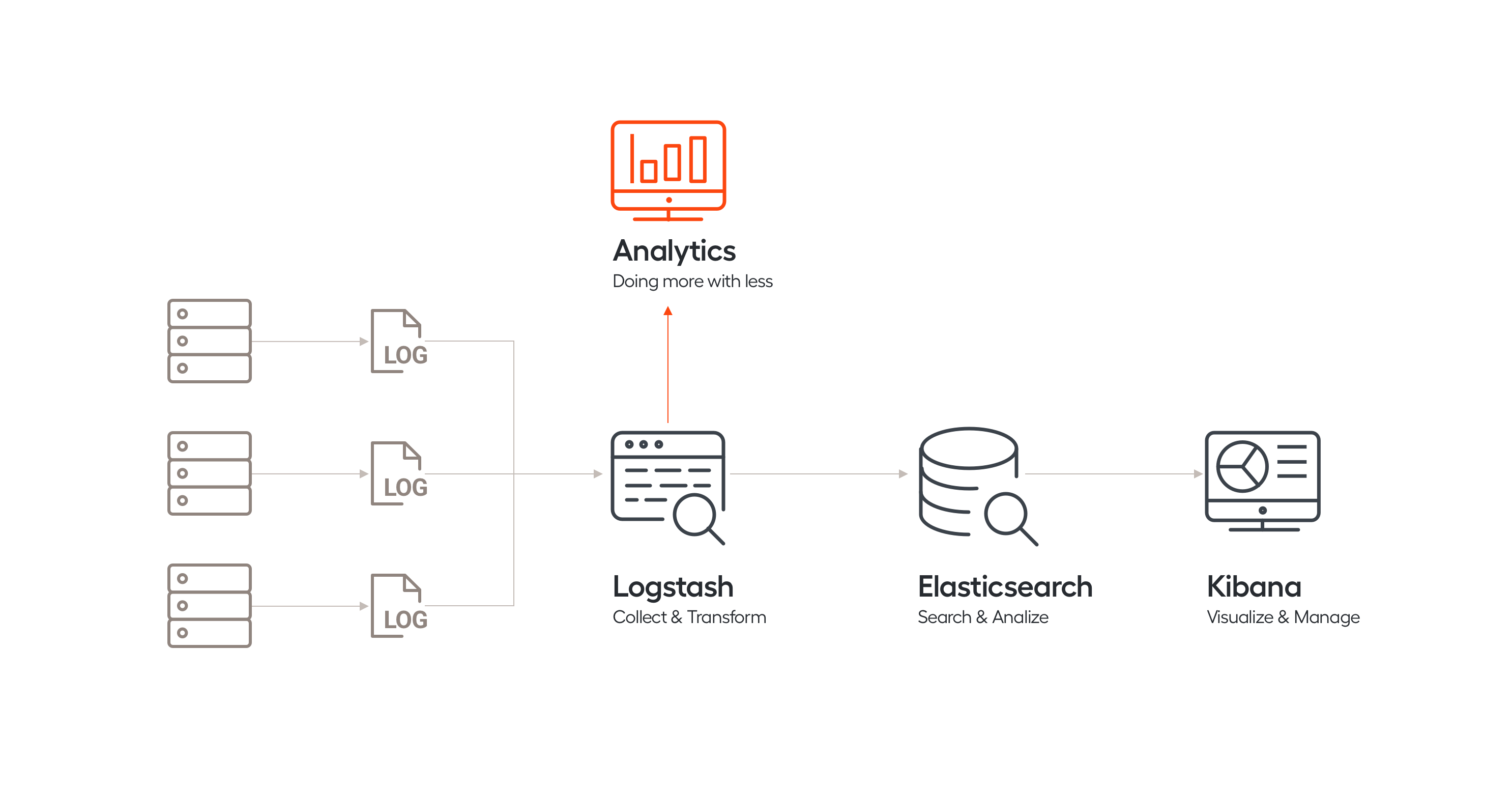
V10.0 changes the logs collecting approach by introducing a single point for logs and metrics aggregation — a well-known ELK stack solution that replaces our Platform Monitor. Earlier, when investigating an incident, to collect logs and figure out what's going on in the system, you had to go to several servers for chunks of information and put together pieces into a single picture.
ELK is shipped as an out-of-the-box tool and provides centralized logging. You can collect logs via Logstash and beautifully visualize them on Kibana dashboards. The environment health metrics will also help you to understand the current state of your infrastructure and the possible bottlenecks that may affect the performance.
ELK includes but is not limited to the following dashboards:
- System Overview for assessing the CPU/Memory/Disk space load on servers
- Application Logs for centralized browsing of logs from applications
- Environment Status for displaying the health status of the environment and list events that provide information about recent changes in health status
For details, refer to the Monitoring documentation.
Robotics
In v10.0, we improved the governance and performance of bots by applying the bot execution platform architecture to manage RPA Windows workers. This change opened ways to the following improvements:
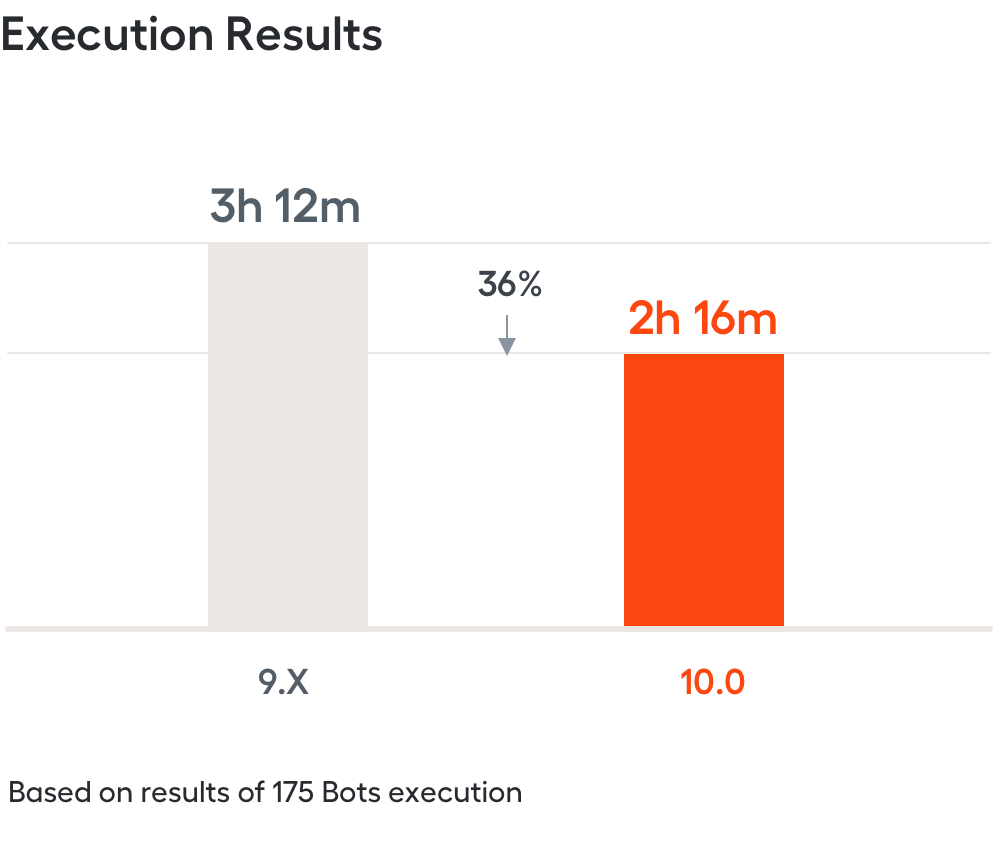
- Faster RPA execution: 36% speed increase – based on results of business process execution on the same cluster size (175 bots) in comparison with v9.x.
- Stable performance: up to 500 bots working simultaneously.
- Simplified bot installation and configuration with less files and components needed to configure multiple bots.
- Enhanced security and stable performance due to the execution of all task instructions on the same machine.
- Unified method of task routing via Fleets — groups of bots used to segregate tasks according to their business value or machines with specified software.
Tagging over Document
One of the main stages of an automation use case development is dataset tagging. Preparing and labeling a high-quality training set is time-consuming and costly. It equals a user teaching a bot to mimic human work — that is, to recognize values such as invoice number and date. Users are accustomed to the real-world document structure, and therefore can perform swiftly and effectively on what's familiar to them: hard and digital copies, and scans.
In SPA v9.x, users tagged the plain text OCR result. It could look nothing like the original documents, because all information about sizes, fonts, positions and layouts was lost. The users couldn't recognize even the documents they used to work with. It took significant effort to precisely identify the required values. This led to user mistakes and increased labeling time.
V10.0 restores the natural workflow by introducing the Tagging over Document (TOD) labeling experience. A user views the original document with text values layered underneath. The scan is rotated and scaled, the image is optimized where needed for convenience. Word boundaries are highlighted and a single value can be selected with one click. Working with a document is as easy as in any text editor.
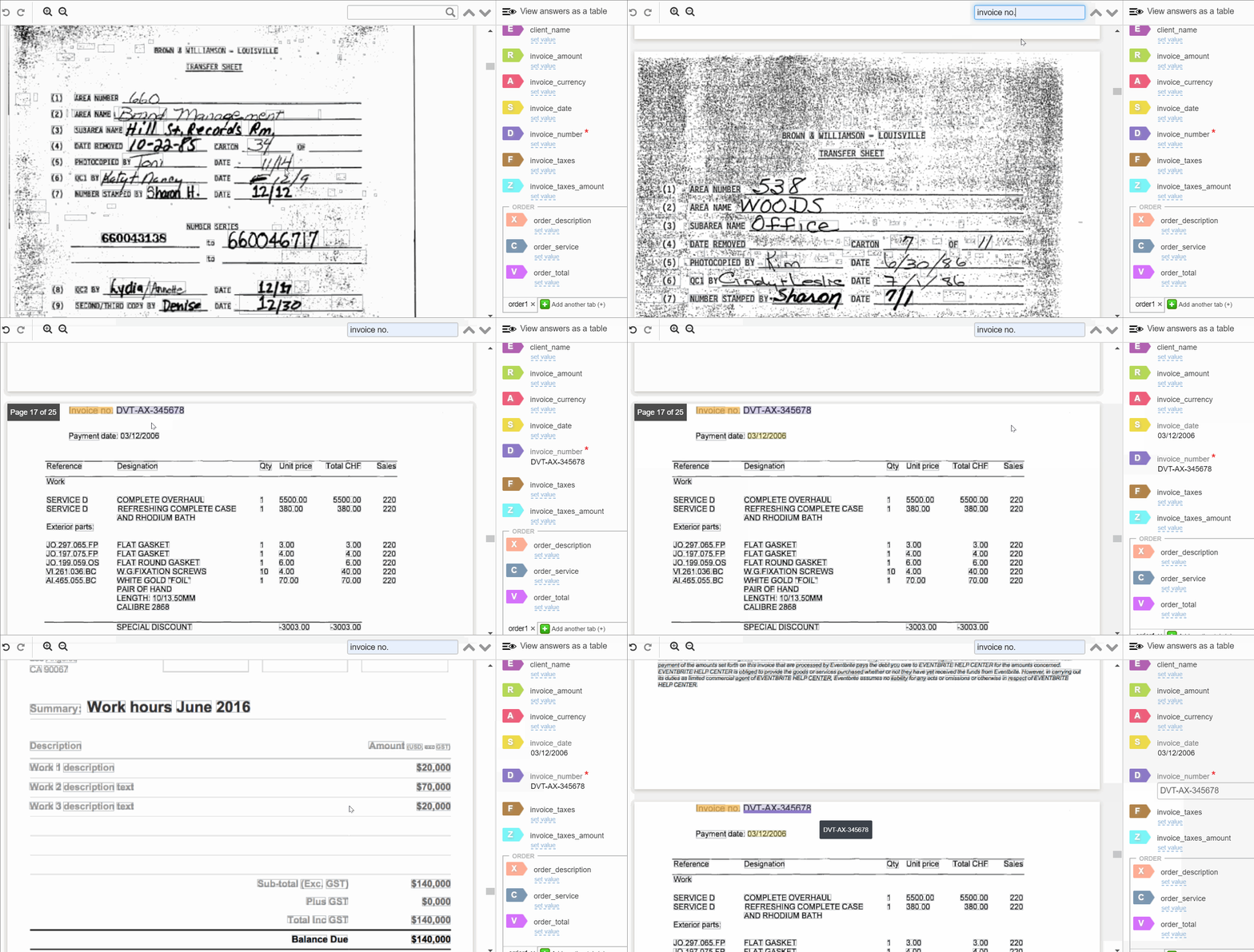
TOD workflow allows to perform the following actions:
- Tag: select and label values, chunks of sentences, or entire table rows and columns.
- Search: find other occurrences of a certain value across the document.
- Evaluate: check the tagged values. Click on the extracted value to jump to it even if the document has many pages.
An extensive assessment shows the average tagging time decrease of 52%:
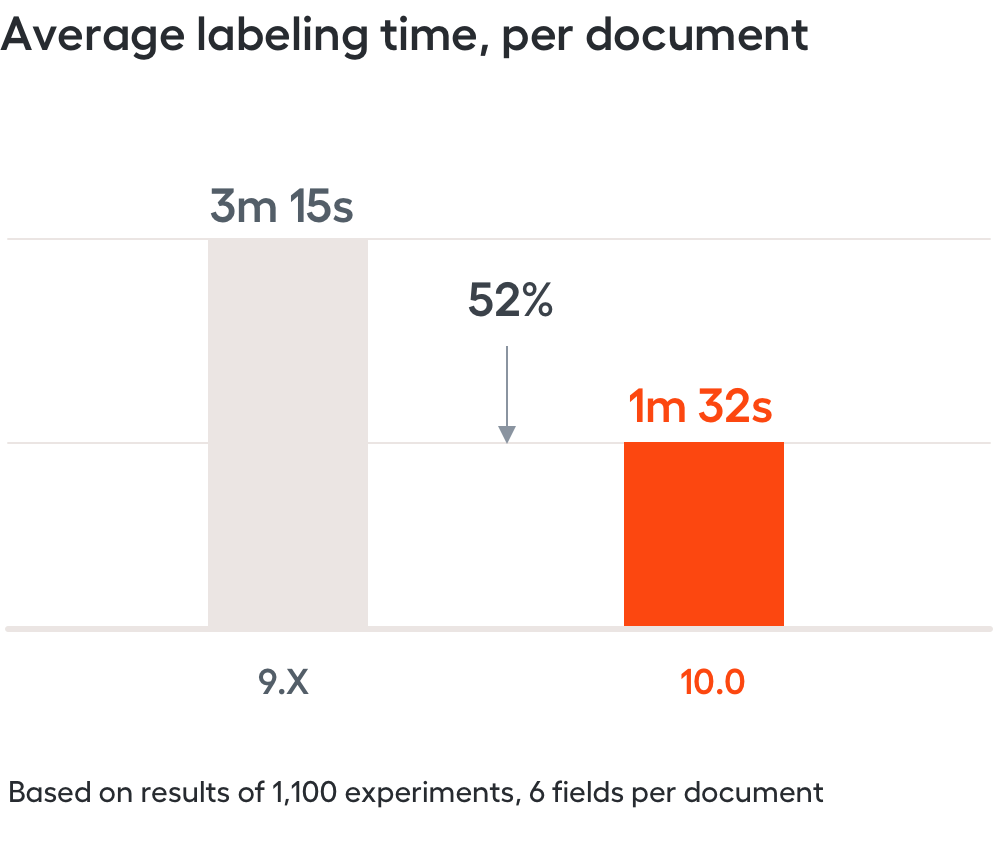
TOD makes user experience intuitive. It doubles the speed of document tagging and cuts the time needed to teach a bot, thus streamlining automation use case delivery.
Analytics
Reporting API
In addition to the above-mentioned monitoring capabilities, we provide automation analytics with the new Reporting API. It represents operational metrics of Control Tower, Workspace, AutoML, RPA, Bot Execution and Infrastructure, not only raw data flowing through the system. You can now leverage automation metrics without spending additional efforts on their calculations via embedded dashboards or connecting with your own BI tools.
Reporting API empowers you with a data language to describe automation processes and help you track progress as well as find bottlenecks.
Capacity Dashboard
The new Capacity dashboard provides a quick and comprehensive overview of system components utilization for business operations in a way that helps show how infrastructure resources are utilized.
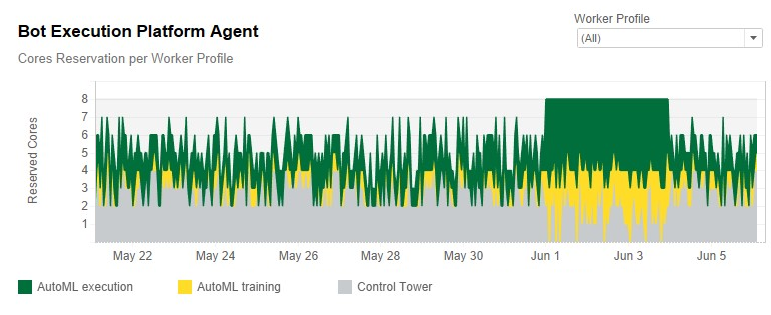
There are four charts explaining resource utilization data:
- CPU, Memory and Disk utilization over time answer whether there are enough resources to dynamically scale depending on the workload.
- Bot Execution Platform Agent chart visualizes how workers with different profiles (Control Tower and AutoML) share CPU and Memory resources.
RPA Dashboard
RPA dashboard provides an overview of bot accuracy, performance, and utilization, thus suggesting ways to improve at the process or bot levels. Here are the key metrics: Volume, RPA Accuracy Rate, Bot Availability, Fleets Utilization, Bot Units Workload.
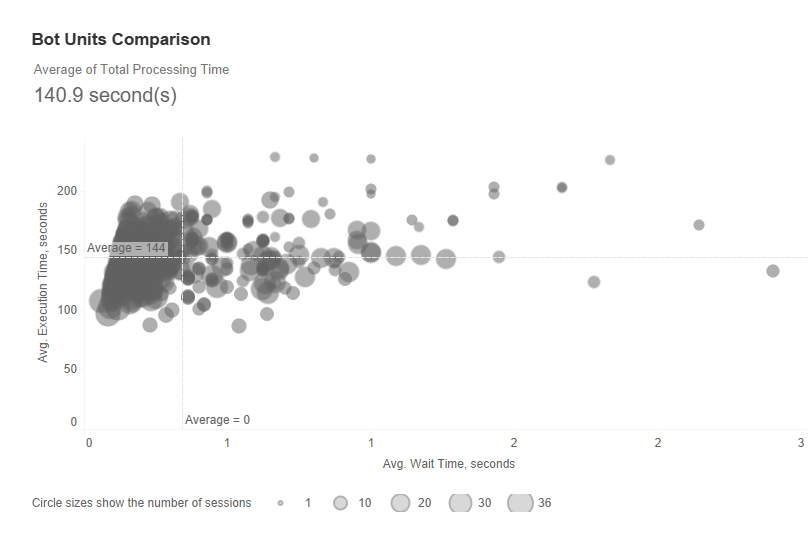
The following Bot Units Comparison chart, for example, shows the average execution time of a number of Bot Units that have been executed during 200 seconds with the average waiting time of up to 3 seconds for each of them, with cluster utilization being close to maximum.
AutoML
On our way to low-code machine learning, we introduce Python classifiers support based on SciKit-learn and MXNet libraries for better text analysis. Being an AI-centric company, it is our first step to the next generation of AutoML Engine which works in real-time side-by-side with a user. In other words, training a bot happens in a natural way, similar to the way information is captured in a conversational manner, not with code.
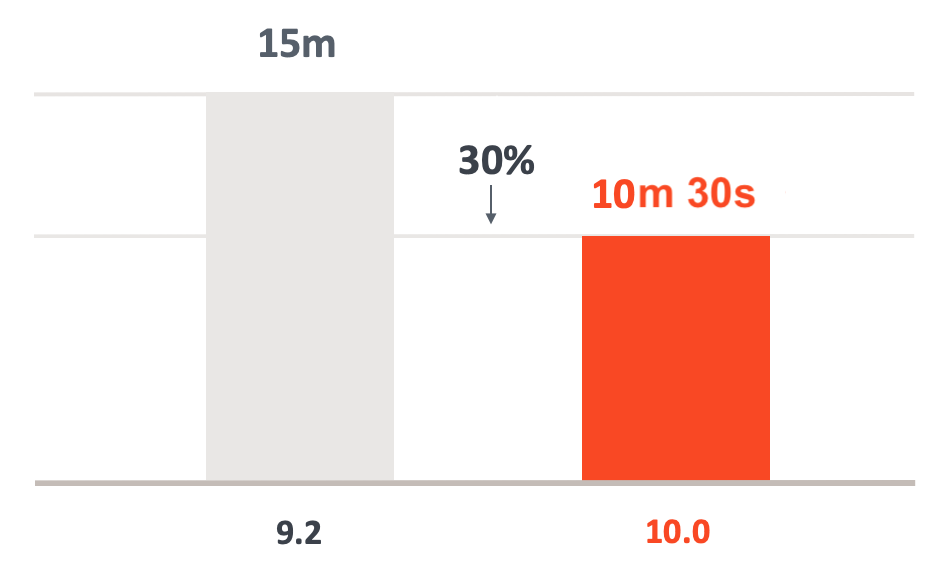
Additional improvements were made to AutoML Engine, now it learns 30% faster without any compromise in quality.
Python Classifiers
Python is widely considered the preferred language for teaching and learning ML because of its relative simplicity. No wonder so many ML algorithms have powerful implementations in Python, making it a go-to language for this purpose.
Starting with v10.0, AutoML SDK allows using a set of Python classifiers based on SciKit-learn and MXNet that identify to which category an object belongs to.
Single Source Installation
With each release, we make steps to improve the process of installation and make it simpler and more user-oriented. Although previous versions might have required dozens of operations to set up all the components, v10.0 can be installed within several hours. The basic installation of all components is now performed 50% faster, compared to previous versions, and requires about 1.5 hours of your time.
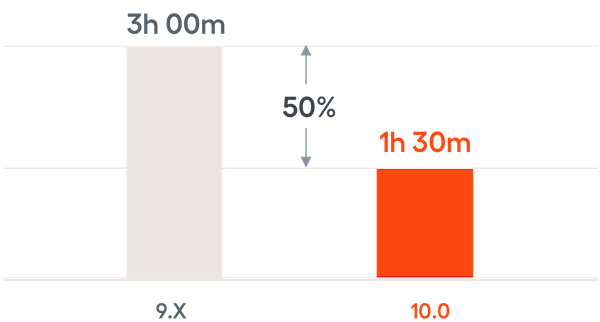
Such improvement is the result of switching to the single-source installation approach that enables you to install all Linux and Windows components from a single server by running the setup script, without logging in to each server and uploading packages to them.