
Business Process step execution
Records and transactions
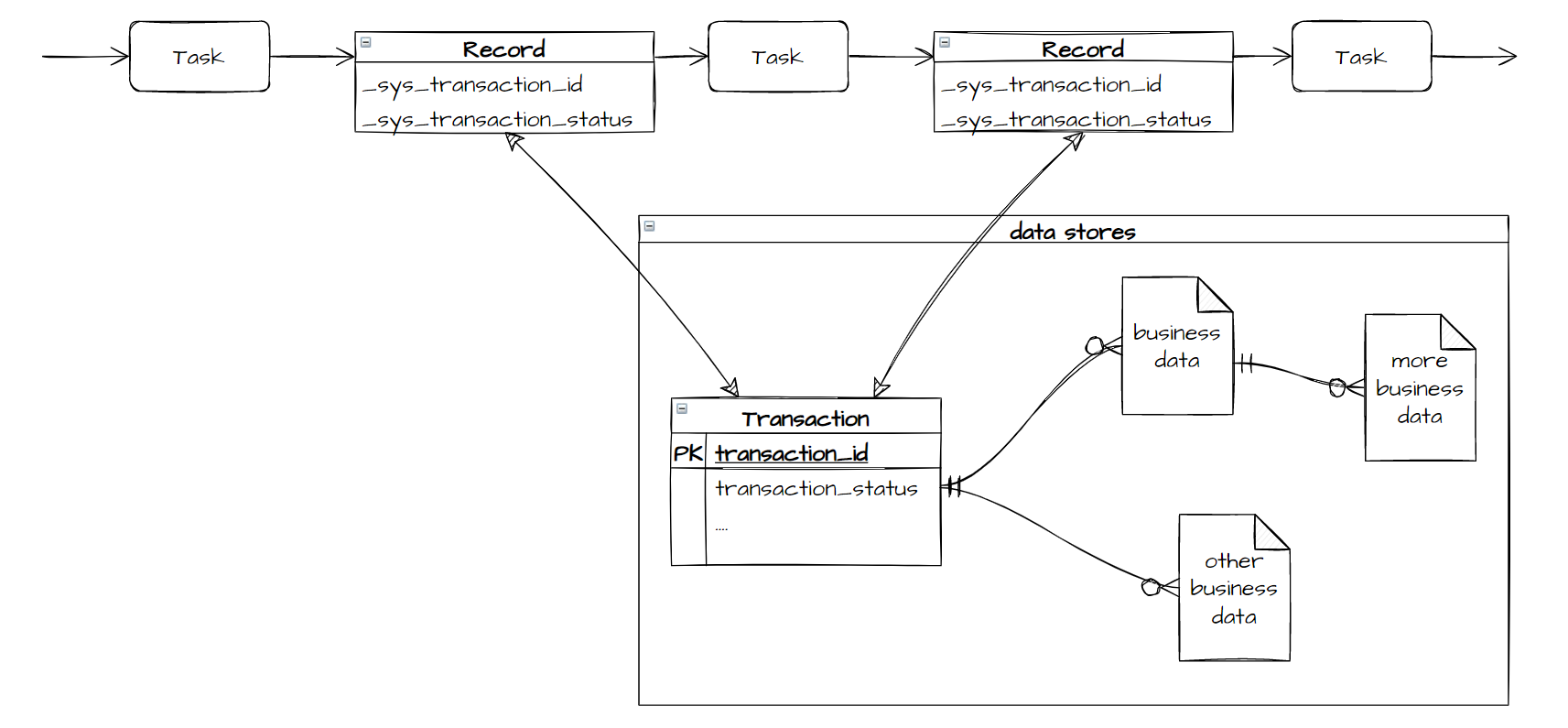
The atomic element of data flowing through a Business Process is called a record. A record is a collection of named columns with some values inside. A classic Business Process design uses records to pass all required data between tasks. ODF 2 applies a different approach.
In ODF 2, all business data is kept in Data Stores or user database tables managed by Control Tower. All data to be processed together is tied to a Transaction—a Data Store entity with a unique ID to address all the data. A Control Tower record passes a Transaction ID and some more technical information between tasks. If you use previously designed tasks, don't worry about read-and-write record operations, as all these low-level operations are managed by the framework. While designing your own Tasks, you inherit all those basic Transaction operations from a parent class.
Execution context: work with Task input and output
ODF 2 executes every Task inside the Dependency Injection context. This context contains assorted services and tools you can use. The context is separated into modules. Some modules are loaded by the framework automatically, and some modules are loaded if a Task states that they are required—this is done with the help of the @Requires annotation on a Task class. The ODF 2 context is re-created for every
Task execution, and no changes made to it by one Task are visible to another. The only way for Tasks to exchange data is Data Stores and record columns.
To read the columns of the incoming record, the Task injects and uses the TaskInput object. To write the columns of the outgoing record, the Task injects and uses the TaskOutput object:
@BotTask
public class SomeTask implements GenericTask {

    private final TaskInput taskInput;
    private final TaskOutput taskOutput;

    public SomeTask(TaskInput taskInput, TaskOutput taskOutput) {
        this.taskInput = taskInput;
        this.taskOutput = taskOutput;
    }

    @Override
    public void run() {
        final String data = taskInput.getRequiredVariable("some_column");
        taskOutput.setColumn("some_column", "changed " + data);
    }

}
The Task accesses the WebHarvest context with the help of the BindingReader object:
@BotTask
public class SomeTask implements GenericTask {

    private final BindingReader bindingReader;

    public SomeTask(BindingReader bindingReader) {
        this.bindingReader = bindingReader;
    }

    @Override
    public void run() {
        final Optional<String> data = bindingReader.getVariable("some_variable", String.class);
    }

}
Transaction and related entities
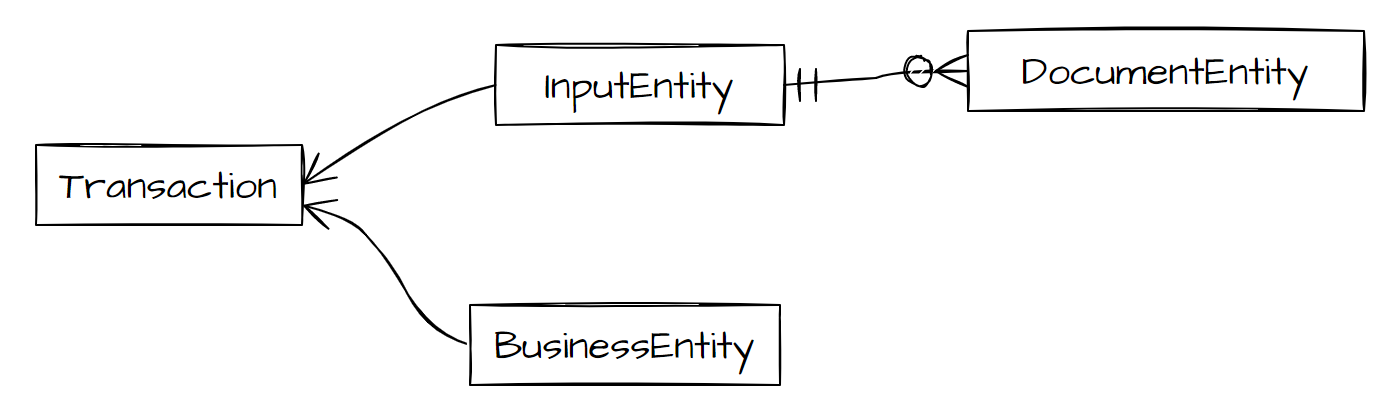
You can define entities to store and process business data. These entities should contain a reference to your Transaction or other entities so that a Task can access them through a known Transaction ID. ODF 2 provides a couple of base classes for such entities that already take care of this. Any entity that inherits one of these classes can be used with out-of-the-box ODF 2 Tasks.
InputEntityis inherited by entities representing some raw data received from external sources.DocumentEntitydescendants are tied toInputEntityto represent individual pieces of data.BusinessEntitydescendants represent data that is validated, sanitized, and/or converted to some form that is ready to be processed.
Input data
ODF 2 Business Processes are not meant to take input from CSV files. Instead, a special Task type called a Monitor Task allows you to pull data from external systems of any kind, put it into a Data Store, and create a Transaction to pass this data to the following Tasks.