
Version Data Model
You can version Data Stores that make your Data Model just like all other Assets of your project. However, increasing a Data Model version each time you release a new Use Case version means that your Intelligent Automation Cloud environment ends up having many Data Store instances.
From a practical perspective, Data Model changes are pretty rare as compared to the Java code changes. So often, your table_1_v1 and table_1_v2 are just copies of each other. Sometimes, you need to make changes to your Data Model, and frequently, they are backward-compatible. For example, you introduce a new Data Store, add a column, create an index, and so on.
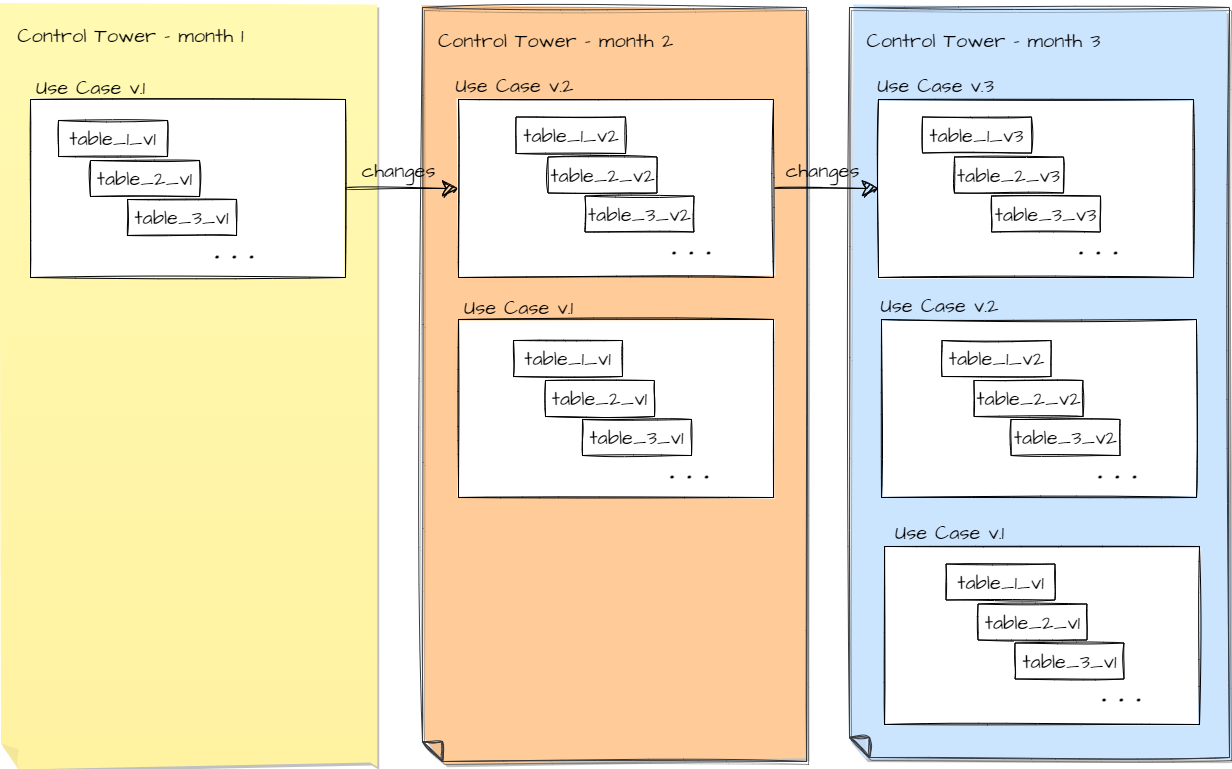
The performance impact of having these copies or slightly modified copies is negligible. However, in some situations, it introduces hard-to-avoid complications:
- If the logic of your automation requires aggregating historical data, this data can be spread across multiple Data Stores of a similar structure, which makes the aggregation harder.
- If your Use Case execution produces a large amount of data and you need to purge it periodically, you must have a data purge procedure to go through an increasingly extensive list of tables. It also requires constant maintenance.
- It becomes harder to visually locate the Data Store you need in the overall list.
The best practice to avoid these complications is to have a different approach to Data Model versioning that leverages Liquibase support of additive changes and ODF 2 capability to have a Data Model version that differs from the Use Case version. In this approach, you start with version 1 of the Data Model and continue with this version for as long as possible. Often, you don't have to do anything to your project to the extent of the Data Model change since a new version of your Use Case contains changes in the Java code only. In that case, refer to Use Case versioning.
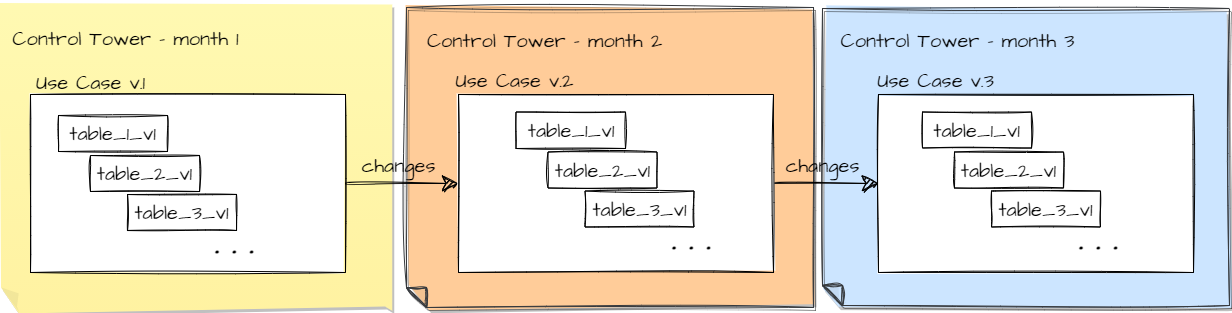
To extend your Data Model in a backward-compatible way, keep version 1 of the Data Model as described in the Data Model management guide.
It is recommended to test deployment of the new Use Case version on top of the previous one, which is supposed to reveal if your changes are truly backward-compatible. The best practice is to keep version 1 of the Data Model for as long as possible until other circumstances of your development force you to introduce breaking changes and, for one time, accept the complications mentioned above. In case of breaking changes, increase the Data Model version.
Increase Data Model version
The Data Model version of your ODF 2 project is specified by the usecase.model-version attribute of the root pom.xml file. When you create a project from the ODF 2 Full Archetype, this value is set to 1. To increase it, use the Maven command: mvn versions:set-property -Dproperty=usecase.model-version -DnewVersion=2. Then, you can build a bundle and deploy it to Control Tower. This way, you can also change a Data Model version without changing that of a Use Case.
tip
To change the Use Case version, refer to Use Case versioning | Update Asset Bundle for the information on how to run bundle-versions-maven-plugin.
The migration files are updated only if the usecase.model-version value differs from that of DATA_MODEL_VERSION in the meta-info.json file of your package module. If the meta-info.json file contains no DATA_MODEL_VERSION, the USE_CASE_VERSION value is taken for comparison instead.
caution
Do not manually modify the meta-info.json file of your package module. The content of this file is dynamically changed. During the build, versions from the root pom.xml are copied into meta-info.json.
As a result of the operation, for all files listed in datastore/migrations/versioned/_changelist.xml:
- All database objects named according to the
uc_<Use Case code>_<individual name>_v<Data Model version>pattern (for example,uc_UCCODE_demo_transaction_v1) are updated so that the token that corresponds to the Data Model version is changed to a new value, for example,uc_UCCODE_demo_transaction_v1>uc_UCCODE_demo_transaction_v2. - All changeset identifiers that start with
<Use Case code>_v<Data Model version from meta-info.json>(for example,UCCODE_v1_chset_0001) are updated so that the token that corresponds to the Data Model version is changed to a new value, for example,UCCODE_v1_chset_0001>UCCODE_v2_chset_0001. - In the
meta-info.jsonfile of your package module, theDATA_MODEL_VERSIONattribute’s value is set to the value of theusecase.model-versionattribute from the rootPOM.xmlfile of your project.